

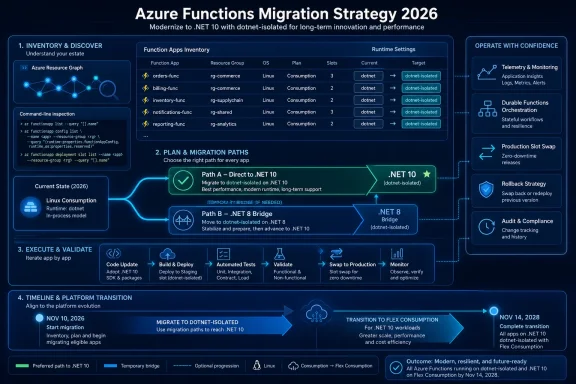
Organizations still running Azure Functions in-process should treat.NET 10 isolated worker as the strategic destination in 2026, while.NET 8 isolated worker remains a documented lower-change bridge for apps blocked by dependency, release, or hosting constraints. Microsoft’s in-process support policy ends support for the in-process model on November 10, 2026;.NET 8 support ends the same day, while.NET 10 support runs through November 14, 2028.
That makes the framework decision more than a technical upgrade. A move to.NET 8 isolated worker can meet the immediate retirement requirement, but it also creates another support decision on the same date. A move to.NET 10 isolated worker creates a longer support runway. Microsoft’s isolated worker guide documents the supported target versions and the worker model’s separate process architecture.
Start with an Azure Resource Graph inventory that includes function apps and slots. This is estate discovery only: it identifies resources that need configuration inspection, but it does not determine an app’s.NET target or reliably classify its execution model.
For every returned app and slot, inspect the deployed configuration.
For the production slot, omit
In the Azure portal, select the Function App, then select the relevant deployment slot if one exists. Open Settings > Configuration > Application settings to inspect
Classify the results conservatively:
.NET 9 can look like a current target, but its Azure Functions support ends on November 10, 2026—the same date as.NET 8 and the in-process model. For a migration program beginning in 2026, that leaves little value in completing an execution-model conversion only to schedule another framework move immediately afterward.
.NET 10 isolated worker should be the default destination. It is the clearest one-migration path for apps that can take the framework update now, with support through November 14, 2028.
A.NET 8 bridge is reasonable when:
For Durable Functions, use Microsoft’s Durable Functions.NET isolated overview and the migration guidance. The isolated model has project, package, and programming-model differences that deserve a separately owned test plan.
For each candidate, record:
Add a deployment gate that rejects a production promotion when the intended configuration still contains:
The gate should inspect the same infrastructure and application settings used by the release pipeline. It should also flag a mismatch between the approved framework, worker runtime, and hosting plan. A.NET 10 isolated-worker release aimed at Linux Consumption is a design conflict that must be corrected before cutover.
Every approved.NET 8 exception should name an owner, identify the blocking dependency or constraint, and include a reevaluation date before November 10, 2026.
Microsoft’s migration guide for moving to isolated worker should guide the code and package conversion. The release procedure above supplies the operational proof that documentation alone cannot provide.
Does changing
No. It classifies the worker runtime, but the app still needs the required code and package conversion, configuration verification, named trigger tests, telemetry checks, and a defined cutover and rollback decision.
The November 10, 2026 deadline should drive discovery and release planning now. Organizations that inventory apps and slots, inspect the deployed configuration with repeatable commands, block new in-process promotions, and reserve.NET 8 for documented exceptions can turn the required isolated-worker move into a support strategy that extends through November 14, 2028.
That makes the framework decision more than a technical upgrade. A move to.NET 8 isolated worker can meet the immediate retirement requirement, but it also creates another support decision on the same date. A move to.NET 10 isolated worker creates a longer support runway. Microsoft’s isolated worker guide documents the supported target versions and the worker model’s separate process architecture.
 Find the deployed estate before classifying it
Start with an Azure Resource Graph inventory that includes function apps and slots. This is estate discovery only: it identifies resources that need configuration inspection, but it does not determine an app’s.NET target or reliably classify its execution model.
Code:
resources
| where type in~ ('microsoft.web/sites', 'microsoft.web/sites/slots')
| where kind has 'functionapp'
| project subscriptionId, resourceGroup, name, type, kind, location,
 state = tostring(properties.state),
 netFrameworkVersion = tostring(properties.siteConfig.netFrameworkVersion)
| order by subscriptionId asc, resourceGroup asc, name ascFUNCTIONS_WORKER_RUNTIME is the decisive setting for the initial execution-model classification:
Code:
az functionapp config appsettings list \
 --name <app> \
 --resource-group <rg> \
 --subscription <sub> \
--slot <slot>--slot <slot>. Record these values for each app and each slot separately:FUNCTIONS_WORKER_RUNTIME- The project target framework, such as
net8.0ornet10.0 - The hosting plan
Code:
az functionapp config show \
 --name <app> \
 --resource-group <rg> \
 --subscription <sub> \
 --slot <slot>
Code:
az functionapp show \
 --name <app> \
 --resource-group <rg> \
 --subscription <sub> \
 --slot <slot> \
 --query "{name:name, serverFarmId:serverFarmId, kind:kind}" \
--output jsonFUNCTIONS_WORKER_RUNTIME; use the app’s Overview page and linked App Service plan to record the hosting plan. Review the project file or release artifact for the actual target framework.Classify the results conservatively:
FUNCTIONS_WORKER_RUNTIME=dotnetidentifies an in-process migration candidate.FUNCTIONS_WORKER_RUNTIME=dotnet-isolatedidentifies an isolated-worker deployment, which still needs target-framework and hosting-plan review.- A missing, conflicting, or unexpected value is an exception. Review the deployment configuration and release history before marking the app compliant.
- Treat each slot as its own deployed artifact. Record the parent app, slot name, runtime setting, framework, plan, and release owner.
Why.NET 9 is usually the wrong stop
Azure Functions runtime 4.x supports isolated worker apps on.NET 8,.NET 9,.NET 10, and.NET Framework 4.8, as documented in Microsoft’s isolated worker supported versions. In-process support is narrower and is ending..NET 9 can look like a current target, but its Azure Functions support ends on November 10, 2026—the same date as.NET 8 and the in-process model. For a migration program beginning in 2026, that leaves little value in completing an execution-model conversion only to schedule another framework move immediately afterward.
.NET 10 isolated worker should be the default destination. It is the clearest one-migration path for apps that can take the framework update now, with support through November 14, 2028.
When.NET 8 isolated worker is the right bridge
.NET 8 isolated worker is not the long-term default. It is a bridge for applications that cannot safely combine the worker-model conversion and a.NET 10 upgrade in one release.A.NET 8 bridge is reasonable when:
- A required library, internal package, generated client, or build component has not been validated for.NET 10.
- A release blackout, regulatory test cycle, or customer change-control window requires the smallest practical code delta.
- The app runs on Linux Consumption and the team cannot make the required hosting decision in the same release.
- A Durable Functions workload needs a dedicated conversion release before its framework target advances.
For Durable Functions, use Microsoft’s Durable Functions.NET isolated overview and the migration guidance. The isolated model has project, package, and programming-model differences that deserve a separately owned test plan.
Build a migration queue, not a flat checklist
A flat inventory encourages teams to migrate whatever is easiest first. Instead, create a queue that prioritizes production impact and uncertainty.For each candidate, record:
- Tenant, subscription, resource group, app name, and slot name
- Production exposure and business owner
FUNCTIONS_WORKER_RUNTIME- Target framework from the project or build artifact
- Hosting plan
- Durable Functions usage
- Deployment owner and rollback owner
-.NET 10 decision, or the documented reason for a.NET 8 exception
Add a deployment gate that rejects a production promotion when the intended configuration still contains:
FUNCTIONS_WORKER_RUNTIME=dotnetThe gate should inspect the same infrastructure and application settings used by the release pipeline. It should also flag a mismatch between the approved framework, worker runtime, and hosting plan. A.NET 10 isolated-worker release aimed at Linux Consumption is a design conflict that must be corrected before cutover.
Every approved.NET 8 exception should name an owner, identify the blocking dependency or constraint, and include a reevaluation date before November 10, 2026.
Use a reproducible slot cutover sequence
A successful deployment is not migration proof. Use a controlled release sequence for each production app:- Create or select a non-production deployment slot and deploy the isolated-worker build there.
- Confirm the slot’s
FUNCTIONS_WORKER_RUNTIME=dotnet-isolated, target framework, and hosting plan against the approved migration record. - Run named trigger tests for the workload. For example: invoke specific HTTP routes; submit a known queue message; publish a test event; run a timer-equivalent controlled invocation where applicable; and verify expected output destinations.
- Inspect telemetry for those test executions. Confirm that the operations team can locate successful executions, failures, dependencies, and useful correlation data.
- For Durable Functions, run named orchestration tests that cover orchestration start, activity completion, expected state progression, failure handling, and externally visible status endpoints.
- Swap the validated slot into production using the team’s approved slot-swap procedure.
- Retain the prior deployment only for the stated rollback window. Revert if the agreed acceptance criteria fail—for example, a named trigger test fails, expected telemetry is unavailable, or the production workload does not produce its expected business output.
Microsoft’s migration guide for moving to isolated worker should guide the code and package conversion. The release procedure above supplies the operational proof that documentation alone cannot provide.
Frequently Asked Questions
Should every in-process app target.NET 10 immediately?
No. Target.NET 10 isolated worker by default, but use.NET 8 isolated worker when a dependency, release constraint, Durable conversion effort, or Linux Consumption hosting limitation makes a direct move unsafe.Is.NET 9 a useful intermediate target?
Usually not for a 2026 migration. Its Azure Functions support ends on November 10, 2026, the same date as.NET 8 and in-process support.Can a Linux Consumption app run.NET 10 isolated worker?
No. Microsoft states that.NET 10 Azure Functions apps cannot run on Linux Consumption. A Linux app that requires.NET 10 needs Flex Consumption.Does changing FUNCTIONS_WORKER_RUNTIME finish the migration?
No. It classifies the worker runtime, but the app still needs the required code and package conversion, configuration verification, named trigger tests, telemetry checks, and a defined cutover and rollback decision.The November 10, 2026 deadline should drive discovery and release planning now. Organizations that inventory apps and slots, inspect the deployed configuration with repeatable commands, block new in-process promotions, and reserve.NET 8 for documented exceptions can turn the required isolated-worker move into a support strategy that extends through November 14, 2028.
References
- Primary source: learn.microsoft.com
Migrate Durable Functions from in-process to isolated worker (.NET) | Microsoft Learn
Step-by-step guide to migrate your .NET Durable Functions app from the in-process model to the isolated worker model. Includes code examples, API mapping, and troubleshooting.learn.microsoft.com - Primary source: WindowsForum
AWS Q Developer: The Future of Seamless .NET Migration from Windows to Linux | Windows Forum
Enterprises have long faced difficult decisions regarding software infrastructure, particularly those entrenched in Microsoft’s .NET ecosystem...windowsforum.com
