

Microsoft will end BlobFuse v1 support on September 30, 2026, and Windows-first organizations should use the retirement to classify every Linux-mounted Blob workload: move validated Linux file-path workloads to BlobFuse2, evaluate Azure Files for genuine Windows/Linux shared-file requirements, and adopt direct Blob APIs where the mount only disguises an object-storage integration.
Microsoft identifies BlobFuse2 as the current BlobFuse release, while Azure retirement guidance sets the specific BlobFuse v1 cutoff. The immediate task is not to replace one package everywhere. It is to discover, classify, test, and assign ownership before an unsupported component remains embedded in WSL, Linux build agents, AKS nodes, virtual machines, or deployment images.
WindowsForum user reports about Windows users testing Linux alternatives underscore why WSL and other Windows-adjacent Linux environments now deserve explicit inspection. A Windows asset inventory will not necessarily reveal the Linux package, mount, script, or container image connecting an application to Blob Storage.
BlobFuse maps Linux file operations to Azure Blob Storage operations through a FUSE-mounted path. That convenience does not give Blob Storage all the behavior of a conventional shared file system. Test the operations the application actually uses—particularly writes, renames, deletes, listings, and access from multiple processes or hosts—rather than approving a migration merely because a container mounts successfully.
For every discovered instance, record:
Inspect each relevant distribution, replacing
Also inspect shell profiles,
Then inspect
Review Helm values, Kustomize overlays, init containers, privileged containers, host mounts, node bootstrap configuration, and custom images. If cluster policy permits node inspection, have the AKS platform owner check installed packages and active mounts on the underlying Linux nodes as well.
Also search for mount paths found in production, package-install commands, storage-account names, container names,
Microsoft’s migration material establishes that BlobFuse2 provides a
A defensible migration sequence is:
The storage service owner should lead this branch with the application, identity, networking, Windows endpoint, and Linux platform owners. They must answer:
The migration package should contain:
Application changes may take longer than a BlobFuse2 migration. If necessary, use BlobFuse2 as an explicitly documented interim state while maintaining a separate plan to adopt Blob APIs. Do not let a tactical replacement become an unreviewed permanent architecture.
Microsoft identifies BlobFuse2 as the current BlobFuse release, while Azure retirement guidance sets the specific BlobFuse v1 cutoff. The immediate task is not to replace one package everywhere. It is to discover, classify, test, and assign ownership before an unsupported component remains embedded in WSL, Linux build agents, AKS nodes, virtual machines, or deployment images.
WindowsForum user reports about Windows users testing Linux alternatives underscore why WSL and other Windows-adjacent Linux environments now deserve explicit inspection. A Windows asset inventory will not necessarily reveal the Linux package, mount, script, or container image connecting an application to Blob Storage.
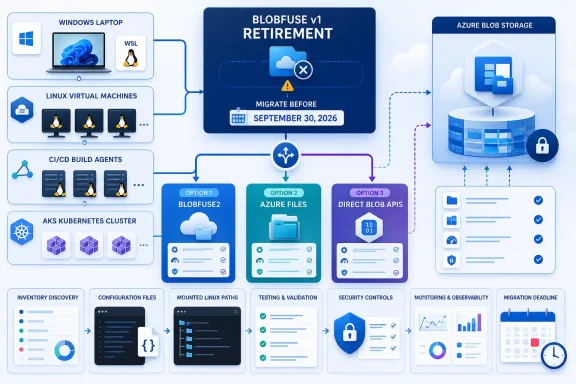 Find BlobFuse Before Choosing Its Replacement
BlobFuse maps Linux file operations to Azure Blob Storage operations through a FUSE-mounted path. That convenience does not give Blob Storage all the behavior of a conventional shared file system. Test the operations the application actually uses—particularly writes, renames, deletes, listings, and access from multiple processes or hosts—rather than approving a migration merely because a container mounts successfully.For every discovered instance, record:
- Storage account and container.
- Host, WSL distribution, AKS workload, node, image, or build agent.
- Package and version, configuration location, and startup mechanism.
- Application and business process using the path.
- Read, write, rename, delete, listing, and concurrent-access patterns.
- Other systems that modify the same blobs.
- Authentication method and credential owner.
- Application, Linux platform, storage, and migration owners.
- Required availability, rollback path, and replacement decision.
WSL discovery
Start in PowerShell or Windows Terminal by listing installed distributions:wsl --list --verboseInspect each relevant distribution, replacing
<Distro> with its name:
Code:
wsl -d <Distro> -- sh -lc '
 command -v blobfuse 2>/dev/null || true
 command -v blobfuse2 2>/dev/null || true
 blobfuse --version 2>/dev/null || true
 blobfuse2 --version 2>/dev/null || true
 dpkg -l 2>/dev/null | grep -Ei "blobfuse|fuse" || true
 rpm -qa 2>/dev/null | grep -Ei "blobfuse|fuse" || true
 findmnt 2>/dev/null | grep -Ei "blobfuse|fuse|blob" || true
 mount 2>/dev/null | grep -Ei "blobfuse|fuse|blob" || true
'/etc/fstab, systemd units, cron jobs, and distribution startup scripts. Record whether Linux tools consume the mount directly or Windows applications reach it through WSL path sharing; that distinction affects the destination architecture.Linux VMs and build agents
Run package, binary, and active-mount checks on persistent VMs and on the images or templates used to create ephemeral agents:
Code:
command -v blobfuse || true
command -v blobfuse2 || true
blobfuse --version 2>/dev/null || true
blobfuse2 --version 2>/dev/null || true

dpkg -l 2>/dev/null | grep -Ei 'blobfuse|fuse' || true
rpm -qa 2>/dev/null | grep -Ei 'blobfuse|fuse' || true

findmnt | grep -Ei 'blobfuse|fuse|blob' || true
mount | grep -Ei 'blobfuse|fuse|blob' || true/etc/fstab, /etc/systemd/system, /usr/lib/systemd/system, cloud-init files, agent bootstrap scripts, Packer definitions, Dockerfiles, and CI/CD templates. A live agent may be clean while its next image build silently reinstalls v1.AKS discovery
Search workload manifests and rendered cluster objects, including DaemonSets that may mount storage on every node:
Code:
kubectl get daemonsets,deployments,statefulsets,pods -A -o yaml \
 | grep -Ein 'blobfuse|blobfuse2|mountv1'

kubectl get daemonsets -A -o wide
kubectl get pods -A -o custom-columns='NAMESPACE:.metadata.namespace,NAME:.metadata.name,IMAGES:.spec.containers
- .image' \
| grep -Ei 'blob|fuse'Repository and image searches
Search application, infrastructure, image, and operations repositories together:rg -n -i 'blobfuse|blobfuse2|mountv1|fuse_connection\.cfg|blobfuse.*\.(cfg|yaml|yml)|config\.ya?ml'Also search for mount paths found in production, package-install commands, storage-account names, container names,
/etc/fstab, systemd unit directives, and scripts invoking mount. Generic filenames such as config.yaml should be reviewed in context rather than assumed to belong to BlobFuse.Choose the Destination by Workload
| Environment | Recommended default | Disqualifying semantics or requirement | Decision owner | Minimum evidence |
|---|---|---|---|---|
| WSL Linux tooling | BlobFuse2 if Linux tools genuinely need a path to Blob data | Windows applications, multiple users, or share-style coordination are the real consumers | Desktop/WSL owner with application owner | Version inventory plus representative read/write and external-change tests |
| Linux build agents | BlobFuse2, or direct Blob APIs when the pipeline can be changed | Pipeline depends on untested rename, concurrency, or cross-host visibility behavior | CI/CD platform owner | Clean-agent test, cache-capacity observation, failure test, and image scan |
| AKS nodes/workloads | BlobFuse2 only for a validated blob-backed Linux workload; otherwise direct APIs | Workload assumes conventional shared-disk behavior or node-local persistence | AKS platform owner with application owner | Staging deployment, pod/node replacement test, concurrent-access test, rollback manifest |
| Shared Windows/Linux workflow | Evaluate Azure Files rather than preserving a Blob mount workaround | Requirements cannot be met by the selected Azure Files protocol, identity, performance, or networking design | Storage service owner | Windows and Linux client tests, permissions test, performance baseline, cutover and rollback plan |
Use BlobFuse2 for Validated Linux File-Path Workloads
BlobFuse2 is the natural successor when a Linux application requires a mounted path and its behavior is compatible with Blob Storage. Likely candidates include Linux build agents reading artifacts, AKS processing workloads designed around blob-backed data, and WSL command-line tools processing object data.Microsoft’s migration material establishes that BlobFuse2 provides a
mountv1 migration path and a convert-config-only capability. Use Microsoft’s current BlobFuse migration guidance for the supported syntax for the installed release rather than copying an unverified command line or assuming a generated configuration is production-ready.A defensible migration sequence is:
- Capture the v1 package version, mount definition, configuration, credentials model, and startup process.
- Generate or construct a separate BlobFuse2 configuration using current Microsoft guidance.
- Review authentication, permissions, logging, cache location, capacity, and retention settings.
- Reproduce the workload in a nonproduction Linux environment.
- Test real reads, writes, renames, deletes, listings, concurrency, and changes made outside the mount.
- Test local-capacity pressure, process restart, host or pod replacement, and temporary loss of storage connectivity.
- Record monitoring, support ownership, rollback commands, and the old configuration.
- Cut over during a controlled window, then remove v1 from packages, images, scripts, and repositories.
Make Azure Files a Concrete Architecture Decision
Microsoft describes Azure Files as managed file shares accessible through standard file-sharing protocols. That makes it a service to evaluate—not an automatic answer—when the requirement is a shared file workflow involving Windows and Linux clients.The storage service owner should lead this branch with the application, identity, networking, Windows endpoint, and Linux platform owners. They must answer:
- Which clients must connect: Windows desktop or server, Linux VM, WSL, build agent, container, or AKS workload?
- Which protocol and authentication options are supported by every required client?
- What permissions, identity mapping, directory behavior, locking, rename, and concurrency behavior does the application require?
- Are private endpoints, firewall rules, DNS, routing, or outbound restrictions involved?
- What capacity, latency, throughput, availability, backup, and recovery targets apply?
- Can all writers be paused or synchronized during data transfer and final cutover?
- Does any consumer actually require Blob APIs or object lifecycle features instead?
The migration package should contain:
- Approved target-share and networking design.
- Identity, authorization, and permissions mapping.
- Data-copy and reconciliation procedure.
- Client mount or connection instructions.
- Application configuration changes.
- Performance and functional test results.
- Monitoring and support runbook.
- Cutover schedule, writer-freeze plan, validation checklist, and rollback procedure.
Prefer Direct Blob APIs When the Mount Adds No Value
If an application naturally uploads, downloads, lists, or processes objects, direct Blob APIs can remove an unnecessary file-system translation layer. This is especially appropriate when developers selected a path such as/data/input for convenience but do not require shared-directory behavior.Application changes may take longer than a BlobFuse2 migration. If necessary, use BlobFuse2 as an explicitly documented interim state while maintaining a separate plan to adopt Blob APIs. Do not let a tactical replacement become an unreviewed permanent architecture.
Frequently Asked Questions
Will BlobFuse v1 mounts stop working immediately after September 30, 2026?
The established issue is the end of support, not proof that every mount will immediately fail. Continuing to depend on v1 leaves production tied to an unsupported component, so discovery and migration should finish before the cutoff.Is BlobFuse2 always the correct replacement?
No. Choose BlobFuse2 for validated Linux applications that require a file path to Blob data. Evaluate Azure Files for genuine shared-file requirements, and use direct Blob APIs when the application is object-oriented.Is a successful BlobFuse2 mount enough evidence?
No. It proves little beyond basic configuration and connectivity. Approval requires representative application operations, concurrency and external-change tests, capacity and restart testing, monitoring, and a documented rollback.Who should own the migration?
Assign one accountable migration owner for each mount. That owner must coordinate the application owner, Linux or AKS platform owner, storage owner, and—where WSL or shared access is involved—the Windows endpoint and identity teams.References
- Primary source: learn.microsoft.com
BlobFuse란? - BlobFuse - Azure Storage | Microsoft Learn
BlobFuse를 사용하여 Linux 파일 시스템을 통해 Azure Blob Storage 컨테이너를 탑재하는 방법에 대한 개요입니다.learn.microsoft.com - Primary source: WindowsForum
Windows 10 End of Support 2025 Sparks Linux Desktop Migration | Windows Forum
Microsoft’s tightening of the Windows 11 out-of‑box experience and the October 14, 2025 end of support for Windows 10 have created a rare alignment of...windowsforum.com