

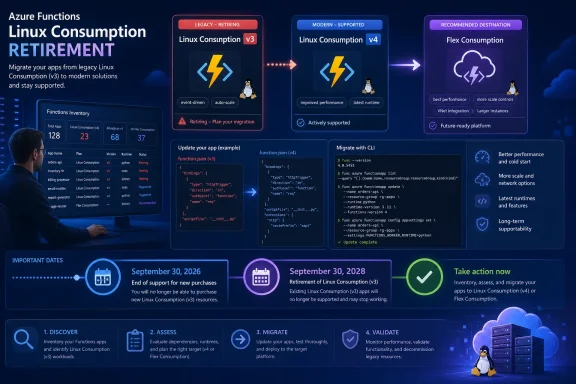
Azure Functions 3.x apps running on Linux Consumption will stop running after September 30, 2026, so teams must move those apps to Functions v4 by that date; Linux Consumption apps already on v4 still require a hosting-plan migration before Linux Consumption retires on September 30, 2028.
Microsoft’s Azure Functions runtime documentation draws an important distinction: Functions 2.x and 3.x are already unsupported, but the September 2026 hard stop specifically targets v3 on Linux Consumption. A successful deployment from Azure DevOps, GitHub Actions, Jenkins, or a Windows-hosted build server does not prove that the deployed app will survive the cutoff.
That distinction matters in the sustained cross-product sunsetting cycle WindowsForum users have been tracking across Microsoft operating systems, developer tools, applications, Azure services, and enterprise products. For this deadline, administrators need evidence for three fields: the Function App’s hosting OS, its linked plan’s
Begin with a broad inventory of App Service site resources. Do not assume that the SKU, Linux flag, or runtime stack is stored in a particular nested Azure Resource Graph property; an incorrect schema assumption can silently return an incomplete result.
Because this can include App Service resources that are not Function Apps, reconcile the results against the Function Apps visible in each subscription. If organization-wide access is unavailable, repeat the inventory for every subscription in scope.
Use a second query as a coverage check:
A zero or unexpectedly low count should trigger a permissions and subscription-scope review. It is not proof that the organization has no affected apps.
Administrators can install the Resource Graph extension and confirm the active account from Azure Cloud Shell, Windows Terminal, or another Azure CLI environment:
Resource Graph is the discovery layer. Classify each Function App with Azure CLI by retrieving the app, following its
The output must show both
Administrators who prefer the Azure portal can open the Function App, select Overview, and follow the linked App Service plan to inspect its operating system and pricing tier. Record the values rather than relying on the app or plan name.
Also record the configured Linux runtime stack:
The following decision-ready script puts the three required classification fields together:
A hard-stop candidate produces output like this:
Use the combined output to place the app in the correct queue:
The dates describe separate events. September 30, 2026 is the v3 runtime hard stop on Linux Consumption. September 30, 2028 is the retirement date for the Linux Consumption hosting option itself.
Microsoft warns that apps using Functions v2 or v3 may still be created and deployed through CI/CD pipelines. A green pipeline, successful package upload, or completed infrastructure deployment is therefore not a support check.
Search repositories and pipeline libraries for:
Use this remediation sequence:
Where a team wants to use a deployment slot or a separate test app, validate that design against the selected plan’s current Microsoft documentation before scheduling the change. Likewise, use Microsoft’s current migration procedure to determine how a particular workload moves from Linux Consumption to Flex Consumption rather than assuming an in-place conversion or parallel-app workflow.
The v4 runtime upgrade and Flex Consumption planning can be coordinated, but the broader hosting migration must not delay removal of the September 2026 hard-stop condition.
For every Consumption Function App, record:
Teams can also add a policy check or pipeline test that rejects newly introduced v2- or v3-targeting settings. This is a preventive control, not a substitute for querying the linked plan and effective application settings.
The immediate objective is measurable. By September 30, 2026, the inventory should contain no production Function App combining Linux, the legacy
Is changing
No. Update and test the application and its dependencies against Functions v4, correct source-controlled deployment configuration, deploy, and then verify the effective Azure setting.
| Current configuration | Required action |
|---|---|
Linux + Consumption (Dynamic) + Functions v3 | Migrate the application to Functions v4 by September 30, 2026 |
Linux + Consumption (Dynamic) + Functions v4 | Plan migration to Flex Consumption before September 30, 2028 |
| Windows Consumption | Not currently affected by the Linux Consumption retirement |
| Premium, Dedicated, Flex Consumption, or another plan | Not part of this specific Linux Consumption shutdown; unsupported runtimes still require remediation |
That distinction matters in the sustained cross-product sunsetting cycle WindowsForum users have been tracking across Microsoft operating systems, developer tools, applications, Azure services, and enterprise products. For this deadline, administrators need evidence for three fields: the Function App’s hosting OS, its linked plan’s
Dynamic SKU, and its effective FUNCTIONS_EXTENSION_VERSION.
 Find the Hard-Stop Population First
Begin with a broad inventory of App Service site resources. Do not assume that the SKU, Linux flag, or runtime stack is stored in a particular nested Azure Resource Graph property; an incorrect schema assumption can silently return an incomplete result.
Code:
resources
| where type =~ 'microsoft.web/sites'
| project subscriptionId, resourceGroup, name, location, kind, id
| order by subscriptionId asc, resourceGroup asc, name ascUse a second query as a coverage check:
Code:
resources
| where type =~ 'microsoft.web/sites'
| summarize SiteResources=count() by subscriptionId, resourceGroup
| order by subscriptionId asc, resourceGroup ascAdministrators can install the Resource Graph extension and confirm the active account from Azure Cloud Shell, Windows Terminal, or another Azure CLI environment:
Code:
az extension add --name resource-graph
az login
az account show --output tableserverFarmId to the linked App Service plan, and reading the plan’s OS marker and SKU. In App Service plan data, reserved: true identifies a Linux plan, while the legacy Consumption plan has the Dynamic SKU tier.
Code:
$resourceGroup = "<RESOURCE_GROUP_NAME>"
$functionApp  = "<FUNCTION_APP_NAME>"

$app = az functionapp show `
  --resource-group $resourceGroup `
  --name $functionApp | ConvertFrom-Json

$plan = az appservice plan show `
  --ids $app.serverFarmId | ConvertFrom-Json

[pscustomobject]@{
  FunctionApp = $app.name
  HostingOS   = if ($plan.reserved) { "Linux" } else { "Windows" }
  Plan        = $plan.name
  SkuName     = $plan.sku.name
  SkuTier     = $plan.sku.tier
}HostingOS: Linux and SkuTier: Dynamic before the app is classified as Linux Consumption. This also confirms the exact plan linked through the Function App’s serverFarmId, rather than relying on a naming convention.Administrators who prefer the Azure portal can open the Function App, select Overview, and follow the linked App Service plan to inspect its operating system and pricing tier. Record the values rather than relying on the app or plan name.
Check the Runtime Setting, Not the Deployment Result
For each app, inspectFUNCTIONS_EXTENSION_VERSION. That app setting exposes the targeted Azure Functions host version. A v4 app ordinarily targets ~4; a legacy app may contain a v3-targeting value.
Code:
az functionapp config appsettings list `
  --name <FUNCTION_APP_NAME> `
  --resource-group <RESOURCE_GROUP_NAME> `
  --query "[?name=='FUNCTIONS_EXTENSION_VERSION'].{Name:name,Value:value}" `
  --output table
Code:
az functionapp config show `
  --name <FUNCTION_APP_NAME> `
  --resource-group <RESOURCE_GROUP_NAME> `
  --query "linuxFxVersion" `
  --output tsv
Code:
$resourceGroup = "<RESOURCE_GROUP_NAME>"
$functionApp  = "<FUNCTION_APP_NAME>"

$app = az functionapp show -g $resourceGroup -n $functionApp |
  ConvertFrom-Json

$plan = az appservice plan show --ids $app.serverFarmId |
  ConvertFrom-Json

$extensionVersion = az functionapp config appsettings list `
  -g $resourceGroup -n $functionApp `
  --query "[?name=='FUNCTIONS_EXTENSION_VERSION'].value | [0]" `
  --output tsv

[pscustomobject]@{
  FunctionApp               = $app.name
  HostingOS                 = if ($plan.reserved) { "Linux" } else { "Windows" }
  PlanSkuTier               = $plan.sku.tier
  FUNCTIONS_EXTENSION_VERSION = $extensionVersion
}
Code:
FunctionApp                 : orders-api-prod
HostingOS                   : Linux
PlanSkuTier                 : Dynamic
FUNCTIONS_EXTENSION_VERSION : ~3Linux+Dynamic+ v3 target: September 30, 2026 hard-stop queue.Linux+Dynamic+~4: September 30, 2028 hosting-retirement queue.Windows+Dynamic: outside this Linux Consumption retirement, but an unsupported runtime still requires remediation.- Any non-
Dynamicplan: outside this specific shutdown, but an unsupported runtime still requires remediation.
The dates describe separate events. September 30, 2026 is the v3 runtime hard stop on Linux Consumption. September 30, 2028 is the retirement date for the Linux Consumption hosting option itself.
Windows Tooling Can Conceal a Linux Production Target
The operating system used by an administrator, build agent, or development team does not determine the Function App’s hosting OS. A team can build in Visual Studio, run Azure PowerShell from Windows Server, and deploy through a Windows Azure DevOps agent while the destination remains Linux Consumption.Microsoft warns that apps using Functions v2 or v3 may still be created and deployed through CI/CD pipelines. A green pipeline, successful package upload, or completed infrastructure deployment is therefore not a support check.
Search repositories and pipeline libraries for:
FUNCTIONS_EXTENSION_VERSIONvalues that do not target~4.- ARM, Bicep, and Terraform definitions for Consumption plans and Linux settings.
- Pipeline variables that override Function App settings.
- Scripts that call
az functionapp config appsettings set. - Scripts or templates that change the Linux runtime stack.
- Reusable platform templates, release stages, and variable groups.
- Disaster-recovery or rebuild automation that could recreate an old configuration.
Upgrade the App Before Changing the Number
ChangingFUNCTIONS_EXTENSION_VERSION to ~4 is part of the migration, but it does not validate the application against Functions v4. Follow the language-specific v3-to-v4 migration guidance and test for breaking changes.Use this remediation sequence:
- Inventory current app settings, site configuration, runtime stack, deployment method, triggers, identities, and dependent resources.
- Record the source repository and the pipeline or script authorized to deploy the app.
- Update the application and dependencies for Azure Functions v4 using the relevant language guidance.
- Change the source-controlled runtime target to
~4. - Verify that the configured Linux runtime stack matches the updated application.
- Choose a test environment and confirm locally whether the selected plan and deployment design support the intended isolation method.
- Exercise every trigger path, including scheduled jobs and low-frequency event handlers.
- Deploy to production and query Azure again for the effective plan, OS, runtime target, and Linux stack.
- Rerun the inventory and verify that the app has left the v3 Linux Consumption population.
Where a team wants to use a deployment slot or a separate test app, validate that design against the selected plan’s current Microsoft documentation before scheduling the change. Likewise, use Microsoft’s current migration procedure to determine how a particular workload moves from Linux Consumption to Flex Consumption rather than assuming an in-place conversion or parallel-app workflow.
The v4 runtime upgrade and Flex Consumption planning can be coordinated, but the broader hosting migration must not delay removal of the September 2026 hard-stop condition.
Build an Inventory That Survives the Next Deployment
The useful deliverable is not merely a spreadsheet of app names. It is an ownership and deployment map showing why each app is safe.For every Consumption Function App, record:
- Subscription and resource group
- Function App name and resource ID
- Linked plan name and
serverFarmId - Hosting OS and plan SKU tier
FUNCTIONS_EXTENSION_VERSION- Linux runtime stack, where applicable
- Repository and deployment pipeline
- Application owner and pipeline owner
- Environment and validated test approach
- Remediation status and validation date
- Planned action for the 2028 Linux Consumption retirement
Teams can also add a policy check or pipeline test that rejects newly introduced v2- or v3-targeting settings. This is a preventive control, not a substitute for querying the linked plan and effective application settings.
The immediate objective is measurable. By September 30, 2026, the inventory should contain no production Function App combining Linux, the legacy
Dynamic Consumption SKU, and a v3 runtime target. Every remaining Linux Consumption app then needs a documented plan for the September 30, 2028 retirement.Frequently Asked Questions
Will every Azure Functions v3 app stop on September 30, 2026?
No. The hard stop discussed here applies specifically to Functions v3 apps on Linux Consumption. Other configurations may remain operational, but Functions v3 is unsupported and should still be upgraded.How do I prove that an app is on Linux Consumption?
Retrieve the Function App withaz functionapp show, follow its serverFarmId with az appservice plan show, and confirm that the linked plan reports reserved: true and sku.tier: Dynamic. Record those results with FUNCTIONS_EXTENSION_VERSION.Are Windows Consumption Function Apps affected?
Windows Consumption is not currently affected by the Linux Consumption retirement. Unsupported runtime versions on Windows still belong in the modernization backlog.Is changing FUNCTIONS_EXTENSION_VERSION to ~4 enough?
No. Update and test the application and its dependencies against Functions v4, correct source-controlled deployment configuration, deploy, and then verify the effective Azure setting.Does a successful CI/CD deployment prove the app is safe?
No. Verify the linked hosting plan, operating system,FUNCTIONS_EXTENSION_VERSION, and runtime stack directly in Azure after deployment.Should teams migrate directly to Flex Consumption?
Every Linux Consumption app needs a plan before September 30, 2028. Whether to combine that work with the v4 upgrade depends on the application and current Microsoft migration guidance, but the hosting migration must not delay the September 2026 runtime remediation.Can a staging slot be used for testing?
Use a slot only after validating that the selected plan supports it and that its behavior fits the deployment design. Otherwise, choose another locally validated test environment rather than assuming slot availability.References
- Primary source: learn.microsoft.com
Compare Azure Functions Runtime Versions | Microsoft Learn
Learn how Azure Functions supports multiple versions of the runtime, and understand the differences between them and how to choose the one that's right for you.learn.microsoft.com - Primary source: WindowsForum
Microsoft 2025 Sunsetting: Windows 10, Azure, and Apps End-of-Support Guide | Windows Forum
Microsoft’s 2025 product sunsetting is not a single headline—it’s a sustained, cross‑product sweep that touches operating systems, developer tools, Office...windowsforum.com