

Microsoft Azure Images are the repeatable, auditable building blocks that let IT teams bake security, configuration, and compliance into every virtual machine before it ever boots — turning manual provisioning work into predictable, versioned artifacts that scale from single‑server proof‑of‑concepts to enterprise fleets deployed across regions. This piece explains what Azure Images are, why they matter to modern IT departments, how to operationalize an image-first strategy, and the practical risks and trade-offs platform teams must manage to get it right.
Azure Images are pre‑configured VM templates that package an operating system together with optionally preinstalled software, agents, hardening, and configuration state so new virtual machines (VMs) provision with a known baseline. Images can come from multiple channels:
Key trade‑offs:
That said, an image program introduces new complexity:
Source: TechBullion Understanding Microsoft Azure Images and Their Importance in Modern IT Departments
 Background / Overview
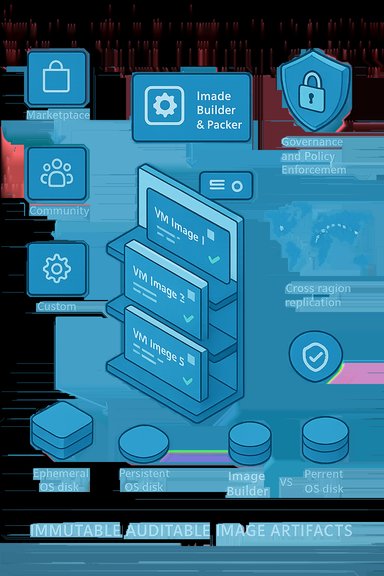
Azure Images are pre‑configured VM templates that package an operating system together with optionally preinstalled software, agents, hardening, and configuration state so new virtual machines (VMs) provision with a known baseline. Images can come from multiple channels:- Azure Marketplace images maintained by Microsoft and vetted third‑party publishers.
- Community images published to public galleries (fast but less trustworthy).
- Custom managed images created by your teams and stored in a subscription.
- Azure Compute Gallery (formerly Shared Image Gallery) images — enterprise‑grade, versioned artifacts designed for distribution, replication, and governance.
- Captured VM images made by capturing an existing, generalized VM when circumstances require a lift‑and‑shift approach.
Why Azure Images matter to modern IT departments
Azure Images are not just convenience—they are a lever for speed, consistency, security, and cost control. The following core benefits explain why platform teams increasingly adopt an image-first mindset.1. Fast and scalable provisioning
Pre‑baked images collapse hours of manual setup into minutes. By launching VMs from a validated image rather than installing OS patches, agents, and custom packages at boot, teams can:- Scale application tiers quickly under load.
- Create repeatable development or test environments on demand.
- Integrate image artifacts as the canonical source for autoscaling groups such as VM Scale Sets and for CI/CD pipelines built in Azure DevOps, GitHub Actions, or Terraform.
2. Consistency and reduced drift
Images provide a single, enforceable baseline across development, staging, and production. When every host boots from the same curated image version, configuration drift shrinks, troubleshooting becomes deterministic, and “it works on my machine” problems disappear. This reduces operational toil and shortens mean time to repair.3. Security and compliance by design
Baking patches, endpoint protection, logging, and hardening controls into images reduces exposure windows for new hosts. Image metadata and gallery provenance allow teams to prove which build produced which instances — a key requirement for audits. Azure Policy can be applied to restrict production subscriptions to approved gallery versions, closing a common enforcement gap.4. Operational efficiency and automation
Treating images as artifacts means you can “build once, deploy many.” Combine Image Builder or Packer‑driven build pipelines with the Azure Compute Gallery to publish versioned images, and then reference exact image URNs from Infrastructure as Code (IaC) modules. This supports safe rollouts, controlled rollbacks, and automated fleet reimages without one‑off manual steps. Microsoft documents the Compute Gallery pattern for versioning, replication, and scale.5. Disaster recovery and global distribution
Replicating image versions to multiple regions via the Azure Compute Gallery shortens recovery time objectives and reduces deployment latency for global teams. Gallery replication is an operational primitive for disaster‑recovery playbooks and fast cross‑region reprovisioning. However, regional replication has storage and egress cost implications that must be modeled.Azure image types, how they differ, and when to use each
Choosing the right image channel is a foundational decision. Below is a practical breakdown.Marketplace images
- Best for quick proof‑of‑concepts and baseline OS checks.
- Pros: fast onboarding, vendor‑maintained updates.
- Cons: may include vendor defaults or telemetry; not ideal as a long‑term production artifact without further hardening.
Community images
- Useful for sharing and rapid iteration.
- Pros: agility and breadth.
- Cons: not platform‑verified — treat as unvetted and validate contents before production use.
Managed/custom images (subscription level)
- Good for one‑off images or small fleets.
- Created by capturing a generalized VM or via a build pipeline (Packer / Image Builder).
- Suitable where you need precise control but fewer distribution requirements.
Azure Compute Gallery (ACG)
- Enterprise‑grade: immutable versions, region replication, RBAC sharing, metadata, and lifecycle controls.
- Recommended as the single source of truth for production fleets; supports promotion of versions and controlled rollouts. Microsoft’s Compute Gallery documentation explains replication, limits, and best practices for replicas and region choices.
Captured VM images
- Useful for migrations and lift‑and‑shift scenarios.
- Restrictions exist: certain disk types (for example, ephemeral OS disks) and VM states may not be captureable; validate before relying on capture as your migration strategy.
Building and managing an image pipeline: tools and patterns
A mature image program treats images like software artifacts. That means version control, automated builds, tests, signing, publishing, and retirement.Core tools
- Azure Image Builder — a managed Microsoft service that orchestrates immutable image builds, supports Bicep/ARM templates, integrates with Compute Gallery, and can be triggered from CI. The Image Builder service handles orchestration while you pay for the VM/storage resources that run during the build.
- HashiCorp Packer — the de‑facto open‑source builder many organizations use; Packer supports Azure builders and can publish managed images or Gallery versions. HashiCorp’s Packer docs describe Azure builders and configuration options.
- IaC — Bicep/ARM for native Azure semantics or Terraform for multi‑cloud portability. Use IaC modules to reference exact, immutable image URNs rather than “latest.”
Recommended pipeline stages
- Base selection: choose a trusted Marketplace LTS image or validated internal base.
- Build: use Image Builder/Packer to apply provisioning scripts, install agents, and run hardening tools.
- Test: run smoke tests, boot verification, CIS/DISA checks, and workload probes.
- Sign & attest: generate SBOMs, sign images cryptographically where required, and store metadata (pipeline run ID, approver).
- Publish: push versions to Azure Compute Gallery with semantic versioning (major.minor.patch).
- Promote: reference the exact image URN in IaC modules for staging and production promotion gates.
- Retire: automate deprecation and deletion of old versions to prevent sprawl.
Practical automation notes
- Use Image Builder triggers or CI pipelines to regularly re‑bake base commits and include patch windows. Azure Image Builder can accept a Gallery image or Marketplace image as a source and automatically increment versions on publish.
- Keep build outputs small: smaller images replicate faster and reduce placement failures in certain VM families and ephemeral scenarios.
Ephemeral OS disks: when stateless wins—and when it doesn’t
Azure supports ephemeral OS disks that place the OS layer on local VM storage for faster boots and reimages and reduced OS-disk latency. Use cases include pooled VDI hosts, ephemeral CI runners, and high‑churn test fleets.Key trade‑offs:
- Benefits: much faster provisioning and reimage times, lower OS latency, and potential managed‑disk storage cost reductions.
- Important limitations: ephemeral OS disks do not support OS‑disk snapshots or VM image capture, are not compatible with Azure Backup/ASR for the OS disk, and cannot be stop‑deallocated in the same way persistent OS‑disk VMs are. These restrictions affect forensic traceability, backup models, and some CMK rotation workflows. For these reasons ephemeral OS disks should only be used for stateless workloads with compensating controls (FSLogix, cloud profiles, OneDrive).
Governance: signing, provenance, and policy enforcement
Operationalizing images at scale requires strong governance:- Immutability and provenance: Publish immutable versions to Compute Gallery and attach build metadata (build ID, SBOM, approver, expiry). Block deletion before end of life where needed.
- Image signing and attestation: For high‑assurance environments, cryptographically sign images and integrate signing into CI pipelines; maintain key rotation practices and anticipate operational impacts (e.g., a signing key rotation might require rebuilding images).
- Azure Policy and RBAC: Use Azure Policy to audit or deny VMs launched from non‑approved images and apply RBAC to limit who can publish or consume images from a gallery. Enforce gallery‑only production images through policy to close the shadow‑image risk.
- Maintain separate Compute Galleries for production and test.
- Enforce CI‑backed publishing (no manual gallery publishes without an approver).
- Require SBOMs and attach lifecycle metadata (expiry, owner).
- Use policy to deny non‑gallery images in production subscriptions.
Cost, performance and operational trade-offs
Images make operations predictable, but they bring new cost and performance considerations:- Replication and storage costs: Each replica of an image stored in Compute Gallery consumes snapshot storage and may generate network egress charges during initial replication. Plan replication only to regions you actually need and consider shallow replication for rarely used regions.
- Build costs: Azure Image Builder orchestrates the process, but you pay for the transient compute, storage, and any Azure Container Instances the build uses. Include build resource costs in your TCO models.
- Ephemeral OS disk nuances: Savings on managed‑OS disk storage can be offset by operational constraints and the need for alternative backup strategies for stateful data.
Common pitfalls and how to avoid them
- Image sprawl: Without CI‑backed controls and a single Compute Gallery, small uncontrolled variations create hundreds of near‑identical images. Mitigation: centralize publishing, require pipeline provenance, and automate retirement.
- Stale images: Relying on old images creates security exposure. Mitigation: enforce a rebuild cadence and automated retirement policy.
- Misusing ephemeral OS disks: Applying ephemeral patterns to workloads that need OS‑level persistence, snapshots, or forensic traceability will create compliance and DR gaps. Mitigation: reserve ephemeral for stateless fleets and externalize user state.
- Over‑trusting marketing claims: Vendor performance or “up to X times” claims are workload‑specific; always benchmark with representative tests.
- Poor key management: Image signing and disk encryption keys require solid rotation plans; missing this can force disruptive VM operations. Plan key rotation workflows early.
A practical, phased rollout playbook
- Start with a small pilot: create a staging Compute Gallery and automate a single image build pipeline (Image Builder or Packer) that publishes one version. Validate boot, agents, and extensions.
- Add CI gates and tests: include smoke tests, CIS checks, and SBOM emission. Ensure build artifacts are signed and metadata is recorded.
- Enforce consumption: deploy Azure Policy that audits or denies VM creates that do not reference gallery URNs (start with audit, graduate to deny after confidence grows).
- Expand replication: replicate only to regions that require low latency or DR proximity; monitor storage and egress costs.
- Pilot ephemeral OS disks where appropriate: run realistic load and reimage tests; externalize user state to FSLogix or cloud profile storage before scaling.
- Operationalize retirement: automate deprecation and removal of old versions and include policy checks for unused images.
Technical verification and references (what I checked)
- Azure Compute Gallery supports image versioning, regional replication, replica counts, and storage types; Microsoft lists limits and best practices for replica counts and region replication.
- Azure Image Builder uses templates (Bicep/ARM) and supports Marketplace and Compute Gallery sources; Image Builder orchestrates builds while customers pay for the transient build resources.
- HashiCorp Packer remains a first‑class tooling option for producing managed images and Shared/Gallery image versions — Packer docs cover azure-arm and chroot builders.
- Ephemeral OS disk operational constraints — inability to snapshot or capture OS disks and backup/ASR incompatibilities — are recognized limitations and require compensating controls for stateful data. These constraints are emphasized in operational guidance and vendor notes.
Critical analysis — strengths, risks, and realistic expectations
Azure Images and a gallery‑driven, immutable image model deliver real operational benefits: dramatically faster provisioning, far better consistency, and an enforceable control plane for security and compliance. For enterprises moving to cloud‑first operations, images are the practical mechanism to make infrastructure auditable and repeatable.That said, an image program introduces new complexity:
- Governance overhead: Signing keys, approval gates, SBOMs, and lifecycle policies require organizational processes and tool investment. Without them, images become another source of technical debt.
- Hidden costs: Regional replication, transient build resources, and storage for versions add recurring costs that can surprise teams that optimized for per‑VM runtime only. Model these costs upfront.
- Technology misuse risk: Patterns such as ephemeral OS disks are powerful but dangerous when misapplied to workloads needing persistence or forensic capabilities. Pilot and document trade‑offs clearly.
Final recommendations for platform teams
- Treat images as code: store build templates, customizers, and tests in version control and enforce pipeline‑driven publishing.
- Use Azure Compute Gallery as the production image registry and enforce consumption with Azure Policy and RBAC.
- Automate builds using Azure Image Builder or HashiCorp Packer, include security and functional tests, emit SBOMs, and sign images where required.
- Pilot ephemeral OS disks only with representative workloads and externalize user data and profiles for pooled or stateless fleets.
- Maintain an image retirement cadence, automate deprecation, and avoid “latest” in production IaC — always reference explicit image versions.
Source: TechBullion Understanding Microsoft Azure Images and Their Importance in Modern IT Departments
