

Microsoft has released Azure Linux 4.0, the latest version of the open-source distribution formerly known as CBL-Mariner. The usable bottom line is straightforward: Azure Linux 4.0 is currently a public-preview evaluation platform, not a production-ISO recommendation. Azure-centric platform teams should evaluate it now if they want to understand its compatibility, automation impact, and possible role in future standardized images. Organizations that require mature third-party certification, extensive vendor validation, or operational parity outside Azure should wait for firmer documentation and support commitments.
The reported release highlights are substantial: Kernel 7.0, glibc 2.42, OpenSSL 3.5, Python 3.13, OpenSSH 10, and dnf5. Those versions make compatibility testing important, but they must not be treated as a substitute for inspecting the exact build being evaluated. Preview media and accompanying descriptions can change. Before running any test, record and verify the manifest, package versions, repository configuration, image identifier, download source, and integrity information for the actual ISO.
The downloadable ISO broadens access to Azure Linux, but its public-preview status defines the immediate decision. It is an opportunity to investigate the operating system in a controlled environment—not a reason to add it to a production deployment plan.
Use the public-preview ISO only in an isolated virtual machine or dedicated lab. Do not deploy it to production, expose it directly to sensitive networks, or treat a successful installation as evidence that the platform is ready for supported workloads.
A practical first-round evaluation should include the following steps:
Those distinctions matter:
This makes Azure-centric platform teams the clearest early audience. They can use the preview to identify automation changes, package dependencies, application gaps, and operational assumptions before a later release creates deadline pressure. Evaluation is also useful for teams maintaining standardized Linux build pipelines, provided that the work remains isolated from production.
Organizations should be more cautious when their adoption decision depends on broad independent software-vendor certification, established hardware or security-tool validation, long lifecycle commitments, or equivalent operations across several cloud and non-cloud environments. The ISO’s existence does not establish any of those conditions.
The sensible response is not to infer benefits or guarantees from the version numbers. It is to turn each component into a test category.
A kernel change can affect boot behavior, virtual hardware, networking, storage, drivers, observability tools, and software that relies on kernel interfaces. A glibc change can expose application or installer assumptions. OpenSSL and OpenSSH changes can affect cryptographic policies, client compatibility, authentication, and integrations that depend on older algorithms or configuration behavior. A Python change can affect administrative scripts, installed modules, and tools that expect another interpreter version. A package-manager change can touch nearly every automated build and maintenance workflow.
None of those effects should be presumed from the headline version alone. The actual packages, build options, patches, repository state, and configuration in the tested image are what matter.
Teams should therefore capture two records:
Teams should search for package-management assumptions in:
Container builds need the same scrutiny. A build can complete while still producing an unexpected package graph, different layer size, stale cache, changed dependency set, or incomplete cleanup. The resulting image should be compared against the organization’s expected inventory and software bill of materials rather than judged only by whether the application starts.
Repository testing is equally important. Teams using internal mirrors, curated package sets, proxies, disconnected networks, or locally produced RPMs should reproduce those conditions in the lab. A package manager that works against a default internet-accessible repository has not yet been validated for an enterprise’s actual supply path.
The appropriate unit of testing is therefore the complete workflow: repository configuration, dependency selection, package installation, update, removal, audit evidence, failure handling, and recovery. Replacing a command name without validating those surrounding behaviors would leave the highest-risk assumptions untouched.
The following table is a proposed evaluation framework, not a description of Microsoft’s delivery or support commitments:
This approach prevents the ISO from being treated as evidence for claims it cannot establish. It also gives decision-makers a concise view of what is known, what remains open, and what engineering work could close each gap.
That does not make those subjects unimportant. It makes direct verification necessary.
Administrators should record SELinux status, loaded policy, application denials, administrative exceptions, and the effect of any proposed policy changes. If a workload appears to require disabling enforcement, that result should be treated as a compatibility problem to investigate—not an automatic deployment instruction.
Secure Boot should be tested only where the proposed virtualization and boot path support a meaningful evaluation. Teams should document whether it is available, enabled, enforced, or irrelevant in the tested configuration. They should also verify the behavior of any required modules, recovery media, and diagnostic tools.
Package and repository integrity controls should be inspected directly. Record repository definitions, trust configuration, metadata behavior, and the result of intentionally invalid or unavailable package sources. Do not convert the existence of familiar RPM tooling into an unsupported claim about the complete software-supply-chain policy.
Security-product compatibility also needs evidence. Vulnerability scanners, endpoint tools, file-integrity systems, logging agents, and configuration-assessment products may identify the distribution correctly, partially, or not at all. A tool producing output is not sufficient; the team must determine whether its vendor recognizes and supports the platform, understands the package data, and can distinguish applicable findings from false positives.
Finally, teams should test their own response process. Can they inventory installed packages, identify changes between images, isolate a failed update, rebuild a host, recover application data, and produce evidence for an audit? Those questions can be answered in a preview lab without making unsupported promises about Microsoft’s future servicing model.
Those subjects should be converted into explicit decision gates for later review:
For an Azure-centric platform organization, the preview still has practical value. The team can determine how Azure Linux affects its existing build definitions, package workflows, access model, monitoring stack, security products, and application portfolio. It can also measure whether adopting another distribution would reduce or increase operational variation.
That judgment should be based on observed results. If Azure Linux allows the organization to simplify images, scripts, repositories, or troubleshooting, the evaluation should quantify that reduction. If it requires exceptions, replacement tools, or vendor waivers, those costs should be recorded with equal care.
Organizations operating across multiple environments should run comparative tests using the same criteria. Boot success alone is not parity. The comparison should include identity, networking, repositories, remote administration, monitoring, security tooling, backup, patching, rebuild time, rollback, application support, and incident diagnosis.
Portability should also be defined precisely. Application source code may be portable even when its installation and operations are not. A container may start in several environments while depending on different host controls and support arrangements. A VM may boot while losing access to required management or recovery processes. Each organization must decide which form of portability it actually needs.
This replaces a broad cloud-strategy debate with an operational question: Does Azure Linux 4.0 reduce enough complexity in the organization’s real environment to justify the compatibility, support, and transition work it introduces? The preview can help answer that question, but it cannot answer it in advance.
First, the installation or image path being considered must no longer be limited to public-preview evaluation. Second, Microsoft’s current documentation must clearly describe the status, lifecycle, update process, and relevant support boundaries for that path. Third, the exact production candidate must be tested; results from an earlier preview should be treated as preliminary.
The organization must also demonstrate that its own operations are ready. Package-management automation needs to work with the actual image. Boot, networking, repositories, SSH, security controls, required agents, monitoring, backup, recovery, rollback, and rebuild procedures all need documented outcomes. Application owners and external vendors must approve the configuration where their support is required.
A production recommendation should include evidence, not enthusiasm:
It does not provide a production recommendation. The ISO remains an evaluation artifact, and the supplied verified facts do not establish the wider support, lifecycle, integration, security-default, or third-party-certification claims that a production decision would require.
Azure-centric platform teams should evaluate Azure Linux 4.0 now in an isolated VM or lab, especially if they maintain automated images, package pipelines, or a defined Linux platform standard. Their immediate objective should be to discover dependencies and produce evidence—not to accelerate deployment.
Organizations that depend on mature third-party certification, established vendor support, or equivalent operations outside Azure should wait. They can still inventory dnf-dependent automation and document future test requirements, but there is no reason to accept preview risk merely because installation media is available.
The concrete next step is simple: assign an owner, download the public-preview ISO from the official source, verify and preserve the exact image manifest, create an isolated test VM, run the boot-to-rollback checklist, and record every unsupported or unknown dependency. Then stop. Do not promote the ISO into production.
Azure Linux 4.0’s eventual enterprise value will not be decided by its version list or by whether it installs successfully. It will be decided by whether a production release can provide a documented, supportable, recoverable operating model for the workloads and environments an organization actually runs.
The reported release highlights are substantial: Kernel 7.0, glibc 2.42, OpenSSL 3.5, Python 3.13, OpenSSH 10, and dnf5. Those versions make compatibility testing important, but they must not be treated as a substitute for inspecting the exact build being evaluated. Preview media and accompanying descriptions can change. Before running any test, record and verify the manifest, package versions, repository configuration, image identifier, download source, and integrity information for the actual ISO.
The downloadable ISO broadens access to Azure Linux, but its public-preview status defines the immediate decision. It is an opportunity to investigate the operating system in a controlled environment—not a reason to add it to a production deployment plan.
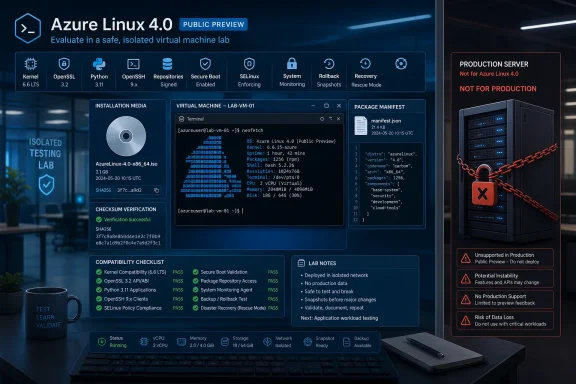 What IT Teams Should Do Now
Use the public-preview ISO only in an isolated virtual machine or dedicated lab. Do not deploy it to production, expose it directly to sensitive networks, or treat a successful installation as evidence that the platform is ready for supported workloads.A practical first-round evaluation should include the following steps:
- Record the exact media and manifest. Preserve the ISO identifier, checksum, build information, package inventory, enabled repositories, repository metadata, and test date. Do not rely solely on version lists in articles or announcements.
- Inventory package-management dependencies. Search configuration-management repositories, bootstrap scripts, CI pipelines, Dockerfiles, image-building definitions, recovery procedures, and administrator runbooks for assumptions involving
dnf,dnf5, or related RPM tooling. - Test installation and boot behavior. Confirm that the lab VM installs, starts, restarts, and shuts down cleanly under the hypervisor configuration the organization intends to evaluate.
- Validate networking and repositories. Test addressing, DNS, routing, proxy use, repository access, mirror behavior, package installation, updates, and expected failure handling.
- Test SSH access. Check authentication methods, cryptographic compatibility, host-key handling, automation access, session policies, and interaction with existing administrative tooling.
- Inspect SELinux behavior. Determine the actual mode and policy configuration in the tested image, then check whether applications, scripts, agents, and operational procedures behave correctly. Do not assume a particular default from secondary coverage.
- Inspect Secure Boot behavior. If it is relevant to the intended environment, verify the tested build and virtualization path directly. Do not assume support, enforcement, or configuration until the exact scenario has been demonstrated.
- Test required agents and tools. Install or exercise monitoring, security, backup, identity, inventory, vulnerability-management, and configuration-management software in the lab. Obtain vendor confirmation where formal support matters.
- Test rollback and recovery. Simulate a failed update, repository outage, broken boot, configuration error, and application deployment failure. Document whether snapshot restoration, image replacement, package rollback, or another recovery method is required.
- Check application and vendor support. A workload running successfully is not the same as its supplier supporting Azure Linux 4.0. Record explicit vendor statements, certification gaps, and unresolved dependencies.
- Keep the ISO out of production. The public preview should remain an evaluation input until Microsoft publishes production-ready media and the documentation, support position, and third-party ecosystem meet the organization’s requirements.
Azure Linux 4.0 Is an Evaluation Platform First
Azure Linux 4.0 is notable because it gives a wider audience a direct way to examine the distribution formerly called CBL-Mariner. The ISO makes that evaluation easier, but it does not by itself establish production readiness, a support boundary, a lifecycle commitment, or parity across environments.Those distinctions matter:
- Availability means teams can obtain and inspect the software.
- Installability means the software can complete installation in a tested configuration.
- Compatibility means a particular workload functions under defined test conditions.
- Vendor support means the relevant supplier has agreed to support that workload and configuration.
- Production readiness requires operational evidence covering updates, recovery, security processes, monitoring, capacity, documentation, and escalation—not merely a successful boot.
This makes Azure-centric platform teams the clearest early audience. They can use the preview to identify automation changes, package dependencies, application gaps, and operational assumptions before a later release creates deadline pressure. Evaluation is also useful for teams maintaining standardized Linux build pipelines, provided that the work remains isolated from production.
Organizations should be more cautious when their adoption decision depends on broad independent software-vendor certification, established hardware or security-tool validation, long lifecycle commitments, or equivalent operations across several cloud and non-cloud environments. The ISO’s existence does not establish any of those conditions.
The Version Highlights Require Exact-Image Verification
The listed Azure Linux 4.0 highlights include Kernel 7.0, glibc 2.42, OpenSSL 3.5, Python 3.13, OpenSSH 10, and dnf5. That is a concentrated set of changes across the kernel, core C library, cryptographic stack, automation runtime, remote-access service, and package-management layer.The sensible response is not to infer benefits or guarantees from the version numbers. It is to turn each component into a test category.
A kernel change can affect boot behavior, virtual hardware, networking, storage, drivers, observability tools, and software that relies on kernel interfaces. A glibc change can expose application or installer assumptions. OpenSSL and OpenSSH changes can affect cryptographic policies, client compatibility, authentication, and integrations that depend on older algorithms or configuration behavior. A Python change can affect administrative scripts, installed modules, and tools that expect another interpreter version. A package-manager change can touch nearly every automated build and maintenance workflow.
None of those effects should be presumed from the headline version alone. The actual packages, build options, patches, repository state, and configuration in the tested image are what matter.
Teams should therefore capture two records:
- The announced highlights, which explain what deserves attention.
- The observed image manifest, which identifies what was actually tested.
dnf5 Could Have the Widest Automation Impact
Among the highlighted changes, dnf5 deserves early attention because package-management commands are commonly embedded throughout Linux operations. This is general migration advice based on the operational role of package tooling; it should not be presented as Microsoft-specific guidance unless Microsoft publishes corresponding instructions.Teams should search for package-management assumptions in:
- Configuration-management roles and modules
- Shell scripts and cloud-init-style bootstrap logic
- CI/CD pipelines
- Container build definitions
- Golden-image and template builders
- Offline installation procedures
- Internal repository and mirror tooling
- Compliance and inventory scripts
- Incident-response runbooks
- Patching, cleanup, and rollback procedures
Container builds need the same scrutiny. A build can complete while still producing an unexpected package graph, different layer size, stale cache, changed dependency set, or incomplete cleanup. The resulting image should be compared against the organization’s expected inventory and software bill of materials rather than judged only by whether the application starts.
Repository testing is equally important. Teams using internal mirrors, curated package sets, proxies, disconnected networks, or locally produced RPMs should reproduce those conditions in the lab. A package manager that works against a default internet-accessible repository has not yet been validated for an enterprise’s actual supply path.
The appropriate unit of testing is therefore the complete workflow: repository configuration, dependency selection, package installation, update, removal, audit evidence, failure handling, and recovery. Replacing a command name without validating those surrounding behaviors would leave the highest-risk assumptions untouched.
The ISO Expands Access, Not the Evidence Base
The public-preview ISO gives administrators a convenient artifact for controlled evaluation. It does not prove the status of other delivery methods, establish intended deployment roles, or define support terms outside the preview statement.The following table is a proposed evaluation framework, not a description of Microsoft’s delivery or support commitments:
| Evaluation question | What is verified | What remains unknown | What the team should test |
|---|---|---|---|
| Release identity | Azure Linux 4.0 was formerly known as CBL-Mariner | Whether every publication refers to the same preview build | Record the exact ISO, build data, checksum, manifest, and test date |
| ISO status | The downloadable ISO is a public preview for evaluation rather than production | Conditions and timing for any later production recommendation | Keep the ISO in an isolated lab and monitor official status changes |
| Core components | Listed highlights include Kernel 7.0, glibc 2.42, OpenSSL 3.5, Python 3.13, OpenSSH 10, and dnf5 | Exact package builds, patches, configuration, and later preview changes | Query the installed system and preserve a complete package inventory |
| Package management | dnf5 is among the listed highlights | Compatibility with the organization’s scripts, plugins, repositories, and procedures | Run full build, update, failure, cleanup, and recovery workflows |
| Security controls | No broader security-default claim is established by the supplied facts | Actual SELinux mode, Secure Boot behavior, package settings, and policy configuration | Inspect and test each control directly in the exact image |
| Management tooling | No general agent or extension support claim is established | Compatibility and vendor support for required operational tools | Test each required agent and obtain supplier confirmation |
| Application readiness | No broad application-certification claim is established | Whether specific applications and vendors support the platform | Run functional, performance, update, recovery, and support checks |
| Environment parity | The ISO permits evaluation outside a production deployment | Whether operations and support are equivalent across environments | Compare procedures, tooling, observability, recovery, and escalation requirements |
Security Must Be Tested, Not Reconstructed From Feature Lists
Security evaluation should begin with the tested image rather than an assumed list of defaults. The supplied verified facts do not establish claims about SELinux defaults, Secure Boot configuration, package-signing behavior, security-update timing, severity-based service levels, or broader hardening policies.That does not make those subjects unimportant. It makes direct verification necessary.
Administrators should record SELinux status, loaded policy, application denials, administrative exceptions, and the effect of any proposed policy changes. If a workload appears to require disabling enforcement, that result should be treated as a compatibility problem to investigate—not an automatic deployment instruction.
Secure Boot should be tested only where the proposed virtualization and boot path support a meaningful evaluation. Teams should document whether it is available, enabled, enforced, or irrelevant in the tested configuration. They should also verify the behavior of any required modules, recovery media, and diagnostic tools.
Package and repository integrity controls should be inspected directly. Record repository definitions, trust configuration, metadata behavior, and the result of intentionally invalid or unavailable package sources. Do not convert the existence of familiar RPM tooling into an unsupported claim about the complete software-supply-chain policy.
Security-product compatibility also needs evidence. Vulnerability scanners, endpoint tools, file-integrity systems, logging agents, and configuration-assessment products may identify the distribution correctly, partially, or not at all. A tool producing output is not sufficient; the team must determine whether its vendor recognizes and supports the platform, understands the package data, and can distinguish applicable findings from false positives.
Finally, teams should test their own response process. Can they inventory installed packages, identify changes between images, isolate a failed update, rebuild a host, recover application data, and produce evidence for an audit? Those questions can be answered in a preview lab without making unsupported promises about Microsoft’s future servicing model.
Support and Lifecycle Questions Remain Decision Gates
The public-preview label establishes that the ISO should not be used for production. It does not, from the supplied verified facts, establish a production lifecycle, servicing duration, feature-update schedule, overlap period, maintenance calendar, vulnerability-response commitment, or formal support scope.Those subjects should be converted into explicit decision gates for later review:
- Has Microsoft declared the relevant ISO or installation path production-ready?
- Is a lifecycle documented for the exact release and delivery method under consideration?
- Are update channels, advisories, package histories, and recovery procedures clear enough for operations?
- Are support boundaries documented for the intended environment?
- Do required application, security, backup, monitoring, and management vendors support the distribution?
- Can the organization reproduce, patch, replace, and roll back systems using its existing automation?
- Can vulnerability and compliance tools interpret Azure Linux package data accurately?
- Are exceptions, escalations, and ownership boundaries clear when a problem crosses the operating system, application, hypervisor, or management tooling?
- Has the production candidate been tested rather than inferred from an earlier preview image?
- Does the resulting operating model meet the organization’s portability and recovery requirements?
Azure-Centric Value Must Be Measured, Not Assumed
Azure Linux’s name makes its center of gravity clear, but the supplied facts do not establish detailed integration claims, management-agent coverage, extension support, or equal behavior across environments. Teams should therefore avoid treating either deep Azure optimization or broad non-Azure parity as proven.For an Azure-centric platform organization, the preview still has practical value. The team can determine how Azure Linux affects its existing build definitions, package workflows, access model, monitoring stack, security products, and application portfolio. It can also measure whether adopting another distribution would reduce or increase operational variation.
That judgment should be based on observed results. If Azure Linux allows the organization to simplify images, scripts, repositories, or troubleshooting, the evaluation should quantify that reduction. If it requires exceptions, replacement tools, or vendor waivers, those costs should be recorded with equal care.
Organizations operating across multiple environments should run comparative tests using the same criteria. Boot success alone is not parity. The comparison should include identity, networking, repositories, remote administration, monitoring, security tooling, backup, patching, rebuild time, rollback, application support, and incident diagnosis.
Portability should also be defined precisely. Application source code may be portable even when its installation and operations are not. A container may start in several environments while depending on different host controls and support arrangements. A VM may boot while losing access to required management or recovery processes. Each organization must decide which form of portability it actually needs.
This replaces a broad cloud-strategy debate with an operational question: Does Azure Linux 4.0 reduce enough complexity in the organization’s real environment to justify the compatibility, support, and transition work it introduces? The preview can help answer that question, but it cannot answer it in advance.
What Would Need to Be True Before Production Consideration
Azure Linux 4.0 should move beyond laboratory status only after several conditions are satisfied.First, the installation or image path being considered must no longer be limited to public-preview evaluation. Second, Microsoft’s current documentation must clearly describe the status, lifecycle, update process, and relevant support boundaries for that path. Third, the exact production candidate must be tested; results from an earlier preview should be treated as preliminary.
The organization must also demonstrate that its own operations are ready. Package-management automation needs to work with the actual image. Boot, networking, repositories, SSH, security controls, required agents, monitoring, backup, recovery, rollback, and rebuild procedures all need documented outcomes. Application owners and external vendors must approve the configuration where their support is required.
A production recommendation should include evidence, not enthusiasm:
- Exact image and package manifest
- Completed compatibility matrix
- Confirmed application-owner acceptance
- Third-party vendor support status
- Security and compliance assessment
- Update and repository procedure
- Monitoring and incident-response coverage
- Backup, rebuild, rollback, and recovery results
- Capacity and performance results for the intended workload
- Documented exceptions and risk owners
- Approved pilot scope
- Defined exit criteria if the pilot fails
Final Verdict: Evaluate Now, but Keep Production Waiting
Azure Linux 4.0 is worth evaluating because it exposes a newer generation of the distribution formerly called CBL-Mariner and places several major component changes in front of platform teams at once. Kernel 7.0, glibc 2.42, OpenSSL 3.5, Python 3.13, OpenSSH 10, and dnf5 create a meaningful compatibility-testing agenda. The public-preview ISO gives teams a practical way to begin that work.It does not provide a production recommendation. The ISO remains an evaluation artifact, and the supplied verified facts do not establish the wider support, lifecycle, integration, security-default, or third-party-certification claims that a production decision would require.
Azure-centric platform teams should evaluate Azure Linux 4.0 now in an isolated VM or lab, especially if they maintain automated images, package pipelines, or a defined Linux platform standard. Their immediate objective should be to discover dependencies and produce evidence—not to accelerate deployment.
Organizations that depend on mature third-party certification, established vendor support, or equivalent operations outside Azure should wait. They can still inventory dnf-dependent automation and document future test requirements, but there is no reason to accept preview risk merely because installation media is available.
The concrete next step is simple: assign an owner, download the public-preview ISO from the official source, verify and preserve the exact image manifest, create an isolated test VM, run the boot-to-rollback checklist, and record every unsupported or unknown dependency. Then stop. Do not promote the ISO into production.
Azure Linux 4.0’s eventual enterprise value will not be decided by its version list or by whether it installs successfully. It will be decided by whether a production release can provide a documented, supportable, recoverable operating model for the workloads and environments an organization actually runs.
References
- Primary source: Linux Journal
Published: Thu, 09 Jul 2026 07:00:00 GMT
Loading…
www.linuxjournal.com - Official source: techcommunity.microsoft.com
Announcing Azure Linux 4.0: Purpose-Built for Azure, Now in Public Preview | Microsoft Community Hub
Today at Microsoft Build, we're announcing the public preview of Azure Linux 4.0 - Microsoft's first party Linux distribution, purpose-built for Azure. Azure... techcommunity.microsoft.com
- Official source: marketplace.microsoft.com
Loading…
marketplace.microsoft.com - Official source: learn.microsoft.com
Novedades de Azure Linux 4.0 | Microsoft Learn
Obtenga información sobre las nuevas características y actualizaciones de Azure Linux 4.0, incluido el kernel actualizado, el administrador de paquetes y las bibliotecas principales.learn.microsoft.com - Official source: opensource.microsoft.com
From open source to agentic systems: Microsoft at Open Source Summit North America 2026 | Microsoft Open Source Blog
Discover how Azure Linux 4.0 and Azure Container Linux deliver a secure, scalable Linux foundation for cloud native apps, containers, and AI workloads.opensource.microsoft.com - Related coverage: linuxiac.com
Microsoft’s Azure Linux 4.0 Is Publicly Available, But Still Preview-Only
Azure Linux 4.0 is now available through Azure images, containers, and downloadable ISOs, but Microsoft still marks it as preview-only and not suitable for production use.linuxiac.com
- Related coverage: researchrepository.ucd.ie
Loading…
researchrepository.ucd.ie - Related coverage: infoq.com
Microsoft Announces Azure Linux 4.0, Its First General-Purpose Server Linux Distribution - InfoQ
Microsoft announced Azure Linux 4.0 and Azure Container Linux at Open Source Summit. Azure Linux 4.0 is a Fedora-based general-purpose server distribution for Azure VMs, the first time Microsoft has owww.infoq.com
- Related coverage: docs.redhat.com
Loading…
docs.redhat.com - Official source: marketingassets.microsoft.com
1552881556
Tablet, designer and serious woman research in business startup office at night on deadline. Technology, creative professional or Indian entrepreneur reading information, email or app in neon companymarketingassets.microsoft.com
- Official source: download.microsoft.com
- Official source: cdn-dynmedia-1.microsoft.com
MSFT_logo_rgb_C-Gray
Photographer: David Johnson Location: Austin, TX Catapult Systems David Fuess–CEO Captured: December 2016 Usage Rights: Global Perpetuitycdn-dynmedia-1.microsoft.com
- Related coverage: resources.wisdominterface.com
Loading…
resources.wisdominterface.com