

Microsoft’s short public statement — that “Azure Linux includes this open‑source library and is therefore potentially affected” — is accurate, actionable, and deliberately scoped: it confirms Microsoft’s inventory work for the Azure Linux product family, not a universal guarantee that no other Microsoft product ships the same vulnerable Linux kernel code. In practice, Azure Linux is the only Microsoft product that had been publicly attested at the time of the advisory, but the nature of the bug (a kernel Bluetooth defect) means any Microsoft‑distributed kernel artifact that enabled the Bluetooth stack could, in principle, carry the same defect until that artifact is verified or patched. Administrators should treat Azure Linux as Known Affected and immediately apply vendor guidance, while simultaneously auditing other Microsoft artifacts in their environment (notably WSL kernels, Marketplace or appliance images, and any Microsoft‑supplied kernel binaries) to confirm they are not carriers.
CVE‑2025‑38099 is a Linux kernel Bluetooth defect that was tracked and fixed in upstream stable trees during mid‑2025. The bug lives in the kernel Bluetooth codepath (the hci event handling path) and manifests when a SCO (Synchronous Connection‑Oriented) audio connection is attempted while the controller’s READ_VOICE_SETTING support is broken or absent. If a SCO connection is established without the correct voice_setting, certain controllers can deadlock or lock up, producing a denial‑of‑service condition for Bluetooth on the host and, in some cases, causing kernel instability.
Upstream kernel maintainers published fixes in the stable releases; the upstream CVE announcement and stable commits identify the affected source file as net/bluetooth/hci_event.c and list the fixes backported into maintained stable branches. The kernel‑level fixes were applied into the stable release lines that resulted in patched releases (for example, kernel stable branch fixes were carried into releases identified by the kernel team).
Why that matters: this is a kernel correctness/hardware interaction bug rather than an application‑level vulnerability in user‑space Bluetooth stacks. The vulnerable code is in core kernel handling of Bluetooth HCI events; therefore any product that ships a compiled Linux kernel that includes the Bluetooth subsystem (built‑in or modular) and was built from a commit range that did not include the upstream fix can be vulnerable.
Important clarifications:
Check 1 — get the kernel version
Check 2 — check kernel config for Bluetooth
Check 3 — determine whether vendor backports include the fix
However, it is not a universal declaration that other Microsoft artifacts are free of the vulnerability. The Linux kernel is an artifact that is compiled and configured per product; presence or absence of the vulnerable code is an artifact‑level property, not simply a corporate or project‑level fact. Any Microsoft product that ships a Linux kernel binary (notably WSL kernels, certain Azure image artifacts, and Marketplace appliances) must be checked on a per‑artifact basis using the concrete verification checklist above.
Operationally, the right approach is twofold:
CVE‑2025‑38099 is a kernel correctness bug with an availability impact whose practical remediation path is clear: verify which kernels in your estate enabled the Bluetooth stack, confirm whether those kernels received vendor backports or the upstream fix, and then patch or mitigate. Microsoft’s public attestation identifies Azure Linux as in‑scope; use that signal to prioritize but rely on artifact‑level verification to obtain full coverage across WSL, Marketplace images, and any Microsoft‑distributed kernels you run.
Source: MSRC Security Update Guide - Microsoft Security Response Center
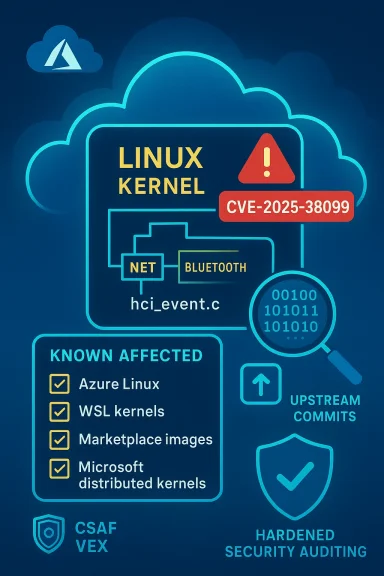 Background / Overview
CVE‑2025‑38099 is a Linux kernel Bluetooth defect that was tracked and fixed in upstream stable trees during mid‑2025. The bug lives in the kernel Bluetooth codepath (the hci event handling path) and manifests when a SCO (Synchronous Connection‑Oriented) audio connection is attempted while the controller’s READ_VOICE_SETTING support is broken or absent. If a SCO connection is established without the correct voice_setting, certain controllers can deadlock or lock up, producing a denial‑of‑service condition for Bluetooth on the host and, in some cases, causing kernel instability.Upstream kernel maintainers published fixes in the stable releases; the upstream CVE announcement and stable commits identify the affected source file as net/bluetooth/hci_event.c and list the fixes backported into maintained stable branches. The kernel‑level fixes were applied into the stable release lines that resulted in patched releases (for example, kernel stable branch fixes were carried into releases identified by the kernel team).
Why that matters: this is a kernel correctness/hardware interaction bug rather than an application‑level vulnerability in user‑space Bluetooth stacks. The vulnerable code is in core kernel handling of Bluetooth HCI events; therefore any product that ships a compiled Linux kernel that includes the Bluetooth subsystem (built‑in or modular) and was built from a commit range that did not include the upstream fix can be vulnerable.
What Microsoft actually said — and what it does not mean
Microsoft’s MSRC language — condensed to the phrase quoted in the user’s question — is a product‑level attestation: the company inventory‑checked the Azure Linux artifacts and found the implicated upstream code present, and therefore Azure Linux images are in scope and should be remediated. Microsoft also committed to publishing machine‑readable CSAF/VEX attestations (the rollout began in October 2025) and to updating the CVE mapping if additional Microsoft products are discovered to ship the same component.Important clarifications:
- The MSRC phrase is not a categorical statement that only Azure Linux includes the library; it is a statement that Azure Linux does include it and that Microsoft has validated that for this product family.
- Absence of the same statement for other Microsoft products does not prove those products are free of the vulnerable kernel code — it only means Microsoft has not yet published a VEX/CSAF attestation for them.
- For kernel‑level CVEs the artifact matters: the presence of upstream files in a source tree is insufficient to determine exposure. A particular kernel binary is defined by (a) the upstream commit range compiled, (b) the vendor’s backports and patches, and (c) the kernel configuration flags (CONFIG_*). All three must be checked for each artifact.
Is Azure Linux the only Microsoft product that could be affected?
Short answer: No — but with an important operational distinction.- Azure Linux is the only Microsoft product Microsoft has publicly attested (so far) as including the implicated Linux kernel component for CVE‑2025‑38099. That means Azure Linux customers should prioritize patching and follow Microsoft’s VEX/CSAF guidance for Azure Linux images and kernel packages.
- Technically, any Microsoft product that ships or distributes a Linux kernel binary compiled from an upstream tree that lacks the fix — and that has the Bluetooth subsystem enabled in the kernel config — is a potential carrier until verified. The most prominent examples to check are:
- Windows Subsystem for Linux (WSL2) kernel images that Microsoft ships to Windows clients.
- Microsoft‑published kernel images used in certain Azure VM offerings or Marketplace images where Microsoft builds or signs the kernel.
- Any appliances, developer VMs, or platform images Microsoft distributes that include a Linux kernel binary.
- Microsoft publishes kernel artifacts for WSL and sometimes publishes kernel source or config for WSL builds; if a WSL kernel binary was compiled from an upstream version affected by CVE‑2025‑38099 and it included the Bluetooth stack, that WSL kernel could be vulnerable.
- Many cloud images and appliance images are built from distribution kernels; if Microsoft’s image build pipeline uses a vulnerable kernel branch or a vendor kernel that has not been backported, the image may be vulnerable even if it is marketed under a Microsoft product umbrella.
Technical summary of the vulnerability (what you need to know)
- Affected component: Linux kernel Bluetooth HCI event handling (file: net/bluetooth/hci_event.c).
- Symptom: SCO connection handling can proceed without a valid voice_setting when READ_VOICE_SETTING is unsupported or broken; this can cause the controller to lock up or kernel Bluetooth subsystem to deadlock or crash.
- Fix approach: upstream kernel code was changed to disable SCO support in the specific case where READ_VOICE_SETTING is not supported or behaves incorrectly; the change prevents establishing a SCO connection without valid voice settings.
- Upstream fixes: kernel stable commits were applied to make the behavior safe; patched stable releases were published by the Linux kernel team.
- Kernel versions noted in upstream announcements as receiving fixes: fixed in kernel releases by the stable tree (for example, stable branches that produced releases with the fix — administrators must consult vendor advisories or the kernel changelog to see the patched package version used in a particular distro).
- Exploitability: this is not an obvious remote code‑execution path. The impact is primarily availability — a dead controller or kernel instability. In many environments the attacker needs local access or the ability to trigger SCO negotiation with a target controller. That said, on shared hosts or multi‑tenant images the availability impact can be material.
Which Microsoft artifacts you should audit right now
Prioritize the following artifact classes in order:- Azure Linux images and kernels (Known Affected per Microsoft). Patch these first using the Azure Linux update guidance or automated image updates.
- WSL2 kernels shipped by Microsoft to Windows clients and any custom WSL kernels you distribute internally. Check the kernel version and config inside the WSL instance.
- Microsoft Marketplace images and appliance images you run (check whether they’re Microsoft‑built or third‑party). If Microsoft published the image (and especially if it’s based on Azure Linux kernels), treat it as higher priority.
- Any containers or nodes that run Microsoft‑packaged linux kernels (for instance, certain platform services or developer tools that include a kernel binary).
- Devices or images used for automated builds or CI that may bootstrap Linux virtual machines using Microsoft kernels.
Practical verification steps (artifact‑level checks)
The only reliable way to determine exposure for a given machine/image is to inspect the actual kernel binary and configuration used by that artifact. The following checklist and commands will get you to a reliable answer quickly.Check 1 — get the kernel version
- On the target Linux host (VM, container host, WSL instance):
- uname -r
- Example output: 6.10.0-xxx or 6.14.8-xxx
Check 2 — check kernel config for Bluetooth
- Look for a kernel config file in /boot:
- cat /boot/config-$(uname -r) | grep -E 'CONFIG_BT|CONFIG_BT_SCO|CONFIG_BT_HCIBTUSB'
- Or, if /proc/config.gz is available:
- zcat /proc/config.gz | grep -E 'CONFIG_BT|CONFIG_BT_SCO|CONFIG_BT_HCIBTUSB'
- If CONFIG_BT is set to y or m, the kernel included the Bluetooth subsystem (built‑in or module).
Check 3 — determine whether vendor backports include the fix
- Kernel version checks alone are insufficient because vendors often backport fixes. You must:
- Check distribution or vendor security advisories and package changelogs for the CVE number or for mentions of the specific hci_event.c fix.
- For Microsoft‑distributed artifacts, check MSRC VEX/CSAF attestations and the product advisory for the CVE.
- If you control the image build pipeline, check the git commit that produced the kernel and search for the stable commit IDs that patch the CVE in the kernel stable tree.
- Inside WSL2 run uname -r and check the kernel config as above. WSL kernels are Microsoft‑supplied binaries; differences between an out‑of‑the‑box WSL kernel and a custom-built WSL kernel matter.
- If the default WSL kernel version is within an affected upstream range and the WSL kernel config includes CONFIG_BT, treat WSL as potentially affected until Microsoft updates the WSL kernel or you install a patched kernel.
- If the image was published by Microsoft, consult MSRC and the product‑level VEX attestation where available.
- If the image uses a common distribution kernel (Ubuntu, RHEL, SUSE), check that distribution’s CVE advisory for the kernel package and its update timeline.
Mitigations and remediation options
- Update to a patched kernel (recommended)
- Install vendor/kernel package updates that include the upstream fix or backport the specific commits into your vendor kernel.
- For Azure Linux customers: apply Microsoft’s published updates or follow Azure Linux image replacement guidance.
- For WSL users: update Windows/WSL via the standard update channels (Windows Update or the WSL update mechanism). If you use a custom WSL kernel, rebuild a kernel that includes the upstream fix or a vendor backport.
- If updating immediately is impossible, disable the Bluetooth stack
- Stop and disable the Bluetooth user‑space service:
- sudo systemctl stop bluetooth.service
- sudo systemctl disable bluetooth.service
- Unload Bluetooth kernel modules and blacklist them to prevent auto‑load:
- sudo modprobe -r btusb bluetooth
- Add lines like blacklist btusb and blacklist bluetooth to a /etc/modprobe.d/blacklist‑bluetooth.conf file and update initramfs if your distribution requires it.
- On many cloud‑oriented kernels, Bluetooth is disabled by default; check your kernel config to confirm.
- Restrict access until patched
- Prevent untrusted users from negotiating SCO sessions with the host: limit user privileges, firewall sockets to management Netlink interfaces (where practical), and restrict who can access the guest/VM in multi‑tenant platforms.
- Backport the fix (for advanced users/operators)
- If you manage your own kernel builds, cherry‑pick the upstream commits that fix the issue into your current kernel branch and rebuild.
- Caveat: cherry‑picking kernel commits is error‑prone; vendor backports or full kernel upgrades are the safer path unless you have a solid kernel maintenance process.
Risk analysis — what this means to different environments
- Cloud VM images (Azure): If a distribution kernel or Microsoft Azure Linux kernel includes the vulnerable code, the risk is operational: Bluetooth controller lockups can degrade service or require host reboots. Azure Linux customers should treat the MSRC attestation as an authoritative “act now” signal.
- Multi‑tenant hosts: If an attacker with local access can trigger the defective SCO negotiation (for example, via a maliciously behaving attached Bluetooth peripheral or virtualized USB device), the attacker could cause service disruption; risk is higher on shared developer or CI hosts that accept potentially untrusted devices.
- WSL: risk is tied to the WSL kernel build that a Windows host runs. WSL is widely used for development; if a WSL kernel includes the vulnerable code and Bluetooth is enabled, a user could trigger the issue locally. Impact is primarily to Bluetooth functionality inside WSL and potentially to the WSL VM; remote exploitation is not the common attack vector.
- Embedded and IoT: devices that use Linux kernels with Bluetooth support should be checked — vendor kernels may have different patch timelines and customers should consult vendor advisories.
How to automate detection and reduce manual work
- Ingest VEX/CSAF feeds into your vulnerability management tooling so you receive product attestations programmatically.
- Inventory kernels and kernel configs automatically:
- Pull uname -r and /boot/config-$(uname -r) across servers with configuration management tools (Ansible, Salt, Chef).
- For WSL fleets, script checks inside WSL instances or check the WSL kernel package versions from the Windows host side where possible.
- Correlate kernel versions with upstream kernel fix commits or vendor package changelogs; maintain a small mapping table for common kernel series vs. whether they include the fix or a vendor backport.
- For images in the cloud: maintain an SBOM or image manifest that includes the kernel package version for each image; ensure images are rebuilt and republished when kernels are patched.
Practical remediation playbook (prioritized actions)
- Azure Linux customers
- Immediately apply Microsoft’s Azure Linux updates and follow MSRC guidance. Azure Linux is the product Microsoft has attested as including the implicated component.
- Replace or patch images at scale using your image management pipeline.
- WSL users / Windows endpoints
- Check WSL kernel version and kernel config inside each WSL instance you manage.
- Apply any available WSL/kernel updates Microsoft publishes via Windows Update or WSL update channels.
- If you run custom WSL kernels, rebuild them with the upstream fix or deploy an updated custom kernel ASAP.
- Cloud images & Marketplace appliances
- Identify whether the images in use were built by Microsoft and whether they use Microsoft‑maintained kernel binaries.
- Verify the kernel package’s advisory status; patch or replace affected images.
- On‑prem Linux servers and developer machines
- Check kernel config for CONFIG_BT; if enabled, cross‑check kernel version and vendor advisory for backports.
- Patch or apply mitigations (disable Bluetooth) where patching is not yet possible.
- Documentation & automation
- Subscribe to MSRC VEX/CSAF feeds and vendor advisories.
- Update runbooks to include the quick checks above and to automate the module blacklisting remediation if necessary.
Final analysis and cautions
Microsoft did the right thing from a transparency and operational standpoint by producing a product‑scoped attestation for Azure Linux and committing to extend its machine‑readable VEX/CSAF mappings. That attestation is the correct, actionable signal for Azure Linux customers: treat Azure Linux as in‑scope and remediate promptly.However, it is not a universal declaration that other Microsoft artifacts are free of the vulnerability. The Linux kernel is an artifact that is compiled and configured per product; presence or absence of the vulnerable code is an artifact‑level property, not simply a corporate or project‑level fact. Any Microsoft product that ships a Linux kernel binary (notably WSL kernels, certain Azure image artifacts, and Marketplace appliances) must be checked on a per‑artifact basis using the concrete verification checklist above.
Operationally, the right approach is twofold:
- Treat Microsoft’s Azure Linux attestation as authoritative for Azure Linux — apply the vendor updates immediately.
- Treat other Microsoft artifacts as unverified until validated — run the verification steps, automate checks, and apply mitigations (disable Bluetooth modules) where patching cannot be performed quickly.
Quick checklist (for busy ops teams)
- If you run Azure Linux: patch now (this is Known Affected).
- For every host or image you control:
- uname -r
- cat /boot/config-$(uname -r) or zcat /proc/config.gz | grep CONFIG_BT
- If CONFIG_BT=y or CONFIG_BT=m, check vendor advisories or package changelog for CVE‑2025‑38099 backport.
- If you cannot patch immediately: stop and disable bluetooth.service, unload and blacklist btusb/bluetooth modules.
- For WSL fleets: check WSL kernel versions and configs inside distributions; update WSL kernels or apply mitigations.
- Subscribe to MSRC VEX/CSAF and vendor advisories for automation and future attestations.
CVE‑2025‑38099 is a kernel correctness bug with an availability impact whose practical remediation path is clear: verify which kernels in your estate enabled the Bluetooth stack, confirm whether those kernels received vendor backports or the upstream fix, and then patch or mitigate. Microsoft’s public attestation identifies Azure Linux as in‑scope; use that signal to prioritize but rely on artifact‑level verification to obtain full coverage across WSL, Marketplace images, and any Microsoft‑distributed kernels you run.
Source: MSRC Security Update Guide - Microsoft Security Response Center
