

Microsoft introduced Azure Logic Apps Automation in public preview at Build 2026 as a new Azure workflow service for building agentic, runtime-adaptive automations that combine Logic Apps’ connector ecosystem with AI-assisted planning, human approval, and enterprise controls. The announcement is more than another “AI in the workflow designer” checkbox. It is Microsoft’s clearest attempt yet to turn automation from a fixed flowchart into a governed execution layer for agents. For WindowsForum readers, the practical question is not whether this sounds futuristic; it is whether IT teams can trust probabilistic systems to touch production workflows without losing auditability, cost control, and operational sanity.
For years, Azure Logic Apps has been Microsoft’s dependable plumbing for integration work: a trigger fires, conditions are evaluated, connectors call systems, and a known chain of actions runs. That model fits the world of purchase approvals, ticket routing, file movement, and scheduled maintenance jobs. It is also brittle when the process does not behave like a diagram.
Logic Apps Automation is Microsoft’s answer to that brittleness. Instead of forcing builders to define every branch in advance, the new preview asks them to describe a goal, give the workflow tools, and let the runtime decide the next step as conditions change. Microsoft calls this a probabilistic approach, which is a polite way of saying the workflow is no longer merely executing a path; it is evaluating context and choosing one.
That is a significant philosophical break from classic business process automation. Traditional Logic Apps is deterministic: the administrator or developer owns the map. Logic Apps Automation shifts part of that mapping into the runtime itself, which can reason over instructions, data, available tools, and approval rules. Microsoft is not hiding the distinction. Its own positioning separates stable, repeatable workflows from variable, decision-heavy processes where the best route may differ on every run.
The pitch lands because the pain is real. IT departments already have workflows that resemble legal discovery more than assembly lines: triaging support incidents, reconciling invoice exceptions, responding to security alerts, onboarding contractors across multiple systems, and routing customer cases when the customer did not submit the right information in the first place. Those processes are full of “it depends,” and “it depends” is where rigid automation usually becomes an unmaintainable mess.
That distinction matters. Enterprises do not lack chatbots. They lack safe execution environments for software that can make decisions, call tools, and cross organizational boundaries. A chatbot that drafts a reply is one thing. An agent that updates a CRM record, opens a firewall-change request, pings a Teams channel, queries an ERP system, and waits for a manager’s approval is quite another.
Logic Apps Automation inherits the appeal of the existing Logic Apps platform: connectors, Azure management, monitoring, private networking options, and workflow operations that administrators can inspect. Microsoft says the new service uses the same runtime, connectors, and management tools as Azure Logic Apps, which is a crucial detail. The company is not asking customers to throw away their integration estate and start again in a toy agent builder.
That is also where Microsoft is trying to draw a boundary between this product and Copilot Studio. Copilot Studio is the natural home for conversational agents surfaced through Microsoft 365 and business channels. Logic Apps Automation is being positioned as the workflow-first sibling: less about a bot persona, more about orchestrating work across APIs, services, approvals, and data sources. If Copilot Studio is where an enterprise agent talks, Logic Apps Automation is where it does chores.
A deterministic workflow can fail, but it tends to fail in legible ways. A variable workflow that selects tools at runtime introduces a new class of operational questions. Why did it pick that action? What context did it consider? Was a human approval required but misconfigured? Did the model choose a suboptimal path because the prompt was vague, the data was stale, or the available tools were too broad?
Microsoft’s documentation leans heavily on monitoring, tracing, and human approval, which is exactly where the company needs to lean. But IT pros should treat this preview as a design pattern to evaluate, not a magic upgrade to existing automation. The right early projects are not payroll-critical or legally sensitive workflows. They are controlled, observable, exception-heavy processes where the upside of adaptability is obvious and the blast radius can be contained.
That means the preview should live in the same risk category as any new automation runtime that can call real systems. Start with non-destructive operations. Require approvals for writes. Put tight boundaries around connectors. Log aggressively. Do not give an agent a general-purpose enterprise credential and hope the workflow designer’s friendly interface has solved identity governance.
This is where Microsoft’s enterprise gravity becomes hard for competitors to match. The company already sits near identity, mail, Teams, SharePoint, Dynamics, Azure services, SQL, security tooling, and a long tail of SaaS platforms. For a workflow product, that distribution is not cosmetic. It is the difference between a clever prototype and something that can survive the first meeting with the compliance team.
The new service also supports concepts that have become central to Microsoft’s agent platform story, including Model Context Protocol and Agent-to-Agent patterns. The technical implication is that Microsoft wants Logic Apps Automation to be less of a closed workflow canvas and more of an orchestration surface for typed tools, external context, and multiple agents. That is ambitious, and it will be judged by how well the resulting workflows can be tested, versioned, and audited.
For developers, the more interesting promise is that Logic Apps Automation does not appear to abandon code. Microsoft describes support for inline JavaScript and Python, code-first development, custom code, and local development in Visual Studio Code. That blend is important because no serious automation platform survives as low-code only. Eventually, someone needs to parse the weird payload, normalize the vendor’s broken timestamp, or enforce a rule that does not belong in a chat prompt.
An adaptive workflow can make that experience feel natural. It can evaluate the incoming request, determine which tools are relevant, and choose a path without every possible branch being drawn beforehand. That is the dream Microsoft is selling: less time encoding permutations, more time defining goals, guardrails, and approvals.
The tradeoff is that adaptability is harder to reason about than a fixed path. IT operations depends on predictability. Security teams depend on least privilege. Auditors depend on evidence. Developers depend on reproducible behavior. A workflow that “figures it out” is valuable only if the organization can later understand what “it” was and why the system considered that answer acceptable.
This is why human-in-the-loop controls should not be seen as an optional enterprise feature. They are the bridge between agentic automation and responsible operations. A system that autonomously drafts, enriches, categorizes, and recommends can be useful quickly. A system that autonomously changes records, disables accounts, or moves money needs far more discipline.
That sounds messy because it is messy. Microsoft’s platform strength is breadth; its platform weakness is explaining where one product ends and the next begins. The company’s own comparison is helpful: use Logic Apps Automation when the process is variable and decision-heavy, use standard Logic Apps when the process is stable and predictable, and use Copilot Studio when the primary need is a conversational agent distributed through Microsoft 365-style channels.
For Windows admins and enterprise architects, the dividing line should be operational ownership. If a business user wants to automate a personal or departmental task, Power Automate remains the obvious door. If a developer needs deterministic integration across Azure services, APIs, and enterprise systems, Logic Apps Standard remains a mature choice. If the business process itself is ambiguous and the automation must make runtime decisions while still living under Azure governance, Logic Apps Automation becomes interesting.
That does not mean every Power Automate flow should be rebuilt. In fact, most should not. The more mundane the process, the less reason there is to introduce an agentic runtime. A scheduled export does not need to reason. A file copy does not need an LLM. A password-expiry notification does not need multi-agent coordination. The right use of this technology is not to sprinkle AI everywhere; it is to reserve it for the messy edge cases that broke the old model.
The first security challenge is identity. Agentic workflows need permissions to act, but those permissions must be scoped to the task, not to the imagination of the person writing the prompt. Managed identities, service principals, connector permissions, role-based access control, and approval gates will matter more than the AI assistant’s prose. A workflow that can call 20 systems should not be granted write access to all 20 by default.
The second challenge is prompt and context governance. If business intent becomes part of the executable specification, then prompt text becomes operational configuration. It needs review, versioning, change control, and rollback. Organizations that treat prompts as disposable chat messages will have a bad time when those prompts are connected to systems of record.
The third challenge is data exposure. Agentic workflows may inspect tickets, emails, documents, customer records, telemetry, and internal knowledge. That makes data classification and connector boundaries essential. The mere fact that a workflow can read from one source and write to another does not mean the organization wants those domains blended by an automated planner.
The fourth challenge is incident response. When a deterministic workflow misbehaves, responders inspect the run history and the branch logic. When an adaptive workflow misbehaves, responders also need reasoning traces, tool-call history, model context, and evidence of approval decisions. Microsoft appears to understand this, but buyers should demand proof in their own tenant, with their own logging and SIEM integration, before trusting the model.
Anyone who has used AI coding tools knows the rhythm. The model gets you to something plausible quickly. Then the real work begins: authentication, edge cases, error handling, retries, idempotency, observability, schema drift, timeout behavior, rate limits, deployment pipelines, and security review. Logic Apps Automation will not repeal those concerns. It will move them into a more conversational and visual development experience.
That is not a criticism. A faster canvas is valuable. If the tool can generate 60 percent of a workflow skeleton and spare developers the repetitive connector work, that is meaningful productivity. But the final 40 percent is where enterprise reliability lives. The dangerous story is “business users describe outcomes and the system handles the rest.” The credible story is “developers and automation specialists use AI to accelerate orchestration while keeping governance and operational review intact.”
The support for local development in Visual Studio Code is therefore more important than it may sound. Serious teams will want source control, environment promotion, reviewable changes, repeatable deployment, and automated testing. If Logic Apps Automation stays trapped as a portal-only experience, it will remain a demo platform. If it fits into development workflows, it has a path to production relevance.
That has practical consequences for hybrid environments. Many organizations still need to touch on-premises line-of-business apps, file shares, SQL Server systems, Active Directory, print infrastructure, and legacy APIs. Logic Apps Automation may be cloud-first, but its usefulness will depend on how cleanly it can operate across private networks, hybrid connectors, and enterprise identity boundaries.
The other Windows-adjacent question is operational culture. Sysadmins are used to scripts that do exactly what they say, even when what they say is wrong. Agentic automation asks administrators to govern systems that may decide among multiple possible actions. That requires a different review mindset. You are no longer just reviewing commands; you are reviewing available tools, instructions, constraints, and escalation points.
This will not replace PowerShell, Group Policy, Intune, Configuration Manager, or the many practical tools that keep Windows estates alive. But it may increasingly sit beside them, especially for workflows that span helpdesk, security, HR, finance, and cloud operations. The future Windows admin may spend less time wiring single-purpose scripts and more time defining safe toolsets for agents that operate across the Microsoft stack.
The difference is governance. Microsoft is offering adaptive execution, but customers still own process design. Microsoft is offering AI assistance, but customers still own validation. Microsoft is offering connector reach, but customers still own permissions. Microsoft is offering human approval, but customers still need to decide where approval is mandatory rather than decorative.
The preview also arrives at a moment when the industry is still learning how to operate AI agents safely. The demos are ahead of the discipline. Every vendor wants to show software that plans, acts, and collaborates. Fewer vendors can show clean answers to versioning, audit trails, deterministic replay, cost predictability, and liability when an autonomous choice causes damage.
That does not make Logic Apps Automation vapor. It makes it early. Microsoft’s advantage is that it can wrap agentic behavior in familiar Azure management patterns rather than asking enterprises to trust a standalone agent platform. Its challenge is that familiar management patterns may not be enough for systems whose behavior changes at runtime.
The most concrete value will likely show up in exception handling. Traditional automation excels at the happy path. Businesses spend far more human time on the unhappy paths: missing fields, conflicting records, ambiguous requests, incomplete approvals, duplicate tickets, and situations where the next step depends on context scattered across systems. Logic Apps Automation is aimed directly at those gaps.
IT teams should also use the preview to learn where the product’s boundaries are. How well does it explain decisions? How granular are approvals? How easy is it to constrain tool use? Can workflow definitions be reviewed like code? What happens when a connector fails midway through a plan? How are costs represented when reasoning, connector calls, and workflow execution combine?
Those questions are not objections. They are the checklist that separates useful enterprise automation from a keynote trick.
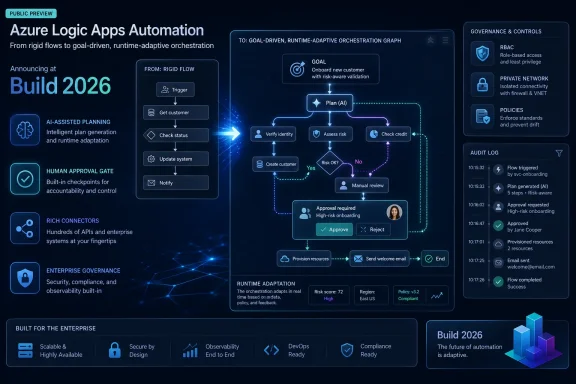 Microsoft Moves Automation From Flowcharts to Intent
For years, Azure Logic Apps has been Microsoft’s dependable plumbing for integration work: a trigger fires, conditions are evaluated, connectors call systems, and a known chain of actions runs. That model fits the world of purchase approvals, ticket routing, file movement, and scheduled maintenance jobs. It is also brittle when the process does not behave like a diagram.Logic Apps Automation is Microsoft’s answer to that brittleness. Instead of forcing builders to define every branch in advance, the new preview asks them to describe a goal, give the workflow tools, and let the runtime decide the next step as conditions change. Microsoft calls this a probabilistic approach, which is a polite way of saying the workflow is no longer merely executing a path; it is evaluating context and choosing one.
That is a significant philosophical break from classic business process automation. Traditional Logic Apps is deterministic: the administrator or developer owns the map. Logic Apps Automation shifts part of that mapping into the runtime itself, which can reason over instructions, data, available tools, and approval rules. Microsoft is not hiding the distinction. Its own positioning separates stable, repeatable workflows from variable, decision-heavy processes where the best route may differ on every run.
The pitch lands because the pain is real. IT departments already have workflows that resemble legal discovery more than assembly lines: triaging support incidents, reconciling invoice exceptions, responding to security alerts, onboarding contractors across multiple systems, and routing customer cases when the customer did not submit the right information in the first place. Those processes are full of “it depends,” and “it depends” is where rigid automation usually becomes an unmaintainable mess.
Build 2026 Was About Agents, but Logic Apps Automation Is About Control
Build 2026 has been wrapped in Microsoft’s now-familiar language of agents, copilots, and AI-native development. That framing can make every announcement sound like a demo looking for a governance model. Logic Apps Automation is interesting because it approaches the same agentic trend from the opposite direction: not “what can an agent do?” but “how do we let an agent do work inside systems administrators already govern?”That distinction matters. Enterprises do not lack chatbots. They lack safe execution environments for software that can make decisions, call tools, and cross organizational boundaries. A chatbot that drafts a reply is one thing. An agent that updates a CRM record, opens a firewall-change request, pings a Teams channel, queries an ERP system, and waits for a manager’s approval is quite another.
Logic Apps Automation inherits the appeal of the existing Logic Apps platform: connectors, Azure management, monitoring, private networking options, and workflow operations that administrators can inspect. Microsoft says the new service uses the same runtime, connectors, and management tools as Azure Logic Apps, which is a crucial detail. The company is not asking customers to throw away their integration estate and start again in a toy agent builder.
That is also where Microsoft is trying to draw a boundary between this product and Copilot Studio. Copilot Studio is the natural home for conversational agents surfaced through Microsoft 365 and business channels. Logic Apps Automation is being positioned as the workflow-first sibling: less about a bot persona, more about orchestrating work across APIs, services, approvals, and data sources. If Copilot Studio is where an enterprise agent talks, Logic Apps Automation is where it does chores.
The Preview Label Is Doing a Lot of Work
The most important word in Microsoft’s launch is not “agentic.” It is “preview.” Azure previews are useful, but they are not the same as a mature production commitment, and the practical risks here are larger than a new UI blade or connector update.A deterministic workflow can fail, but it tends to fail in legible ways. A variable workflow that selects tools at runtime introduces a new class of operational questions. Why did it pick that action? What context did it consider? Was a human approval required but misconfigured? Did the model choose a suboptimal path because the prompt was vague, the data was stale, or the available tools were too broad?
Microsoft’s documentation leans heavily on monitoring, tracing, and human approval, which is exactly where the company needs to lean. But IT pros should treat this preview as a design pattern to evaluate, not a magic upgrade to existing automation. The right early projects are not payroll-critical or legally sensitive workflows. They are controlled, observable, exception-heavy processes where the upside of adaptability is obvious and the blast radius can be contained.
That means the preview should live in the same risk category as any new automation runtime that can call real systems. Start with non-destructive operations. Require approvals for writes. Put tight boundaries around connectors. Log aggressively. Do not give an agent a general-purpose enterprise credential and hope the workflow designer’s friendly interface has solved identity governance.
The Connector Library Is Microsoft’s Real Moat
The headline feature is AI-assisted workflow generation, but the strategic advantage is the connector library. Microsoft says Logic Apps Automation can use more than 1,400 connectors, and that matters more than the demo prompt. Agents are only useful when they can reach the systems where work actually happens.This is where Microsoft’s enterprise gravity becomes hard for competitors to match. The company already sits near identity, mail, Teams, SharePoint, Dynamics, Azure services, SQL, security tooling, and a long tail of SaaS platforms. For a workflow product, that distribution is not cosmetic. It is the difference between a clever prototype and something that can survive the first meeting with the compliance team.
The new service also supports concepts that have become central to Microsoft’s agent platform story, including Model Context Protocol and Agent-to-Agent patterns. The technical implication is that Microsoft wants Logic Apps Automation to be less of a closed workflow canvas and more of an orchestration surface for typed tools, external context, and multiple agents. That is ambitious, and it will be judged by how well the resulting workflows can be tested, versioned, and audited.
For developers, the more interesting promise is that Logic Apps Automation does not appear to abandon code. Microsoft describes support for inline JavaScript and Python, code-first development, custom code, and local development in Visual Studio Code. That blend is important because no serious automation platform survives as low-code only. Eventually, someone needs to parse the weird payload, normalize the vendor’s broken timestamp, or enforce a rule that does not belong in a chat prompt.
Runtime Adaptation Solves One Problem and Creates Another
The argument for Logic Apps Automation is strongest when the workflow path genuinely changes from run to run. Consider case triage. A routine helpdesk ticket may need categorization, enrichment from asset inventory, a knowledge-base suggestion, and closure. A suspicious security ticket may need correlation with Defender alerts, escalation to Sentinel, a Teams notification, and a human approval before containment. A VIP ticket may need a different SLA path. A rigid workflow can model all of this, but the diagram becomes an administrative tax.An adaptive workflow can make that experience feel natural. It can evaluate the incoming request, determine which tools are relevant, and choose a path without every possible branch being drawn beforehand. That is the dream Microsoft is selling: less time encoding permutations, more time defining goals, guardrails, and approvals.
The tradeoff is that adaptability is harder to reason about than a fixed path. IT operations depends on predictability. Security teams depend on least privilege. Auditors depend on evidence. Developers depend on reproducible behavior. A workflow that “figures it out” is valuable only if the organization can later understand what “it” was and why the system considered that answer acceptable.
This is why human-in-the-loop controls should not be seen as an optional enterprise feature. They are the bridge between agentic automation and responsible operations. A system that autonomously drafts, enriches, categorizes, and recommends can be useful quickly. A system that autonomously changes records, disables accounts, or moves money needs far more discipline.
Power Automate Now Has a More Serious Azure Cousin
Microsoft already has a sprawling automation portfolio, and that creates inevitable confusion. Power Automate handles business-user flows and desktop automation. Azure Logic Apps handles developer and IT integration. Copilot Studio handles conversational agents. Azure Functions handles code-first serverless execution. Now Logic Apps Automation enters as the agentic workflow layer.That sounds messy because it is messy. Microsoft’s platform strength is breadth; its platform weakness is explaining where one product ends and the next begins. The company’s own comparison is helpful: use Logic Apps Automation when the process is variable and decision-heavy, use standard Logic Apps when the process is stable and predictable, and use Copilot Studio when the primary need is a conversational agent distributed through Microsoft 365-style channels.
For Windows admins and enterprise architects, the dividing line should be operational ownership. If a business user wants to automate a personal or departmental task, Power Automate remains the obvious door. If a developer needs deterministic integration across Azure services, APIs, and enterprise systems, Logic Apps Standard remains a mature choice. If the business process itself is ambiguous and the automation must make runtime decisions while still living under Azure governance, Logic Apps Automation becomes interesting.
That does not mean every Power Automate flow should be rebuilt. In fact, most should not. The more mundane the process, the less reason there is to introduce an agentic runtime. A scheduled export does not need to reason. A file copy does not need an LLM. A password-expiry notification does not need multi-agent coordination. The right use of this technology is not to sprinkle AI everywhere; it is to reserve it for the messy edge cases that broke the old model.
The Security Story Will Decide Enterprise Adoption
Microsoft’s language around isolation, private endpoints, virtual networks, permissions, and policies is not decorative. It is the adoption story. The companies most interested in dynamic automation are also the companies least willing to let an opaque agent roam across production systems.The first security challenge is identity. Agentic workflows need permissions to act, but those permissions must be scoped to the task, not to the imagination of the person writing the prompt. Managed identities, service principals, connector permissions, role-based access control, and approval gates will matter more than the AI assistant’s prose. A workflow that can call 20 systems should not be granted write access to all 20 by default.
The second challenge is prompt and context governance. If business intent becomes part of the executable specification, then prompt text becomes operational configuration. It needs review, versioning, change control, and rollback. Organizations that treat prompts as disposable chat messages will have a bad time when those prompts are connected to systems of record.
The third challenge is data exposure. Agentic workflows may inspect tickets, emails, documents, customer records, telemetry, and internal knowledge. That makes data classification and connector boundaries essential. The mere fact that a workflow can read from one source and write to another does not mean the organization wants those domains blended by an automated planner.
The fourth challenge is incident response. When a deterministic workflow misbehaves, responders inspect the run history and the branch logic. When an adaptive workflow misbehaves, responders also need reasoning traces, tool-call history, model context, and evidence of approval decisions. Microsoft appears to understand this, but buyers should demand proof in their own tenant, with their own logging and SIEM integration, before trusting the model.
Developers Get a Faster Canvas, Not a Free Pass
The AI assistant in Logic Apps Automation can generate a workflow from plain-language instructions, then let builders refine it in the designer. That will appeal to teams drowning in integration backlog. It may also produce a familiar pattern: fast first draft, slow hardening phase.Anyone who has used AI coding tools knows the rhythm. The model gets you to something plausible quickly. Then the real work begins: authentication, edge cases, error handling, retries, idempotency, observability, schema drift, timeout behavior, rate limits, deployment pipelines, and security review. Logic Apps Automation will not repeal those concerns. It will move them into a more conversational and visual development experience.
That is not a criticism. A faster canvas is valuable. If the tool can generate 60 percent of a workflow skeleton and spare developers the repetitive connector work, that is meaningful productivity. But the final 40 percent is where enterprise reliability lives. The dangerous story is “business users describe outcomes and the system handles the rest.” The credible story is “developers and automation specialists use AI to accelerate orchestration while keeping governance and operational review intact.”
The support for local development in Visual Studio Code is therefore more important than it may sound. Serious teams will want source control, environment promotion, reviewable changes, repeatable deployment, and automated testing. If Logic Apps Automation stays trapped as a portal-only experience, it will remain a demo platform. If it fits into development workflows, it has a path to production relevance.
Windows Shops Should Watch the Azure Boundary
For WindowsForum’s audience, the announcement is also a reminder that Microsoft’s automation center of gravity continues to move upward into Azure. Windows still matters as an endpoint, a management surface, and a place where Power Automate Desktop can run local tasks. But the strategic automation layer is increasingly cloud-hosted, identity-driven, connector-rich, and AI-assisted.That has practical consequences for hybrid environments. Many organizations still need to touch on-premises line-of-business apps, file shares, SQL Server systems, Active Directory, print infrastructure, and legacy APIs. Logic Apps Automation may be cloud-first, but its usefulness will depend on how cleanly it can operate across private networks, hybrid connectors, and enterprise identity boundaries.
The other Windows-adjacent question is operational culture. Sysadmins are used to scripts that do exactly what they say, even when what they say is wrong. Agentic automation asks administrators to govern systems that may decide among multiple possible actions. That requires a different review mindset. You are no longer just reviewing commands; you are reviewing available tools, instructions, constraints, and escalation points.
This will not replace PowerShell, Group Policy, Intune, Configuration Manager, or the many practical tools that keep Windows estates alive. But it may increasingly sit beside them, especially for workflows that span helpdesk, security, HR, finance, and cloud operations. The future Windows admin may spend less time wiring single-purpose scripts and more time defining safe toolsets for agents that operate across the Microsoft stack.
Microsoft’s Automation Bet Comes With a Fine Print Clause
There is a sensible way to read Logic Apps Automation, and there is a reckless one. The reckless reading is that Microsoft has created self-driving business processes. The sensible reading is that Microsoft is building an Azure-native orchestration layer for workflows where fixed branching has become too expensive to maintain.The difference is governance. Microsoft is offering adaptive execution, but customers still own process design. Microsoft is offering AI assistance, but customers still own validation. Microsoft is offering connector reach, but customers still own permissions. Microsoft is offering human approval, but customers still need to decide where approval is mandatory rather than decorative.
The preview also arrives at a moment when the industry is still learning how to operate AI agents safely. The demos are ahead of the discipline. Every vendor wants to show software that plans, acts, and collaborates. Fewer vendors can show clean answers to versioning, audit trails, deterministic replay, cost predictability, and liability when an autonomous choice causes damage.
That does not make Logic Apps Automation vapor. It makes it early. Microsoft’s advantage is that it can wrap agentic behavior in familiar Azure management patterns rather than asking enterprises to trust a standalone agent platform. Its challenge is that familiar management patterns may not be enough for systems whose behavior changes at runtime.
The Useful Version Is Narrower Than the Marketing Version
The best early deployments will be deliberately narrow. A workflow that reads from several systems, summarizes a case, recommends next steps, and asks a human to approve the chosen path is a strong candidate. A workflow that performs irreversible actions across financial, identity, or production systems with minimal supervision is not.The most concrete value will likely show up in exception handling. Traditional automation excels at the happy path. Businesses spend far more human time on the unhappy paths: missing fields, conflicting records, ambiguous requests, incomplete approvals, duplicate tickets, and situations where the next step depends on context scattered across systems. Logic Apps Automation is aimed directly at those gaps.
IT teams should also use the preview to learn where the product’s boundaries are. How well does it explain decisions? How granular are approvals? How easy is it to constrain tool use? Can workflow definitions be reviewed like code? What happens when a connector fails midway through a plan? How are costs represented when reasoning, connector calls, and workflow execution combine?
Those questions are not objections. They are the checklist that separates useful enterprise automation from a keynote trick.
The Admin’s Shortlist Before Letting Agents Touch the Plumbing
Logic Apps Automation deserves attention because it points toward where Microsoft wants enterprise work to go: less hand-drawn branching, more goal-driven orchestration, and a stronger link between AI agents and governed Azure execution. The preview is worth testing, but it should be tested like infrastructure, not like a chatbot.- Organizations should use Logic Apps Automation first for variable, exception-heavy workflows where deterministic branching is already painful to maintain.
- Stable and predictable processes should usually remain in Azure Logic Apps Standard, Consumption, Power Automate, scripts, or existing job runners.
- Human approval should be treated as a core control for write actions, destructive operations, and cross-system updates.
- Connector permissions should be scoped narrowly, because an agentic workflow is only as safe as the tools and identities it can use.
- Prompts, workflow definitions, and tool configurations should be versioned, reviewed, and promoted through environments like any other operational asset.
- Preview status should limit early adoption to controlled pilots with strong logging, rollback plans, and clear ownership.
References
- Primary source: techgig.com
Published: 2026-06-08T11:30:08.733584
Microsoft unveils Azure Logic Apps Automation at Build 2026, TechGig
Microsoft has launched Azure Logic Apps Automation, a managed SaaS offering designed to streamline workflow automation for business teams. This new service aims to reduce the need for dedicated integration developers while maintaining enterprise-level security and governance.techgig.com
- Independent coverage: infoq.com
Published: Mon, 08 Jun 2026 08:01:25 GMT
Microsoft Launches Logic Apps Automation at Build 2026 - InfoQ
Microsoft announced Logic Apps Automation at Build 2026, a new SKU at auto.azure.com packaging workflows, AI agents, knowledge services, and model access into a managed SaaS experience. Agents integrawww.infoq.com
- Related coverage: tomshardware.com
Microsoft unveils Project Solara AI, a chip-to-cloud platform built to power a new generation of 'agent-first' enterprise devices — hardware designed to run AI agents instead of traditional apps | Tom's Hardware
Microsoft ditches Windows to build OS on Androidwww.tomshardware.com - Related coverage: windowscentral.com
Build 2026 only makes sense if you remember Build 2025: a look back at the groundwork of the "age of AI agents" | Windows Central
Microsoft’s latest announcements build directly on the architecture it introduced a year ago.www.windowscentral.com - Related coverage: techradar.com
From Quantum to Containers - 4 big things you might have missed at Microsoft Build 2026 | TechRadar
We round up some of the other major news from Microsoft Build 2026www.techradar.com - Related coverage: tomsguide.com
Biggest Microsoft Build 2026 announcements — agentic AI, RTX Spark Dev Box, GitHub Copilot app, new MAI models, and more | Tom's Guide
All the big news from Microsoft's AI-focused eventwww.tomsguide.com
- Official source: learn.microsoft.com
Workflow Integration and Automation - Azure Logic Apps | Microsoft Learn
Learn about workflow automation that integrates services, on-premises systems, apps, data, and AI with no-code-low-code tools. Run workflows in multitenant or single-tenant Azure Logic Apps, App Service Environment (ASE), or a partially connected environment.learn.microsoft.com - Official source: news.microsoft.com
Microsoft Build 2026
 news.microsoft.com
- Official source: azure.microsoft.com
Azure Logic Apps | Microsoft Azure
Get started with Azure Logic Apps to streamline enterprise integration, build AI workflows, and enable secure multi-agent automation across Azure workflows.azure.microsoft.com
- Official source: azure-int.microsoft.com
- Official source: blogs.microsoft.com
Microsoft Build 2026: Be yourself at work - The Official Microsoft Blog
Platforms shift when developers build. We explore, choose tools, dream, create. This platform shift comes with more information than ever, ready at your fingertips. This shift, it’s about building fast AND THEN: it’s about building, operating, optimizing and observing. Securing your...blogs.microsoft.com - Official source: microsoft.com
Licensing brief PLT Robotic Process Automation in Power Automate UI flows
PDF documentwww.microsoft.com
- Related coverage: help.experlogix.com
- Official source: info.microsoft.com
Azure_Hero_Illustration_Wave
ProEXR File Description =Attributes= channels (chlist) compression (compression): Zip16 dataWindow (box2i): [0, 0, 3499, 1968] displayWindow (box2i): [0, 0, 3499, 1968] lineOrder (lineOrder): Increasing Y pixelAspectRatio (float): 1 screenWindowCenter (v2f): [0, 0] screenWindowWidth (float): 1...info.microsoft.com
- Related coverage: isg.sitefinity.cloud
MSFT Blueprint 2026
Business people join puzzle pieces in office. Concept of teamwork and partnership. double exposure with light effectsisg.sitefinity.cloud
- Official source: techcommunity.microsoft.com
Business Applications Partner Alert Microsoft Build May 21 23, 2024
PDF documenttechcommunity.microsoft.com
