

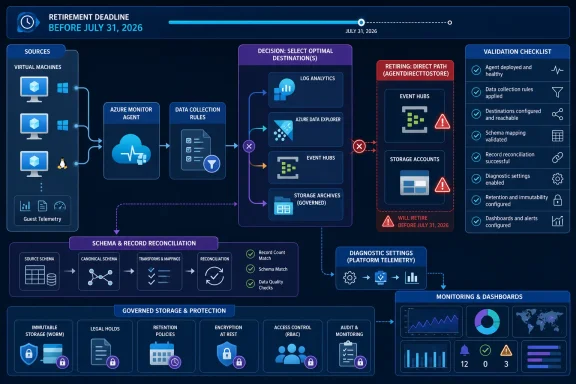
Microsoft will retire Azure Monitor’s preview “Send virtual machine client data to Event Hubs and Storage” capability on July 31, 2026, so operations teams should find every data collection rule whose kind is
WindowsForum user reports about Azure’s default outbound access change, retiring Reserved VM Instance options, and Microsoft 365 feature retirements illustrate the same operational pattern: retirement notices often collide with networking, cost, security, and application work already in flight. This migration therefore needs an owned inventory and executable change plan, not another entry in a general lifecycle spreadsheet.
The retiring capability used Azure Monitor Agent, or AMA, to collect client data from virtual machines and send it directly to Azure Event Hubs or Azure Storage. The identifying characteristic is the DCR kind
An inventory of AMA installations is insufficient. A VM may continue running AMA even though the destination path used by downstream security, analytics, or compliance systems is being retired. Agent health does not prove that those consumers will continue receiving records.
Start with Azure Advisor:
In the portal:
Repeat that command in every relevant subscription, or set the subscription explicitly before each run:
For a tenant-scale search, open Azure portal > Resource Graph Explorer and run:
For each result, map the complete operational chain:
Instead, make the ADX path a formal architecture decision. Before implementation, use current Microsoft documentation to verify:
Test the chosen path at the data-source level. Compare representative time windows, event channels, counters, custom sources, record counts, timestamps, and schemas. A successful ADX connection is not proof that every record selected by the old DCR is arriving.
Before creating anything:
Export monitoring also needs an owner. Monitor Azure Monitor’s available export and destination indicators, alert on delivery failures, and reconcile expected records against records received by the Event Hub consumer or Storage process. Workspace ingestion alone proves only that the first stage succeeded.
This end-to-end emphasis matches the lesson WindowsForum users drew from the reported Azure Front Door outage: service health at one layer does not establish that the final application or consumer is functioning. The migration test must follow records all the way to the system that uses them.
Use this sequence:
To create one:
A mixed environment may need both mechanisms: AMA and a DCR for guest operating-system telemetry, plus diagnostic settings for Azure platform logs and metrics. They may converge downstream, but they do not collect equivalent records.
For each pipeline:
AgentDirectToStore, classify its purpose, and build a validated replacement before removing it. Do not assume that another direct Azure Monitor Agent route to Azure Data Explorer is available or equivalent; the appropriate ADX ingestion design must be confirmed against current Microsoft documentation and the organization’s configuration requirements.| Existing requirement | Replacement mechanism | Decisive limitations or gate |
|---|---|---|
| Guest VM data used in Azure Data Explorer | Select and validate a Microsoft-documented ADX ingestion architecture | Do not treat direct AMA-to-ADX delivery as an established replacement without verifying current support, regions, schemas, prerequisites, and production status |
| Guest VM data sent to a third-party SIEM, Event Hub, or Storage | Ingest with AMA into Log Analytics, then use a Log Analytics data export rule | The data must first reach the workspace; every required table must support export; destinations must meet regional requirements; only 10 active export rules are allowed per workspace |
| Immutable guest-data archive | Log Analytics ingestion and data export to a properly governed Storage account | Table eligibility, export completeness, storage immutability, retention, access, and reconciliation must all be validated |
| Azure platform logs and metrics | Azure resource diagnostic settings | Diagnostic settings collect platform telemetry, not Windows Event Logs or other guest data selected by an AMA DCR |
 Find Every Affected Rule
The retiring capability used Azure Monitor Agent, or AMA, to collect client data from virtual machines and send it directly to Azure Event Hubs or Azure Storage. The identifying characteristic is the DCR kind AgentDirectToStore.An inventory of AMA installations is insufficient. A VM may continue running AMA even though the destination path used by downstream security, analytics, or compliance systems is being retired. Agent health does not prove that those consumers will continue receiving records.
Start with Azure Advisor:
- Sign in to the Azure portal.
- Open Advisor.
- Open Recommendations and review the available service-retirement or service-upgrade recommendations.
- Search or filter for the retirement of Send virtual machine client data to Event Hubs and Storage (Preview).
- Export or record every affected subscription and DCR resource.
- If the retirement appears through the Advisor retirement workbook in your tenant, open Advisor > Workbooks > Service Retirement and review the affected-resource list there as well.
In the portal:
- Open Azure portal > Monitor > Data Collection Rules.
- Open each suspected rule.
- Select JSON View from the resource page.
- Confirm that the top-level
kindvalue isAgentDirectToStore. - Record the rule’s resource group, subscription, associations, data sources, streams, and destinations.
Code:
az resource list \
  --resource-type Microsoft.Insights/dataCollectionRules \
  --query "[?kind=='AgentDirectToStore'].{name:name,resourceGroup:resourceGroup,id:id,location:location}" \
--output tableaz account set --subscription "<subscription-id-or-name>"For a tenant-scale search, open Azure portal > Resource Graph Explorer and run:
Code:
resources
| where type =~ "microsoft.insights/datacollectionrules"
| where kind =~ "AgentDirectToStore"
| project subscriptionId, resourceGroup, name, location, id
| order by subscriptionId asc, resourceGroup asc, name asc- DCR and DCR associations.
- Associated Windows or Linux VMs.
- Selected event channels, performance counters, IIS logs, or other sources.
- Event Hub namespace, Event Hub, or Storage destination.
- Final consumer, such as ADX, a SIEM, an integration service, or an archive process.
- Data owner and migration approver.
- Expected record volume and a representative validation query.
- Replacement route and rollback plan.
Treat ADX as a Design Decision Requiring Validation
If an Event Hub currently exists to move AMA-collected VM data into Azure Data Explorer, do not automatically replace it with an assumed direct AMA-to-ADX route. The supplied retirement information does not establish that route as the supported successor, document its prerequisites, or show that it is interchangeable withAgentDirectToStore.Instead, make the ADX path a formal architecture decision. Before implementation, use current Microsoft documentation to verify:
- The supported ingestion mechanism and its production or preview status.
- Supported Azure regions and resource relationships.
- Authentication and managed-identity requirements.
- Required DCR, endpoint, Event Hub, connector, or ADX configuration.
- Supported guest-data sources and stream transformations.
- Destination table creation, mappings, retention, and schema behavior.
- Throughput, batching, retry, and failure-monitoring behavior.
- Whether parallel operation is possible during validation.
AgentDirectToStore retires.Test the chosen path at the data-source level. Compare representative time windows, event channels, counters, custom sources, record counts, timestamps, and schemas. A successful ADX connection is not proof that every record selected by the old DCR is arriving.
Gate Log Analytics Export Before Building It
Log Analytics data export is viable only if the relevant guest data is first ingested into the Log Analytics workspace and every required destination table supports export. Make both conditions pre-migration gates, not late-stage caveats.Before creating anything:
- Configure or identify an AMA DCR that sends the required guest data to the target Log Analytics workspace.
- Confirm that the expected records appear in the correct workspace tables.
- Inventory the precise tables required by the downstream consumer.
- Verify that each table is supported for Log Analytics data export.
- Confirm that the Event Hub namespace or Storage account satisfies the documented destination and regional requirements.
- Verify that downstream consumers can process the exported table schemas.
- Do not approve this branch if a required table cannot be exported.
- Open Azure portal > Log Analytics workspaces.
- Select the workspace receiving the guest data.
- Open Data Export under the workspace settings.
- Select New export rule.
- Enter the rule name.
- Select the supported tables to export.
- Choose the destination subscription and the Event Hub or Storage resource.
- Create the rule and verify its deployment.
- Send representative records, then confirm receipt at the destination and final consumer.
Export monitoring also needs an owner. Monitor Azure Monitor’s available export and destination indicators, alert on delivery failures, and reconcile expected records against records received by the Event Hub consumer or Storage process. Workspace ingestion alone proves only that the first stage succeeded.
This end-to-end emphasis matches the lesson WindowsForum users drew from the reported Azure Front Door outage: service health at one layer does not establish that the final application or consumer is functioning. The migration test must follow records all the way to the system that uses them.
Build Immutable Retention Deliberately
When the old Storage destination exists for audit retention, begin with the retention and evidence requirements rather than simply choosing another storage account. Log Analytics data export can copy supported workspace tables to Storage, but the archive becomes immutable only through the destination’s storage governance and policy configuration.Use this sequence:
- Confirm that AMA sends all required guest records to Log Analytics.
- Confirm that every archive table supports data export.
- Create the Storage destination in the required region and under the appropriate subscription and ownership model.
- Configure the organization’s required immutability, retention, access, and legal-hold controls.
- Create the export rule through Log Analytics workspace > Data Export > New export rule.
- Validate that records reach Storage with the expected timestamps and structure.
- Reconcile source and archived records over representative periods.
- Test monitoring and escalation for export or destination failures.
- Obtain compliance-owner approval before retiring the old path.
Use Diagnostic Settings Only for Platform Telemetry
Diagnostic settings are the established mechanism for sending Azure resource logs and platform metrics to supported destinations. They do not replace AMA guest collection. A diagnostic setting on a VM resource does not recreate Windows Event Log channels, IIS logs, or other operating-system data selected by an AMA DCR.To create one:
- Open the relevant Azure resource in the Azure portal.
- Select Monitoring > Diagnostic settings.
- Select Add diagnostic setting.
- Name the setting.
- Select the required platform log categories and metrics.
- Select the destination, such as a Log Analytics workspace, Storage account, or Event Hub.
- Save the setting.
- Confirm that the selected platform records reach the destination.
A mixed environment may need both mechanisms: AMA and a DCR for guest operating-system telemetry, plus diagnostic settings for Azure platform logs and metrics. They may converge downstream, but they do not collect equivalent records.
Run the Cutover End to End
Create the replacement before disabling an affectedAgentDirectToStore rule. Where practical, run both paths long enough to compare representative traffic.For each pipeline:
- Generate or identify known test records.
- Confirm workspace ingestion when Log Analytics is part of the route.
- Verify the correct tables and schemas.
- Confirm destination receipt.
- Confirm that every downstream consumer processes the records.
- Compare counts and time ranges rather than checking a single sample.
- Test alerts for export or destination failures.
- Record discrepancies and resolve them before cutover.
- Disable the old path only after the data owner accepts the results.
- Retain rollback instructions until the post-cutover validation period ends.
Frequently Asked Questions
What exactly is retiring?
Microsoft is retiring the preview capability named Send virtual machine client data to Event Hubs and Storage on July 31, 2026. Affected DCRs are identified by the kindAgentDirectToStore.Does Azure Monitor Agent itself stop working?
No. The retirement concerns this destination capability, not the general existence of AMA. A VM can show a healthy agent while the retiring downstream path still requires replacement.Can diagnostic settings replace the affected DCR?
Only for Azure platform logs and metrics. Diagnostic settings do not reproduce Windows guest telemetry or application data collected inside the VM by AMA.Can Log Analytics data export replace direct delivery?
It can be appropriate when the guest data is first ingested into Log Analytics and all required tables support export. It changes the architecture, introduces workspace ingestion into the critical path, and is subject to destination requirements and the 10-active-rule workspace limit.Should tables be consolidated into one export rule?
Only when they can share the same destination, access model, operational owner, retention requirements, and change authority. Inventory existing active rules first; consolidation is not merely a quota workaround.What should teams do for Azure Data Explorer?
Treat ADX as an architecture branch requiring validation against current Microsoft documentation. Do not assume direct AMA-to-ADX delivery is an established, universally supported replacement without confirming its current status, prerequisites, supported sources, regions, authentication, schema handling, and monitoring.When is the migration complete?
The work is complete when everyAgentDirectToStore rule has an approved replacement or documented disposition, required records reach the final consumer, failures are monitored, expected and received records are reconciled, and the old rule can be removed without reducing security, operational, analytics, or compliance coverage.References
- Primary source: learn.microsoft.com
Stream Azure monitoring data to an event hub and external partners - Azure Monitor | Microsoft Learn
Learn how to stream your Azure monitoring data to an event hub to get the data into a partner SIEM or analytics tool.learn.microsoft.com - Independent coverage: azurecharts.com
One Feed - Latest Azure Updates
Feed of consolidated latest updates from all most important official sources, sorted by date of publishing.azurecharts.com - Independent coverage: cloudscoop.io
Retirement: "Send data to Event Hubs & Storage (Preview)" retiring July 31, 2026 · CloudScoop
The feature 'Send virtual machine client data to Event Hubs and Storage (Preview)' will retire on July 31, 2026. This means it will no longer be available…www.cloudscoop.io
- Independent coverage: falconersecurity.com
- Independent coverage: linkedin.com
#microsoftazure #microsoftsentinel #sentinel #azuredataexplorer #adx | Sándor Tőkési | 11 comments
❌ Microsoft is retiring a core Azure Monitor Agent (AMA) feature on July 31, 2026. ⚠️ 🔗 Full post + step-by-step guide — link in the comments 👇 I previously wrote about using Event Hubs as a backbone for your logging infra - but it is going away now, and in the retirement notice Microsoft is...www.linkedin.com
- Primary source: WindowsForum
Azure VMs Default Outbound Access Ends in September: What It Means for Cloud Security | Windows Forum
Cloud computing has always promised agility, productivity, and unlimited scale, but rarely do the default settings underpinning these promises curtail...windowsforum.com