

Microsoft has added Dynamic thresholds for Azure Monitor Log Search Alerts in June 2026, bringing automated anomaly detection to log-based alert rules so administrators can alert on unusual behavior without manually choosing static limits for every query. The change matters because log alerts are where many real operational problems first become visible, but they have also been one of the places where monitoring discipline goes to die. Microsoft is not merely adding another checkbox to Azure Monitor; it is acknowledging that modern cloud telemetry has outgrown the old ritual of guessing a number and hoping it survives Monday morning traffic. The promise is quieter alerting, but the real story is a gradual transfer of monitoring judgment from human-maintained thresholds to machine-learned baselines.
For years, the simplest alerting model in Azure Monitor has also been the most brittle: run a query, count or aggregate the result, compare it to a fixed threshold, and fire an alert if the line is crossed. That model is easy to explain and easy to audit, which is why it has survived so long. It is also poorly suited to systems whose “normal” is not a number but a rhythm.
Dynamic thresholds change the premise. Instead of asking an administrator to decide that a value above 80, below 5, or outside some other hard-coded range is dangerous, Azure Monitor learns historical behavior and calculates a range that represents expected activity. The alert then fires when the query result deviates materially from that learned pattern.
That is a small configuration change with a large operational implication. Static thresholds encode what an operator believed at the moment the rule was created. Dynamic thresholds encode what the system has been doing over time, including recurring patterns such as daily cycles, weekly seasonality, and workload-specific variation.
This is particularly relevant for log search alerts because logs are not neatly bounded telemetry in the way many infrastructure metrics are. A CPU metric has an obvious ceiling. A failed login count, request error rate, queue backlog, or custom application event count may not. Those values are shaped by customer behavior, deployment schedules, batch jobs, business hours, geography, and plain old entropy.
Microsoft is therefore extending a familiar cloud-management idea into one of the messier corners of operations: the threshold should not be a guess made during setup; it should be a continuously adjusted boundary based on observed behavior.
That decay is especially pronounced in Azure estates that scale up and down, absorb new services, or shift usage patterns as applications mature. A threshold that was sensible for a pilot may be absurdly low after production adoption. A value that caught a genuine outage last year may now describe normal seasonal traffic.
The predictable result is alert fatigue. Operators stop trusting the channel because too many alerts are technically correct but operationally unhelpful. The team then raises thresholds to quiet the noise, which reduces false positives but risks hiding real failures. Monitoring becomes a negotiation between annoyance and blindness.
Dynamic thresholds attack that compromise directly. If the platform can learn that a workload is busy at 9 a.m., quiet on weekends, or cyclic during nightly processing, the alert rule can become less dependent on human-maintained folklore. It can distinguish “high for this service at this time” from simply “high.”
That distinction is not academic. In cloud operations, the most important incidents are often contextual. A thousand errors may be ordinary during a stress test and catastrophic during a quiet maintenance window. A small drop in ingestion volume may be harmless for a test workspace and alarming for a production security pipeline. Static thresholds flatten those differences; behavioral thresholds at least attempt to preserve them.
Log search alerts sit at an important point in that stack. They allow teams to query Log Analytics data with KQL and turn those results into actionable alerts. That makes them flexible enough for application telemetry, infrastructure signals, platform logs, security-adjacent events, and business-specific conditions that do not exist as built-in metrics.
The drawback is that flexibility creates maintenance work. Every query needs alert logic. Every rule needs a threshold. Every threshold needs justification. At small scale, that is manageable. At enterprise scale, it becomes a governance problem.
Dynamic thresholds are Microsoft’s answer to that scaling problem. A monitoring estate with hundreds of resources and dozens of teams cannot rely indefinitely on hand-tuned thresholds for every meaningful log pattern. The feature offers a way to standardize alert creation without pretending that all workloads behave the same.
The important phrase is at-scale intelligence. Microsoft is not saying administrators no longer need to understand their systems. It is saying the platform can now shoulder more of the repetitive calibration work that previously consumed operations teams.
That is a reasonable bet. It is also one administrators should treat with healthy skepticism. Dynamic thresholds reduce the need to choose a number, but they do not remove the need to choose the right signal.
The limitations are practical rather than cosmetic. Dynamic thresholds for log search alerts require enough historical data before alerts can behave meaningfully. New resources, sparse logs, and recently changed systems may not produce useful baselines immediately. Microsoft’s model needs time and samples before it can decide what “normal” looks like.
That is a key operational constraint. A dynamic threshold is not magic on day one. If a workload is brand new, rarely emits data, or has just undergone a major architectural change, the learned boundary may be incomplete or stale. The feature is best suited to signals with enough regularity and volume to support pattern detection.
There are also configuration boundaries. Microsoft notes that 1-minute frequency is not supported for log search alert rules using dynamic thresholds. That matters for teams that want near-real-time detection from log queries. If a particular alert must fire at the fastest possible cadence, static thresholding may remain the required approach.
The preview status should therefore shape rollout strategy. This is not a feature to blanket-enable across every alert rule and celebrate as an instant cure for noise. It is a feature to apply where the monitored signal has a history, a pattern, and a failure mode that looks like deviation from that pattern.
Operational anomalies are the natural fit. A sudden rise in failed requests, an unexpected drop in processed jobs, an unusual increase in dependency errors, or a burst of infrastructure events can all be better expressed as deviations from normal behavior than as universal numbers. The same applies to log ingestion patterns, where “too few logs” may be just as important as “too many errors.”
Application teams may benefit most because application behavior is rarely static. Traffic changes with releases, campaigns, customer growth, and product usage. Static alerting often punishes success by treating growth as abnormal until someone retunes the rule. A dynamic threshold should, over time, adapt to that growth without requiring every alert to be revisited.
Infrastructure teams get a different advantage. In fleets of virtual machines, containers, databases, and platform services, manually choosing per-resource log thresholds is slow and error-prone. Dynamic thresholds make more sense when the goal is to monitor many similar resources while still respecting that each may have its own baseline.
Security-minded teams should be more cautious but still interested. Many security detections are not purely behavioral; they depend on known-bad events, policy violations, or threat intelligence. But some operational-security signals, such as unusual authentication failures or unexpected logging gaps, may benefit from adaptive baselines. The trick is not to confuse anomaly detection with full security detection.
False positives are only one side of the monitoring problem. A dynamic model can also miss slow-moving failures, normalize bad behavior if it persists, or struggle during abrupt but legitimate business changes. If yesterday’s abnormal becomes today’s baseline, the system may become quieter for the wrong reason.
Microsoft attempts to address this by using historical learning, seasonality, trend detection, and violation-duration logic. In plain English, the feature should not fire just because a value twitches briefly outside a boundary. It should be looking for sustained or significant deviation, not every random spike.
That is good engineering, but it introduces a trade-off. Suppressing short-lived anomalies can reduce noise, but some short-lived anomalies matter. A five-minute authentication storm, a brief but severe data pipeline interruption, or a sudden burst of critical application errors may be operationally important even if it does not persist.
Administrators will need to tune sensitivity and violation settings with that trade-off in mind. Dynamic thresholds are not a replacement for severity design. Some alerts should be tolerant and trend-oriented. Others should be brutally simple: if this specific condition occurs, wake someone up.
The most mature Azure shops will likely end up with a hybrid model. Dynamic thresholds will handle noisy, seasonal, or fleet-scale patterns. Static thresholds will remain for hard service limits, compliance conditions, and events whose meaning does not depend on baseline behavior.
By folding the capability into the existing alert-rule economics, Microsoft encourages experimentation. Teams can test dynamic thresholds on noisy alerts without needing a procurement conversation. That is exactly how a feature like this should spread: through targeted use on rules that already hurt.
The cost story is still not free in the broader sense. Log search alerts depend on logs, and logs have ingestion, retention, query, and workspace-design implications. Better alert thresholds do not solve telemetry cost management. In some environments, they may even encourage teams to create more log-based alerts because the setup feels easier.
That is not necessarily bad. More meaningful alerts can improve reliability. But Azure administrators already know the pattern: convenience at the control plane can become spend at the data plane. If dynamic thresholds lead teams to query large volumes of data more frequently, the alerting bill may not be the only cost to watch.
Still, the lack of a premium charge for the feature itself lowers the barrier. Microsoft is betting that smarter alerting should be part of the baseline Azure operations experience, not a luxury tier.
The old job was often mechanical. Pick a threshold, observe noise, adjust, repeat. That work felt operationally important because bad thresholds caused pain, but it was not a high-value use of engineering judgment. It was calibration toil.
The new job is more architectural. Teams must decide which log queries represent meaningful service health, which dimensions matter, how alert severity maps to response, and when a dynamic model is appropriate. They must also decide what not to alert on, which remains the most underrated skill in monitoring.
A dynamic threshold can learn a pattern, but it cannot know whether the pattern matters to the business. It cannot know whether a noisy query is badly written, whether a missing log stream is acceptable during maintenance, or whether a deviation should page an engineer or create a ticket for the next business day.
That means the quality of the underlying KQL still matters enormously. A vague query with a dynamic threshold is still a vague alert. A carefully scoped query with a dynamic threshold can become a powerful signal. The intelligence in the threshold does not compensate for sloppy telemetry design.
This is where Microsoft’s move is useful but not revolutionary. It removes one class of bad human guesswork. It does not remove the need for operational ownership.
Large organizations tend to accumulate alert rules across subscriptions, teams, and eras. Some are created by central platform teams, others by application owners, others by consultants who have long since left the building. In that environment, a new threshold mode can either improve consistency or add another layer of inconsistency.
The right enterprise response is probably policy and pattern libraries. Platform teams can identify approved scenarios for dynamic log thresholds, publish KQL templates, and define severity conventions. They can also keep static rules for conditions where deterministic alerting is required.
There is also an audit angle. Static thresholds are easy to explain after an incident: the value crossed 100, the alert fired, the response followed. Dynamic thresholds require a different explanation: the value deviated from a learned boundary based on historical behavior. That is defensible, but it demands better observability around the alert itself.
Microsoft’s preview chart, which shows historical query results alongside calculated dynamic boundaries, is important for precisely this reason. Operators need to see not only that an alert fired, but why the platform believed the value was abnormal. Trust in adaptive alerting depends on visible reasoning, even if the underlying model remains abstracted.
Dynamic thresholds for log search alerts strengthen that argument. Third-party observability platforms have long competed on smarter alerting, anomaly detection, and noise reduction. Microsoft is bringing more of that capability into the Azure-native toolchain, where it benefits from direct integration with Log Analytics, Azure resources, action groups, and identity controls.
That does not eliminate the role of specialist observability vendors. Many enterprises still need multi-cloud views, deep application performance monitoring, distributed tracing, incident management integrations, or advanced analytics beyond what Azure Monitor provides. But Microsoft does not need to win every observability comparison. It needs Azure Monitor to be good enough, integrated enough, and inexpensive enough for many workloads to stay native.
Dynamic thresholds help with that. They make the built-in product feel less like a raw telemetry console and more like an opinionated operations platform. For Windows and Azure administrators, that means fewer reasons to export every signal before it becomes actionable.
The trade-off is dependency. The more teams rely on Azure Monitor’s learned behavior, the more their alert semantics are tied to Microsoft’s implementation. That may be acceptable, even desirable, for Azure-first organizations. But it should be recognized as an architectural choice, not merely a feature toggle.
Dynamic thresholds can help restore some of that trust if they are used well. They can make alerts more sensitive to context and less dependent on stale assumptions. They can also reduce the maintenance burden that causes teams to ignore threshold hygiene until something breaks.
But quieter systems are not automatically safer systems. A monitoring environment can be calm because it is well tuned, or calm because it has stopped seeing. The difference lies in validation: testing alert behavior, reviewing fired and suppressed conditions, and comparing alert output against real incidents.
The best administrators will treat dynamic thresholds as a way to buy time for more important work. Instead of spending cycles adjusting arbitrary numbers, they can revisit whether the alert portfolio reflects the service’s actual failure modes. That is where reliability improves.
Microsoft’s feature is therefore most valuable not when it hides complexity, but when it redirects human attention toward the parts of monitoring that humans still do best.
A short pilot is the obvious first step. Pick a handful of noisy log search alerts with recurring patterns, enable dynamic thresholds where supported, and compare alert behavior against the old static rules. The goal is not simply fewer alerts; it is fewer useless alerts without losing early warning on real incidents.
Administrators should also document where dynamic thresholds are deliberately not used. Hard limits, compliance events, security policy violations, and known-failure signatures may still deserve static or deterministic alerting. In mature monitoring, the threshold type should be a design decision, not a default inherited from the portal.
The most concrete guidance is simple:
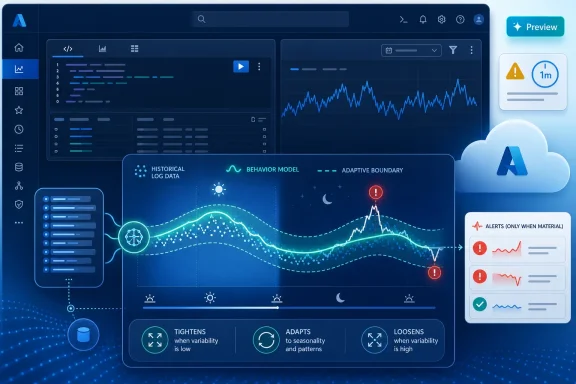 Microsoft Moves the Threshold From a Number to a Behavior Model
For years, the simplest alerting model in Azure Monitor has also been the most brittle: run a query, count or aggregate the result, compare it to a fixed threshold, and fire an alert if the line is crossed. That model is easy to explain and easy to audit, which is why it has survived so long. It is also poorly suited to systems whose “normal” is not a number but a rhythm.Dynamic thresholds change the premise. Instead of asking an administrator to decide that a value above 80, below 5, or outside some other hard-coded range is dangerous, Azure Monitor learns historical behavior and calculates a range that represents expected activity. The alert then fires when the query result deviates materially from that learned pattern.
That is a small configuration change with a large operational implication. Static thresholds encode what an operator believed at the moment the rule was created. Dynamic thresholds encode what the system has been doing over time, including recurring patterns such as daily cycles, weekly seasonality, and workload-specific variation.
This is particularly relevant for log search alerts because logs are not neatly bounded telemetry in the way many infrastructure metrics are. A CPU metric has an obvious ceiling. A failed login count, request error rate, queue backlog, or custom application event count may not. Those values are shaped by customer behavior, deployment schedules, batch jobs, business hours, geography, and plain old entropy.
Microsoft is therefore extending a familiar cloud-management idea into one of the messier corners of operations: the threshold should not be a guess made during setup; it should be a continuously adjusted boundary based on observed behavior.
Static Alerts Were Always a Compromise With Time
The dirty secret of most monitoring environments is that many alert thresholds are not “designed” so much as inherited. Someone sets a value during rollout, tunes it after the first few noisy incidents, and then the rule remains in place long after the workload has changed. The alert is still technically active, but its meaning decays.That decay is especially pronounced in Azure estates that scale up and down, absorb new services, or shift usage patterns as applications mature. A threshold that was sensible for a pilot may be absurdly low after production adoption. A value that caught a genuine outage last year may now describe normal seasonal traffic.
The predictable result is alert fatigue. Operators stop trusting the channel because too many alerts are technically correct but operationally unhelpful. The team then raises thresholds to quiet the noise, which reduces false positives but risks hiding real failures. Monitoring becomes a negotiation between annoyance and blindness.
Dynamic thresholds attack that compromise directly. If the platform can learn that a workload is busy at 9 a.m., quiet on weekends, or cyclic during nightly processing, the alert rule can become less dependent on human-maintained folklore. It can distinguish “high for this service at this time” from simply “high.”
That distinction is not academic. In cloud operations, the most important incidents are often contextual. A thousand errors may be ordinary during a stress test and catastrophic during a quiet maintenance window. A small drop in ingestion volume may be harmless for a test workspace and alarming for a production security pipeline. Static thresholds flatten those differences; behavioral thresholds at least attempt to preserve them.
Azure Monitor Is Becoming Less of a Console and More of an Operations Engine
Microsoft’s monitoring strategy has been moving in this direction for some time. Azure Monitor is no longer just a place to look at charts and wire up notifications. It is increasingly the control plane through which Microsoft expects customers to manage telemetry, detection, response, and cost across sprawling cloud environments.Log search alerts sit at an important point in that stack. They allow teams to query Log Analytics data with KQL and turn those results into actionable alerts. That makes them flexible enough for application telemetry, infrastructure signals, platform logs, security-adjacent events, and business-specific conditions that do not exist as built-in metrics.
The drawback is that flexibility creates maintenance work. Every query needs alert logic. Every rule needs a threshold. Every threshold needs justification. At small scale, that is manageable. At enterprise scale, it becomes a governance problem.
Dynamic thresholds are Microsoft’s answer to that scaling problem. A monitoring estate with hundreds of resources and dozens of teams cannot rely indefinitely on hand-tuned thresholds for every meaningful log pattern. The feature offers a way to standardize alert creation without pretending that all workloads behave the same.
The important phrase is at-scale intelligence. Microsoft is not saying administrators no longer need to understand their systems. It is saying the platform can now shoulder more of the repetitive calibration work that previously consumed operations teams.
That is a reasonable bet. It is also one administrators should treat with healthy skepticism. Dynamic thresholds reduce the need to choose a number, but they do not remove the need to choose the right signal.
The Preview Label Is Doing Real Work
Microsoft’s documentation describes dynamic thresholds for log query results as a preview capability, and that label should not be waved away as ceremonial. Preview features in Azure can be useful and production-relevant, but they also carry the usual warning: behavior, support boundaries, and tooling coverage may not be as complete as mature features.The limitations are practical rather than cosmetic. Dynamic thresholds for log search alerts require enough historical data before alerts can behave meaningfully. New resources, sparse logs, and recently changed systems may not produce useful baselines immediately. Microsoft’s model needs time and samples before it can decide what “normal” looks like.
That is a key operational constraint. A dynamic threshold is not magic on day one. If a workload is brand new, rarely emits data, or has just undergone a major architectural change, the learned boundary may be incomplete or stale. The feature is best suited to signals with enough regularity and volume to support pattern detection.
There are also configuration boundaries. Microsoft notes that 1-minute frequency is not supported for log search alert rules using dynamic thresholds. That matters for teams that want near-real-time detection from log queries. If a particular alert must fire at the fastest possible cadence, static thresholding may remain the required approach.
The preview status should therefore shape rollout strategy. This is not a feature to blanket-enable across every alert rule and celebrate as an instant cure for noise. It is a feature to apply where the monitored signal has a history, a pattern, and a failure mode that looks like deviation from that pattern.
The Best Use Cases Are the Ones Static Thresholds Make Painful
Dynamic thresholds are most compelling when the old threshold conversation is obviously absurd. If a team spends more time debating the right value than responding to actual alerts, the threshold is probably a candidate for automation. If the value must be different for each resource, time of day, region, or workload tier, a fixed number is doing too much work.Operational anomalies are the natural fit. A sudden rise in failed requests, an unexpected drop in processed jobs, an unusual increase in dependency errors, or a burst of infrastructure events can all be better expressed as deviations from normal behavior than as universal numbers. The same applies to log ingestion patterns, where “too few logs” may be just as important as “too many errors.”
Application teams may benefit most because application behavior is rarely static. Traffic changes with releases, campaigns, customer growth, and product usage. Static alerting often punishes success by treating growth as abnormal until someone retunes the rule. A dynamic threshold should, over time, adapt to that growth without requiring every alert to be revisited.
Infrastructure teams get a different advantage. In fleets of virtual machines, containers, databases, and platform services, manually choosing per-resource log thresholds is slow and error-prone. Dynamic thresholds make more sense when the goal is to monitor many similar resources while still respecting that each may have its own baseline.
Security-minded teams should be more cautious but still interested. Many security detections are not purely behavioral; they depend on known-bad events, policy violations, or threat intelligence. But some operational-security signals, such as unusual authentication failures or unexpected logging gaps, may benefit from adaptive baselines. The trick is not to confuse anomaly detection with full security detection.
Fewer False Positives Does Not Automatically Mean Better Detection
Microsoft’s pitch includes a familiar monitoring promise: reduce false positives while improving the chance of detecting meaningful anomalies. That is the dream of every alerting product, and it is not wrong. But it is incomplete.False positives are only one side of the monitoring problem. A dynamic model can also miss slow-moving failures, normalize bad behavior if it persists, or struggle during abrupt but legitimate business changes. If yesterday’s abnormal becomes today’s baseline, the system may become quieter for the wrong reason.
Microsoft attempts to address this by using historical learning, seasonality, trend detection, and violation-duration logic. In plain English, the feature should not fire just because a value twitches briefly outside a boundary. It should be looking for sustained or significant deviation, not every random spike.
That is good engineering, but it introduces a trade-off. Suppressing short-lived anomalies can reduce noise, but some short-lived anomalies matter. A five-minute authentication storm, a brief but severe data pipeline interruption, or a sudden burst of critical application errors may be operationally important even if it does not persist.
Administrators will need to tune sensitivity and violation settings with that trade-off in mind. Dynamic thresholds are not a replacement for severity design. Some alerts should be tolerant and trend-oriented. Others should be brutally simple: if this specific condition occurs, wake someone up.
The most mature Azure shops will likely end up with a hybrid model. Dynamic thresholds will handle noisy, seasonal, or fleet-scale patterns. Static thresholds will remain for hard service limits, compliance conditions, and events whose meaning does not depend on baseline behavior.
The Economics Are Quietly Important
Microsoft says Dynamic thresholds for Log Search Alerts are available at no extra charge beyond the standard log search alert rule rate. That pricing detail matters because monitoring features often create adoption friction when they arrive with a separate meter. If using smarter thresholds makes every alert materially more expensive, administrators will reserve them for a narrow slice of rules.By folding the capability into the existing alert-rule economics, Microsoft encourages experimentation. Teams can test dynamic thresholds on noisy alerts without needing a procurement conversation. That is exactly how a feature like this should spread: through targeted use on rules that already hurt.
The cost story is still not free in the broader sense. Log search alerts depend on logs, and logs have ingestion, retention, query, and workspace-design implications. Better alert thresholds do not solve telemetry cost management. In some environments, they may even encourage teams to create more log-based alerts because the setup feels easier.
That is not necessarily bad. More meaningful alerts can improve reliability. But Azure administrators already know the pattern: convenience at the control plane can become spend at the data plane. If dynamic thresholds lead teams to query large volumes of data more frequently, the alerting bill may not be the only cost to watch.
Still, the lack of a premium charge for the feature itself lowers the barrier. Microsoft is betting that smarter alerting should be part of the baseline Azure operations experience, not a luxury tier.
The Human Job Moves Upstream
The easy interpretation of dynamic thresholds is that Microsoft is automating alert configuration. The better interpretation is that Microsoft is changing which part of alert configuration deserves human attention.The old job was often mechanical. Pick a threshold, observe noise, adjust, repeat. That work felt operationally important because bad thresholds caused pain, but it was not a high-value use of engineering judgment. It was calibration toil.
The new job is more architectural. Teams must decide which log queries represent meaningful service health, which dimensions matter, how alert severity maps to response, and when a dynamic model is appropriate. They must also decide what not to alert on, which remains the most underrated skill in monitoring.
A dynamic threshold can learn a pattern, but it cannot know whether the pattern matters to the business. It cannot know whether a noisy query is badly written, whether a missing log stream is acceptable during maintenance, or whether a deviation should page an engineer or create a ticket for the next business day.
That means the quality of the underlying KQL still matters enormously. A vague query with a dynamic threshold is still a vague alert. A carefully scoped query with a dynamic threshold can become a powerful signal. The intelligence in the threshold does not compensate for sloppy telemetry design.
This is where Microsoft’s move is useful but not revolutionary. It removes one class of bad human guesswork. It does not remove the need for operational ownership.
Enterprises Will Treat This as Governance, Not Gadgetry
For individual administrators, dynamic thresholds are a welcome convenience. For enterprises, they are a governance question. Who decides when adaptive alerting is allowed? Which production services can rely on preview behavior? How are sensitivity settings standardized? How are exceptions documented?Large organizations tend to accumulate alert rules across subscriptions, teams, and eras. Some are created by central platform teams, others by application owners, others by consultants who have long since left the building. In that environment, a new threshold mode can either improve consistency or add another layer of inconsistency.
The right enterprise response is probably policy and pattern libraries. Platform teams can identify approved scenarios for dynamic log thresholds, publish KQL templates, and define severity conventions. They can also keep static rules for conditions where deterministic alerting is required.
There is also an audit angle. Static thresholds are easy to explain after an incident: the value crossed 100, the alert fired, the response followed. Dynamic thresholds require a different explanation: the value deviated from a learned boundary based on historical behavior. That is defensible, but it demands better observability around the alert itself.
Microsoft’s preview chart, which shows historical query results alongside calculated dynamic boundaries, is important for precisely this reason. Operators need to see not only that an alert fired, but why the platform believed the value was abnormal. Trust in adaptive alerting depends on visible reasoning, even if the underlying model remains abstracted.
This Is Also a Bet on Azure’s Operational Stickiness
Monitoring features are rarely just monitoring features in cloud strategy. They are part of the gravitational field that keeps workloads inside a platform. The more Azure Monitor can handle native metrics, logs, alerts, dashboards, baselines, and response workflows, the more customers have to justify moving operational data elsewhere.Dynamic thresholds for log search alerts strengthen that argument. Third-party observability platforms have long competed on smarter alerting, anomaly detection, and noise reduction. Microsoft is bringing more of that capability into the Azure-native toolchain, where it benefits from direct integration with Log Analytics, Azure resources, action groups, and identity controls.
That does not eliminate the role of specialist observability vendors. Many enterprises still need multi-cloud views, deep application performance monitoring, distributed tracing, incident management integrations, or advanced analytics beyond what Azure Monitor provides. But Microsoft does not need to win every observability comparison. It needs Azure Monitor to be good enough, integrated enough, and inexpensive enough for many workloads to stay native.
Dynamic thresholds help with that. They make the built-in product feel less like a raw telemetry console and more like an opinionated operations platform. For Windows and Azure administrators, that means fewer reasons to export every signal before it becomes actionable.
The trade-off is dependency. The more teams rely on Azure Monitor’s learned behavior, the more their alert semantics are tied to Microsoft’s implementation. That may be acceptable, even desirable, for Azure-first organizations. But it should be recognized as an architectural choice, not merely a feature toggle.
The Real Win Is Not Silence, but Better Attention
Alert fatigue is often described as a noise problem, but it is really an attention problem. Engineers have a finite amount of trust, urgency, and cognitive bandwidth. Every bad alert spends that budget. Every missed incident bankrupts it.Dynamic thresholds can help restore some of that trust if they are used well. They can make alerts more sensitive to context and less dependent on stale assumptions. They can also reduce the maintenance burden that causes teams to ignore threshold hygiene until something breaks.
But quieter systems are not automatically safer systems. A monitoring environment can be calm because it is well tuned, or calm because it has stopped seeing. The difference lies in validation: testing alert behavior, reviewing fired and suppressed conditions, and comparing alert output against real incidents.
The best administrators will treat dynamic thresholds as a way to buy time for more important work. Instead of spending cycles adjusting arbitrary numbers, they can revisit whether the alert portfolio reflects the service’s actual failure modes. That is where reliability improves.
Microsoft’s feature is therefore most valuable not when it hides complexity, but when it redirects human attention toward the parts of monitoring that humans still do best.
The Azure Alert Rule Is Getting Smarter, but the Runbook Still Belongs to You
Dynamic thresholds for Log Search Alerts should change how Azure teams think about alert design, but not by encouraging blind automation. The practical lesson is to reserve adaptive thresholds for signals where history is meaningful and deviation is actionable.A short pilot is the obvious first step. Pick a handful of noisy log search alerts with recurring patterns, enable dynamic thresholds where supported, and compare alert behavior against the old static rules. The goal is not simply fewer alerts; it is fewer useless alerts without losing early warning on real incidents.
Administrators should also document where dynamic thresholds are deliberately not used. Hard limits, compliance events, security policy violations, and known-failure signatures may still deserve static or deterministic alerting. In mature monitoring, the threshold type should be a design decision, not a default inherited from the portal.
The most concrete guidance is simple:
- Dynamic thresholds are best suited to log query results that have enough history, volume, and seasonal behavior for Azure Monitor to learn a useful baseline.
- Static thresholds remain the safer choice for hard limits, rare critical events, and conditions whose meaning does not depend on historical normality.
- Teams should expect a learning period before adaptive alerts become trustworthy, especially for new resources or recently changed workloads.
- The preview status means production rollout should be deliberate, measured, and documented rather than automatic.
- Better thresholds do not fix poor KQL, weak severity models, or runbooks that fail to tell responders what to do next.
- The feature is most valuable when it reduces calibration toil and gives administrators more time to improve the actual alerting strategy.
References
- Primary source: redmondmag.com
Published: Wed, 17 Jun 2026 00:40:19 GMT
Microsoft Adds Dynamic Thresholds to Azure Monitor for Log Search Alerts -- Redmondmag.com
New anomaly detection capability helps operations teams identify unusual behavior without manually tuning alert thresholds.redmondmag.com - Official source: learn.microsoft.com
Create a Log Search alert rule with dynamic threshold - Azure Monitor | Microsoft Learn
Get information about creating metric alerts with dynamic thresholds that are based on machine learning.learn.microsoft.com - Official source: techcommunity.microsoft.com
- Official source: download.microsoft.com
PDF_MSFT_Cloud_architecture_information protection for GDPR.vsdx
PDF documentdownload.microsoft.com
