

Verdict: move most Windows, AVD, CAD, and visualization workloads first to NVads_V710_v5, choose NVadsA10_v5 only where NVIDIA software or licensing is a hard requirement, and reserve NGads_V620 for graphics-streaming and gaming-oriented workloads. Azure will retire eight NVv4 VM SKUs on September 30, 2026, and this is not a safe “same-size” resize: GPU vendor, frame-buffer allocation, session model, and application certification must drive the target choice.
Microsoft’s retirement notice covers Standard_NV4as_v4, Standard_NV4ahs_v4, Standard_NV8as_v4, Standard_NV8ahs_v4, Standard_NV16as_v4, Standard_NV16ahs_v4, Standard_NV32as_v4, and Standard_NV32ahs_v4. Any instance still running after September 30 will be deallocated, stop working, stop incurring charges, and lose both SLA and support coverage, according to Microsoft’s Azure documentation.
The immediate action is clear:
Because the required registration action is specific to this retirement, use the procedure in Microsoft’s NVv4 retirement notice rather than guessing at a feature namespace or command. Complete the registration for every subscription containing affected VMs, verify that the feature’s status is registered using the method specified by Microsoft, and record that confirmation in the change ticket before beginning the pilot. Do not treat a submitted registration request as equivalent to completed registration.
This AFEC check belongs at the front of the migration plan. It is a known blocker for the recommended V710 path, not a troubleshooting step to discover during the production window.
Microsoft’s broad recommendation is NVads_V710_v5, but its workload table makes clear that it is one of three paths, not the automatic answer for every machine. The right decision starts with a question many migrations miss: what does this VM’s GPU vendor actually enable?
Starting-target matrix
This matrix identifies a sensible family to test first; it is not a compatibility, capacity, or performance guarantee. Each application, image, driver package, partition size, and concurrency target still requires validation.
The most practical default for conventional Windows virtual desktops is NVads_V710_v5. Microsoft recommends it for the migration, it supports both Windows and Linux, and its published allocation range runs from 1/6 of a V710 GPU with 4 GB of frame buffer to one GPU with 24 GB. That range gives administrators several possible starting points for pools containing both lighter GPU users and more demanding visualization users.
This should not be read as proof that V710 is a one-for-one successor to every NVv4 configuration. The published V710 partition range helps with target selection, but it does not establish equivalence in application behavior, user density, or performance. Select a partition from measured frame-buffer demand and representative workload tests, not from similarity in VM naming.
WindowsForum’s user reports on NVads V710 v5 place the family in the broader growth of GPU-accelerated cloud computing, including AI inference, advanced visualization, real-time graphics, and other compute-heavy applications. For this retirement, the useful takeaway is narrower: V710 is a credible first pilot for many Windows graphics and visualization estates, but those broader use cases do not eliminate the need to validate the particular NVv4 workload being moved.
Attach baseline observations to that record: startup behavior, GPU recognition, application launch time, representative task behavior, remote-session quality where applicable, and concurrency. The artifact should end with a clear promote, retest, change-target, or roll-back decision. “The VM resized successfully” is not an acceptance criterion.
The A10 family includes NVIDIA GRID licensing with every VM. That matters in virtual-application environments because Microsoft says one NVadsA10_v5 VM can support up to 25 concurrent users in that scenario. For an IT team publishing a shared Windows application rather than assigning a full desktop to each worker, that statement should be used as a test reference, not a blanket capacity promise.
Concurrency depends on what those users actually do. A pilot must reproduce the organization’s application mix, session duration, graphics activity, reconnect behavior, and peak overlap. If the tested application or user profile cannot meet the acceptance threshold, the published maximum does not make the deployment suitable.
There is another practical distinction: NVadsA10_v5 scales from 1/6 of an A10 GPU to two A10 GPUs. A team that requires an NVIDIA-specific capability, GRID licensing, or an allocation beyond one GPU should evaluate A10 before assuming the recommended AMD V710 route is sufficient. Conversely, choosing A10 merely because it is NVIDIA can add cost or capacity that a workload does not need.
The small-inference choice follows the same evidence-based approach. Microsoft lists both V710 and A10 for small AI inference. Azure’s retirement guidance does not establish performance equivalence between them, and it does not turn either family into a substitute for large-scale AI infrastructure. Test the application’s documented requirements, model execution, memory use, latency, throughput, and concurrency on the proposed partition.
That distinction is important because WindowsForum users have also been following Azure’s ND GB200 v6 VMs and the GB200 NVL72 deployment associated with Microsoft and OpenAI. Those reports concern a different class of AI infrastructure built around NVIDIA GB200 systems. They should not be used to infer that an NVv4 desktop, visualization VM, or small-inference deployment needs a GB200-class target—or that NVadsA10_v5 and NVads_V710_v5 are interchangeable. The retirement decision remains a workload-specific choice among Microsoft’s identified replacement families.
Its GPU partitions start at 1/4 of a Radeon Pro V620 with 8 GB of frame buffer and extend to one GPU with 32 GB. That is a different published allocation range from V710’s 1/6 GPU and 4 GB starting option. For a small AVD proof of concept or a lighter GPU user, the V620 starting allocation may be more than the initial test requires. For graphics-intensive streaming, its positioning and frame-buffer range make it a sensible candidate.
This makes NGads_V620 a targeted choice for teams that care most about the interactive graphics-streaming experience, not a universal substitute for broad virtual desktop pools. Microsoft’s workload guidance separates it from the general V710 recommendation by explicitly associating it with gaming, while also listing graphics applications, virtual desktops, and visualization among its uses.
Do not select V620 from the category label alone. The pilot must still reproduce the endpoint, remote protocol, display configuration, image quality expectations, interaction pattern, and concurrency that production users will encounter. A family positioned for graphics streaming can still fail an organization’s latency, application, or density requirements.
WindowsForum user reports about AMD’s Virtualized Automotive Stack on Azure show Radeon Pro V710 GPUs being used with AMD EPYC CPUs, Xen-based nested virtualization, and Siemens PAVE360 for cloud-scale software-defined-vehicle validation. That is evidence of a specialized V710 deployment pattern, not a promise that an ordinary NVv4 workload will inherit the same architecture or capabilities. It reinforces the need to document the actual application and virtualization requirements rather than choosing a replacement solely from the GPU brand.
For Windows and AVD administrators, the pilot should use the real image, policy set, profile system, remote protocol, endpoint type, and representative user activity. Open the production applications, load realistic project data, exercise graphics-intensive views, reconnect sessions, test published applications, and observe behavior under the intended number of simultaneous users.
For CAD and visualization applications, record whether the software vendor certifies or supports the chosen GPU and driver combination. If certification is unavailable, the exception and its owner should be explicit. A successful application launch does not establish that rendering, viewport stability, exports, long-running operations, or multiuser behavior are acceptable.
Small-inference teams should test the actual model and application path rather than a generic GPU benchmark. Record whether execution succeeds, whether memory use fits the selected allocation, and whether measured latency and throughput satisfy the service requirement. The supplied migration guidance supports both V710 and A10 as candidates for small AI inference, but it does not establish additional AI use cases or guarantee cross-vendor equivalence.
Quota must be treated as an early gating item, not a deployment-day detail. Check the required family quota in every subscription and region involved, compare it with the planned pilot and production capacity, and leave time to resolve any shortfall through Azure’s current quota-request process. Do not schedule the migration solely because a target family appears in a sizing table; required capacity must be available where the workload will run.
Regional availability is a separate check. Confirm that the selected family and size are offered in the intended region and can support the workload’s deployment design. If multiple regions or subscriptions are involved, record quota and availability separately for each one rather than assuming approval or availability carries across boundaries.
The migration also needs a deliberate availability, network, monitoring, and recovery review. Identify the maintenance window, expected interruption, health checks, alert suppression rules, validation owner, and rollback authority. Preserve the information needed to return to the approved original configuration if the target fails acceptance testing.
After the change, validate at three levels:
A staged rollout is safer than a fleet-wide conversion. Begin with one representative VM for each materially different image, application, GPU dependency, and user profile. A single successful desktop does not validate a pool containing different applications, drivers, images, or session patterns.
Microsoft’s retirement notice covers Standard_NV4as_v4, Standard_NV4ahs_v4, Standard_NV8as_v4, Standard_NV8ahs_v4, Standard_NV16as_v4, Standard_NV16ahs_v4, Standard_NV32as_v4, and Standard_NV32ahs_v4. Any instance still running after September 30 will be deallocated, stop working, stop incurring charges, and lose both SLA and support coverage, according to Microsoft’s Azure documentation.
The immediate action is clear:
- Inventory every NVv4 VM and classify its workload as virtual desktop, virtual application, CAD or visualization, graphics streaming, gaming, or small AI inference.
- Check quota availability for the chosen target VM family and deployment region before scheduling a maintenance window.
- Test one representative VM per application and user profile, including its GPU-dependent software, image configuration, graphics behavior, and session density.
- Use Azure’s supported VM-resize process to select the approved target size. Follow the current Microsoft instructions rather than assuming that every source and target combination can be changed through the same sequence.
- Treat the operation as planned maintenance. Record the original size and configuration, establish rollback criteria, and allow time for post-change validation.
- After the target VM starts, verify the effective VM size, operating-system health, GPU driver, GPU visibility, remote-session behavior, application launch, rendering or inference behavior, and expected concurrency before declaring the migration complete.
VMTempDiskResizePreview Azure Feature Exposure Control flag before attempting the affected resize.Because the required registration action is specific to this retirement, use the procedure in Microsoft’s NVv4 retirement notice rather than guessing at a feature namespace or command. Complete the registration for every subscription containing affected VMs, verify that the feature’s status is registered using the method specified by Microsoft, and record that confirmation in the change ticket before beginning the pilot. Do not treat a submitted registration request as equivalent to completed registration.
This AFEC check belongs at the front of the migration plan. It is a known blocker for the recommended V710 path, not a troubleshooting step to discover during the production window.
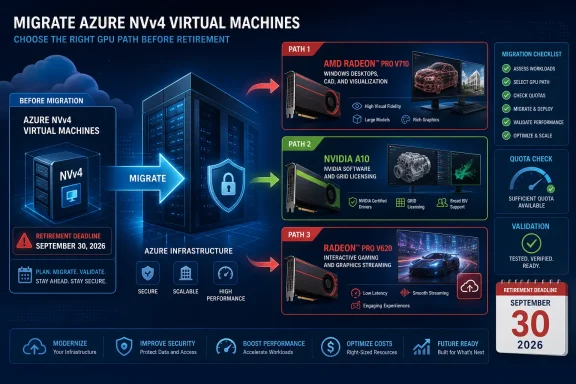 Which Azure GPU family fits an NVv4 replacement?
Microsoft’s broad recommendation is NVads_V710_v5, but its workload table makes clear that it is one of three paths, not the automatic answer for every machine. The right decision starts with a question many migrations miss: what does this VM’s GPU vendor actually enable?Starting-target matrix
| Workload profile | Best starting target | Why |
|---|---|---|
| Windows AVD desktops, CAD, graphics applications, visualization | NVads_V710_v5 | AMD Radeon Pro V710 options span 1/6 to one GPU, with 4 GB to 24 GB frame buffer. Windows and Linux are supported. |
| NVIDIA-dependent virtual apps or workflows needing NVIDIA GRID licensing | NVadsA10_v5 | NVIDIA A10 allocation ranges from 1/6 to two GPUs, includes a GRID license, and supports up to 25 concurrent users in a virtual-application scenario. |
| High-quality graphics streaming and interactive gaming | NGads_V620 | AMD Radeon Pro V620 allocation ranges from 1/4 to one GPU, with 8 GB to 32 GB frame buffer, and is explicitly positioned for interactive gaming and graphics streaming. |
| Small AI inference | NVads_V710_v5 or NVadsA10_v5 | Microsoft lists both families for small AI workloads, so the application’s documented GPU requirements, licensing, measured performance, and cost should decide the pilot target. |
The most practical default for conventional Windows virtual desktops is NVads_V710_v5. Microsoft recommends it for the migration, it supports both Windows and Linux, and its published allocation range runs from 1/6 of a V710 GPU with 4 GB of frame buffer to one GPU with 24 GB. That range gives administrators several possible starting points for pools containing both lighter GPU users and more demanding visualization users.
This should not be read as proof that V710 is a one-for-one successor to every NVv4 configuration. The published V710 partition range helps with target selection, but it does not establish equivalence in application behavior, user density, or performance. Select a partition from measured frame-buffer demand and representative workload tests, not from similarity in VM naming.
WindowsForum’s user reports on NVads V710 v5 place the family in the broader growth of GPU-accelerated cloud computing, including AI inference, advanced visualization, real-time graphics, and other compute-heavy applications. For this retirement, the useful takeaway is narrower: V710 is a credible first pilot for many Windows graphics and visualization estates, but those broader use cases do not eliminate the need to validate the particular NVv4 workload being moved.
Pre-pilot migration record
Before changing the first VM, create one record per workload and complete every field:| Field | Value to record |
|---|---|
| Current SKU | Exact NVv4 SKU currently assigned |
| OS and image | Windows or Linux version, image source, image version, and relevant customization |
| GPU-dependent application | Application name, release, GPU-dependent function, driver dependency, and available vendor certification |
| Vendor-lock requirement | AMD-compatible, NVIDIA-required, NVIDIA GRID-required, or not yet established |
| Starting target family | NVads_V710_v5, NVadsA10_v5, or NGads_V620 |
| Target partition and frame buffer | Proposed GPU allocation and available frame buffer |
| User-concurrency test | Representative number of simultaneous sessions, applications, or inference requests and the acceptance result |
| Rollback decision | Conditions that trigger rollback, responsible owner, and approved original configuration |
NVIDIA dependencies make NVadsA10_v5 a separate decision
NVadsA10_v5 is not simply the “more powerful” alternative. It is the compatibility-first option for Windows environments whose applications, licensing, workflows, or operational requirements are tied to NVIDIA GPU behavior.The A10 family includes NVIDIA GRID licensing with every VM. That matters in virtual-application environments because Microsoft says one NVadsA10_v5 VM can support up to 25 concurrent users in that scenario. For an IT team publishing a shared Windows application rather than assigning a full desktop to each worker, that statement should be used as a test reference, not a blanket capacity promise.
Concurrency depends on what those users actually do. A pilot must reproduce the organization’s application mix, session duration, graphics activity, reconnect behavior, and peak overlap. If the tested application or user profile cannot meet the acceptance threshold, the published maximum does not make the deployment suitable.
There is another practical distinction: NVadsA10_v5 scales from 1/6 of an A10 GPU to two A10 GPUs. A team that requires an NVIDIA-specific capability, GRID licensing, or an allocation beyond one GPU should evaluate A10 before assuming the recommended AMD V710 route is sufficient. Conversely, choosing A10 merely because it is NVIDIA can add cost or capacity that a workload does not need.
The small-inference choice follows the same evidence-based approach. Microsoft lists both V710 and A10 for small AI inference. Azure’s retirement guidance does not establish performance equivalence between them, and it does not turn either family into a substitute for large-scale AI infrastructure. Test the application’s documented requirements, model execution, memory use, latency, throughput, and concurrency on the proposed partition.
That distinction is important because WindowsForum users have also been following Azure’s ND GB200 v6 VMs and the GB200 NVL72 deployment associated with Microsoft and OpenAI. Those reports concern a different class of AI infrastructure built around NVIDIA GB200 systems. They should not be used to infer that an NVv4 desktop, visualization VM, or small-inference deployment needs a GB200-class target—or that NVadsA10_v5 and NVads_V710_v5 are interchangeable. The retirement decision remains a workload-specific choice among Microsoft’s identified replacement families.
NGads_V620 is the graphics-streaming specialist
NGads_V620 should not be treated as an unusual detour from the NVv4 migration path. Microsoft specifically directs gaming workloads to it, and the positioning explains why: the V620 family is designed for high-quality interactive gaming and graphics streaming.Its GPU partitions start at 1/4 of a Radeon Pro V620 with 8 GB of frame buffer and extend to one GPU with 32 GB. That is a different published allocation range from V710’s 1/6 GPU and 4 GB starting option. For a small AVD proof of concept or a lighter GPU user, the V620 starting allocation may be more than the initial test requires. For graphics-intensive streaming, its positioning and frame-buffer range make it a sensible candidate.
This makes NGads_V620 a targeted choice for teams that care most about the interactive graphics-streaming experience, not a universal substitute for broad virtual desktop pools. Microsoft’s workload guidance separates it from the general V710 recommendation by explicitly associating it with gaming, while also listing graphics applications, virtual desktops, and visualization among its uses.
Do not select V620 from the category label alone. The pilot must still reproduce the endpoint, remote protocol, display configuration, image quality expectations, interaction pattern, and concurrency that production users will encounter. A family positioned for graphics streaming can still fail an organization’s latency, application, or density requirements.
WindowsForum user reports about AMD’s Virtualized Automotive Stack on Azure show Radeon Pro V710 GPUs being used with AMD EPYC CPUs, Xen-based nested virtualization, and Siemens PAVE360 for cloud-scale software-defined-vehicle validation. That is evidence of a specialized V710 deployment pattern, not a promise that an ordinary NVv4 workload will inherit the same architecture or capabilities. It reinforces the need to document the actual application and virtualization requirements rather than choosing a replacement solely from the GPU brand.
A resize is not the migration plan
The dangerous assumption in this retirement is that an apparently similar NVv4 size maps neatly to an equivalent target size. It does not. A completed infrastructure change does not prove that a Windows image, GPU driver, application certification, remote-session experience, or user density is acceptable.For Windows and AVD administrators, the pilot should use the real image, policy set, profile system, remote protocol, endpoint type, and representative user activity. Open the production applications, load realistic project data, exercise graphics-intensive views, reconnect sessions, test published applications, and observe behavior under the intended number of simultaneous users.
For CAD and visualization applications, record whether the software vendor certifies or supports the chosen GPU and driver combination. If certification is unavailable, the exception and its owner should be explicit. A successful application launch does not establish that rendering, viewport stability, exports, long-running operations, or multiuser behavior are acceptable.
Small-inference teams should test the actual model and application path rather than a generic GPU benchmark. Record whether execution succeeds, whether memory use fits the selected allocation, and whether measured latency and throughput satisfy the service requirement. The supplied migration guidance supports both V710 and A10 as candidates for small AI inference, but it does not establish additional AI use cases or guarantee cross-vendor equivalence.
Quota must be treated as an early gating item, not a deployment-day detail. Check the required family quota in every subscription and region involved, compare it with the planned pilot and production capacity, and leave time to resolve any shortfall through Azure’s current quota-request process. Do not schedule the migration solely because a target family appears in a sizing table; required capacity must be available where the workload will run.
Regional availability is a separate check. Confirm that the selected family and size are offered in the intended region and can support the workload’s deployment design. If multiple regions or subscriptions are involved, record quota and availability separately for each one rather than assuming approval or availability carries across boundaries.
The migration also needs a deliberate availability, network, monitoring, and recovery review. Identify the maintenance window, expected interruption, health checks, alert suppression rules, validation owner, and rollback authority. Preserve the information needed to return to the approved original configuration if the target fails acceptance testing.
After the change, validate at three levels:
- Infrastructure: intended family and size, operating-system boot, networking, storage access, monitoring, and agent health.
- GPU platform: GPU detection, expected allocation and frame buffer, driver health, licensing where required, and absence of device errors.
- Workload: application launch, representative task completion, remote-session experience, user concurrency or request concurrency, and acceptance against the recorded baseline.
A staged rollout is safer than a fleet-wide conversion. Begin with one representative VM for each materially different image, application, GPU dependency, and user profile. A single successful desktop does not validate a pool containing different applications, drivers, images, or session patterns.
Frequently Asked Questions
Which NVv4 replacement should Windows AVD teams choose?
Start by testing NVads_V710_v5 for most GPU-accelerated Windows desktops. Choose NVadsA10_v5 if NVIDIA compatibility or GRID licensing is required, and test NGads_V620 for graphics-streaming-heavy deployments. These are starting targets, not compatibility guarantees.What happens if an NVv4 VM is still running on September 30, 2026?
Azure will deallocate it. The VM will stop working and stop billing, and it will no longer have SLA or support coverage.Does Azure automatically move NVv4 VMs to a new GPU family?
No. Microsoft requires customers to resize or deallocate the affected NVv4 VMs before retirement. Organizations must select, test, and implement the replacement.Is NVads_V710_v5 supported for Windows?
Yes. Microsoft lists support for both Windows and Linux on NVads_V710_v5.Is NVads_V710_v5 a guaranteed one-for-one replacement for NVv4?
No. Microsoft recommends the family and publishes its V710 allocation range, but that does not establish one-for-one compatibility, performance, or user density. Validate the image, driver, application, frame-buffer allocation, and representative workload.When should an organization choose NVadsA10_v5?
Choose it as the first test target when NVIDIA compatibility or NVIDIA GRID licensing is a firm requirement, or when the proposed deployment needs an A10 allocation beyond one GPU. Confirm the requirement instead of selecting A10 solely by brand.When should an organization choose NGads_V620?
Test NGads_V620 when the workload is centered on interactive gaming or high-quality graphics streaming. Its published allocation range starts at 1/4 of a V620 GPU with 8 GB of frame buffer and extends to one GPU with 32 GB.What must be done before an NVv4-to-V710 resize?
RegisterVMTempDiskResizePreview for the affected subscription and verify that registration has completed. Follow the registration action in Microsoft’s NVv4 retirement notice, because this AFEC requirement is a known blocker for the V710 migration path.