

Azure SQL Database Hyperscale has spent years fighting an unfortunate implication embedded in its own name: that it belongs only beneath enormous, multi-terabyte applications. That perception is increasingly outdated. Hyperscale’s real differentiators are architectural rather than volumetric, including independently scalable compute and storage, high transaction-log throughput, rapid replica creation, snapshot-based recovery, and a pricing model that can make sense even when the database is relatively small.
Azure SQL Database is Microsoft’s fully managed relational database platform as a service, built around the SQL Server database engine but delivered as a cloud-native resource. Microsoft manages the operating system, patching, backups, high availability, and much of the routine infrastructure work that would otherwise fall to database administrators.
The service traces its history to SQL Azure, whose early editions supported databases measured in single-digit gigabytes. Azure SQL Database has since expanded into a broad platform with multiple purchasing models, compute configurations, hardware families, availability options, and service tiers.
The distinctions matter because each option represents a different balance between compatibility, administrative control, scalability, and platform management:
General Purpose emphasizes balanced cost and performance. Business Critical targets transaction-heavy applications requiring low storage latency, local SSD performance, and multiple hot replicas. Hyperscale separates database compute from a distributed storage system, allowing the two dimensions to grow more independently.
That last distinction is the key to understanding why Hyperscale is relevant beyond massive databases. Its architecture can improve operational flexibility and write performance long before an application approaches a conventional storage limit.
Microsoft currently positions Hyperscale for a broad range of transactional and hybrid transactional-analytical workloads. Storage begins at a 10 GB allocation and can grow automatically to as much as 128 TB, while supported compute configurations extend substantially beyond the requirements of an ordinary departmental application.
A small database can also produce a demanding workload. Database size says little about transaction frequency, concurrency, latency sensitivity, index-maintenance activity, or the volume of data changes generated every second.
Consider three applications:
Microsoft simplified the pricing model in December 2023, removing the SQL software license charge from new Hyperscale databases. That change reduced the cost gap and altered the economic argument: organizations no longer had to treat Hyperscale primarily as a premium escape hatch for databases that had outgrown another tier.
The result is a service that competes on performance and flexibility as much as maximum capacity.
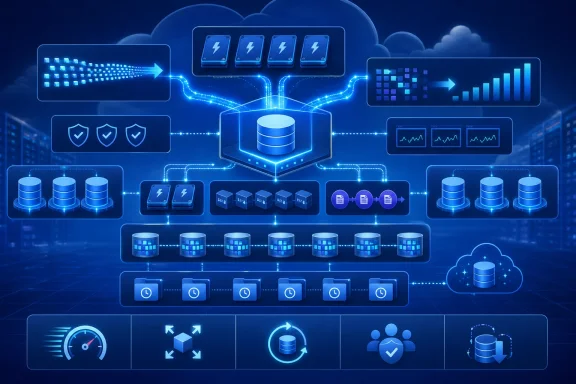
Hyperscale decomposes those responsibilities. Compute nodes process queries and transactions, while specialized services manage the transaction log and long-term data storage.
Each compute replica also uses a local SSD-based cache known as the Resilient Buffer Pool Extension data cache. Frequently accessed pages can be served from this low-latency cache rather than repeatedly fetched from remote storage.
The cache is important because decoupled storage can otherwise introduce a latency penalty. Hyperscale attempts to combine cloud storage durability and elasticity with local access speeds for active data.
However, cache behavior remains workload-dependent. A working set that fits comfortably within local cache may perform very differently from a broad, random-access workload that constantly fetches uncached pages.
As a database grows, additional page servers can be introduced horizontally. The primary compute node does not need to host every data page locally, which removes one of the constraints associated with monolithic database architecture.
This distributed model changes the scaling process. Increasing compute does not require copying the complete database onto a larger server, while increasing storage does not automatically force an increase in CPU capacity.
This approach preserves the transactional model developers expect from SQL Server while allowing storage functions to operate independently. It is one reason Hyperscale can create replicas and database copies without duplicating every underlying page through a conventional file-copy operation.
The architecture is sophisticated, but customers do not administer page servers or the log service directly. They consume those components as part of the managed Azure SQL Database platform.
Every durable transaction must record its changes in the log. Bulk ingestion, large updates, index creation, index rebuilds, and heavy online transaction processing can all generate log records fast enough to encounter service-level governance.
Those are limits rather than guaranteed application results. Reaching them requires enough compute, suitable client-side throughput, efficient transactions, and an application capable of producing log records at that rate.
Even so, the ceiling is significant because other Azure SQL Database tiers may require a larger compute allocation before approaching comparable write throughput. An organization can otherwise find itself buying extra cores not because its queries need more CPU, but because the service-level objective ties log-rate limits to the selected compute size.
The correct approach is to establish the bottleneck first:
This sounds like a feature for enormous databases, but the financial impact can emerge much earlier. Conventional service configurations sometimes force customers into awkward jumps when storage requirements exceed the limit associated with an otherwise adequate compute level.
Hyperscale bills compute per replica while charging for allocated data storage and backup storage separately. Storage automatically grows between the tier’s minimum and maximum boundaries.
That provides a more linear planning model:
This matters for seasonal applications. A retailer, tax service, ticketing platform, or event-registration system can increase compute for a predictable surge and reduce it afterward without treating the entire database as a payload that must be relocated.
Scaling is still an operational event. Connections can be interrupted during certain transitions, caches may need to warm, and application retry logic remains essential. “Fast scaling” should not be interpreted as “completely invisible scaling.”
The distinction turns replicas from a purely defensive database feature into part of application architecture.
Adding high-availability replicas improves resilience, but each replica carries compute cost. Zone-redundant designs also change the price comparison with General Purpose, so an economical standalone Hyperscale deployment can become substantially more expensive after redundancy requirements are applied.
Availability must therefore be priced as a complete configuration. Comparing only the cost of a primary database produces an incomplete result.
That separation provides useful security and workload-isolation options. A reporting replica can use different logins and firewall rules from the transactional primary, while a resource-intensive analytical consumer can receive more compute than an ordinary application replica.
Potential uses include:
That caveat is especially important for read-after-write workflows. If an application writes an order to the primary and immediately redirects the user to a replica, the replica may not yet reflect the transaction.
Developers need explicit consistency rules. Critical post-transaction reads may remain on the primary, while dashboards, searches, and analytical queries can tolerate some delay.
The effect is not merely faster administration. It changes what organizations can reasonably expect from recovery, testing, and data-copy workflows.
For point-in-time recovery, Azure selects applicable snapshots and applies the required log records to produce a transactionally consistent database. Microsoft states that most point-in-time restores complete within 60 minutes regardless of database size, although heavy write activity and certain storage-redundancy changes can extend the process.
That is a substantial improvement over recovery procedures in which restore duration grows directly with every terabyte.
This creates several opportunities:
Organizations still need to distinguish among several objectives: recovery from accidental deletion, recovery from corruption, high availability within a region, and survival of a regional outage. Hyperscale supports geo-replication and failover groups, but those capabilities require separate design, testing, and expenditure.
The question is not whether Hyperscale makes General Purpose obsolete. It is whether the additional capabilities justify the configuration and operating costs for a particular application.
General Purpose serverless also has a notable advantage for intermittent databases: it can automatically pause after inactivity and stop compute billing. As of July 22, 2026, Hyperscale serverless supports compute autoscaling but not automatic pause and resume.
That difference can dominate the cost calculation for development systems, prototypes, low-traffic internal tools, and databases used only a few hours per week. “Serverless” does not mean identical behavior across the two service tiers.
Hyperscale can deliver strong performance at a lower primary-compute price, but it is not a universal replacement.
When Hyperscale serves data from a compute replica’s local SSD cache, performance can resemble that of a local-storage tier. Cache misses require access through the distributed storage path, which may produce different latency characteristics.
Applications with large, unpredictable working sets and strict single-digit-millisecond storage requirements deserve careful testing. Average benchmark performance can conceal tail-latency behavior that affects user-facing transactions.
Business Critical also includes multiple replicas as part of its standard architecture, which helps explain its higher price. A fair comparison must configure Hyperscale with the required availability replicas rather than comparing one Hyperscale primary against a fully redundant Business Critical deployment.
Hyperscale often wins when independent storage, read scale, and write throughput are the priorities. Business Critical remains strong when consistently low storage latency, built-in replica topology, or supported in-memory features are decisive.
A successful migration begins with application architecture, not a database-size spreadsheet.
Elastic query can provide read-only access to external tables across Azure SQL databases, but it is not a transparent substitute for all cross-database code. Applications that perform complex joins across databases or depend on large remote result sets may require redesign.
Organizations should inventory:
Azure Database Migration Service supports online and offline migration patterns, and Microsoft’s assessment tools can identify blockers. Even with those tools, large databases require careful planning around initial load duration, ongoing change replication, validation, and final cutover.
The migration plan should include:
A properly designed Hyperscale deployment can help an application remain responsive as data and readership grow. A poorly designed deployment can simply move the bottleneck elsewhere while increasing the cloud bill.
Named replicas allow developers to separate those activities. Transactional traffic can remain on the primary while dashboards, searches, exports, and analytical services use independently sized read endpoints.
This does require application awareness. Connection strings, retry logic, routing policy, and data-freshness expectations must be designed deliberately rather than left to chance.
Developers should nevertheless resist treating scale as unlimited. Connection limits, worker availability, CPU, memory, tempdb behavior, log governance, and query efficiency remain finite resources.
The healthiest design principle is not “Azure will scale everything.” It is “Azure makes specific dimensions easier to scale when the application respects the platform boundaries.”
The DBA role becomes less focused on disks and backup jobs and more focused on service design and measurable outcomes.
Teams must forecast:
A dashboard that reports only primary CPU utilization is insufficient. The database may show low CPU while suffering from log-rate throttling, uncached reads, blocking, or a lagging reporting replica.
Operational runbooks should also define what happens during scaling, failover, restore, and regional recovery. Managed services reduce mechanical work, but they do not replace rehearsed incident response.
Automatic pause and resume would make Hyperscale more compelling for development, test, disaster-recovery staging, and highly intermittent production workloads.
Cloud prices also vary by region, hardware family, reservation term, redundancy choice, and contractual discount. Published four-vCore examples are useful illustrations, but they should never replace a workload-specific pricing calculation.
If that strategy continues, Hyperscale may gradually become the default Azure SQL Database architecture rather than a specialist tier. General Purpose would remain valuable for cost-sensitive and auto-pausing scenarios, while Business Critical would serve workloads requiring its latency profile and feature set.
Microsoft continues to improve assessment and migration tooling, but tooling cannot automatically transform every instance-oriented application into a database-scoped cloud service. Better change replication, validation, and cutover automation would reduce risk, particularly for databases exceeding hundreds of gigabytes.
The most useful future benchmarks will compare complete architectures: primary compute, required replicas, zone redundancy, storage growth, recovery performance, and real application latency. Simple price tables do not capture those trade-offs.
Azure SQL Database Hyperscale should no longer be viewed as the tier reserved for the day a database becomes enormous. Its more immediate value lies in removing the rigid coupling among data size, compute capacity, write throughput, recovery operations, and read scaling. For Windows and SQL Server professionals evaluating a modern managed database, the right question is not whether the workload is “hyperscale” today, but whether Hyperscale’s architecture solves a real performance, resilience, operational, or cost problem more effectively than the alternatives.
 Background
Azure SQL Database is Microsoft’s fully managed relational database platform as a service, built around the SQL Server database engine but delivered as a cloud-native resource. Microsoft manages the operating system, patching, backups, high availability, and much of the routine infrastructure work that would otherwise fall to database administrators.The service traces its history to SQL Azure, whose early editions supported databases measured in single-digit gigabytes. Azure SQL Database has since expanded into a broad platform with multiple purchasing models, compute configurations, hardware families, availability options, and service tiers.
The Azure SQL naming problem
Microsoft’s cloud data portfolio includes Azure SQL Database, Azure SQL Managed Instance, SQL Server on Azure Virtual Machines, Azure Cosmos DB, Microsoft Fabric databases, Azure Table Storage, and several overlapping analytics services. Those products solve different problems, but their names do not always make the boundaries obvious.The distinctions matter because each option represents a different balance between compatibility, administrative control, scalability, and platform management:
- SQL Server on an Azure virtual machine provides the closest experience to running SQL Server in a traditional data center, including operating-system access and broad compatibility.
- Azure SQL Managed Instance removes much of the infrastructure administration while retaining more instance-level SQL Server behavior and migration compatibility.
- Azure SQL Database focuses on managed, database-scoped applications and cloud-native operational simplicity.
- Azure SQL Database Hyperscale is a service tier within Azure SQL Database, not a separate database engine or an entirely different SQL product.
Three principal service tiers
In the vCore purchasing model, Azure SQL Database offers General Purpose, Business Critical, and Hyperscale service tiers. Each uses the SQL Server engine, but the underlying storage, availability, and I/O architectures differ significantly.General Purpose emphasizes balanced cost and performance. Business Critical targets transaction-heavy applications requiring low storage latency, local SSD performance, and multiple hot replicas. Hyperscale separates database compute from a distributed storage system, allowing the two dimensions to grow more independently.
That last distinction is the key to understanding why Hyperscale is relevant beyond massive databases. Its architecture can improve operational flexibility and write performance long before an application approaches a conventional storage limit.
Why the Hyperscale Name Is Misleading
“Hyperscale” naturally evokes enormous datasets, global internet services, and workloads requiring hundreds of processor cores. Storage scale is certainly one of the tier’s strengths, but it is only one result of the underlying design.Microsoft currently positions Hyperscale for a broad range of transactional and hybrid transactional-analytical workloads. Storage begins at a 10 GB allocation and can grow automatically to as much as 128 TB, while supported compute configurations extend substantially beyond the requirements of an ordinary departmental application.
Architecture matters more than database size
A 50 GB database and a 50 TB database can benefit from the same architectural properties. Both may need predictable log throughput, a reporting replica, rapid recovery, or the ability to increase compute without waiting for the database files to move onto new infrastructure.A small database can also produce a demanding workload. Database size says little about transaction frequency, concurrency, latency sensitivity, index-maintenance activity, or the volume of data changes generated every second.
Consider three applications:
- A 40 GB order-processing database may execute thousands of short transactions per second.
- A 500 GB operational database may receive a large nightly data load that saturates transaction-log throughput.
- A 20 TB archive may handle only a modest number of daily queries.
The legacy perception
Early Hyperscale messaging emphasized extremely large databases because the 100 TB-class storage ceiling sharply differentiated it from conventional Azure SQL tiers. Initial pricing also made Hyperscale harder to justify for smaller deployments.Microsoft simplified the pricing model in December 2023, removing the SQL software license charge from new Hyperscale databases. That change reduced the cost gap and altered the economic argument: organizations no longer had to treat Hyperscale primarily as a premium escape hatch for databases that had outgrown another tier.
The result is a service that competes on performance and flexibility as much as maximum capacity.
How the Distributed Architecture Works
Traditional SQL Server deployments tightly associate the database engine, memory, transaction log, and database files with one server or a coordinated group of servers. Scaling often means moving or reproducing large quantities of data.Hyperscale decomposes those responsibilities. Compute nodes process queries and transactions, while specialized services manage the transaction log and long-term data storage.
Compute nodes and local caching
Applications connect to a primary compute replica running the familiar SQL Server relational engine. That node handles query compilation, transaction processing, locking, memory management, and other database-engine functions.Each compute replica also uses a local SSD-based cache known as the Resilient Buffer Pool Extension data cache. Frequently accessed pages can be served from this low-latency cache rather than repeatedly fetched from remote storage.
The cache is important because decoupled storage can otherwise introduce a latency penalty. Hyperscale attempts to combine cloud storage durability and elasticity with local access speeds for active data.
However, cache behavior remains workload-dependent. A working set that fits comfortably within local cache may perform very differently from a broad, random-access workload that constantly fetches uncached pages.
Page servers and durable storage
Page servers manage portions of the database and maintain their own caches. They receive log records, update database pages, and store those pages durably in Azure storage.As a database grows, additional page servers can be introduced horizontally. The primary compute node does not need to host every data page locally, which removes one of the constraints associated with monolithic database architecture.
This distributed model changes the scaling process. Increasing compute does not require copying the complete database onto a larger server, while increasing storage does not automatically force an increase in CPU capacity.
The log service
The log service receives transaction-log records from the primary compute node and distributes relevant changes to page servers and secondary compute replicas. The log is also persisted in Azure storage for durability and recovery.This approach preserves the transactional model developers expect from SQL Server while allowing storage functions to operate independently. It is one reason Hyperscale can create replicas and database copies without duplicating every underlying page through a conventional file-copy operation.
The architecture is sophisticated, but customers do not administer page servers or the log service directly. They consume those components as part of the managed Azure SQL Database platform.
Write Performance Is the Underappreciated Advantage
Cloud database comparisons often focus on CPU count, memory, storage capacity, and nominal IOPS. For write-intensive SQL workloads, transaction-log generation can become the decisive constraint.Every durable transaction must record its changes in the log. Bulk ingestion, large updates, index creation, index rebuilds, and heavy online transaction processing can all generate log records fast enough to encounter service-level governance.
Log throughput changes the sizing calculation
Hyperscale supports a transaction-log throughput ceiling of 100 MiB per second on standard-series hardware. Premium-series and premium-series memory-optimized configurations can support log-generation rates of up to 150 MiB per second per database.Those are limits rather than guaranteed application results. Reaching them requires enough compute, suitable client-side throughput, efficient transactions, and an application capable of producing log records at that rate.
Even so, the ceiling is significant because other Azure SQL Database tiers may require a larger compute allocation before approaching comparable write throughput. An organization can otherwise find itself buying extra cores not because its queries need more CPU, but because the service-level objective ties log-rate limits to the selected compute size.
Workloads that may benefit
Hyperscale deserves consideration when monitoring reveals sustained pressure from log-rate governance. Typical candidates include:- High-volume ingestion pipelines that regularly execute bulk inserts or large merge operations.
- Transaction-heavy web applications with many concurrent write operations.
- Software-as-a-service platforms that experience sharp bursts of customer activity.
- Operational reporting systems that combine continuous writes with substantial read demand.
- Databases with tight maintenance windows in which index operations must complete quickly.
- Applications with rapid data churn, even when their retained database size remains modest.
Throughput does not eliminate tuning
Moving to Hyperscale will not repair inefficient SQL, excessive indexing, poorly batched data loads, or transactions that remain open unnecessarily. An application can still suffer from blocking, latch contention, CPU saturation, memory pressure, or inefficient query plans.The correct approach is to establish the bottleneck first:
- Measure CPU, data I/O, log I/O, latency, waits, and query duration under representative load.
- Determine whether log-rate governance or storage latency is limiting throughput.
- Test the application on a realistically sized Hyperscale configuration.
- Review cache-warm and cache-cold behavior separately.
- Compare performance and cost over an entire business cycle rather than a short benchmark.
- Validate failover, replica lag, scaling operations, and recovery procedures before production cutover.
Storage and Compute No Longer Have to Move Together
One of Hyperscale’s most practical benefits is the independent treatment of storage and compute. The database can add allocated storage as needed without requiring customers to select a larger CPU configuration merely to accommodate more data.This sounds like a feature for enormous databases, but the financial impact can emerge much earlier. Conventional service configurations sometimes force customers into awkward jumps when storage requirements exceed the limit associated with an otherwise adequate compute level.
Avoiding forced overprovisioning
Suppose an application needs relatively few cores but retains a growing amount of historical data. A tightly coupled service model may force the customer to buy a larger or more expensive configuration even though the application has no corresponding need for additional processors.Hyperscale bills compute per replica while charging for allocated data storage and backup storage separately. Storage automatically grows between the tier’s minimum and maximum boundaries.
That provides a more linear planning model:
- Additional data primarily increases storage charges.
- Additional transaction processing primarily increases primary compute charges.
- Additional read capacity primarily increases replica compute charges.
- Additional resilience may increase both replica and redundancy costs.
Flexible scaling without data movement
Because compute nodes do not own the durable database files in the traditional sense, changing compute size can be faster than moving a similarly sized conventional database. The storage layer remains in place while compute capacity changes around it.This matters for seasonal applications. A retailer, tax service, ticketing platform, or event-registration system can increase compute for a predictable surge and reduce it afterward without treating the entire database as a payload that must be relocated.
Scaling is still an operational event. Connections can be interrupted during certain transitions, caches may need to warm, and application retry logic remains essential. “Fast scaling” should not be interpreted as “completely invisible scaling.”
Replicas Become an Application Design Tool
Hyperscale supports multiple forms of secondary compute replicas. High-availability replicas improve resilience and can serve read-only workloads, while named replicas offer a more flexible scale-out mechanism.The distinction turns replicas from a purely defensive database feature into part of application architecture.
High-availability replicas
A Hyperscale primary can have up to four high-availability secondary replicas. These replicas are designed to be ready for failover and can also process read-only workloads.Adding high-availability replicas improves resilience, but each replica carries compute cost. Zone-redundant designs also change the price comparison with General Purpose, so an economical standalone Hyperscale deployment can become substantially more expensive after redundancy requirements are applied.
Availability must therefore be priced as a complete configuration. Comparing only the cost of a primary database produces an incomplete result.
Named replicas
Hyperscale supports up to 30 named replicas for a primary database. A named replica may have a different database name, use a different compute configuration, and reside on a different logical server within the same region.That separation provides useful security and workload-isolation options. A reporting replica can use different logins and firewall rules from the transactional primary, while a resource-intensive analytical consumer can receive more compute than an ordinary application replica.
Potential uses include:
- Separating dashboards from the customer-facing transaction path.
- Giving data science teams a read-only endpoint.
- Isolating audit searches and operational investigations.
- Serving regional application components within the same Azure region.
- Providing different compute sizes for different classes of readers.
- Testing reporting changes without directing experimental queries at production compute.
Replica lag still matters
A readable replica does not automatically provide a perfectly current view at every instant. Log records must propagate and be applied, so applications must account for potential lag.That caveat is especially important for read-after-write workflows. If an application writes an order to the primary and immediately redirects the user to a replica, the replica may not yet reflect the transaction.
Developers need explicit consistency rules. Critical post-transaction reads may remain on the primary, while dashboards, searches, and analytical queries can tolerate some delay.
Backup and Restore Work Differently
Traditional SQL Server backup and restore processes become increasingly time-consuming as databases grow. Hyperscale moves much of this work into the distributed storage layer and relies on storage snapshots rather than conventional full, differential, and log backup chains.The effect is not merely faster administration. It changes what organizations can reasonably expect from recovery, testing, and data-copy workflows.
Snapshot-based protection
Hyperscale continuously retains transaction-log information and periodically snapshots data files at the storage layer. Backups do not consume the primary compute node in the same way as engine-driven backup operations.For point-in-time recovery, Azure selects applicable snapshots and applies the required log records to produce a transactionally consistent database. Microsoft states that most point-in-time restores complete within 60 minutes regardless of database size, although heavy write activity and certain storage-redundancy changes can extend the process.
That is a substantial improvement over recovery procedures in which restore duration grows directly with every terabyte.
Faster copies for development and testing
The same architectural separation can accelerate database copies and restores within a region when compatible storage settings are used. Teams can create a test or development database from a large production source without waiting for a traditional file-by-file copy.This creates several opportunities:
- Developers can test schema changes against realistic data volumes.
- Database administrators can validate index strategies on a recent copy.
- Incident-response teams can examine a historical point without disturbing production.
- Release engineers can rehearse application upgrades against representative data.
- Analytics teams can run temporary experiments outside the primary workload.
Disaster recovery remains distinct
Fast point-in-time restore within a region is not the same as cross-region disaster recovery. Geo-restore can involve a size-of-data operation, particularly when data must be copied into another region.Organizations still need to distinguish among several objectives: recovery from accidental deletion, recovery from corruption, high availability within a region, and survival of a regional outage. Hyperscale supports geo-replication and failover groups, but those capabilities require separate design, testing, and expenditure.
Hyperscale Versus General Purpose
General Purpose remains an appropriate service tier for many databases. It offers a balanced architecture, comparatively straightforward pricing, and serverless auto-pause for workloads that become completely inactive.The question is not whether Hyperscale makes General Purpose obsolete. It is whether the additional capabilities justify the configuration and operating costs for a particular application.
Where General Purpose remains compelling
A modest application with predictable read and write demand may obtain no measurable benefit from Hyperscale. If it does not need replicas, rapid large-database restore, high log throughput, or independent storage growth, architectural sophistication may add little business value.General Purpose serverless also has a notable advantage for intermittent databases: it can automatically pause after inactivity and stop compute billing. As of July 22, 2026, Hyperscale serverless supports compute autoscaling but not automatic pause and resume.
That difference can dominate the cost calculation for development systems, prototypes, low-traffic internal tools, and databases used only a few hours per week. “Serverless” does not mean identical behavior across the two service tiers.
Where Hyperscale pulls ahead
Hyperscale becomes more attractive when the application needs one or more of the following:- Higher write throughput at a moderate compute size.
- Storage growth unconstrained by a 4 TB service-tier ceiling.
- Multiple independently sized read replicas.
- Rapid scale changes without moving the full database.
- Snapshot-based recovery for large datasets.
- A cost structure that separates storage growth from CPU growth.
- A path toward mixed transactional and reporting workloads.
Hyperscale Versus Business Critical
Business Critical uses an architecture derived from SQL Server availability-group concepts, with multiple replicas and local SSD storage. It is designed for high transaction rates, low I/O latency, fast failover, and workloads requiring features such as memory-optimized tables.Hyperscale can deliver strong performance at a lower primary-compute price, but it is not a universal replacement.
Latency and cache behavior
Business Critical stores the database on local SSDs associated with its replicas. Hyperscale relies on distributed durable storage combined with multiple cache layers.When Hyperscale serves data from a compute replica’s local SSD cache, performance can resemble that of a local-storage tier. Cache misses require access through the distributed storage path, which may produce different latency characteristics.
Applications with large, unpredictable working sets and strict single-digit-millisecond storage requirements deserve careful testing. Average benchmark performance can conceal tail-latency behavior that affects user-facing transactions.
Feature differences matter
Business Critical supports capabilities that Hyperscale does not, including in-memory OLTP tables. If an application depends on memory-optimized tables or another tier-specific feature, a favorable cost or throughput comparison cannot override the compatibility requirement.Business Critical also includes multiple replicas as part of its standard architecture, which helps explain its higher price. A fair comparison must configure Hyperscale with the required availability replicas rather than comparing one Hyperscale primary against a fully redundant Business Critical deployment.
Hyperscale often wins when independent storage, read scale, and write throughput are the priorities. Business Critical remains strong when consistently low storage latency, built-in replica topology, or supported in-memory features are decisive.
Compatibility and Migration Realities
Hyperscale uses the Azure SQL Database engine and therefore inherits Azure SQL Database’s platform boundaries. It is not an instance-level replacement for every SQL Server workload.A successful migration begins with application architecture, not a database-size spreadsheet.
Unsupported SQL Server patterns
Azure SQL Database does not provide ordinary three-part-name cross-database queries in the way traditional SQL Server instances do. It also lacks SQL CLR, SQL Server Agent, instance-level distributed transactions, and several server-scoped behaviors.Elastic query can provide read-only access to external tables across Azure SQL databases, but it is not a transparent substitute for all cross-database code. Applications that perform complex joins across databases or depend on large remote result sets may require redesign.
Organizations should inventory:
- Cross-database dependencies and synonyms.
- SQL CLR assemblies.
- SQL Server Agent jobs.
- Linked servers.
- Server-level logins and permissions.
- Distributed transactions.
- File-system integrations.
- Database Mail and external executable calls.
- Features tied to the Windows operating system.
- Operational scripts that assume instance-level control.
Migration is not native restore
A conventional SQL Server backup cannot simply be restored directly into Azure SQL Database Hyperscale as though the destination were another SQL Server instance. Data and schema must move through supported migration mechanisms.Azure Database Migration Service supports online and offline migration patterns, and Microsoft’s assessment tools can identify blockers. Even with those tools, large databases require careful planning around initial load duration, ongoing change replication, validation, and final cutover.
The migration plan should include:
- An automated compatibility assessment.
- Remediation of unsupported features and cross-database dependencies.
- Target sizing based on measured workload metrics.
- A representative migration rehearsal.
- Validation of row counts, objects, security, and application behavior.
- Performance testing with realistic concurrency.
- A timed cutover and rollback procedure.
- Post-cutover monitoring for query regressions and replica behavior.
Consumer and Developer Impact
Most consumers will never know whether an application runs on General Purpose, Business Critical, or Hyperscale. They will experience the consequences through responsiveness, availability, and recovery time.A properly designed Hyperscale deployment can help an application remain responsive as data and readership grow. A poorly designed deployment can simply move the bottleneck elsewhere while increasing the cloud bill.
Better isolation for user-facing services
Reporting queries are notorious for competing with transactional traffic. A large aggregation can consume CPU, memory, workers, and I/O at precisely the moment customers are attempting to place orders or update accounts.Named replicas allow developers to separate those activities. Transactional traffic can remain on the primary while dashboards, searches, exports, and analytical services use independently sized read endpoints.
This does require application awareness. Connection strings, retry logic, routing policy, and data-freshness expectations must be designed deliberately rather than left to chance.
Cloud-native development assumptions
Hyperscale is particularly suitable for newly developed applications that treat the database as a managed service. These applications are more likely to avoid instance-level dependencies, use transient-fault handling, and separate read and write paths.Developers should nevertheless resist treating scale as unlimited. Connection limits, worker availability, CPU, memory, tempdb behavior, log governance, and query efficiency remain finite resources.
The healthiest design principle is not “Azure will scale everything.” It is “Azure makes specific dimensions easier to scale when the application respects the platform boundaries.”
Enterprise Operational Impact
For enterprise database teams, Hyperscale shifts responsibility rather than eliminating it. Microsoft operates the infrastructure, but customers still own data architecture, security, cost governance, resilience requirements, and query performance.The DBA role becomes less focused on disks and backup jobs and more focused on service design and measurable outcomes.
Capacity planning changes
Traditional planning often couples server memory, CPU sockets, storage capacity, storage throughput, and high-availability hardware into one procurement cycle. Hyperscale exposes those concerns as more independent service dimensions.Teams must forecast:
- Primary compute requirements.
- Data-storage growth.
- Backup-retention consumption.
- Number and size of read replicas.
- High-availability replica requirements.
- Zone and regional redundancy.
- Serverless minimum and maximum compute.
- Network transfer and downstream service costs.
New monitoring priorities
Infrastructure metrics remain important, but distributed architecture adds context. Teams should watch cache behavior, replica lag, transaction-log rates, failover events, storage growth, and query performance across each replica.A dashboard that reports only primary CPU utilization is insufficient. The database may show low CPU while suffering from log-rate throttling, uncached reads, blocking, or a lagging reporting replica.
Operational runbooks should also define what happens during scaling, failover, restore, and regional recovery. Managed services reduce mechanical work, but they do not replace rehearsed incident response.
Strengths and Opportunities
Hyperscale’s strongest argument is not that every database will become 100 TB. It is that modern database requirements rarely grow evenly, and Hyperscale lets several dimensions evolve separately.- Strong write throughput can reduce forced compute upgrades. Applications limited by transaction-log generation may obtain more useful capacity without buying a much larger CPU allocation.
- Independent storage growth improves financial predictability. Retained data can expand without automatically dragging compute into a higher configuration.
- Named replicas enable workload isolation. Reporting, analytics, exports, and investigative queries can move away from the transactional primary.
- Snapshot-based recovery changes large-database operations. Backups avoid consuming primary compute, and many same-region restore operations complete much faster than traditional size-of-data restores.
- Rapid compute scaling supports seasonal demand. Organizations can adjust processor capacity without relocating the entire durable database.
- The 128 TB storage ceiling creates a long runway. Applications can remain on one managed relational platform through growth that would exceed the limits of conventional tiers.
- The shared SQL Server engine preserves familiar development skills. Teams can continue using T-SQL, indexes, stored procedures, Query Store, and established SQL performance techniques.
- Different replica sizes support cost-aware specialization. A reporting endpoint can have more or less compute than the primary according to its own workload.
Risks and Concerns
Hyperscale’s flexibility can encourage customers to underestimate architectural and financial complexity. Every additional capability needs to be evaluated as part of the production design.- The name can still distort purchasing decisions. Some teams dismiss Hyperscale too early, while others assume its branding guarantees automatic performance at any scale.
- Cache-dependent performance requires realistic testing. Warm-cache demonstrations may not represent broad, random, or newly scaled workloads.
- Replicas can multiply compute costs. Named and high-availability replicas are operationally convenient, but each provisioned replica has a price.
- Zone redundancy changes the economics. A low-cost primary comparison may disappear when equivalent high availability is configured.
- Hyperscale serverless does not currently auto-pause. Intermittent workloads may remain cheaper on General Purpose serverless.
- Platform compatibility remains narrower than SQL Server. Cross-database querying, CLR, instance-level services, and native backup restoration can become migration blockers.
- Scaling and failover can affect connections. Applications need retry logic and must tolerate transient interruptions.
- Read replicas introduce consistency considerations. Replica lag can break workflows that assume immediate read-after-write visibility.
- Fast copies increase data-governance exposure. Development and investigative databases must receive the same security attention as production data.
- Moving away can require planning. Databases originally created in Hyperscale can face restrictions when moving back to other Azure SQL Database tiers, making early architectural validation essential.
What to Watch Next
Microsoft’s next major opportunity is to make Hyperscale serverless behave more like customers expect from the word “serverless.” Compute autoscaling is useful, but the absence of automatic pause means a completely idle Hyperscale database can continue incurring minimum compute charges.Automatic pause and resume would make Hyperscale more compelling for development, test, disaster-recovery staging, and highly intermittent production workloads.
Pricing and licensing transitions
The simplified licensing model has already made Hyperscale more competitive with General Purpose. Existing provisioned Hyperscale databases that retained Azure Hybrid Benefit under earlier rules are approaching the end of a transition period in December 2026, so customers should review their expected charges before that deadline.Cloud prices also vary by region, hardware family, reservation term, redundancy choice, and contractual discount. Published four-vCore examples are useful illustrations, but they should never replace a workload-specific pricing calculation.
Higher compute and broader adoption
Hyperscale supports compute configurations up to 192 vCores, with the largest sizes still subject to availability and preview conditions. More important than the top number is Microsoft’s positioning of Hyperscale as a recommended tier for new and modernizing transactional workloads.If that strategy continues, Hyperscale may gradually become the default Azure SQL Database architecture rather than a specialist tier. General Purpose would remain valuable for cost-sensitive and auto-pausing scenarios, while Business Critical would serve workloads requiring its latency profile and feature set.
Better migration paths
Migration remains one of the largest obstacles to broader adoption. Organizations accustomed to backup-and-restore portability reasonably expect a direct, low-downtime path from SQL Server into Azure SQL Database.Microsoft continues to improve assessment and migration tooling, but tooling cannot automatically transform every instance-oriented application into a database-scoped cloud service. Better change replication, validation, and cutover automation would reduce risk, particularly for databases exceeding hundreds of gigabytes.
Operational maturity
Enterprises should expect best practices to evolve around replica routing, cache warming, serverless scaling, and cost governance. As more ordinary workloads adopt Hyperscale, guidance must move beyond maximum-size demonstrations and focus on routine production operations.The most useful future benchmarks will compare complete architectures: primary compute, required replicas, zone redundancy, storage growth, recovery performance, and real application latency. Simple price tables do not capture those trade-offs.
Azure SQL Database Hyperscale should no longer be viewed as the tier reserved for the day a database becomes enormous. Its more immediate value lies in removing the rigid coupling among data size, compute capacity, write throughput, recovery operations, and read scaling. For Windows and SQL Server professionals evaluating a modern managed database, the right question is not whether the workload is “hyperscale” today, but whether Hyperscale’s architecture solves a real performance, resilience, operational, or cost problem more effectively than the alternatives.
References
- Primary source: redmondmag.com
Published: Wed, 22 Jul 2026 01:41:15 GMT
Why Azure SQL Database Hyperscale Is Not Just for Massive Workloads -- Redmondmag.com
Hyperscale combines strong write performance, flexible storage and fast replica creation for databases of nearly any size.redmondmag.com - Official source: learn.microsoft.com
Serverless compute tier - Azure SQL Database | Microsoft Learn
This article describes the new serverless compute tier and compares it with the existing provisioned compute tier for Azure SQL Database.learn.microsoft.com