

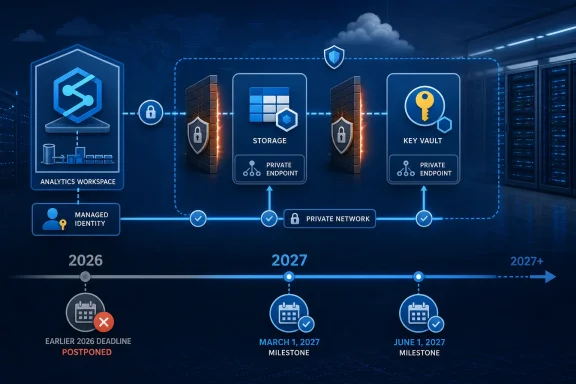
Microsoft has postponed the retirement of the Azure Synapse Analytics trusted-services firewall exception, so the earlier 2026 cutover date should no longer drive outage planning. Microsoft Q&A product-team guidance posted July 9 says a new workspace-level security setting will be available before March 1, 2027, and network-scoped access becomes the default beginning June 1, 2027.
Affected teams should inventory managed-identity Synapse access to firewalled Azure Storage accounts and Azure Key Vaults, identify workspaces created without a Managed Virtual Network, and plan against the pre-March 1 and June 1, 2027 milestones rather than the superseded date in older notices.
The original notification concerned a specific access pattern: Azure Synapse using managed identity to reach firewalled Azure Storage or Azure Key Vault through the trusted-services exception. It did not announce the retirement of every Synapse connectivity option, every managed-identity flow, or every workspace without a Managed VNet.
That distinction matters when administrators reconcile the original notification with the July 9 update. An organization working from the older notice may still have emergency changes, migration deadlines, or risk exceptions tied to a date Microsoft has since postponed.
Microsoft Q&A product-team guidance establishes two replacement milestones:
The useful conclusion is narrower: there is no immediate retirement event based on the old notice, but organizations should not treat the postponement as cancellation. The trusted-services dependency remains something teams need to identify and either migrate or deliberately retain under Microsoft’s forthcoming controls.
Exact Azure Resource Graph queries should not be copied from unverified examples. Before using an executable query, confirm the relevant resource properties and schemas against current Microsoft documentation for Azure Resource Graph and the applicable resource provider.
In the meantime, build the inventory from deployed configuration and observed relationships. For each Synapse workspace, record:
Administrators should also distinguish configuration evidence from successful workload evidence. A linked service may exist without being active, while a scheduled workload may use a connection that is not obvious from a quick portal review. The inventory should therefore be reviewed with the workspace and application owners who can identify the production path.
Prioritize workspaces that meet all of these conditions:
Administrators should therefore treat the setting as a compatibility and transition control until Microsoft publishes the final technical documentation. The option may help workloads continue operating during the transition, but it should not be described as equivalent to private network connectivity or as a substitute for reviewing firewall architecture.
Assign an owner to every planned use of the previous-token option. Record why it is needed, which workload depends on it, and when the decision will be reviewed. Otherwise, a temporary compatibility choice can become an undocumented permanent dependency.
WindowsForum’s reports on the October 2025 Azure Front Door outage showed why this inventory matters operationally: when many workloads depend on one shared control, teams need to know that dependency before a control-plane change or failure removes it. The Front Door incident does not determine whether a Synapse workspace is affected, but it reinforces the practical value of mapping shared dependencies and preparing an alternative path.
That makes the Managed VNet field the most important dividing line in the inventory. Teams should not assume that every workspace can adopt managed private endpoints through a simple in-place configuration change.
For a workspace already using Managed VNet, administrators can evaluate Microsoft’s managed private endpoint model and the target resource’s networking requirements. For a workspace created without Managed VNet, adopting that architecture may mean creating a different workspace rather than changing the existing one.
The supplied Microsoft guidance does not define the complete scope of such a migration, so teams should assess their own deployments instead of relying on a universal checklist. At minimum, the owner should determine what must be recreated, retested, or redirected before approving a new-workspace strategy.
This is where the postponement provides real value. Organizations have time to compare the cost of a workspace change with the risk of retaining the prior behavior. They do not need to make that decision as an emergency response to the date in the original notification.
The decision should nevertheless be made before the June 1, 2027 default change. Waiting for the final portal control to appear may leave too little time for organizations whose preferred network design requires a new workspace.
First, choose a nonproduction or otherwise controlled environment that represents the intended Synapse and target-resource configuration. Testing only from an administrator’s workstation cannot demonstrate that the Synapse workload itself will succeed.
Second, verify the exact connection being changed. Record the workspace identity, linked service, target resource, firewall posture, and expected network model. This helps teams separate identity authorization failures from network-policy failures.
Third, run representative workload operations rather than relying exclusively on a basic connection test. Select tests that reflect what the affected production workload actually does, especially where it reads from Storage or retrieves secrets from Key Vault.
Fourth, monitor the Synapse workload and target resource during the test. Preserve enough evidence to show which configuration was tested and whether the trusted-services dependency was still present.
Finally, schedule production changes through the organization’s normal change process. WindowsForum recommends keeping the previous configuration available until the team has validated the intended workload path, where organizational policy and Microsoft’s supported configuration allow that approach.
These recommendations deliberately stop short of prescribing endpoint approval, DNS, Spark, SQL, cutover, or rollback procedures. Those details depend on the deployed architecture and should be taken from the applicable Microsoft product documentation and the organization’s own change controls.
Before March 1, 2027, teams should aim to have:
Affected teams should inventory managed-identity Synapse access to firewalled Azure Storage accounts and Azure Key Vaults, identify workspaces created without a Managed Virtual Network, and plan against the pre-March 1 and June 1, 2027 milestones rather than the superseded date in older notices.
 The Earlier Cutover Date No Longer Applies
The original notification concerned a specific access pattern: Azure Synapse using managed identity to reach firewalled Azure Storage or Azure Key Vault through the trusted-services exception. It did not announce the retirement of every Synapse connectivity option, every managed-identity flow, or every workspace without a Managed VNet.That distinction matters when administrators reconcile the original notification with the July 9 update. An organization working from the older notice may still have emergency changes, migration deadlines, or risk exceptions tied to a date Microsoft has since postponed.
Microsoft Q&A product-team guidance establishes two replacement milestones:
- The new workspace-level security setting will be available before March 1, 2027.
- Network-scoped access becomes the default beginning June 1, 2027, with an option to use the previous token behavior where required.
The useful conclusion is narrower: there is no immediate retirement event based on the old notice, but organizations should not treat the postponement as cancellation. The trusted-services dependency remains something teams need to identify and either migrate or deliberately retain under Microsoft’s forthcoming controls.
Inventory the Dependency, Not Just the Checkbox
The first task is to identify workspaces that may rely on the affected combination. Looking only for Storage accounts or Key Vaults that allow trusted Microsoft services will create false positives. The presence of that setting does not prove that Synapse uses it, and it does not identify which workspace, identity, linked service, or workload depends on it.Exact Azure Resource Graph queries should not be copied from unverified examples. Before using an executable query, confirm the relevant resource properties and schemas against current Microsoft documentation for Azure Resource Graph and the applicable resource provider.
In the meantime, build the inventory from deployed configuration and observed relationships. For each Synapse workspace, record:
- The workspace and owning subscription.
- Whether it uses a system-assigned or user-assigned managed identity for the relevant connection.
- The linked Storage accounts and Key Vaults.
- Whether those target resources are protected by firewall rules.
- Whether the trusted-services exception is enabled.
- Whether the Synapse workspace was created with a Managed workspace Virtual Network.
- The workload owner and the team responsible for the target resource.
- Whether the connection has been confirmed as dependent on the trusted-services route.
Administrators should also distinguish configuration evidence from successful workload evidence. A linked service may exist without being active, while a scheduled workload may use a connection that is not obvious from a quick portal review. The inventory should therefore be reviewed with the workspace and application owners who can identify the production path.
Prioritize workspaces that meet all of these conditions:
- Synapse uses managed identity to access Storage or Key Vault.
- The target resource is firewalled.
- Access relies on the trusted-services exception.
- The workspace does not have a Managed VNet.
Treat the New Setting as Transition Control
The July 9 product-team guidance establishes that Microsoft will introduce a workspace-level security setting, make network-scoped access the default, and permit an opt-in to the previous token behavior. It does not explain the underlying token mechanism in enough detail to claim precisely how Synapse presents or scopes an identity.Administrators should therefore treat the setting as a compatibility and transition control until Microsoft publishes the final technical documentation. The option may help workloads continue operating during the transition, but it should not be described as equivalent to private network connectivity or as a substitute for reviewing firewall architecture.
Assign an owner to every planned use of the previous-token option. Record why it is needed, which workload depends on it, and when the decision will be reviewed. Otherwise, a temporary compatibility choice can become an undocumented permanent dependency.
WindowsForum’s reports on the October 2025 Azure Front Door outage showed why this inventory matters operationally: when many workloads depend on one shared control, teams need to know that dependency before a control-plane change or failure removes it. The Front Door incident does not determine whether a Synapse workspace is affected, but it reinforces the practical value of mapping shared dependencies and preparing an alternative path.
Managed VNet Is the Critical Architecture Decision
Microsoft Learn states that a Managed workspace Virtual Network cannot be added to an existing Azure Synapse workspace after creation. Microsoft also states that managed private endpoints require a Managed workspace VNet.That makes the Managed VNet field the most important dividing line in the inventory. Teams should not assume that every workspace can adopt managed private endpoints through a simple in-place configuration change.
For a workspace already using Managed VNet, administrators can evaluate Microsoft’s managed private endpoint model and the target resource’s networking requirements. For a workspace created without Managed VNet, adopting that architecture may mean creating a different workspace rather than changing the existing one.
The supplied Microsoft guidance does not define the complete scope of such a migration, so teams should assess their own deployments instead of relying on a universal checklist. At minimum, the owner should determine what must be recreated, retested, or redirected before approving a new-workspace strategy.
This is where the postponement provides real value. Organizations have time to compare the cost of a workspace change with the risk of retaining the prior behavior. They do not need to make that decision as an emergency response to the date in the original notification.
The decision should nevertheless be made before the June 1, 2027 default change. Waiting for the final portal control to appear may leave too little time for organizations whose preferred network design requires a new workspace.
Validate With Representative Workloads
Microsoft’s July 9 guidance does not prescribe a complete migration test procedure. The following is WindowsForum operational advice, not a Microsoft-documented requirement.First, choose a nonproduction or otherwise controlled environment that represents the intended Synapse and target-resource configuration. Testing only from an administrator’s workstation cannot demonstrate that the Synapse workload itself will succeed.
Second, verify the exact connection being changed. Record the workspace identity, linked service, target resource, firewall posture, and expected network model. This helps teams separate identity authorization failures from network-policy failures.
Third, run representative workload operations rather than relying exclusively on a basic connection test. Select tests that reflect what the affected production workload actually does, especially where it reads from Storage or retrieves secrets from Key Vault.
Fourth, monitor the Synapse workload and target resource during the test. Preserve enough evidence to show which configuration was tested and whether the trusted-services dependency was still present.
Finally, schedule production changes through the organization’s normal change process. WindowsForum recommends keeping the previous configuration available until the team has validated the intended workload path, where organizational policy and Microsoft’s supported configuration allow that approach.
These recommendations deliberately stop short of prescribing endpoint approval, DNS, Spark, SQL, cutover, or rollback procedures. Those details depend on the deployed architecture and should be taken from the applicable Microsoft product documentation and the organization’s own change controls.
Plan Around Microsoft’s New Milestones
Administrators should retain the original notification as historical evidence of which subscriptions or resources Microsoft considered potentially exposed. Deadline planning, however, should use the July 9 Microsoft Q&A product-team guidance.Before March 1, 2027, teams should aim to have:
- An owner for each potentially affected workspace.
- A confirmed map of Synapse-to-Storage and Synapse-to-Key Vault dependencies.
- The Managed VNet status of each workspace.
- A preliminary decision to migrate, retain the previous behavior temporarily, or investigate further.
- A process for evaluating the new workspace setting when Microsoft releases it.
- Tested the intended configuration for active workloads.
- Documented any use of the previous-token option.
- Assigned review dates to temporary compatibility decisions.
- Updated operational documentation and change records to remove the obsolete deadline.
- Confirmed that workload owners understand the network-scoped default.
Frequently Asked Questions
Is the Synapse trusted-services exception being retired immediately?
No. Microsoft Q&A product-team guidance posted July 9 says the retirement has been postponed. The new workspace-level security setting is due before March 1, 2027, and network-scoped access becomes the default beginning June 1, 2027.Which Synapse workloads should be reviewed?
Review workloads in which Azure Synapse uses managed identity to access a firewalled Azure Storage account or Azure Key Vault through the trusted-services exception. The presence of the exception alone does not prove that a workspace depends on it.Does every affected workspace need to be rebuilt?
Not necessarily. The key question is whether the organization chooses an architecture that requires Managed VNet. Microsoft states that Managed VNet cannot be added to an existing workspace after creation and that managed private endpoints require it. A workspace created without Managed VNet therefore needs special attention during planning.Is the previous-token option a permanent replacement for migration?
Microsoft’s guidance confirms that administrators can opt in to the previous token behavior where required, but it does not establish that this should be the permanent design. Organizations should treat it as a documented decision, assign an owner, and review it after Microsoft publishes the full implementation guidance.Can Azure Resource Graph identify every affected workload?
Resource Graph may help locate candidate resources, but infrastructure properties alone cannot prove that an active Synapse workload depends on the trusted-services exception. Confirm exact query schemas with Microsoft documentation and validate candidates against linked services, identities, resource firewalls, and workload-owner knowledge.What should administrators do now?
Inventory the actual Synapse-to-Storage and Synapse-to-Key Vault relationships, identify workspaces without Managed VNet, assign owners, and prepare to evaluate the new setting before March 1, 2027. Complete testing and exception decisions before network-scoped access becomes the default on June 1, 2027.References
- Primary source: learn.microsoft.com
Synapse workspace:2026年8月1日まで プライベートリンク移行について - Microsoft Q&A
Microsoft社より、下記のメールを受信いたしました。 Transition your Azure Synapse Analytics workspaces to private links before 1 August 2026 You're receiving this email because you're using one or more Azure products with a managed identity and firewall exception for trusted…learn.microsoft.com - Independent coverage: alithya.com
Azure Synapse is retiring trusted-services access on August 1, 2026 | Alithya
Take action now to ensure no downtime to Azure Synapse workspaces. Get help with remediation for a seamless D365 migration.www.alithya.com - Primary source: WindowsForum
Azure Front Door Outage Oct 29 2025: Lessons in Hyperscale Control Plane Risk | Windows Forum
A high‑visibility outage on October 29, 2025 knocked large swaths of Microsoft Azure — including Azure Front Door (AFD), Microsoft 365 web surfaces, Xbox...windowsforum.com