

Azure Virtual Desktop (classic) retires on September 30, 2026, and most organizations should not treat the deadline as a one-click control-plane upgrade. Use Microsoft’s automated migration for straightforward, documented host pools; choose a parallel Azure Resource Manager-integrated rebuild for complex environments with extensive RemoteApp publishing, large user populations, fragile access policies, or configurations that took months to stabilize.
Microsoft states in its Q&A retirement guidance that Azure Virtual Desktop (classic) will no longer be supported after the cutoff and directs customers to migrate to Azure Resource Manager-integrated Azure Virtual Desktop. The immediate task is to identify every classic host pool, assign an accountable owner, and decide whether each workload should be migrated, rebuilt, retired, or investigated.
The following matrix is WindowsForum’s operational recommendation. Microsoft specifically recommends migrating in small groups and cautions that complex configurations or environments with many users can require substantial manual work.
Azure Virtual Desktop with Azure Resource Manager integration became generally available in July 2020. The earlier Fall 2019 release was subsequently designated Azure Virtual Desktop (classic).
The reliable distinction is that classic does not use the current Azure Resource Manager-integrated model. Microsoft’s retirement Q&A distinguishes the classic and Azure Resource Manager experiences, so administrators should not assume that a view of modern AVD resources proves no classic deployment remains.
Use Microsoft’s automatic migration guidance, classic-environment records, billing data, support records, and service-owner interviews to establish the inventory. Portal labels and navigation can change; in the current Azure portal experience, reconcile findings with the Azure Virtual Desktop views for host pools, application groups, workspaces, and session hosts.
Do not build an oversized discovery workbook that nobody can finish. Create one downloadable-style evidence record per host pool containing this minimum set:
Similar names in classic and modern environments do not establish that a workload was migrated. Evidence must connect the users, published resources, hosts, profiles, policies, and approval chain.
WindowsForum user reports about managed service providers moving Citrix workloads to AVD reinforce the operational point: the control plane is only one part of a usable desktop service. Other WindowsForum lifecycle discussions, including the reported NVv4 retirement, are useful prompts to inspect VM sizing and application compatibility separately. They do not change the AVD classic retirement scope or prove that a particular host pool is ready to move.
Use the minimum evidence set as the baseline, then run a concrete pilot with pass/fail criteria:
Microsoft establishes that automated migration uses PowerShell, but administrators should obtain the current commands, parameters, supported operation values, permissions, eligibility rules, and prerequisites directly from the current Microsoft procedure. Do not copy an unverified command template from a forum post or assume that an older module example remains valid.
Before making changes, confirm in Microsoft’s current automatic-migration documentation:
After the documented operation, inspect the resulting Azure Resource Manager-integrated resources in the current Azure Virtual Desktop portal experience. Verify host pools, application groups, workspace associations, assignments, and registered session hosts. Because portal navigation and labels can evolve, use Microsoft’s current interface documentation rather than treating any fixed click path as permanent. Then complete the pilot acceptance checklist through the real client and feed.
The rebuild path creates modern host pools, application groups, workspaces, assignments, and session hosts beside classic production. Coexistence temporarily costs more, but it creates a clean testing boundary and avoids restructuring the only working environment.
Prefer a parallel rebuild when several of these conditions apply:
WindowsForum users discussing Citrix-to-AVD projects describe the same need for parallel validation: publishing an application is not enough if identity, profiles, networking, client behavior, or support procedures fail. Likewise, WindowsForum’s NVv4 retirement report is a reason to review GPU dependencies, but VM-family migration requires its own design, compatibility evidence, and rollback plan.
A practical sequence is:
Rollback triggers should be measurable. Examples include failure of a critical application workflow, profile corruption affecting any pilot user, widespread feed-assignment errors, an access-policy result that differs from the approved design, or session-launch failure beyond the owner’s stated tolerance. Avoid vague triggers such as “poor experience.”
Adjacent Azure lifecycle risks should remain separate workstreams. A VM reservation, GPU-family retirement, image change, or application upgrade may influence migration planning, but none proves that the AVD control-plane migration is complete. If multiple changes must coincide, give each one its own owner, evidence, acceptance criteria, and rollback decision.
Any pool still marked “unknown owner,” “testing,” or “operation completed” near the retirement date remains an operational risk. Escalate it to both the Azure platform owner and the business owner whose users depend on the service.
By September 30, 2026, the meaningful metric will not be how many classic entries disappeared. It will be how many users can reach the required applications, profiles, and network resources through Azure Resource Manager-integrated Azure Virtual Desktop—with tested policies, visible ownership, recorded approval, and a rollback path retired deliberately rather than lost accidentally.
Microsoft states in its Q&A retirement guidance that Azure Virtual Desktop (classic) will no longer be supported after the cutoff and directs customers to migrate to Azure Resource Manager-integrated Azure Virtual Desktop. The immediate task is to identify every classic host pool, assign an accountable owner, and decide whether each workload should be migrated, rebuilt, retired, or investigated.
The following matrix is WindowsForum’s operational recommendation. Microsoft specifically recommends migrating in small groups and cautions that complex configurations or environments with many users can require substantial manual work.
| Deployment characteristic | Recommended path | Why | Minimum cutover method |
|---|---|---|---|
| Well-documented, limited complexity, understood assignments | Automated migration | Minimizes rebuilding when Microsoft’s current eligibility rules are met | Representative pilot, staged user groups, owner approval |
| Complex RemoteApps, fragile policies, high user count | Parallel rebuild | Isolates change from the working environment | New modern resources, pilot hosts, wave-based reassignment |
| Obsolete or unused workload | Retire | Avoids migrating unnecessary cost and risk | Confirm no active users, obtain owner approval, preserve required records |
| Unknown owner, dependencies, or usage | Investigate | Migration without evidence can break an unidentified service | Hold changes until ownership and test coverage are established |
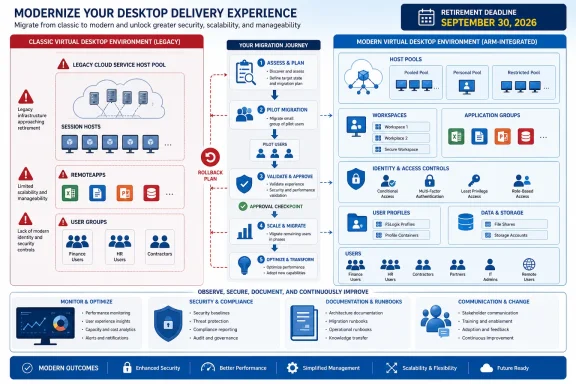 Find Classic Host Pools Before Planning the Move
Azure Virtual Desktop with Azure Resource Manager integration became generally available in July 2020. The earlier Fall 2019 release was subsequently designated Azure Virtual Desktop (classic).The reliable distinction is that classic does not use the current Azure Resource Manager-integrated model. Microsoft’s retirement Q&A distinguishes the classic and Azure Resource Manager experiences, so administrators should not assume that a view of modern AVD resources proves no classic deployment remains.
Use Microsoft’s automatic migration guidance, classic-environment records, billing data, support records, and service-owner interviews to establish the inventory. Portal labels and navigation can change; in the current Azure portal experience, reconcile findings with the Azure Virtual Desktop views for host pools, application groups, workspaces, and session hosts.
Do not build an oversized discovery workbook that nobody can finish. Create one downloadable-style evidence record per host pool containing this minimum set:
| Required evidence | What to capture |
|---|---|
| Owner | Named technical owner and accountable business owner |
| User/group assignment export | Current users and Microsoft Entra groups, with export date |
| Published app list | Desktops and RemoteApps visible to users |
| Host count and state | Total hosts and whether each is available, unavailable, draining, or otherwise impaired |
| Profile dependency | Profile technology, storage location, and responsible team |
| Conditional Access policy IDs | Policy identifiers affecting AVD access—not only policy names |
| Test users | Representative users covering applications, devices, locations, and access conditions |
| Rollback trigger | Measurable condition that stops or reverses cutover |
| Approval owner | Person authorized to accept production or invoke rollback |
WindowsForum user reports about managed service providers moving Citrix workloads to AVD reinforce the operational point: the control plane is only one part of a usable desktop service. Other WindowsForum lifecycle discussions, including the reported NVv4 retirement, are useful prompts to inspect VM sizing and application compatibility separately. They do not change the AVD classic retirement scope or prove that a particular host pool is ready to move.
Separate Control-Plane Migration From Workload Validation
A reported successful migration operation is not production validation. Production acceptance requires evidence that users can discover the correct resources, authenticate under the expected policies, launch required desktops or RemoteApps, load the right profile, and reach necessary network services.Use the minimum evidence set as the baseline, then run a concrete pilot with pass/fail criteria:
- Feed discovery: Pass only if every pilot user sees exactly the assigned desktop and RemoteApps, with no missing or unintended resources.
- Authentication: Pass only if expected multifactor authentication, device, location, and sign-in controls apply; record the relevant Conditional Access policy IDs.
- Session launch: Pass only if each test user can establish a session through the approved production client without repeated or unexplained failures.
- Profiles: Pass only if the expected profile loads and a test change persists—or intentionally does not persist—according to the documented design.
- Applications: Pass only if every business-critical application launches and completes a representative transaction or workflow.
- Network dependencies: Pass only if required storage, databases, line-of-business endpoints, printing, and management paths are reachable.
- User experience: Pass only if logon time and interactive behavior stay within the service owner’s preapproved tolerance.
- Operations: Pass only if monitoring detects the pilot sessions and support staff can identify the user, host, application group, and failure path.
- Rollback: Pass only if the team can execute the documented rollback before the approved window expires.
- Approval: Pass only when the named technical and business approval owners sign the pilot record.
Use Microsoft’s Automated Migration Only Within Its Current Scope
Automated migration is appropriate when the classic inventory is complete, assignments are understood, published resources can be mapped without redesign, and a representative pilot group can test the result.Microsoft establishes that automated migration uses PowerShell, but administrators should obtain the current commands, parameters, supported operation values, permissions, eligibility rules, and prerequisites directly from the current Microsoft procedure. Do not copy an unverified command template from a forum post or assume that an older module example remains valid.
Before making changes, confirm in Microsoft’s current automatic-migration documentation:
- Whether the specific classic host pool is eligible.
- Which identities and Azure permissions are required.
- Which PowerShell components and versions Microsoft currently supports.
- Which target-resource decisions must be made in advance.
- What the operation migrates and, equally important, what remains outside its scope.
- How Microsoft defines start, monitoring, completion, failure, and recovery for the current process.
- What actions could affect existing host registrations, assignments, or rollback options.
After the documented operation, inspect the resulting Azure Resource Manager-integrated resources in the current Azure Virtual Desktop portal experience. Verify host pools, application groups, workspace associations, assignments, and registered session hosts. Because portal navigation and labels can evolve, use Microsoft’s current interface documentation rather than treating any fixed click path as permanent. Then complete the pilot acceptance checklist through the real client and feed.
Parallel Rebuilds Reduce Risk in Fragile Environments
A parallel Azure Resource Manager-integrated rebuild is safer when the existing deployment is difficult to explain, reproduce, or support. Microsoft cautions that advanced configurations and environments serving many users can require complex manual work. The decision to prefer a rebuild in those cases is WindowsForum’s operational recommendation, not a Microsoft mandate.The rebuild path creates modern host pools, application groups, workspaces, assignments, and session hosts beside classic production. Coexistence temporarily costs more, but it creates a clean testing boundary and avoids restructuring the only working environment.
Prefer a parallel rebuild when several of these conditions apply:
- The pool serves a large or operationally critical population.
- RemoteApp publishing contains undocumented dependencies.
- Session-host drift makes existing machines difficult to trust.
- Assignments are inconsistent or tied to legacy practices.
- Conditional Access requires substantial redesign.
- Images, profiles, networking, or management tooling must change.
- No credible rollback route exists.
- The migration is also becoming a VM-family or application-platform redesign.
WindowsForum users discussing Citrix-to-AVD projects describe the same need for parallel validation: publishing an application is not enough if identity, profiles, networking, client behavior, or support procedures fail. Likewise, WindowsForum’s NVv4 retirement report is a reason to review GPU dependencies, but VM-family migration requires its own design, compatibility evidence, and rollback plan.
Staged Cutover Keeps the Working Environment Intact
Microsoft recommends moving session hosts and users in small groups to reduce disruption. Apply that guidance whether the chosen path is automated migration or a parallel rebuild.A practical sequence is:
- Identify every classic pool and assign an owner, approval owner, risk rating, and disposition.
- Complete the minimum evidence set, including assignment exports and Conditional Access policy IDs.
- Create or migrate the modern host pool, application groups, workspace association, and required assignments using the current Microsoft procedure.
- Keep working classic access intact unless Microsoft’s documented method requires a specific change.
- Prepare suitable pilot capacity and named test users.
- Run the acceptance checklist and record each result as pass, fail, or approved exception.
- Stop if the documented rollback trigger is reached.
- Expand through controlled waves while retaining enough capacity and time to reverse the move.
- Freeze avoidable configuration changes before the final wave.
- Obtain technical and business approval before removing classic configuration.
Rollback triggers should be measurable. Examples include failure of a critical application workflow, profile corruption affecting any pilot user, widespread feed-assignment errors, an access-policy result that differs from the approved design, or session-launch failure beyond the owner’s stated tolerance. Avoid vague triggers such as “poor experience.”
Retirement Reporting Must Track User Experience
Track discovery, evidence completion, owner approval, object creation, workspace association, session-host state, identity assignments, Conditional Access testing, pilot acceptance, production cutover, rollback expiry, and classic decommissioning as separate milestones.Adjacent Azure lifecycle risks should remain separate workstreams. A VM reservation, GPU-family retirement, image change, or application upgrade may influence migration planning, but none proves that the AVD control-plane migration is complete. If multiple changes must coincide, give each one its own owner, evidence, acceptance criteria, and rollback decision.
Any pool still marked “unknown owner,” “testing,” or “operation completed” near the retirement date remains an operational risk. Escalate it to both the Azure platform owner and the business owner whose users depend on the service.
By September 30, 2026, the meaningful metric will not be how many classic entries disappeared. It will be how many users can reach the required applications, profiles, and network resources through Azure Resource Manager-integrated Azure Virtual Desktop—with tested policies, visible ownership, recorded approval, and a rollback path retired deliberately rather than lost accidentally.
Frequently Asked Questions
When does Azure Virtual Desktop (classic) retire?
Microsoft’s Q&A retirement guidance gives September 30, 2026 as the retirement date.Should every classic host pool use automated migration?
No. WindowsForum recommends automated migration for eligible, well-understood deployments and a parallel rebuild for complex or fragile environments. Confirm eligibility and current prerequisites in Microsoft’s automatic-migration documentation.Where should administrators validate the migrated resources?
Inspect the current Azure Virtual Desktop portal views for host pools, application groups, workspaces, assignments, and session hosts. Portal labels can change, and portal objects are only part of validation; users must test the actual client, feed, applications, profiles, policies, and network paths.Does a successful migration command mean the workload is finished?
No. Production completion requires the pilot acceptance criteria to pass and the named technical and business owners to approve the result.What should happen first?
Inventory every classic host pool and complete the minimum evidence set: owner, user/group assignment export, published app list, host count and state, profile dependency, Conditional Access policy IDs, test users, rollback trigger, and approval owner. Then assign one of four dispositions: automate, rebuild, retire, or investigate.References
- Primary source: learn.microsoft.com
What's new in Azure Virtual Desktop? - Azure - Azure Virtual Desktop | Microsoft Learn
Learn about new features and product updates for Azure Virtual Desktop.learn.microsoft.com - Primary source: WindowsForum
Azure Reserved VM Instance Cutoff July 1, 2026: Migration Deadline for Legacy SKUs | Windows Forum
Microsoft will stop new purchases and renewals of Azure Reserved VM Instances for select older virtual-machine series on July 1, 2026, affecting one-year...windowsforum.com