

Microsoft has opened a new hybrid chapter for desktop virtualization: Azure Virtual Desktop (AVD) can now use Azure Arc–enabled servers as session hosts, letting organizations run cloud‑managed virtual desktops on existing on‑premises hypervisors, physical Windows Servers, and HCI platforms such as Nutanix AHV, VMware vSphere and Microsoft Hyper‑V.
Microsoft launched Azure Virtual Desktop in 2019 as a cloud‑native VDI broker and management plane. Until recently, customers who wanted to keep session hosts on premises had limited options: Azure Local (Azure Stack HCI / Azure Local) offered an on‑premises end‑to‑end Microsoft solution, but broader support for arbitrary on‑prem hypervisors and physical servers was constrained. The new hybrid capability — announced in limited preview at Microsoft Ignite 2025 — changes that by bridging the AVD control plane in Azure with a data plane comprised of Arc‑enabled machines anywhere the Arc agent can run. At its core, the feature treats each on‑prem VM or physical server that is connected to Azure via Azure Arc as a first‑class AVD session host. That allows organizations to keep desktop workloads local for latency, data residency, or regulatory reasons while centralizing brokering, identity integration, policy, and monitoring in Azure.
However, this flexibility comes with caveats: the preview omits Windows 11 Enterprise Multi‑Session, relies on partner tooling for lifecycle management, and leaves pricing and certain failure‑mode behaviors unspecified. The hybrid AVD story is promising, but success will depend on careful pilot testing, rigorous partner evaluation, and conservative cost planning — exactly the activities organizations should prioritize during the preview.
Source: infoq.com Azure Virtual Desktop Goes Fully Hybrid with Arc-Enabled Servers
 Background
Microsoft launched Azure Virtual Desktop in 2019 as a cloud‑native VDI broker and management plane. Until recently, customers who wanted to keep session hosts on premises had limited options: Azure Local (Azure Stack HCI / Azure Local) offered an on‑premises end‑to‑end Microsoft solution, but broader support for arbitrary on‑prem hypervisors and physical servers was constrained. The new hybrid capability — announced in limited preview at Microsoft Ignite 2025 — changes that by bridging the AVD control plane in Azure with a data plane comprised of Arc‑enabled machines anywhere the Arc agent can run. At its core, the feature treats each on‑prem VM or physical server that is connected to Azure via Azure Arc as a first‑class AVD session host. That allows organizations to keep desktop workloads local for latency, data residency, or regulatory reasons while centralizing brokering, identity integration, policy, and monitoring in Azure. What Microsoft actually announced
Key points of the preview
- On‑premises Arc‑enabled servers can be configured as AVD session hosts, expanding AVD hybrid reach beyond Azure Local to Hyper‑V, Nutanix AHV, VMware vSphere, physical Windows Servers and other environments supported by Azure Arc.
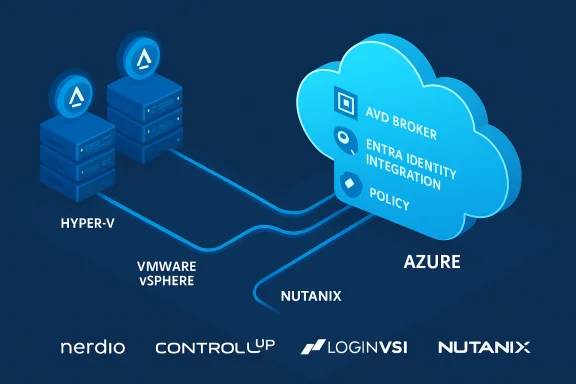
- The AVD control plane (brokering, workspace assignment, identity integration with Microsoft Entra, and management) remains in Azure; session hosts are managed as Arc resources. This creates a split between a cloud control plane and a decentralized data plane.
- Microsoft is launching the capability as a limited preview with partner integrations from ControlUp, LoginVSI, Nerdio, and Nutanix to deliver lifecycle, provisioning, and operational tooling for on‑prem VDI hosts.
- Supported guest OSes for the preview include Windows 11 Enterprise and Windows Server 2016–2025; Windows 11 Enterprise Multi‑Session is not supported in the hybrid preview at announcement.
How it works — the architecture, explained
The control plane / data plane split
The hybrid model follows the common Azure Arc pattern: Azure provides a unified management and security control plane, and the Arc agent projects on‑prem machines into Azure as Arc‑enabled servers. Once Arc‑connected, those servers can be targeted by Azure services — in this case, AVD — so they appear to the AVD broker as session hosts even though they run outside Azure. That means the brokering, workspace and identity logic runs in Azure while rendering and I/O stay local.Partner role and lifecycle
Microsoft’s announcement makes an explicit design choice: VM provisioning, image lifecycle, patching, and scaling in non‑Azure hypervisors are expected to be handled by partner tooling rather than a single Microsoft‑provided agent for every hypervisor. The early partner list includes Nerdio, ControlUp, LoginVSI and Nutanix — vendors that bring automation, performance testing and HCI integration to the host lifecycle. This creates a partner‑led operational model for customers who want to keep their existing infrastructure.Why this matters: benefits for enterprises
- Data residency and compliance: Industries such as financial services, healthcare, and government that must keep data on local networks can run session hosts where the data resides while still using Azure’s centralized control features. This is a strong win for regulatory and sovereignty requirements.
- Hypervisor choice and investment protection: Organizations that standardized on Nutanix AHV, VMware vSphere or Hyper‑V no longer need to rip and replace infrastructure to adopt AVD. Running AVD session hosts on existing HCI nodes preserves operational investments.
- Unified management and identity: Centralized brokering, Microsoft Entra identity integration, and Azure policy/monitoring give enterprises the governance and visibility they rely on — across cloud, edge and on‑premises resources.
- Edge and latency‑sensitive scenarios: For remote offices, edge locations, or graphics/voice workloads requiring low jitter and latency, keeping session hosts on local infrastructure while brokering and management remain in Azure can materially improve user experience.
- Operational flexibility: The hybrid model enables staged migrations — customers can start with on‑prem session hosts and then move hosts to Azure when appropriate, using a consistent control plane across that journey.
Technical and operational considerations
Supported platforms and OS constraints
Microsoft’s preview explicitly supports Arc‑enabled servers that are Windows Server 2016 through 2025 and Windows 11 Enterprise (single‑session). Importantly, Windows 11 Enterprise Multi‑Session (the multi‑user variant popular in cloud‑native AVD scenarios) is not supported in the hybrid preview at the time of the announcement. That limitation affects consolidation density and some use cases that rely on multi‑session economics.Networking and connectivity
Arc‑enabled servers communicate with Azure through the Azure Connected Machine agent and require outbound connectivity to Azure endpoints. Organizations that route traffic through private endpoints, service endpoints, or strict outbound firewall rules must validate network paths to ensure the Arc agent and AVD control plane can communicate reliably. This is a practical dependency: loss of connectivity may prevent brokering and telemetry and complicate management.Lifecycle management and tooling
Because Microsoft expects partners to provide provisioning, golden‑image management, scaling and driver lifecycle (notably GPU driver management for graphics workloads), customers must evaluate partner maturity and integration depth. If an organization lacks a partner solution that fully automates their VDI lifecycle, they will need to build operational automation — a nontrivial effort for large estates.Licensing, activation and billing
Microsoft’s announcement leaves General Availability (GA) timing and precise billing/licensing details unspecified. Early community discussion highlights that licensing and how Microsoft will charge for cloud‑brokered on‑prem hosts will be a key procurement decision for customers planning migration or hybrid deployments. Customers should treat cost modeling and licensing as first‑class evaluation criteria during the preview.Security and governance
Centralized security posture through Azure Arc
Arc projects on‑prem machines into Azure resource groups and subscriptions, enabling Azure Policy, Microsoft Defender for Cloud, Sentinel and other governance tools to manage non‑Azure servers consistently alongside Azure VMs. That unified security posture is a major benefit for compliance teams because it reduces toolchain fragmentation.Data-in-place vs. data-in-flight
Running session hosts locally keeps application data on‑premises, reducing exposure of data residency to the cloud. However, control traffic and some management telemetry still flow to Azure. Organizations should map what data is confined to the data plane and what metadata or telemetry traverses to Azure during operations to satisfy compliance and privacy teams. This distinction must be documented and validated during pilots.Identity and access controls
AVD hybrid uses Microsoft Entra for identity and conditional access, which centralizes authentication and SSO. That simplifies policy enforcement for hybrid resources, but teams must ensure identity flows (especially in disconnected or edge locations) meet their availability and recovery objectives. Conditional access, device posture, and MFA should be part of the initial security baseline.Real‑world implications and partner ecosystem
Nutanix and the HCI angle
Nutanix publicly confirmed support for AVD on AHV, emphasizing that customers can run session hosts on Nutanix Cloud Platform while using AVD’s Azure brokering. Nutanix frames this as an operational win for performance‑sensitive workloads that benefit from HCI locality. Those claims are consistent with Microsoft’s hybrid architecture, but performance benefits will vary by workload, NIC, storage and GPU configuration and should be validated in each environment. Vendor performance claims should be proven in pilot tests.Third‑party lifecycle and monitoring vendors
Vendors like Nerdio, ControlUp and LoginVSI are positioned to fill the operational gap: automating host provisioning, scaling, testing and performance monitoring across on‑prem hosts and Azure. Early integrations will determine how seamless the hybrid management story becomes for large estates. Customers should evaluate partner roadmaps, supported hypervisors, and OEM integrations before committing to a single approach.Deployment checklist — minimum path to preview
- Inventory current VDI estate and identify session host candidates (VMs on AHV, vSphere, Hyper‑V, or physical Windows Servers).
- Validate OS compatibility (Windows 11 Enterprise single‑session and Windows Server 2016–2025 supported for preview).
- Onboard selected machines to Azure Arc (install the Connected Machine / Arc agent and validate Azure Resource ID assignment).
- Plan networking: ensure outbound connectivity, private endpoint paths, and firewall rules allow Arc and AVD endpoints.
- Engage partner tooling for image lifecycle, scaling, and operational automation (Nerdio, ControlUp, LoginVSI, Nutanix).
- Validate security posture: apply Azure Policy, Defender for Cloud and Sentinel coverage to Arc resources.
- Run pilot with representative user workloads (productivity, Teams/voice, graphics if applicable) and measure latency, bandwidth, and user experience.
- Model cost: include partner licensing, on‑prem infrastructure ownership, and any new Microsoft licensing implications as GA is announced.
Strengths: what Microsoft got right
- Practical hybrid model: Rather than forcing customers into a single on‑prem Microsoft stack, the Arc pattern supports multiple hypervisors and physical servers — matching real enterprise heterogeneity. This reduces migration friction.
- Centralized governance and identity: Moving management, identity and policy to Azure lets security and IT teams maintain a single pane of control for a distributed estate. That simplifies compliance and auditing.
- Partner‑centric operations: Allowing ecosystem players to provide lifecycle tools acknowledges that existing vendors already handle image and HCI operations; integrating them preserves established operational flows.
- Edge and latency use cases enabled: For distributed enterprises and regulated sectors, the ability to run session hosts locally while brokering centrally is a compelling architecture for performance and compliance.
Risks, open questions and caveats
- Windows 11 Enterprise Multi‑Session limitation: The lack of multi‑session support in the preview reduces density benefits and could make TCO calculations less favorable for organizations that relied on multi‑session consolidation in Azure. This limitation is significant and must be planned for in capacity models.
- Operational complexity and partner dependency: Shifting provisioning and lifecycle automation to partners can create variability in customer experience. Organizations will need to vet partner capabilities and SLAs carefully. This could increase integration work and vendor management overhead.
- Connectivity and resilience: The hybrid model depends on connectivity between Arc‑enabled servers and Azure. Disconnected or intermittently connected sites need a clear operational plan: what happens to session brokering if control plane connectivity is lost? Microsoft’s preview documentation does not fully outline offline behaviors, so customers should test failure modes.
- Costs and licensing model uncertainty: Microsoft has not provided GA billing details for cloud‑brokered on‑prem hosts. Cost modeling must include partner tooling, on‑prem infrastructure, and any future Microsoft charges — an uncertainty that impacts procurement decisions.
- Performance claims need proof: Vendors tout latency, Teams optimizations, and performance advantages for local hosting — all plausible, but highly environment‑dependent. These are vendor claims and should be validated through empirical testing in each target environment.
- Management surface area: Adding Arc agents across hundreds or thousands of hosts changes patching, agent management and troubleshooting. Some operations teams report variability in Arc agent stability at scale and should budget for potential support overhead. (Community experience with Arc in large estates has surfaced management edge cases.
Recommendations for IT leaders
- Treat the preview as a validation program rather than production‑ready GA. Use it to evaluate operational workflows, partner integration maturity, and user experience under real workload conditions.
- Prioritize pilot scenarios where data residency, latency or regulatory requirements are blocking cloud migration today — those are the highest‑value use cases for hybrid AVD.
- Engage with partner vendors early. Confirm automation capabilities for image management, driver updates (GPU/graphics stacks), scaling and telemetry across on‑prem hypervisors. Validate SLAs, upgrade policies, and support models.
- Model costs conservatively. Until Microsoft clarifies GA pricing and licensing details, include sensitivity analysis for scenarios where multi‑session is unavailable or where partner tooling increases operational expense.
- Test failure and disconnected modes. Simulate control‑plane outages and network partitions to understand recovery, session persistence and operational impacts.
Where to go from here
Organizations interested in the preview can sign up through Microsoft’s preview interest channels and should coordinate with their Microsoft account teams and preferred partners. Early adopters will play a pivotal role shaping partner integrations and Microsoft’s GA priorities. Expect Microsoft to refine OS support, scalability guidance and billing models based on preview feedback.Conclusion
Microsoft’s preview of Azure Virtual Desktop for hybrid environments represents a pragmatic leap: the AVD control plane remains cloud‑native while the session host data plane becomes portable and partner‑driven via Azure Arc. This model gives enterprises the flexibility to meet compliance and performance demands without abandoning centralized identity, policy and monitoring. The announcement is strategic and timely for organizations with mixed hypervisors or regulated workloads, and it extends the real‑world reach of cloud brokering into on‑prem data centers.However, this flexibility comes with caveats: the preview omits Windows 11 Enterprise Multi‑Session, relies on partner tooling for lifecycle management, and leaves pricing and certain failure‑mode behaviors unspecified. The hybrid AVD story is promising, but success will depend on careful pilot testing, rigorous partner evaluation, and conservative cost planning — exactly the activities organizations should prioritize during the preview.
Source: infoq.com Azure Virtual Desktop Goes Fully Hybrid with Arc-Enabled Servers
