

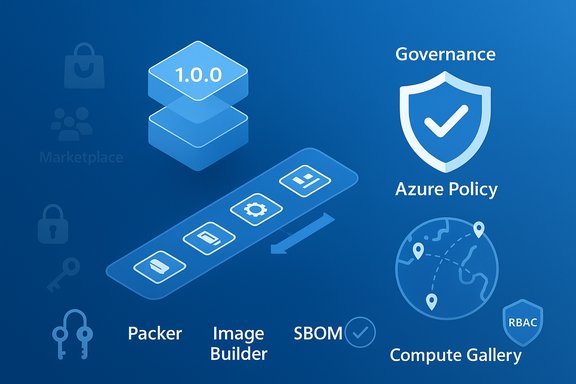
Microsoft Azure Images are the repeatable, auditable building blocks that let IT teams bake security, configuration, and compliance into every virtual machine before it ever boots — turning manual provisioning into a predictable, versioned artifact that scales from single‑server proof‑of‑concepts to enterprise fleets deployed across continents.
Background
Microsoft’s cloud-native model encourages teams to treat infrastructure as code and images as immutable artifacts. The article provided in the brief frames Azure Images as the backbone of cloud-first IT operations, emphasizing speed, consistency, security, and governance as the primary benefits of a disciplined image strategy. That summary accurately reflects modern best practices for VM lifecycle management and the way Azure products (Marketplace images, custom images, Compute Gallery, and image builders) are positioned to support them.This feature unpacks those claims, verifies key technical details against vendor documentation and independent tooling guidance, and offers practical analysis for platform engineers, security teams, and IT leaders planning an image-first strategy.
Overview: What exactly is an Azure Image?
An Azure Image is a pre-configured template used to create Azure Virtual Machines (VMs). At its core an image bundles:- An operating system (Windows Server, Windows client builds, or Linux distributions)
- Installed agents and runtime dependencies (monitoring, EDR, cloud-init/WALinuxAgent)
- System and security configuration (hardening scripts, baseline settings)
- Optionally, application binaries and frameworks to reduce first‑boot setup
- Marketplace Images — vendor- and Microsoft-maintained OS and application images.
- Community Images — publicly shared images (not platform‑verified).
- Custom Managed Images — images created and stored in a subscription.
- Azure Compute Gallery images (formerly Shared Image Gallery) — enterprise-grade, versioned images with replication, metadata, and RBAC sharing.
- Captured VM images — images created by capturing a configured VM (subject to disk type and OS constraints).
Why Azure Images matter to modern IT departments
Fast, repeatable deployments
Pre-baked images convert hours of manual work (OS install, patching, agent installs, hardening) into minutes. Images materially reduce lead time for new environments, accelerate CI/CD provisioning, and are the natural source artifact for autoscaling groups like VM Scale Sets.- Use cases: high‑velocity test/dev environments, autoscaled application tiers, disaster re-provisioning, and ephemeral build farms.
Consistency and reduced drift
When teams launch VMs from an approved image version, incidents caused by configuration drift shrink dramatically. That predictability speeds troubleshooting, simplifies playbooks, and reduces “works on my machine” problems.Security and compliance by design
Baking patches, endpoint protection (for example Microsoft Defender agents), logging and baseline hardening into images reduces the time to exposure for vulnerable systems. Image signing, attestations, and gallery provenance further support compliance and auditability. Azure Policy can be used to enforce image provenance and prevent non-approved images in production.Operational efficiency and automation
Images let platform teams “build once, deploy many.” Combined with image pipelines, Compute Gallery replication, VM Scale Sets, and IaC, images enable automated reimage, rolling upgrades, and precise rollback control without manual per-host intervention.Disaster recovery and global scale
Publishing images to the Azure Compute Gallery and replicating versions to target regions shortens recovery times and ensures deployments are low-latency for global users. The gallery supports versioning, regional replication, and metadata that are critical for controlled rollouts and disaster playbooks.Types of images and when to use them
1) Marketplace images
- Best for quick proof‑of‑concepts and baseline OS compatibility checks.
- Trade-off: quicker onboarding, but you should validate vendor defaults and embedded agents before trusting them for production.
2) Community images
- Useful for rapid sharing but not platform-verified — treat as unvetted and validate carefully before production use. Microsoft explicitly advises caution here.
3) Managed/custom images (subscription-level)
- Good for small fleets or one-off images; creation via VM capture or image pipeline is straightforward.
4) Azure Compute Gallery (ACG) / Shared Image Gallery
- Enterprise-grade: immutable versions, regional replication, RBAC sharing, and metadata (owner, build pipeline ID, end-of-life dates).
- Recommended for production fleets and for enforcing lifecycle policies.
5) VM-capture images
- Useful for migration/legacy lifts; note capture has constraints (e.g., ephemeral OS disks cannot be captured directly). Validate disk types and OS generation before relying on capture workflows.
Building and managing image pipelines
A mature image program treats images like software artifacts — they are produced by CI/CD, tested, signed, versioned, and published.Core tools
- Azure VM Image Builder (managed Microsoft service built on Packer): simplifies reproducible builds and integrates with Compute Gallery; the service is free — you pay for the transient compute/storage used during build.
- HashiCorp Packer: widely used, cloud‑agnostic tool for image builds; Packer supports building Azure managed images and Gallery versions and integrates cleanly into pipelines.
- Custom CI pipelines (Azure DevOps, GitHub Actions, Terraform/Bicep/ARM template promotion steps).
Recommended pipeline stages
- Base selection — pick a Marketplace LTS image or validated internal base.
- Build stage — run automated provisioning scripts (Packer or Image Builder) to install agents, apply hardening, emit SBOMs, and sign the image.
- Test stage — boot tests, package verification, CIS-style hardening checks, and smoke tests against representative workloads.
- Publish stage — publish to Azure Compute Gallery with semantic versioning (major.minor.patch).
- Promote stage — reference exact image URNs in IaC for staging/production promotion and use approval gates for production promotion.
- Retirement stage — automate deprecation and removal of old versions to prevent sprawl.
Ephemeral OS disks: performance gains — and the caveats
Azure supports Ephemeral OS Disks which place the OS layer on local VM storage (cache, temp disk, or NVMe). They provide lower OS-disk latency and much faster reimage/boot times, which can be compelling for pooled VDI, test runners, and stateless scale-out workloads. Microsoft now supports NVMe placement for certain VM families and marks it GA for those SKUs. Important operational limitations (documented by Microsoft):- No OS-disk snapshots or VM image capture from ephemeral OS–backed VMs.
- Not compatible with Azure Backup/ASR for OS disks.
- Cannot be stop-deallocated — VM lifecycle operations differ from persistent OS disks.
- Some encryption operations, CMK rotations, and forensic workflows may be limited and require VM deletion and recreation.
Because of these restrictions, ephemeral OS disks are only recommended for stateless workloads with compensating controls for user data (FSLogix profiles, OneDrive, Azure Files).
Security, signing, and governance
Embedding security into the image lifecycle is the most effective way to reduce exposure windows.- Bake in: latest OS patches, EDR/monitoring agents (Microsoft Defender, Azure Monitor Agent), CIS/DISA STIG baselines, and principle of least privilege.
- Image signing & attestation: for high‑assurance environments, cryptographically sign images and record build provenance metadata (pipeline run ID, SBOM, approver).
- Azure Policy: use Azure Policy to audit and enforce image provenance (audit/deny VMs launched outside approved gallery versions). Azure Architecture guidance recommends restricting production to gallery-published images as a best practice.
- RBAC on Compute Gallery: control who can publish, approve, or consume images. Tag images with metadata (owner, expiry) to ensure lifecycle traceability.
- Use an “image registry” pattern (Compute Gallery) with immutable versions.
- Enforce gallery-only deployments for production subscriptions.
- Require CI-based approvals for image promotion.
- Automate image retirement (deprecate old versions and remove them from IaC modules).
Disaster recovery, replication and global deployments
Compute Gallery supports regional replication of image versions and shallow replication for development/test scenarios. Replication reduces deployment latency and improves resilience for cross-region failover, but copying large images to many regions has storage and egress costs. Plan replication based on RTO/RPO and region‑specific availability. Operational notes:- Keep images small when possible — large images slow replication and can increase placement failures.
- Use shallow replication for occasional, low‑concurrency images.
- Replicate only to regions where you plan to deploy frequently; otherwise consider on-demand copy patterns to avoid unnecessary cost.
Common pitfalls and how to avoid them
- Image sprawl: uncontrolled image creation leads to many similar images. Mitigation: centralize publishing to Compute Gallery and require CI provenance.
- Stale, unpatched images: old images increase security risk. Mitigation: automated rebuild cadence, mandatory patch windows in CI.
- Incompatible ephemeral assumptions: using ephemeral OS disks where forensic traces, OS snapshots, or disk-level backups are needed will create compliance gaps.
- Overtrusted marketing claims: vendor performance numbers are context‑sensitive — always benchmark with representative workloads.
- Poor key/secret management: image signing and CMK rotation can force VM lifecycle operations; plan key rotation workflows ahead of time.
Practical checklist — an operational playbook
- Start with a documented base image selection policy (approved publishers, LTS SKUs).
- Automate image builds with Azure Image Builder or Packer; store build definitions in version control.
- Include tests: boot smoke tests, security scans, and functional probes before publish.
- Publish immutable versions to Azure Compute Gallery with semantic versioning and replication to target regions.
- Reference explicit image URNs in IaC (Bicep/ARM/Terraform). Never rely on “latest” for production.
- Enforce consumption via Azure Policy and RBAC. Audit non‑compliant VMs and run remediation playbooks.
- For ephemeral workloads, pilot with representative load tests and ensure state persistence mechanisms for user data.
- Maintain a retirement cadence and automated cleanup of old versions.
- Developer or pipeline chooses a Marketplace base image.
- Packer/Image Builder runs provisioning scripts and hardening.
- Image is smoke-tested in a staging subscription.
- Approved image is published to Compute Gallery (1.0.0).
- IaC references image URN and deploys to VMSS/VM.
- Periodic automatic re-bake is scheduled to incorporate new patches.
Verification of key technical claims (what to trust)
- Azure Compute Gallery supports versioned images, regional replication, and RBAC — verified by Azure documentation.
- Ephemeral OS disks deliver faster boot/reimage and are supported on local SSD/NVMe placements, but they explicitly do not support OS-disk snapshots/capture and are not stop-deallocatable — verified by Microsoft Learn.
- Azure VM Image Builder is a managed service (free to use as a service) built on Packer and integrates with Compute Gallery; customers still pay for transient build resources. This is documented in Microsoft Learn and Azure product pages.
- Packer remains a first-class, supported tool for building Azure images and can publish directly to Compute Gallery — corroborated by HashiCorp developer docs and community guidance.
Critical analysis — strengths, risks, and realistic expectations
Strengths
- Operational speed: Consistent images slash provisioning time and reduce mean time to recovery.
- Security posture: Hardened images reduce the window of exposure; when combined with policy enforcement they form a strong preventative control.
- Scale & consistency: Compute Gallery + VM Scale Sets enable truly reproducible fleets, essential for enterprise scale.
Risks and limitations
- Governance complexity: An image pipeline introduces new governance responsibilities — signing keys, CI approval gates, SBOMs, and lifecycle controls.
- Hidden costs: Regional replication, build transient resources, and storage for image versions create ongoing costs that must be modeled.
- Misapplied technologies: Ephemeral OS disks, while attractive for performance, are unsuitable for workloads requiring OS persistence, backups, or forensic snapshots.
- Vendor claims: Marketing metrics should not substitute for lab and field tests; they are not contractual SLAs.
Where teams trip up
- Treating Marketplace images as a long‑term production strategy without a plan to curate and re‑bake them.
- Allowing unlimited image publishing and bypassing gallery governance, which leads to sprawl and drift.
- Failing to test image builds per region or SKU; driver and kernel behavior can vary by VM family and region.
Final recommendations for platform teams
- Treat images as code: store, test, sign, and version them via CI/CD.
- Use Azure Compute Gallery as the single source of truth for production images; enforce via Azure Policy.
- Automate builds with Azure VM Image Builder or Packer, include security tests, and sign images where required.
- Pilot ephemeral OS disks with realistic workloads before standardizing; ensure user state persistence is externalized (FSLogix, OneDrive, cloud profiles).
- Maintain an image retirement cadence and automated cleanup to reduce sprawl and exposure.
- Always benchmark vendor performance claims with representative workloads and document the test harness used.
Conclusion
Azure Images are far more than convenience templates — when treated as first-class artifacts they become the control plane for secure, repeatable, and auditable infrastructure at cloud scale. The combination of reproducible build tools (Packer, Azure VM Image Builder), enterprise distribution (Azure Compute Gallery), and governance (Azure Policy, RBAC) offers a pragmatic path to fast, consistent provisioning that reduces drift and strengthens security posture.However, success depends on discipline: automated pipelines, robust testing, image signing, and careful adoption of advanced patterns such as ephemeral OS disks. Organizations that treat images as code — with CI/CD, metadata, and lifecycle policy — will unlock the speed and scale benefits of the cloud while minimizing the operational and compliance risks that accompany rapid change.
Source: TechBullion Understanding Microsoft Azure Images and Their Importance in Modern IT Departments
