

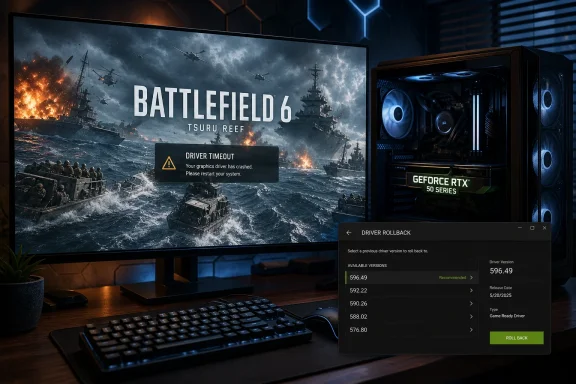
Battlefield 6’s latest seasonal content has arrived with a frustrating caveat for some high-end PC players: systems using NVIDIA GeForce RTX 50 Series graphics cards are reportedly suffering GPU driver crashes on maps dominated by large bodies of water, including the new Tsuru Reef battlefield. Battlefield Studios has acknowledged the issue, says it is working with NVIDIA, and is recommending a temporary rollback to the older GeForce Game Ready Driver 596.49 for affected players.
The issue emerged alongside Battlefield 6 Season 4 and its Pacific Front content, which added Tsuru Reef, naval combat, broad open-water environments, and a new dynamic wave system. Those technical additions are exactly what make the problem notable: players are not simply reporting a general Battlefield 6 crash on startup or a predictable performance drop after an update.
Instead, the reports point to GPU driver crashes while playing maps with substantial water rendering. Tsuru Reef is named specifically, but the developer’s wording indicates that the concern extends to maps with “large bodies of water,” rather than being limited to one level, one game mode, or one visual preset.
That distinction matters. A crash tied to one map can often be traced to corrupted downloaded content, a damaged shader cache, or a bad asset stream. A crash associated with a broad category of visual environment is more suggestive of an interaction between the game engine, a graphics-driver code path, and a rendering workload that is unusually demanding or exposed by recent changes.
For Windows 11 gaming PCs, the immediate takeaway is straightforward: this is a confirmed NVIDIA-focused compatibility issue under investigation, not proof that every RTX 50 Series card is defective. Battlefield Studios has explicitly said the behavior does not affect every player using affected NVIDIA hardware.
Still, the concentration of reports around the newest GeForce generation makes the problem particularly awkward. RTX 50 Series owners are among the users most likely to run Battlefield 6 at high resolutions, with ray-traced effects, DLSS features, high frame-rate targets, and aggressive quality settings. In other words, the audience most equipped to enjoy visually ambitious water-heavy maps may currently be the audience most exposed to a driver-level crash.
Several key details are clear:
The rollback advice also gives users a useful troubleshooting baseline. If Battlefield 6 becomes stable on Driver 596.49 after crashing on a newer release, that does not by itself conclusively prove NVIDIA caused the fault. It does, however, strongly establish that the combination of the game, newer drivers, and certain water-heavy workloads is meaningful.
Battlefield Studios has not publicly confirmed that a particular GeForce driver release is solely responsible. The currently discussed newer driver is GeForce Game Ready Driver 610.74, released on July 7, but the studio has not formally named it as the defective version.
Nor has EA confirmed that the new wave system itself is faulty. Water rendering can involve reflections, screen-space effects, shadowing, fog, transparency, particle effects, physics-driven geometry, post-processing, and temporal upscaling. A crash may occur during one of those operations without the visible water simulation being the actual cause.
Similarly, it would be premature to say that AMD Radeon cards are completely unaffected, or that all NVIDIA GPUs outside the RTX 50 Series are safe. The most reliable statement is narrower: the issue is currently reported more heavily among GeForce RTX 50 Series users, though it does not affect every RTX 50 system.
That level of precision is essential in PC gaming. Hardware configurations differ dramatically, even among two systems with the same graphics card. BIOS revisions, motherboard chipsets, CPU stability, memory profiles, Windows builds, overlays, capture tools, game settings, display configurations, and background software can all change the outcome.
A large ocean scene can combine multiple demanding operations at once:
In a best-case scenario, Windows resets the GPU driver and the game closes. In a worse scenario, the screen may go black briefly, the display driver may restart, or the system may become unstable. The fact that Battlefield Studios is calling this a driver crash does not automatically mean the GPU hardware is damaged or overheating.
It does mean the failure is occurring below the game’s ordinary application layer. That is why conventional in-game fixes may be insufficient, and why a known-good driver version is currently the most practical mitigation.
First, newer architectures can use different scheduling, memory-management, shader-compilation, frame-generation, and power-management behavior than older products. Second, enthusiasts with premium cards commonly enable every graphics feature at once, pushing rendering workloads that more modest systems may never reproduce.
Third, newer GPUs are frequently paired with recent driver branches. A player with an RTX 50 Series card is far more likely to be using the latest Game Ready driver than someone maintaining an older, stable build on an RTX 30 or RTX 40 Series GPU.
None of this makes RTX 50 Series hardware inherently unreliable. It simply means that new hardware, new drivers, and new game content create a larger compatibility surface. This is precisely why targeted driver hotfixes and rapid game-side patches remain a normal part of PC gaming.
The recommendation is unusually specific. Battlefield Studios is not telling everyone to “try an older driver”; it is identifying a version that its current data suggests can reduce or eliminate the repeated crashes.
A newer GeForce driver may include:
Users who are not crashing should generally avoid rolling back preemptively. Battlefield Studios has said that the problem does not affect all RTX 50 Series users. Replacing a stable current driver with an older release offers little benefit if Tsuru Reef and other water-heavy maps are running normally.
The developer has identified a specific older driver as the recommended workaround. Start there. A standard rollback or normal driver installation is less disruptive, preserves settings more reliably, and reduces the chance of creating unrelated configuration problems.
If standard installation fails, Windows displays persistent driver-install errors, or the system suffers crashes across multiple games and the desktop, deeper cleanup may be justified. Those scenarios are broader than the currently identified Battlefield 6 issue and should be treated as separate stability investigations.
A stable overclock in one title can fail in another. Water-heavy Battlefield 6 scenes may generate a different combination of GPU load, VRAM pressure, transient power draw, and shader activity than a benchmark or previous game.
The same applies to memory profiles. EXPO and XMP are widely used and often stable, but a system at the edge of RAM stability can manifest errors as application crashes that appear to implicate a game or GPU driver.
Here, the developer has done three useful things:
There is no confirmed root cause, no published list of affected game settings, no defined range of driver versions implicated, and no estimate for a final patch. Battlefield Studios has also not established whether a game update, an NVIDIA hotfix, or a combination of both will be needed.
The current driver recommendation could be interpreted too broadly if players are not careful. It does not prove that every driver after 596.49 is broken in Battlefield 6. It does not mean that all RTX 50 Series cards will crash. And it does not mean that users who have stable systems should abandon current drivers.
A good temporary workaround is not the same as a completed diagnosis. Players should expect the guidance to evolve as EA and NVIDIA collect crash reports, compare system configurations, and reproduce the behavior internally.
A high-quality report should include:
By contrast, reports that mix several changes at once are less useful. Reinstalling the game, changing Windows power settings, disabling overlays, lowering graphics settings, updating BIOS firmware, and changing drivers before testing makes it difficult to know which change mattered.
A new game season can alter the equation as much as a new driver. Tsuru Reef’s wave systems, naval content, expansive water, visual effects, and multiplayer load may represent a workload that existing testing did not fully cover before release.
That does not undermine the value of regular driver updates. It does reinforce the value of measured update practices:
The key point for affected Windows 11 players is that Battlefield Studios has issued a practical workaround: roll back to NVIDIA GeForce Game Ready Driver 596.49 and test again. That recommendation is useful, specific, and preferable to indiscriminate troubleshooting, though it should remain a temporary measure rather than a permanent driver strategy.
Until a game update, NVIDIA hotfix, or joint fix arrives, careful testing and detailed crash reports will matter. The most productive path is to keep the variables controlled, document what changes stability, and resist drawing sweeping conclusions about RTX 50 Series hardware, NVIDIA drivers, or Battlefield 6’s water technology before the investigation is complete.
 Overview: A Map-Specific Crash Problem With a Broad PC Gaming Impact
The issue emerged alongside Battlefield 6 Season 4 and its Pacific Front content, which added Tsuru Reef, naval combat, broad open-water environments, and a new dynamic wave system. Those technical additions are exactly what make the problem notable: players are not simply reporting a general Battlefield 6 crash on startup or a predictable performance drop after an update.Instead, the reports point to GPU driver crashes while playing maps with substantial water rendering. Tsuru Reef is named specifically, but the developer’s wording indicates that the concern extends to maps with “large bodies of water,” rather than being limited to one level, one game mode, or one visual preset.
That distinction matters. A crash tied to one map can often be traced to corrupted downloaded content, a damaged shader cache, or a bad asset stream. A crash associated with a broad category of visual environment is more suggestive of an interaction between the game engine, a graphics-driver code path, and a rendering workload that is unusually demanding or exposed by recent changes.
For Windows 11 gaming PCs, the immediate takeaway is straightforward: this is a confirmed NVIDIA-focused compatibility issue under investigation, not proof that every RTX 50 Series card is defective. Battlefield Studios has explicitly said the behavior does not affect every player using affected NVIDIA hardware.
Still, the concentration of reports around the newest GeForce generation makes the problem particularly awkward. RTX 50 Series owners are among the users most likely to run Battlefield 6 at high resolutions, with ray-traced effects, DLSS features, high frame-rate targets, and aggressive quality settings. In other words, the audience most equipped to enjoy visually ambitious water-heavy maps may currently be the audience most exposed to a driver-level crash.
What Battlefield Studios Has Confirmed
Battlefield Studios has characterized the problem as an NVIDIA GPU driver crash occurring on certain PC maps with large bodies of water. The developer’s current assessment is deliberately cautious and avoids assigning blame exclusively to the game or to NVIDIA’s driver stack.Several key details are clear:
- The problem is affecting some PC players, not the entire Battlefield 6 population.
- Reports are more concentrated among users with GeForce RTX 50 Series GPUs.
- The issue is associated with maps featuring large water surfaces, including Tsuru Reef.
- Battlefield Studios is investigating the failure alongside NVIDIA.
- Players experiencing repeated crashes have been advised to roll back to NVIDIA driver version 596.49.
- Players who still crash after rolling back are being asked to provide their GPU model, installed driver version, affected map, and crash-report information through the game’s technical support channels.
The rollback advice also gives users a useful troubleshooting baseline. If Battlefield 6 becomes stable on Driver 596.49 after crashing on a newer release, that does not by itself conclusively prove NVIDIA caused the fault. It does, however, strongly establish that the combination of the game, newer drivers, and certain water-heavy workloads is meaningful.
What Has Not Been Confirmed
There is also plenty that remains unknown.Battlefield Studios has not publicly confirmed that a particular GeForce driver release is solely responsible. The currently discussed newer driver is GeForce Game Ready Driver 610.74, released on July 7, but the studio has not formally named it as the defective version.
Nor has EA confirmed that the new wave system itself is faulty. Water rendering can involve reflections, screen-space effects, shadowing, fog, transparency, particle effects, physics-driven geometry, post-processing, and temporal upscaling. A crash may occur during one of those operations without the visible water simulation being the actual cause.
Similarly, it would be premature to say that AMD Radeon cards are completely unaffected, or that all NVIDIA GPUs outside the RTX 50 Series are safe. The most reliable statement is narrower: the issue is currently reported more heavily among GeForce RTX 50 Series users, though it does not affect every RTX 50 system.
That level of precision is essential in PC gaming. Hardware configurations differ dramatically, even among two systems with the same graphics card. BIOS revisions, motherboard chipsets, CPU stability, memory profiles, Windows builds, overlays, capture tools, game settings, display configurations, and background software can all change the outcome.
Why Water-Heavy Maps Can Expose GPU Driver Failures
It is easy to reduce the situation to “water maps crash RTX 50 PCs,” but the technical reality is almost certainly more complex. Modern water is among the most expensive and interconnected visual features in a high-end game engine.A large ocean scene can combine multiple demanding operations at once:
- Dynamic wave displacement that changes surface geometry over time
- Screen-space reflections or ray-traced reflections
- Refraction through transparent water volumes
- Volumetric fog and atmospheric scattering near the surface
- Shadows cast over or through water
- Particle effects from explosions, boat wakes, spray, and weather
- Temporal anti-aliasing and upscaling processing motion-heavy detail
- High-resolution texture streaming for coastlines, ships, foliage, and terrain
- Physics interactions involving vehicles, projectiles, debris, and players
The Driver Timeout Scenario
When a game crashes with a GPU driver error, Windows may be responding to a condition where the graphics processor appears to stop responding within the expected timeframe. Windows uses a recovery mechanism commonly called Timeout Detection and Recovery, or TDR, to prevent a graphics workload from freezing the entire operating system indefinitely.In a best-case scenario, Windows resets the GPU driver and the game closes. In a worse scenario, the screen may go black briefly, the display driver may restart, or the system may become unstable. The fact that Battlefield Studios is calling this a driver crash does not automatically mean the GPU hardware is damaged or overheating.
It does mean the failure is occurring below the game’s ordinary application layer. That is why conventional in-game fixes may be insufficient, and why a known-good driver version is currently the most practical mitigation.
Why RTX 50 Series Systems May Be More Visible in Reports
New GPU generations often expose edge cases more quickly for several reasons.First, newer architectures can use different scheduling, memory-management, shader-compilation, frame-generation, and power-management behavior than older products. Second, enthusiasts with premium cards commonly enable every graphics feature at once, pushing rendering workloads that more modest systems may never reproduce.
Third, newer GPUs are frequently paired with recent driver branches. A player with an RTX 50 Series card is far more likely to be using the latest Game Ready driver than someone maintaining an older, stable build on an RTX 30 or RTX 40 Series GPU.
None of this makes RTX 50 Series hardware inherently unreliable. It simply means that new hardware, new drivers, and new game content create a larger compatibility surface. This is precisely why targeted driver hotfixes and rapid game-side patches remain a normal part of PC gaming.
The Recommended Workaround: Roll Back to NVIDIA Driver 596.49
For affected Battlefield 6 players, the recommended temporary fix is to install GeForce Game Ready Driver 596.49, a WHQL driver released on May 12. It supports Windows 10 64-bit and Windows 11, including RTX 50 Series products.The recommendation is unusually specific. Battlefield Studios is not telling everyone to “try an older driver”; it is identifying a version that its current data suggests can reduce or eliminate the repeated crashes.
Before Rolling Back: Understand the Trade-Off
Driver rollbacks are useful, but they are not cost-free.A newer GeForce driver may include:
- Day-one optimizations for recently released games
- Fixes for unrelated bugs
- Improvements to DLSS, Frame Generation, or NVIDIA App features
- Security-related updates
- Better support for new displays or peripherals
- Stability changes for creative and productivity software
Users who are not crashing should generally avoid rolling back preemptively. Battlefield Studios has said that the problem does not affect all RTX 50 Series users. Replacing a stable current driver with an older release offers little benefit if Tsuru Reef and other water-heavy maps are running normally.
A Sensible Windows 11 Rollback Process
Players who are repeatedly crashing should approach the driver change methodically.- Record the current driver version.
Open the NVIDIA App, NVIDIA Control Panel, or Windows Device Manager and note the installed version. This makes it easier to reverse the change later. - Create a Windows restore point.
A restore point is not a substitute for a backup, but it provides a practical safety net before making a graphics-driver change. - Download Driver 596.49 from NVIDIA’s official driver archive.
Confirm that the package matches the installed GPU, operating system, and desktop or notebook configuration. Laptop owners should be especially careful, as some manufacturers validate customized drivers for their specific systems. - Close games and graphics-heavy applications.
Shut down Battlefield 6, browser windows with video playback, hardware-monitoring overlays, streaming software, and creative applications before beginning the installation. - Install the older driver.
Choose the installer’s standard installation flow unless there is a clear reason to use a custom option. A clean installation can be helpful when a prior driver installation is suspected to be damaged, but it also resets NVIDIA settings and should not be treated as mandatory. - Restart Windows.
A reboot ensures the previous driver components are fully unloaded and the restored version is operating normally. - Test the affected map deliberately.
Launch Battlefield 6, visit Tsuru Reef or another known problem map, and play long enough to establish whether the crash has truly stopped. One successful match is encouraging, but it is not definitive evidence. - Keep notes if the issue continues.
Record the map, game mode, driver version, graphics settings, DLSS mode, frame-generation status, overlays, and exact time of the crash. That information is far more useful to support teams than a general statement that the game “keeps crashing.”
Avoid Overreacting With Aggressive Cleanup Tools
Many PC troubleshooting guides immediately recommend a complete driver purge with third-party utilities. That approach can be effective in rare cases involving corrupted installations, but it should not be the first move for every Battlefield 6 crash.The developer has identified a specific older driver as the recommended workaround. Start there. A standard rollback or normal driver installation is less disruptive, preserves settings more reliably, and reduces the chance of creating unrelated configuration problems.
If standard installation fails, Windows displays persistent driver-install errors, or the system suffers crashes across multiple games and the desktop, deeper cleanup may be justified. Those scenarios are broader than the currently identified Battlefield 6 issue and should be treated as separate stability investigations.
Additional Settings Worth Testing — With Realistic Expectations
Rolling back to Driver 596.49 is the primary workaround. If crashes persist, several settings can help narrow down the trigger, though none should be presented as a confirmed universal fix.Disable Overlays and Monitoring Hooks
Turn off overlays temporarily from applications such as:- NVIDIA App
- Discord
- Steam
- EA App
- Xbox Game Bar
- MSI Afterburner and RivaTuner Statistics Server
- OBS or other capture software
- Peripheral utilities with in-game overlays
Return Overclocks to Stock Settings
If the GPU, CPU, or memory is overclocked, return it to stock settings during testing. This includes factory-overclocked profiles that have been further adjusted with manual voltage curves, memory tweaks, or elevated power limits.A stable overclock in one title can fail in another. Water-heavy Battlefield 6 scenes may generate a different combination of GPU load, VRAM pressure, transient power draw, and shader activity than a benchmark or previous game.
The same applies to memory profiles. EXPO and XMP are widely used and often stable, but a system at the edge of RAM stability can manifest errors as application crashes that appear to implicate a game or GPU driver.
Test Without Frame Generation and Advanced Rendering Features
If Driver 596.49 does not resolve the problem, temporarily testing with advanced features disabled can produce useful information:- Disable DLSS Frame Generation
- Try a different DLSS Super Resolution mode
- Disable ray-traced effects if available
- Lower the water-quality setting
- Reduce volumetric and post-processing settings
- Apply an in-game frame-rate limit
- Switch from exclusive fullscreen to borderless, or vice versa
Why EA’s Response Is Better Than Silence — But Still Incomplete
Battlefield Studios deserves credit for acknowledging the issue quickly and offering a precise workaround. Too many game-support responses default to generic advice: verify files, update Windows, reinstall the game, or contact support. Those steps sometimes help, but they can waste hours when the real issue is an active compatibility bug.Here, the developer has done three useful things:
- Identified the affected workload category: maps with large bodies of water
- Identified the hardware concentration: NVIDIA GPUs, particularly RTX 50 Series
- Identified a provisional workaround: driver version 596.49
The Remaining Gaps
The public status is still incomplete in several important ways.There is no confirmed root cause, no published list of affected game settings, no defined range of driver versions implicated, and no estimate for a final patch. Battlefield Studios has also not established whether a game update, an NVIDIA hotfix, or a combination of both will be needed.
The current driver recommendation could be interpreted too broadly if players are not careful. It does not prove that every driver after 596.49 is broken in Battlefield 6. It does not mean that all RTX 50 Series cards will crash. And it does not mean that users who have stable systems should abandon current drivers.
A good temporary workaround is not the same as a completed diagnosis. Players should expect the guidance to evolve as EA and NVIDIA collect crash reports, compare system configurations, and reproduce the behavior internally.
What Crash Reports Need to Include
The request for player reports is not a formality. Detailed crash data is often what transforms an intermittent community complaint into a reproducible bug that engineers can fix.A high-quality report should include:
- Exact GPU model, such as GeForce RTX 5070, RTX 5080, or RTX 5090
- Desktop or laptop designation
- NVIDIA driver version before and after rollback
- Windows 11 version and build
- Battlefield 6 game version
- Affected map and game mode
- Graphics preset and resolution
- Whether DLSS, Frame Generation, ray tracing, HDR, or Reflex were enabled
- Any active overlay, recording, monitoring, RGB, or peripheral software
- Whether the crash returns to desktop, causes a black screen, restarts the driver, or freezes Windows
- Any crash-report identifier, error code, Event Viewer entry, or reliability-monitor result
By contrast, reports that mix several changes at once are less useful. Reinstalling the game, changing Windows power settings, disabling overlays, lowering graphics settings, updating BIOS firmware, and changing drivers before testing makes it difficult to know which change mattered.
The Bigger Lesson for Windows 11 PC Gamers
This Battlefield 6 crash issue is a reminder that the “latest driver” is not always the best driver for every game on every day. Game Ready releases are designed to improve compatibility and performance across a huge range of hardware and software combinations, but modern PC gaming remains a moving target.A new game season can alter the equation as much as a new driver. Tsuru Reef’s wave systems, naval content, expansive water, visual effects, and multiplayer load may represent a workload that existing testing did not fully cover before release.
That does not undermine the value of regular driver updates. It does reinforce the value of measured update practices:
- Keep a record of the last stable driver version.
- Avoid changing multiple stability-sensitive settings at once.
- Use restore points before major driver or firmware changes.
- Do not assume an application crash means a hardware failure.
- Do not assume a new GPU is immune from early compatibility issues.
- Keep crash logs and Windows reliability information when problems emerge.
- Follow official workaround guidance before relying on unverified social-media fixes.
Conclusion
Battlefield 6’s water-map crashes are a real compatibility concern for a subset of NVIDIA GeForce users, with reports currently most concentrated among RTX 50 Series owners. The problem is linked to GPU driver failures on maps with extensive water rendering, including Season 4’s Tsuru Reef, but the exact underlying cause has not yet been publicly established.The key point for affected Windows 11 players is that Battlefield Studios has issued a practical workaround: roll back to NVIDIA GeForce Game Ready Driver 596.49 and test again. That recommendation is useful, specific, and preferable to indiscriminate troubleshooting, though it should remain a temporary measure rather than a permanent driver strategy.
Until a game update, NVIDIA hotfix, or joint fix arrives, careful testing and detailed crash reports will matter. The most productive path is to keep the variables controlled, document what changes stability, and resist drawing sweeping conclusions about RTX 50 Series hardware, NVIDIA drivers, or Battlefield 6’s water technology before the investigation is complete.
References
- Primary source: GamingBolt
Published: 2026-07-22T00:00:00+00:00
Battlefield 6 With Nvidia RTX 50-Series GPUs Face Crashes on Maps With Lots of Water
EA has suggested that players should rollback to driver version 596.49 while the Battlefield 6 team works on fixing the issues.gamingbolt.com - Independent coverage: eTeknix
Published: 2026-07-22T15:11:57+00:00
Latest Battlefield 6 Update Causes Crashes on Some PCs with NVIDIA RTX 50 Series - eTeknix
Battlefield 6 has received its Season 4 update, one that many fans of the series had been waiting for. The update introduces a new map, new vehicles…www.eteknix.com - Independent coverage: OC3D
Published: 2026-07-22T14:24:48+00:00
EA confirms Nvidia GeForce RTX 50 series crashes in Battlefield 6 - OC3D
EA has recommended that all Nvidia users roll back their drivers to make Battlefield 6 stable. A fix is in the works.overclock3d.net - Independent coverage: Wccftech
Published: 2026-07-22T12:56:00+00:00
EA Tells RTX 50 Owners to Downgrade NVIDIA Drivers as Battlefield 6 Keeps Crashing on Water Maps
EA investigates RTX 50 GPU crashes in Battlefield 6's Tsuru Reef map and recommends downgrading to driver version 596.49 for fixes.wccftech.com
- Independent coverage: videocardz.com
Published: 2026-07-22T09:47:05+00:00
- Related coverage: nvidia.com
Driver Details | NVIDIA
Download the <dd~LanguageName> <dd~Name> for <dd~OSName> systems. Released <dd~ReleaseDateTime>www.nvidia.com