

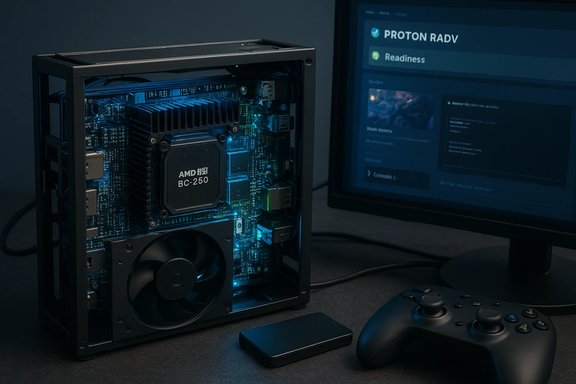
The resurgence of DIY Steam Machine-style rigs has a new, unlikely protagonist: secondhand mining hardware built around the ASRock AMD BC-250 APU. What began as a practical recycling move—mining blades and single-purpose cards flooded the secondary market after crypto’s decline—has morphed into a small but growing trend: repurpose inexpensive BC-250 boards into compact, self-contained gaming machines. Recent coverage and a popular ETA PRIME build demonstrate that, with a modest investment and a Linux-first approach, these boards can run modern AAA titles far beyond what their mining pedigree would suggest.
The ASRock BC-250 card is a mining-focused single-board system that repurposes an AMD APU sibling of the PlayStation 5 SoC. The board contains the APU, onboard GDDR6, a single M.2 slot, a DisplayPort output, a gigabit Ethernet port, and a small set of USB ports—everything needed to become a standalone mini-PC once supplied with power, storage, and cooling. Community developers and Linux driver maintainers have added experimental support that makes the board viable as a gaming device, and purpose-built Linux gaming distributions such as Bazzite have been used successfully in public demos.
The result is a modern reinterpretation of the “Steam Machine” concept: a compact, appliance-like gaming box that prioritizes convenience and price/performance over upgradeability. For hobbyists and budget-minded gamers, the BC-250 offers a novel path to a tiny, mostly self-contained Windows-like gaming experience—provided you’re willing to work in Linux and accept a few important caveats.
Benefits of a Bazzite-style approach:
However, this path is not without trade-offs. The BC-250 lives in a gray zone between novelty and utility. There are real risks around driver stability, anti-cheat compatibility, thermal management, and used-hardware provenance. The initial viral pricing spike has also diminished some of the bargain appeal; patience, regional searches, and community marketplaces remain the best ways to find a good deal.
For WindowsForum readers, the BC-250 is exactly the sort of project that rewards technical curiosity: if you enjoy tinkering, are comfortable with Linux and open-source drivers, and want a small, entertaining gaming device that recalls the Steam Machine vision, the BC-250 is one of the most interesting DIY options available today. For users who need out-of-the-box Windows-compatible multiplayer gaming or vendor support, more conventional SFF PCs or consumer APUs are the safer, less-hands-on choice.
In short: the BC-250 Steam Machine clone is real, it's playable, and it’s compelling as a hobbyist project—but treat it like a project, not a product.
Source: Hackaday A Steam Machine Clone For An Indeterminate But Possibly Low Cost
 Background / Overview
The ASRock BC-250 card is a mining-focused single-board system that repurposes an AMD APU sibling of the PlayStation 5 SoC. The board contains the APU, onboard GDDR6, a single M.2 slot, a DisplayPort output, a gigabit Ethernet port, and a small set of USB ports—everything needed to become a standalone mini-PC once supplied with power, storage, and cooling. Community developers and Linux driver maintainers have added experimental support that makes the board viable as a gaming device, and purpose-built Linux gaming distributions such as Bazzite have been used successfully in public demos.The result is a modern reinterpretation of the “Steam Machine” concept: a compact, appliance-like gaming box that prioritizes convenience and price/performance over upgradeability. For hobbyists and budget-minded gamers, the BC-250 offers a novel path to a tiny, mostly self-contained Windows-like gaming experience—provided you’re willing to work in Linux and accept a few important caveats.
The hardware in plain terms
What’s actually on the BC-250 board
- APU type: An AMD BC-250 APU, essentially a cut-down variant related to the PS5’s Ariel/Oberon SoC.
- CPU: Six Zen 2 cores (twelve threads in SMT-capable configurations).
- GPU: A cut-down RDNA-family integrated GPU—community and driver documentation converge on a configuration commonly described in the wild as a GFX1013 variant with a reduced number of compute units compared to a full PS5 die.
- Memory: 16 GB of onboard GDDR6 used as unified memory for CPU and GPU.
- Storage: 1x M.2 slot (commonly PCIe 2.0 x2 as found in many mining boards).
- I/O: 1x DisplayPort, 1x GbE, 2x USB 2.0, 2x USB 3.0 (varies slightly by board revision).
- Power: Single 8-pin 12V PCIe-style power connector; these boards were designed for rack deployment and assume external PSUs.
- Form factor: Blade/single-card style meant for rack-mounted mining rigs; not a consumer motherboard.
Why this hardware is interesting for gaming
- The APU is from the same architectural family as a modern console SoC: Zen 2 CPU cores plus an RDNA-class GPU with hardware features not typical of low-end PC APUs.
- 16 GB of high-bandwidth GDDR6 is a rare commodity on integrated platforms and makes higher-resolution and texture-heavy gaming more feasible.
- The whole unit is compact and self-contained; with a correct power and cooling setup it behaves like a minimal PC chassis.
Software and driver reality: Linux-first, not Windows-ready
Driver support: RADV / Mesa is the path
The BC-250 has seen the bulk of its usable GPU work delivered via the open-source Linux stack. The community has upstreamed support into Mesa and RADV in recent releases, and those Mesa updates are the practical prerequisite for playable graphics on this board.- Minimum software requirement: a modern Mesa release (community testing converges around Mesa 25.x or later for stable detection and fixes).
- Driver workarounds: users commonly apply environment variables and updated kernel/amdgpu firmware to get optimal behavior—typical tweaks include forcing or disabling certain compute queues and using RADV-specific runtime options that emerged with the new support.
- Windows limitations: there are currently no reliable, supported Windows GPU drivers for this platform. Windows will boot on some boards, but you should expect the GPU to be either unaccelerated or severely limited. If you need Windows-native games that rely on anti-cheat or proprietary drivers, BC-250 is a poor fit.
Gaming distributions: Bazzite and the Steam-mode experience
Bazzite (a SteamOS-style Linux distribution) has been used successfully on BC-250 builds to provide a near-console experience: Steam preinstalled, Proton-ready tooling, and community packaging for gaming-specific tweaks. Bazzite’s image-based model and Steam Gaming Mode make it a compelling choice for users who want an out-of-the-box, Steam-first experience on Linux hardware that otherwise needs care.Benefits of a Bazzite-style approach:
- Preconfigured Proton and Steam launcher options.
- Easier rollback for kernel/Mesa updates (image-based snapshots).
- Familiar Steam-like UI in a console-like mode for couch gaming.
- Anti-cheat: many Windows anti-cheat systems are hostile to Proton and non-standard drivers; multiplayer titles that use anti-cheat may refuse to run or ban accounts in edge cases.
- Proton/compatibility quirks: though Proton continues to improve, not every game runs perfectly. Expect to spend time adjusting launch options, Proton versions, and runtime tweaks.
ETA PRIME’s practical build: what it demonstrated
The widely-viewed ETA PRIME video that inspired recent attention to the BC-250 showed a practical, minimal conversion from mining blade to “Steam Machine clone.” The essentials covered in that build:- Power: connect a proper 12V/8-pin supply, as the single-card design expects rack power distribution.
- Storage: an NVMe or SATA SSD in the onboard M.2 slot is enough for OS and a modest game library.
- Cooling: a high-flow fan or two placed directly on the board’s heatsink keeps thermals within playable ranges. Mining blades were built to dissipate sustained loads, but gaming has different thermal profiles; memory chips (GDDR6) run hot and require proper airflow or a heatsink solution.
- BIOS tweaks: a few firmware/BIOS changes—mostly around memory mapping and enabling/adjusting specific startup behaviors—were necessary to make the board behave like a single-board desktop rather than part of a mining cluster.
- OS: the build used Bazzite to get Steam and Proton working quickly, and then tuned Mesa/RADV settings.
Realistic performance expectations
- Playable 1080p: most modern titles will be playable at 1080p with medium-to-high settings depending on the game’s shader/CPU demands and how well Proton handles it.
- Upscaling is key: using FSR (or other upscalers) and frame-generation techniques dramatically improves perceived performance; these methods are commonly used on the BC-250 to reach higher framerates.
- Not a 4K powerhouse: do not expect consistent 4K 60 FPS performance in the latest AAA releases.
- Thermal throttling possibility: under sustained load the APU and GDDR6 can heat up, which may cause frame drops and throttling without attentive cooling.
Power, cooling and mechanical considerations
- Power supply: use a high-quality 12V rail supply with an 8-pin connector capable of delivering the board’s rated draw; expect peak draws in the 200 W range under full load.
- Cooling: directed airflow across the primary heatsink and dedicated cooling for the GDDR6 modules are essential. Some hobbyists split the heatsink or add AM4-style coolers with 3D-printed adapters.
- Form factor: these cards are not plug-and-play in a consumer PC case—consider custom cases or compact enclosures designed by the community.
- Rack vs desktop: the board’s connectors and layout favor rack use; turning it into a shelf or enclosure-based desktop needs small mechanical adaptions.
Cost and availability: a shifting market
- Initial bargain bins: early sellers and miners offloading hardware due to market declines listed BC-250 boards at very low prices—some reports mentioned prices near $50–$150 per board.
- Market reaction: after a viral video, supply listings tightened and prices rose in many markets. These cards are now often more expensive than the earliest dumps.
- Long tail availability: in many regions you’ll find single boards and even aftermarket cases, but price and shipping costs can erode the bargain case.
- Value proposition: even with price inflation, the total cost (board + PSU + SSD + fans) can be notably lower than a new mid-range gaming PC, especially if you don’t need Windows-native features or anti-cheat-critical multiplayer.
Compatibility and legal caveats
- No guaranteed driver support: the BC-250 is a mining product and was never sold as a consumer APU; don’t expect ASRock or AMD to provide consumer-level driver guarantees or updates.
- Anti-cheat and multiplayer risk: multiplayer titles with strict anti-cheat may be problematic under Proton; some anti-cheat layers detect nonstandard environments and either refuse to launch or produce false positives.
- Warranty and provenance: many of these boards come from decommissioned mining rigs with unknown duty cycles and unknown repairs; buying used mining hardware is riskier than buying used consumer parts.
- Intellectual property concerns: while the chips are legitimate AMD-manufactured silicon, earlier coverage claimed these could be dies binned from console production lines; that’s plausible but not legally contested—treat such rumors as unverified.
Alternatives and the broader DIY landscape
If the BC-250 concept appeals, but you want more conventional support or Windows capability, consider:- Compact consumer APUs and small form-factor systems built around Ryzen mobile/desktop APUs (official drivers, broader support).
- Low-cost dedicated GPUs in mini-ITX builds—more flexible, easier to upgrade.
- Handhelds or Valve/Steam Deck-style ecosystems running SteamOS/Bazzite on supported hardware for a true “console-first” experience.
How-to summary: turning a BC-250 into a Steam Machine clone (high level)
- Acquire a BC-250 board from a reputable seller; inspect for physical damage or missing connectors.
- Prepare power: a reliable 12V supply with the correct 8-pin connector and adequate wattage (250–300 W recommended headroom).
- Add storage: M.2 NVMe or SATA-insertable SSD for OS and games.
- Arrange cooling: at least one high-flow fan directed at the heatsink, and additional cooling for exposed GDDR6 chips.
- First boot: enter the board’s BIOS/UEFI and apply memory and auto-start settings the community recommends—these are typically small changes to map unified memory and enable stable POST behavior.
- Install a Linux gaming distribution optimized for consoles (Bazzite or equivalent) and ensure you install Mesa 25.x or newer plus any community-patched kernel/amdgpu firmware stack your distro advises.
- Configure RADV/Mesa environment variables and Proton versions for best compatibility; test single-player titles first.
- Iterate on cooling and power limits to avoid thermal throttling and improve reliability.
Risks, not-so-obvious pitfalls, and recommended precautions
- Driver regressions and updates: Mesa and kernel updates can break BC-250 support unexpectedly. Always test updates in a roll-back-capable setup (image-based distributions like Bazzite simplify rollbacks).
- Anti-cheat showstoppers: for competitive multiplayer or titles with strict anti-cheat, assume issues until you test each title thoroughly.
- Variable hardware revisions: different BC-250 batches may differ in firmware or wiring; community-tested instructions may require small adaptations.
- Thermal and VRAM fragility: GDDR6 modules tolerate high bandwidth but not unlimited heat. Ensure sustained gaming sessions don’t overheat the memory.
- No vendor-level recovery: these boards were sold for mining; expect limited or no warranty support and scarce official docs. Keep your expectations aligned with hobbyist hardware.
- Use image-based OSes or backup/clone your drive before experimenting.
- Start with single-player, Proton-friendly games to validate driver stability.
- Join community forums before spending; that will shorten your troubleshooting time.
Final analysis and verdict
Repurposing ASRock BC-250 mining boards into compact Linux gaming boxes is a fascinating, feel-good recycling story that also yields tangible value for tinkerers and price-conscious gamers. The hardware’s console-derived APU and high-bandwidth GDDR6 memory make it unusually well-suited for a tiny Steam Machine clone—when matched with the right software stack. The practical path is Linux-first: Mesa/RADV driver support and a gaming distribution such as Bazzite are the keys that unlock playable performance.However, this path is not without trade-offs. The BC-250 lives in a gray zone between novelty and utility. There are real risks around driver stability, anti-cheat compatibility, thermal management, and used-hardware provenance. The initial viral pricing spike has also diminished some of the bargain appeal; patience, regional searches, and community marketplaces remain the best ways to find a good deal.
For WindowsForum readers, the BC-250 is exactly the sort of project that rewards technical curiosity: if you enjoy tinkering, are comfortable with Linux and open-source drivers, and want a small, entertaining gaming device that recalls the Steam Machine vision, the BC-250 is one of the most interesting DIY options available today. For users who need out-of-the-box Windows-compatible multiplayer gaming or vendor support, more conventional SFF PCs or consumer APUs are the safer, less-hands-on choice.
In short: the BC-250 Steam Machine clone is real, it's playable, and it’s compelling as a hobbyist project—but treat it like a project, not a product.
Source: Hackaday A Steam Machine Clone For An Indeterminate But Possibly Low Cost
