

Sider AI, Grammarly, Eightify, Harpa AI, and Voicy stand out among AI Chrome extensions for work and productivity in 2026 because they put writing help, summaries, research, browser automation, and voice-driven workflow support directly inside the browser where most knowledge work already happens. That is the real story behind this crowded category: the winning AI tool is no longer the one with the flashiest chatbot window, but the one that appears at the exact moment a task becomes tedious. Chrome extensions are turning generative AI from a destination into an ambient layer. For Windows users and IT teams, that shift is useful, powerful, and slightly uncomfortable.
The browser has become the modern office suite, terminal, filing cabinet, meeting room, and research library. Gmail, Outlook on the web, Google Docs, Microsoft 365, Salesforce, Slack, Teams, YouTube, PDFs, dashboards, and internal admin portals all live in tabs. If AI is going to save time in ordinary work, it has to show up there rather than asking users to copy text into yet another standalone app.
That is why Chrome extensions matter more than their tiny toolbar icons suggest. They sit between the user and the web page, watching the same context the user sees and acting on it without the ritual of opening a separate AI service. A summarizer that works on the page you are reading is more useful than a general chatbot that requires a carefully pasted prompt.
The most productive extensions in 2026 are not simply “ChatGPT in Chrome.” They are specialized tools that compress common work loops: write, revise, summarize, compare, extract, transcribe, and automate. The best ones reduce switching costs, and in modern work, switching costs are everywhere.
This is also why the category is messy. Chrome Web Store listings are full of grand claims, overlapping features, and growth-hacking language. The practical question is not which extension promises the most, but which one reliably removes friction from work you already do.
The value of Sider is not just model aggregation. It is context. Highlight a paragraph, summarize a page, ask for an explanation, rewrite a reply, or interrogate a document without leaving the tab. For workers who spend the day in research pages, PDFs, email, and dashboards, that is often enough to make the extension feel like part of the browser rather than an add-on.
There is a catch, and it matters. A multi-model sidebar can tempt users into treating AI output as a second search engine, even when the underlying model is guessing, compressing, or smoothing over uncertainty. Sider is strongest when used as a thinking aid and weakest when treated as an authority.
For WindowsForum readers, the lesson is familiar from decades of desktop utilities: the best productivity tools become dangerous when they are invisible. Sider can accelerate reading and drafting, but organizations still need rules about what may be sent to third-party AI systems. Browser convenience does not cancel data governance.
Its core use case is still writing hygiene: grammar, spelling, punctuation, clarity, tone, and sentence structure. The AI layer adds rewriting and drafting help, but the real productivity gain is often smaller and more constant. It catches awkward phrasing in a customer email, tightens a project update, and keeps a rushed Slack message from sounding sharper than intended.
That makes Grammarly especially useful in organizations where writing is not the job title but writing is still the work. Sales teams, support staff, students, analysts, managers, recruiters, and engineers all produce text that carries professional consequences. The extension earns its keep by lowering the cost of getting that text to “good enough.”
The risk is homogenization. AI-assisted writing can flatten voice, sand off nuance, and make every message sound like it came from the same corporate template. The most productive Grammarly users accept suggestions selectively rather than outsourcing their judgment.
For professionals who use YouTube as a research source, an AI summarizer can be a practical time saver. Instead of watching an entire video to decide whether it is relevant, the user gets a summary, key points, and often a structure that makes the content easier to evaluate. That does not replace watching high-stakes material, but it does make triage faster.
This matters because video has become a default documentation layer for many products and workflows. Not every vendor writes clear docs. Not every creator timestamps well. Not every tutorial respects the viewer’s time. A good summarizer gives users a fighting chance against the sprawl.
The limitation is obvious: summaries inherit the quality of transcripts and the model’s ability to distinguish substance from filler. Eightify is best used to decide what deserves deeper attention, not to certify that a video’s claims are correct. In a professional setting, summaries should start the research process rather than end it.
That agent framing is important. A summarizer helps you understand a page. An agent begins to act on your behalf. The difference is small in interface and large in consequence. Once an extension can extract data, monitor changes, and automate workflows, it starts to resemble a junior operations assistant living inside Chrome.
For sales, recruiting, market research, and operations teams, that can be useful. Many browser tasks are repetitive but not worth engineering into full internal software: checking pages, collecting snippets, drafting outreach, watching competitors, moving structured information from one place to another. Harpa aims directly at that neglected middle ground.
But the same flexibility creates administrative risk. Browser automation can interact with web apps that were never designed for robotic use. It can also blur boundaries between approved workflow automation and user-created shadow IT. Enterprises that allow tools like Harpa need policies that distinguish harmless personal productivity from automation that touches regulated, confidential, or customer data.
The productivity case for voice is not simply dictation. It is reducing the delay between thought and recorded text. A user can capture a note, draft a message, or convert spoken ideas into usable prose without breaking flow. For workers who think aloud, multitask, or handle frequent informal updates, that can be a meaningful shift.
Voice tools also have an accessibility dimension. They can make browser-based work easier for users with repetitive strain issues, visual impairments, or workflows where typing is inconvenient. Productivity software often sells speed to power users, but its most durable gains sometimes come from making work less physically or cognitively demanding.
The privacy concerns are equally durable. Voice data can include sensitive names, customer details, health information, credentials spoken carelessly, or internal project context. Any organization adopting voice-based AI extensions should treat microphone access as a serious permission, not a cosmetic browser prompt.
Compose AI is easy to understand: it autocompletes, drafts, and rewrites short-form text. That makes it especially attractive for users drowning in routine email. The question is whether speed improves communication or merely increases the volume of low-effort replies.
QuillBot has a different center of gravity. Its paraphrasing, grammar, summarizing, translation, and citation features make it appealing to students, bloggers, researchers, and professionals who work with existing text. It is useful when the task is not to generate from nothing, but to reshape something that already exists.
Perplexity’s browser companion is aimed at quick, source-aware research. Its value is strongest when the user needs a fast answer while browsing and wants the answer tied to the page or search context. That makes it a better fit for research triage than for private corporate knowledge work unless the organization has approved its data handling.
SciSpace Copilot is more specialized and arguably more defensible. Academic and technical papers are dense by design, and an assistant that explains sections, summarizes arguments, and supports multiple languages can lower the barrier to understanding. The caveat is that scientific claims require careful reading; an AI explanation is not peer review.
Tactiq’s bot-free approach is attractive because nobody wants another awkward participant named “AI Notetaker” joining the room. It supports major meeting platforms such as Google Meet, Zoom, and Microsoft Teams, which puts it in the center of modern hybrid work. Its usefulness is highest when teams consistently review and assign the action items it generates.
Bluedot operates in similar territory, with recording, transcripts, summaries, highlights, and integrations into systems such as CRMs and applicant tracking tools. That makes it particularly relevant for sales, recruiting, and customer-facing teams. Meeting notes become more valuable when they land where the next workflow already happens.
The trap is that meeting AI can create the illusion of accountability without the practice of accountability. A transcript is not a decision. A generated action item is not ownership. These tools save time only when teams treat the output as a draft record that must be confirmed, corrected, and acted upon.
No-code browser automation fills that gap. A user can build or generate workflows that pull data from web pages, move it into tools, or trigger follow-up actions. For teams that live in CRMs, recruiting platforms, spreadsheets, and web research, this can produce real savings.
The productivity claim is plausible because the target work is so repetitive. If a user performs the same browser routine dozens of times a week, even a partial automation can pay for itself quickly. The harder question is whether the resulting workflow is reliable, auditable, and maintainable.
That is where IT should pay attention. User-built automations can become business-critical before anyone notices. If an extension is scraping pages, updating records, or sending messages, it needs the same basic scrutiny as any other automation: permissions, logging, ownership, error handling, and offboarding.
For Windows users, the story is slightly more complicated. Microsoft Edge runs on Chromium and supports many Chrome extension patterns, but Chrome remains the cultural default for many web workers. The center of gravity for browser add-ons still pulls toward Google’s ecosystem, even on Microsoft’s operating system.
That gives Chrome extensions a strange status inside enterprises. They are small enough for individuals to install casually, but powerful enough to read pages, modify content, capture user input, and communicate with cloud services. In the AI era, that power becomes more sensitive because the extension may also send page context to external models.
The extension is no longer just a UI tweak or password-manager companion. It can become a workplace data processor. That means procurement, security, and compliance teams cannot afford to ignore the category simply because it arrives through a browser store rather than an enterprise software contract.
But productivity gains are not magic dust. They depend on task type, user skill, trust calibration, and workflow fit. AI is excellent at compressing text, drafting plausible language, extracting patterns, and creating first-pass structure. It is weaker when the job requires judgment, accountability, confidential context, or correctness under uncertainty.
This is why the best AI extension strategy is boringly pragmatic. Start with tasks where a rough draft is acceptable, the user remains in control, and mistakes are easy to catch. Email drafts, meeting summaries, page summaries, research triage, and repetitive extraction are good candidates. Legal conclusions, medical guidance, security decisions, financial commitments, and customer promises require stricter review.
There is also a human factor. Some workers become faster because AI removes friction. Others become slower because they over-consult the tool, compare too many model outputs, or polish routine messages past the point of usefulness. Productivity software can create new rituals even as it kills old ones.
That does not mean companies should ban AI extensions outright. Blanket bans often drive users toward unmanaged alternatives. A more realistic approach is to approve specific tools for specific use cases and define what kinds of data may be used with them.
Administrators should look closely at permission scopes, vendor privacy terms, retention policies, model-training settings, enterprise controls, authentication options, and auditability. They should also distinguish between consumer accounts and business plans. A tool that is tolerable for personal research may be inappropriate for regulated customer data.
Windows environments already have mature habits around endpoint management, identity, and app control. Browser AI needs to be folded into that discipline. If an extension can read a web page containing customer records, it belongs in the security conversation.
That future will not eliminate Chrome extensions quickly because extensions remain fast to install, easy to market, and flexible across web apps. They are the startup-friendly edge of the productivity market. Big platforms move slowly; extensions move wherever users feel pain.
The likely outcome is a split. Consumer and small-business users will keep adopting powerful general-purpose extensions such as Sider, Harpa, Merlin, and Grammarly. Larger organizations will prefer managed AI features inside Microsoft 365, Google Workspace, Salesforce, ServiceNow, and approved browser configurations. The feature sets will converge, but governance will separate the markets.
For now, the browser extension remains the fastest way for many users to experience practical AI at work. That is why the category deserves attention from IT pros, not just productivity bloggers.
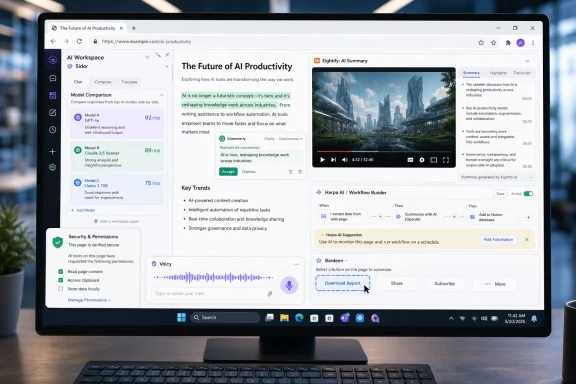 The AI Productivity War Has Moved Into the Browser
The browser has become the modern office suite, terminal, filing cabinet, meeting room, and research library. Gmail, Outlook on the web, Google Docs, Microsoft 365, Salesforce, Slack, Teams, YouTube, PDFs, dashboards, and internal admin portals all live in tabs. If AI is going to save time in ordinary work, it has to show up there rather than asking users to copy text into yet another standalone app.That is why Chrome extensions matter more than their tiny toolbar icons suggest. They sit between the user and the web page, watching the same context the user sees and acting on it without the ritual of opening a separate AI service. A summarizer that works on the page you are reading is more useful than a general chatbot that requires a carefully pasted prompt.
The most productive extensions in 2026 are not simply “ChatGPT in Chrome.” They are specialized tools that compress common work loops: write, revise, summarize, compare, extract, transcribe, and automate. The best ones reduce switching costs, and in modern work, switching costs are everywhere.
This is also why the category is messy. Chrome Web Store listings are full of grand claims, overlapping features, and growth-hacking language. The practical question is not which extension promises the most, but which one reliably removes friction from work you already do.
Sider Shows Why the Sidebar Became the New AI Desk
Sider’s appeal is straightforward: it turns the browser sidebar into a multi-model AI workspace. Rather than bouncing between ChatGPT, Claude, Gemini, Grok, DeepSeek, or other services, users can compare outputs and ask questions from one panel. That sounds like convenience, but for heavy users it changes the rhythm of research and writing.The value of Sider is not just model aggregation. It is context. Highlight a paragraph, summarize a page, ask for an explanation, rewrite a reply, or interrogate a document without leaving the tab. For workers who spend the day in research pages, PDFs, email, and dashboards, that is often enough to make the extension feel like part of the browser rather than an add-on.
There is a catch, and it matters. A multi-model sidebar can tempt users into treating AI output as a second search engine, even when the underlying model is guessing, compressing, or smoothing over uncertainty. Sider is strongest when used as a thinking aid and weakest when treated as an authority.
For WindowsForum readers, the lesson is familiar from decades of desktop utilities: the best productivity tools become dangerous when they are invisible. Sider can accelerate reading and drafting, but organizations still need rules about what may be sent to third-party AI systems. Browser convenience does not cancel data governance.
Grammarly Remains the Boring Tool That Actually Ships Value
Grammarly is no longer exciting in the way a brand-new AI assistant is exciting. That is part of its strength. It has spent years embedding itself into the places people write, and its Chrome extension remains one of the clearest examples of AI productivity that does not require users to become prompt engineers.Its core use case is still writing hygiene: grammar, spelling, punctuation, clarity, tone, and sentence structure. The AI layer adds rewriting and drafting help, but the real productivity gain is often smaller and more constant. It catches awkward phrasing in a customer email, tightens a project update, and keeps a rushed Slack message from sounding sharper than intended.
That makes Grammarly especially useful in organizations where writing is not the job title but writing is still the work. Sales teams, support staff, students, analysts, managers, recruiters, and engineers all produce text that carries professional consequences. The extension earns its keep by lowering the cost of getting that text to “good enough.”
The risk is homogenization. AI-assisted writing can flatten voice, sand off nuance, and make every message sound like it came from the same corporate template. The most productive Grammarly users accept suggestions selectively rather than outsourcing their judgment.
Eightify Turns YouTube From a Time Sink Into a Work Surface
YouTube is both a knowledge base and a productivity trap. Training videos, conference talks, product demos, lectures, and reviews can contain valuable information, but extracting that value often means scrubbing through a 38-minute video for the two minutes that matter. Eightify’s pitch is that it compresses that loop.For professionals who use YouTube as a research source, an AI summarizer can be a practical time saver. Instead of watching an entire video to decide whether it is relevant, the user gets a summary, key points, and often a structure that makes the content easier to evaluate. That does not replace watching high-stakes material, but it does make triage faster.
This matters because video has become a default documentation layer for many products and workflows. Not every vendor writes clear docs. Not every creator timestamps well. Not every tutorial respects the viewer’s time. A good summarizer gives users a fighting chance against the sprawl.
The limitation is obvious: summaries inherit the quality of transcripts and the model’s ability to distinguish substance from filler. Eightify is best used to decide what deserves deeper attention, not to certify that a video’s claims are correct. In a professional setting, summaries should start the research process rather than end it.
Harpa AI Is What Happens When a Summarizer Learns to Push Buttons
Harpa AI is one of the more ambitious entries because it treats the browser not merely as content to summarize, but as an environment to operate. It can summarize pages, YouTube videos, PDFs, and emails; draft replies; monitor pages; extract data; and automate repetitive browser tasks. In practical terms, it is less a writing assistant than a lightweight browser agent.That agent framing is important. A summarizer helps you understand a page. An agent begins to act on your behalf. The difference is small in interface and large in consequence. Once an extension can extract data, monitor changes, and automate workflows, it starts to resemble a junior operations assistant living inside Chrome.
For sales, recruiting, market research, and operations teams, that can be useful. Many browser tasks are repetitive but not worth engineering into full internal software: checking pages, collecting snippets, drafting outreach, watching competitors, moving structured information from one place to another. Harpa aims directly at that neglected middle ground.
But the same flexibility creates administrative risk. Browser automation can interact with web apps that were never designed for robotic use. It can also blur boundaries between approved workflow automation and user-created shadow IT. Enterprises that allow tools like Harpa need policies that distinguish harmless personal productivity from automation that touches regulated, confidential, or customer data.
Voicy Points to the Next Interface Shift
Voicy’s inclusion among productivity extensions reflects a broader change: AI work is becoming less keyboard-bound. Voice input, transcription, and spoken interaction are increasingly useful for people who spend their day moving between meetings, messages, notes, and documents. The browser is a natural place for that because so many capture points already live there.The productivity case for voice is not simply dictation. It is reducing the delay between thought and recorded text. A user can capture a note, draft a message, or convert spoken ideas into usable prose without breaking flow. For workers who think aloud, multitask, or handle frequent informal updates, that can be a meaningful shift.
Voice tools also have an accessibility dimension. They can make browser-based work easier for users with repetitive strain issues, visual impairments, or workflows where typing is inconvenient. Productivity software often sells speed to power users, but its most durable gains sometimes come from making work less physically or cognitively demanding.
The privacy concerns are equally durable. Voice data can include sensitive names, customer details, health information, credentials spoken carelessly, or internal project context. Any organization adopting voice-based AI extensions should treat microphone access as a serious permission, not a cosmetic browser prompt.
The Rest of the Field Proves Productivity Is a Workflow, Not a Category
The Simplilearn list casts a wide net, and that is useful because AI productivity is not one problem. Grammarly, Compose AI, and QuillBot cluster around writing. Perplexity AI Companion and SciSpace Copilot aim at research. Tactiq and Bluedot focus on meetings. Bardeen and Harpa go after automation. Sider and Merlin try to become general-purpose AI sidebars.Compose AI is easy to understand: it autocompletes, drafts, and rewrites short-form text. That makes it especially attractive for users drowning in routine email. The question is whether speed improves communication or merely increases the volume of low-effort replies.
QuillBot has a different center of gravity. Its paraphrasing, grammar, summarizing, translation, and citation features make it appealing to students, bloggers, researchers, and professionals who work with existing text. It is useful when the task is not to generate from nothing, but to reshape something that already exists.
Perplexity’s browser companion is aimed at quick, source-aware research. Its value is strongest when the user needs a fast answer while browsing and wants the answer tied to the page or search context. That makes it a better fit for research triage than for private corporate knowledge work unless the organization has approved its data handling.
SciSpace Copilot is more specialized and arguably more defensible. Academic and technical papers are dense by design, and an assistant that explains sections, summarizes arguments, and supports multiple languages can lower the barrier to understanding. The caveat is that scientific claims require careful reading; an AI explanation is not peer review.
Meeting Extensions Attack the Most Expensive Waste in the Office
Meetings are where productivity tools go to make bold claims because the pain is universal. Tactiq and Bluedot both target the familiar problem: people leave calls with partial notes, vague commitments, and a dim memory of who promised what. Real-time transcription, summaries, action items, and follow-up notes are obvious use cases for generative AI.Tactiq’s bot-free approach is attractive because nobody wants another awkward participant named “AI Notetaker” joining the room. It supports major meeting platforms such as Google Meet, Zoom, and Microsoft Teams, which puts it in the center of modern hybrid work. Its usefulness is highest when teams consistently review and assign the action items it generates.
Bluedot operates in similar territory, with recording, transcripts, summaries, highlights, and integrations into systems such as CRMs and applicant tracking tools. That makes it particularly relevant for sales, recruiting, and customer-facing teams. Meeting notes become more valuable when they land where the next workflow already happens.
The trap is that meeting AI can create the illusion of accountability without the practice of accountability. A transcript is not a decision. A generated action item is not ownership. These tools save time only when teams treat the output as a draft record that must be confirmed, corrected, and acted upon.
Bardeen Makes the Case for Browser Automation Without a Developer Backlog
Bardeen’s strongest argument is that many work automations are too small to justify a formal software project and too annoying to leave untouched. Copying information from websites, enriching leads, moving data into spreadsheets, drafting outreach, and repeating browser-based research are not glamorous tasks. They are exactly the kind of tasks that quietly consume hours.No-code browser automation fills that gap. A user can build or generate workflows that pull data from web pages, move it into tools, or trigger follow-up actions. For teams that live in CRMs, recruiting platforms, spreadsheets, and web research, this can produce real savings.
The productivity claim is plausible because the target work is so repetitive. If a user performs the same browser routine dozens of times a week, even a partial automation can pay for itself quickly. The harder question is whether the resulting workflow is reliable, auditable, and maintainable.
That is where IT should pay attention. User-built automations can become business-critical before anyone notices. If an extension is scraping pages, updating records, or sending messages, it needs the same basic scrutiny as any other automation: permissions, logging, ownership, error handling, and offboarding.
Chrome’s Dominance Turns Extensions Into Infrastructure
Chrome’s market share is not just a browser statistic; it is a distribution system. When one browser family commands a large share of work browsing, its extension ecosystem becomes a de facto productivity platform. That is why AI vendors crowd into Chrome first and why users treat extensions as a natural way to add capabilities.For Windows users, the story is slightly more complicated. Microsoft Edge runs on Chromium and supports many Chrome extension patterns, but Chrome remains the cultural default for many web workers. The center of gravity for browser add-ons still pulls toward Google’s ecosystem, even on Microsoft’s operating system.
That gives Chrome extensions a strange status inside enterprises. They are small enough for individuals to install casually, but powerful enough to read pages, modify content, capture user input, and communicate with cloud services. In the AI era, that power becomes more sensitive because the extension may also send page context to external models.
The extension is no longer just a UI tweak or password-manager companion. It can become a workplace data processor. That means procurement, security, and compliance teams cannot afford to ignore the category simply because it arrives through a browser store rather than an enterprise software contract.
The Productivity Claims Are Real, but They Are Not Evenly Distributed
Research from major consulting firms supports the broad idea that workers expect generative AI to take on a significant share of daily tasks. Reports also suggest that frequent AI users can save meaningful time, particularly when AI is applied to writing, summarization, research, and routine digital operations. That aligns neatly with what these Chrome extensions are built to do.But productivity gains are not magic dust. They depend on task type, user skill, trust calibration, and workflow fit. AI is excellent at compressing text, drafting plausible language, extracting patterns, and creating first-pass structure. It is weaker when the job requires judgment, accountability, confidential context, or correctness under uncertainty.
This is why the best AI extension strategy is boringly pragmatic. Start with tasks where a rough draft is acceptable, the user remains in control, and mistakes are easy to catch. Email drafts, meeting summaries, page summaries, research triage, and repetitive extraction are good candidates. Legal conclusions, medical guidance, security decisions, financial commitments, and customer promises require stricter review.
There is also a human factor. Some workers become faster because AI removes friction. Others become slower because they over-consult the tool, compare too many model outputs, or polish routine messages past the point of usefulness. Productivity software can create new rituals even as it kills old ones.
IT Cannot Treat AI Extensions Like Harmless Personal Preferences
The old browser-extension risk model was already serious: permissions, tracking, malicious updates, credential theft, and data exfiltration. AI adds a new layer because the value of the tool often depends on sending context somewhere else. The more useful the assistant, the more it wants to see.That does not mean companies should ban AI extensions outright. Blanket bans often drive users toward unmanaged alternatives. A more realistic approach is to approve specific tools for specific use cases and define what kinds of data may be used with them.
Administrators should look closely at permission scopes, vendor privacy terms, retention policies, model-training settings, enterprise controls, authentication options, and auditability. They should also distinguish between consumer accounts and business plans. A tool that is tolerable for personal research may be inappropriate for regulated customer data.
Windows environments already have mature habits around endpoint management, identity, and app control. Browser AI needs to be folded into that discipline. If an extension can read a web page containing customer records, it belongs in the security conversation.
The Browser Is Becoming the Front End for Everyday AI
The deeper trend is not that one extension wins. It is that AI is being pulled toward the surface area where work happens. Today that surface is Chrome. Tomorrow it may be Edge sidebars, Windows shell integrations, Microsoft 365 Copilot, browser-native agents, or enterprise assistants with direct access to internal knowledge.That future will not eliminate Chrome extensions quickly because extensions remain fast to install, easy to market, and flexible across web apps. They are the startup-friendly edge of the productivity market. Big platforms move slowly; extensions move wherever users feel pain.
The likely outcome is a split. Consumer and small-business users will keep adopting powerful general-purpose extensions such as Sider, Harpa, Merlin, and Grammarly. Larger organizations will prefer managed AI features inside Microsoft 365, Google Workspace, Salesforce, ServiceNow, and approved browser configurations. The feature sets will converge, but governance will separate the markets.
For now, the browser extension remains the fastest way for many users to experience practical AI at work. That is why the category deserves attention from IT pros, not just productivity bloggers.
The Smart Money Is on Fewer Extensions Used More Deliberately
The best AI Chrome setup is not a toolbar stuffed with overlapping assistants. It is a small collection of tools mapped to real work. One writing assistant, one research or sidebar assistant, one meeting tool, and one automation tool will usually beat a dozen extensions all competing to summarize the same page.- Sider is strongest when users want a persistent AI sidebar that can compare models, summarize pages, explain highlighted text, and support everyday reading and writing.
- Grammarly remains one of the safest productivity bets for improving email, documents, forms, and workplace writing without forcing users into complex prompting.
- Eightify is useful when YouTube is part of research, training, or product evaluation, but its summaries should be treated as triage rather than verification.
- Harpa AI and Bardeen are powerful because they move beyond summaries into browser automation, which also makes them more important for IT teams to review.
- Tactiq and Bluedot show that meeting AI is most valuable when summaries and action items flow into real follow-up systems rather than sitting as decorative transcripts.
- Voicy represents the growing importance of voice-driven work, but microphone access and spoken sensitive data deserve stricter privacy scrutiny than ordinary typing tools.
References
- Primary source: simplilearn.com
Published: 2026-06-22T22:42:10.612634
Top AI Chrome Extensions for Work and Productivity
From writing and research to automation and meeting notes, discover the AI Chrome extensions helping professionals save time and work smarter. Learn them here. www.simplilearn.com
- Related coverage: windowscentral.com
Steve Ballmer called Google Chrome a "rounding error" — 17 years later, Internet Explorer is dead, and Microsoft Edge can barely catch up | Windows Central
Google CEO Sundar Pichai admits that Ballmer's comments were "demoralizing," but they didn't give up on Chrome.www.windowscentral.com - Related coverage: mckinsey.com
- Related coverage: backlinko.com
Google Chrome Statistics for 2026
Important Google Chrome user stats. Includes data on market share, extensions and more. backlinko.com
- Related coverage: aboutchromebooks.com
Google Chrome Statistics And User Trends 2026
Google Chrome reached 3.45 billion users worldwide in 2026, holding 64.86% of the global browser market as of March. That share has grown steadily from 63.87%www.aboutchromebooks.com - Related coverage: mckinsey.com.br
- Related coverage: techradar.com
Is this the tipping point for AI at work? New Gallup survey finds half of all US employees now use it in some way | TechRadar
Is AI at work now here to stay?www.techradar.com - Related coverage: ashgabattimes.com
