

The best AI coding agents for developers in 2026 are Cursor, Claude Code, GitHub Copilot, Magic Coder by BridgeApp, Cline, Windsurf, and Devin, each targeting a different point on the spectrum between editor assistance, terminal-driven automation, and autonomous software work. The real story is not that one assistant has “won” coding. It is that coding tools have split into distinct operating models, and choosing badly now means importing workflow debt as surely as choosing the wrong framework did a decade ago. The agent is no longer just suggesting the next line; it is becoming part of the development process itself.
For years, the pitch for AI coding tools was simple: type less, autocomplete more. GitHub Copilot made that model mainstream, and most developers learned the same lesson quickly. A good suggestion could feel magical; a bad one could quietly plant a bug you would not notice until review, testing, or production.
The 2026 crop of coding agents changes the risk profile because these tools no longer stop at suggestion. They inspect repositories, infer architecture, edit multiple files, run commands, generate tests, interpret failures, and sometimes open pull requests. That means the unit of trust has moved from “Do I accept this completion?” to “Do I trust this agent’s understanding of the system?”
That is a much harder question. Real codebases are not tutorial sandboxes. They contain historical compromises, undocumented invariants, security assumptions, brittle CI pipelines, and naming conventions that make sense only to the people who have lived with them. An agent that writes correct-looking code while missing those local rules is not a productivity tool; it is a very fast source of review fatigue.
The best tools in 2026 are not necessarily the ones with the flashiest demos. They are the ones that preserve developer control at the right moments, maintain context across messy projects, and make it clear what they are about to do before they do it.
For individual developers and small teams, Cursor is often the most natural first stop because it improves the work developers already do every day. Its autocomplete can anticipate multi-line edits, and its agent mode can move from intent to implementation without forcing the user to manually shepherd every file change. The result is an AI-native IDE that feels less like a chatbot and more like a faster pair programmer.
Cursor’s strength is repository awareness. Developers can reference files, symbols, documentation, and project context while asking for changes, and the tool is especially useful for feature work, test generation, and local refactors. Its newer parallel-agent workflows push the product toward something closer to a lightweight development swarm, where multiple agents can work on related tasks in separate contexts.
The weakness is the same one that shadows every ambitious IDE agent: local coherence is not global correctness. Cursor can produce a clean edit that compiles, passes obvious tests, and still breaks a less visible architectural assumption elsewhere. On very large codebases, teams should treat Cursor’s confidence as a starting point for review, not as evidence that the system-level consequences have been fully understood.
Pricing is also no longer a trivial footnote. As AI coding tools have moved from completions to multi-step agent execution, usage-based and credit-based plans have made monthly bills harder to predict. Cursor remains one of the strongest tools for everyday development, but heavy agent users should model costs before letting it loose on every task.
That makes it especially attractive to senior engineers, infrastructure teams, and developers who spend more time in shells than sidebars. Claude’s strongest models have earned a reputation for deep reasoning, and Claude Code benefits from that ceiling. When the job is not “write a helper function” but “untangle why this service fails after a dependency migration,” the terminal agent model starts to make sense.
Its best use cases are architectural debugging, large refactors, migration planning, and documentation-heavy work. It can hold a broad view of a project, explain its reasoning, and iterate through failures with less hand-holding than simpler assistants. In practice, that often makes Claude Code feel less like autocomplete and more like an unusually patient staff engineer who happens to need supervision.
The trade-off is accessibility. A CLI-first workflow is powerful, but it is not the default comfort zone for every developer. Teams that live in Visual Studio Code or JetBrains may find Claude Code less immediately inviting than Cursor, Windsurf, or Copilot, even when its reasoning is stronger.
Cost is another serious consideration. Claude Code can be inexpensive for light use and expensive for sustained heavy work, especially when developers lean on high-end models for long sessions. The better the agent gets at absorbing whole problems, the more tempting it becomes to feed it large contexts—and large contexts are where budgets start to matter.
Copilot’s evolution from autocomplete to agent mode is important because it gives Microsoft and GitHub a bridge from the old assistant era into the new agent era. Developers still get inline completions and chat, but Copilot can also operate around issues, pull requests, reviews, and repository-level tasks. For many teams, that continuity matters more than benchmark heroics.
The product’s biggest advantage is ecosystem fit. It works across popular IDEs, aligns with GitHub workflows, and gives enterprises a familiar compliance conversation. When a CIO asks where the code goes, what policy controls exist, and how usage is governed, GitHub has answers that many smaller vendors are still assembling.
Copilot’s limitation is that it can feel less ambitious than the best autonomous agents. It is excellent as a broad assistant and increasingly capable as an agent, but it is not always the tool developers reach for when they need deep architectural reasoning or an aggressive multi-file transformation. That gap may narrow, but in 2026 Copilot is still strongest as the institutional standard rather than the hacker’s favorite scalpel.
The uncomfortable truth is that productivity gains vary by developer, codebase, and task type. Some programmers feel substantially faster with Copilot; others find they mostly accept boilerplate and spend the saved time reviewing generated code. That does not make Copilot weak. It means the enterprise default should still be measured against actual workflow outcomes, not license-count momentum.
That is a serious differentiator if it works in practice. Many AI-generated code problems are not syntax problems. They are alignment problems. The code may compile, but it may not follow the team’s layering rules, naming conventions, security assumptions, logging standards, or deployment model.
Magic Coder’s terminal-based approach puts it closer to Claude Code than Cursor. It can inspect a repository, propose a plan, apply diff-based edits, run shell commands, and iterate on failures. The important distinction is its emphasis on controlled autonomy. Plan mode lets teams see the intended path before files change, while more automated modes allow experienced users to delegate routine tasks with less friction.
That makes it particularly interesting for CTOs, tech leads, and enterprise teams trying to standardize AI-assisted development rather than letting every developer bring a different agent with a different memory of the architecture. If the agent can consume shared workspace rules reliably, it becomes not just a coding assistant but a policy enforcement layer for engineering practice.
The obvious caveat is maturity. Newer tools have smaller public footprints, thinner community ecosystems, and less independent scrutiny than the giants. A product can have the right architecture and still need time to prove itself under production-scale engineering pressure. Teams considering Magic Coder should pilot it on real internal work, not toy examples, and pay attention to whether its workspace context reduces review burden or merely adds setup overhead.
The plan/act workflow is central to that appeal. The agent proposes what it wants to do, then the user approves file edits and commands. That can feel slower than a fully autonomous system, but it maps well to the way cautious developers actually want to adopt AI. Trust is earned one diff at a time.
Cline also lets teams bring their own model providers and API keys. That matters because the best model for one task is not always the best model for another, and because pricing changes have become a recurring pain point in this market. A tool that separates the agent interface from the model vendor gives developers leverage.
Its rules system is another practical strength. Shared project instructions can capture conventions, preferred libraries, testing expectations, and architectural boundaries. That does not magically solve context drift, but it gives teams a repeatable mechanism for shaping agent behavior.
The cost-control story has a catch. “Bring your own API key” does not mean “free.” Long sessions with premium models can still become expensive, and developers must understand token usage better than they do with a flat subscription. Cline’s transparency is valuable, but transparency also makes the meter visible.
The user experience is improving, but it remains less polished than commercial IDE-first products. For developers who value control, auditability, and model choice, that trade-off is acceptable. For teams that want the smoothest possible onboarding, Cline may require more patience.
Its Cascade flow is designed to make the agent feel present while a developer works. Rather than treating AI as a separate chat session, Windsurf tries to keep suggestions and changes close to the editing loop. That makes it useful for developers who want agentic help but do not want to abandon an IDE-shaped workflow.
Windsurf’s connection to Cognition, the company behind Devin, also gives it a strategic angle. The future suggested by that pairing is a split workflow: use a local editor for daily development, then delegate larger or more repetitive tasks to a cloud agent when the specification is clear enough. That is likely where much of the market is heading.
The limitation is maturity relative to Cursor. Cursor has become a reference point for AI-native IDE expectations, and competing against that requires not only good features but relentless polish. Users working in very large repositories may still encounter stability or context-management issues that make Windsurf feel less battle-hardened.
Still, Windsurf deserves attention because not every developer wants the maximum-autonomy option. Many want a competent AI editor with fewer surprises, a clear monthly cost, and enough agent behavior to reduce repetitive work. That is a real market, and it may be larger than the market for fully autonomous coding robots.
That is powerful when the task is well specified. Dependency updates, test fixes, narrow bug reports, reproduction-based issues, and contained feature tickets can be good candidates. A human writes the ticket; Devin works through the implementation path and returns a result for review.
The model is attractive because it changes the allocation of attention. Instead of sitting beside the agent and approving each step, a developer can move on while the agent attempts the job. For overloaded teams with endless maintenance work, that is not a gimmick. It is a possible new operating model for software backlogs.
But Devin also exposes the central weakness of autonomous coding: ambiguity. Vague requirements, incomplete product decisions, hidden architectural constraints, and underspecified edge cases can send an autonomous agent in the wrong direction for a long time. A supervised assistant can be corrected midstream; an autonomous one may return a beautifully executed misunderstanding.
Cost and control are the other trade-offs. Full autonomy consumes more compute, and cloud agents introduce governance questions around repository access, secrets, dependency installation, and generated pull requests. Devin is best treated as a specialized tool for bounded work, not a replacement for engineering judgment.
The broader lesson is that autonomy is not automatically better. The best agent is the one whose independence matches the clarity of the task. If the work is precise, autonomy can save hours. If the work is exploratory, autonomy can simply produce more artifacts to review.
But benchmarks are not destiny. A tool that performs well on open-source issue resolution may not understand your payment service, your device driver stack, your internal deployment scripts, or your decade-old monorepo. The local weirdness of a codebase is often where developer productivity is won or lost.
Task type matters enormously. Some agents are better at documentation, some at fixes, some at feature work, some at repository navigation, and some at disciplined command execution. Treating “best coding agent” as a single leaderboard category is like ranking databases without asking whether the workload is analytical, transactional, embedded, or distributed.
This is why teams should evaluate agents on their own work. Pick a representative set of recent tickets: a bug fix, a test failure, a small feature, a refactor, a documentation update, and a dependency migration. Run the tools against those tasks under controlled conditions. Measure not only whether the code works, but how much review effort it creates.
The most important metric may be review burden. If an agent saves 20 minutes of typing but adds 40 minutes of uncertainty, it has not helped. If it produces a rough first pass that makes the human reviewer faster and more confident, it may be worth adopting even if it does not top a benchmark chart.
Prompt injection is not a theoretical concern in this setting. Agents read issue text, documentation, comments, logs, dependency metadata, and sometimes web pages. Any of those inputs can contain instructions that attempt to redirect the agent. If the agent cannot distinguish trusted developer intent from untrusted content, it becomes a new attack surface.
The same applies to generated code. AI agents can introduce insecure defaults, insufficient validation, unsafe dependency choices, weak cryptography, or overly broad permissions. They can also produce tests that confirm the code they wrote rather than tests that validate the requirement. That is one reason human review remains non-negotiable.
Enterprise teams should pay particular attention to repository access, audit logs, secret handling, command approval, data retention, and model-training policies. The right question is not simply “Does the vendor say our code is safe?” It is “What can the agent access, what can it execute, what is logged, and how do we prove what happened?”
The safest adoption pattern is staged. Start with read-only assistance and local edits. Move to approved command execution. Then allow limited autonomous pull requests for low-risk tasks. Full autonomy should be earned through evidence, not granted because a demo looked impressive.
A sensible stack often starts with a daily driver. Cursor, Windsurf, Copilot, or Cline can sit inside the everyday development loop and handle completions, local edits, tests, and small refactors. The goal here is flow: fewer interruptions, faster navigation, and enough context awareness to reduce repetitive work.
Then teams add a specialist. Claude Code may become the terminal reasoning tool for complex debugging. Devin may handle well-specified backlog items. Magic Coder may serve teams that need workspace-aware standards and controlled autonomy. Cline may become the open-source option for teams that want model choice and inspectable behavior.
This two-tool pattern is not inefficiency. It is an acknowledgment that software work is not one activity. Writing a React component, migrating an authentication layer, updating documentation, reviewing a pull request, fixing flaky tests, and modernizing build scripts all place different demands on an agent.
The danger is tool sprawl. If every developer uses a different assistant with different rules, different models, and different security assumptions, organizations will reproduce the worst parts of shadow IT inside the development process. Standardization matters, but it should standardize roles rather than pretend one tool fits all work.
Magic Coder by BridgeApp is the architecture-aware option for teams that want workspace context and centralized standards. Cline is the open-source, model-flexible choice for developers who want transparency and approval gates. Windsurf is the predictable editor alternative for teams that want agentic help without billing drama. Devin is the autonomous cloud worker for bounded tasks with clear specifications.
That taxonomy matters more than a universal first-place medal. A startup building fast in a TypeScript monorepo may reasonably choose Cursor and Devin. A regulated enterprise may choose Copilot and Magic Coder. A cost-sensitive team with strong internal tooling may choose Cline and Claude Code.
The most common mistake is buying autonomy before defining process. If your tickets are vague, your tests are weak, and your architecture rules live in one senior engineer’s head, an AI agent will not fix that. It will amplify the ambiguity.
The second mistake is underestimating how quickly tools change. Pricing models, model support, context windows, IDE integrations, and security controls are moving rapidly. A sensible 2026 evaluation should be revisited quarterly, not carved into a three-year tooling strategy.
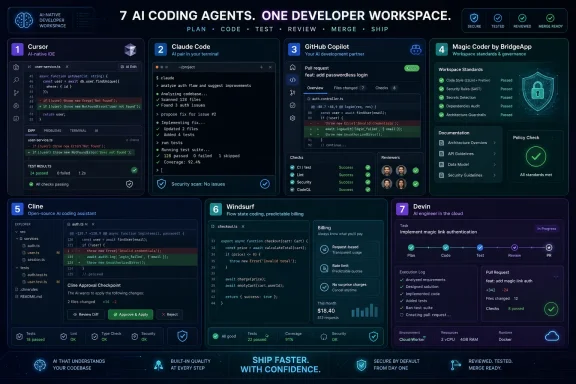 The Coding Assistant Has Become a Coworker With Root Access
For years, the pitch for AI coding tools was simple: type less, autocomplete more. GitHub Copilot made that model mainstream, and most developers learned the same lesson quickly. A good suggestion could feel magical; a bad one could quietly plant a bug you would not notice until review, testing, or production.The 2026 crop of coding agents changes the risk profile because these tools no longer stop at suggestion. They inspect repositories, infer architecture, edit multiple files, run commands, generate tests, interpret failures, and sometimes open pull requests. That means the unit of trust has moved from “Do I accept this completion?” to “Do I trust this agent’s understanding of the system?”
That is a much harder question. Real codebases are not tutorial sandboxes. They contain historical compromises, undocumented invariants, security assumptions, brittle CI pipelines, and naming conventions that make sense only to the people who have lived with them. An agent that writes correct-looking code while missing those local rules is not a productivity tool; it is a very fast source of review fatigue.
The best tools in 2026 are not necessarily the ones with the flashiest demos. They are the ones that preserve developer control at the right moments, maintain context across messy projects, and make it clear what they are about to do before they do it.
Cursor Wins the Daily Driver Slot by Becoming the IDE
Cursor’s advantage is that it does not feel like an add-on. It is a VS Code-derived editor rebuilt around AI workflows, and that distinction matters. The agent is not sitting beside the editor; it is woven into navigation, search, inline completion, refactoring, terminal interaction, and repository context.For individual developers and small teams, Cursor is often the most natural first stop because it improves the work developers already do every day. Its autocomplete can anticipate multi-line edits, and its agent mode can move from intent to implementation without forcing the user to manually shepherd every file change. The result is an AI-native IDE that feels less like a chatbot and more like a faster pair programmer.
Cursor’s strength is repository awareness. Developers can reference files, symbols, documentation, and project context while asking for changes, and the tool is especially useful for feature work, test generation, and local refactors. Its newer parallel-agent workflows push the product toward something closer to a lightweight development swarm, where multiple agents can work on related tasks in separate contexts.
The weakness is the same one that shadows every ambitious IDE agent: local coherence is not global correctness. Cursor can produce a clean edit that compiles, passes obvious tests, and still breaks a less visible architectural assumption elsewhere. On very large codebases, teams should treat Cursor’s confidence as a starting point for review, not as evidence that the system-level consequences have been fully understood.
Pricing is also no longer a trivial footnote. As AI coding tools have moved from completions to multi-step agent execution, usage-based and credit-based plans have made monthly bills harder to predict. Cursor remains one of the strongest tools for everyday development, but heavy agent users should model costs before letting it loose on every task.
Claude Code Is the Power Tool for Engineers Who Still Like the Terminal
Claude Code occupies a different mental space. It is not trying to win by becoming your prettiest editor. It is a terminal-first coding agent built for developers who are comfortable asking a model to inspect a repository, reason through a problem, run commands, and make changes from the command line.That makes it especially attractive to senior engineers, infrastructure teams, and developers who spend more time in shells than sidebars. Claude’s strongest models have earned a reputation for deep reasoning, and Claude Code benefits from that ceiling. When the job is not “write a helper function” but “untangle why this service fails after a dependency migration,” the terminal agent model starts to make sense.
Its best use cases are architectural debugging, large refactors, migration planning, and documentation-heavy work. It can hold a broad view of a project, explain its reasoning, and iterate through failures with less hand-holding than simpler assistants. In practice, that often makes Claude Code feel less like autocomplete and more like an unusually patient staff engineer who happens to need supervision.
The trade-off is accessibility. A CLI-first workflow is powerful, but it is not the default comfort zone for every developer. Teams that live in Visual Studio Code or JetBrains may find Claude Code less immediately inviting than Cursor, Windsurf, or Copilot, even when its reasoning is stronger.
Cost is another serious consideration. Claude Code can be inexpensive for light use and expensive for sustained heavy work, especially when developers lean on high-end models for long sessions. The better the agent gets at absorbing whole problems, the more tempting it becomes to feed it large contexts—and large contexts are where budgets start to matter.
GitHub Copilot Is the Enterprise Default Because Defaults Matter
GitHub Copilot remains the safest organizational answer for many teams, even when it is not the most exciting agent. That sounds like faint praise, but in enterprise IT, defaults are powerful. If a company already uses GitHub, Microsoft identity, policy controls, code review flows, and existing security processes, Copilot slides into the machine with less procurement drama than a more exotic rival.Copilot’s evolution from autocomplete to agent mode is important because it gives Microsoft and GitHub a bridge from the old assistant era into the new agent era. Developers still get inline completions and chat, but Copilot can also operate around issues, pull requests, reviews, and repository-level tasks. For many teams, that continuity matters more than benchmark heroics.
The product’s biggest advantage is ecosystem fit. It works across popular IDEs, aligns with GitHub workflows, and gives enterprises a familiar compliance conversation. When a CIO asks where the code goes, what policy controls exist, and how usage is governed, GitHub has answers that many smaller vendors are still assembling.
Copilot’s limitation is that it can feel less ambitious than the best autonomous agents. It is excellent as a broad assistant and increasingly capable as an agent, but it is not always the tool developers reach for when they need deep architectural reasoning or an aggressive multi-file transformation. That gap may narrow, but in 2026 Copilot is still strongest as the institutional standard rather than the hacker’s favorite scalpel.
The uncomfortable truth is that productivity gains vary by developer, codebase, and task type. Some programmers feel substantially faster with Copilot; others find they mostly accept boilerplate and spend the saved time reviewing generated code. That does not make Copilot weak. It means the enterprise default should still be measured against actual workflow outcomes, not license-count momentum.
Magic Coder by BridgeApp Bets That Context Is a Team Asset
Magic Coder by BridgeApp is less famous than Cursor or Copilot, but it points at one of the most important questions in agentic coding: where should the agent learn the rules of the team? Most tools infer local patterns from the repository. Magic Coder’s pitch is that an agent should also understand workspace context—documents, standards, architectural rules, task requirements, and team conventions.That is a serious differentiator if it works in practice. Many AI-generated code problems are not syntax problems. They are alignment problems. The code may compile, but it may not follow the team’s layering rules, naming conventions, security assumptions, logging standards, or deployment model.
Magic Coder’s terminal-based approach puts it closer to Claude Code than Cursor. It can inspect a repository, propose a plan, apply diff-based edits, run shell commands, and iterate on failures. The important distinction is its emphasis on controlled autonomy. Plan mode lets teams see the intended path before files change, while more automated modes allow experienced users to delegate routine tasks with less friction.
That makes it particularly interesting for CTOs, tech leads, and enterprise teams trying to standardize AI-assisted development rather than letting every developer bring a different agent with a different memory of the architecture. If the agent can consume shared workspace rules reliably, it becomes not just a coding assistant but a policy enforcement layer for engineering practice.
The obvious caveat is maturity. Newer tools have smaller public footprints, thinner community ecosystems, and less independent scrutiny than the giants. A product can have the right architecture and still need time to prove itself under production-scale engineering pressure. Teams considering Magic Coder should pilot it on real internal work, not toy examples, and pay attention to whether its workspace context reduces review burden or merely adds setup overhead.
Cline Is the Open-Source Check on Vendor Lock-In
Cline’s appeal is philosophical as much as technical. It is open source, model-agnostic, and explicit about human approval. In an agent market increasingly shaped by proprietary IDEs, bundled subscriptions, and opaque usage policies, Cline gives developers a more inspectable path.The plan/act workflow is central to that appeal. The agent proposes what it wants to do, then the user approves file edits and commands. That can feel slower than a fully autonomous system, but it maps well to the way cautious developers actually want to adopt AI. Trust is earned one diff at a time.
Cline also lets teams bring their own model providers and API keys. That matters because the best model for one task is not always the best model for another, and because pricing changes have become a recurring pain point in this market. A tool that separates the agent interface from the model vendor gives developers leverage.
Its rules system is another practical strength. Shared project instructions can capture conventions, preferred libraries, testing expectations, and architectural boundaries. That does not magically solve context drift, but it gives teams a repeatable mechanism for shaping agent behavior.
The cost-control story has a catch. “Bring your own API key” does not mean “free.” Long sessions with premium models can still become expensive, and developers must understand token usage better than they do with a flat subscription. Cline’s transparency is valuable, but transparency also makes the meter visible.
The user experience is improving, but it remains less polished than commercial IDE-first products. For developers who value control, auditability, and model choice, that trade-off is acceptable. For teams that want the smoothest possible onboarding, Cline may require more patience.
Windsurf Makes Predictability a Feature
Windsurf’s place in the market is easiest to understand as the calmer alternative to Cursor. It offers an AI-oriented editor experience, a polished interface, and agentic workflows without asking every developer to become a pricing analyst. In a market full of credit systems, model tiers, and usage multipliers, predictable billing is a product feature.Its Cascade flow is designed to make the agent feel present while a developer works. Rather than treating AI as a separate chat session, Windsurf tries to keep suggestions and changes close to the editing loop. That makes it useful for developers who want agentic help but do not want to abandon an IDE-shaped workflow.
Windsurf’s connection to Cognition, the company behind Devin, also gives it a strategic angle. The future suggested by that pairing is a split workflow: use a local editor for daily development, then delegate larger or more repetitive tasks to a cloud agent when the specification is clear enough. That is likely where much of the market is heading.
The limitation is maturity relative to Cursor. Cursor has become a reference point for AI-native IDE expectations, and competing against that requires not only good features but relentless polish. Users working in very large repositories may still encounter stability or context-management issues that make Windsurf feel less battle-hardened.
Still, Windsurf deserves attention because not every developer wants the maximum-autonomy option. Many want a competent AI editor with fewer surprises, a clear monthly cost, and enough agent behavior to reduce repetitive work. That is a real market, and it may be larger than the market for fully autonomous coding robots.
Devin Shows the Future and the Warning Label
Devin remains the most provocative tool on the list because it pushes furthest toward autonomy. It operates in a cloud environment with its own shell, editor, and browser, and it is designed to take a task from instruction to implementation to testing to pull request. If other tools augment a developer, Devin tries to become a delegated worker.That is powerful when the task is well specified. Dependency updates, test fixes, narrow bug reports, reproduction-based issues, and contained feature tickets can be good candidates. A human writes the ticket; Devin works through the implementation path and returns a result for review.
The model is attractive because it changes the allocation of attention. Instead of sitting beside the agent and approving each step, a developer can move on while the agent attempts the job. For overloaded teams with endless maintenance work, that is not a gimmick. It is a possible new operating model for software backlogs.
But Devin also exposes the central weakness of autonomous coding: ambiguity. Vague requirements, incomplete product decisions, hidden architectural constraints, and underspecified edge cases can send an autonomous agent in the wrong direction for a long time. A supervised assistant can be corrected midstream; an autonomous one may return a beautifully executed misunderstanding.
Cost and control are the other trade-offs. Full autonomy consumes more compute, and cloud agents introduce governance questions around repository access, secrets, dependency installation, and generated pull requests. Devin is best treated as a specialized tool for bounded work, not a replacement for engineering judgment.
The broader lesson is that autonomy is not automatically better. The best agent is the one whose independence matches the clarity of the task. If the work is precise, autonomy can save hours. If the work is exploratory, autonomy can simply produce more artifacts to review.
Benchmarks Help, but They Do Not Know Your Codebase
The AI coding market loves benchmarks because benchmarks create the illusion of clean rankings. SWE-Bench and newer pull-request studies are useful because they test agents on more realistic tasks than autocomplete demos. They help separate genuine multi-file problem solving from marketing theater.But benchmarks are not destiny. A tool that performs well on open-source issue resolution may not understand your payment service, your device driver stack, your internal deployment scripts, or your decade-old monorepo. The local weirdness of a codebase is often where developer productivity is won or lost.
Task type matters enormously. Some agents are better at documentation, some at fixes, some at feature work, some at repository navigation, and some at disciplined command execution. Treating “best coding agent” as a single leaderboard category is like ranking databases without asking whether the workload is analytical, transactional, embedded, or distributed.
This is why teams should evaluate agents on their own work. Pick a representative set of recent tickets: a bug fix, a test failure, a small feature, a refactor, a documentation update, and a dependency migration. Run the tools against those tasks under controlled conditions. Measure not only whether the code works, but how much review effort it creates.
The most important metric may be review burden. If an agent saves 20 minutes of typing but adds 40 minutes of uncertainty, it has not helped. If it produces a rough first pass that makes the human reviewer faster and more confident, it may be worth adopting even if it does not top a benchmark chart.
Security Is the Part the Demo Skips
Coding agents are unusually sensitive tools because they combine language-model uncertainty with developer-grade permissions. A chatbot that gives bad advice is annoying. An agent that runs shell commands, edits config files, installs packages, or touches secrets can create real damage.Prompt injection is not a theoretical concern in this setting. Agents read issue text, documentation, comments, logs, dependency metadata, and sometimes web pages. Any of those inputs can contain instructions that attempt to redirect the agent. If the agent cannot distinguish trusted developer intent from untrusted content, it becomes a new attack surface.
The same applies to generated code. AI agents can introduce insecure defaults, insufficient validation, unsafe dependency choices, weak cryptography, or overly broad permissions. They can also produce tests that confirm the code they wrote rather than tests that validate the requirement. That is one reason human review remains non-negotiable.
Enterprise teams should pay particular attention to repository access, audit logs, secret handling, command approval, data retention, and model-training policies. The right question is not simply “Does the vendor say our code is safe?” It is “What can the agent access, what can it execute, what is logged, and how do we prove what happened?”
The safest adoption pattern is staged. Start with read-only assistance and local edits. Move to approved command execution. Then allow limited autonomous pull requests for low-risk tasks. Full autonomy should be earned through evidence, not granted because a demo looked impressive.
The Winning Stack Is Usually Two Tools, Not One
The strongest engineering teams in 2026 are unlikely to standardize on a single AI coding agent for every job. The market has already become too specialized. A tool that is perfect for inline development may be mediocre for deep debugging; a cloud agent that handles maintenance tickets may be awkward for live exploratory coding.A sensible stack often starts with a daily driver. Cursor, Windsurf, Copilot, or Cline can sit inside the everyday development loop and handle completions, local edits, tests, and small refactors. The goal here is flow: fewer interruptions, faster navigation, and enough context awareness to reduce repetitive work.
Then teams add a specialist. Claude Code may become the terminal reasoning tool for complex debugging. Devin may handle well-specified backlog items. Magic Coder may serve teams that need workspace-aware standards and controlled autonomy. Cline may become the open-source option for teams that want model choice and inspectable behavior.
This two-tool pattern is not inefficiency. It is an acknowledgment that software work is not one activity. Writing a React component, migrating an authentication layer, updating documentation, reviewing a pull request, fixing flaky tests, and modernizing build scripts all place different demands on an agent.
The danger is tool sprawl. If every developer uses a different assistant with different rules, different models, and different security assumptions, organizations will reproduce the worst parts of shadow IT inside the development process. Standardization matters, but it should standardize roles rather than pretend one tool fits all work.
The Seven-Agent Shortlist Has a Shape, Not Just a Ranking
The useful way to choose among these tools is to map them to the kind of control your team wants. Cursor is the polished AI-native IDE for developers who want acceleration inside the editor. Claude Code is the terminal reasoning engine for hard problems. GitHub Copilot is the enterprise-safe default for teams already living in GitHub.Magic Coder by BridgeApp is the architecture-aware option for teams that want workspace context and centralized standards. Cline is the open-source, model-flexible choice for developers who want transparency and approval gates. Windsurf is the predictable editor alternative for teams that want agentic help without billing drama. Devin is the autonomous cloud worker for bounded tasks with clear specifications.
That taxonomy matters more than a universal first-place medal. A startup building fast in a TypeScript monorepo may reasonably choose Cursor and Devin. A regulated enterprise may choose Copilot and Magic Coder. A cost-sensitive team with strong internal tooling may choose Cline and Claude Code.
The most common mistake is buying autonomy before defining process. If your tickets are vague, your tests are weak, and your architecture rules live in one senior engineer’s head, an AI agent will not fix that. It will amplify the ambiguity.
The second mistake is underestimating how quickly tools change. Pricing models, model support, context windows, IDE integrations, and security controls are moving rapidly. A sensible 2026 evaluation should be revisited quarterly, not carved into a three-year tooling strategy.
The Practical Shortlist for Developers Who Have to Ship
The agent market is noisy, but the decision can be made concrete if teams focus on workflow fit, task clarity, cost control, and governance. The right tool should reduce the amount of human attention required to produce safe, maintainable code—not merely increase the volume of code created.- Cursor is the strongest default for developers who want an AI-native IDE with excellent everyday ergonomics and strong repository indexing.
- Claude Code is the best fit for terminal-first engineers who need deep reasoning across complex debugging, refactoring, and architectural tasks.
- GitHub Copilot is the pragmatic enterprise choice for organizations that already depend on GitHub workflows, Microsoft governance, and broad IDE support.
- Magic Coder by BridgeApp is worth evaluating when team standards, workspace context, controlled autonomy, and deployment flexibility matter more than brand recognition.
- Cline is the right answer for developers who want open-source transparency, explicit approval of actions, and freedom to choose model providers.
- Windsurf and Devin define the two ends of Cognition’s strategy: a predictable local AI editor for daily work and a more autonomous cloud agent for clearly specified tasks.
References
- Primary source: findarticles.com
Published: 2026-07-02T06:00:39.329392
Best AI Agents for Coding in 2026: Top 7 Tools for Developers
AI coding assistants have evolved into comprehensive agents managing entire development workflows. What used to be simple code completion inside an editorwww.findarticles.com - Related coverage: techradar.com
Claude Sonnet 5 is here, and the 'most agentic Sonnet model yet' shows that the AI war is shifting from chat to agents | TechRadar
Let the agent wars beginwww.techradar.com - Related coverage: presenc.ai
Coding Agent Benchmarks 2026 (SWE-Bench, TerminalBench, Live PR) | Presenc AI
Comprehensive 2026 benchmark data for coding agents: SWE-Bench Verified, TerminalBench, real-world PR pass rate. Claude Code, Devin, Cursor agents, OpenAI...presenc.ai - Related coverage: techplained.com
- Related coverage: amux.io
AI Coding Tools Pricing Compared (2026): Claude Code, Cursor, Copilot, Devin & More — amux
Comprehensive pricing comparison of every major AI coding tool in 2026. Side-by-side costs for Claude Code, Cursor, GitHub Copilot, Windsurf, Devin, Codex, Cline, Aider, and more — including what multi-agent setups actually cost per month. amux.io
- Related coverage: aiagentsquare.com
Coding AI Agents Buyer's Guide 2026 | Cursor, GitHub
Enterprise buyer's guide to coding AI agents: GitHub Copilot, Cursor, Devin, Replit, v0. Features, pricing, integration, and use cases.aiagentsquare.com
- Related coverage: agentmarketcap.ai
Coding Agents Compared: Claude Code vs Cursor vs Windsurf vs Devin | AgentMarketCap
A data-driven comparison of the four leading AI coding agents in 2026 — Claude Code, Cursor, Windsurf, and Devin — covering benchmarks, pricing, and which one to choose.agentmarketcap.ai - Related coverage: windowscentral.com
Microsoft cancels Claude Code licenses, shifting developers to GitHub Copilot CLI — a move likely driven by financial motives | Windows Central
Claude Code was popular among Microsoft engineers, but the company now wants them to shift to GitHub Copilot CLI.www.windowscentral.com - Related coverage: informationmatters.net
