

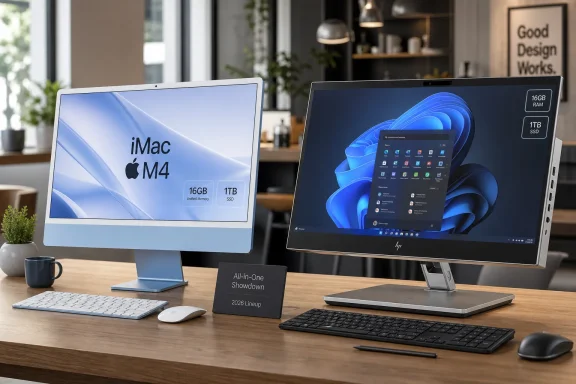
The best all-in-one computers for 2026 are the machines that treat the display, processor, memory, storage, webcam, speakers, ports, and service life as one purchase decision, with Apple’s M4 iMac setting the consumer benchmark and Windows AIOs competing hardest on price, touch, and business practicality. The category looks simple from across a showroom floor, but it is one of the least forgiving corners of the PC market. Buy the wrong tower and you can swap parts; buy the wrong AIO and you are living with the mistake in glass, aluminum, plastic, and solder.
That is the central bargain of the all-in-one in 2026: elegance in exchange for escape routes. The best AIOs are not merely desktops without towers. They are appliances that happen to run Windows or macOS, and that makes the buying decision closer to choosing a laptop than building a PC.
Every all-in-one buying guide begins with the display because the display is the machine. That sounds obvious until you remember how many desktop buyers still think in tower-PC terms: processor first, graphics second, storage third, monitor somewhere down the invoice. With an AIO, that hierarchy is backwards.
A 23-inch screen is the practical floor, not the sweet spot. Anything smaller increasingly collides with the question that haunts cheap all-in-ones: why not just buy a laptop and plug in a monitor later? AIOs earn their desk space when they give you a broad, bright, always-ready canvas that feels materially better than a notebook.
The practical mainstream remains 24 to 27 inches, where full HD can still work but starts to look merely adequate rather than generous. At 27 inches, 1440p is a more comfortable baseline, while 4K gives spreadsheets, browser windows, and creative apps enough room to breathe. Ultra-wide AIOs and curved 34-inch designs make the strongest visual argument, but they also become furniture, not just computers.
Panel quality matters more than spec-sheet resolution. IPS-class viewing angles are still important because all-in-ones are often shared machines: a kitchen PC, a family Zoom terminal, a reception-desk workstation, or a small-office hub. A poor panel turns that use case into a daily annoyance, especially when two people are looking at the same screen from different angles.
Brightness is another underappreciated line item. Desktop displays are often used in brighter rooms than laptops, and the AIO that looks fine in a dim review lab can look washed out near a window. A good all-in-one should not require you to rearrange the room around it.
The old “gorilla arm” critique still applies. A vertical touchscreen is pleasant for quick taps and miserable for sustained work. If a user is expected to touch the panel constantly, the screen needs to recline dramatically or lie nearly flat. Otherwise, touch becomes a demo feature that impresses in the store and fades into disuse after a week.
This is where Windows AIOs have an opening that Apple still declines to pursue. The iMac remains a beautifully integrated desktop, but macOS does not turn it into a touch-first machine, and Apple has shown no appetite for making the iMac behave like a giant iPad. That decision keeps the product focused, but it also leaves room for Windows machines that serve classrooms, counters, studios, and collaborative spaces.
The stronger question is not whether an AIO has touch, but whether its stand justifies touch. A fixed vertical panel with a touchscreen is a convenience. A flexible hinge with pen support, good palm rejection, and near-horizontal use can become a different class of machine. Most buyers do not need the latter, but those who do should not compromise.
Portrait rotation is even rarer and more specialized. Developers, editors, designers, and document-heavy workers may love it, but AIO makers rarely prioritize it because the enclosure, cabling, weight distribution, and webcam placement all become harder. If portrait mode matters, verify it before buying rather than assuming a desktop monitor feature has migrated into the all-in-one world.
But the distinction still matters. Intel’s U, H, and HX suffixes signal mobile parts, while desktop CPUs usually lack those letters or use suffixes such as K or T. In AIOs, the mobile chip is often the rational choice because the case is slim, the cooling budget is limited, and the buyer is not expecting workstation-class expansion.
Intel remains dominant in this market. AMD’s Ryzen chips appear in some models and can be excellent, but the AIO shelf is still disproportionately Intel territory. That has less to do with AMD’s capability than with OEM design habits, supply agreements, and the conservative update cadence of all-in-one desktops.
The 2026 processor story is also more confusing than it used to be. Intel’s 14th-generation Raptor Lake Refresh chips remain present in some systems, while Core and Core Ultra 100 and 200-series processors brought Meteor Lake, Lunar Lake, and Arrow Lake branding into compact PCs. Panther Lake, sold as Core Ultra Series 3, arrived at the start of 2026 for laptops and compact systems, while Wildcat Lake is being positioned for lower-cost machines.
That alphabet soup matters less than the buyer’s workload. Office apps, video calls, web browsing, media playback, and light photo editing are now easy for almost any current Core, Core Ultra, Ryzen, or Apple silicon machine. The problems arrive when buyers expect an AIO to be a gaming rig, CAD box, or long-lived upgrade platform.
An 8GB all-in-one can still function, especially in controlled office, classroom, or kiosk roles. But it is no longer a comfortable general-purpose recommendation. Modern browsers are greedy, Windows background services are not getting smaller, collaboration apps are persistent, and creative tools punish thin memory configurations quickly.
Sixteen gigabytes should be the mainstream floor for a 2026 AIO. It is enough for heavy browser use, office work, photo editing, and the sort of casual multitasking that real households and small offices actually do. It is also the safer starting point for operating-system features increasingly marketed around local AI assistance.
The catch is that many AIOs are sealed like laptops. Memory may be soldered, storage may be awkward to reach, and even theoretically replaceable parts may be locked behind difficult disassembly. That changes the purchasing rule: do not buy the memory you need today; buy the memory you will resent not having three years from now.
Apple makes this particularly stark because the iMac is an integrated appliance by design. The M4 iMac is fast, quiet, and polished, but configuration discipline matters. A buyer who skimps on memory or storage at checkout will not fix that mistake with a screwdriver later.
A 500GB SSD is acceptable for cloud-first users, office deployments, and households that mostly stream media. But the moment a machine becomes the family photo vault, a home-video archive, or a small-business creative workstation, 1TB becomes the sensible starting point. Video files in particular make optimistic storage estimates look foolish.
External drives can soften the blow, and network-attached storage remains a better answer for serious households or offices. Still, the AIO form factor invites people to centralize everything because it sits in the shared space. That convenience can turn a modest SSD into a constant cleanup chore.
Ports deserve similar attention. USB ports should be reachable, not hidden in a yoga pose behind the panel. Ethernet still matters in offices, schools, clinics, and homes where Wi-Fi is congested or unreliable. HDMI input, when available, is quietly valuable because it can extend the useful life of the panel after the computer inside grows old.
That last point is underappreciated. An all-in-one with a great display but no way to use it as an external monitor becomes e-waste faster than it should. The industry loves to talk about sustainability; HDMI input is one of the simplest ways to make an AIO less disposable.
That coherence matters. Apple does not treat the iMac as a small tower glued to a monitor. It treats it as a single object, and that is why the machine feels more finished than many Windows competitors. The display, webcam, microphones, speakers, thermals, and operating system all serve one design thesis.
The caution is that Apple’s version of integration is also a lock-in strategy. No touch. Limited post-purchase flexibility. Configuration choices that must be made early. A design that looks effortless precisely because the user is not invited behind the curtain.
For many households, that trade is fine. The iMac is a shared computer that behaves predictably and looks good in a living room, office, or studio. For IT departments, labs, and mixed-device environments, the lack of Windows compatibility as a native management assumption may be the bigger issue than the hardware itself.
Windows AIOs answer with variety. Some are cheap, some are touch-enabled, some are business-friendly, some have better port layouts, and some can be bought in fleets with service contracts. The problem is that variety also means inconsistency. The Windows buyer has to inspect the whole package more carefully because there is no single design philosophy holding the category together.
This is why business AIOs can be more attractive than their spec sheets suggest. Dell, HP, and Lenovo commercial lines often look less glamorous than consumer machines, but they may offer better warranty options, more predictable imaging and deployment, and less absurd industrial design. For an office, a boring AIO can be a virtue.
Home users should still be wary of the cheapest Windows all-in-ones. Low-end processors such as Intel N-series chips can be fine for web terminals, basic schoolwork, and lightweight office use, but they are not magic. Pair them with 8GB of RAM and a small SSD, and the system may feel old long before its display fails.
The midrange is where the category makes the most sense. A 24- or 27-inch IPS display, 16GB of RAM, a 1TB SSD, Wi-Fi 6E or better, a current Core/Core Ultra or Ryzen processor, and a decent webcam form the backbone of a machine that can live in a household or office for years. Everything beyond that should be justified by a real workload.
Discrete graphics are the exception that proves the rule. A few AIOs include mobile-class Nvidia GeForce RTX hardware, but they remain niche machines. If gaming or GPU-heavy work is central, a tower or gaming laptop is usually the more honest purchase.
AIOs are excellent at that role. They make sense on a kitchen counter, in a den, at a reception desk, in a classroom corner, or in a small studio apartment where the same screen may handle bills, homework, video calls, streaming, recipes, and light work. A laptop can do those things, but it often disappears into a backpack or bedroom.
The large screen changes behavior. A family video call on a 27-inch AIO feels less cramped than a call around a tablet. A shared photo library feels more accessible. A child doing homework at a visible desktop is easier to supervise than one hidden behind a bedroom door with a laptop.
This is not nostalgia for the beige family PC. It is a recognition that shared computing still has a place, especially as tablets and phones have made private screens ubiquitous. The AIO is the desktop as household appliance, and that role is more durable than enthusiasts sometimes admit.
Small businesses understand the same logic. A front-desk AIO, a point-of-sale-adjacent workstation, or a conference-room machine benefits from having fewer cables, fewer boxes, and fewer things for users to unplug. The elegance is operational, not just aesthetic.
This does not make all-in-ones unreliable. It makes them structurally less forgiving. A failed display can compromise the whole machine. A noisy fan may require model-specific parts. A storage upgrade may demand patience, tools, and a service manual that the manufacturer would rather you never read.
The laptop comparison is apt. Buyers increasingly accept sealed notebooks because portability is worth the trade. AIOs ask for the same compromise without portability, which means the desk-space and simplicity benefits must be real. If they are not, a mini PC plus a good monitor may be the smarter long-term answer.
For enterprise IT, serviceability is not a philosophical issue; it is a cost line. Fleet buyers should care about warranty length, on-site service, image stability, dock and peripheral compatibility, and whether the vendor will sell essentially the same chassis long enough to simplify support. A beautiful consumer AIO can become an ugly support problem at scale.
Consumers should be just as practical. If the household computer is mission-critical for work, school, or caregiving, extended warranty coverage may be more rational on an AIO than on a tower. The machine’s all-in-one nature concentrates risk.
A mini PC plus a quality display lets the buyer choose the exact screen, webcam, speakers, keyboard, and repair path. If the PC ages out, keep the monitor. If the monitor fails, keep the PC. If storage needs change, many mini PCs are easier to open than AIOs.
That modularity undercuts the AIO’s weakest point. The all-in-one looks simpler on day one, but the mini-PC setup may be simpler on year five. This is especially true for users who care about 4K displays, adjustable stands, portrait rotation, or specialized webcams.
Still, the mini PC does not kill the AIO because integration has value. One power cable, one warranty, one design, one box, one purchase. For many buyers, that is the whole point. The AIO survives because convenience often beats theoretical flexibility.
The right comparison, then, is not AIO versus desktop in the abstract. It is AIO versus mini PC plus monitor for your actual room, your actual users, and your actual tolerance for clutter and maintenance.
The practical buying rules are clearer than the marketing:
The all-in-one remains a strangely honest PC category because it refuses to hide the trade: you get the clean desk, the large shared screen, and the appliance-like simplicity, but you give up the freedom that made desktops beloved by tinkerers. In 2026, that bargain is still worth making for the right user, and still wrong for anyone who mistakes elegance for expandability. The next wave of AI-branded processors and brighter panels will make AIOs feel more modern, but the winning machines will be the ones that remember the oldest desktop truth: the computer is only as good as the screen, the service life, and the work it lets you finish.
That is the central bargain of the all-in-one in 2026: elegance in exchange for escape routes. The best AIOs are not merely desktops without towers. They are appliances that happen to run Windows or macOS, and that makes the buying decision closer to choosing a laptop than building a PC.
 The Screen Is the Computer Now
Every all-in-one buying guide begins with the display because the display is the machine. That sounds obvious until you remember how many desktop buyers still think in tower-PC terms: processor first, graphics second, storage third, monitor somewhere down the invoice. With an AIO, that hierarchy is backwards.A 23-inch screen is the practical floor, not the sweet spot. Anything smaller increasingly collides with the question that haunts cheap all-in-ones: why not just buy a laptop and plug in a monitor later? AIOs earn their desk space when they give you a broad, bright, always-ready canvas that feels materially better than a notebook.
The practical mainstream remains 24 to 27 inches, where full HD can still work but starts to look merely adequate rather than generous. At 27 inches, 1440p is a more comfortable baseline, while 4K gives spreadsheets, browser windows, and creative apps enough room to breathe. Ultra-wide AIOs and curved 34-inch designs make the strongest visual argument, but they also become furniture, not just computers.
Panel quality matters more than spec-sheet resolution. IPS-class viewing angles are still important because all-in-ones are often shared machines: a kitchen PC, a family Zoom terminal, a reception-desk workstation, or a small-office hub. A poor panel turns that use case into a daily annoyance, especially when two people are looking at the same screen from different angles.
Brightness is another underappreciated line item. Desktop displays are often used in brighter rooms than laptops, and the AIO that looks fine in a dim review lab can look washed out near a window. A good all-in-one should not require you to rearrange the room around it.
Touch Is Useful, but Ergonomics Still Wins
Windows has been touch-aware for years, and in 2026 the software case for touch is no longer exotic. Families like it, kiosks need it, and certain creative or classroom workflows benefit from direct manipulation. But the hardware case remains more complicated.The old “gorilla arm” critique still applies. A vertical touchscreen is pleasant for quick taps and miserable for sustained work. If a user is expected to touch the panel constantly, the screen needs to recline dramatically or lie nearly flat. Otherwise, touch becomes a demo feature that impresses in the store and fades into disuse after a week.
This is where Windows AIOs have an opening that Apple still declines to pursue. The iMac remains a beautifully integrated desktop, but macOS does not turn it into a touch-first machine, and Apple has shown no appetite for making the iMac behave like a giant iPad. That decision keeps the product focused, but it also leaves room for Windows machines that serve classrooms, counters, studios, and collaborative spaces.
The stronger question is not whether an AIO has touch, but whether its stand justifies touch. A fixed vertical panel with a touchscreen is a convenience. A flexible hinge with pen support, good palm rejection, and near-horizontal use can become a different class of machine. Most buyers do not need the latter, but those who do should not compromise.
Portrait rotation is even rarer and more specialized. Developers, editors, designers, and document-heavy workers may love it, but AIO makers rarely prioritize it because the enclosure, cabling, weight distribution, and webcam placement all become harder. If portrait mode matters, verify it before buying rather than assuming a desktop monitor feature has migrated into the all-in-one world.
Intel’s Laptop Chips Have Taken Over the Desktop Disguise
The dirty secret of the modern Windows all-in-one is that many are laptop platforms wearing desktop clothing. That is not necessarily bad. Mobile processors have become efficient, capable, and much better suited to thin thermally constrained chassis than old-school desktop chips.But the distinction still matters. Intel’s U, H, and HX suffixes signal mobile parts, while desktop CPUs usually lack those letters or use suffixes such as K or T. In AIOs, the mobile chip is often the rational choice because the case is slim, the cooling budget is limited, and the buyer is not expecting workstation-class expansion.
Intel remains dominant in this market. AMD’s Ryzen chips appear in some models and can be excellent, but the AIO shelf is still disproportionately Intel territory. That has less to do with AMD’s capability than with OEM design habits, supply agreements, and the conservative update cadence of all-in-one desktops.
The 2026 processor story is also more confusing than it used to be. Intel’s 14th-generation Raptor Lake Refresh chips remain present in some systems, while Core and Core Ultra 100 and 200-series processors brought Meteor Lake, Lunar Lake, and Arrow Lake branding into compact PCs. Panther Lake, sold as Core Ultra Series 3, arrived at the start of 2026 for laptops and compact systems, while Wildcat Lake is being positioned for lower-cost machines.
That alphabet soup matters less than the buyer’s workload. Office apps, video calls, web browsing, media playback, and light photo editing are now easy for almost any current Core, Core Ultra, Ryzen, or Apple silicon machine. The problems arrive when buyers expect an AIO to be a gaming rig, CAD box, or long-lived upgrade platform.
The AI PC Tax Is Really a Memory Tax
The most consequential 2026 spec may not be the neural processor, the CPU generation, or the marketing badge. It may be RAM. The industry’s AI obsession has pushed memory into the spotlight, and AIO buyers should treat 8GB as the new warning label.An 8GB all-in-one can still function, especially in controlled office, classroom, or kiosk roles. But it is no longer a comfortable general-purpose recommendation. Modern browsers are greedy, Windows background services are not getting smaller, collaboration apps are persistent, and creative tools punish thin memory configurations quickly.
Sixteen gigabytes should be the mainstream floor for a 2026 AIO. It is enough for heavy browser use, office work, photo editing, and the sort of casual multitasking that real households and small offices actually do. It is also the safer starting point for operating-system features increasingly marketed around local AI assistance.
The catch is that many AIOs are sealed like laptops. Memory may be soldered, storage may be awkward to reach, and even theoretically replaceable parts may be locked behind difficult disassembly. That changes the purchasing rule: do not buy the memory you need today; buy the memory you will resent not having three years from now.
Apple makes this particularly stark because the iMac is an integrated appliance by design. The M4 iMac is fast, quiet, and polished, but configuration discipline matters. A buyer who skimps on memory or storage at checkout will not fix that mistake with a screwdriver later.
Storage Has Become Simple, Except When Vendors Make It Cheap
The good news is that the spinning boot drive is effectively dead in serious AIO shopping. A modern all-in-one should boot from an SSD, full stop. If a new machine still leans on a hard drive as primary storage, it belongs in the bargain bin or a procurement spreadsheet with very narrow assumptions.A 500GB SSD is acceptable for cloud-first users, office deployments, and households that mostly stream media. But the moment a machine becomes the family photo vault, a home-video archive, or a small-business creative workstation, 1TB becomes the sensible starting point. Video files in particular make optimistic storage estimates look foolish.
External drives can soften the blow, and network-attached storage remains a better answer for serious households or offices. Still, the AIO form factor invites people to centralize everything because it sits in the shared space. That convenience can turn a modest SSD into a constant cleanup chore.
Ports deserve similar attention. USB ports should be reachable, not hidden in a yoga pose behind the panel. Ethernet still matters in offices, schools, clinics, and homes where Wi-Fi is congested or unreliable. HDMI input, when available, is quietly valuable because it can extend the useful life of the panel after the computer inside grows old.
That last point is underappreciated. An all-in-one with a great display but no way to use it as an external monitor becomes e-waste faster than it should. The industry loves to talk about sustainability; HDMI input is one of the simplest ways to make an AIO less disposable.
The iMac Remains the Category’s North Star and Its Cautionary Tale
Apple’s 24-inch iMac is still the machine that defines what many buyers imagine when they hear “all-in-one.” The current M4 model keeps the formula intact: thin body, strong Apple silicon, high-quality display, good speakers, clean desk presence, and almost no tolerance for tinkering. It is not the most flexible AIO, but it is the most coherent one.That coherence matters. Apple does not treat the iMac as a small tower glued to a monitor. It treats it as a single object, and that is why the machine feels more finished than many Windows competitors. The display, webcam, microphones, speakers, thermals, and operating system all serve one design thesis.
The caution is that Apple’s version of integration is also a lock-in strategy. No touch. Limited post-purchase flexibility. Configuration choices that must be made early. A design that looks effortless precisely because the user is not invited behind the curtain.
For many households, that trade is fine. The iMac is a shared computer that behaves predictably and looks good in a living room, office, or studio. For IT departments, labs, and mixed-device environments, the lack of Windows compatibility as a native management assumption may be the bigger issue than the hardware itself.
Windows AIOs answer with variety. Some are cheap, some are touch-enabled, some are business-friendly, some have better port layouts, and some can be bought in fleets with service contracts. The problem is that variety also means inconsistency. The Windows buyer has to inspect the whole package more carefully because there is no single design philosophy holding the category together.
The Best Windows AIO Is Usually the Least Compromised One, Not the Fastest
AIO buyers often ask which model is fastest, but the more useful question is which model has the fewest bad compromises. Speed is easy to market. Quiet cooling, a non-wobbly stand, a sensible webcam angle, accessible ports, decent speakers, serviceable memory, and a panel that does not look cheap are harder to compress into a product badge.This is why business AIOs can be more attractive than their spec sheets suggest. Dell, HP, and Lenovo commercial lines often look less glamorous than consumer machines, but they may offer better warranty options, more predictable imaging and deployment, and less absurd industrial design. For an office, a boring AIO can be a virtue.
Home users should still be wary of the cheapest Windows all-in-ones. Low-end processors such as Intel N-series chips can be fine for web terminals, basic schoolwork, and lightweight office use, but they are not magic. Pair them with 8GB of RAM and a small SSD, and the system may feel old long before its display fails.
The midrange is where the category makes the most sense. A 24- or 27-inch IPS display, 16GB of RAM, a 1TB SSD, Wi-Fi 6E or better, a current Core/Core Ultra or Ryzen processor, and a decent webcam form the backbone of a machine that can live in a household or office for years. Everything beyond that should be justified by a real workload.
Discrete graphics are the exception that proves the rule. A few AIOs include mobile-class Nvidia GeForce RTX hardware, but they remain niche machines. If gaming or GPU-heavy work is central, a tower or gaming laptop is usually the more honest purchase.
The AIO Is a Family Computer in an Era That Pretends Families Only Own Phones
One reason the all-in-one refuses to die is that it solves a problem the rest of the industry likes to ignore. Not every computer is personal. Some computers are communal, stationary, and used in short bursts by multiple people.AIOs are excellent at that role. They make sense on a kitchen counter, in a den, at a reception desk, in a classroom corner, or in a small studio apartment where the same screen may handle bills, homework, video calls, streaming, recipes, and light work. A laptop can do those things, but it often disappears into a backpack or bedroom.
The large screen changes behavior. A family video call on a 27-inch AIO feels less cramped than a call around a tablet. A shared photo library feels more accessible. A child doing homework at a visible desktop is easier to supervise than one hidden behind a bedroom door with a laptop.
This is not nostalgia for the beige family PC. It is a recognition that shared computing still has a place, especially as tablets and phones have made private screens ubiquitous. The AIO is the desktop as household appliance, and that role is more durable than enthusiasts sometimes admit.
Small businesses understand the same logic. A front-desk AIO, a point-of-sale-adjacent workstation, or a conference-room machine benefits from having fewer cables, fewer boxes, and fewer things for users to unplug. The elegance is operational, not just aesthetic.
The Repair Story Is Where the Romance Ends
Every AIO review should include a moment of sobriety: when the screen, logic board, power supply, webcam, speakers, and stand are one product, failure gets complicated. A tower lets you replace a bad monitor, swap a power supply, add RAM, or install a new GPU. An AIO asks you to hope the warranty is still valid.This does not make all-in-ones unreliable. It makes them structurally less forgiving. A failed display can compromise the whole machine. A noisy fan may require model-specific parts. A storage upgrade may demand patience, tools, and a service manual that the manufacturer would rather you never read.
The laptop comparison is apt. Buyers increasingly accept sealed notebooks because portability is worth the trade. AIOs ask for the same compromise without portability, which means the desk-space and simplicity benefits must be real. If they are not, a mini PC plus a good monitor may be the smarter long-term answer.
For enterprise IT, serviceability is not a philosophical issue; it is a cost line. Fleet buyers should care about warranty length, on-site service, image stability, dock and peripheral compatibility, and whether the vendor will sell essentially the same chassis long enough to simplify support. A beautiful consumer AIO can become an ugly support problem at scale.
Consumers should be just as practical. If the household computer is mission-critical for work, school, or caregiving, extended warranty coverage may be more rational on an AIO than on a tower. The machine’s all-in-one nature concentrates risk.
The Mini PC Is the AIO’s Most Dangerous Rival
The strongest alternative to an all-in-one is no longer the traditional tower. It is the mini PC strapped, mounted, or tucked behind a monitor. That setup can deliver the same clean desk with far more flexibility.A mini PC plus a quality display lets the buyer choose the exact screen, webcam, speakers, keyboard, and repair path. If the PC ages out, keep the monitor. If the monitor fails, keep the PC. If storage needs change, many mini PCs are easier to open than AIOs.
That modularity undercuts the AIO’s weakest point. The all-in-one looks simpler on day one, but the mini-PC setup may be simpler on year five. This is especially true for users who care about 4K displays, adjustable stands, portrait rotation, or specialized webcams.
Still, the mini PC does not kill the AIO because integration has value. One power cable, one warranty, one design, one box, one purchase. For many buyers, that is the whole point. The AIO survives because convenience often beats theoretical flexibility.
The right comparison, then, is not AIO versus desktop in the abstract. It is AIO versus mini PC plus monitor for your actual room, your actual users, and your actual tolerance for clutter and maintenance.
The 2026 Shortlist Starts With the Mistakes to Avoid
The all-in-one market rewards disciplined buyers more than spec chasers. A fast CPU cannot rescue a dim display. A pretty chassis cannot compensate for 8GB of soldered RAM. A touchscreen does not matter if the hinge makes it uncomfortable to use.The practical buying rules are clearer than the marketing:
- A 23-inch display should be treated as the minimum for a serious all-in-one, while 24 to 27 inches is the more comfortable mainstream range.
- A 16GB memory configuration should be the default target for general-purpose Windows and Mac AIOs in 2026.
- A 1TB SSD is the safer choice for households, creators, and small offices that store local photos, videos, or project files.
- A touchscreen is worth paying for only when the stand and hinge make frequent touch use comfortable.
- AIOs with HDMI input, accessible USB ports, Ethernet, and strong warranty options age more gracefully than prettier machines with fewer practical concessions.
- Buyers who expect gaming, graphics upgrades, or long-term component swaps should choose a tower or a mini PC setup instead.
The all-in-one remains a strangely honest PC category because it refuses to hide the trade: you get the clean desk, the large shared screen, and the appliance-like simplicity, but you give up the freedom that made desktops beloved by tinkerers. In 2026, that bargain is still worth making for the right user, and still wrong for anyone who mistakes elegance for expandability. The next wave of AI-branded processors and brighter panels will make AIOs feel more modern, but the winning machines will be the ones that remember the oldest desktop truth: the computer is only as good as the screen, the service life, and the work it lets you finish.
References
- Primary source: PCMag UK
Published: 2026-06-16T18:10:08.689552
The Best All-in-One Computers for 2026
If you want space savings, power, and flexibility—all from a single desktop computer—you need an all-in-one (AIO) PC. We've got the advice, backed by our lab-based reviews, to help you find the right AIO.uk.pcmag.com - Related coverage: techradar.com
The best all-in-one computer for 2026 | TechRadar
It can be hard to choose the best all-in-one computers in 2026, but we're here to bring you only the top picks for any budget.www.techradar.com - Related coverage: forbes.com
Best All-In-One Computers 2026 - Forbes Vetted
The best all-in-one computers save space by housing the processor, screen, speakers and other components all in one slender unit. Here are our top picks.www.forbes.com - Related coverage: download.intel.com
