

The best gaming PC specs for 2026 center on a modern discrete GPU such as Nvidia’s GeForce RTX 50 series or AMD’s Radeon RX 9000 series, a current six- to eight-core CPU, 16GB to 32GB of RAM, and at least a 1TB NVMe SSD. That answer is simple enough to fit in a buying guide, but it hides the real story: the gaming PC has become less about raw component hierarchy and more about choosing the right compromise. In 2026, the smartest gaming desktop is not necessarily the one with the largest graphics card; it is the one that spends money where your monitor, games, and upgrade plans can actually use it. The new performance ladder is powerful, expensive, and increasingly shaped by AI-era supply pressures that have little to do with your Steam backlog.
Every generation of PC hardware produces a few comforting myths, and one of the oldest is that gaming desktops are “balanced systems.” They are, up to a point. But once the basics are covered, a gaming PC still lives or dies by the graphics card.
That is especially true in 2026 because the GPU is no longer just a rasterization engine pushing frames in the old-fashioned sense. It is the part that determines whether you can run high-refresh 1440p, whether 4K is realistic, whether ray tracing is worth enabling, and whether modern upscaling and frame-generation features rescue performance in games that would otherwise punish even expensive hardware.
Nvidia’s GeForce RTX 50 series has become the default reference point for new gaming desktops, with the RTX 5090, RTX 5080, RTX 5070 Ti, RTX 5070, RTX 5060 Ti, RTX 5060, and RTX 5050 filling out the stack. AMD’s Radeon RX 9000 cards, especially the RX 9070 XT, RX 9070, and RX 9060 XT, give buyers a stronger midrange alternative than AMD has had in several cycles. Intel’s Arc cards remain the third player, more visible in DIY discussions than in big-name prebuilts, but still useful as price pressure on the market.
The old dual-card fantasy is gone. SLI and CrossFire once gave enthusiast PCs a kind of science-project glamour, but modern games, drivers, engines, and APIs have moved on. The best gaming PC in 2026 has one good GPU, not two temperamental ones pretending to be better together.
But halo products distort the way people shop. A $1,999-class graphics card may be the right answer for a small number of buyers with 4K high-refresh monitors, aggressive ray-tracing expectations, and no patience for compromise. For most people, it is a terrible place to begin the conversation.
The more interesting Nvidia cards are lower in the stack. The RTX 5070 and RTX 5060 Ti are the cards that will define a large share of practical 2026 gaming PCs, because they sit closer to the monitors most people actually own. A strong 1440p experience is now the real mainstream enthusiast target, and the RTX 5060 Ti or RTX 5070 class makes more sense there than a prestige card that costs as much as the rest of the system.
This is where DLSS matters. Nvidia’s software stack has become part of the hardware purchase, not a bonus feature tucked into a control panel. DLSS upscaling, frame generation, and related rendering tricks can turn a midrange GPU into something that feels more expensive in supported games, especially when the alternative is brute-forcing every pixel.
That does not mean Nvidia’s lower-end cards are magic. Memory capacity, bus width, and game support still matter, and no upscaler can turn a weak GPU into a universal 4K monster. But it does mean that a 2026 gaming PC buyer has to judge Nvidia cards by the platform around them, not just by traditional benchmark bars.
The Radeon RX 9070 XT and RX 9070 are the cards that best express that argument. They are not designed to dethrone the RTX 5090, and pretending otherwise misses the point. They are designed to make Nvidia’s middle and upper-middle stack look expensive.
That distinction matters in prebuilts. A system builder can pair a Radeon RX 9070 XT with a sensible Ryzen 7 or Core Ultra 7 CPU, 32GB of RAM, and a roomy SSD, then sell a machine that feels meaningfully complete rather than theatrically extreme. For many gamers, that is a better product than an RTX 5090 desktop with compromises elsewhere or a price tag that belongs in a workstation budget.
AMD still trails Nvidia in some ray-tracing and software ecosystem comparisons, especially where DLSS has strong support. But the gap that matters to ordinary buyers is not philosophical; it is experiential. If a Radeon-based desktop runs your games smoothly at your monitor’s native resolution, the fact that it does not win every path-traced showcase may be irrelevant.
The RX 9060 XT also deserves attention because the lower midrange is where bad buying decisions multiply. A cheaper GPU can be a good deal, but only if it has enough memory and performance headroom to last. In 2026, bargain hunting should not mean buying a system that already feels one console port away from regret.
A 2,560-by-1,440 display gives buyers a visible jump over 1080p without imposing the brutal GPU demands of 4K. It also pairs naturally with the cards that make the most sense financially: RTX 5060 Ti, RTX 5070, Radeon RX 9060 XT, Radeon RX 9070, and Radeon RX 9070 XT-class hardware. This is the zone where a well-built PC can feel fast, sharp, and durable without requiring a flagship GPU.
The monitor should drive the PC purchase, not the other way around. If you own a 1080p 144Hz screen and have no intention of replacing it, an RTX 5090-class desktop is largely wasted outside specialized use cases. If you own a 4K 144Hz or 240Hz panel and want high settings in demanding games, the GPU budget must rise accordingly.
This sounds obvious, but prebuilt marketing works hard to make it less obvious. Vendors love hero configurations because they photograph well and benchmark cleanly. Buyers should ask a duller question: what resolution and refresh rate am I actually trying to feed for the next three to five years?
That question usually produces a more restrained answer. The best gaming PC is often the one that lets you buy a better monitor, headset, keyboard, chair, or backup drive instead of pouring every last dollar into a GPU tier you will rarely exploit.
For native 4K with high settings and ray tracing, buyers should be looking at the RTX 5080, RTX 5090, or the strongest last-generation Nvidia cards still found in worthwhile systems. AMD’s higher-end Radeon cards can be credible 4K options as well, especially where ray tracing is not the main attraction, but Nvidia remains the cleaner choice for those who want the most aggressive visual feature set.
The catch is that 4K has become slippery. With upscaling and frame generation, “4K gaming” may mean native 4K, reconstructed 4K, or a hybrid of rendering shortcuts and perceptual wins. That is not cheating; it is where graphics technology has gone. But buyers should understand what they are buying.
A 4K desktop is not just a GPU purchase. It needs enough CPU headroom to avoid bottlenecks in high-refresh scenarios, enough memory to handle large modern games, enough cooling to keep boost clocks stable, and enough storage to house the kind of massive installations that come with modern AAA titles. A weak supporting cast can make an expensive GPU feel oddly ordinary.
VR is a different case. It can be demanding, but not always in the same way as high-end 4K gaming. Headset requirements vary, and smoothness matters more than screenshot beauty. Anyone buying for VR should start with the headset’s recommended specs, then exceed them rather than merely meeting the floor.
For a mainstream gaming desktop, a modern Core i5, Core Ultra 5, Ryzen 5, Core i7, Core Ultra 7, or Ryzen 7 is usually the right class of processor. These chips provide enough cores and enough single-threaded performance for today’s games while leaving more budget for the GPU. That trade matters because the GPU usually determines the upper limit of visual performance.
Intel’s Core Ultra 200S “Arrow Lake” generation changed the desktop lineup’s branding and platform conversation, while AMD’s Ryzen 9000 and X3D chips continue to appeal to gamers chasing high frame rates. AMD’s 3D V-Cache processors remain especially interesting for CPU-sensitive titles, where extra cache can produce real gains rather than spreadsheet vanity.
But a Ryzen 9 or Core Ultra 9 is not automatically a better gaming buy. It may be a better streaming, compiling, rendering, or workstation-adjacent buy. If the machine will spend half its life in Premiere Pro, Blender, Visual Studio, or virtual machines, the higher-end CPU case gets stronger. If it is mostly for gaming, the money often belongs elsewhere.
Intel’s 13th- and 14th-generation instability saga also changed the tone of CPU shopping. Even with mitigations and firmware updates available, buyers are right to ask whether a prebuilt vendor has shipped systems with updated BIOS versions and clear warranty coverage. Trust is now part of the spec sheet.
Modern games, launchers, browsers, chat apps, RGB utilities, capture tools, and anti-cheat systems all take their cut before the game itself gets comfortable. A machine with 8GB of RAM may still launch games, but it should not be presented as a serious new gaming PC unless the budget is exceptionally tight and upgrades are immediate.
Thirty-two gigabytes is the safer choice for a midrange or high-end system. It gives Windows room to breathe, makes multitasking less irritating, and provides a cushion for the next wave of large PC releases. It is not glamorous, but it is one of those specs that keeps a computer feeling new longer.
The complication is price. Memory and storage markets have been increasingly affected by demand from AI infrastructure, which changes the old assumption that RAM upgrades will always be cheap and painless later. Buyers should still avoid panic spending, but they should not assume that a low-memory configuration is harmless if the upgrade path is unclear.
For most 2026 gaming desktops, the clean recommendation is simple: 16GB for entry-level systems, 32GB for serious midrange and high-end systems, and more only if the PC also has workstation duties. Anything less needs a very good explanation.
One terabyte should be treated as the practical minimum for a new gaming desktop. It sounds spacious until a few large games, Windows, drivers, media apps, and launchers have moved in. A 500GB SSD can work in a budget machine, but it feels like a corner cut from the first week of ownership.
Two terabytes is the comfortable choice. It allows a real game library to live on fast storage and reduces the constant uninstall-and-redownload shuffle. For players with data caps, slow broadband, or a taste for large open-world games, that comfort is worth money.
Hard drives still have a role, but not as primary game drives in premium systems. A large HDD can be useful for media, backups, recordings, and cold storage. For games you actively play, NVMe storage is the experience you want.
Prebuilt vendors know storage is easy to obscure in marketing. “1TB storage” sounds fine until it turns out to be a small SSD paired with a slow drive, or a budget SSD with unimpressive performance. Buyers do not need to obsess over benchmark minutiae, but they should confirm that the system uses an M.2 NVMe SSD and leaves room for expansion.
Prebuilt desktops have gained relevance because GPU pricing and availability are uneven. Large vendors and boutique builders can sometimes obtain graphics cards in volume when individual buyers face inflated street prices or stock problems. That does not make every prebuilt a bargain, but it changes the calculation.
A good prebuilt also solves compatibility and warranty friction. Power supply sizing, case airflow, BIOS updates, memory compatibility, and cable routing are handled before the box reaches your desk. For a forum full of enthusiasts, that may sound like surrender. For a parent buying a first gaming PC, a sysadmin who does not want to troubleshoot at home, or a gamer who just wants to play, it sounds like sanity.
The danger is that prebuilts can hide weak choices behind one marquee component. A system advertised around an RTX 5070 can still ship with too little RAM, a cramped case, a mediocre power supply, or proprietary parts that make future upgrades annoying. The GPU may be the star, but the supporting cast still decides whether the system is pleasant to own.
The best prebuilt vendors in 2026 are the ones that treat transparency as a feature. They tell you the power supply rating and efficiency, the motherboard class, the cooling setup, the RAM configuration, the number of free M.2 slots, and the warranty terms. If those details are missing, assume there is a reason.
An RTX 5050, RTX 5060, RTX 4060-class leftover, Radeon RX 7600-class system, or Radeon RX 9060 XT configuration can all make sense depending on price. The key is not the name alone; it is the full system price and whether the machine has enough memory, fast storage, and a power supply that can support a future GPU.
The danger zone is the too-cheap gaming PC. These systems often use a low-end GPU, 8GB of RAM, a small SSD, and a case that looks “gamer” while behaving like a toaster. The spec sheet says gaming. The ownership experience says compromise.
For tight budgets, buyers should prioritize a sane foundation. A six-core CPU, 16GB of RAM, a 1TB NVMe SSD if possible, and the best GPU the budget allows will outperform a flashier-looking system with a mismatched processor and weak graphics card. RGB is not airflow, and tempered glass is not performance.
Used and clearance systems can be attractive, especially as older RTX 40-series machines cycle out. But the discount must be real. A last-generation GPU at a modern price is not a deal; it is inventory management with a side of nostalgia.
This is also where CPU restraint pays off. Pairing one of those GPUs with a Core Ultra 5, Core Ultra 7, Ryzen 5, or Ryzen 7 is usually more sensible than chasing a Core Ultra 9 or Ryzen 9. The result is a machine that feels fast in games and still has enough general-purpose muscle for streaming, schoolwork, office tasks, and light content creation.
The best midrange configuration for many buyers is almost boring: eight-ish modern CPU cores, 32GB of RAM, a 1TB or 2TB NVMe SSD, a reputable power supply, and a case with actual airflow. It will not win every benchmark chart. It will, however, make far more people happy than an unbalanced luxury build.
This tier also gives buyers room for peripherals. A good 1440p high-refresh monitor may change the experience more than moving up one GPU tier. The same is true of a comfortable mouse, a mechanical keyboard you actually like, and a headset that does not make Discord sound like a drive-through speaker.
Midrange buyers should be especially skeptical of “future-proofing.” The phrase often means spending today’s money against tomorrow’s uncertainty. Buy some headroom, yes. But do not buy a flagship GPU for a monitor you might purchase someday.
There is nothing wrong with that. Enthusiast computing has always had an emotional component, and pretending otherwise is joyless. A beautifully built high-end desktop can be a hobby object as much as a gaming appliance.
But high-end buyers should demand high-end execution. That means excellent cooling, a premium power supply, a motherboard with sensible expansion, 32GB to 64GB of RAM depending on workload, and at least 2TB of fast SSD storage. A flagship GPU in a mediocre chassis is not a dream machine; it is a heat-management problem with financing options.
The RTX 5090 class also pushes the conversation toward electricity, acoustics, and space. These are large, power-hungry systems that may not suit every desk, room, or household. Performance is intoxicating, but the physical reality of the machine matters.
For many WindowsForum readers, the high-end desktop will also double as a test bench, media workstation, or local lab box. In that case, the spending can be justified beyond gaming. If the machine is only for playing at 1440p, however, the top tier is usually excess pretending to be prudence.
A high-refresh monitor should be considered part of the system, not an afterthought. If your GPU can produce 180 frames per second and your monitor is a tired 60Hz panel, the PC is doing work you cannot see. If your monitor supports adaptive sync, matching it well with the GPU ecosystem can make variable frame rates feel smoother and less distracting.
Audio matters more than gaming PC marketing admits. A reliable headset or speaker setup changes multiplayer communication and single-player immersion. A good microphone can do more for your friends than another strip of addressable RGB.
Input devices are personal, and that is exactly why they should not be treated as checkout filler. The mouse shape, keyboard layout, switch feel, controller preference, and desk space all affect the daily experience. Buying them separately often produces a better result than accepting whatever bundle a vendor is pushing.
This is the broader lesson of 2026 PC buying: performance is no longer confined to the tower. The system includes the display, network, desk, cooling environment, and the patience of the person using it. A balanced setup beats a benchmark monster attached to bad peripherals.
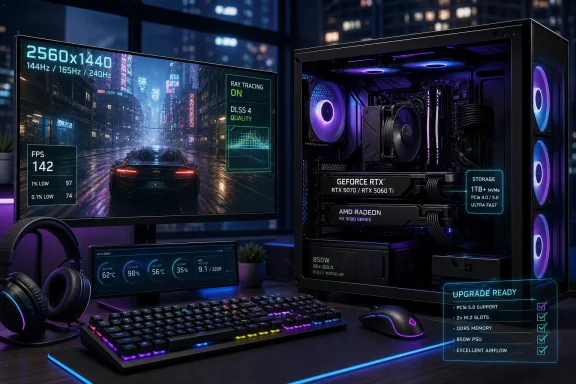 The Graphics Card Is Still the Gaming PC’s Center of Gravity
Every generation of PC hardware produces a few comforting myths, and one of the oldest is that gaming desktops are “balanced systems.” They are, up to a point. But once the basics are covered, a gaming PC still lives or dies by the graphics card.That is especially true in 2026 because the GPU is no longer just a rasterization engine pushing frames in the old-fashioned sense. It is the part that determines whether you can run high-refresh 1440p, whether 4K is realistic, whether ray tracing is worth enabling, and whether modern upscaling and frame-generation features rescue performance in games that would otherwise punish even expensive hardware.
Nvidia’s GeForce RTX 50 series has become the default reference point for new gaming desktops, with the RTX 5090, RTX 5080, RTX 5070 Ti, RTX 5070, RTX 5060 Ti, RTX 5060, and RTX 5050 filling out the stack. AMD’s Radeon RX 9000 cards, especially the RX 9070 XT, RX 9070, and RX 9060 XT, give buyers a stronger midrange alternative than AMD has had in several cycles. Intel’s Arc cards remain the third player, more visible in DIY discussions than in big-name prebuilts, but still useful as price pressure on the market.
The old dual-card fantasy is gone. SLI and CrossFire once gave enthusiast PCs a kind of science-project glamour, but modern games, drivers, engines, and APIs have moved on. The best gaming PC in 2026 has one good GPU, not two temperamental ones pretending to be better together.
Nvidia Owns the Halo, but the Halo Is Not the Market
Nvidia’s advantage at the top end is not subtle. The RTX 5090 is the sort of component that defines review charts, boutique desktop marketing, and enthusiast bragging rights. The RTX 5080 is still expensive enough to anchor premium systems, and the RTX 5070 Ti sits in the psychological zone where many buyers start convincing themselves that “almost flagship” is the responsible choice.But halo products distort the way people shop. A $1,999-class graphics card may be the right answer for a small number of buyers with 4K high-refresh monitors, aggressive ray-tracing expectations, and no patience for compromise. For most people, it is a terrible place to begin the conversation.
The more interesting Nvidia cards are lower in the stack. The RTX 5070 and RTX 5060 Ti are the cards that will define a large share of practical 2026 gaming PCs, because they sit closer to the monitors most people actually own. A strong 1440p experience is now the real mainstream enthusiast target, and the RTX 5060 Ti or RTX 5070 class makes more sense there than a prestige card that costs as much as the rest of the system.
This is where DLSS matters. Nvidia’s software stack has become part of the hardware purchase, not a bonus feature tucked into a control panel. DLSS upscaling, frame generation, and related rendering tricks can turn a midrange GPU into something that feels more expensive in supported games, especially when the alternative is brute-forcing every pixel.
That does not mean Nvidia’s lower-end cards are magic. Memory capacity, bus width, and game support still matter, and no upscaler can turn a weak GPU into a universal 4K monster. But it does mean that a 2026 gaming PC buyer has to judge Nvidia cards by the platform around them, not just by traditional benchmark bars.
AMD’s Best Argument Is No Longer Just “Cheaper”
AMD has spent years being described as the value alternative in gaming graphics, which is both accurate and a little unfair. The Radeon RX 9000 generation makes a more pointed argument: most gamers do not need to pay Nvidia’s high-end tax to get an excellent 1440p or entry-level 4K experience.The Radeon RX 9070 XT and RX 9070 are the cards that best express that argument. They are not designed to dethrone the RTX 5090, and pretending otherwise misses the point. They are designed to make Nvidia’s middle and upper-middle stack look expensive.
That distinction matters in prebuilts. A system builder can pair a Radeon RX 9070 XT with a sensible Ryzen 7 or Core Ultra 7 CPU, 32GB of RAM, and a roomy SSD, then sell a machine that feels meaningfully complete rather than theatrically extreme. For many gamers, that is a better product than an RTX 5090 desktop with compromises elsewhere or a price tag that belongs in a workstation budget.
AMD still trails Nvidia in some ray-tracing and software ecosystem comparisons, especially where DLSS has strong support. But the gap that matters to ordinary buyers is not philosophical; it is experiential. If a Radeon-based desktop runs your games smoothly at your monitor’s native resolution, the fact that it does not win every path-traced showcase may be irrelevant.
The RX 9060 XT also deserves attention because the lower midrange is where bad buying decisions multiply. A cheaper GPU can be a good deal, but only if it has enough memory and performance headroom to last. In 2026, bargain hunting should not mean buying a system that already feels one console port away from regret.
The 1440p Monitor Quietly Became the Sensible Center
For years, PC gaming advice was divided between 1080p value and 4K aspiration. That framework is now too crude. The most rational gaming target in 2026 is 1440p, especially at high refresh rates.A 2,560-by-1,440 display gives buyers a visible jump over 1080p without imposing the brutal GPU demands of 4K. It also pairs naturally with the cards that make the most sense financially: RTX 5060 Ti, RTX 5070, Radeon RX 9060 XT, Radeon RX 9070, and Radeon RX 9070 XT-class hardware. This is the zone where a well-built PC can feel fast, sharp, and durable without requiring a flagship GPU.
The monitor should drive the PC purchase, not the other way around. If you own a 1080p 144Hz screen and have no intention of replacing it, an RTX 5090-class desktop is largely wasted outside specialized use cases. If you own a 4K 144Hz or 240Hz panel and want high settings in demanding games, the GPU budget must rise accordingly.
This sounds obvious, but prebuilt marketing works hard to make it less obvious. Vendors love hero configurations because they photograph well and benchmark cleanly. Buyers should ask a duller question: what resolution and refresh rate am I actually trying to feed for the next three to five years?
That question usually produces a more restrained answer. The best gaming PC is often the one that lets you buy a better monitor, headset, keyboard, chair, or backup drive instead of pouring every last dollar into a GPU tier you will rarely exploit.
4K Gaming Remains a Luxury, Not a Baseline
4K gaming is easier in 2026 than it was five years ago, but it is still not cheap. The pixel count is unforgiving, and modern games have not become kinder just because GPU marketing departments discovered AI-assisted rendering.For native 4K with high settings and ray tracing, buyers should be looking at the RTX 5080, RTX 5090, or the strongest last-generation Nvidia cards still found in worthwhile systems. AMD’s higher-end Radeon cards can be credible 4K options as well, especially where ray tracing is not the main attraction, but Nvidia remains the cleaner choice for those who want the most aggressive visual feature set.
The catch is that 4K has become slippery. With upscaling and frame generation, “4K gaming” may mean native 4K, reconstructed 4K, or a hybrid of rendering shortcuts and perceptual wins. That is not cheating; it is where graphics technology has gone. But buyers should understand what they are buying.
A 4K desktop is not just a GPU purchase. It needs enough CPU headroom to avoid bottlenecks in high-refresh scenarios, enough memory to handle large modern games, enough cooling to keep boost clocks stable, and enough storage to house the kind of massive installations that come with modern AAA titles. A weak supporting cast can make an expensive GPU feel oddly ordinary.
VR is a different case. It can be demanding, but not always in the same way as high-end 4K gaming. Headset requirements vary, and smoothness matters more than screenshot beauty. Anyone buying for VR should start with the headset’s recommended specs, then exceed them rather than merely meeting the floor.
The CPU Sweet Spot Is Lower Than Enthusiasts Like to Admit
The gaming CPU conversation is where many buyers overspend. Intel and AMD both sell impressive high-end desktop processors, but most gaming systems do not need the most expensive chip on the shelf.For a mainstream gaming desktop, a modern Core i5, Core Ultra 5, Ryzen 5, Core i7, Core Ultra 7, or Ryzen 7 is usually the right class of processor. These chips provide enough cores and enough single-threaded performance for today’s games while leaving more budget for the GPU. That trade matters because the GPU usually determines the upper limit of visual performance.
Intel’s Core Ultra 200S “Arrow Lake” generation changed the desktop lineup’s branding and platform conversation, while AMD’s Ryzen 9000 and X3D chips continue to appeal to gamers chasing high frame rates. AMD’s 3D V-Cache processors remain especially interesting for CPU-sensitive titles, where extra cache can produce real gains rather than spreadsheet vanity.
But a Ryzen 9 or Core Ultra 9 is not automatically a better gaming buy. It may be a better streaming, compiling, rendering, or workstation-adjacent buy. If the machine will spend half its life in Premiere Pro, Blender, Visual Studio, or virtual machines, the higher-end CPU case gets stronger. If it is mostly for gaming, the money often belongs elsewhere.
Intel’s 13th- and 14th-generation instability saga also changed the tone of CPU shopping. Even with mitigations and firmware updates available, buyers are right to ask whether a prebuilt vendor has shipped systems with updated BIOS versions and clear warranty coverage. Trust is now part of the spec sheet.
RAM Has Become the Boring Part You Cannot Ignore
For years, 16GB of RAM was the sensible recommendation for gaming PCs. In 2026, it is still the baseline, but the emphasis has shifted. Sixteen gigabytes is no longer generous; it is the line below which a new gaming desktop starts to look compromised.Modern games, launchers, browsers, chat apps, RGB utilities, capture tools, and anti-cheat systems all take their cut before the game itself gets comfortable. A machine with 8GB of RAM may still launch games, but it should not be presented as a serious new gaming PC unless the budget is exceptionally tight and upgrades are immediate.
Thirty-two gigabytes is the safer choice for a midrange or high-end system. It gives Windows room to breathe, makes multitasking less irritating, and provides a cushion for the next wave of large PC releases. It is not glamorous, but it is one of those specs that keeps a computer feeling new longer.
The complication is price. Memory and storage markets have been increasingly affected by demand from AI infrastructure, which changes the old assumption that RAM upgrades will always be cheap and painless later. Buyers should still avoid panic spending, but they should not assume that a low-memory configuration is harmless if the upgrade path is unclear.
For most 2026 gaming desktops, the clean recommendation is simple: 16GB for entry-level systems, 32GB for serious midrange and high-end systems, and more only if the PC also has workstation duties. Anything less needs a very good explanation.
Storage Is Where Prebuilts Still Try to Get Cute
The SSD has won. A gaming PC without an NVMe solid-state boot drive is not a gaming PC anyone should be recommending in 2026. The question is capacity, not format.One terabyte should be treated as the practical minimum for a new gaming desktop. It sounds spacious until a few large games, Windows, drivers, media apps, and launchers have moved in. A 500GB SSD can work in a budget machine, but it feels like a corner cut from the first week of ownership.
Two terabytes is the comfortable choice. It allows a real game library to live on fast storage and reduces the constant uninstall-and-redownload shuffle. For players with data caps, slow broadband, or a taste for large open-world games, that comfort is worth money.
Hard drives still have a role, but not as primary game drives in premium systems. A large HDD can be useful for media, backups, recordings, and cold storage. For games you actively play, NVMe storage is the experience you want.
Prebuilt vendors know storage is easy to obscure in marketing. “1TB storage” sounds fine until it turns out to be a small SSD paired with a slow drive, or a budget SSD with unimpressive performance. Buyers do not need to obsess over benchmark minutiae, but they should confirm that the system uses an M.2 NVMe SSD and leaves room for expansion.
Prebuilt Desktops Make More Sense Than Enthusiasts Want to Admit
The DIY gaming PC remains one of the great rites of passage in enthusiast computing. It teaches you what the parts do, saves money in some markets, and gives you control over every screw, cable, and fan curve. It is also not the obvious answer for everyone in 2026.Prebuilt desktops have gained relevance because GPU pricing and availability are uneven. Large vendors and boutique builders can sometimes obtain graphics cards in volume when individual buyers face inflated street prices or stock problems. That does not make every prebuilt a bargain, but it changes the calculation.
A good prebuilt also solves compatibility and warranty friction. Power supply sizing, case airflow, BIOS updates, memory compatibility, and cable routing are handled before the box reaches your desk. For a forum full of enthusiasts, that may sound like surrender. For a parent buying a first gaming PC, a sysadmin who does not want to troubleshoot at home, or a gamer who just wants to play, it sounds like sanity.
The danger is that prebuilts can hide weak choices behind one marquee component. A system advertised around an RTX 5070 can still ship with too little RAM, a cramped case, a mediocre power supply, or proprietary parts that make future upgrades annoying. The GPU may be the star, but the supporting cast still decides whether the system is pleasant to own.
The best prebuilt vendors in 2026 are the ones that treat transparency as a feature. They tell you the power supply rating and efficiency, the motherboard class, the cooling setup, the RAM configuration, the number of free M.2 slots, and the warranty terms. If those details are missing, assume there is a reason.
The Best Budget Gaming PC Is a 1080p Machine That Knows Its Limits
Budget gaming desktops should not pretend to be miniature flagships. Their job is to play modern games well at 1080p, handle esports titles at high frame rates, and provide an upgrade path that does not collapse the moment you open the side panel.An RTX 5050, RTX 5060, RTX 4060-class leftover, Radeon RX 7600-class system, or Radeon RX 9060 XT configuration can all make sense depending on price. The key is not the name alone; it is the full system price and whether the machine has enough memory, fast storage, and a power supply that can support a future GPU.
The danger zone is the too-cheap gaming PC. These systems often use a low-end GPU, 8GB of RAM, a small SSD, and a case that looks “gamer” while behaving like a toaster. The spec sheet says gaming. The ownership experience says compromise.
For tight budgets, buyers should prioritize a sane foundation. A six-core CPU, 16GB of RAM, a 1TB NVMe SSD if possible, and the best GPU the budget allows will outperform a flashier-looking system with a mismatched processor and weak graphics card. RGB is not airflow, and tempered glass is not performance.
Used and clearance systems can be attractive, especially as older RTX 40-series machines cycle out. But the discount must be real. A last-generation GPU at a modern price is not a deal; it is inventory management with a side of nostalgia.
The Best Midrange Gaming PC Is the One Most People Should Buy
The midrange is where the 2026 gaming PC market makes the most sense. A desktop built around an RTX 5060 Ti, RTX 5070, Radeon RX 9060 XT, RX 9070, or RX 9070 XT can deliver excellent 1440p gaming without requiring flagship money.This is also where CPU restraint pays off. Pairing one of those GPUs with a Core Ultra 5, Core Ultra 7, Ryzen 5, or Ryzen 7 is usually more sensible than chasing a Core Ultra 9 or Ryzen 9. The result is a machine that feels fast in games and still has enough general-purpose muscle for streaming, schoolwork, office tasks, and light content creation.
The best midrange configuration for many buyers is almost boring: eight-ish modern CPU cores, 32GB of RAM, a 1TB or 2TB NVMe SSD, a reputable power supply, and a case with actual airflow. It will not win every benchmark chart. It will, however, make far more people happy than an unbalanced luxury build.
This tier also gives buyers room for peripherals. A good 1440p high-refresh monitor may change the experience more than moving up one GPU tier. The same is true of a comfortable mouse, a mechanical keyboard you actually like, and a headset that does not make Discord sound like a drive-through speaker.
Midrange buyers should be especially skeptical of “future-proofing.” The phrase often means spending today’s money against tomorrow’s uncertainty. Buy some headroom, yes. But do not buy a flagship GPU for a monitor you might purchase someday.
The Best High-End Gaming PC Is a Specialist Tool
High-end gaming desktops are thrilling, but they are no longer general recommendations. A machine with an RTX 5080 or RTX 5090 exists for buyers with specific needs: 4K high refresh, heavy ray tracing, VR headroom, content creation, local AI experimentation, or simply the desire to own the fastest thing available.There is nothing wrong with that. Enthusiast computing has always had an emotional component, and pretending otherwise is joyless. A beautifully built high-end desktop can be a hobby object as much as a gaming appliance.
But high-end buyers should demand high-end execution. That means excellent cooling, a premium power supply, a motherboard with sensible expansion, 32GB to 64GB of RAM depending on workload, and at least 2TB of fast SSD storage. A flagship GPU in a mediocre chassis is not a dream machine; it is a heat-management problem with financing options.
The RTX 5090 class also pushes the conversation toward electricity, acoustics, and space. These are large, power-hungry systems that may not suit every desk, room, or household. Performance is intoxicating, but the physical reality of the machine matters.
For many WindowsForum readers, the high-end desktop will also double as a test bench, media workstation, or local lab box. In that case, the spending can be justified beyond gaming. If the machine is only for playing at 1440p, however, the top tier is usually excess pretending to be prudence.
The Accessories Decide Whether the Specs Matter
A gaming PC is only as good as the devices that let you see, hear, and control it. This is where spec-sheet shoppers often undermine their own builds.A high-refresh monitor should be considered part of the system, not an afterthought. If your GPU can produce 180 frames per second and your monitor is a tired 60Hz panel, the PC is doing work you cannot see. If your monitor supports adaptive sync, matching it well with the GPU ecosystem can make variable frame rates feel smoother and less distracting.
Audio matters more than gaming PC marketing admits. A reliable headset or speaker setup changes multiplayer communication and single-player immersion. A good microphone can do more for your friends than another strip of addressable RGB.
Input devices are personal, and that is exactly why they should not be treated as checkout filler. The mouse shape, keyboard layout, switch feel, controller preference, and desk space all affect the daily experience. Buying them separately often produces a better result than accepting whatever bundle a vendor is pushing.
This is the broader lesson of 2026 PC buying: performance is no longer confined to the tower. The system includes the display, network, desk, cooling environment, and the patience of the person using it. A balanced setup beats a benchmark monster attached to bad peripherals.
The 2026 Spec Sheet That Actually Deserves Your Money
The best gaming PC specs for 2026 are not universal, but the buying logic is. Start with the monitor target, pick the GPU that serves it, choose a CPU that will not get in the way, and refuse configurations that skimp on memory, storage, cooling, or power delivery. The smartest systems are not the loudest ones in marketing copy; they are the ones whose compromises line up with how you actually play.- A serious entry-level gaming PC should have a modern discrete GPU, a Core i5/Core Ultra 5 or Ryzen 5-class CPU, 16GB of RAM, and preferably a 1TB NVMe SSD.
- A strong mainstream 1440p gaming PC should use an RTX 5060 Ti, RTX 5070, Radeon RX 9060 XT, RX 9070, or better, paired with 32GB of RAM.
- A 4K gaming PC should move into RTX 5080, RTX 5090, or comparable high-end Radeon territory, with cooling and power delivery treated as core specs rather than footnotes.
- A prebuilt desktop is worth considering when GPU street prices are inflated, but only if the vendor clearly discloses the motherboard, power supply, cooling, memory, storage, and warranty details.
- A better monitor can be a smarter upgrade than a higher GPU tier, especially for buyers moving from 1080p 60Hz to 1440p high refresh.
- A new gaming PC with 8GB of RAM, a tiny SSD, or vague power-supply details should be treated as a warning sign, not a bargain.
References
- Primary source: PCMag UK
Published: 2026-06-22T18:10:42.286852
The Best Gaming PCs for 2026
You can't buy a more powerful gaming platform than a tricked-out desktop. Here's everything you need to know, part by part, to pick the right prebuilt gaming PC, plus current favorites culled from PC Labs' top-rated reviews.uk.pcmag.com
