

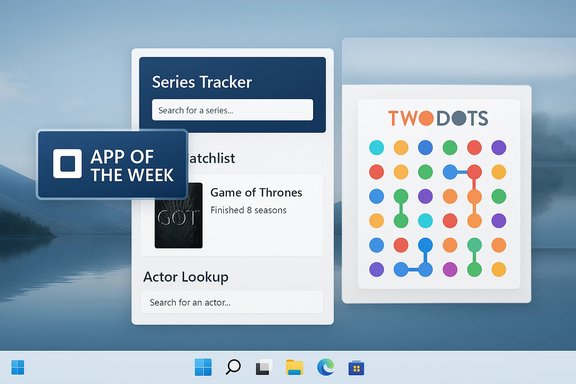
One-hundred and sixty-one in the series, this week’s BetaNews roundup delivers a compact but useful list of new Windows Store arrivals and updates, with Series Tracker crowned App of the Week and a cluster of games and utilities — from the meditative puzzle of Two Dots to the practical convenience of Dynamic Theme for automated wallpapers — that together illustrate the continuing variety of the Windows app ecosystem.
The BetaNews “Best Windows apps this week” pieces are short-form curated snapshots that collect notable new releases, promotions and updates from the Microsoft Store on a weekly cadence. These roundups are aimed at users who want a fast way to spot useful additions without digging through the Store’s noise. The format typically highlights a single “App of the Week,” then lists several other apps and games with one-paragraph summaries and quick notes on pricing or mechanics.
Why these weekly lists still matter: the Microsoft Store remains a mixed landscape where high-quality, well-maintained apps sit alongside experimental, region-limited or abandoned ports. A concise roundup helps readers focus on apps that are either broadly useful (productivity tools and customizers) or culturally sticky (mobile-first puzzle games and freemium titles) — but the selection also carries implicit caveats about maintenance, monetization and API dependency that users should weigh before installing.
Cons: Microtransaction or unlock-gated progression in some builds; quality varies by platform.
If you plan to install any of these picks this week, start with the free utilities to improve your desktop experience, then test games offline to measure paywall pressure before investing in in‑app purchases. For tracking-heavy workflows (long TV watch histories or cross-device sync), confirm that Trakt or the chosen sync provider is supported and active in the app you select.
Source: BetaNews Best Windows apps this week
 Background
The BetaNews “Best Windows apps this week” pieces are short-form curated snapshots that collect notable new releases, promotions and updates from the Microsoft Store on a weekly cadence. These roundups are aimed at users who want a fast way to spot useful additions without digging through the Store’s noise. The format typically highlights a single “App of the Week,” then lists several other apps and games with one-paragraph summaries and quick notes on pricing or mechanics.Why these weekly lists still matter: the Microsoft Store remains a mixed landscape where high-quality, well-maintained apps sit alongside experimental, region-limited or abandoned ports. A concise roundup helps readers focus on apps that are either broadly useful (productivity tools and customizers) or culturally sticky (mobile-first puzzle games and freemium titles) — but the selection also carries implicit caveats about maintenance, monetization and API dependency that users should weigh before installing.
Overview of this week’s highlights
- App of the Week — Series Tracker: A polished TV show tracker that combines discovery, watchlists and episode management, with integration for external data sources. The roundup calls out actor lookups as an especially useful discovery angle.
- Dynamic Theme: A free utility that automates desktop and lock-screen wallpapers by pulling Bing images or Windows Spotlight images, adding options for local slideshows and automatic saving. Practical for users who want rotating, high-quality wallpapers without manual intervention.
- Two Dots: The Playdots puzzle favorite is noted for its elegant "connect same-color dots" core and level-by-level progression that encourages special-shape creation (squares/loops) for bigger clears. The game’s design and longevity on mobile make it a natural pick for casual gamers.
- Other games and utilities called out include Kingdom Tales 2 HD, Crime Coast: Mafia Wars, Nitro Nation, and Block Slider Star — a mix of time‑management city-builders, social/multiplayer strategy titles, drag-racing sims, and puzzle variants for players who prefer short sessions or free-to-play ecosystems.
App of the Week — Series Tracker
What it is and why it stands out
Series Tracker is presented as a TV show tracking, management and discovery app for Windows devices that feels professionally designed and filled with features targeted at TV watchers: watchlists, episode tracking, lists of missed episodes and upcoming shows, plus discovery tools that let you search by actors to find series they’ve appeared in. That actor-lookup angle is explicitly called out as a standout discovery feature in the roundup.Verified integrations and data sources
The BetaNews summary states Series Tracker taps into large TV metadata services such as IMDB and Trakt. Public app listings and third‑party mirrors for Series Tracker–style Windows clients commonly advertise Trakt integration and large show databases powered by Trakt or similar services — which provide watchlist sync, episode metadata and calendar functionality. Third‑party Windows store wrappers and clients for TV tracking commonly advertise Trakt sync and IMDB-style lookups, consistent with the claims in the roundup. Caution: not every client uses the same mix of sources (TMDb, TVDB, Trakt, IMDB) and naming conventions differ between apps called “Series Tracker,” “TV Show Tracker,” “TV Series Hub,” etc. If accurate, long-term Trakt sync is a major plus because it preserves your progress across devices; verify the app’s explicit Trakt/IMDB claims on the Store listing or the developer page before relying on sync for a large watch history.Key features (as described in the roundup and corroborated by app listings)
- Clean UI and local watchlist management.
- Syncing with Trakt (where supported) so progress is retained across devices.
- Actor-based discovery to find shows via cast members.
- Episode reminders and lists of missed/upcoming episodes.
- Live tiles and push notifications for new episodes (Windows-specific UX touches).
Strengths
- Discovery-first: Actor lookups and similarity suggestions add useful discovery hooks beyond a raw alphabetical search.
- Cross-device sync (when implemented): Trakt support is the industry standard for watchlist and progress sync.
- Windows-specific niceties: Live tiles and Windows notifications mean the app is tuned to platform conventions.
Risks & caveats
- Naming confusion: Multiple apps use similar names. Confirm the exact publisher before installing.
- API dependence: If the app relies on third-party metadata services, changes to those APIs or rate limits can degrade functionality.
- Privacy: Apps that integrate social features or third-party services can expose usage telemetry or require external accounts; read the privacy policy before granting broad permissions.
Who should install
- Binge-watchers who want to track dozens of shows with reminders.
- Users who already use Trakt or want cross-device watch progress.
- Anyone who values a discovery-first interface on Windows devices.
Spotlight: Dynamic Theme — automating wallpapers the way Windows should
What it does
Dynamic Theme is a small utility that automates your desktop background and lock-screen images by pulling daily Bing images or Windows Spotlight pictures, or by cycling through local photo folders. It provides history browsing, autosave, and multiple modes (single-image, slideshow), and lets you save the daily images automatically to disk. The app is free and widely recommended as a simple way to bring rotating high-quality wallpapers to Windows.Why this matters
Microsoft’s built-in Spotlight and Bing daily images are visually appealing but clumsy to manage: users often want direct access to the image history, automatic saves, and control over whether the image becomes the desktop wallpaper, lock-screen image, or both. Dynamic Theme fills that UX gap with a dedicated interface and automation options. MakeUseOf and other how‑to guides frequently recommend Dynamic Theme as the easiest way to use Spotlight/Bing images as desktop backgrounds.Strengths
- Practical automation: Auto-saves daily images to a folder so you can reuse or archive them.
- Flexible modes: Use Spotlight, Bing, single-images, or local slideshows.
- Lightweight and free: No heavy overhead or subscription model.
Risks & privacy considerations
- Network access: The app accesses Microsoft/Bing endpoints to fetch images — that’s expected, but users in privacy-sensitive contexts should consider the traffic.
- Region behavior and Spotlight quirks: Windows Spotlight behavior can be regionally constrained or periodically buggy; the app cannot fix upstream Spotlight feed issues. Community discussions show Spotlight can sometimes appear to cycle the same few images or misbehave with recent OS updates. Dynamic Theme is a good workaround, but it isn’t a replacement for Microsoft’s own lock‑screen service.
Two Dots — the casual puzzler that earned its stripes
Gameplay in plain terms
Two Dots is a minimalist yet addictive puzzle game where you connect two or more dots of the same color to clear them from the board. Creating closed loops (squares/rectangles) yields special effects that clear all dots of a color, rewarding strategic play. Each level sets objectives (e.g., clear X green dots, collect items, remove anchors) and new dots drop from above to refill the grid. The title’s long lifespan and continued updates on developer channels make it a familiar pick for casual players.Why BetaNews highlighted it
The roundup singles out Two Dots for its unique puzzle mechanics — the square/loop mechanic differentiates it from simple match-3 games — and for being a polished, mobile-originated title that translates well to Windows devices. While the Windows Store versions of mobile-first titles can lag behind the primary iOS/Android builds, Two Dots remains a useful leisure pick.Strengths and weaknesses
- Strengths: Gorgeous minimal art style, low learning curve, high replayability through events and level design.
- Weaknesses: Modern mobile monetization patterns (e.g., lives, boosters, in-app purchases) can pressure progression; Windows ports have historically lagged behind mobile updates. Community discussions have flagged maintenance and outdated Store builds for some ports.
Quick takes: Other apps and games from the roundup
Kingdom Tales 2 HD — time management with a story
- A level-based building/time-management title where you allocate workers, construct buildings and gather resources to progress through levels. Published as a free-to-try game but often requires unlocking the full experience via purchase. Steam and cross-platform storefront listings show the franchise’s presence beyond Windows Store and provide system requirement details for desktop players.
Cons: Microtransaction or unlock-gated progression in some builds; quality varies by platform.
Crime Coast: Mafia Wars — city building with PvP leanings
- A social city-builder where you recruit gang members, upgrade buildings, send crews on raids and form cartels with other players. These social strategy games are often heavily monetized and network-dependent; BetaNews notes the single-player and multiplayer elements and the raiding mechanics. Expect asynchronous PvP, IAP-driven boosts and persistent server-side progression.
Nitro Nation — drag-racing with tuning and cards
- A drag-racing title focused on upgrades, tuning and timing rather than steering. The game emphasizes hitting perfect launch and gear shifts, with customization systems and competitive modes. The franchise exists across mobile storefronts and has varied incarnations; confirm which Nitro Nation build is present in the Windows Store before installing.
Block Slider Star — Tetris-with-a-twist
- Described as Tetris-like but with a sliding mechanic that lets you move pieces already dropped into the playfield, offering a fresh spin for fans of gravity-and-grid puzzles. BetaNews flagged it for its hybrid design and short-session friendliness.
Practical installation, safety and verification checklist
- Check the publisher name on the Store listing. Multiple apps use similar titles; verify the developer before installing.
- Read recent user reviews for device compatibility and update cadence. The Windows Store has many abandoned ports; reviews are a good heuristic for maintenance.
- Review permissions and network access. Apps that sync (Trakt, cloud save) or require social login will need network rights.
- Test free-to-play games offline first where possible to evaluate gameplay pacing and monetization pressure.
- For utilities that intercept system APIs (wallpaper managers, audio mixers), prefer Store-distributed or signed apps to reduce supply-chain invasion risk.
Critical analysis — strengths, patterns and systemic risks
What BetaNews does well in these weekly roundups
- Curated discoverability: The roundup highlights a handful of useful apps across categories, which is valuable for readers who don’t want to wade through hundreds of Store results.
- Practical notes: Short caveats about IAPs, unlocks, and feature highlights give readers quick signals about whether to follow up.
- Cross-category mix: The selection typically balances productivity, personalization, and games, reflecting the breadth of daily Windows Store additions.
Broader ecosystem observations
- Mobile-first ports dominate entertainment picks. Many gaming highlights started on iOS/Android before being ported to Windows. That’s great for content breadth, but port quality and update frequency can lag. Community feedback often shows Windows ports falling out of sync with the primary mobile releases.
- Utility apps fill Windows UX gaps. Tools like Dynamic Theme address real usability holes (Spotlight/Bing image management) that Microsoft’s defaults leave under-served. These small utilities often provide more value than large apps because they restore lost workflow features.
- API dependence is a persistent risk. Many apps rely on third-party metadata providers, cloud services, or social networks; changes to those upstream services can degrade or break features suddenly. Users should prefer apps that clearly state their data sources and provide local or offline modes where possible.
Security and privacy watchlist
- Wallpaper and background utilities traffic: fetching Bing/Spotlight images is benign, but any app that saves or archives images should be examined for where saved files are stored and whether telemetry is sent.
- Game monetization: free-to-play mechanics often push for engagement via time gating or IAPs; watch for social login requirements and payment permissions.
- Ad-blockers and browser extensions: when those appear in the Store, review requested permissions closely; ad blockers have broad page access by design and require vendor trust.
Final verdict and practical recommendations
- Install immediately: Dynamic Theme if you want automated, high-quality rotating wallpapers and Spotlight/Bing image access without manual work. It’s lightweight, free and fills a clear UX gap.
- Try if you like TV tracking: Series Tracker is a strong pick if the Store listing confirms Trakt (or another sync provider) and the developer identity matches the app you expect; its actor-driven discovery makes it uniquely useful for finding new shows. Verify the listing before you commit to a large watch history.
- Casual gaming pick: Two Dots remains an elegantly designed time-killer; it’s best enjoyed without expecting all features to be perfectly synced across platforms, and be mindful of IAP mechanics.
- Exercise caution with social/multiplayer strategy titles: Crime Coast, Nitro Nation and similar entries are fine for casual play but often rely on networked economies and IAPs; inspect reviews and permissions.
Closing thoughts
Weekly roundups like BetaNews’ “Best Windows apps this week” remain a solid signal boost for useful additions amid the Microsoft Store’s vast catalog. They succeed when they highlight practical utilities (like Dynamic Theme), well-integrated productivity apps (like Series Tracker when it supports Trakt/IMDB), and polished casual games that respect player time. At the same time, the Windows Store’s heterogeneity — varied publisher quality, region‑locked content, and occasional abandonment of ports — means readers should treat the roundup as a starting point: click through to the Store listing, check the publisher, read recent reviews, and verify sync or multiplayer features before committing time or money. The short weekly snapshot gives you the map; the Store listing and community reviews tell you whether the road is open.If you plan to install any of these picks this week, start with the free utilities to improve your desktop experience, then test games offline to measure paywall pressure before investing in in‑app purchases. For tracking-heavy workflows (long TV watch histories or cross-device sync), confirm that Trakt or the chosen sync provider is supported and active in the app you select.
Source: BetaNews Best Windows apps this week
