

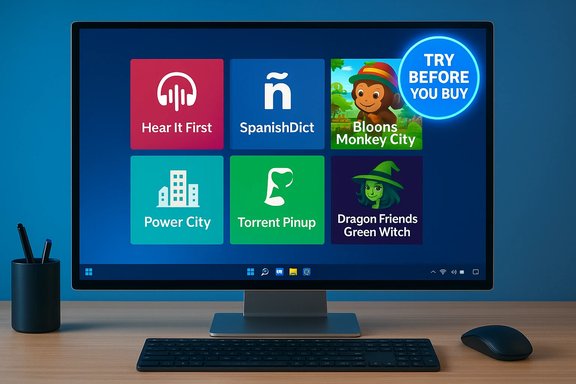
One-hundred and fifty-seven installments into a long-running BetaNews series, this week’s roundup steers a steady course through the Microsoft Store’s mid-tier releases: a handful of small but useful utilities, several mobile-to-Windows game ports, and one or two lightweight clients that highlight the strengths — and the fragility — of the Windows Store ecosystem. The collection on offer mixes language tools, casual and puzzle games, and a modest torrent client; it rewards quick trials more than long-term devotion, and the original BetaNews summary captures that discovery-first, “try before you buy” spirit.
The BetaNews weekly “Best Windows apps this week” column acts less as a formal review outlet and more as a curated discovery feed for Windows users who want to surface new arrivals and short-term store deals. Each weekly entry typically:
Below is a deeper look at the most interesting entries, verification of key technical claims where possible, and practical guidance for users who want to test these apps safely.
Cautionary note:
In short: this issue of the weekly roundup is a tidy set of experiments — try Hear It First for quick pronunciation practice, sample SpanishDict for reference and conjugation lookup, and test Bloons Monkey City or Power City if you want casual puzzle or strategy play. Use the Store listings and recent reviews as your safety net, and treat unverified mentions as leads to research rather than direct recommendations.
Source: BetaNews Best Windows apps this week
 Background
The BetaNews weekly “Best Windows apps this week” column acts less as a formal review outlet and more as a curated discovery feed for Windows users who want to surface new arrivals and short-term store deals. Each weekly entry typically:- Names an App of the Week when a standout appears;
- Lists several other notable releases (games, utilities, and ports);
- Flags store promotions such as Red Stripe Deals;
- Leaves readers with succinct one-paragraph descriptions designed for quick triage.
Overview of this week’s picks
BetaNews highlighted the following items in this edition: Hear it First, SpanishDict (Windows port), Bloons Monkey City, Torrent Pinup, Dragon Friends: Green Witch, Power City, and Boss Battle Phoenix 10. The article also pointed out a TuneIn Radio update that converted the client into a universal Windows app and improved podcast playback performance.Below is a deeper look at the most interesting entries, verification of key technical claims where possible, and practical guidance for users who want to test these apps safely.
Language and study tools
Hear It First — a compact text-to-speech study aid
BetaNews describes Hear It First as a small app that “helps you study new languages by offering to pronounce text that you enter” and notes the ability to save items as MP3. That description matches independent coverage and hands-on writeups: Hear It First taps the Windows speech synthesis engine, requires language speech packs installed through Windows Settings, and offers an in-app option to export audio — often behind a small in-app purchase. The Windows Central feature on the app confirms both the multi-lingual text input workflow and the MP3 export option as a paid toggle. Why it’s useful:- Minimal setup: Works offline once the appropriate Windows speech language pack is installed.
- Exportable audio: Helpful for listening practice on the go or building custom pronunciation libraries.
- Low friction: Simple UI for quick lookups and repetition drills.
- Voice quality varies by language — the app relies on Windows’ built-in voices rather than custom studio recordings, so pronunciations are synthetic and sometimes awkward with idiomatic phrases.
- Language pack installation required — users must know how to add speech packages in Windows Settings (Time & Language → Speech).
- Privacy: text entered may be stored locally by the app; review app permissions if you plan to copy sensitive phrases.
SpanishDict — a portable Spanish↔English resource
BetaNews listed a Windows port of SpanishDict, the widely used online Spanish-English dictionary and learning service. SpanishDict is a recognized brand with native mobile apps and a mature web presence; multiple app-store entries and SpanishDict’s own pages confirm apps exist for mobile platforms and desktop wrappers. While the Windows Store variant has historically been available as a UWP wrapper, availability has fluctuated by region and time — always verify the current Store listing before installing. Why it’s useful:- Quick lookups: Definitions, conjugations, example sentences and regional usage notes.
- Pronunciation support: Audio playback for many entries; useful combined with Hear It First for listening drills.
- Offline dictionary: Many clients support offline lookup of core entries — important for travel or classroom use.
- Feature parity: Not all mobile/desktop wrappers mirror the web experience (some UWP ports omit advanced features).
- Sync: Verify whether saved words or practice history sync with SpanishDict.com or are stored locally.
Games and ports
Bloons Monkey City — tower defense + city building
BetaNews highlighted Bloons Monkey City as a well-designed entry that blends tower defense with city-building mechanics: capture tiles via tower-defense fights, then use city-building and research to expand towers and upgrades. That hybrid design is confirmed by official storefronts and developer pages: Ninja Kiwi’s listings and the Steam page describe precisely this capture-then-build loop and the social/weekly event features. The Steam release listing corroborates the mix of city progression and tower-defense missions and notes Windows 10 as a supported platform. What it gets right:- Clear progression loop: City growth unlocks more towers and upgrades; the gameplay loop weaves strategy with incremental progression.
- Cross-platform pedigree: Ninja Kiwi has long supported multi-platform releases and frequent updates.
- Accessibility: The game’s free-to-play model lowers the barrier to try it.
- Freemium pressure: Like many mobile ports, progression can be gated behind timers and in-app purchases.
- Input parity: Desktop play may feel designed for touch or mobile interaction; test controls before committing to long sessions.
- Online dependency: Social features and events require an online account.
Dragon Friends: Green Witch — social dragon-breeding city builder
BetaNews describes a social/empire-building game focused on breeding dragons and evolving them through quests and social features. Independent mobile game coverage confirms Dragon Friends: Green Witch as a mobile-era social farming/breeding title by InnoSpark (and associated publishers), with versions on iOS/Android and historical Windows ports. The game’s mechanics — breeding, evolving dragons, social visits, and weekly updates — are consistent across platform listings. Strengths:- Cute, collectible loop: Breeding and collecting rare dragons drives retention.
- Social mechanics: Cooperative mechanics and friend systems increase stickiness for casual players.
- Monetization and longevity: Many social breeders rely heavily on IAPs and timed mechanics; publisher support may end after a few years.
- Data use & accounts: Social games often require account creation and cloud saves — review privacy settings.
Power City — an electrical-connection puzzle
BetaNews describes Power City as a rotation/connection puzzle where you must connect power lines to houses and parks and avoid loose ends. Independent Windows Store and software-roundup coverage confirm the title as a logic puzzle with hundreds (or thousands in some builds) of levels and a one-finger rotate-and-connect mechanic. The gameplay is straightforward and ideal for short bursts. Why it’s worth trying:- Short sessions: Levels are solved in minutes; good for commutes or short breaks.
- Clever progression: Difficulty ramps without requiring reflex mastery, leaning on logic instead.
- Ads and monetization: Many casual puzzle titles include ad-supported free tiers and optional ad-free purchases.
- Clones and forks: Small puzzle games can be rebranded across app stores—verify publisher identity.
Boss Battle Phoenix 10 — an unverifiable pick
BetaNews lists Boss Battle Phoenix 10 as a “boss-only shoot ’em up” where players control legendary birds to fight boss monsters. This entry reads like a compact arcade concept but proved difficult to corroborate in independent searches outside the BetaNews roundup. There is no clear, authoritative storefront page or developer site that matches the exact name and description in contemporary indexes; the BetaNews mention appears to be the primary public reference.Cautionary note:
- Unverifiable claims: Treat this mention as a discovery lead rather than a confirmed, actively maintained release.
- If you can’t find the Store listing: don’t install unknown packages from third-party sites — prefer official Store or publisher pages.
Utilities and niche clients
Torrent Pinup — a basic torrent client
BetaNews describes Torrent Pinup as a free, basic torrent client that intentionally omits advanced controls like speed limits and port management — a fit for occasional quick downloads rather than heavy torrent users. Independent coverage and developer submissions confirm the app’s existence as a Windows Store client aimed at casual downloaders; MSPowerUser and community posts from the Windows ecosystem documented the Store listing and described its pared-back feature set. Why some users like it:- Simplicity: Minimal UI and straightforward downloads make it accessible to newcomers.
- Store packaging: The Microsoft Store wrapper simplifies installation on Windows 10 devices.
- No advanced controls: Lack of speed capping, port config, comprehensive trackers or background downloading limits frequent torrent users.
- Legal and security considerations: Torrents are a legitimate distribution mechanism for many open-source and large media files, but users must ensure content is legal in their jurisdiction.
Notable updates
TuneIn Radio becomes a Universal Windows app (and stumbles)
BetaNews notes a TuneIn Radio update that made the app universal, improved podcast playback performance and reorganized content. Independent tech coverage confirms that TuneIn released a Windows 10 universal version around the same timeframe and that early users experienced mixed results — the update brought a modern UI and broader device compatibility but also reported playback bugs on some devices during initial rollouts. Coverage and forum reports detail both the new universal packaging and the early compatibility/performance issues that followed. Why the update mattered:- Universal packaging: One app binary for PC and mobile simplified maintenance and improved reach.
- Podcast improvements: Better playback and organization are high-value changes for listeners.
- Compatibility hiccups: Some early adopters reported streams that would not play on certain handsets and occasional crashes — typical of universal-app rollouts during OS transitions.
- Performance trade-offs: The modern UI sometimes introduced slower load times on older hardware.
How to vet small Windows Store apps — a short checklist
When a weekly roundup collects small apps, the actionable step is user verification. Follow this checklist before installing:- Check the Store listing’s publisher name and recent update date.
- Read recent user reviews (last 30–90 days) for compatibility notes.
- Confirm required permissions and whether features like sync or cloud saves use third-party APIs.
- Test the free or trial mode on your hardware for the first 15–30 minutes.
- For paid upgrades or in-app purchases, verify refund policies and trial availability.
- For games, test a sample of levels offline to measure paywall pressure.
Critical analysis — strengths and systemic risks
The week’s collection showcases two recurring strengths of the Windows Store model:- Discovery efficiency: Weekly roundups surface useful single-purpose utilities and casual games that otherwise get lost in a massive catalog. A short, curated list can save readers time and point to genuinely helpful tools (language utilities, small puzzle games, and niche clients).
- Cross-platform porting: Developers continue to bring successful mobile mechanics to Windows (city-builders, tower defense, and breeding games), expanding the library of lightweight entertainment.
- Variable developer commitment: Many small apps are hobby projects or mobile-first titles with sporadic updates. The Windows Store’s heterogeneity means maintenance and longevity are unpredictable. Always check update cadence before trusting an app for a workflow.
- Feature-parity gaps in ports: Mobile-first UI paradigms don’t always translate well to desktop input models. Users can face incomplete control sets or awkward keyboard/mouse mappings.
- Privacy and API dependency: Numerous small utilities rely on third-party APIs (translate engines, speech services, social login). Those dependencies can vanish or change, degrading app functionality unexpectedly.
- Verification friction: For obscure entries like Boss Battle Phoenix 10, a single editorial mention may be the only reference — that’s a signal to treat the pick as a lead, not a recommendation.
Final verdict and practical recommendations
This week’s BetaNews snapshot is typical and useful: it’s compact, practical, and tailored for readers who want to sample a few new Windows 8.x/Windows 10 apps each week rather than commit to a full rediscovery project. The standout items in this edition fall into two groups:- Reliable, utility-first picks — Hear It First and SpanishDict deliver clear, repeatable utility value for language learners, provided you validate speech packs and sync behavior.
- Casual game ports worth testing — Bloons Monkey City and Dragon Friends: Green Witch bring familiar mobile loops to Windows; they’re well suited to casual play but frequently use freemium gating and online accounts.
In short: this issue of the weekly roundup is a tidy set of experiments — try Hear It First for quick pronunciation practice, sample SpanishDict for reference and conjugation lookup, and test Bloons Monkey City or Power City if you want casual puzzle or strategy play. Use the Store listings and recent reviews as your safety net, and treat unverified mentions as leads to research rather than direct recommendations.
Source: BetaNews Best Windows apps this week
