

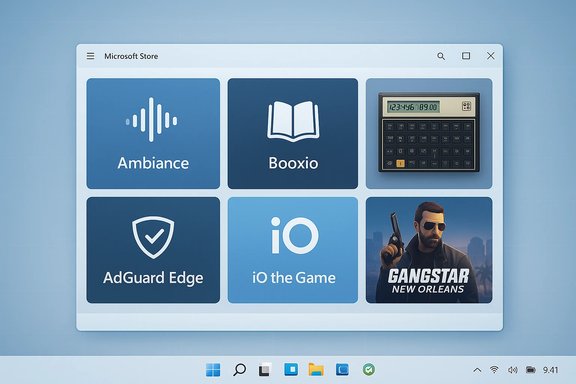
Two-hundred-and-nineteen in the series: this week’s Windows Store roundup highlights a small but diverse batch of new arrivals — from ambient sound mixers and audiobook players to a GTA-style open-world mobile port and an official HP financial calculator app — plus a newly available ad‑blocking extension for Microsoft Edge and several incremental updates to niche productivity and entertainment clients.
The weekly “Best Windows 10 apps this week” roundups are designed to surface noteworthy new Windows Store releases, promotions and notable updates for readers who follow the Microsoft Store ecosystem closely. The issue covered here was published on February 17, 2017 and lists new entries, deals, and notable updates that appeared in the Store during the prior seven days. That snapshot is useful for historical context: even small new releases can illustrate ongoing trends in the Microsoft Store — lean single‑purpose utilities (sound mixers, lightweight audiobook players), console/console‑adjacent ports and mobile‑first games, plus a steady stream of browser extensions as Edge’s extension platform matures. The selection this week underscores that mix.
Strengths
(Note: a number of feature claims in the original weekly roundup were brief and, for smaller apps, lacked separate developer documentation at the time of this verification. Those items are flagged in the text above as unverifiable until the app’s Store page and privacy policy are reviewed directly.
Source: BetaNews Best Windows 10 apps this week
 Background
The weekly “Best Windows 10 apps this week” roundups are designed to surface noteworthy new Windows Store releases, promotions and notable updates for readers who follow the Microsoft Store ecosystem closely. The issue covered here was published on February 17, 2017 and lists new entries, deals, and notable updates that appeared in the Store during the prior seven days. That snapshot is useful for historical context: even small new releases can illustrate ongoing trends in the Microsoft Store — lean single‑purpose utilities (sound mixers, lightweight audiobook players), console/console‑adjacent ports and mobile‑first games, plus a steady stream of browser extensions as Edge’s extension platform matures. The selection this week underscores that mix.Overview of this week’s highlights
- New utility: Ambiance — a local sound‑mixer/ambient sound app with multiple samples and saved mixes.
- New utility: Booxio — an audiobook player for Windows devices with library support, progress saving, speed control and bookmarks. (Claimed to be free of subscription fees and IAP.
- New games: Frontier Wars, iO the Game, Gangstar New Orleans, Supermarket Mania Journey, and TubeLife — a mix of strategy, speed/platform puzzlers, open‑world mobile ports and time‑management casuals.
- Official port: HP 12C Financial Calculator for X3 — HP’s widely known HP‑12C is available in app form for Windows devices, replicating the physical calculator’s layout and functions.
- Browser extension: AdGuard AdBlocker for Microsoft Edge — a new extension offering ad blocking, tracker protection and element blocking for Edge. AdGuard reports availability on the Windows Store and public documentation describes Edge support.
- Notable updates: Codehub (adds an organizations view), Collecto (placeholders, better stats), and TV Show Tracker (options to hide shows). These are incremental but useful in-app improvements.
Deep dive: the utilities
Ambiance — ambient sound mixer (utility)
Ambiance is presented as a simple sound‑mixer with about three dozen samples (white noise, light rain, coffee shop atmosphere, bird song) and the ability to save custom patterns for later playback. That combination — mixable ambient tracks with save/load — is a practical pattern that works well for concentration, sleep, and background masking.Strengths
- Simple, focused feature set: mixing fixed samples and saving combos is easier to use than full DAW‑like tools.
- No network dependency required (in typical implementations): local samples avoid streaming stalls and privacy concerns.
- The original listing in the weekly roundup is brief; I could not find a dedicated developer page or Store page with extensive technical details during validation. Because of that, some claims (exact sample count or DRM/telemetry behavior) are not independently verifiable from the public record cited in the roundup. Treat the published feature list as accurate but flag it as unverifiable until you check the Store page and the app’s privacy policy directly.
- Check the Store listing for required permissions (microphone, network).
- Confirm whether the app stores data in the cloud or keeps mixes locally.
- If privacy is a concern, test in an offline environment first.
Booxio — lightweight audiobook player
Booxio is described as a local audiobook player that provides:- Library management and progress saving
- A timer and playback speed control
- Bookmarks and chapter support
- No subscription fees or in‑app purchases (per the roundup)
- No subscription model is attractive for users with DRM‑free audiobooks or local audiobook libraries.
- Simple playback and bookmarking features solve a common gap for Windows users who want a dedicated audiobook player outside of major services.
- Like Ambiance, the Booxio mention in the roundup is short and there is limited corroborating information available in major app repositories or developer sites at the time of writing. The claim of “no subscription fees or IAP” should be verified on the Store entry and in the app’s metadata before assuming it’s permanent. If the developer is small, check for infrequent updates or compatibility issues with newer Windows 10 builds.
- Install and test with a sample DRM‑free audiobook file before importing your entire library.
- Use the built‑in timer and progress markers to verify the app’s reliability on your device.
Deep dive: the games
iO the Game — physics‑based speed puzzler
iO by Game Troopers is a physics platformer focused on speed and momentum, featuring 225+ puzzles and a retro aesthetic. It launched with a discounted price ($4.99 launch price, normally $7.99), according to coverage at launch. This claim is corroborated by contemporary reporting from Windows Central and launch coverage, which also list features like portals and gravity manipulation. Why this matters- Puzzle/platformers that reward momentum and timing often scale well on both touch and traditional inputs, and a 225‑puzzle campaign offers good single‑player value.
- Launch discounts are common; if you want the game, the discounted window is the time to act.
Gangstar New Orleans — mobile open‑world port
Gangstar New Orleans is a Gameloft title frequently compared to the GTA series; it’s a free‑to‑play, mission‑driven open‑world action game available on mobile platforms and — at times — listed on the Microsoft Store for Windows 10. Gameloft’s Gangstar page markets the game’s open world, numerous vehicles and weapons, and multiplayer features. Independent install guides document Windows downloads and the game’s system requirements for PC. Points to watch- Availability: mobile ports are sometimes region‑restricted on the Microsoft Store or removed later; user reports and community threads note that the Windows Store presence has fluctuated, and some Windows ports were discontinued or never available in all countries. Verify availability for your region before planning to install.
- Monetization: free‑to‑play open‑world mobile games commonly rely on in‑app purchases and timers; check pricing and IAP lists in the Store entry.
Supermarket Mania Journey — time management casual
Published by G5, Supermarket Mania Journey continues the developer’s long line of time‑management casuals with “hundreds of levels,” in‑game currency, and optional purchases. G5’s official game page and mobile storefronts confirm cross‑platform availability and the expected in‑game store mechanics. This type of game is friendly for casual sessions and suitable for players who enjoy level progression and upgrades.TubeLife — YouTuber simulation (casual / simulation)
TubeLife (sometimes stylized TubeLive or TubeLive: A Streamer Adventure) is a casual simulator that casts players as content creators trying to grow a channel. The title appears on indie game portals and databases (MobyGames, RAWG) and is representative of the “virtual career” subgenre. The developer/publisher footprint is smaller than AAA publishers, so availability and long‑term support may vary.Official utilities and tools
HP 12C Financial Calculator — official port
HP’s 12C is a long‑standing professional financial calculator, and HP (and partners) have produced official digital emulators of the device. The Windows‑oriented HP 12C family has official support pages and app listings in app stores; these digital versions aim to preserve the original RPN behavior and feature set familiar to finance professionals. The HP product support documentation and current app listings corroborate the authenticity and intent to mirror the physical device’s function. Why this is important- For students and professionals who rely on consistent calculation results across devices, an official emulator reduces the risk of algorithmic differences and ensures compatibility for exams and workflows.
- Verify licensing and exact feature parity if you depend on advanced functions (e.g., bond math, cash flows).
Microsoft Edge: AdGuard AdBlocker extension
AdGuard announced and shipped an Edge extension that blocks popups, banners, video ads and trackers. AdGuard’s blog and product pages describe a browser extension tailored for Edge and explain that the extension was made available on the Windows Store and through other extension channels; the company also documents feature differences vs. its full desktop product. The extension’s arrival matters because ad‑blockers for Edge were a high demand item as Edge’s extension API matured. Strengths- Effective blocking: AdGuard combines filter lists and element blocking controls that perform well across many sites.
- Edge support: native extension availability makes installation easy for Windows 10 users.
- Extension provenance and updates: browser extension security is critical. Confirm you install the extension from the official AdGuard vendor page in the Microsoft Store and read recent reviews for any signs of malicious updates or changes in ownership.
- Privacy tradeoffs: some ad blockers request permissions that include reading and modifying site content. Review the extension’s permissions and privacy policy, and consider pairing a reputable extension with system‑level protections if you need more comprehensive filtering.
- Confirm the extension’s developer name matches the vendor (e.g., AdGuard).
- Read the latest user reviews for unexplained changes or negative flags.
- Check whether the extension uses local filter lists only or communicates with a cloud service.
- Keep a fallback (uBlock Origin or another trusted option) in mind if the extension behaves unexpectedly.
Small updates and housekeeping
- Codehub added an organization‑level repository browser — a useful workflow improvement for devs who use GitHub organizations to group projects. For people managing many orgs, this reduces navigation steps.
- Collecto added placeholders and improved stats. Small UX updates like this often improve onboarding and retention.
- TV Show Tracker added hide options — a simple but welcome addition for users who prefer a cleaner watchlist.
Security, privacy and long‑term support: a practical assessment
When you install new Windows Store apps and Edge extensions, these are the main non‑functional considerations to weigh.- Permissions and telemetry: many small utilities request network access or telemetry to report crashes. If a utility’s privacy policy is missing or unclear, assume the app may share usage data. Where possible, favor apps that document data collection and provide opt‑outs.
- Monetization and IAP: a “free” game often includes in‑app purchases. Review the IAP list on the storefront before downloading to avoid surprise charges or aggressive paywalls. Supermarket Mania Journey and many Gameloft/G5 titles list optional in‑game purchases.
- Extension provenance: browser extensions can be a vector for unwanted behavior. Install only from reputable vendors (AdGuard’s official domain and the Microsoft Store entry are the correct sources) and monitor reviews for unexpected changes.
- App availability and regional limitations: mobile ports and publisher decisions can lead to region restrictions or later removal from the Store; verify availability for your region and maintain a copy or alternate access if the app is critical (this is especially true for some mobile ports and indie releases). Community reports on Gangstar’s Windows Store presence show variable availability across regions.
- Long‑term support for indie titles: indie developers sometimes stop updating niche apps. If long‑term compatibility matters, prefer apps with an established developer or those on larger distribution platforms.
How to evaluate and test these apps safely (step‑by‑step)
- Read the Microsoft Store listing carefully: permissions, developer name, IAP list and last updated date.
- Check the developer’s website or support page for privacy policy and contact details.
- Install and run the app in a controlled way:
- For utilities, test with non‑sensitive files first.
- For games, play initial levels offline if possible to evaluate monetization pressure.
- Monitor resource and network use:
- Open Task Manager to check CPU, disk and network usage during initial use.
- Use a network monitor (built‑in Resource Monitor or a third‑party tool) if the app’s behavior seems suspicious.
- Keep backups and restore points if you’re installing apps that make system changes (though Store apps are sandboxed, desktop bridge or packaged Win32 apps may alter system behavior).
- For browser extensions, confirm the extension’s publisher and review permission prompts carefully before enabling.
Strengths and notable positives in this week’s batch
- Diversity: the lineup crosses categories — utilities, casual games, a professional tool (HP 12C), and a valuable browser extension — showing the Store can serve both productivity and entertainment needs.
- Niche usefulness: small focused apps like Ambiance and Booxio fill gaps in Windows’ app landscape (ambient mixers, standalone audiobook players), which are often underserved by first‑party Microsoft apps.
- Official vendor support: the HP 12C presence is a strong signal for professionals who need consistent calculator behavior across devices.
- Edge ecosystem maturing: the addition of established blockers like AdGuard to the Microsoft Store means Edge users have more choice for content filtering without switching browsers.
Risks, limitations and what to watch
- Verification gaps for small apps: Ambiance and Booxio’s features were described in the roundup, but developer pages and third‑party corroboration are limited. Treat those descriptions as potentially incomplete until you review the Store listing and privacy policy directly.
- Region and support volatility for mobile ports: Gangstar New Orleans and similar titles may be removed from the Windows Store later or restricted by region; Don’t assume perpetual availability.
- Ad‑blocker trust model: ad blockers can require broad page access; rely on reputable vendors and watch for major permission changes in updates.
- Monetization patterns: many new games are free‑to‑play; look at the IAP/monetization structure before investing time to avoid frustrating paywalls.
Final verdict — what to try first
- Try iO the Game if you enjoy physics‑based platformers and a strong single‑player puzzle campaign; its launch discount makes it a good value proposition.
- If you rely on an HP financial calculator for work or study, the HP 12C digital app is worth installing for consistent calculations across devices. Verify the app version and whether it matches the exact model you depend on.
- For everyday browsing, consider AdGuard for Edge if you want a Store‑native ad blocker; confirm vendor authenticity and review permissions before installing.
- If you need ambient noise to focus or sleep, Ambiance looks promising but double‑check the Store listing and privacy policy before use. If Ambiance does not meet your needs, there are many mature alternatives (web‑based mixers and cross‑platform apps) available.
Closing summary
This week’s Windows Store additions are a reminder that the ecosystem still produces both small utilities that solve very specific problems and larger entertainment titles that bridge mobile and PC play. The most immediately useful items in this roundup are the HP 12C emulator for finance pros, iO for puzzle fans (good launch pricing), and AdGuard for Edge users who want a Store‑native ad‑blocking option. Small utilities like Ambiance and Booxio are interesting fills for niche needs but require extra due diligence because independent documentation is limited in a few cases. As always, check Store permissions, developer identity, and recent user reviews before installing, and prefer official vendor pages where possible for long‑term reliability.(Note: a number of feature claims in the original weekly roundup were brief and, for smaller apps, lacked separate developer documentation at the time of this verification. Those items are flagged in the text above as unverifiable until the app’s Store page and privacy policy are reviewed directly.
Source: BetaNews Best Windows 10 apps this week
