

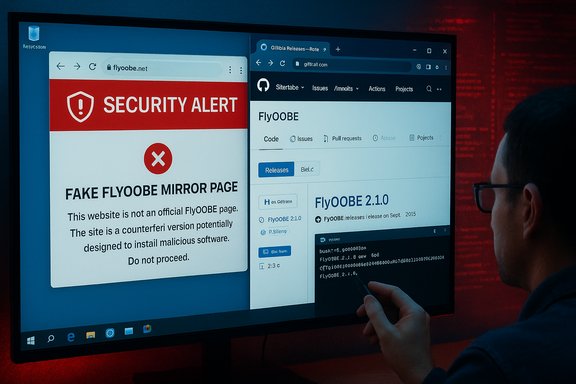
Windows 10’s end-of-support has created a scramble — and attackers are leaning into that urgency with counterfeit download pages that impersonate popular upgrade utilities. The developer of FlyOOBE (formerly Flyby11), a widely used community tool that automates bypasses and Out‑Of‑Box Experience (OOBE) customizations for Windows 11 installs on unsupported hardware, has posted a blunt SECURITY ALERT telling users to avoid an unofficial mirror (flyoobe.net) and to download only from the project’s official GitHub Releases. This is not theoretical: mainstream outlets and community moderators have corroborated the warning and flagged the impersonating site as a likely supply‑chain risk.
Background / Overview
Windows 10 reached official end of support on October 14, 2025. Microsoft will no longer ship free security updates or provide routine technical support to consumer devices past that date, and it is directing users toward Windows 11 or the Consumer Extended Security Updates (ESU) option as a short bridge. That lifecycle deadline has produced an urgent migration vector: millions of users need a path to a supported OS, and many of them face hardware barriers (TPM 2.0, Secure Boot, specific CPU instruction sets) that make direct upgrades impossible without workarounds. Community tooling — like Flyby11 and its successor FlyOOBE — arose to solve exactly this problem by automating known, legitimate setup-time techniques to bypass Microsoft’s compatibility gates and to package OOBE customizations and debloat options. Those projects are popular with refurbishers, hobbyists, and small IT teams because they save time and reduce repetitive setup tasks. But they also operate in a precarious space: unsigned, elevated utilities that change install behavior are a high-value target for attackers who want an easy privileged foothold on victims’ machines. The FlyOOBE maintainer’s warning reflects this tension: the tool itself is used by many responsibly, but a tampered distribution can convert a convenience into a catastrophe.What happened: the impersonation and the developer warning
The immediate incident
In recent days the FlyOOBE release notes were updated with a short but explicit SECURITY ALERT telling users: “DO NOT DOWNLOAD FROM FlyOOBE - FlyOOBE — this is an unofficial mirror and may host tampered or malicious builds. It has NO affiliation with me or this project’s official pages.” The developer points users to the GitHub Releases page as the only trustworthy distribution channel. Reporting by several outlets and community threads reproduced that advisory and added context about the impersonating domain offering apparently official downloads and an FAQ that insists its builds are “safe.” Until independent verification is performed, the maintainer’s warning remains the most authoritative guidance.Why this is dangerous
Tools that run during Windows setup or that orchestrate official ISOs often need system-level privileges to perform registry edits, swap installer routing, or run PowerShell extensions during OOBE. That privileged context is exactly what many attackers seek: a single compromised installer run as SYSTEM can plant backdoors, install credential-harvesting components, or bootstrap persistence mechanisms that survive reboots and elude casual detection. A tampered FlyOOBE binary or a wrapped installer distributed from an impersonating site could therefore deliver far more than a “just works” upgrade — it could hand an attacker deep and persistent access to the target machine and network.Why impersonating mirrors work (and why urgency makes them succeed)
- High trust, high urgency: end-of-life messaging creates panic and compressed decision-making windows. Attackers exploit that by presenting “quick fix” installers that appear to come from legitimate projects.
- Familiar names and UX mimicry: typosquatting domains and near-identical landing pages make it easy for less experienced users to mistake fake mirrors for the real thing.
- Elevated privileges during install: installers and OOBE scripts run with administrative rights, so a malicious payload executed during setup can do the worst damage early and effectively.
- Poor verification by users: many users don’t validate hashes, check signatures, or test in a VM before running unknown downloads — and that lowers the bar for successful compromise.
Technical reality: what FlyOOBE does and why a tampered build matters
Functional summary of FlyOOBE
- Automates registry and setup-time edits (LabConfig-like flags and alternate setup routing).
- Optionally leverages server-variant setup flows or patched installer sequences to circumvent TPM/CPU/Secure Boot checks.
- Provides OOBE customization: debloat controls, account provisioning choices, and scripted PowerShell extensions that run at first sign-in. These features make it attractive to refurbishers and power users.
What a malicious modification could do
Because FlyOOBE interacts with official ISOs and runs privileged extensions, a maliciously modified binary or a wrapped installer could:- Inject persistent backdoors into the system during OOBE that survive reboots.
- Install credential stealers and keyloggers before the user completes setup.
- Seed the machine with launch‑at‑boot services that contact command-and-control servers.
- Replace or corrupt system files so that detection and remediation become unreliable.
- Ship a modified “helper” ISO or ZIP that looks legitimate but contains extra installers or launchers.
How to verify downloads safely — a pragmatic checklist
If you or your team need to use FlyOOBE or similar community tooling, follow this sequence before executing any installer on production hardware.- Download only from canonical sources: prefer the project’s GitHub Releases page or the maintainer’s verified repository. The FlyOOBE maintainer explicitly directs users to GitHub Releases.
- Verify cryptographic hashes: compare a SHA‑256 (or stronger) hash computed locally (Get-FileHash -Algorithm SHA256 .\filename.exe) with a hash posted in the official release notes or attached release assets. Treat missing hashes as a red flag.
- Check signatures: if the project provides PGP/GPG signatures, verify them with the maintainer’s public key obtained from a verified source; if the binary is code-signed, cross-check the signing certificate details.
- Build from source where feasible: for absolute assurance, clone the repository and build the binary yourself in a controlled environment; then compare your build to the distributed executable where possible. This is practical only for technically able teams.
- Scan with multiple engines: upload suspicious or unfamiliar builds to trusted multi-engine scanners or an AV vendor portal (treat results as indicators, not guarantees).
- Test in an isolated VM: snapshot a VM, run the installer, monitor network connections, services, and file writes, then revert the snapshot. If anything unexpected occurs, destroy the snapshot and reimage.
- Maintain backups and recovery media: create a full image backup and a rescue USB so you can reimage quickly if a post-install compromise is detected.
Immediate steps if you visited the impersonating site or downloaded a suspicious build
- Disconnect: physically unplug or disable network interfaces on the machine to stop any active exfiltration.
- Preserve evidence: record the exact download URL, filenames, and any browser receipts or logs you have. This helps incident response and takedown requests.
- Boot clean or use rescue media: boot into a trusted Windows PE or Linux live environment and run offline AV/EDR scans.
- Reimage if executed: if you executed a suspicious installer, the safest course is to reimage from known‑good media and restore from validated backups. Treat “in place” cleanups as unreliable for installer-time compromises.
- Notify affected parties: if the machine contained corporate credentials or had network access to sensitive resources, follow your incident response protocol and alert security/IT immediately. Report the impersonating domain to the registry/host and the project maintainer so takedown action can begin.
Enterprise considerations: policy, procurement, and remediation
Enterprises should treat unsigned third‑party bypass tools as unacceptable for production use unless they are audited, signed, and distributed through managed channels. The risks include:- Supply‑chain compromise and lateral movement: an infected imaging tool can seed entire fleets with backdoors.
- Warranty and compliance exposure: using unsupported installation hacks may void vendor warranties or breach corporate security controls and procurement policies.
- Update and servicing uncertainty: Microsoft does not guarantee update entitlement for unsupported Windows 11 installs; relying on such installs complicates patch management.
- Prefer vendor‑supported migration paths or managed imaging that uses official ISOs and signed configuration scripts.
- If a tool like FlyOOBE is required for a lab or pilot, run it in a strictly isolated test environment and perform code audits and binary reproducibility checks before approving.
- Maintain a documented rollback and reimage plan; treat any exposure as a candidate for forensic review.
Safer alternatives and when they make sense
If you dislike Windows 11 or cannot meet Microsoft’s requirements, there are sensible choices that reduce risk:- Official upgrade: enable firmware TPM or Secure Boot where possible and use Microsoft’s supported upgrade paths (Windows Update, Installation Assistant, or official ISO). This preserves update entitlement and vendor support.
- Rufus + official ISO: for controlled bypass needs, tools like Rufus (used properly with an official ISO) provide a more transparent bypass route; still, this creates unsupported configurations and carries tradeoffs. Test on spare hardware or VMs first.
- Extended Security Updates (ESU): Microsoft offered a consumer ESU as a temporary bridge to keep Windows 10 patched for a finite period — an option for users who cannot migrate immediately. ESU has enrollment and configuration prerequisites.
- Move workloads: consider ChromeOS Flex or mainstream Linux distributions for older hardware where Windows 11 is impractical. These can be lower‑risk long-term options for certain use cases.
What this incident teaches us about supply‑chain hygiene
- Canonical distribution matters: projects hosted on GitHub (or similar code platforms) almost always have a single authoritative release channel; deviation is a signal, not noise. The FlyOOBE developer’s public warning is the right, minimal step to centralize trust.
- Elevated‑privilege utilities are high-value targets: any tool that runs during install must be treated as a privileged channel and validated accordingly.
- User behavior is the lever attackers push: urgency sustains the conversion funnel from search result to compromised machine. Clear messaging, defensive checklists, and blocked domains in corporate filtering reduce that risk.
Practical checklist for readers (short, actionable)
- Do not visit or download from the impersonating domain (flyoobe.net) or any non‑canonical mirror. Use GitHub Releases for FlyOOBE.
- If you must use a bypass tool, verify hashes and signatures before running anything.
- Run new installers inside a snapshot-capable VM first.
- Keep a full image backup and recovery USB before starting any upgrade.
- If you downloaded from a mirror, assume compromise and reimage from trusted media.
Final analysis and verdict
FlyOOBE is a legitimate community project that provides useful automation for installers and OOBE customization — a productivity gain for refurbishers, technicians, and enthusiasts. But its very utility makes it attractive to impersonators, and an unauthorised mirror offering installer binaries is a classic supply‑chain risk vector. The project maintainer’s SECURITY ALERT is precise and calibrated: it does not accuse the mirror operator of active infection; it warns that the mirror may host tampered or malicious builds and directs users to the canonical GitHub Releases as the safe distribution channel. That instruction is the simplest and most effective mitigation available today. For everyday users and enterprises alike, the incident is a stark reminder that where you download software matters as much as what it does. Elevated installers deserve the same provenance checks you apply to firmware, OS images, and corporate software: cryptographic verification, isolated testing, and a reimaging plan for the worst case. If you are unwilling or unable to follow those steps, prefer supported Microsoft upgrade paths or vetted alternatives rather than chasing a quick bypass.The migration clock is real and pressure will not abate overnight. That urgency makes the impersonation attack particularly dangerous — it converts a hard, honest migration problem into an opportunistic social-engineering opening for criminals. The right response is simple and technical: centralize downloads on trusted channels, verify before you run, and assume the worst if an install came from an unvetted mirror. These habits keep machines usable and networks secure long after the headlines move on.
Conclusion
In the weeks and months ahead, the Windows community will see more migration activity, more tooling, and regrettably, more adversarial attempts to co‑opt that movement. The FlyOOBE impersonation is a textbook example: a useful open‑source project, an unauthorised mirror with a plausible UX, and a developer warning that cuts the ambiguity in half. Heed that warning. If you need a bypass tool, make the verification steps part of the install procedure; if you can avoid one, prefer supported upgrade paths and vendor guidance. In the migration between supported and unsupported states, prudence is the single best upgrade you can make.
Source: TechRadar Hate Windows 11? Just make sure you aren't falling for fake download sites hosting upgrade dodgy bypass tools
