

Amazon shoppers are encountering a worrying pattern: Windows laptops and prebuilt PCs listed with attractive total-storage numbers that hide the truth — small, slow internal eMMC modules combined with included SD cards or external drives, or outright fraudulent storage devices that report enormous capacities while containing only a tiny flash chip. This isn't a one-off listing error; it's a long-running marketplace failure that mixes aggressive marketing, review manipulation, and hardware-level trickery — and it leaves everyday buyers with machines that feel unusably slow, run out of space the first week, or simply don't contain the storage they paid for. (wired.com)
For now, the safest path for Windows buyers is simple: favor reputable brands and authorized sellers, read product descriptions fully, verify internal storage types (eMMC vs SSD), and never assume that a massive capacity listed at an impossibly low price is legitimate. When in doubt, step away from the “too-good-to-be-true” buy — your data and time are worth far more than a headline number. (wired.com)
Source: Neowin Beware: Windows PCs are being sold with misleading storage specs on Amazon
 Background
Why this matters now
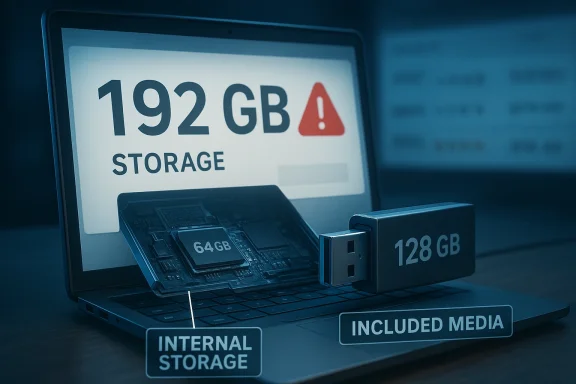
As device makers push entry-level Windows machines to lower price points, storage becomes the weakest link. Many budget laptops ship with 32–64 GB of eMMC — a slow, soldered-on storage type adequate only for the most basic tasks. Marketing copy and some third‑party sellers amplify total capacity by counting included SD cards or bundled USB drives as part of the "storage" figure, or by using ambiguous phrasing like “192 GB (expandable)” that a shopper might read as built-in capacity. In other cases, vendors on general marketplaces exploit listing hijacking and fake reviews to sell devices that deliberately misrepresent physical capacity. Wired and independent reviewers documented precisely this pattern, including a widely shared example where a laptop advertised as 192 GB actually had 64 GB of internal eMMC and a bundled 128‑GB SD card. (wired.com)The longer history: fake storage devices and misleading claims
This problem extends beyond laptops. For years, researchers and watchdog outlets have been reporting fake high‑capacity flash drives and portable SSDs on big marketplaces: devices sold as "16 TB" or "30 TB" that are actually microSD cards with modified firmware in a cheap USB enclosure. Investigations show these devices often appear with many positive reviews and can even be shipped with “fulfilled by” badges, making them seem legitimate until buyers test them. The technical method — firmware or controller manipulation to misreport capacity — has been documented repeatedly.How the scam works — two distinct patterns
1) Misleading product copy: counting removable media as "storage"
- What sellers do: list a single spec like “192 GB storage” without clarifying that only a portion is internal, and the rest is provided by an included SD or USB card. The packaging or title omits or buries the fact that the extra storage is not built into the machine.
- The effect on buyers: Windows installs, updates, and mainstream apps quickly consume eMMC space; bundled SD cards are often slower, removable, and not appropriate for OS or app installations. Buyers discover they have far less usable system storage than advertised, causing poor performance and rapid filling of the C: drive. A concrete example of this problem was documented in Wired’s recent review of Amazon listings. (wired.com)
2) Fraudulent hardware: fake-capacity drives and controller firmware trickery
- What vendors do: ship enclosures with tiny onboard storage (e.g., 32–128 GB microSD) but program the controller’s firmware to report a much larger logical block addressing (LBA) range to the OS. The operating system shows the inflated capacity, but actual writes are overwritten or fail once you exceed the real physical capacity.
- How it looks to buyers: Windows Explorer and Disk Management report massive sizes; benchmark tools may appear to pass simple capacity checks; but in real life data corruption or overwritten files appear as soon as real usage surpasses the physical memory. Security researchers and teardown reports have repeatedly found microSD cards inside “16 TB” portable SSDs.
Verified examples and journalism coverage
- Wired examined Amazon search results for “best laptops” and found multiple cheap Windows machines promoted with inflated or confusing storage claims — notably an HP bargain listed as 192 GB that actually had 64 GB of eMMC and a bundled 128‑GB SD card. That article lays out why this combination produces a false sense of value and leads to unhappy buyers. (wired.com)
- Review and teardown reporting has repeatedly exposed fake “16 TB” and “30 TB” portable SSDs that, once opened, revealed nothing more than small microSD cards in inexpensive enclosures; Ars Technica, tech reviewers, and multiple security blogs documented these finds and explained how Windows can be lied to by modified firmware.
- Security-focused writeups explain the firmware-based capacity inflation and demonstrate repeated cases across retail platforms, showing this is an enduring technique rather than a series of isolated one-off errors.
Why marketplace systems keep failing
Review hijacking and listing reuse
Bad actors commonly take over old listings (with many positive reviews) and replace the product or pictures while letting the reviews remain, or they create new listings and seed them with fake five‑star reviews to simulate legitimacy. The review system, combined with ranking signals that reward older, highly rated listings, gives these sellers an outsized advantage. Investigative articles and tests show multiple listings with suspicious review patterns and mismatched review content.Detection limits and the whack-a-mole problem
Marketplaces like Amazon invest heavily in automated detection and brand-protection programs, including serialisation services and brand-controlled takedown tools. But the sellers adapt quickly: once a listing is removed, another appears; once a listing is corrected, a new seller lists a nearly identical item under a different ASIN or brand name. That pace makes complete policing difficult in practice despite corporate efforts. Amazon has publicly described programs such as Transparency and Project Zero to counter counterfeits, but the reality is that enforcement is imperfect and porous at scale.Consumer behavior and price pressure
Shoppers searching for bargain laptops or “huge” SSD capacities naturally click the most compelling headline figure — but very few users read product pages carefully or understand the difference between eMMC vs NVMe vs SATA, or between built-in storage and included accessories. The combination of low price, good-looking spec numbers, and superficial five‑star reviews creates predictable demand for these misleading listings. Wired and other outlets argue that retailers need better UX and stronger labeling to prevent that confusion. (wired.com)Which claims are verifiable, and where to be cautious
- Verifiable: Multiple independent teardowns confirm that many “high capacity” portable SSDs sold cheaply were actually microSD cards in USB enclosures. This is well‑documented across several reputable outlets and test reports.
- Verifiable: Listings that count bundled removable media (SD/USB) in “total storage” exist and have been observed in major marketplace search results. Wired documented this specific category with concrete listings. (wired.com)
- Caution: Individual Amazon listings may have recently been removed or corrected by the marketplace; live availability of any given scam SKU is ephemeral. If you see an alarming spec, it may be gone the next day — but the underlying structural issues remain.
Practical guidance for buyers — a checklist before you click
- Read the full product description, not just the headline spec. Look for language like “includes 128 GB microSD” vs “64 GB eMMC + 128 GB microSD”. If the listing doesn’t clarify what’s built-in and what’s bundled, treat it with suspicion.
- Inspect seller identity and fulfillment: prefer listings sold by the brand (the manufacturer) or “Ships from and sold by [brand]” rather than an unknown third-party seller. Fulfilled-by-marketplace is better than seller-fulfilled in many cases, but it’s no guarantee of authenticity.
- Scan reviews carefully: open the low-rated reviews and the most recent reviews to see whether buyers report wrong items, missing internal storage, or “came with a microSD card only.” Watch for reviews that seem unrelated to the product — a common sign of review hijacking.
- Check for real-world performance specs: eMMC will feel slow; search the listing or manual for eMMC, SATA, NVMe, or PCIe rather than vague “SSD” language. If a “laptop with SSD” costs under ~$300 and the title promises huge storage, double-check the internal type.
- When possible, buy from reputable retailers or the manufacturer’s own storefront. For storage devices, stick to recognized brands for large capacities. If an external drive or SSD is priced significantly below known-brand market rates, treat the deal as too good to be true.
- Test immediately: run a simple copy test (large files) and a capacity test using tools like H2testw or F3 for USB/flash devices, and Windows built-in Disk Management for laptops. If a device reports a larger capacity but can’t store data beyond a certain point, request a refund and report the seller.
For IT pros and institutions: procurement guardrails
- Require vendor authorization: mandate purchases only from authorized distributors or brand‑authorized resellers, and maintain a vendor whitelist.
- Insist on model-level documentation: procurement orders should reference manufacturer part numbers (MPNs) and not just descriptive listing titles.
- Test-sample incoming batches: for fleet buys, test a sample unit from each shipment for real capacity, speed, and build quality before deploying devices across the organization.
- Educate end-users: provide simple guidance explaining why an included SD card is not the same as built‑in storage, and how to check actual storage type in Windows. Community posts and support threads show many users are surprised that a 32–64 GB eMMC machine is essentially non-upgradeable for OS tasks.
What marketplaces and brands should do (and aren’t consistently doing)
- Enforce clearer UI labels: show a distinct field for “internal storage” vs “included/removable storage” in product detail pages and in search snippets, so headline numbers aren’t misleading.
- Harden listing transition rules: disallow wholesale product-swap edits on listings with a long review history; if a seller changes the SKU or product type, require a new listing rather than inheriting old ratings.
- Fast-track removal of demonstrably fraudulent hardware: use hardware-level heuristics (e.g., matching known counterfeit controller IDs) and require sellers of storage devices to register batch serial ranges for provenance checks.
- Improve buyer remedies: extend return windows or provide automated safety nets for categories prone to fraud (small flash drives and ultra-cheap laptops), and make reporting a single-click action in the marketplace app. Amazon already runs programs like Project Zero and Transparency to help brands fight counterfeits, but enforcement continues to lag behind new evasion tactics.
Risks beyond buyer disappointment
- Data loss and corruption: fake or misreported storage can silently overwrite user data. Consumers who trust the reported capacity may lose backups or critical files. This is not just an inconvenience; it is a real data‑integrity hazard.
- Malware and privacy concerns: while many teardowns have not found malware embedded in counterfeit storage enclosures, shipping unknown hardware from untrusted vendors carries risk. Adversarial firmware or spyware are plausible attack vectors and should be considered in high-risk procurement.
- Environmental waste: cheap fake hardware tends to be disposable. Consumers placed with unusable devices are likely to discard them, worsening e‑waste problems and providing perverse incentives for low‑quality manufacturing cycles.
How to report and escalate (a step-by-step for affected buyers)
- Take photos of the packaging and product serials immediately upon unboxing.
- Run a capacity test (H2testw, F3, or a sustained large-file copy test) and record the results.
- Open a claim with the marketplace and request a refund — cite the test result and attach evidence. Most marketplaces have refund policies for items not as described.
- If the item was shipped from a brand’s storefront but is counterfeit, report the listing to the brand via their official IP or authenticity channels; brands can escalate via projects like Project Zero. If the device is possibly dangerous (e.g., poor power regulation), report to consumer protection authorities.
Conclusion — what Windows buyers should take away
The era of headline storage numbers on marketplace search results has created a predictable trap: buyers attracted to big numbers are often not told whether that capacity is internal and fast or ephemeral and removable. Worse, fraudulent devices that misreport physical capacity continue to appear. The fixes require better marketplace UI design, tougher seller verification, and proactive buyer education.For now, the safest path for Windows buyers is simple: favor reputable brands and authorized sellers, read product descriptions fully, verify internal storage types (eMMC vs SSD), and never assume that a massive capacity listed at an impossibly low price is legitimate. When in doubt, step away from the “too-good-to-be-true” buy — your data and time are worth far more than a headline number. (wired.com)
Source: Neowin Beware: Windows PCs are being sold with misleading storage specs on Amazon
