

Jack Wallen at ZDNET spotlighted Blip in July 2026 as a free personal file-transfer app for Android that also runs on Windows, macOS, iOS, and iPadOS, promising direct, original-quality transfers with no advertised file-size limits and a paid business tier. The interesting part is not that another utility can fling a photo across a room. It is that Blip aims squarely at the gap Apple, Google, and Microsoft still have not closed: painless sharing across the devices people actually own. For Windows users in mixed households, small studios, and bring-your-own-device workplaces, that gap is no longer a niche inconvenience; it is one of the last places where the platform wars still waste ordinary time.
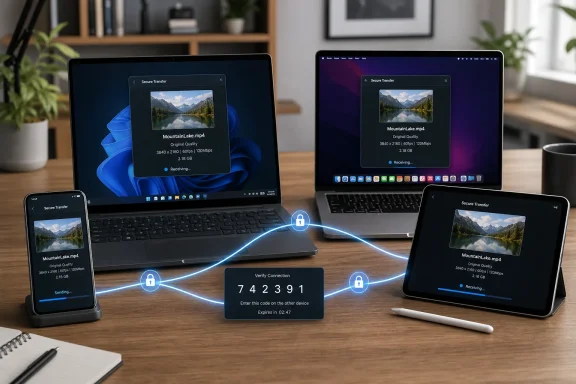
The highest praise in Wallen’s ZDNET piece is also the most damning indictment of the incumbents: Blip is easy. Install it, sign in with an email address, verify with a six-digit code, and the devices appear as targets. Pick a file, send it, and the transfer arrives without the sender thinking about SMB shares, cloud folders, Bluetooth pairing, cable modes, or whether the recipient is in the correct ecosystem.
That sounds almost too modest to matter until you remember how many “simple” file-sharing workflows collapse the moment Android, Windows, iPhone, and Mac all enter the same room. Apple’s AirDrop remains excellent inside Apple’s walls. Google’s Quick Share has improved the Android-to-Windows story. Windows has had nearby sharing of its own. But the average user does not think in platform compatibility matrices; they think, “I need this video from my phone on that laptop.”
Blip’s pitch is to make that sentence the whole workflow. According to the Google Play listing, the app works across Mac, iOS, Windows, and Android, sends original-quality files, and avoids a separate upload-and-download process. Cult of Mac described the same practical appeal earlier this year, noting Blip’s usefulness for large media files that are awkward to push through traditional cloud services.
This is the part Microsoft should pay attention to. File sharing is not glamorous infrastructure, but it is one of those tiny frictions that makes an operating system feel either coherent or fussy. When a third-party utility can make a Windows PC feel like a natural endpoint for an Android phone or iPad, it is not merely competing with OneDrive or Quick Share. It is competing with the user’s memory of every failed transfer that came before it.
That mess is where file-transfer tools earn their keep. A photographer may shoot on Android, edit on a Mac, invoice from Windows, and deliver to a client using an iPhone. A sysadmin may need to move screenshots, logs, installers, and config exports between whatever device is in reach. A student may have an Android handset, a Windows laptop, and classmates on iPhones. None of these users should have to care which company owns the protocol.
The problem is that the built-in tools still reflect their corporate parents. AirDrop is polished because Apple controls the hardware, software, account layer, and user interface. Quick Share is increasingly useful, but it is still strongest in Google’s orbit and especially relevant to Android and Windows users. Windows sharing features can be useful between PCs, yet they do not magically solve the phone-to-everything problem.
Blip’s value is not that it invents a category. It is that it treats cross-platform support as the starting line rather than the enterprise SKU. ZDNET’s Wallen tested it on Android and desktop systems and came away arguing that it was faster and easier than the alternatives he had tried. That is subjective, but it tracks with the larger market reality: users do not need another theoretical standard as much as they need something that works before they lose patience.
Blip’s marketing leans into the opposite idea: direct transfer, original quality, no compression, and no stated size limit. The Google Play listing says files go directly to the other device rather than requiring a cloud upload first. That matters because the cloud path has three costs: time, bandwidth, and trust.
Time is the obvious one. If the sender and receiver are online at the same time, a direct path can avoid the two-step wait. Bandwidth is the practical one, especially on metered connections, hotel Wi-Fi, mobile hotspots, or offices where upload capacity is far worse than download capacity. Trust is the quiet one: many users are increasingly uncomfortable using random cloud buckets, message apps, or email attachments as temporary file depots.
None of this means cloud storage is going away. OneDrive, Google Drive, Dropbox, iCloud Drive, Box, and SharePoint solve different problems: synchronization, collaboration, retention, search, policy, and recovery. But a tool designed for transfer rather than storage can feel dramatically better when the job is simply to move a file now.
The distinction matters for Windows users because Microsoft has often treated OneDrive as the answer to more questions than users actually asked. OneDrive is useful, sometimes essential, and increasingly woven into Windows. But it is not the same thing as a fast, disposable, cross-platform handoff. Blip is interesting precisely because it refuses to turn every transfer into a library, backup plan, or collaboration space.
“End-to-end encrypted” is a phrase that now does too much work in consumer software. It can mean cryptographic protection where only sender and receiver possess the keys. It can also be used loosely by vendors to describe encrypted transport, secure tunnels, or architecture that still depends on trust in the service operator. Without a clear technical white paper, independent audit, or detailed threat model, the phrase is a promise rather than proof.
That does not make Blip unsafe. It means the right conclusion depends on the file. Vacation videos, phone photos, podcast recordings, and non-sensitive work assets are one category. Legal documents, unreleased financials, regulated health data, source code, identity documents, and confidential customer files are another. A tool can be excellent for the first category while still requiring review before the second.
The auto-accept behavior Wallen mentions is another example of convenience rubbing against policy. If devices registered to the same account can receive files automatically, that is exactly what makes the app feel magical. It is also the kind of behavior an administrator will want to understand before allowing it on managed endpoints. In personal use, the risk may be small. In an office, unsolicited file receipt is a control-plane question.
Enterprise IT should ask the boring questions before celebrating. Where are account identifiers stored? How are devices discovered? What relay infrastructure is used when direct paths fail? Are filenames or metadata visible to the service? Are transfers logged? Can administrators disable personal accounts, restrict destinations, enforce retention rules, or audit use? The answers may be perfectly reasonable, but the burden is higher when a tool crosses corporate boundaries.
This is also why Microsoft’s own sharing story has felt incomplete. Windows is superb at tolerating heterogeneity in some areas and oddly clumsy in others. It can join domains, mount network shares, run ancient applications, talk to printers no one should still own, and host development environments for nearly every platform. Yet moving a file from a phone to a PC can still send users into a maze of cables, companion apps, cloud folders, and inconsistent share targets.
The Phone Link app has improved the Android-to-Windows experience, especially for messaging, notifications, photos, and calls. Quick Share for Windows gives Android users a more direct path for nearby transfers. But these tools still do not erase the appeal of one app that works across Windows, macOS, Android, iOS, and iPadOS with the same mental model.
That sameness is underrated. Users do not want to remember that AirDrop works only here, Quick Share works there, Nearby Sharing works under these conditions, and the cable workflow depends on the device being unlocked and in the correct USB mode. Blip’s bet is that the best interface is a list of people and devices, not a platform lesson.
For Windows enthusiasts, that should feel familiar. Some of the best Windows utilities have historically won by smoothing over gaps Microsoft left exposed. Compression tools, clipboard managers, remote access utilities, screenshot tools, launchers, terminal replacements, and file sync clients all became popular because the built-in experience was either too narrow or too slow to evolve. Blip belongs to that tradition more than to the social-sharing app world.
That comparison is not entirely fair, because Blip is not trying to be a full document platform. But budgets do not care about category nuance. A small video team might see $25 per user per month as cheap if it saves hours moving huge files. A law firm, school district, or healthcare provider might see it as another unmanaged tool unless it brings policy, auditability, and contractual assurances.
The price also hints at the real market Blip may be chasing: creative professionals, distributed teams, and people who routinely send large files that cloud collaboration suites handle awkwardly. In that world, speed and simplicity can justify a subscription more easily than another storage quota. If a production workflow involves moving dozens or hundreds of gigabytes, avoiding compression and upload staging is not a luxury.
But the enterprise story will depend on administrative depth. Business users do not merely need the right to use the software commercially. They need device management, identity integration, revocation, compliance documentation, support guarantees, and predictable behavior under network controls. If Blip wants to graduate from beloved utility to approved workplace tool, it will have to speak that language.
The personal-versus-business split is still a smart move. It lets the app spread where friction is lowest while charging the users most likely to extract measurable value. That is a familiar freemium pattern, but in file transfer it has a special advantage: the product advertises itself every time someone receives a file and asks, “What did you use to send that?”
The irony is that Linux users already have strong file-transfer options if they are willing to tolerate rougher edges. SSH, rsync, Syncthing, LocalSend, KDE Connect, SMB, NFS, SFTP, and a dozen web-based tools can all do pieces of the job. The problem is not capability. It is approachability across the entire household or team.
If Blip eventually adds Linux with the same polish, its claim to universality becomes much stronger. Windows, Mac, Android, iPhone, iPad, and Linux would cover the real-world device set for most enthusiasts and many small organizations. Without Linux, Blip is still useful, but it leaves out a technically influential constituency that often drives utility adoption.
The Linux gap also matters competitively. LocalSend, for example, is open source and cross-platform, including Linux, and it appeals to users who prefer local-network transfers and inspectable code. Syncthing is more synchronization engine than casual sending app, but it has a strong following among privacy-conscious users. Blip does not need to become those projects, but Linux support would prevent it from looking like a consumer-only bridge between Apple, Google, and Microsoft.
For now, Windows users should treat Linux support as a promise rather than a feature. That is not a criticism so much as a reminder that cross-platform products are judged by the platforms they have not yet reached. The hardest part of universal file sharing is not sending one file beautifully. It is staying beautiful everywhere.
The trouble is that users experience all of those improvements as partial victories. AirDrop does not help the Android user with a Windows workstation. Quick Share does not make an iPad a first-class endpoint. Phone Link is useful, but it is not a universal file-transfer grammar for every device in the house. Each tool reduces pain inside a corridor, while Blip tries to be the hallway.
That positioning is powerful because it turns platform neutrality into the feature. The best cross-platform utilities do not ask users to pledge allegiance. They accept the messy inventory and make the next action obvious. Password managers did this. Messaging apps tried, with mixed success. Remote desktop tools did it for support. File transfer is overdue for the same treatment.
There is a deeper lesson here for Microsoft. Windows does not have to own every endpoint to be indispensable; it has to be the place where endpoints can meet. The more Microsoft leans into Windows as the practical hub for mixed environments, the less it needs to pretend users live entirely inside its own services. That strategy is less tidy than ecosystem lock-in, but it is more honest.
Blip’s rise, if it continues, will not be because users hate Microsoft, Apple, or Google. It will be because they are tired of remembering which company’s convenience applies to which pair of devices. In consumer software, the winning abstraction is often the one that lets people forget the map.
Wallen’s experience with Blip was strongly positive, and other coverage has praised its speed with large files. But long-term reliability is the feature that decides whether a utility becomes permanent. Users forgive a manual setup step if the tool works every time afterward. They do not forgive a “simple” app that fails mysteriously on the one day a deadline matters.
Windows adds its own wrinkles. Security suites may inspect or block unfamiliar network behavior. Corporate networks may restrict peer-to-peer traffic. Users may not understand whether files are moving locally, through a relay, or over the broader internet. Windows sleep states and laptop lid behavior can interrupt long transfers. If Blip handles these cases gracefully, it has a real advantage. If not, it becomes another app people keep installed “just in case.”
The best version of Blip would be transparent without becoming technical. Users should know whether a transfer is direct or relayed, whether the connection is encrypted end to end, and whether either device can go offline. Administrators should have a more detailed view. Simplicity does not require opacity; it requires hiding complexity until the moment knowing it changes a decision.
That is where many consumer utilities stumble. They optimize the first-run delight and underinvest in the second-month trust. Blip’s challenge is to keep the delightful part while giving power users enough information to believe what is happening.
Today’s assumption is that everything is connected, yet file movement is often less direct than it was with a thumb drive. Photos are trapped in phone galleries. Videos are too large for messaging apps. Cloud folders sync too much or too slowly. Corporate tools are secure but cumbersome. Consumer tools are easy but sometimes lossy, limited, or unclear about privacy.
Blip’s emotional appeal comes from restoring the feeling of just send it. That phrase matters because it is what users thought modern computing had already promised them. We can stream 4K video, summon remote GPUs, and run AI models in the cloud, but sending a full-quality video from an Android phone to a Mac or Windows PC can still feel like arranging a small diplomatic summit.
The utility also arrives at a time when file size has quietly exploded. Phone cameras produce larger images and videos. Creators work with 4K and 8K footage. Game clips, screen recordings, datasets, virtual machines, and project folders dwarf the attachments of the early broadband era. A “no size limit” transfer tool is not a gimmick when ordinary users are generating files that legacy sharing paths were never designed to handle.
The counterargument is that many people already have a workflow. They use Google Photos, iCloud, OneDrive, WhatsApp, Signal, Telegram, Dropbox, a USB-C cable, or a NAS. That is true. But the persistence of workarounds is not proof the problem is solved. It is proof users are adaptable.
Still, the smart posture is enthusiastic caution. Do not make any third-party transfer app the default path for sensitive work until its security model is clear enough for your risk level. Do not assume “free for personal use” covers business workflows. Do not assume no file-size limit means no practical limits under your network conditions. And do not assume a tool that works beautifully at home will behave the same way on a locked-down corporate network.
For IT pros, the more interesting move is to watch user behavior. If employees start adopting Blip or similar tools organically, that is signal. It means approved workflows are too slow, too platform-specific, or too confusing. Shadow IT is often a governance problem, but it is also user research with consequences.
The wrong response is simply to ban the tool and declare victory. The better response is to ask what pain made the tool attractive, then provide a sanctioned path that is at least nearly as easy. If that sanctioned path is “upload to SharePoint, wait, share a link, adjust permissions, explain login, troubleshoot access,” users will keep looking elsewhere.
Blip may or may not become the default answer. But the demand it exposes is real, and Windows sits at the center of it.
 Blip Wins by Refusing to Make File Sharing a Project
The highest praise in Wallen’s ZDNET piece is also the most damning indictment of the incumbents: Blip is easy. Install it, sign in with an email address, verify with a six-digit code, and the devices appear as targets. Pick a file, send it, and the transfer arrives without the sender thinking about SMB shares, cloud folders, Bluetooth pairing, cable modes, or whether the recipient is in the correct ecosystem.That sounds almost too modest to matter until you remember how many “simple” file-sharing workflows collapse the moment Android, Windows, iPhone, and Mac all enter the same room. Apple’s AirDrop remains excellent inside Apple’s walls. Google’s Quick Share has improved the Android-to-Windows story. Windows has had nearby sharing of its own. But the average user does not think in platform compatibility matrices; they think, “I need this video from my phone on that laptop.”
Blip’s pitch is to make that sentence the whole workflow. According to the Google Play listing, the app works across Mac, iOS, Windows, and Android, sends original-quality files, and avoids a separate upload-and-download process. Cult of Mac described the same practical appeal earlier this year, noting Blip’s usefulness for large media files that are awkward to push through traditional cloud services.
This is the part Microsoft should pay attention to. File sharing is not glamorous infrastructure, but it is one of those tiny frictions that makes an operating system feel either coherent or fussy. When a third-party utility can make a Windows PC feel like a natural endpoint for an Android phone or iPad, it is not merely competing with OneDrive or Quick Share. It is competing with the user’s memory of every failed transfer that came before it.
The Cross-Platform Tax Is Still Real
The modern device stack is not a stack at all. It is a pile. A Windows desktop at work, a MacBook at home, an Android phone in one pocket, an iPad on the couch, and maybe a NAS or external drive somewhere in the background. The tech industry loves to sell ecosystems, but many households and small businesses live in something messier: overlapping islands of convenience.That mess is where file-transfer tools earn their keep. A photographer may shoot on Android, edit on a Mac, invoice from Windows, and deliver to a client using an iPhone. A sysadmin may need to move screenshots, logs, installers, and config exports between whatever device is in reach. A student may have an Android handset, a Windows laptop, and classmates on iPhones. None of these users should have to care which company owns the protocol.
The problem is that the built-in tools still reflect their corporate parents. AirDrop is polished because Apple controls the hardware, software, account layer, and user interface. Quick Share is increasingly useful, but it is still strongest in Google’s orbit and especially relevant to Android and Windows users. Windows sharing features can be useful between PCs, yet they do not magically solve the phone-to-everything problem.
Blip’s value is not that it invents a category. It is that it treats cross-platform support as the starting line rather than the enterprise SKU. ZDNET’s Wallen tested it on Android and desktop systems and came away arguing that it was faster and easier than the alternatives he had tried. That is subjective, but it tracks with the larger market reality: users do not need another theoretical standard as much as they need something that works before they lose patience.
The Cloud Was a Workaround, Not a Destination
For years, the default answer to awkward file movement has been “put it in the cloud.” That works well enough for documents and small photo batches, but it becomes absurd when the file is a multi-gigabyte video, a folder full of RAW images, or a local build artifact that only needs to move six feet across a room. Uploading to a remote server just to download to a nearby machine is an engineering compromise disguised as convenience.Blip’s marketing leans into the opposite idea: direct transfer, original quality, no compression, and no stated size limit. The Google Play listing says files go directly to the other device rather than requiring a cloud upload first. That matters because the cloud path has three costs: time, bandwidth, and trust.
Time is the obvious one. If the sender and receiver are online at the same time, a direct path can avoid the two-step wait. Bandwidth is the practical one, especially on metered connections, hotel Wi-Fi, mobile hotspots, or offices where upload capacity is far worse than download capacity. Trust is the quiet one: many users are increasingly uncomfortable using random cloud buckets, message apps, or email attachments as temporary file depots.
None of this means cloud storage is going away. OneDrive, Google Drive, Dropbox, iCloud Drive, Box, and SharePoint solve different problems: synchronization, collaboration, retention, search, policy, and recovery. But a tool designed for transfer rather than storage can feel dramatically better when the job is simply to move a file now.
The distinction matters for Windows users because Microsoft has often treated OneDrive as the answer to more questions than users actually asked. OneDrive is useful, sometimes essential, and increasingly woven into Windows. But it is not the same thing as a fast, disposable, cross-platform handoff. Blip is interesting precisely because it refuses to turn every transfer into a library, backup plan, or collaboration space.
Security Claims Need More Than Comforting Words
The security story is where the enthusiasm should slow down. ZDNET’s article says Blip uses end-to-end encryption, and the app’s public listings emphasize privacy-friendly transfer behavior. Community discussions around Blip have also included developer statements that files are not stored in the cloud and that encrypted connections are used. That is encouraging, but WindowsForum readers should know the difference between a useful consumer security claim and a procurement-ready assurance.“End-to-end encrypted” is a phrase that now does too much work in consumer software. It can mean cryptographic protection where only sender and receiver possess the keys. It can also be used loosely by vendors to describe encrypted transport, secure tunnels, or architecture that still depends on trust in the service operator. Without a clear technical white paper, independent audit, or detailed threat model, the phrase is a promise rather than proof.
That does not make Blip unsafe. It means the right conclusion depends on the file. Vacation videos, phone photos, podcast recordings, and non-sensitive work assets are one category. Legal documents, unreleased financials, regulated health data, source code, identity documents, and confidential customer files are another. A tool can be excellent for the first category while still requiring review before the second.
The auto-accept behavior Wallen mentions is another example of convenience rubbing against policy. If devices registered to the same account can receive files automatically, that is exactly what makes the app feel magical. It is also the kind of behavior an administrator will want to understand before allowing it on managed endpoints. In personal use, the risk may be small. In an office, unsolicited file receipt is a control-plane question.
Enterprise IT should ask the boring questions before celebrating. Where are account identifiers stored? How are devices discovered? What relay infrastructure is used when direct paths fail? Are filenames or metadata visible to the service? Are transfers logged? Can administrators disable personal accounts, restrict destinations, enforce retention rules, or audit use? The answers may be perfectly reasonable, but the burden is higher when a tool crosses corporate boundaries.
Windows Is the Prize Because Windows Is the Middle Ground
Blip’s Windows support is strategically important because Windows is often the neutral device in a mixed-platform life. The Windows PC is where Android users dump camera rolls, where iPhone users sometimes need a file outside iCloud, where small businesses keep legacy applications, and where family tech support usually happens. If a transfer app works well on Windows, it can become the bridge rather than just another app icon.This is also why Microsoft’s own sharing story has felt incomplete. Windows is superb at tolerating heterogeneity in some areas and oddly clumsy in others. It can join domains, mount network shares, run ancient applications, talk to printers no one should still own, and host development environments for nearly every platform. Yet moving a file from a phone to a PC can still send users into a maze of cables, companion apps, cloud folders, and inconsistent share targets.
The Phone Link app has improved the Android-to-Windows experience, especially for messaging, notifications, photos, and calls. Quick Share for Windows gives Android users a more direct path for nearby transfers. But these tools still do not erase the appeal of one app that works across Windows, macOS, Android, iOS, and iPadOS with the same mental model.
That sameness is underrated. Users do not want to remember that AirDrop works only here, Quick Share works there, Nearby Sharing works under these conditions, and the cable workflow depends on the device being unlocked and in the correct USB mode. Blip’s bet is that the best interface is a list of people and devices, not a platform lesson.
For Windows enthusiasts, that should feel familiar. Some of the best Windows utilities have historically won by smoothing over gaps Microsoft left exposed. Compression tools, clipboard managers, remote access utilities, screenshot tools, launchers, terminal replacements, and file sync clients all became popular because the built-in experience was either too narrow or too slow to evolve. Blip belongs to that tradition more than to the social-sharing app world.
The Business Model Draws a Line Between Handy and Governed
Blip is free for personal use, while ZDNET reports that commercial use requires a Business plan priced at $25 per user per month. That price immediately changes the conversation. Free is easy to recommend to a household. Twenty-five dollars per user per month asks to be compared with Microsoft 365, Dropbox, Box, Google Workspace, and managed file-transfer products.That comparison is not entirely fair, because Blip is not trying to be a full document platform. But budgets do not care about category nuance. A small video team might see $25 per user per month as cheap if it saves hours moving huge files. A law firm, school district, or healthcare provider might see it as another unmanaged tool unless it brings policy, auditability, and contractual assurances.
The price also hints at the real market Blip may be chasing: creative professionals, distributed teams, and people who routinely send large files that cloud collaboration suites handle awkwardly. In that world, speed and simplicity can justify a subscription more easily than another storage quota. If a production workflow involves moving dozens or hundreds of gigabytes, avoiding compression and upload staging is not a luxury.
But the enterprise story will depend on administrative depth. Business users do not merely need the right to use the software commercially. They need device management, identity integration, revocation, compliance documentation, support guarantees, and predictable behavior under network controls. If Blip wants to graduate from beloved utility to approved workplace tool, it will have to speak that language.
The personal-versus-business split is still a smart move. It lets the app spread where friction is lowest while charging the users most likely to extract measurable value. That is a familiar freemium pattern, but in file transfer it has a special advantage: the product advertises itself every time someone receives a file and asks, “What did you use to send that?”
Linux Is the Missing Door in the Room
Wallen notes that Linux support is marked as coming soon, and that his attempt to sign up for the Linux version failed. For WindowsForum readers, Linux may sound like a side issue, but it is a meaningful gap for the very users most likely to care about universal file movement. Developers, homelab operators, media workflows, and sysadmins often have at least one Linux machine in the mix.The irony is that Linux users already have strong file-transfer options if they are willing to tolerate rougher edges. SSH, rsync, Syncthing, LocalSend, KDE Connect, SMB, NFS, SFTP, and a dozen web-based tools can all do pieces of the job. The problem is not capability. It is approachability across the entire household or team.
If Blip eventually adds Linux with the same polish, its claim to universality becomes much stronger. Windows, Mac, Android, iPhone, iPad, and Linux would cover the real-world device set for most enthusiasts and many small organizations. Without Linux, Blip is still useful, but it leaves out a technically influential constituency that often drives utility adoption.
The Linux gap also matters competitively. LocalSend, for example, is open source and cross-platform, including Linux, and it appeals to users who prefer local-network transfers and inspectable code. Syncthing is more synchronization engine than casual sending app, but it has a strong following among privacy-conscious users. Blip does not need to become those projects, but Linux support would prevent it from looking like a consumer-only bridge between Apple, Google, and Microsoft.
For now, Windows users should treat Linux support as a promise rather than a feature. That is not a criticism so much as a reminder that cross-platform products are judged by the platforms they have not yet reached. The hardest part of universal file sharing is not sending one file beautifully. It is staying beautiful everywhere.
The Built-In Options Are Better, but Still Not Enough
It would be wrong to pretend the platform vendors have ignored this problem. Apple’s AirDrop remains a benchmark for local sharing inside Apple’s ecosystem. Google’s Quick Share, formed from the Nearby Share lineage and Samsung collaboration, has made Android sharing more coherent and supports Windows PCs. Microsoft continues to integrate phone-adjacent features into Windows through Phone Link and related services.The trouble is that users experience all of those improvements as partial victories. AirDrop does not help the Android user with a Windows workstation. Quick Share does not make an iPad a first-class endpoint. Phone Link is useful, but it is not a universal file-transfer grammar for every device in the house. Each tool reduces pain inside a corridor, while Blip tries to be the hallway.
That positioning is powerful because it turns platform neutrality into the feature. The best cross-platform utilities do not ask users to pledge allegiance. They accept the messy inventory and make the next action obvious. Password managers did this. Messaging apps tried, with mixed success. Remote desktop tools did it for support. File transfer is overdue for the same treatment.
There is a deeper lesson here for Microsoft. Windows does not have to own every endpoint to be indispensable; it has to be the place where endpoints can meet. The more Microsoft leans into Windows as the practical hub for mixed environments, the less it needs to pretend users live entirely inside its own services. That strategy is less tidy than ecosystem lock-in, but it is more honest.
Blip’s rise, if it continues, will not be because users hate Microsoft, Apple, or Google. It will be because they are tired of remembering which company’s convenience applies to which pair of devices. In consumer software, the winning abstraction is often the one that lets people forget the map.
The Real Test Is the Bad Network Day
Every file-transfer app looks good in the ideal demo. The sender and receiver are online, permissions are granted, network discovery works, NAT traversal behaves, antivirus stays quiet, and the file arrives before anyone has time to doubt the workflow. The real test comes later: captive portals, office firewalls, sleeping laptops, mobile data, blocked relays, expired sessions, and devices with different power-management habits.Wallen’s experience with Blip was strongly positive, and other coverage has praised its speed with large files. But long-term reliability is the feature that decides whether a utility becomes permanent. Users forgive a manual setup step if the tool works every time afterward. They do not forgive a “simple” app that fails mysteriously on the one day a deadline matters.
Windows adds its own wrinkles. Security suites may inspect or block unfamiliar network behavior. Corporate networks may restrict peer-to-peer traffic. Users may not understand whether files are moving locally, through a relay, or over the broader internet. Windows sleep states and laptop lid behavior can interrupt long transfers. If Blip handles these cases gracefully, it has a real advantage. If not, it becomes another app people keep installed “just in case.”
The best version of Blip would be transparent without becoming technical. Users should know whether a transfer is direct or relayed, whether the connection is encrypted end to end, and whether either device can go offline. Administrators should have a more detailed view. Simplicity does not require opacity; it requires hiding complexity until the moment knowing it changes a decision.
That is where many consumer utilities stumble. They optimize the first-run delight and underinvest in the second-month trust. Blip’s challenge is to keep the delightful part while giving power users enough information to believe what is happening.
The App Store Era Finally Comes for Sneakernet
There is something charmingly old-fashioned about the problem Blip solves. Moving a file from one machine to another used to be the most basic act in computing. Floppies, Zip disks, burned CDs, USB sticks, external drives, LAN shares, FTP servers, and email attachments all had their moment. Each reflected the assumptions of its era.Today’s assumption is that everything is connected, yet file movement is often less direct than it was with a thumb drive. Photos are trapped in phone galleries. Videos are too large for messaging apps. Cloud folders sync too much or too slowly. Corporate tools are secure but cumbersome. Consumer tools are easy but sometimes lossy, limited, or unclear about privacy.
Blip’s emotional appeal comes from restoring the feeling of just send it. That phrase matters because it is what users thought modern computing had already promised them. We can stream 4K video, summon remote GPUs, and run AI models in the cloud, but sending a full-quality video from an Android phone to a Mac or Windows PC can still feel like arranging a small diplomatic summit.
The utility also arrives at a time when file size has quietly exploded. Phone cameras produce larger images and videos. Creators work with 4K and 8K footage. Game clips, screen recordings, datasets, virtual machines, and project folders dwarf the attachments of the early broadband era. A “no size limit” transfer tool is not a gimmick when ordinary users are generating files that legacy sharing paths were never designed to handle.
The counterargument is that many people already have a workflow. They use Google Photos, iCloud, OneDrive, WhatsApp, Signal, Telegram, Dropbox, a USB-C cable, or a NAS. That is true. But the persistence of workarounds is not proof the problem is solved. It is proof users are adaptable.
Windows Users Should Try It, but Not Suspend Judgment
For personal Windows users, Blip looks like the kind of utility worth testing immediately. The installation burden is low, the use case is obvious, and the upside is high if you regularly move files between Android, Windows, macOS, and iOS devices. Wallen’s ZDNET recommendation is enthusiastic for a reason: apps that remove friction this directly are rare.Still, the smart posture is enthusiastic caution. Do not make any third-party transfer app the default path for sensitive work until its security model is clear enough for your risk level. Do not assume “free for personal use” covers business workflows. Do not assume no file-size limit means no practical limits under your network conditions. And do not assume a tool that works beautifully at home will behave the same way on a locked-down corporate network.
For IT pros, the more interesting move is to watch user behavior. If employees start adopting Blip or similar tools organically, that is signal. It means approved workflows are too slow, too platform-specific, or too confusing. Shadow IT is often a governance problem, but it is also user research with consequences.
The wrong response is simply to ban the tool and declare victory. The better response is to ask what pain made the tool attractive, then provide a sanctioned path that is at least nearly as easy. If that sanctioned path is “upload to SharePoint, wait, share a link, adjust permissions, explain login, troubleshoot access,” users will keep looking elsewhere.
Blip may or may not become the default answer. But the demand it exposes is real, and Windows sits at the center of it.
The Small Utility With an Outsized Warning for Big Platforms
Blip’s appeal can be reduced to a few practical facts, but those facts point to a larger platform failure. A small app should not have to feel revolutionary for moving files between modern devices. The fact that it does says plenty about the unfinished business of cross-platform computing.- Blip is a free personal-use file-transfer app available for Android, Windows, macOS, iOS, and iPadOS, with Linux support described as coming soon.
- ZDNET’s Jack Wallen found the app unusually fast and simple in testing, especially for Android-to-desktop transfers.
- The app’s public materials emphasize original-quality transfers, no advertised file-size limits, and direct movement rather than a conventional cloud upload-and-download workflow.
- Business use is not free, with ZDNET reporting a $25-per-user-per-month commercial plan.
- Security-conscious users should distinguish between convenient encrypted transfer claims and the level of documentation or auditability required for regulated or confidential work.
- Windows users stand to benefit disproportionately because Windows often serves as the practical bridge in mixed Android, iOS, macOS, and PC environments.
References
- Primary source: ZDNET
Published: 2026-07-07T16:21:08.864435
Loading…
www.zdnet.com - Official source: play.google.com
Loading…
play.google.com - Related coverage: gadgets.beebom.com
Loading…
gadgets.beebom.com - Related coverage: 91mobiles.com
Loading…
www.91mobiles.com - Related coverage: macrumors.com
Loading…
www.macrumors.com - Related coverage: android.gadgethacks.com
Loading…
android.gadgethacks.com