

Microsoft used Build 2026 in San Francisco on June 2 to pitch Windows, Surface, Microsoft 365, and its AI stack as a unified platform for local agents, developer workflows, and post-cloud AI computing. The message was not subtle: the next Windows PC is supposed to be less like a passive desktop and more like a supervised workplace for software that acts on the user’s behalf. That is an ambitious bet, but it also makes Build 2026 feel less like a product showcase than a platform reset. Microsoft is trying to make the AI PC real by giving it hardware, terminals, containers, models, and corporate governance all at once.
For the last two years, “AI PC” has often meant a laptop with an NPU, a Copilot key, and a marketing slide about on-device inference. Build 2026 moves the argument into more concrete territory. Microsoft is no longer merely saying that Windows devices should run AI workloads locally; it is showing the pieces of a developer ecosystem meant to make that normal.
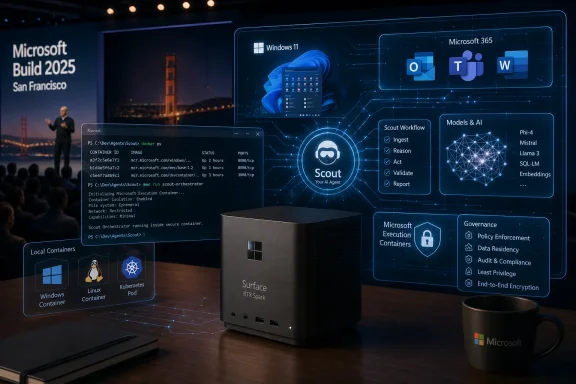
The Surface RTX Spark Dev Box is the clearest symbol of that shift. It is a small-form-factor developer machine built around Nvidia’s Arm-based RTX Spark silicon, with 128GB of unified memory and a Windows 11 Pro image tailored for local AI development. Microsoft says it is aimed at developers who want to run and test models on their own hardware rather than treat the cloud as the only practical place for serious AI work.
That matters because the AI PC has had a credibility problem. Consumers have been asked to believe in the category before there were enough compelling local workloads to justify it. Developers, meanwhile, have been asked to build for hardware that many users did not yet own and for APIs that were still settling. A dev box does not solve that chicken-and-egg problem by itself, but it is Microsoft acknowledging that the ecosystem needs a proving ground.
The comparison hanging over the announcement is Qualcomm’s canceled Windows-on-Arm developer kit. Microsoft’s new box is not just another reference machine; it is an attempt to restore confidence that Windows on Arm and local AI development will not be stranded between partner roadmaps. By putting the Surface brand on the device, Microsoft is taking more visible responsibility for the developer story.
The unanswered questions are still large. Microsoft has not disclosed full pricing or every specification, and “available in the US later this year” leaves plenty of room for delays, limited supply, or enterprise-only positioning. But the strategic point is already visible: Microsoft wants the next generation of Windows development to happen on machines that look more like compact AI workstations than conventional PCs.
Coreutils is a particularly telling move. Microsoft describes it as Linux-like command-line utilities that run natively on Windows 11. That sounds small until you remember how much daily developer friction comes from tiny incompatibilities: a command that behaves differently, a script that needs translation, a workflow that assumes a Unix-like baseline. Native utilities do not make Windows into Linux, but they reduce the number of times a developer has to remember that Windows is the odd environment out.
The new WSL container work pushes further. Microsoft is adding the ability to create, run, and interact with Linux containers through Windows Subsystem for Linux, including APIs that native Windows apps can use. That is not just a convenience feature for hobbyists. It is an admission that modern software development is container-first, Linux-shaped, and increasingly local again as AI workloads move closer to the machine.
The Intelligent Terminal is the more speculative piece. Microsoft says it will provide context to a developer’s preferred AI-powered agent, which suggests a command line that becomes less of a neutral text interface and more of a mediated workspace. That could be useful if it helps explain errors, generate commands, and coordinate tasks across shells. It could also become maddening if it turns the terminal into another place where Microsoft inserts a layer of agentic interpretation between the user and the machine.
Still, the direction is important. Windows spent years trying to be more welcoming to developers through WSL, Windows Terminal, package management, and better open-source posture. Build 2026 extends that project from compatibility into orchestration. Microsoft is no longer just saying, “You can run Linux things here.” It is saying, “You can run Linux things, Windows things, containers, agents, and local models here — and Windows will be the control plane.”
That is exactly the kind of assistant Microsoft has been gesturing toward since it began folding generative AI into Office. The distinction now is persistence. Scout is not simply a chat box waiting for a prompt; it is part of a broader family of “Autopilot” agents that Microsoft says will have their own identities and operate in the background.
For Microsoft 365 customers, the pitch is obvious. The modern workplace is full of low-grade administrative labor that nobody loves: scheduling, filing, status chasing, document preparation, expense workflows, meeting follow-ups. If an agent can reliably take even a portion of that work off employees’ hands, Microsoft has a powerful reason to defend its productivity suite against both Google and the swarm of AI-native startups.
But the more autonomy Microsoft gives these agents, the more the security model matters. That is where Microsoft Execution Containers enter the story. MXC is intended to let developers define what agents can access on a device and run them in a sandboxed environment. The OpenClaw companion app similarly points toward a world where users can configure agents or connect to existing ones without granting them uncontrolled access to everything on the PC.
This is the right problem for Microsoft to emphasize. The biggest barrier to workplace agents is not whether a model can summarize an email thread. It is whether a business can trust an agent with inboxes, documents, calendars, credentials, internal files, customer data, and the ability to act. If Microsoft wants agents to become first-class citizens on Windows, containment cannot be an afterthought.
The challenge is that containment and convenience often pull in opposite directions. A tightly sandboxed agent may be safer but less useful; a deeply integrated agent may be useful but terrifying to administrators. Microsoft’s job now is to prove that Windows can offer enough guardrails to make persistent agents deployable without smothering the very automation that makes them attractive.
The important point is not the hardware shown on stage. It is that Microsoft is imagining agents as entities that move between contexts rather than features trapped inside one app or one device. A PC could start a task, a companion device could continue it, and a badge or hub could serve as an ambient interface for the same workflow.
That is a very different conception of Windows’ role. Historically, Microsoft’s platform power came from making the PC the center of the user’s digital life. Smartphones weakened that model, and cloud services weakened it further. Project Solara suggests Microsoft is willing to let the Windows PC become one node in a broader agent fabric, provided Microsoft controls enough of the identity, productivity, and developer stack around it.
The use of Android is notable. Microsoft has learned, repeatedly and painfully, that it cannot simply will a third mobile platform into existence. By building around Android for some companion experiences, it can use an existing device ecosystem while trying to keep the higher-value agent layer tied to Microsoft services.
That strategy is pragmatic, but it also exposes the tension in Microsoft’s platform ambitions. Windows remains central, yet Microsoft knows many future AI interactions may happen on small screens, shared devices, badges, hubs, or hardware categories that do not look like PCs at all. Solara is Microsoft hedging against a future in which the operating system matters less than the agent runtime.
The significance is not that Microsoft has suddenly abandoned OpenAI. The two companies remain deeply intertwined commercially and technically. But Microsoft clearly wants more control over the models that power its products, both for cost reasons and for strategic independence.
Owning more of the model stack gives Microsoft leverage. It can tune models for GitHub Copilot, VS Code, Microsoft 365, Windows, and Azure without waiting for a partner’s priorities to align perfectly. It can optimize for enterprise deployment, latency, local execution, and product-specific behavior. It can also reduce the risk that its most important AI features are permanently dependent on another company’s roadmap.
The newly announced models span image, voice, code generation, transcription, and reasoning. That breadth matters because Microsoft is not trying to win a leaderboard contest in isolation. It is trying to fill product slots. A smaller, cheaper, deeply integrated model can be more valuable to Microsoft than a general-purpose flagship model that is expensive to run and awkward to deploy at scale.
For Windows users, the model news connects back to the hardware news. Local AI devices need models that can actually run locally or in hybrid patterns. If Microsoft can supply optimized models for its own agent framework, dev tools, and productivity apps, then the Surface RTX Spark Dev Box becomes more than a curiosity. It becomes part of a pipeline from model creation to developer testing to enterprise deployment.
Quantum claims deserve caution. The field is famous for breakthroughs that are real in the lab but distant from practical impact. Microsoft’s topological approach has been especially ambitious, with a long history of scientific promise, controversy, and delayed payoff. A better chip does not automatically mean a useful quantum computer is around the corner.
Still, the 2029 target is meaningful because it gives Microsoft’s quantum story a sharper commercial horizon. The company is not merely saying that quantum will matter someday. It is trying to persuade developers, researchers, governments, and enterprise customers that its architecture is moving toward a practical machine on a foreseeable timeline.
The mention of Microsoft Discovery’s agentic AI in connection with Majorana 2 also fits the event’s larger theme. Microsoft is presenting AI not just as a product interface but as a research accelerator. In that framing, agents help design materials, improve chips, write software, administer workplaces, and coordinate developer environments. Build 2026’s real thesis is that agentic systems are becoming infrastructure.
That may be too neat, but it is coherent. Microsoft wants to be the company that supplies the cloud, the local PC, the developer tools, the productivity apps, the models, the containers, and eventually the scientific computing breakthroughs. Quantum is the farthest-out version of that ambition.
The company is asking for a lot. It wants developers to adopt new local AI hardware, trust Windows as a Linux-friendly development environment, run agents inside sandboxed containers, let assistants work across Microsoft 365 data, and believe that its in-house AI models will keep improving. Each piece may be defensible on its own. Together, they amount to a major change in the operating system’s social contract.
Windows has always been a general-purpose platform, but it has also been a messy one. It carries decades of compatibility baggage, enterprise policy layers, consumer annoyances, OEM customization, telemetry debates, and security tradeoffs. Adding persistent agents to that environment raises the stakes. A bad recommendation from an AI assistant is annoying; a bad autonomous action inside a corporate tenant is a governance incident.
This is why Microsoft’s emphasis on secured-core PCs, BitLocker, Defender, Entra ID, Intune, containers, and sandboxing is not just enterprise boilerplate. It is the price of admission. The more Microsoft turns Windows into an agent host, the more Windows has to behave like a platform that can define, audit, restrict, and explain what those agents are doing.
The developer angle also depends on trust. If Intelligent Terminal becomes a helpful layer that respects existing workflows, it could be a genuine improvement. If it feels like a forced AI veneer over the command line, developers will disable it, mock it, or avoid it. The same is true of Coreutils and WSL containers: the features will be judged by whether they reduce friction, not by whether they sound good in a keynote.
Microsoft’s advantage is that it owns many of the layers that matter. Its disadvantage is that users have learned to be skeptical when Windows is used as a distribution channel for whatever strategic priority Redmond is chasing this year. Build 2026 gives Microsoft a stronger technical story than the first wave of Copilot-era PC marketing. It does not automatically give it permission.
 Microsoft Turns the AI PC From Slogan Into Supply Chain
For the last two years, “AI PC” has often meant a laptop with an NPU, a Copilot key, and a marketing slide about on-device inference. Build 2026 moves the argument into more concrete territory. Microsoft is no longer merely saying that Windows devices should run AI workloads locally; it is showing the pieces of a developer ecosystem meant to make that normal.The Surface RTX Spark Dev Box is the clearest symbol of that shift. It is a small-form-factor developer machine built around Nvidia’s Arm-based RTX Spark silicon, with 128GB of unified memory and a Windows 11 Pro image tailored for local AI development. Microsoft says it is aimed at developers who want to run and test models on their own hardware rather than treat the cloud as the only practical place for serious AI work.
That matters because the AI PC has had a credibility problem. Consumers have been asked to believe in the category before there were enough compelling local workloads to justify it. Developers, meanwhile, have been asked to build for hardware that many users did not yet own and for APIs that were still settling. A dev box does not solve that chicken-and-egg problem by itself, but it is Microsoft acknowledging that the ecosystem needs a proving ground.
The comparison hanging over the announcement is Qualcomm’s canceled Windows-on-Arm developer kit. Microsoft’s new box is not just another reference machine; it is an attempt to restore confidence that Windows on Arm and local AI development will not be stranded between partner roadmaps. By putting the Surface brand on the device, Microsoft is taking more visible responsibility for the developer story.
The unanswered questions are still large. Microsoft has not disclosed full pricing or every specification, and “available in the US later this year” leaves plenty of room for delays, limited supply, or enterprise-only positioning. But the strategic point is already visible: Microsoft wants the next generation of Windows development to happen on machines that look more like compact AI workstations than conventional PCs.
Windows Learns to Speak Developer Again
The most practical Windows news from Build may not be the most glamorous. Coreutils for Windows, Linux containers through WSL, and the experimental Intelligent Terminal all point toward the same conclusion: Microsoft knows it cannot win developers back with Copilot branding alone. It has to make Windows feel less like a compromise for people who live in terminals, containers, and cross-platform toolchains.Coreutils is a particularly telling move. Microsoft describes it as Linux-like command-line utilities that run natively on Windows 11. That sounds small until you remember how much daily developer friction comes from tiny incompatibilities: a command that behaves differently, a script that needs translation, a workflow that assumes a Unix-like baseline. Native utilities do not make Windows into Linux, but they reduce the number of times a developer has to remember that Windows is the odd environment out.
The new WSL container work pushes further. Microsoft is adding the ability to create, run, and interact with Linux containers through Windows Subsystem for Linux, including APIs that native Windows apps can use. That is not just a convenience feature for hobbyists. It is an admission that modern software development is container-first, Linux-shaped, and increasingly local again as AI workloads move closer to the machine.
The Intelligent Terminal is the more speculative piece. Microsoft says it will provide context to a developer’s preferred AI-powered agent, which suggests a command line that becomes less of a neutral text interface and more of a mediated workspace. That could be useful if it helps explain errors, generate commands, and coordinate tasks across shells. It could also become maddening if it turns the terminal into another place where Microsoft inserts a layer of agentic interpretation between the user and the machine.
Still, the direction is important. Windows spent years trying to be more welcoming to developers through WSL, Windows Terminal, package management, and better open-source posture. Build 2026 extends that project from compatibility into orchestration. Microsoft is no longer just saying, “You can run Linux things here.” It is saying, “You can run Linux things, Windows things, containers, agents, and local models here — and Windows will be the control plane.”
The Agent Era Arrives With a Sandbox Attached
Microsoft’s agent announcements are where Build 2026 becomes both interesting and risky. Scout, the always-on assistant built on OpenClaw, is designed to work across Microsoft 365 apps such as Outlook, OneDrive, and Teams. It can reportedly organize calendars, manage expense reporting, draft emails, and perform background work for business users.That is exactly the kind of assistant Microsoft has been gesturing toward since it began folding generative AI into Office. The distinction now is persistence. Scout is not simply a chat box waiting for a prompt; it is part of a broader family of “Autopilot” agents that Microsoft says will have their own identities and operate in the background.
For Microsoft 365 customers, the pitch is obvious. The modern workplace is full of low-grade administrative labor that nobody loves: scheduling, filing, status chasing, document preparation, expense workflows, meeting follow-ups. If an agent can reliably take even a portion of that work off employees’ hands, Microsoft has a powerful reason to defend its productivity suite against both Google and the swarm of AI-native startups.
But the more autonomy Microsoft gives these agents, the more the security model matters. That is where Microsoft Execution Containers enter the story. MXC is intended to let developers define what agents can access on a device and run them in a sandboxed environment. The OpenClaw companion app similarly points toward a world where users can configure agents or connect to existing ones without granting them uncontrolled access to everything on the PC.
This is the right problem for Microsoft to emphasize. The biggest barrier to workplace agents is not whether a model can summarize an email thread. It is whether a business can trust an agent with inboxes, documents, calendars, credentials, internal files, customer data, and the ability to act. If Microsoft wants agents to become first-class citizens on Windows, containment cannot be an afterthought.
The challenge is that containment and convenience often pull in opposite directions. A tightly sandboxed agent may be safer but less useful; a deeply integrated agent may be useful but terrifying to administrators. Microsoft’s job now is to prove that Windows can offer enough guardrails to make persistent agents deployable without smothering the very automation that makes them attractive.
Project Solara Shows Microsoft Peering Beyond the PC
Project Solara may be the strangest announcement in the Build lineup, and that makes it one of the most revealing. Microsoft showed an Android-based operating system designed to run agents across different devices, developed with Qualcomm and MediaTek. The examples included a desktop hub and a digital badge — not exactly mainstream PC categories.The important point is not the hardware shown on stage. It is that Microsoft is imagining agents as entities that move between contexts rather than features trapped inside one app or one device. A PC could start a task, a companion device could continue it, and a badge or hub could serve as an ambient interface for the same workflow.
That is a very different conception of Windows’ role. Historically, Microsoft’s platform power came from making the PC the center of the user’s digital life. Smartphones weakened that model, and cloud services weakened it further. Project Solara suggests Microsoft is willing to let the Windows PC become one node in a broader agent fabric, provided Microsoft controls enough of the identity, productivity, and developer stack around it.
The use of Android is notable. Microsoft has learned, repeatedly and painfully, that it cannot simply will a third mobile platform into existence. By building around Android for some companion experiences, it can use an existing device ecosystem while trying to keep the higher-value agent layer tied to Microsoft services.
That strategy is pragmatic, but it also exposes the tension in Microsoft’s platform ambitions. Windows remains central, yet Microsoft knows many future AI interactions may happen on small screens, shared devices, badges, hubs, or hardware categories that do not look like PCs at all. Solara is Microsoft hedging against a future in which the operating system matters less than the agent runtime.
Microsoft’s Own Models Become a Strategic Escape Hatch
Build 2026 also sharpened Microsoft’s evolving relationship with OpenAI. The company announced seven new in-house AI models, including MAI-Thinking-1, described as its first reasoning model, with 35 billion active parameters and a 128K context window. Microsoft says it is designed for complex multi-step instructions, long-context reasoning, code generation, and related workloads.The significance is not that Microsoft has suddenly abandoned OpenAI. The two companies remain deeply intertwined commercially and technically. But Microsoft clearly wants more control over the models that power its products, both for cost reasons and for strategic independence.
Owning more of the model stack gives Microsoft leverage. It can tune models for GitHub Copilot, VS Code, Microsoft 365, Windows, and Azure without waiting for a partner’s priorities to align perfectly. It can optimize for enterprise deployment, latency, local execution, and product-specific behavior. It can also reduce the risk that its most important AI features are permanently dependent on another company’s roadmap.
The newly announced models span image, voice, code generation, transcription, and reasoning. That breadth matters because Microsoft is not trying to win a leaderboard contest in isolation. It is trying to fill product slots. A smaller, cheaper, deeply integrated model can be more valuable to Microsoft than a general-purpose flagship model that is expensive to run and awkward to deploy at scale.
For Windows users, the model news connects back to the hardware news. Local AI devices need models that can actually run locally or in hybrid patterns. If Microsoft can supply optimized models for its own agent framework, dev tools, and productivity apps, then the Surface RTX Spark Dev Box becomes more than a curiosity. It becomes part of a pipeline from model creation to developer testing to enterprise deployment.
Quantum Makes Its Annual Leap, but the Calendar Finally Matters
Microsoft’s Majorana 2 announcement sits in a different category from the Windows and agent news, but it follows the same Build 2026 pattern: Microsoft wants to turn long-running research bets into product-shaped roadmaps. The company says the next-generation topological quantum chip uses a new material stack and contains qubits that are 1,000 times more accurate. Microsoft also says it could reach a practical quantum computer by 2029.Quantum claims deserve caution. The field is famous for breakthroughs that are real in the lab but distant from practical impact. Microsoft’s topological approach has been especially ambitious, with a long history of scientific promise, controversy, and delayed payoff. A better chip does not automatically mean a useful quantum computer is around the corner.
Still, the 2029 target is meaningful because it gives Microsoft’s quantum story a sharper commercial horizon. The company is not merely saying that quantum will matter someday. It is trying to persuade developers, researchers, governments, and enterprise customers that its architecture is moving toward a practical machine on a foreseeable timeline.
The mention of Microsoft Discovery’s agentic AI in connection with Majorana 2 also fits the event’s larger theme. Microsoft is presenting AI not just as a product interface but as a research accelerator. In that framing, agents help design materials, improve chips, write software, administer workplaces, and coordinate developer environments. Build 2026’s real thesis is that agentic systems are becoming infrastructure.
That may be too neat, but it is coherent. Microsoft wants to be the company that supplies the cloud, the local PC, the developer tools, the productivity apps, the models, the containers, and eventually the scientific computing breakthroughs. Quantum is the farthest-out version of that ambition.
The Windows Platform Is Being Rebuilt Around Trust
For WindowsForum readers, the most important question is not whether Build 2026 had enough announcements. It clearly did. The harder question is whether Microsoft’s new Windows strategy can earn enough trust to survive contact with real users and real administrators.The company is asking for a lot. It wants developers to adopt new local AI hardware, trust Windows as a Linux-friendly development environment, run agents inside sandboxed containers, let assistants work across Microsoft 365 data, and believe that its in-house AI models will keep improving. Each piece may be defensible on its own. Together, they amount to a major change in the operating system’s social contract.
Windows has always been a general-purpose platform, but it has also been a messy one. It carries decades of compatibility baggage, enterprise policy layers, consumer annoyances, OEM customization, telemetry debates, and security tradeoffs. Adding persistent agents to that environment raises the stakes. A bad recommendation from an AI assistant is annoying; a bad autonomous action inside a corporate tenant is a governance incident.
This is why Microsoft’s emphasis on secured-core PCs, BitLocker, Defender, Entra ID, Intune, containers, and sandboxing is not just enterprise boilerplate. It is the price of admission. The more Microsoft turns Windows into an agent host, the more Windows has to behave like a platform that can define, audit, restrict, and explain what those agents are doing.
The developer angle also depends on trust. If Intelligent Terminal becomes a helpful layer that respects existing workflows, it could be a genuine improvement. If it feels like a forced AI veneer over the command line, developers will disable it, mock it, or avoid it. The same is true of Coreutils and WSL containers: the features will be judged by whether they reduce friction, not by whether they sound good in a keynote.
Microsoft’s advantage is that it owns many of the layers that matter. Its disadvantage is that users have learned to be skeptical when Windows is used as a distribution channel for whatever strategic priority Redmond is chasing this year. Build 2026 gives Microsoft a stronger technical story than the first wave of Copilot-era PC marketing. It does not automatically give it permission.
The Build 2026 Announcements That Will Actually Matter on Monday
The keynote was broad, but the practical consequences narrow quickly once you view them through the eyes of developers, admins, and Windows power users. The announcements that matter most are the ones that change what can run locally, what can be managed centrally, and what can be trusted enough to automate.- Surface RTX Spark Dev Box gives Windows developers a dedicated local AI target with Nvidia silicon and 128GB of unified memory, but its real impact will depend on pricing, availability, and how many workloads Microsoft can make practical outside the cloud.
- Coreutils for Windows and WSL-based Linux containers make Windows more credible as a first-class development machine for teams that already build around Unix-style tools and containerized workflows.
- Intelligent Terminal will succeed only if it behaves like a useful assistant for experienced developers rather than a branded AI interruption inside one of the last interfaces power users still feel they control.
- Scout and the broader Autopilot agent family put Microsoft 365 on a path toward persistent background automation, which raises the value of the suite while increasing the need for strong policy, audit, and containment.
- Microsoft Execution Containers are not a side feature; they are the security mechanism that could decide whether enterprise agents are deployable or merely demo-friendly.
- Microsoft’s new MAI models show that the company wants more independence in the AI stack, especially where smaller, cheaper, product-specific models can be integrated directly into Windows, Copilot, GitHub, and Microsoft 365.
References
- Primary source: The Verge
Published: Tue, 02 Jun 2026 19:23:52 GMT
Loading…
www.theverge.com - Related coverage: techradar.com
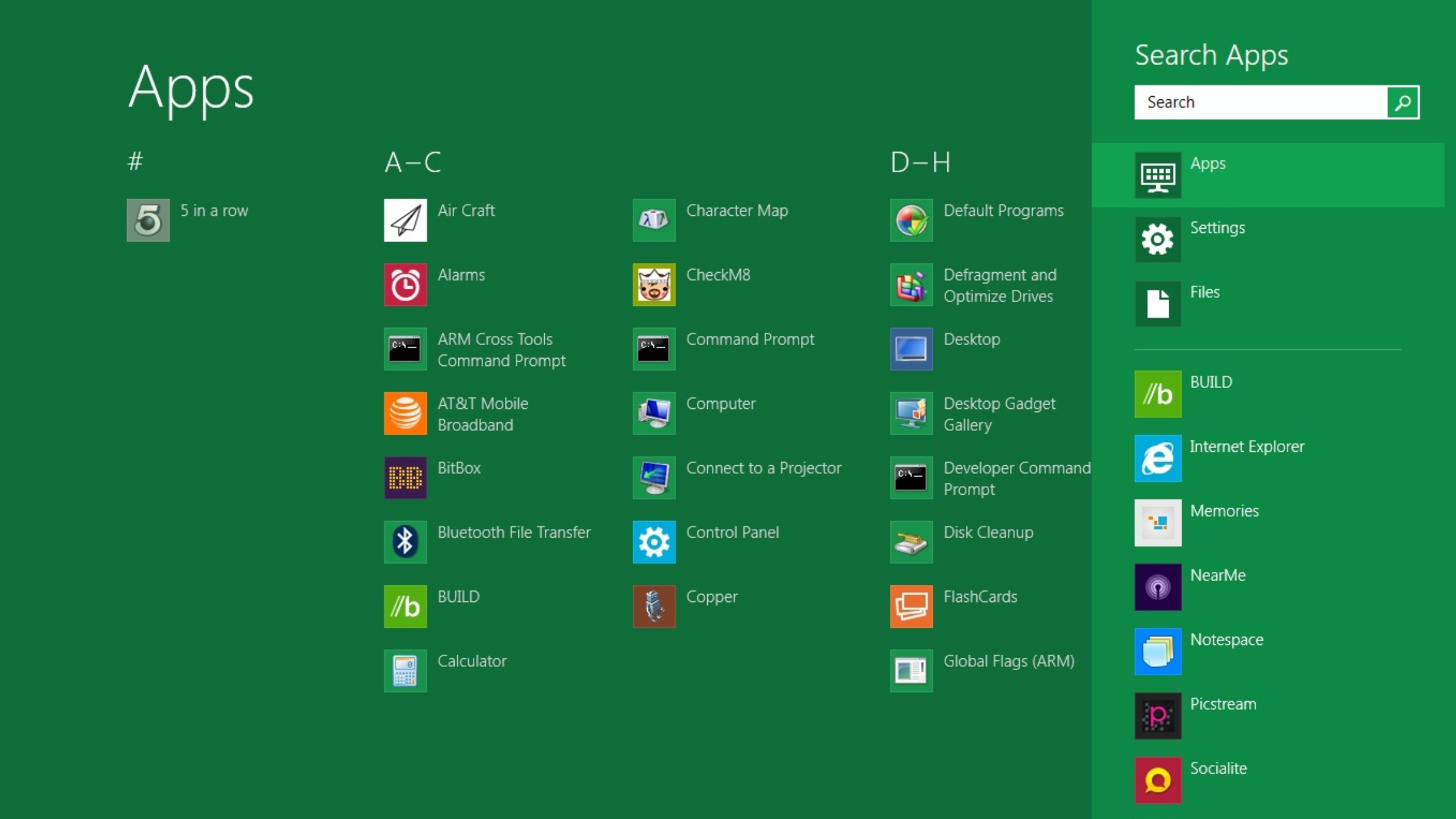
10 products that launched at Microsoft Build — and what happened to them
From Windows 8 to Copilot, here’s everything that was born at Buildwww.techradar.com
- Related coverage: windowscentral.com
Loading…
www.windowscentral.com - Official source: microsoft.com
Loading…
www.microsoft.com - Related coverage: tomshardware.com

Microsoft debuts Surface RTX Spark Dev Box — Nvidia-powered mini-PC helps devs get ready for an agentic Windows
It will have Visual Studio Code and GitHub Copilot preinstalled.www.tomshardware.com
- Official source: blogs.windows.com
Build 2026: Furthering Windows as the trusted platform for development
Build is one of our favorite moments each year - a chance to connect with the global developer community and share what we’ve been building. Over the past year, we have connected with many developers pushing the boundaries of what’s possible on blogs.windows.com
- Official source: news.microsoft.com
Loading…
news.microsoft.com - Official source: opensource.microsoft.com
From open source to agentic systems: Microsoft at Open Source Summit North America 2026 | Microsoft Open Source Blog
Discover how Azure Linux 4.0 and Azure Container Linux deliver a secure, scalable Linux foundation for cloud native apps, containers, and AI workloads. opensource.microsoft.com
- Related coverage: techtimes.com
WSL 3 at Build 2026: Near-Native GPU and NPU Passthrough Brings Local AI to Windows
WSL 3 GPU passthrough for Windows arrives at Microsoft Build 2026, letting developers run Ollama, PyTorch, and llama.cpp inside Linux on Windows at near-native GPU and NPU speed. Qualcomm Snapdragon X Elite and Intel Meteor Lake platforms are supported at launch; AMD support is planned for a later www.techtimes.com
- Official source: build.microsoft.com

Microsoft Build
Go deep on real code and real systems with the teams building and scaling AI at Microsoft Build, June 2–3, 2026, in San Francisco and online.build.microsoft.com
- Related coverage: investor.nvidia.com

NVIDIA and Microsoft Reinvent Windows PCs for the Age of Personal AI
RTX Spark — a 1-Petaflop Superchip, the Full CUDA and RTX Ecosystem, and Windows-Native Agents — a New Beginning for Personal Computers News Summary: NVIDIA RTX Spark powers the world’s first Windows PCs purpose-built for personal agents, featuring 1 petaflop of AI performance, industry-leading...investor.nvidia.com
- Official source: support.microsoft.com
Surface Secure Boot Certificates | Microsoft Support
Secure Boot in UEFI firmware verifies pre-boot software using trusted certificates. Microsoft will update expiring Windows Secure Boot certificates starting June 2026 to maintain device protection. support.microsoft.com
- Official source: marketingassets.microsoft.com
Loading…
marketingassets.microsoft.com
