

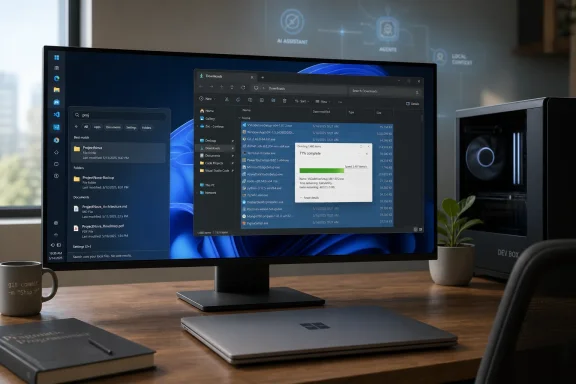
At Build 2026, Microsoft’s most consequential Windows announcement was a developer-optimized Windows 11 configuration, shown alongside the Surface Laptop Ultra and Surface RTX Spark Dev Box, that strips away distractions, preloads core developer tools, and reframes Windows as a calmer, faster workstation rather than another AI billboard. The irony is hard to miss: after years of making Windows feel busier in the name of engagement, Microsoft’s sharpest pitch was subtraction. Build was still drenched in agents, copilots, and local models, but the operating-system story underneath was more old-fashioned and more important. Microsoft appears to have rediscovered that the people most likely to influence Windows’ future are also the people least tolerant of a noisy desktop.
For the last several Windows cycles, Microsoft has treated the desktop as a distribution surface. The Start menu became a place for web results and recommendations. Widgets became a news and feed panel. Search became an on-ramp to Bing. Even File Explorer, the oldest of Windows workhorses, periodically picked up cloud nudges and performance regressions that made power users wonder whether anyone in Redmond still used the same machines they did.
That is why the developer-optimized Windows 11 experience shown at Build matters more than its modest packaging suggests. Microsoft did not announce “Windows 12,” did not promise a sweeping visual reset, and did not say that every consumer PC would suddenly become a Zen garden. It instead presented a configuration that makes Windows less needy, less interruptive, and more immediately useful to someone trying to build software.
That may sound like inside baseball, but it cuts to the heart of Windows’ current credibility problem. Developers, sysadmins, enthusiasts, and IT pros are not the majority of Windows users, but they are the people who set defaults for organizations, recommend hardware to families, file useful bugs, and decide whether Windows remains a serious platform or merely the thing bundled with the laptop.
Microsoft’s message was not that AI is going away. It was that AI cannot be the whole operating-system strategy. A PC that can run local models but still nags, stutters, and searches the web when you want a local file is not futuristic. It is just a more expensive annoyance.
Microsoft’s decision to make this cleaner Windows setup the default on its developer-facing Surface hardware is a quiet admission that its mainstream defaults have drifted. If the best experience for a serious user is one with fewer promotional surfaces, fewer unsolicited panels, and fewer web-powered distractions, then the distinction between “developer preference” and “good product design” becomes uncomfortably thin.
The company’s route to this cleaner setup is also revealing. Rather than shipping it only as a hidden OEM image, Microsoft is making the configuration available through WinGet-based developer configuration files. In plain terms, a fresh Windows 11 PC can be pushed toward a ready-to-code, less cluttered state with a single command. That puts the idea in the open, where developers can inspect it, fork it, complain about it, and improve it.
This is not the same as giving every consumer a “make Windows sane” button in Settings. But it is closer than Microsoft has come in years to acknowledging that power users should not need a folder full of registry hacks, third-party debloaters, and post-install scripts to make Windows behave like a professional tool. If this configuration eventually migrates into Settings, it could become one of the most important quality-of-life changes in Windows 11’s lifespan.
The danger, of course, is that Microsoft treats this as a developer perk rather than a design correction. A clean desktop should not be a boutique mode reserved for people who know what WinGet is. It should be a first-class Windows posture: work first, feeds later, and only if the user asks.
Operating systems are not spreadsheets where every feature lives or dies by raw usage share. Some features matter because they support specialized workflows, accessibility needs, muscle memory, or expensive hardware setups. A vertical taskbar on an ultrawide monitor is not nostalgia. It is a rational use of screen geometry.
Developers are a convenient constituency for bringing the feature back because they can explain the need in language Microsoft respects: multi-pane editors, terminals, documentation windows, debug tools, and wide displays where horizontal pixels are abundant but vertical space remains precious. But the same logic applies to financial workers, video editors, accessibility users, and anyone who has built a desktop arrangement over years and does not appreciate being told that telemetry invalidates it.
The taskbar episode is a useful case study in the limits of Microsoft’s Windows 11 minimalism. Simplification can be good when it removes confusion. It becomes destructive when it removes agency. Windows won the desktop era not because it was the prettiest operating system, but because it was adaptable enough to meet users where they worked.
Bringing back movable taskbar options is not a grand strategic pivot. It is Microsoft restoring a small piece of trust. The company should not need three years and a developer conference to relearn that configurability is part of Windows’ identity.
File Explorer is not glamorous infrastructure. It is the place where every promise about the PC eventually has to cash out. Developers use it to move repositories, logs, build artifacts, assets, and installers. Sysadmins use it to wrangle shares, profiles, packages, and diagnostic dumps. Home users use it to find photos, clean downloads folders, and wonder why deleting a pile of small files still feels like a ritual from the spinning-disk era.
A faster File Explorer matters because Windows’ reputation is built less on peak benchmark wins than on accumulated friction. A delay here, a web result there, a hung shell extension somewhere else, and the machine starts to feel less like a computer and more like a negotiation. Microsoft can talk about AI PCs all it wants, but if the file manager feels sluggish, users will conclude the platform’s priorities are upside down.
That is the same reason the new option to turn off Bing results in Start menu search matters. Web search in Start has always been defensible from Microsoft’s business perspective and frequently maddening from the user’s perspective. When someone presses the Windows key and types the name of a local tool, file, or setting, they are not inviting the operating system to perform a commercial web detour.
This is where the developer-first story becomes a broader Windows story. Developers are often merely the first to articulate what everyone else feels. They notice latency, misdirected search, and interruptive UI because those things break concentration. Ordinary users may not describe the problem in the same vocabulary, but they experience the same drag.
A Microsoft-maintained developer configuration changes the terms of that conversation. It gives users a supported-ish path to a cleaner, more purposeful Windows setup without asking them to trust a random script from a forum post or a GitHub repository they have not audited. It also creates a public artifact that can be debated on its merits.
That publicness is important. Windows configuration has too often been split between enterprise policy, scattered Settings pages, registry folklore, and opaque OEM customizations. A curated configuration file is legible. It can say, in effect, “Here is what Microsoft thinks a serious Windows workstation should look like.”
If Microsoft handles this well, Dev Configs could become a bridge between consumer Windows and enterprise provisioning. A developer gets a fast path to Visual Studio Code, PowerShell 7, WSL, GitHub tooling, terminal improvements, and tuned settings. An IT admin gets a model for repeatable setup that does not require imaging every machine like it is 2009. An enthusiast gets a cleaner baseline without performing surgery on the OS.
The risk is that Microsoft lets this become yet another side project: useful, underpromoted, and only discoverable by people already deep in the ecosystem. The company has a habit of building good Windows utilities in the margins while leaving the mainstream setup experience comparatively noisy. If the clean configuration is good enough to showcase on premium Surface hardware, it is good enough to expose in the box.
Windows on Arm has had competent hardware before. Qualcomm’s Snapdragon X generation helped move the platform out of punchline territory, especially for battery life and everyday productivity. But compatibility doubts linger, particularly around games, drivers, emulators, developer tools, and edge-case professional software. In Windows, ecosystem confidence matters as much as silicon.
Nvidia changes the politics of that ecosystem. Game developers, engine vendors, creative-app makers, and AI-tool builders already optimize for Nvidia hardware because the company owns enormous mindshare in accelerated computing. If Nvidia is serious about Windows on Arm, the conversation with developers changes from “please support Microsoft’s Arm experiment” to “your Nvidia users may be on Arm, too.”
That distinction matters. Microsoft has spent years trying to convince the Windows world that Arm is not a compromise. Nvidia can make that argument with a different kind of leverage: GPU performance, CUDA gravity, gaming relationships, and AI developer credibility. The company’s presence does not magically solve anti-cheat compatibility or legacy driver problems, but it raises the cost of ignoring the platform.
The Surface Laptop Ultra is therefore less interesting as a laptop most people will buy than as a signal to the software market. It says that Windows on Arm is no longer just a thin-and-light battery-life story. Microsoft and Nvidia want it to be a workstation story, a local AI story, and eventually a gaming story.
That is why reports of Nvidia and Microsoft engaging more seriously with game developers matter. A powerful GPU is not enough if the platform cannot run the games users actually care about. Likewise, a translation layer is not enough if anti-cheat vendors block execution or performance collapses under real workloads.
The promise of native Arm ports, Prism-optimized updates, and better developer engagement is encouraging, but this is where skepticism is healthy. Windows history is full of compatibility promises that were true in demos and messier on real desks. The only proof will be shipping games, working launchers, stable drivers, and anti-cheat support that does not treat Arm users as suspicious by default.
Still, Nvidia’s involvement gives the project a credibility Windows on Arm has often lacked. Developers who might have shrugged at another Microsoft compatibility initiative may pay closer attention when Nvidia is part of the stack. That does not guarantee success, but it makes success more plausible.
For everyday users, the payoff is not that everyone will buy an RTX Spark machine. It is that the software ecosystem may become less hostile to Arm Windows generally. If high-end developer and gaming work improves on Nvidia Arm hardware, some of that work should benefit Qualcomm laptops and future Arm PCs as well.
That contrast is important because “AI PC” messaging has often been too abstract for users who still judge a machine by whether it wakes reliably, searches locally, copies files quickly, and stays out of the way. Microsoft’s developer-first Windows push translates the AI era into something more concrete: if PCs are going to run heavier local workloads, they need to become better workstations first.
Local AI development is demanding. It needs memory, GPU acceleration, terminal fluency, package management, Linux interoperability, fast storage, sane defaults, and a shell that does not waste the user’s attention. In that sense, Microsoft’s cleaner Windows setup is not separate from its AI strategy. It is the prerequisite that makes the AI strategy believable.
The company also seems to understand that developers are the proving ground for agentic computing. Before ordinary users trust agents to operate across their systems, developers will test the tools, break them, automate with them, and decide which ones are real. A less distracting Windows is not anti-AI. It is the environment in which AI tools have a chance to become useful instead of intrusive.
The best version of Microsoft’s strategy would let users choose when intelligence appears. The worst version would replace widgets and news feeds with even more persistent agent surfaces. Build offered hints of the better path, but Windows users have earned the right to wait for shipping code before applauding too loudly.
Admins do not merely want fewer distractions. They want predictable baselines. They want settings that can be enforced without brittle scripts. They want to know whether a clean developer configuration conflicts with existing endpoint management, security tooling, application control, or compliance policies. A one-command setup is useful; a one-command setup that behaves differently after a Store update or policy refresh is a ticket generator.
There is also the broader issue of trust. Microsoft’s consumer and commercial Windows priorities have not always aligned. Features arrive with promotional framing, then admins spend months finding the policy switches to contain them. If Microsoft truly believes in a calmer Windows for developers, it should make that posture manageable through the same serious channels enterprises already use.
The good news is that this developer-first approach could dovetail with modern device provisioning. The industry has been moving away from heavy golden images toward cloud-managed configuration, package deployment, and policy-driven setup. A transparent Microsoft-authored configuration model fits that world better than the old ritual of customizing an image until it becomes unmaintainable.
But Microsoft must resist the temptation to make “developer optimized” mean “Microsoft ecosystem optimized” and nothing more. Developers use JetBrains tools, Docker alternatives, non-Microsoft editors, multiple shells, local databases, third-party terminals, and workflows that do not begin and end in GitHub Copilot. A serious developer Windows must be opinionated about quality, not coercive about vendor allegiance.
Microsoft often uses professional audiences to justify power-user features, then acts surprised when consumers like them too. That is backwards. The fact that developers can articulate a demand precisely does not mean the demand is exclusive to developers. It means they are the canaries in the productivity mine.
The company should therefore avoid trapping these improvements behind branding that makes ordinary users feel excluded. “Developer mode” historically sounds like something one enables only if instructed by a tutorial. “Clean workstation” or “focused Windows” would be closer to the truth. The operating system needs a first-run choice that is honest about trade-offs: do you want feeds, recommendations, and web integrations, or do you want a quieter local-first PC?
This would not require Microsoft to abandon its services business. Users who like widgets can keep widgets. Users who want web search in Start can keep it. The meaningful shift would be making restraint a supported default rather than an adversarial customization.
Windows’ greatest strength has always been its range. It runs on gaming towers, corporate laptops, lab machines, point-of-sale systems, developer workstations, and family PCs that survive on habit and luck. A one-size-fits-all engagement layer was never going to serve that range well. A more modular, user-respecting Windows might.
That posture leads to several concrete expectations.
The encouraging part is that Microsoft seems to be listening to the right complaints. The uneasy part is that Windows users have heard versions of this before. The next phase depends on whether these Build announcements become mainstream defaults, stable policies, and measurable improvements — or whether they remain a polished developer demo orbiting an operating system that still confuses attention with engagement.
 Microsoft Finally Says the Quiet Part Out Loud
For the last several Windows cycles, Microsoft has treated the desktop as a distribution surface. The Start menu became a place for web results and recommendations. Widgets became a news and feed panel. Search became an on-ramp to Bing. Even File Explorer, the oldest of Windows workhorses, periodically picked up cloud nudges and performance regressions that made power users wonder whether anyone in Redmond still used the same machines they did.That is why the developer-optimized Windows 11 experience shown at Build matters more than its modest packaging suggests. Microsoft did not announce “Windows 12,” did not promise a sweeping visual reset, and did not say that every consumer PC would suddenly become a Zen garden. It instead presented a configuration that makes Windows less needy, less interruptive, and more immediately useful to someone trying to build software.
That may sound like inside baseball, but it cuts to the heart of Windows’ current credibility problem. Developers, sysadmins, enthusiasts, and IT pros are not the majority of Windows users, but they are the people who set defaults for organizations, recommend hardware to families, file useful bugs, and decide whether Windows remains a serious platform or merely the thing bundled with the laptop.
Microsoft’s message was not that AI is going away. It was that AI cannot be the whole operating-system strategy. A PC that can run local models but still nags, stutters, and searches the web when you want a local file is not futuristic. It is just a more expensive annoyance.
The Developer Desktop Is a Consumer Confession
The most telling phrase from Build was not about agents orchestrating workflows or models reasoning across context windows. It was the description of a desktop that “feels calm,” with no news feed, no widgets jumping into view, and no notification storm greeting the user at sign-in. That is not a developer-specific desire. That is the thing ordinary Windows users have been asking for since Windows 11 began treating attention as a resource to be harvested.Microsoft’s decision to make this cleaner Windows setup the default on its developer-facing Surface hardware is a quiet admission that its mainstream defaults have drifted. If the best experience for a serious user is one with fewer promotional surfaces, fewer unsolicited panels, and fewer web-powered distractions, then the distinction between “developer preference” and “good product design” becomes uncomfortably thin.
The company’s route to this cleaner setup is also revealing. Rather than shipping it only as a hidden OEM image, Microsoft is making the configuration available through WinGet-based developer configuration files. In plain terms, a fresh Windows 11 PC can be pushed toward a ready-to-code, less cluttered state with a single command. That puts the idea in the open, where developers can inspect it, fork it, complain about it, and improve it.
This is not the same as giving every consumer a “make Windows sane” button in Settings. But it is closer than Microsoft has come in years to acknowledging that power users should not need a folder full of registry hacks, third-party debloaters, and post-install scripts to make Windows behave like a professional tool. If this configuration eventually migrates into Settings, it could become one of the most important quality-of-life changes in Windows 11’s lifespan.
The danger, of course, is that Microsoft treats this as a developer perk rather than a design correction. A clean desktop should not be a boutique mode reserved for people who know what WinGet is. It should be a first-class Windows posture: work first, feeds later, and only if the user asks.
The Movable Taskbar Is Small Only If You Never Needed It
The return of a movable taskbar is one of those changes that sounds trivial until you remember why people were angry in the first place. Windows 11 launched with a simplified taskbar that removed long-standing behaviors, including the ability to place it on different edges of the screen. Microsoft previously argued that relatively few users relied on that flexibility, which was probably true in a narrow telemetry sense and still beside the point.Operating systems are not spreadsheets where every feature lives or dies by raw usage share. Some features matter because they support specialized workflows, accessibility needs, muscle memory, or expensive hardware setups. A vertical taskbar on an ultrawide monitor is not nostalgia. It is a rational use of screen geometry.
Developers are a convenient constituency for bringing the feature back because they can explain the need in language Microsoft respects: multi-pane editors, terminals, documentation windows, debug tools, and wide displays where horizontal pixels are abundant but vertical space remains precious. But the same logic applies to financial workers, video editors, accessibility users, and anyone who has built a desktop arrangement over years and does not appreciate being told that telemetry invalidates it.
The taskbar episode is a useful case study in the limits of Microsoft’s Windows 11 minimalism. Simplification can be good when it removes confusion. It becomes destructive when it removes agency. Windows won the desktop era not because it was the prettiest operating system, but because it was adaptable enough to meet users where they worked.
Bringing back movable taskbar options is not a grand strategic pivot. It is Microsoft restoring a small piece of trust. The company should not need three years and a developer conference to relearn that configurability is part of Windows’ identity.
File Explorer Performance Is the Real AI Readiness Test
Build’s flashiest demos leaned into local AI and developer agents, but one of the most practical claims concerned File Explorer: faster launch behavior and bulk-delete operations reportedly improving by around 30 percent. That is not the sort of statistic that makes a keynote audience gasp. It is, however, the sort of improvement that determines whether users believe the rest of the keynote.File Explorer is not glamorous infrastructure. It is the place where every promise about the PC eventually has to cash out. Developers use it to move repositories, logs, build artifacts, assets, and installers. Sysadmins use it to wrangle shares, profiles, packages, and diagnostic dumps. Home users use it to find photos, clean downloads folders, and wonder why deleting a pile of small files still feels like a ritual from the spinning-disk era.
A faster File Explorer matters because Windows’ reputation is built less on peak benchmark wins than on accumulated friction. A delay here, a web result there, a hung shell extension somewhere else, and the machine starts to feel less like a computer and more like a negotiation. Microsoft can talk about AI PCs all it wants, but if the file manager feels sluggish, users will conclude the platform’s priorities are upside down.
That is the same reason the new option to turn off Bing results in Start menu search matters. Web search in Start has always been defensible from Microsoft’s business perspective and frequently maddening from the user’s perspective. When someone presses the Windows key and types the name of a local tool, file, or setting, they are not inviting the operating system to perform a commercial web detour.
This is where the developer-first story becomes a broader Windows story. Developers are often merely the first to articulate what everyone else feels. They notice latency, misdirected search, and interruptive UI because those things break concentration. Ordinary users may not describe the problem in the same vocabulary, but they experience the same drag.
The WinGet Configuration Is Microsoft’s Anti-Debloater Moment
For years, the Windows enthusiast community has maintained an uneasy shadow ecosystem of cleanup scripts, optimization packs, and debloating tools. Some are careful and transparent. Others are blunt instruments that rip out components Windows expects to exist, creating problems that surface months later as broken updates, missing runtimes, or inexplicable app failures. The popularity of those tools is not a compliment to Microsoft.A Microsoft-maintained developer configuration changes the terms of that conversation. It gives users a supported-ish path to a cleaner, more purposeful Windows setup without asking them to trust a random script from a forum post or a GitHub repository they have not audited. It also creates a public artifact that can be debated on its merits.
That publicness is important. Windows configuration has too often been split between enterprise policy, scattered Settings pages, registry folklore, and opaque OEM customizations. A curated configuration file is legible. It can say, in effect, “Here is what Microsoft thinks a serious Windows workstation should look like.”
If Microsoft handles this well, Dev Configs could become a bridge between consumer Windows and enterprise provisioning. A developer gets a fast path to Visual Studio Code, PowerShell 7, WSL, GitHub tooling, terminal improvements, and tuned settings. An IT admin gets a model for repeatable setup that does not require imaging every machine like it is 2009. An enthusiast gets a cleaner baseline without performing surgery on the OS.
The risk is that Microsoft lets this become yet another side project: useful, underpromoted, and only discoverable by people already deep in the ecosystem. The company has a habit of building good Windows utilities in the margins while leaving the mainstream setup experience comparatively noisy. If the clean configuration is good enough to showcase on premium Surface hardware, it is good enough to expose in the box.
Nvidia Gives Windows on Arm Its Missing Political Muscle
The hardware side of the announcement is more speculative but potentially just as consequential. Microsoft’s Surface Laptop Ultra and Surface RTX Spark Dev Box put Nvidia’s RTX Spark silicon at the center of a new Windows on Arm push, with a high-core-count Arm CPU, Blackwell-class GPU resources, and large unified memory aimed at local AI development. The devices are not mainstream consumer machines. They are flagships, showcases, and bargaining chips.Windows on Arm has had competent hardware before. Qualcomm’s Snapdragon X generation helped move the platform out of punchline territory, especially for battery life and everyday productivity. But compatibility doubts linger, particularly around games, drivers, emulators, developer tools, and edge-case professional software. In Windows, ecosystem confidence matters as much as silicon.
Nvidia changes the politics of that ecosystem. Game developers, engine vendors, creative-app makers, and AI-tool builders already optimize for Nvidia hardware because the company owns enormous mindshare in accelerated computing. If Nvidia is serious about Windows on Arm, the conversation with developers changes from “please support Microsoft’s Arm experiment” to “your Nvidia users may be on Arm, too.”
That distinction matters. Microsoft has spent years trying to convince the Windows world that Arm is not a compromise. Nvidia can make that argument with a different kind of leverage: GPU performance, CUDA gravity, gaming relationships, and AI developer credibility. The company’s presence does not magically solve anti-cheat compatibility or legacy driver problems, but it raises the cost of ignoring the platform.
The Surface Laptop Ultra is therefore less interesting as a laptop most people will buy than as a signal to the software market. It says that Windows on Arm is no longer just a thin-and-light battery-life story. Microsoft and Nvidia want it to be a workstation story, a local AI story, and eventually a gaming story.
Gaming Remains the Cruelest Compatibility Test
If Windows on Arm can satisfy developers but fails gamers, it will still struggle to feel like Windows. That may sound unfair, but gaming has long served as the platform’s harshest compatibility audit. Games hit graphics APIs, kernel-level anti-cheat systems, launchers, overlays, input stacks, copy protection, modding tools, and performance expectations in combinations that ordinary productivity software never touches.That is why reports of Nvidia and Microsoft engaging more seriously with game developers matter. A powerful GPU is not enough if the platform cannot run the games users actually care about. Likewise, a translation layer is not enough if anti-cheat vendors block execution or performance collapses under real workloads.
The promise of native Arm ports, Prism-optimized updates, and better developer engagement is encouraging, but this is where skepticism is healthy. Windows history is full of compatibility promises that were true in demos and messier on real desks. The only proof will be shipping games, working launchers, stable drivers, and anti-cheat support that does not treat Arm users as suspicious by default.
Still, Nvidia’s involvement gives the project a credibility Windows on Arm has often lacked. Developers who might have shrugged at another Microsoft compatibility initiative may pay closer attention when Nvidia is part of the stack. That does not guarantee success, but it makes success more plausible.
For everyday users, the payoff is not that everyone will buy an RTX Spark machine. It is that the software ecosystem may become less hostile to Arm Windows generally. If high-end developer and gaming work improves on Nvidia Arm hardware, some of that work should benefit Qualcomm laptops and future Arm PCs as well.
AI Was the Backdrop, Not the Breakthrough
Build 2026 was inevitably an AI conference. Microsoft has reorganized its public identity around Copilot, agents, model orchestration, and the idea that software will increasingly act on a user’s behalf. None of that is going away, and much of it may eventually matter. But the Windows announcement that felt most grounded was the one that made fewer claims about replacing workflows and more claims about respecting them.That contrast is important because “AI PC” messaging has often been too abstract for users who still judge a machine by whether it wakes reliably, searches locally, copies files quickly, and stays out of the way. Microsoft’s developer-first Windows push translates the AI era into something more concrete: if PCs are going to run heavier local workloads, they need to become better workstations first.
Local AI development is demanding. It needs memory, GPU acceleration, terminal fluency, package management, Linux interoperability, fast storage, sane defaults, and a shell that does not waste the user’s attention. In that sense, Microsoft’s cleaner Windows setup is not separate from its AI strategy. It is the prerequisite that makes the AI strategy believable.
The company also seems to understand that developers are the proving ground for agentic computing. Before ordinary users trust agents to operate across their systems, developers will test the tools, break them, automate with them, and decide which ones are real. A less distracting Windows is not anti-AI. It is the environment in which AI tools have a chance to become useful instead of intrusive.
The best version of Microsoft’s strategy would let users choose when intelligence appears. The worst version would replace widgets and news feeds with even more persistent agent surfaces. Build offered hints of the better path, but Windows users have earned the right to wait for shipping code before applauding too loudly.
Enterprise IT Will Like the Direction and Fear the Drift
For IT departments, the developer-optimized Windows push lands differently. A cleaner, more configurable Windows is welcome. A repeatable setup path is welcome. Faster File Explorer and less web noise in Start are welcome. But enterprises will also ask the question Microsoft often forces them to ask: how much of this can be governed, documented, and kept stable across update cycles?Admins do not merely want fewer distractions. They want predictable baselines. They want settings that can be enforced without brittle scripts. They want to know whether a clean developer configuration conflicts with existing endpoint management, security tooling, application control, or compliance policies. A one-command setup is useful; a one-command setup that behaves differently after a Store update or policy refresh is a ticket generator.
There is also the broader issue of trust. Microsoft’s consumer and commercial Windows priorities have not always aligned. Features arrive with promotional framing, then admins spend months finding the policy switches to contain them. If Microsoft truly believes in a calmer Windows for developers, it should make that posture manageable through the same serious channels enterprises already use.
The good news is that this developer-first approach could dovetail with modern device provisioning. The industry has been moving away from heavy golden images toward cloud-managed configuration, package deployment, and policy-driven setup. A transparent Microsoft-authored configuration model fits that world better than the old ritual of customizing an image until it becomes unmaintainable.
But Microsoft must resist the temptation to make “developer optimized” mean “Microsoft ecosystem optimized” and nothing more. Developers use JetBrains tools, Docker alternatives, non-Microsoft editors, multiple shells, local databases, third-party terminals, and workflows that do not begin and end in GitHub Copilot. A serious developer Windows must be opinionated about quality, not coercive about vendor allegiance.
The Real Test Is Whether Microsoft Lets Normal Users Have Nice Things
The strongest argument for this Build announcement is also the simplest: almost every developer-focused Windows improvement described so far would benefit normal users. A quieter desktop is better for students, parents, accountants, writers, and gamers. A faster File Explorer is better for everyone. A Start menu that can be told to search the PC instead of the web is not a niche developer luxury.Microsoft often uses professional audiences to justify power-user features, then acts surprised when consumers like them too. That is backwards. The fact that developers can articulate a demand precisely does not mean the demand is exclusive to developers. It means they are the canaries in the productivity mine.
The company should therefore avoid trapping these improvements behind branding that makes ordinary users feel excluded. “Developer mode” historically sounds like something one enables only if instructed by a tutorial. “Clean workstation” or “focused Windows” would be closer to the truth. The operating system needs a first-run choice that is honest about trade-offs: do you want feeds, recommendations, and web integrations, or do you want a quieter local-first PC?
This would not require Microsoft to abandon its services business. Users who like widgets can keep widgets. Users who want web search in Start can keep it. The meaningful shift would be making restraint a supported default rather than an adversarial customization.
Windows’ greatest strength has always been its range. It runs on gaming towers, corporate laptops, lab machines, point-of-sale systems, developer workstations, and family PCs that survive on habit and luck. A one-size-fits-all engagement layer was never going to serve that range well. A more modular, user-respecting Windows might.
The Build Announcement That Survives the Keynote Haze
The important thing to remember about Build 2026 is that the most durable Windows news was not a single feature. It was a change in posture. Microsoft appeared willing, at least in front of developers, to say that Windows should be calmer, faster, more configurable, and less presumptuous before it becomes more intelligent.That posture leads to several concrete expectations.
- Microsoft’s developer-optimized Windows 11 configuration should become an easily discoverable Settings option, not just a command-line artifact for insiders and GitHub regulars.
- The movable taskbar should be treated as a restored Windows capability, not as a grudging concession to a vocal minority.
- File Explorer performance work should continue as a core platform priority, because shell latency undermines every higher-level Windows promise.
- Start menu web search controls should be clear, persistent, and available to ordinary users without requiring registry edits or enterprise policy.
- Nvidia’s RTX Spark systems should be judged less by launch spectacle and more by real Windows on Arm compatibility, especially games, drivers, and developer tools.
- Microsoft should prove that “developer-first” means user-respecting defaults, not merely another way to funnel people into its preferred services.
The encouraging part is that Microsoft seems to be listening to the right complaints. The uneasy part is that Windows users have heard versions of this before. The next phase depends on whether these Build announcements become mainstream defaults, stable policies, and measurable improvements — or whether they remain a polished developer demo orbiting an operating system that still confuses attention with engagement.
References
- Primary source: PCMag UK
Published: Thu, 04 Jun 2026 14:06:14 GMT
Microsoft's Most Important Build 2026 Announcement Wasn't About AI
Behind the AI hype, Microsoft unveiled a developer-first vision for Windows 11—one centered on performance, customization, and fixing long-standing user frustrations.uk.pcmag.com - Related coverage: tomshardware.com
- Related coverage: windowscentral.com
NVIDIA CEO Jensen Huang promises new 'RTX Spark' Windows on Arm chips will run every Windows app ever made | Windows Central
In an attempt to quell people's concerns around app compatibility with Windows on Arm, NVIDIA's CEO says that its new RTX Spark chips won't have any app compatibility problems.www.windowscentral.com - Official source: blogs.windows.com
Building the next generation of devices for developers: Surface RTX Spark Dev Box
Software developers are some of the most ambitious makers we serve. They push devices harder, ask more of their tools and expect their environment to help define the pace of modern software creation. Development today means longer runninblogs.windows.com - Related coverage: windowslatest.com
Microsoft's new Surface RTX Spark Dev Box is like the cheese grater Mac Pro, and that's why I love it
The Surface RTX Spark Dev Box brings back Microsoft's experimental design era with a wild unique chassis and 1 petaflop of local AI power. www.windowslatest.com
- Related coverage: notebookcheck.net
Microsoft reveals new Mac Studio rival with Nvidia RTX Spark and 128 GB RAM - Notebookcheck News
Microsoft has revealed a new Surface-branded device featuring the Nvidia RTX Spark chipset. Arriving a day after the Surface Laptop Ultra, the Surface RTX Spark Dev Box is a mini-PC with 128 GB of RAM and more ports than its laptop counterpart. www.notebookcheck.net
- Related coverage: pcworld.com
The Surface Laptop Ultra's killer feature? A cleaner, quieter Windows | PCWorld
Microsoft showed off two new RTX Spark devices at its developers conference this week. I only had eyes for their operating system.www.pcworld.com - Related coverage: axios.com
Microsoft debuts Nvidia-powered Microsoft Surface Ultra laptop
Microsoft is trying again to redefine the PC for the AI era.www.axios.com
- Related coverage: wccftech.com
Microsoft's Brings The "NVIDIA Power" To Devs With Passive-Cooled Surface RTX Spark Dev Box, Coming Later This Year With 128 GB Memory
Microsoft is working on its most powerful developer system, powered by NVIDIA, the Surface RTX Spark Dev Box.wccftech.com
- Related coverage: redmondmag.com
Microsoft Surface Laptop Ultra Pushes Surface Line Into Local AI Workloads -- Redmondmag.com
Microsoft announced it's preparing a new high-end Surface Laptop Ultra built around Nvidia silicon, a move that could give Windows on Arm a stronger role with developers, AI builders and other enterprise users who need more than a standard business laptop.redmondmag.com - Related coverage: techxplore.com
- Official source: learn.microsoft.com
Windows Developer Configurations | Microsoft Learn
Get from a fresh Windows install to a ready-to-code environment in minutes with declarative WinGet Configuration files for toolchains, OS settings, and shells.learn.microsoft.com - Official source: developer.microsoft.com
Herramientas de desarrollo para Windows | Desarrollador de Microsoft
Descubre las mejores herramientas de desarrollo para Windows: Terminal Windows, WSL, PowerToys, WinGet y mucho más.developer.microsoft.com - Official source: github.com
GitHub - microsoft/devhome: The new Dev Home experience for Windows! · GitHub
The new Dev Home experience for Windows! Contribute to microsoft/devhome development by creating an account on GitHub. github.com
- Official source: news.microsoft.com
