

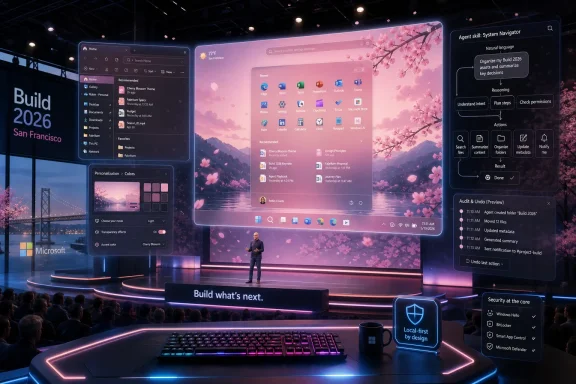
Microsoft used Build 2026 in San Francisco to demonstrate how AI agents could personalize Windows 11 from a single natural-language request, with Windows Latest reporting that Microsoft showed agents coordinating wallpaper, accent colors, RGB lighting, themes, and even registry-backed Explorer accents. The demo matters less as a “make my PC pink” trick than as a statement of intent: Microsoft wants Windows to become a surface that agents can operate, not merely an operating system that users configure by hand. That is both the promise and the danger of the next Windows interface shift.
The most important part of the story is what Microsoft did not announce. This is not a shipping consumer feature that will arrive in next Tuesday’s cumulative update, and Microsoft is not saying that Windows 11 is suddenly gaining another layer of mandatory Copilot automation. The company is instead exposing the direction of travel: Windows as an agent-capable platform, where structured “skills” and existing OS APIs let software act on the user’s intent without forcing the user through the Settings app, registry edits, vendor utilities, or device-specific control panels.
That framing is easy to dismiss because the demo is cosmetic. A cherry-blossom theme, a Zen-garden keyboard animation, or an ocean-styled wallpaper-and-accent bundle sounds like the kind of Build-stage flourish designed to make an abstract developer platform look friendly. But Windows history is littered with small demos that later revealed a bigger platform bet. Personalization is simply the least frightening way to show an agent changing the operating system.
Personalization is the safe demo because it is emotionally legible and operationally low-stakes. If an agent chooses the wrong pink accent color, nobody loses a production database. If it applies an ugly wallpaper, the user can laugh, undo it, and move on.
That makes it the perfect beachhead. Microsoft can show an AI agent manipulating real Windows primitives without asking the audience to immediately trust it with file cleanup, endpoint policy, credential prompts, firewall rules, or admin workflows. A desktop theme lets Microsoft say, “Look, the agent understood intent and used the platform correctly,” while avoiding the more uncomfortable question of what happens when the same pattern is aimed at settings that actually matter.
The Windows Latest report describes Microsoft’s Samantha Song presenting the pitch in human terms: people spend a huge share of their time looking at Windows devices, and those devices should feel personal. That is an appealing argument, especially because Windows personalization today is still a scavenger hunt. Wallpaper lives in one place, accent colors in another, Dynamic Lighting elsewhere, app themes in their own settings, and deeper visual tweaks still depend on third-party tools or registry spelunking.
Microsoft’s demo collapses those scattered surfaces into one sentence. “Make everything cherry blossom themed for spring” is not technically impressive because it changes a wallpaper. It is impressive because the agent can treat several unrelated system surfaces as one coherent action. That is the interface shift Microsoft wants developers to internalize.
The company has spent decades teaching users to think in menus, tabs, property sheets, toggles, and search boxes. Agentic Windows asks users to describe an outcome instead. The operating system then becomes less like a dashboard and more like a substrate for software actors that can reason across settings.
That matters because the old dream of “AI controlling Windows” has already had one false start. Windows 11’s earlier Copilot integration could perform some settings changes, but that approach was limited, awkward, and eventually deemphasized. It felt less like a new operating model and more like a chatbot bolted onto a familiar GUI.
The new pitch is different. Microsoft is not merely saying that a chatbot can click the right Settings page for you. It is saying developers can give agents structured, reliable skills that map intent to known Windows capabilities. In Microsoft’s telling, skills reduce wasted tokens, prevent agents from guessing, and give them predefined tools for a class of task.
That distinction is central. A generic AI model trying to infer which registry key changes a File Explorer accent is a liability. A constrained skill that knows the relevant Windows primitive, exposes a narrow action, validates input, and executes against a supported API is a platform feature.
The demo reportedly included public LampArray APIs for per-lamp RGB effects and Dynamic Lighting integration. That may sound like gamer-desk candy, but it is also a useful example of why Windows needs better abstraction. The RGB ecosystem has long been a mess of vendor tools, background services, proprietary SDKs, and duplicated tray utilities. If Windows can provide a common primitive, and if agents can call that primitive safely, users get less junkware and developers get a cleaner target.
That fragmentation is tolerable for enthusiasts and maddening for everyone else. Windows power users know the ritual: search Settings, fail to find the toggle, open an old dialog, check Group Policy, check the registry, then discover that the OEM utility has its own opinion. The machine is configurable, but the configuration is not conceptually unified.
Microsoft’s “one sentence” demo is an answer to that sprawl. It says the user should not have to know whether a color lives in Personalization, whether a keyboard animation routes through Dynamic Lighting, whether a theme is an MSIX package, or whether Explorer needs a registry-backed accent. The agent should know the territory.
That is a seductive idea because Windows’ complexity is real. It is also dangerous because complexity does not disappear when hidden. It moves into the agent, the skill definition, the permission model, and the audit trail. The question is whether Microsoft can make that hidden machinery more trustworthy than the visible mess it replaces.
In the best version of this future, natural language becomes a power tool rather than a toy. A user could ask Windows to prepare a laptop for a presentation, shifting display sleep, notification behavior, theme contrast, audio routing, and desktop clutter in one pass. A developer could ask for a focused coding setup that opens the right terminal profile, applies a high-contrast editor-friendly theme, and suppresses noncritical interruptions. An accessibility user could describe discomfort instead of hunting for individual vision and input options.
In the worst version, it becomes another layer of mystery between the user and the machine. The agent changes something, the user cannot tell what changed, and undo becomes archaeology. Windows users have already endured enough “helpful” defaults to be suspicious of anything that acts on their behalf.
For enthusiasts, registry modification is normal Windows culture. It is where unsupported tweaks, old fixes, and power-user rituals live. For enterprise IT and security teams, the registry is also a place where configuration drift, persistence mechanisms, breakage, and hard-to-diagnose behavior live. Giving an agent any relationship with registry writes is not automatically reckless, but it is the point where the demo stops being cute.
Microsoft’s likely answer is that skills should constrain the action. The agent is not wandering through
If an agent changes a registry-backed visual setting, Windows should show exactly what changed, who requested it, what skill executed it, and how to revert it. A consumer might accept a simple “undo theme changes” button. An admin needs logs, policy controls, and the ability to disable entire categories of agent action.
The deeper issue is precedent. Once users accept that an agent can change visual settings through a combination of APIs and registry writes, Microsoft and developers will naturally look for adjacent workflows. Power mode, startup behavior, privacy toggles, notification policy, app permissions, default apps, and security settings all invite the same one-sentence treatment. Some of those would be useful. Some would be terrifying without guardrails.
This is where Windows’ long enterprise legacy becomes both a burden and an advantage. Microsoft already knows how to build policy surfaces, management controls, event logs, and administrative boundaries. The company also knows how easily consumer convenience can collide with managed-device reality. If agentic Windows is to be more than a demo, it must respect that difference from the beginning.
But Settings is increasingly the wrong primary interface for multi-step outcomes. It is good at toggles and bad at intent. It can let a user choose a color, but it cannot easily understand “make this easier on my eyes at night while keeping screenshots presentation-friendly.” It can expose Dynamic Lighting, but it cannot naturally coordinate lighting, wallpaper, app theme, and focus state.
That is the opening for agents. They are not better because they are magical. They are better when the user’s goal cuts across product seams. Microsoft’s personalization demo works because the seams are obvious: wallpaper, accent color, light/dark mode, keyboard lighting, Store themes, and Explorer details are separate pieces of what the user experiences as one thing.
The challenge is that intent can be ambiguous. “Make my PC calmer” might mean reduce visual motion, switch to a neutral wallpaper, lower keyboard brightness, silence notifications, enable dark mode, or all of the above. A good agent should ask before making consequential changes. A bad one will confidently impose an aesthetic interpretation and call it personalization.
This is the central UX problem for agentic operating systems. Users want fewer steps, not fewer choices. They want the machine to understand them, but they also want to remain in control. Microsoft’s design task is to make an agent feel less like an overeager assistant and more like a reversible command layer.
The irony is hard to miss. For years, Windows users have complained that too many Microsoft experiences feel like web apps in costume: heavier than they should be, inconsistent with the platform, and disconnected from the old virtues of native Windows software. Now Microsoft is telling developers that native Windows matters again, while also telling them that AI agents will help build and operate those native experiences.
That combination is either a serious course correction or a very Microsoft pileup of strategies. The charitable reading is that Microsoft has finally recognized that agentic computing needs a strong local platform. If agents are going to manipulate apps, settings, windows, files, and device capabilities, then Windows cannot be a random collection of wrappers and half-modernized surfaces. It needs reliable primitives.
The skeptical reading is that Microsoft is once again asking the ecosystem to chase its latest abstraction before the previous ones have fully settled. Windows developers have heard many platform futures before: UWP, Fluent, WinUI, Progressive Web Apps, WebView2, Windows App SDK, and now agent skills. The Windows community’s skepticism is not cynicism for sport; it is memory.
Still, agent skills may be more practical than some past visions because they solve an immediate developer pain. General-purpose coding agents often produce confused Windows apps, mixing frameworks, outdated namespaces, and web habits. A WinUI-specific skill layer gives those agents better rails. If that works, Microsoft gets more native Windows apps and a cleaner story for why Windows remains the place to build desktop software.
An agent that runs locally, asks permission, changes reversible settings, and leaves an audit trail could become genuinely useful. An agent that routes every personalization request through the cloud, nudges users toward Microsoft services, or silently changes defaults will be treated as another intrusion. The Windows audience has already made its feelings clear about ads, recommendations, account pressure, and unwanted Copilot surfaces.
The Windows Latest piece notes the author would be more comfortable with agentic personalization if it runs locally. That caveat is not a footnote; it is the line between a feature and a backlash. Personalization is intimate data. The themes people choose, the lighting profiles they set, the accessibility adjustments they need, and the work modes they create all reveal something about habit, mood, and environment.
Microsoft’s broader AI strategy includes cloud models, local models, NPUs, Copilot+ PCs, and enterprise grounding. The right execution for Windows personalization probably uses a hybrid approach, but the user-facing promise must be simple: the PC should not need to phone home to decide that you want dark mode and a green keyboard.
Local execution also matters for reliability. The more Windows depends on an online agent to manage local state, the more ridiculous the failure modes become. A desktop OS should not lose the ability to apply a theme because a service is down, a subscription changed, or an authentication token expired.
Microsoft’s answer will need to be policy-first. Administrators should be able to decide whether agents can change personalization settings, whether they can use Dynamic Lighting, whether they can download Store themes, whether registry-backed actions are allowed, and whether user-level actions differ from admin-level actions. It is not enough to say the agent uses “real OS APIs.” Enterprises need to decide which APIs are in bounds.
There is also a supportability question. Help desks already struggle when users customize Windows into states that are hard to describe over the phone. Agentic customization could either improve that situation or make it worse. If Windows provides a clear activity history — “At 9:14 a.m., the Theme Skill changed wallpaper, accent color, app mode, keyboard lighting, and Explorer accent” — support gets easier. If changes are scattered and unexplained, support gets worse.
The same applies to security operations. Agent actions need to be distinguishable from malware, scripts, and user tinkering. If an agent writes to a registry path, endpoint tools should know that it was an authorized skill action, not an unexplained modification. Microsoft cannot market agentic Windows as trustworthy while leaving defenders to infer intent from raw system changes.
This is why the consumer demo should be read as the outer edge of a deeper governance problem. The user asks for spring blossoms. The platform question is who approved the skill, what it can touch, where the action is logged, and how it is undone.
A user should be able to say, “Text is too small and bright apps are hurting my eyes,” and have Windows propose a package of changes: scaling, text size, contrast, dark mode, night light, reduced animations, and perhaps app-specific adjustments. Another user might say, “My hands are sore today,” and receive suggestions around voice access, sticky keys, dwell behavior, keyboard shortcuts, or dictation.
The key word is propose. Accessibility changes can have major effects on usability, and different users with similar descriptions may need different outcomes. Agentic Windows should behave like a knowledgeable guide, not a paternalistic switch-flipper.
This is also where local context matters. A Windows agent that understands the hardware attached to the PC, the display configuration, available input devices, and installed apps could help users assemble practical accommodations faster than a generic help page. The operating system already knows the environment. The missing piece is an interface that turns need into configuration without demanding that users memorize Microsoft’s taxonomy.
If Microsoft wants skeptics to see agentic Windows as more than AI garnish, accessibility is the argument to make. Cosmetic theming sells the demo. Assistive configuration sells the platform.
Agentic Windows changes that relationship. The shell becomes less a place you navigate and more a system you negotiate with. You ask for an outcome; Windows maps that outcome to actions; the agent becomes a mediator between human intent and platform capability.
That does not mean the GUI dies. Claims about the death of the mouse and keyboard are usually wrong because direct manipulation remains faster, more precise, and more trustworthy for many tasks. Nobody wants to dictate every window resize or narrate every file drag. The future is not voice replacing the desktop; it is intent supplementing the desktop where the desktop is needlessly bureaucratic.
The best analogy may be PowerShell, not Siri. PowerShell did not eliminate graphical administration tools, but it gave administrators a composable command layer for complex tasks. Agentic Windows could become a natural-language command layer for users who will never write scripts. The danger is that natural language lacks PowerShell’s explicitness unless the platform makes actions inspectable.
That is the balance Microsoft must strike. If agents are too constrained, they become glorified shortcuts. If they are too free, they become unaccountable automation. The successful version will feel like a command preview: here is what I will change, here is why, here is what it touches, and here is how to undo it.
Skills are Microsoft’s attempt to encode that knowledge so agents stop wasting time and producing broken hybrids. For WinUI 3, that means guiding agents through scaffolding, building, testing, packaging, migration, and UI design in ways that align with the Windows App SDK. For personalization, it means defining modules that understand themes, lighting, registry-backed accents, and Store theme packages.
This is a quiet admission that raw AI is not enough. The model may be brilliant at prose and pattern completion, but Windows is a living platform with old scars and current rules. Without rails, agents will hallucinate APIs, mix frameworks, and break conventions. With rails, they may become useful.
The broader opportunity for third-party developers is to expose their own app capabilities as agent-friendly skills. A photo editor could offer constrained batch actions. A terminal app could expose workspace presets. A hardware utility could expose fan, lighting, and performance modes without forcing users into a vendor dashboard. The Windows shell then becomes a broker of capabilities across apps and devices.
But that also raises competitive questions. If Microsoft controls the preferred agent surface, skill discovery, and permission model, it can shape which apps become first-class participants in agentic Windows. Developers will want openness. Users will want safety. Microsoft will want coherence. Those goals will not always align.
That history does not mean agentic Windows is doomed. It means Microsoft has to ship proof, not vibes. Users will judge the feature by whether it saves time, respects defaults, works offline where appropriate, and avoids becoming another promotional surface.
The company also has to resist the temptation to make AI the front door for everything. A good operating system offers multiple paths: GUI, search, keyboard shortcuts, command line, scripts, management policy, and now agents. The agent should be additive. The moment Microsoft makes it feel mandatory, the backlash writes itself.
There is a product lesson here from Windows’ own past. The most durable Windows features tend to become infrastructure. They stop being demos and start being boringly dependable. If agent skills are to matter, they must become boring in exactly that way: permissioned, logged, reversible, documented, manageable, and fast.
Personalization is a fine place to start because it gives Microsoft room to learn. But if the first consumer implementations are flaky, cloud-bound, or too eager, users will not wait for the enterprise-grade version. They will simply disable the thing and add it to the pile of Windows features they distrust on sight.
Here is what the demo makes concrete:
Microsoft’s one-sentence Windows customization demo is easy to mock because the surface example is decorative, but the underlying bet is consequential: the next Windows interface may be less about finding the right toggle and more about granting limited, inspectable authority to software that can act across the system. If Microsoft treats that authority as a privilege to be earned — local-first, policy-aware, transparent, and reversible — agentic Windows could make the PC feel less cluttered and more humane. If it treats the demo as permission to automate first and explain later, the cherry blossoms will not hide the backlash.
The most important part of the story is what Microsoft did not announce. This is not a shipping consumer feature that will arrive in next Tuesday’s cumulative update, and Microsoft is not saying that Windows 11 is suddenly gaining another layer of mandatory Copilot automation. The company is instead exposing the direction of travel: Windows as an agent-capable platform, where structured “skills” and existing OS APIs let software act on the user’s intent without forcing the user through the Settings app, registry edits, vendor utilities, or device-specific control panels.
That framing is easy to dismiss because the demo is cosmetic. A cherry-blossom theme, a Zen-garden keyboard animation, or an ocean-styled wallpaper-and-accent bundle sounds like the kind of Build-stage flourish designed to make an abstract developer platform look friendly. But Windows history is littered with small demos that later revealed a bigger platform bet. Personalization is simply the least frightening way to show an agent changing the operating system.
 Microsoft Has Found the Softest Possible Door Into Agentic Windows
Personalization is the safe demo because it is emotionally legible and operationally low-stakes. If an agent chooses the wrong pink accent color, nobody loses a production database. If it applies an ugly wallpaper, the user can laugh, undo it, and move on.That makes it the perfect beachhead. Microsoft can show an AI agent manipulating real Windows primitives without asking the audience to immediately trust it with file cleanup, endpoint policy, credential prompts, firewall rules, or admin workflows. A desktop theme lets Microsoft say, “Look, the agent understood intent and used the platform correctly,” while avoiding the more uncomfortable question of what happens when the same pattern is aimed at settings that actually matter.
The Windows Latest report describes Microsoft’s Samantha Song presenting the pitch in human terms: people spend a huge share of their time looking at Windows devices, and those devices should feel personal. That is an appealing argument, especially because Windows personalization today is still a scavenger hunt. Wallpaper lives in one place, accent colors in another, Dynamic Lighting elsewhere, app themes in their own settings, and deeper visual tweaks still depend on third-party tools or registry spelunking.
Microsoft’s demo collapses those scattered surfaces into one sentence. “Make everything cherry blossom themed for spring” is not technically impressive because it changes a wallpaper. It is impressive because the agent can treat several unrelated system surfaces as one coherent action. That is the interface shift Microsoft wants developers to internalize.
The company has spent decades teaching users to think in menus, tabs, property sheets, toggles, and search boxes. Agentic Windows asks users to describe an outcome instead. The operating system then becomes less like a dashboard and more like a substrate for software actors that can reason across settings.
The Demo Is Cute Because the Architecture Is Serious
The Build 2026 story sits inside a broader Microsoft push around Windows Development Skills, WinUI 3, the Windows App SDK, GitHub Copilot, Claude Code, and agent-oriented development. Microsoft’s public developer messaging around Build emphasized Windows as a trusted platform for building and running more autonomous agents, with policy-driven containment and structured skills designed to keep agents from improvising their way through the OS.That matters because the old dream of “AI controlling Windows” has already had one false start. Windows 11’s earlier Copilot integration could perform some settings changes, but that approach was limited, awkward, and eventually deemphasized. It felt less like a new operating model and more like a chatbot bolted onto a familiar GUI.
The new pitch is different. Microsoft is not merely saying that a chatbot can click the right Settings page for you. It is saying developers can give agents structured, reliable skills that map intent to known Windows capabilities. In Microsoft’s telling, skills reduce wasted tokens, prevent agents from guessing, and give them predefined tools for a class of task.
That distinction is central. A generic AI model trying to infer which registry key changes a File Explorer accent is a liability. A constrained skill that knows the relevant Windows primitive, exposes a narrow action, validates input, and executes against a supported API is a platform feature.
The demo reportedly included public LampArray APIs for per-lamp RGB effects and Dynamic Lighting integration. That may sound like gamer-desk candy, but it is also a useful example of why Windows needs better abstraction. The RGB ecosystem has long been a mess of vendor tools, background services, proprietary SDKs, and duplicated tray utilities. If Windows can provide a common primitive, and if agents can call that primitive safely, users get less junkware and developers get a cleaner target.
Windows Personalization Has Always Been Powerful, But Rarely Coherent
Windows is not short on customization. The problem is that the customization surface has accreted over decades, with different eras of the OS leaving behind different control models. Some settings are modern and touch-friendly. Some remain classic Control Panel relics. Some are buried in Settings search results. Some exist only because a registry path survived long enough to become folklore.That fragmentation is tolerable for enthusiasts and maddening for everyone else. Windows power users know the ritual: search Settings, fail to find the toggle, open an old dialog, check Group Policy, check the registry, then discover that the OEM utility has its own opinion. The machine is configurable, but the configuration is not conceptually unified.
Microsoft’s “one sentence” demo is an answer to that sprawl. It says the user should not have to know whether a color lives in Personalization, whether a keyboard animation routes through Dynamic Lighting, whether a theme is an MSIX package, or whether Explorer needs a registry-backed accent. The agent should know the territory.
That is a seductive idea because Windows’ complexity is real. It is also dangerous because complexity does not disappear when hidden. It moves into the agent, the skill definition, the permission model, and the audit trail. The question is whether Microsoft can make that hidden machinery more trustworthy than the visible mess it replaces.
In the best version of this future, natural language becomes a power tool rather than a toy. A user could ask Windows to prepare a laptop for a presentation, shifting display sleep, notification behavior, theme contrast, audio routing, and desktop clutter in one pass. A developer could ask for a focused coding setup that opens the right terminal profile, applies a high-contrast editor-friendly theme, and suppresses noncritical interruptions. An accessibility user could describe discomfort instead of hunting for individual vision and input options.
In the worst version, it becomes another layer of mystery between the user and the machine. The agent changes something, the user cannot tell what changed, and undo becomes archaeology. Windows users have already endured enough “helpful” defaults to be suspicious of anything that acts on their behalf.
The Registry Line Is Where the Fun Starts Looking Like Risk
The most eyebrow-raising part of the report is not the wallpaper or the RGB lighting. It is Microsoft’s claim that a theme skill could write accent colors to the Explorer accent registry path. That phrase will divide the room instantly.For enthusiasts, registry modification is normal Windows culture. It is where unsupported tweaks, old fixes, and power-user rituals live. For enterprise IT and security teams, the registry is also a place where configuration drift, persistence mechanisms, breakage, and hard-to-diagnose behavior live. Giving an agent any relationship with registry writes is not automatically reckless, but it is the point where the demo stops being cute.
Microsoft’s likely answer is that skills should constrain the action. The agent is not wandering through
regedit with vibes; it is invoking a defined module that performs a known operation. That is the right architecture, but it does not remove the need for transparency.If an agent changes a registry-backed visual setting, Windows should show exactly what changed, who requested it, what skill executed it, and how to revert it. A consumer might accept a simple “undo theme changes” button. An admin needs logs, policy controls, and the ability to disable entire categories of agent action.
The deeper issue is precedent. Once users accept that an agent can change visual settings through a combination of APIs and registry writes, Microsoft and developers will naturally look for adjacent workflows. Power mode, startup behavior, privacy toggles, notification policy, app permissions, default apps, and security settings all invite the same one-sentence treatment. Some of those would be useful. Some would be terrifying without guardrails.
This is where Windows’ long enterprise legacy becomes both a burden and an advantage. Microsoft already knows how to build policy surfaces, management controls, event logs, and administrative boundaries. The company also knows how easily consumer convenience can collide with managed-device reality. If agentic Windows is to be more than a demo, it must respect that difference from the beginning.
The Real Contest Is Between Settings Pages and Intent
The Windows Settings app is not going away, and it should not. Graphical controls remain essential because they are inspectable. They show available options, current state, and consequences in a way natural language often does not.But Settings is increasingly the wrong primary interface for multi-step outcomes. It is good at toggles and bad at intent. It can let a user choose a color, but it cannot easily understand “make this easier on my eyes at night while keeping screenshots presentation-friendly.” It can expose Dynamic Lighting, but it cannot naturally coordinate lighting, wallpaper, app theme, and focus state.
That is the opening for agents. They are not better because they are magical. They are better when the user’s goal cuts across product seams. Microsoft’s personalization demo works because the seams are obvious: wallpaper, accent color, light/dark mode, keyboard lighting, Store themes, and Explorer details are separate pieces of what the user experiences as one thing.
The challenge is that intent can be ambiguous. “Make my PC calmer” might mean reduce visual motion, switch to a neutral wallpaper, lower keyboard brightness, silence notifications, enable dark mode, or all of the above. A good agent should ask before making consequential changes. A bad one will confidently impose an aesthetic interpretation and call it personalization.
This is the central UX problem for agentic operating systems. Users want fewer steps, not fewer choices. They want the machine to understand them, but they also want to remain in control. Microsoft’s design task is to make an agent feel less like an overeager assistant and more like a reversible command layer.
Build 2026 Revealed Microsoft’s Bigger Windows Rehabilitation Project
The personalization demo also lands at a moment when Microsoft is trying to convince developers and users that Windows is becoming more native, more coherent, and less dependent on web-wrapper compromises. Build 2026 messaging around WinUI 3, the Windows App SDK, and AI-assisted native app development is part of that rehabilitation.The irony is hard to miss. For years, Windows users have complained that too many Microsoft experiences feel like web apps in costume: heavier than they should be, inconsistent with the platform, and disconnected from the old virtues of native Windows software. Now Microsoft is telling developers that native Windows matters again, while also telling them that AI agents will help build and operate those native experiences.
That combination is either a serious course correction or a very Microsoft pileup of strategies. The charitable reading is that Microsoft has finally recognized that agentic computing needs a strong local platform. If agents are going to manipulate apps, settings, windows, files, and device capabilities, then Windows cannot be a random collection of wrappers and half-modernized surfaces. It needs reliable primitives.
The skeptical reading is that Microsoft is once again asking the ecosystem to chase its latest abstraction before the previous ones have fully settled. Windows developers have heard many platform futures before: UWP, Fluent, WinUI, Progressive Web Apps, WebView2, Windows App SDK, and now agent skills. The Windows community’s skepticism is not cynicism for sport; it is memory.
Still, agent skills may be more practical than some past visions because they solve an immediate developer pain. General-purpose coding agents often produce confused Windows apps, mixing frameworks, outdated namespaces, and web habits. A WinUI-specific skill layer gives those agents better rails. If that works, Microsoft gets more native Windows apps and a cleaner story for why Windows remains the place to build desktop software.
Local AI Is the Only Version Windows Users Will Tolerate
Windows users do not hate automation. They hate automation that feels imposed, opaque, cloud-dependent, or promotional. That distinction is crucial.An agent that runs locally, asks permission, changes reversible settings, and leaves an audit trail could become genuinely useful. An agent that routes every personalization request through the cloud, nudges users toward Microsoft services, or silently changes defaults will be treated as another intrusion. The Windows audience has already made its feelings clear about ads, recommendations, account pressure, and unwanted Copilot surfaces.
The Windows Latest piece notes the author would be more comfortable with agentic personalization if it runs locally. That caveat is not a footnote; it is the line between a feature and a backlash. Personalization is intimate data. The themes people choose, the lighting profiles they set, the accessibility adjustments they need, and the work modes they create all reveal something about habit, mood, and environment.
Microsoft’s broader AI strategy includes cloud models, local models, NPUs, Copilot+ PCs, and enterprise grounding. The right execution for Windows personalization probably uses a hybrid approach, but the user-facing promise must be simple: the PC should not need to phone home to decide that you want dark mode and a green keyboard.
Local execution also matters for reliability. The more Windows depends on an online agent to manage local state, the more ridiculous the failure modes become. A desktop OS should not lose the ability to apply a theme because a service is down, a subscription changed, or an authentication token expired.
Enterprise IT Will Ask Who Holds the Paintbrush
For managed environments, personalization is not just personal. It intersects with branding, accessibility, security baselines, device compliance, support costs, and user autonomy. An agent that changes themes may sound harmless until it conflicts with a corporate wallpaper policy, high-contrast accessibility requirement, kiosk configuration, or regulated audit environment.Microsoft’s answer will need to be policy-first. Administrators should be able to decide whether agents can change personalization settings, whether they can use Dynamic Lighting, whether they can download Store themes, whether registry-backed actions are allowed, and whether user-level actions differ from admin-level actions. It is not enough to say the agent uses “real OS APIs.” Enterprises need to decide which APIs are in bounds.
There is also a supportability question. Help desks already struggle when users customize Windows into states that are hard to describe over the phone. Agentic customization could either improve that situation or make it worse. If Windows provides a clear activity history — “At 9:14 a.m., the Theme Skill changed wallpaper, accent color, app mode, keyboard lighting, and Explorer accent” — support gets easier. If changes are scattered and unexplained, support gets worse.
The same applies to security operations. Agent actions need to be distinguishable from malware, scripts, and user tinkering. If an agent writes to a registry path, endpoint tools should know that it was an authorized skill action, not an unexplained modification. Microsoft cannot market agentic Windows as trustworthy while leaving defenders to infer intent from raw system changes.
This is why the consumer demo should be read as the outer edge of a deeper governance problem. The user asks for spring blossoms. The platform question is who approved the skill, what it can touch, where the action is logged, and how it is undone.
Accessibility May Be the Strongest Case Microsoft Did Not Lead With
The personalization pitch is fun, but accessibility is where the one-sentence model becomes morally serious. Windows has a large set of accessibility features, but discovering and combining them can be difficult even for experienced users. Natural language could lower that barrier dramatically.A user should be able to say, “Text is too small and bright apps are hurting my eyes,” and have Windows propose a package of changes: scaling, text size, contrast, dark mode, night light, reduced animations, and perhaps app-specific adjustments. Another user might say, “My hands are sore today,” and receive suggestions around voice access, sticky keys, dwell behavior, keyboard shortcuts, or dictation.
The key word is propose. Accessibility changes can have major effects on usability, and different users with similar descriptions may need different outcomes. Agentic Windows should behave like a knowledgeable guide, not a paternalistic switch-flipper.
This is also where local context matters. A Windows agent that understands the hardware attached to the PC, the display configuration, available input devices, and installed apps could help users assemble practical accommodations faster than a generic help page. The operating system already knows the environment. The missing piece is an interface that turns need into configuration without demanding that users memorize Microsoft’s taxonomy.
If Microsoft wants skeptics to see agentic Windows as more than AI garnish, accessibility is the argument to make. Cosmetic theming sells the demo. Assistive configuration sells the platform.
The Windows Shell Is Becoming a Negotiation
For most of its life, the Windows shell has been a place. The desktop, Start menu, taskbar, File Explorer, system tray, and Settings app formed the geography of the PC. Users learned where things lived.Agentic Windows changes that relationship. The shell becomes less a place you navigate and more a system you negotiate with. You ask for an outcome; Windows maps that outcome to actions; the agent becomes a mediator between human intent and platform capability.
That does not mean the GUI dies. Claims about the death of the mouse and keyboard are usually wrong because direct manipulation remains faster, more precise, and more trustworthy for many tasks. Nobody wants to dictate every window resize or narrate every file drag. The future is not voice replacing the desktop; it is intent supplementing the desktop where the desktop is needlessly bureaucratic.
The best analogy may be PowerShell, not Siri. PowerShell did not eliminate graphical administration tools, but it gave administrators a composable command layer for complex tasks. Agentic Windows could become a natural-language command layer for users who will never write scripts. The danger is that natural language lacks PowerShell’s explicitness unless the platform makes actions inspectable.
That is the balance Microsoft must strike. If agents are too constrained, they become glorified shortcuts. If they are too free, they become unaccountable automation. The successful version will feel like a command preview: here is what I will change, here is why, here is what it touches, and here is how to undo it.
Developers Are Being Asked to Teach Agents the Shape of Windows
The WinUI skills angle is easy to overlook in a consumer-facing personalization story, but it may be the more important developer signal. Microsoft is telling developers that agents need structured knowledge, not just broad model intelligence. A Windows app is not a generic web page with a title bar. It has platform conventions, lifecycle rules, packaging requirements, accessibility expectations, and UI patterns.Skills are Microsoft’s attempt to encode that knowledge so agents stop wasting time and producing broken hybrids. For WinUI 3, that means guiding agents through scaffolding, building, testing, packaging, migration, and UI design in ways that align with the Windows App SDK. For personalization, it means defining modules that understand themes, lighting, registry-backed accents, and Store theme packages.
This is a quiet admission that raw AI is not enough. The model may be brilliant at prose and pattern completion, but Windows is a living platform with old scars and current rules. Without rails, agents will hallucinate APIs, mix frameworks, and break conventions. With rails, they may become useful.
The broader opportunity for third-party developers is to expose their own app capabilities as agent-friendly skills. A photo editor could offer constrained batch actions. A terminal app could expose workspace presets. A hardware utility could expose fan, lighting, and performance modes without forcing users into a vendor dashboard. The Windows shell then becomes a broker of capabilities across apps and devices.
But that also raises competitive questions. If Microsoft controls the preferred agent surface, skill discovery, and permission model, it can shape which apps become first-class participants in agentic Windows. Developers will want openness. Users will want safety. Microsoft will want coherence. Those goals will not always align.
The Skepticism Is Earned, and Microsoft Should Treat It as a Design Requirement
Windows enthusiasts have seen Microsoft overpromise intelligence before. Cortana was going to be the personal assistant woven through Windows. Timeline was going to make activity history useful. Sets was going to rethink app organization. Copilot was going to become the AI entry point for the PC. Some ideas vanished, some changed shape, and some became less central than the keynote suggested.That history does not mean agentic Windows is doomed. It means Microsoft has to ship proof, not vibes. Users will judge the feature by whether it saves time, respects defaults, works offline where appropriate, and avoids becoming another promotional surface.
The company also has to resist the temptation to make AI the front door for everything. A good operating system offers multiple paths: GUI, search, keyboard shortcuts, command line, scripts, management policy, and now agents. The agent should be additive. The moment Microsoft makes it feel mandatory, the backlash writes itself.
There is a product lesson here from Windows’ own past. The most durable Windows features tend to become infrastructure. They stop being demos and start being boringly dependable. If agent skills are to matter, they must become boring in exactly that way: permissioned, logged, reversible, documented, manageable, and fast.
Personalization is a fine place to start because it gives Microsoft room to learn. But if the first consumer implementations are flaky, cloud-bound, or too eager, users will not wait for the enterprise-grade version. They will simply disable the thing and add it to the pile of Windows features they distrust on sight.
The One-Sentence Theme Demo Is Really a Platform Test
Microsoft’s Build 2026 personalization demo should not be mistaken for a promise that everyone’s Windows 11 desktop is about to become an AI mood board. The more interesting question is whether Microsoft can turn Windows’ existing primitives into a safe action layer for agents. If it can, personalization will be the smallest example of a much larger shift.Here is what the demo makes concrete:
- Microsoft is positioning Windows as an agent-native runtime, not merely an OS with a chatbot attached.
- The personalization example works because it coordinates several fragmented Windows surfaces into one user intent.
- Registry-backed actions and device lighting APIs make the demo more powerful, but they also demand permissions, logging, and undo.
- Developers are being nudged toward structured skills so agents can use Windows capabilities reliably instead of guessing.
- The feature will only earn trust if it is local where possible, reversible by design, and controllable by administrators.
- The strongest long-term use cases may be accessibility, workspace setup, device preparation, and supportable automation rather than decorative themes.
Microsoft’s one-sentence Windows customization demo is easy to mock because the surface example is decorative, but the underlying bet is consequential: the next Windows interface may be less about finding the right toggle and more about granting limited, inspectable authority to software that can act across the system. If Microsoft treats that authority as a privilege to be earned — local-first, policy-aware, transparent, and reversible — agentic Windows could make the PC feel less cluttered and more humane. If it treats the demo as permission to automate first and explain later, the cherry blossoms will not hide the backlash.
References
- Primary source: Windows Latest
Published: Thu, 04 Jun 2026 23:10:18 GMT
Watch: Microsoft shows off how AI features can customize your Windows 11 entirely with one sentence
At Build 2026, Microsoft showed off a future where agents could customize Windows 11 in a way that truly makes it feel "personal." www.windowslatest.com
- Related coverage: windowscentral.com
How to watch Microsoft Build 2026: Windows 11, NVIDIA RTX Spark, AI agents, and more | Windows Central
Build isn't just some boring developer conference. It showcases the future of Windows and computing.www.windowscentral.com - Related coverage: tomsguide.com
Biggest Microsoft Build 2026 announcements — agentic AI, RTX Spark Dev Box, GitHub Copilot app, new MAI models, and more | Tom's Guide
All the big news from Microsoft's AI-focused eventwww.tomsguide.com - Related coverage: techradar.com
From code-first to intent-first: Microsoft Build 2026 could be the end of programming as we know it | TechRadar
Redefining what it means to be a developer with agentic AIwww.techradar.com - Official source: blogs.microsoft.com
Microsoft Build 2026: Be yourself at work - The Official Microsoft Blog
Platforms shift when developers build. We explore, choose tools, dream, create. This platform shift comes with more information than ever, ready at your fingertips. This shift, it’s about building fast AND THEN: it’s about building, operating, optimizing and observing. Securing your...blogs.microsoft.com - Official source: news.microsoft.com

- Official source: blogs.windows.com
Build 2026: Furthering Windows as the trusted platform for development
Build is one of our favorite moments each year - a chance to connect with the global developer community and share what we’ve been building. Over the past year, we have connected with many developers pushing the boundaries of what’s possible onblogs.windows.com - Official source: learn.microsoft.com
Tutorial: Build a Windows app with GitHub Copilot - Windows apps | Microsoft Learn
A step-by-step tutorial for building a WinUI 3 Windows app using GitHub Copilot, the WinUI 3 plugin, and the Microsoft Learn MCP server.learn.microsoft.com - Official source: azure.microsoft.com
Microsoft Build 2026: Building agentic apps with Microsoft Fabric and Microsoft Databases | Microsoft Azure Blog
Microsoft Build 2026 highlights advancements in app development with Microsoft Fabric and Microsoft Databases, emphasizing a unified data and AI platform.azure.microsoft.com - Official source: devblogs.microsoft.com
Introducing WinUI agent plugin for GitHub Copilot and Claude Code - #ifdef Windows
iscover AI-powered WinUI development with GitHub Copilot and Claude Code. These new agent skills help you scaffold, build, run, test, and ship native Windows apps with WinUI 3 and the Windows App SDK faster than ever.devblogs.microsoft.com - Related coverage: redmondmag.com
Microsoft Uses Build 2026 To Put AI Agents at the Center of Windows -- Redmondmag.com
Microsoft used Build 2026 to position Windows as a platform for building and running AI agents, expanding its developer focus beyond AI-assisted apps and into agents that can act across local devices, cloud environments and enterprise systems.redmondmag.com - Official source: cdn.techcommunity.microsoft.com
- Official source: microsoft.github.io
- Official source: cdn-dynmedia-1.microsoft.com
