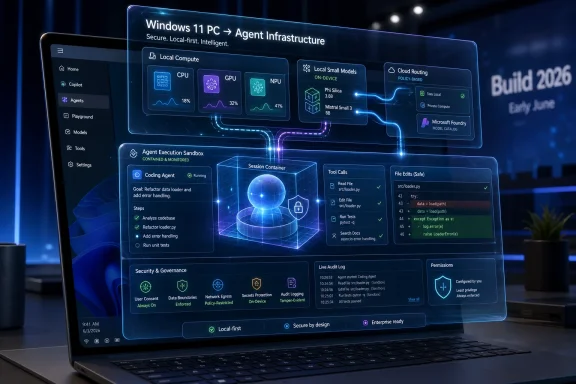
Microsoft used Build 2026 in early June to reposition Windows 11 as a hybrid AI platform, pairing cloud agents with local models, CPU/GPU/NPU-aware APIs, and new NVIDIA-powered hardware intended to run increasingly capable agents directly on PCs. That is the factual headline; the strategic one is sharper. Microsoft is not merely adding AI to Windows. It is rebuilding Windows because the agent era cannot tolerate the flaky, noisy, mistrusted operating system Windows 11 had become.
For years, Microsoft’s PC story has been a familiar loop: announce a grand platform shift, overbrand the hardware, underexplain the actual benefit, then wait for the ecosystem to catch up. Always Connected PCs were sold as mobile freedom. Copilot+ PCs were sold as local AI magic. Build 2026 suggests the company finally understands that neither pitch is enough unless Windows itself becomes the orchestration layer between device silicon, local models, cloud-scale intelligence, enterprise policy, and the user’s actual work.
The easiest way to misunderstand Microsoft’s current Windows strategy is to start with Copilot. The better starting point is the earlier Windows-on-Arm push, when Microsoft and Qualcomm tried to drag the PC industry toward mobile-style efficiency, instant-on behavior, and built-in connectivity.
The first Always Connected PCs were not good enough to transform the market. They were slow, compatibility was fragile, and the promised smartphone-like experience too often collided with the reality of desktop Windows. But the premise mattered: Microsoft wanted the PC to inherit the best traits of mobile devices without giving up the software and peripheral universe that made Windows valuable.
That campaign also had a second audience. Intel had spent years treating laptop efficiency as an optimization problem rather than an existential one. By putting Windows on Snapdragon chips, Microsoft was telling the x86 incumbents that the old assumptions were no longer sacred.
Copilot+ PCs repeated the pattern with a different component in the spotlight. This time the marketing centered on the NPU, the neural processing unit capable of running AI workloads efficiently on-device. The official requirement — 40 TOPS or more — created a clean badge for retail shelves, but it also narrowed the story too much.
The real bet was never that every user would care about a dedicated AI accelerator. The real bet was that Windows needed a local compute layer for AI tasks that should not always be sent to the cloud. That distinction matters because the first wave of Copilot+ experiences did not justify the hype.
Recall became the feature everyone argued about, Click to Do was more interesting than transformative, and Windows Studio Effects remained the kind of useful-but-small enhancement that could not sell a laptop by itself. Microsoft had built a category before it had built a reason for ordinary users to demand it.
Microsoft is now expanding Windows AI APIs beyond the NPU-only framing, with support that reaches CPUs and GPUs as well. That is a major correction. It acknowledges what PC users and developers already knew: millions of capable Windows machines have compute resources that can run local AI workloads, even if they do not meet the Copilot+ badge requirements.
Efficiency still matters. An NPU can run certain models with less power draw and less interference with the rest of the system. On thin-and-light laptops, that can be the difference between a feature people use and a feature people disable after watching their battery collapse.
But efficiency is not the only axis that matters. A desktop workstation with a powerful GPU does not need to worship at the altar of low-watt inference. A gaming laptop with a discrete NVIDIA GPU may be a better local AI machine than an NPU-first ultraportable, even if the latter wears the cleaner marketing badge.
This is where Microsoft’s Build 2026 messaging becomes more interesting than the hardware logos. By widening the target from NPU to CPU, GPU, and NPU, Microsoft is tacitly admitting that hybrid AI cannot be built on a single component. It needs a broker.
That broker is Windows. Or, more precisely, it is what Windows is trying to become.
The obvious hybrid model is straightforward: run cheaper, faster, privacy-sensitive tasks locally, and hand off harder problems to cloud models. If the local model is not capable enough, the cloud takes over. If the cloud service is expensive, rate-limited, or unavailable, the local model provides a fallback.
But the more useful model is messier. A real Windows AI system has to know what hardware is available, which models are installed, which models are allowed to access which data, what the user has paid for, what the enterprise permits, what latency is acceptable, and whether the task can be completed without leaving the device.
That is not a feature. That is an operating system responsibility.
An agent that summarizes a local document, edits an image, changes a system setting, sends an email, invokes a line-of-business app, or queries company data is not just “using AI.” It is crossing boundaries. Some are technical boundaries between CPU, GPU, NPU, and cloud. Some are security boundaries between user context, app permissions, enterprise policy, and sensitive data.
Microsoft’s Build 2026 announcements point toward Windows becoming the traffic controller for those crossings. Local agents, local small language models, Windows AI APIs, Microsoft Foundry on Windows, Agent 365, Windows 365 for Agents, and security containment all orbit the same idea: agents need an execution environment, not just a chat box.
A cloud chatbot can be useful while remaining somewhat external to the PC. It answers questions, drafts text, generates code, and analyzes files when the user explicitly hands them over. A local or hybrid agent is different. It can see more context, act with lower latency, and potentially manipulate the machine itself.
That is powerful, and it is dangerous.
Microsoft’s new Aion small language models appear designed for this middle layer. They are not meant to replace frontier-scale cloud models. They are meant to handle local reasoning, instruction following, and agentic planning close to the user’s machine. That is exactly the kind of workload where latency, privacy, and cost all matter.
If this works, Windows gets a new reason to exist in a world where many apps already live in browsers and cloud workspaces. The operating system becomes the trusted local runtime for agents that need to understand the device, interact with installed software, and respect user or organizational boundaries.
If it fails, Windows becomes a bigger attack surface with a better demo script.
That is why Microsoft’s security framing is not decorative. Execution containers, identity controls, policy enforcement, and enterprise observability are not nice-to-have features for agents. They are the difference between useful automation and a nightmare in which a probabilistic assistant gets broad system access because it sounded confident.
Usage caps, premium tiers, enterprise metering, and model-based pricing are spreading because large-scale AI is not cheap to run. Datacenters, GPUs, power, cooling, networking, and model serving all have costs that someone eventually has to pay. For users, that means the magic box starts looking more like a meter.
Local AI is Microsoft’s escape hatch from that problem. Not a total escape, because the most capable models will still live in the cloud for the foreseeable future, but a partial one. If Windows can handle routine AI tasks locally, Microsoft can reduce cloud pressure, improve responsiveness, and give enterprises a stronger privacy story.
That is why the company’s “unmetered intelligence” language is more than marketing fluff. It points to a future in which the PC once again performs valuable work because doing everything remotely is too expensive, too slow, too regulated, or too fragile.
The irony is rich. After years of moving Windows value into cloud subscriptions, Microsoft now needs the local PC to save the AI business model from its own infrastructure bill.
The RTX Spark announcements push Windows into a different class of machine: PCs and workstations built for local agents, large local models, and developer workflows that previously required cloud GPUs or dedicated servers. Microsoft’s Surface RTX Spark Dev Box and NVIDIA’s broader Windows collaboration are not aimed at the same buyer as a mainstream consumer laptop, but they matter because high-end developer hardware often previews the next software abstraction.
Once Windows can assume that some machines have enormous GPU capability, some have NPUs, some have both, and most have neither at frontier scale, the platform needs a way to normalize that diversity. Developers do not want to hard-code a different AI path for every silicon vendor and every SKU. Users do not want to know whether a task ran on an NPU, GPU, CPU, or cloud model.
They want the result. They want it fast. They want it cheap. They want it private when privacy matters. And they want it not to break the rest of the system.
That is orchestration again. NVIDIA’s hardware makes the need more visible, but the same problem exists across Qualcomm, Intel, AMD, and future AI accelerators. Windows has to become less like a passive host and more like a scheduler for intelligence.
The charitable reading is that Microsoft finally heard the backlash. The more strategic reading is that AI agents require a better Windows foundation than the one Microsoft had allowed to stagnate.
Agents cannot thrive on an OS users do not trust. They cannot act safely on a system with confusing permissions, unpredictable updates, inconsistent performance, and a reputation for dark-pattern nudges. They cannot become enterprise infrastructure if admins see them as consumer Copilot features wearing a suit.
That does not mean user complaints are irrelevant. It means Microsoft may be responding to them because they now block a larger commercial objective. The company needs Windows to be boringly reliable again so it can become radically more ambitious.
This is not cynicism; it is how platform companies behave. They fix foundations when the next layer depends on them.
That requires APIs that reach beyond a tiny hardware slice. It requires model tooling that does not force every developer to become an inference engineer. It requires containers and permissions that enterprises can audit. It requires documentation, samples, predictable behavior, and enough installed hardware to justify the work.
The expansion of Windows AI APIs to CPU and GPU support is therefore more important than it may sound. It lowers the floor. Developers can begin building local AI features for more of the Windows 11 base instead of waiting for Copilot+ adoption to become unavoidable.
That also helps Microsoft with the chicken-and-egg problem it created in 2024. Users did not rush to buy Copilot+ PCs because the features were not compelling enough. Developers did not rush to build Copilot+ features because the audience was too small. By loosening the hardware path, Microsoft gives both sides more room to move.
This does not eliminate fragmentation. It manages it. In the Windows world, that is often the best possible outcome.
The original Recall pitch made a certain kind of product sense: if the PC can remember what the user saw, the user can search and reconstruct past activity more naturally. But the first public reaction focused, predictably and reasonably, on surveillance, sensitive data, malware access, and whether Microsoft had thought deeply enough about the security implications before showing the feature.
The company later changed course, adding stronger protections and making the experience more explicitly opt-in. But the damage was instructive. Users were not merely rejecting one feature. They were telling Microsoft that local AI operating at the system level needs a higher trust bar than a normal app.
That lesson applies directly to agents. A system that can observe, reason, and act on behalf of the user must be designed for distrust. It must assume mistakes, malicious prompts, compromised apps, careless users, and hostile networks. It must make boundaries visible enough for humans and enforceable enough for admins.
Microsoft’s agent story will rise or fall on that point. The demos will get better. The models will get faster. The hardware will improve. But if users and IT departments conclude that Windows agents are another layer of opaque Microsoft intrusion, the platform story collapses.
That difference matters. In a business environment, an agent is not simply a helper. It is a software actor with access, identity, logs, permissions, and consequences. If it reads a confidential document, generates a summary, calls an API, creates a ticket, changes a setting, or sends a message, the organization needs to know what happened and why.
Microsoft is better positioned than most vendors to answer that because it already owns many of the control planes enterprises use: Entra, Defender, Purview, Intune, Windows, Microsoft 365, Azure, and GitHub. Agent 365 and Windows 365 for Agents fit naturally into that stack.
The danger is that Microsoft turns integration into lock-in. If the best-governed agents are the ones that live entirely inside Microsoft’s ecosystem, enterprises may accept the tradeoff for compliance reasons. Developers and competitors will complain, but administrators may prefer a controlled monoculture to an ungoverned zoo of browser extensions, shadow AI tools, and rogue automations.
That is the enterprise version of the Windows bargain. Microsoft gets platform power. Customers get manageability. Everyone pretends the trade is cleaner than it is.
AI changes that, not because it reverses the cloud, but because it exposes the limits of cloud-only computing. The best AI experiences need context, and much of that context lives locally or near the user. They need responsiveness, and round trips are not always acceptable. They need privacy, and not every prompt or document should leave the machine. They need cost discipline, and not every task deserves a datacenter GPU.
That creates a new role for the PC. It becomes the edge node for personal and organizational intelligence.
This is why Microsoft’s current Windows work feels more consequential than another round of Start menu tweaks or Copilot sidebar experiments. The company is trying to make Windows the place where local context, local compute, cloud models, and enterprise rules meet. If it succeeds, the PC stops being merely a client for cloud services and becomes an active participant in AI workflows.
The phrase “AI PC” undersells that ambition. Microsoft is not really building AI PCs. It is trying to build an agentic Windows platform that happens to run across many kinds of PCs.
Both can be true.
The move from NPU-centric features to broader AI orchestration is good for users and developers. It makes better use of existing hardware, reduces dependence on cloud inference, and gives Windows a clearer technical purpose. The move toward governed agents is also necessary if AI is going to do real work rather than generate disposable text.
But Microsoft’s incentives are not neutral. A Windows that brokers AI workloads can also steer developers toward Microsoft models, Microsoft tooling, Microsoft identity, Microsoft cloud services, and Microsoft management layers. The operating system becomes a toll road not because every task is paid, but because every important route passes through Microsoft-controlled infrastructure.
That is the tension Windows users should watch. The best outcome is a local AI platform that is open enough to support many models, many accelerators, and many cloud backends. The worst is a new generation of Windows features that work best only when the user accepts Microsoft’s preferred subscription stack.
History suggests Microsoft will try to do both until customers push back.
Microsoft is widening local AI beyond NPUs, introducing new local models, preparing Windows for local and hybrid agents, partnering with NVIDIA on far more capable AI hardware, and wrapping the whole thing in enterprise governance. Those are not isolated announcements. They are pieces of a single architecture.
The open question is whether Microsoft can execute without burying the value under branding confusion. Copilot, Copilot+, Foundry, Windows AI APIs, Agent 365, Windows 365 for Agents, Aion, RTX Spark, and whatever comes next all risk becoming another Microsoft word cloud. The technology may be coherent even when the names are not.
For users, the test will be simple: does Windows become faster, more reliable, more private, and more useful? For developers, the test will be whether the APIs abstract enough hardware complexity to be worth adopting. For admins, the test will be whether agents can be governed with the same seriousness as users, devices, and apps.
If those answers are yes, Build 2026 may be remembered as the moment the AI PC stopped being a retail sticker and started becoming a real platform.
Microsoft needs a trustworthy local platform for hybrid AI. That means update reliability, predictable performance, better security isolation, clearer permissions, stronger developer tooling, and fewer user-hostile distractions. The same things enthusiasts have complained about for years are now blockers for Microsoft’s next platform shift.
That does not make the fixes less welcome. Motive matters less than outcome when the outcome is a better Windows. If the pressure of AI forces Microsoft to clean up the operating system, users benefit even if they never run a local agent.
The danger is that Microsoft fixes Windows only enough to carry the next wave of AI features, then resumes treating the desktop as inventory for promotions, defaults, and subscription funnels. That would squander the opportunity. Hybrid AI requires trust not as a launch condition, but as a permanent operating principle.
For years, Microsoft’s PC story has been a familiar loop: announce a grand platform shift, overbrand the hardware, underexplain the actual benefit, then wait for the ecosystem to catch up. Always Connected PCs were sold as mobile freedom. Copilot+ PCs were sold as local AI magic. Build 2026 suggests the company finally understands that neither pitch is enough unless Windows itself becomes the orchestration layer between device silicon, local models, cloud-scale intelligence, enterprise policy, and the user’s actual work.
 Microsoft’s AI PC Story Was Always About Leverage
The easiest way to misunderstand Microsoft’s current Windows strategy is to start with Copilot. The better starting point is the earlier Windows-on-Arm push, when Microsoft and Qualcomm tried to drag the PC industry toward mobile-style efficiency, instant-on behavior, and built-in connectivity.The first Always Connected PCs were not good enough to transform the market. They were slow, compatibility was fragile, and the promised smartphone-like experience too often collided with the reality of desktop Windows. But the premise mattered: Microsoft wanted the PC to inherit the best traits of mobile devices without giving up the software and peripheral universe that made Windows valuable.
That campaign also had a second audience. Intel had spent years treating laptop efficiency as an optimization problem rather than an existential one. By putting Windows on Snapdragon chips, Microsoft was telling the x86 incumbents that the old assumptions were no longer sacred.
Copilot+ PCs repeated the pattern with a different component in the spotlight. This time the marketing centered on the NPU, the neural processing unit capable of running AI workloads efficiently on-device. The official requirement — 40 TOPS or more — created a clean badge for retail shelves, but it also narrowed the story too much.
The real bet was never that every user would care about a dedicated AI accelerator. The real bet was that Windows needed a local compute layer for AI tasks that should not always be sent to the cloud. That distinction matters because the first wave of Copilot+ experiences did not justify the hype.
Recall became the feature everyone argued about, Click to Do was more interesting than transformative, and Windows Studio Effects remained the kind of useful-but-small enhancement that could not sell a laptop by itself. Microsoft had built a category before it had built a reason for ordinary users to demand it.
The NPU Was a Doorway, Not the Destination
The Copilot+ PC launch made the NPU sound like the center of the AI PC universe. Build 2026 makes it look more like an opening move.Microsoft is now expanding Windows AI APIs beyond the NPU-only framing, with support that reaches CPUs and GPUs as well. That is a major correction. It acknowledges what PC users and developers already knew: millions of capable Windows machines have compute resources that can run local AI workloads, even if they do not meet the Copilot+ badge requirements.
Efficiency still matters. An NPU can run certain models with less power draw and less interference with the rest of the system. On thin-and-light laptops, that can be the difference between a feature people use and a feature people disable after watching their battery collapse.
But efficiency is not the only axis that matters. A desktop workstation with a powerful GPU does not need to worship at the altar of low-watt inference. A gaming laptop with a discrete NVIDIA GPU may be a better local AI machine than an NPU-first ultraportable, even if the latter wears the cleaner marketing badge.
This is where Microsoft’s Build 2026 messaging becomes more interesting than the hardware logos. By widening the target from NPU to CPU, GPU, and NPU, Microsoft is tacitly admitting that hybrid AI cannot be built on a single component. It needs a broker.
That broker is Windows. Or, more precisely, it is what Windows is trying to become.
Hybrid AI Is Really an Orchestration Problem
The phrase hybrid AI is easy to flatten into a simple local-versus-cloud distinction. That version is too small for what Microsoft is now describing.The obvious hybrid model is straightforward: run cheaper, faster, privacy-sensitive tasks locally, and hand off harder problems to cloud models. If the local model is not capable enough, the cloud takes over. If the cloud service is expensive, rate-limited, or unavailable, the local model provides a fallback.
But the more useful model is messier. A real Windows AI system has to know what hardware is available, which models are installed, which models are allowed to access which data, what the user has paid for, what the enterprise permits, what latency is acceptable, and whether the task can be completed without leaving the device.
That is not a feature. That is an operating system responsibility.
An agent that summarizes a local document, edits an image, changes a system setting, sends an email, invokes a line-of-business app, or queries company data is not just “using AI.” It is crossing boundaries. Some are technical boundaries between CPU, GPU, NPU, and cloud. Some are security boundaries between user context, app permissions, enterprise policy, and sensitive data.
Microsoft’s Build 2026 announcements point toward Windows becoming the traffic controller for those crossings. Local agents, local small language models, Windows AI APIs, Microsoft Foundry on Windows, Agent 365, Windows 365 for Agents, and security containment all orbit the same idea: agents need an execution environment, not just a chat box.
Local Agents Change the Windows Bargain
The most important Windows AI announcement is not that Microsoft has another model family. It is that agents are moving closer to the OS.A cloud chatbot can be useful while remaining somewhat external to the PC. It answers questions, drafts text, generates code, and analyzes files when the user explicitly hands them over. A local or hybrid agent is different. It can see more context, act with lower latency, and potentially manipulate the machine itself.
That is powerful, and it is dangerous.
Microsoft’s new Aion small language models appear designed for this middle layer. They are not meant to replace frontier-scale cloud models. They are meant to handle local reasoning, instruction following, and agentic planning close to the user’s machine. That is exactly the kind of workload where latency, privacy, and cost all matter.
If this works, Windows gets a new reason to exist in a world where many apps already live in browsers and cloud workspaces. The operating system becomes the trusted local runtime for agents that need to understand the device, interact with installed software, and respect user or organizational boundaries.
If it fails, Windows becomes a bigger attack surface with a better demo script.
That is why Microsoft’s security framing is not decorative. Execution containers, identity controls, policy enforcement, and enterprise observability are not nice-to-have features for agents. They are the difference between useful automation and a nightmare in which a probabilistic assistant gets broad system access because it sounded confident.
Cloud AI’s Bill Is Coming Due
The economic backdrop matters. The first phase of consumer AI trained users to expect expensive cloud inference at prices that were often promotional, subsidized, or bundled beyond recognition. That phase is ending.Usage caps, premium tiers, enterprise metering, and model-based pricing are spreading because large-scale AI is not cheap to run. Datacenters, GPUs, power, cooling, networking, and model serving all have costs that someone eventually has to pay. For users, that means the magic box starts looking more like a meter.
Local AI is Microsoft’s escape hatch from that problem. Not a total escape, because the most capable models will still live in the cloud for the foreseeable future, but a partial one. If Windows can handle routine AI tasks locally, Microsoft can reduce cloud pressure, improve responsiveness, and give enterprises a stronger privacy story.
That is why the company’s “unmetered intelligence” language is more than marketing fluff. It points to a future in which the PC once again performs valuable work because doing everything remotely is too expensive, too slow, too regulated, or too fragile.
The irony is rich. After years of moving Windows value into cloud subscriptions, Microsoft now needs the local PC to save the AI business model from its own infrastructure bill.
NVIDIA Gives the AI PC a New Center of Gravity
Qualcomm helped Microsoft prove that Arm-based Windows laptops could finally be good. NVIDIA may now help prove that local AI PCs can be more than Copilot+ ultrabooks running small demos.The RTX Spark announcements push Windows into a different class of machine: PCs and workstations built for local agents, large local models, and developer workflows that previously required cloud GPUs or dedicated servers. Microsoft’s Surface RTX Spark Dev Box and NVIDIA’s broader Windows collaboration are not aimed at the same buyer as a mainstream consumer laptop, but they matter because high-end developer hardware often previews the next software abstraction.
Once Windows can assume that some machines have enormous GPU capability, some have NPUs, some have both, and most have neither at frontier scale, the platform needs a way to normalize that diversity. Developers do not want to hard-code a different AI path for every silicon vendor and every SKU. Users do not want to know whether a task ran on an NPU, GPU, CPU, or cloud model.
They want the result. They want it fast. They want it cheap. They want it private when privacy matters. And they want it not to break the rest of the system.
That is orchestration again. NVIDIA’s hardware makes the need more visible, but the same problem exists across Qualcomm, Intel, AMD, and future AI accelerators. Windows has to become less like a passive host and more like a scheduler for intelligence.
The “Pain Point” Fixes Suddenly Look Less Altruistic
Microsoft has spent the last year trying to convince users that it is listening to Windows complaints. The company has talked more openly about reliability, performance, battery life, update quality, security, and developer experience. It has also been forced to manage reputational damage from Recall, ads in system surfaces, unwanted defaults, Start menu clutter, and the broader sense that Windows 11 often serves Microsoft’s priorities before the user’s.The charitable reading is that Microsoft finally heard the backlash. The more strategic reading is that AI agents require a better Windows foundation than the one Microsoft had allowed to stagnate.
Agents cannot thrive on an OS users do not trust. They cannot act safely on a system with confusing permissions, unpredictable updates, inconsistent performance, and a reputation for dark-pattern nudges. They cannot become enterprise infrastructure if admins see them as consumer Copilot features wearing a suit.
That does not mean user complaints are irrelevant. It means Microsoft may be responding to them because they now block a larger commercial objective. The company needs Windows to be boringly reliable again so it can become radically more ambitious.
This is not cynicism; it is how platform companies behave. They fix foundations when the next layer depends on them.
Developers Are the First Real Audience
Build is a developer conference, and that matters. Microsoft’s immediate problem is not persuading every Windows user to love agents. It is persuading developers that Windows is worth targeting as a local AI platform.That requires APIs that reach beyond a tiny hardware slice. It requires model tooling that does not force every developer to become an inference engineer. It requires containers and permissions that enterprises can audit. It requires documentation, samples, predictable behavior, and enough installed hardware to justify the work.
The expansion of Windows AI APIs to CPU and GPU support is therefore more important than it may sound. It lowers the floor. Developers can begin building local AI features for more of the Windows 11 base instead of waiting for Copilot+ adoption to become unavoidable.
That also helps Microsoft with the chicken-and-egg problem it created in 2024. Users did not rush to buy Copilot+ PCs because the features were not compelling enough. Developers did not rush to build Copilot+ features because the audience was too small. By loosening the hardware path, Microsoft gives both sides more room to move.
This does not eliminate fragmentation. It manages it. In the Windows world, that is often the best possible outcome.
Recall Was a Warning Shot From the Future
Recall deserves its place in this story not because it is the most important AI feature, but because it revealed the trust gap Microsoft must close.The original Recall pitch made a certain kind of product sense: if the PC can remember what the user saw, the user can search and reconstruct past activity more naturally. But the first public reaction focused, predictably and reasonably, on surveillance, sensitive data, malware access, and whether Microsoft had thought deeply enough about the security implications before showing the feature.
The company later changed course, adding stronger protections and making the experience more explicitly opt-in. But the damage was instructive. Users were not merely rejecting one feature. They were telling Microsoft that local AI operating at the system level needs a higher trust bar than a normal app.
That lesson applies directly to agents. A system that can observe, reason, and act on behalf of the user must be designed for distrust. It must assume mistakes, malicious prompts, compromised apps, careless users, and hostile networks. It must make boundaries visible enough for humans and enforceable enough for admins.
Microsoft’s agent story will rise or fall on that point. The demos will get better. The models will get faster. The hardware will improve. But if users and IT departments conclude that Windows agents are another layer of opaque Microsoft intrusion, the platform story collapses.
Enterprise IT Will Ask the Right Uncomfortable Questions
Consumers may ask whether Windows agents are useful. Enterprises will ask whether they are governable.That difference matters. In a business environment, an agent is not simply a helper. It is a software actor with access, identity, logs, permissions, and consequences. If it reads a confidential document, generates a summary, calls an API, creates a ticket, changes a setting, or sends a message, the organization needs to know what happened and why.
Microsoft is better positioned than most vendors to answer that because it already owns many of the control planes enterprises use: Entra, Defender, Purview, Intune, Windows, Microsoft 365, Azure, and GitHub. Agent 365 and Windows 365 for Agents fit naturally into that stack.
The danger is that Microsoft turns integration into lock-in. If the best-governed agents are the ones that live entirely inside Microsoft’s ecosystem, enterprises may accept the tradeoff for compliance reasons. Developers and competitors will complain, but administrators may prefer a controlled monoculture to an ungoverned zoo of browser extensions, shadow AI tools, and rogue automations.
That is the enterprise version of the Windows bargain. Microsoft gets platform power. Customers get manageability. Everyone pretends the trade is cleaner than it is.
The PC Becomes Interesting Again Because the Cloud Got Too Big
For a decade, the PC’s strategic importance seemed to shrink. The browser absorbed applications, SaaS absorbed workflows, smartphones absorbed attention, and cloud platforms absorbed compute. Windows remained huge, profitable, and necessary, but rarely felt like the center of the future.AI changes that, not because it reverses the cloud, but because it exposes the limits of cloud-only computing. The best AI experiences need context, and much of that context lives locally or near the user. They need responsiveness, and round trips are not always acceptable. They need privacy, and not every prompt or document should leave the machine. They need cost discipline, and not every task deserves a datacenter GPU.
That creates a new role for the PC. It becomes the edge node for personal and organizational intelligence.
This is why Microsoft’s current Windows work feels more consequential than another round of Start menu tweaks or Copilot sidebar experiments. The company is trying to make Windows the place where local context, local compute, cloud models, and enterprise rules meet. If it succeeds, the PC stops being merely a client for cloud services and becomes an active participant in AI workflows.
The phrase “AI PC” undersells that ambition. Microsoft is not really building AI PCs. It is trying to build an agentic Windows platform that happens to run across many kinds of PCs.
Microsoft’s Fix for Windows Is Also Microsoft’s Bet on Control
There is a flattering version of this story in which Microsoft rediscovers the user, fixes Windows 11, embraces local computing, and gives developers a better platform. There is also a harsher version in which Microsoft uses AI to deepen its control over the PC stack, from silicon requirements to app APIs to agent governance.Both can be true.
The move from NPU-centric features to broader AI orchestration is good for users and developers. It makes better use of existing hardware, reduces dependence on cloud inference, and gives Windows a clearer technical purpose. The move toward governed agents is also necessary if AI is going to do real work rather than generate disposable text.
But Microsoft’s incentives are not neutral. A Windows that brokers AI workloads can also steer developers toward Microsoft models, Microsoft tooling, Microsoft identity, Microsoft cloud services, and Microsoft management layers. The operating system becomes a toll road not because every task is paid, but because every important route passes through Microsoft-controlled infrastructure.
That is the tension Windows users should watch. The best outcome is a local AI platform that is open enough to support many models, many accelerators, and many cloud backends. The worst is a new generation of Windows features that work best only when the user accepts Microsoft’s preferred subscription stack.
History suggests Microsoft will try to do both until customers push back.
The Build 2026 Signal Hidden Under the Branding
The practical message from Build 2026 is that Windows AI is moving from feature demos to platform plumbing. That is less flashy than a new Copilot animation, but far more important.Microsoft is widening local AI beyond NPUs, introducing new local models, preparing Windows for local and hybrid agents, partnering with NVIDIA on far more capable AI hardware, and wrapping the whole thing in enterprise governance. Those are not isolated announcements. They are pieces of a single architecture.
The open question is whether Microsoft can execute without burying the value under branding confusion. Copilot, Copilot+, Foundry, Windows AI APIs, Agent 365, Windows 365 for Agents, Aion, RTX Spark, and whatever comes next all risk becoming another Microsoft word cloud. The technology may be coherent even when the names are not.
For users, the test will be simple: does Windows become faster, more reliable, more private, and more useful? For developers, the test will be whether the APIs abstract enough hardware complexity to be worth adopting. For admins, the test will be whether agents can be governed with the same seriousness as users, devices, and apps.
If those answers are yes, Build 2026 may be remembered as the moment the AI PC stopped being a retail sticker and started becoming a real platform.
The Windows 11 Repairs Now Have a Larger Explanation
The recent push to address Windows 11’s rough edges looks different when viewed through the agent lens.Microsoft needs a trustworthy local platform for hybrid AI. That means update reliability, predictable performance, better security isolation, clearer permissions, stronger developer tooling, and fewer user-hostile distractions. The same things enthusiasts have complained about for years are now blockers for Microsoft’s next platform shift.
That does not make the fixes less welcome. Motive matters less than outcome when the outcome is a better Windows. If the pressure of AI forces Microsoft to clean up the operating system, users benefit even if they never run a local agent.
The danger is that Microsoft fixes Windows only enough to carry the next wave of AI features, then resumes treating the desktop as inventory for promotions, defaults, and subscription funnels. That would squander the opportunity. Hybrid AI requires trust not as a launch condition, but as a permanent operating principle.
The Agent Era Gives Windows Users a New Checklist
The near-term lesson is not to rush out and buy the newest badge. It is to understand what kind of AI future your PC is actually being prepared for.- Copilot+ PCs remain the cleanest mainstream expression of Microsoft’s local AI strategy, but the Build 2026 direction makes clear that CPUs and GPUs will matter more than the original NPU-only story suggested.
- Local agents will be useful only if Windows can enforce identity, permissions, containment, and auditability at a level users and administrators can understand.
- NVIDIA’s RTX Spark push expands the definition of an AI PC upward into developer workstations and local model machines, not just thin-and-light laptops.
- Microsoft’s Aion models and Windows AI APIs matter because they give developers a more practical path to local AI features that do not require constant cloud round trips.
- The best version of hybrid AI will choose between local and cloud resources based on capability, cost, privacy, latency, and policy, not marketing labels.
- Windows 11’s reliability and trust problems are no longer cosmetic issues for Microsoft; they are platform risks for the agent strategy.
References
- Primary source: thurrott.com
Published: Mon, 08 Jun 2026 19:39:59 GMT
Hybrid AI Agents, Orchestration, and the Real Reason Microsoft is Fixing Windows 11 ⭐ - Thurrott.com
I spent much of the previous weekend catching up on Build 2026 session videos, with an emphasis on those related in some way to Windows 11.www.thurrott.com - Related coverage: tomshardware.com
Microsoft unveils Project Solara AI, a chip-to-cloud platform built to power a new generation of 'agent-first' enterprise devices — hardware designed to run AI agents instead of traditional apps | Tom's Hardware
Microsoft ditches Windows to build OS on Androidwww.tomshardware.com - Related coverage: windowscentral.com
Microsoft outlines its vision for “the next computer” with Project Solara, an agentic platform that exists liminally in your pocket and on your desk | Windows Central
After Windows Phone, Microsoft is eager to get ahead of the next paradigm shift in computing, and it's betting big on an agentic hardware and software future.www.windowscentral.com - Related coverage: techradar.com
HP announces the most powerful Windows AI PC ever built — Nvidia GB300 workstation can handle one trillion parameters thanks to its 784GB unified memory, but it won't be cheap | TechRadar
Server-grade power, now on your desk.www.techradar.com - Related coverage: tomsguide.com
Biggest Microsoft Build 2026 announcements — agentic AI, RTX Spark Dev Box, GitHub Copilot app, new MAI models, and more | Tom's Guide
All the big news from Microsoft's AI-focused eventwww.tomsguide.com - Official source: developer.microsoft.com
Windows AI | Microsoft Developer
A unified, reliable and secure platform supporting the AI developer lifecycle from model selection, fine-tuning, optimizing and deployment across CPU, GPU, NPU and cloud.developer.microsoft.com
- Related coverage: investor.nvidia.com
NVIDIA Corporation - NVIDIA and Microsoft Reinvent Windows PCs for the Age of Personal AI
RTX Spark — a 1-Petaflop Superchip, the Full CUDA and RTX Ecosystem, and Windows-Native Agents — a New Beginning for Personal Computers News Summary: NVIDIA RTX Spark powers the world’s first Windows PCs purpose-built for personal agents, featuring 1 petaflop of AI performance, industry-leading...investor.nvidia.com - Official source: blogs.windows.com
Build 2026: Furthering Windows as the trusted platform for development
Build is one of our favorite moments each year - a chance to connect with the global developer community and share what we’ve been building. Over the past year, we have connected with many developers pushing the boundaries of what’s possible onblogs.windows.com - Related coverage: windowslatest.com
Microsoft pledges to make Windows 11 the OS for building AI, after years of Copilot backlash
Microsoft is turning Windows 11 into agent-native at Build 2026, adding local AI models and OS-level security to fix its developer platform. www.windowslatest.com
- Official source: news.microsoft.com
- Official source: blogs.microsoft.com
Microsoft Build 2026: Be yourself at work - The Official Microsoft Blog
Platforms shift when developers build. We explore, choose tools, dream, create. This platform shift comes with more information than ever, ready at your fingertips. This shift, it’s about building fast AND THEN: it’s about building, operating, optimizing and observing. Securing your...blogs.microsoft.com - Related coverage: windowsreport.com
Microsoft Expands Windows Local AI With New Aion Models and On-Device APIs
Microsoft announced new Aion AI models, local speech APIs, and expanded Windows AI support for CPUs and GPUs. windowsreport.com
- Related coverage: blogs.nvidia.com
NVIDIA Partners With Microsoft on Unified Stack for Agentic AI Deployment, From Windows Devices to Cloud to Local | NVIDIA Blog
At Microsoft Build, NVIDIA founder and CEO Jensen Huang joined Microsoft chairman and CEO Satya Nadella's keynote via livestream from Taipei to discuss the expanded partnership.blogs.nvidia.com - Related coverage: visualstudiomagazine.com
At Build 2026, Microsoft Sets Up Windows as an OS for AI Agents -- Visual Studio Magazine
Microsoft's Build 2026 Windows developer announcements point to a broader platform strategy for agentic AI, spanning terminal workflows, local models, app-building skills, Cloud PCs and operating system-level containment.visualstudiomagazine.com - Related coverage: epcgroup.net
Windows Becomes a Local AI Platform: What Build 2026...
The RTX Spark superchip and DGX Spark redefine local AI for Windows. Aion runs on-device, MAI runs in Foundry, and MXC ties them together.www.epcgroup.net - Related coverage: gihyo.jp
Microsoft Build 2026、AIエージェント開発向けにMicrosoft IQ、MAIモデル、MXCなどを発表 ——Coreutils for WindowsやIntelligent Terminalも | gihyo.jp
Microsoftは2026年6月2日から開催されている開発者イベントMicrosoft Build 2026」で、AIエージェントの構築、実行、管理に関わる開発者向けの発表を行った。gihyo.jp - Official source: learn.microsoft.com
Choose your Windows AI solution | Microsoft Learn
Scenario-based guidance for choosing between Windows AI APIs, Foundry Local, Windows ML, and Microsoft Foundry — including a terminology reference to decode the Windows AI landscape.learn.microsoft.com - Official source: cdn-dynmedia-1.microsoft.com
- Related coverage: media.aivoid.dev