

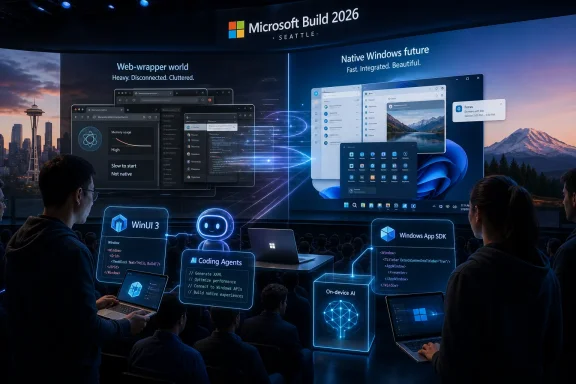
Microsoft used Build 2026 in Seattle to push developers toward modern native Windows 11 apps, pairing WinUI 3, Windows App SDK tooling, AI-assisted coding agents, and new developer hardware into a broader campaign to make Windows feel faster, more coherent, and less like a shell around web views. The message is simple enough: Windows cannot regain polish by fixing the Start menu alone. If the platform is going to feel modern again, Microsoft needs the apps around it to stop behaving like imported websites with taskbar icons.
That is a sharper argument than it may sound. For years, Windows users have complained that the operating system feels inconsistent not only because Microsoft redesigned parts of the shell unevenly, but because major applications increasingly arrived as Electron apps, WebView2 wrappers, hybrid stacks, or cross-platform compromises. At Build 2026, Microsoft effectively admitted that developer convenience has become a user-experience problem.
The modern Windows desktop is full of compromises that made sense one team at a time and became maddening in aggregate. A web-based app can ship quickly across platforms, carry the same interface from macOS to Windows to Linux, and let companies reuse developer talent rather than rebuild for every operating system. The bill comes later, in memory usage, startup time, battery life, accessibility quirks, uneven animations, strange window behavior, and an uncanny feeling that the app is visiting Windows rather than living there.
Microsoft helped create that world. It championed WebView2, pushed cross-platform development stories, let parts of Windows drift into inconsistent UI territory, and repeatedly reset its own native app strategy. Win32 remained the compatibility bedrock, UWP rose and receded, Project Reunion became the Windows App SDK, and WinUI 3 arrived with promise but also with enough friction to make many developers wait rather than bet their business on yet another Microsoft UI roadmap.
Build 2026 matters because Microsoft’s pitch has changed from “here is another framework” to “we need native Windows apps because the platform experience depends on it.” That is a platform-owner argument, not merely a developer-tooling announcement. It says Windows’ perceived quality is inseparable from the apps users touch every day.
The company’s Windows K2 effort, as described in recent reporting, is the internal expression of that same idea. Rebuilding components such as the Start menu with native Windows technologies may improve Microsoft’s own house, but the operating system’s reputation is not set only by the shell. It is set when Slack opens, when a notes app scrolls, when a settings panel animates, when a background helper eats memory, and when a laptop fan starts because three “desktop” apps are each carrying a browser engine.
That is why the Build message is both overdue and risky. Microsoft is asking developers to trust a Windows-native direction after spending years teaching them that the safest bet was abstraction.
That sounds tidy in a keynote. In practice, Windows developers remember every previous tidy answer.
The challenge for WinUI 3 is not merely technical maturity. It is confidence. Developers can work around missing controls, awkward packaging, documentation gaps, and migration pain if they believe the platform is going somewhere durable. What they cannot easily absorb is strategic whiplash. A company choosing a UI stack for a serious Windows app is making a multi-year maintenance decision, not choosing a skin.
Microsoft’s Build sessions around native apps therefore carry a subtext: the company has to prove that WinUI 3 is not another scenic stop on the way to something else. The Windows App SDK gives Microsoft a way to update components outside the strict cadence of Windows itself, which should make the platform more agile. But agility is not the same as stability, and enterprise developers in particular will want to see a long support horizon, predictable behavior, and migration paths that do not turn every app modernization project into archeology.
This is where performance becomes more than a benchmark claim. If Microsoft can make WinUI 3 apps start faster, animate more smoothly, consume less memory, and integrate more naturally with Windows 11, it gives developers a visible payoff for choosing the native path. If users can feel the difference, the framework stops being an ideological preference and becomes a product advantage.
That is the bar. WinUI 3 does not need to win every cross-platform argument. It needs to make Windows apps feel unmistakably better on Windows.
The WinUI agent plugin for GitHub Copilot and Claude Code is a tacit acknowledgment that modern Windows development has become too specialized for general-purpose coding assistants to handle reliably. Generic models can produce plausible XAML, stale API usage, confused packaging advice, or code that looks right until it hits the realities of the Windows App SDK. Microsoft’s answer is to feed agents structured Windows development knowledge so they can scaffold, migrate, test, package, and debug WinUI apps with fewer hallucinated detours.
That is a clever move, and also a telling one. The pitch is not “Windows development is simple now.” The pitch is “the agent knows the maze.”
There is nothing inherently wrong with that. Developers already rely on IDEs, analyzers, templates, documentation servers, and build tools to hide complexity. A specialized agent is a logical next layer. If it can catch outdated UWP patterns, guide a migration away from legacy APIs, wire up packaging correctly, and help drive UI tests from the command line, it may remove enough friction to make native Windows development feel viable again.
But AI assistance cannot become a cover for platform complexity that should have been solved directly. If a human developer needs an agent to remember which activation path applies, which namespace is obsolete, or why an app behaves differently when packaged, that may be acceptable for advanced cases. It is less acceptable if it becomes the normal entry fee for building a polished desktop app.
Microsoft is betting that developers will tolerate the complexity if the tools make the happy path smooth. That bet may be right, especially in a world where agent-assisted programming is rapidly becoming normal. But it also means Microsoft’s Windows-native revival is tied to the credibility of AI tooling at precisely the moment developers are learning both how useful and how unreliable those tools can be.
But the Start menu is not the whole problem. It is the most visible place where users feel a broader malaise: Windows 11 can look modern while feeling internally inconsistent. Some surfaces are fast and crisp. Others feel layered, delayed, or oddly web-like. Settings, search, widgets, store experiences, inbox apps, and third-party utilities can each carry a different design and performance personality.
A native Start menu can improve the first five minutes of using the PC. Native third-party apps improve the next eight hours.
That distinction matters because Microsoft has often tried to solve Windows perception problems with marquee shell changes. New taskbar, new icons, new animations, new Copilot entry points, new widgets, new settings surfaces. Those changes matter, but they do not fully address the daily friction of opening apps that feel bloated or alien to the platform.
The K2 framing suggests Microsoft understands this more clearly now. Fixing Windows requires tightening the operating system and persuading the ecosystem to meet it halfway. The latter is harder. Microsoft can order its own teams to build native components. It cannot order every software company to abandon a cross-platform app stack that saves money.
So the Build 2026 strategy is persuasion by tooling. Make WinUI 3 easier. Make agents smarter. Make templates better. Make performance more visible. Make local AI and Windows-native APIs tempting enough that developers see upside rather than obligation.
A company building for Windows, macOS, Linux, and the web can staff one front-end team around web technologies and ship everywhere. It can share UI components, iterate quickly, and avoid waiting for a platform owner to clarify which native stack is blessed this decade. For venture-backed apps, SaaS products, internal enterprise tools, and communication platforms, that calculus is powerful.
Windows also has a uniquely heavy past. The platform’s greatest strength, compatibility, is also part of why its modern development story can feel cluttered. Win32, .NET, WPF, WinForms, UWP remnants, Windows App SDK, WinUI, WebView2, MSIX, unpackaged apps, Store distribution, enterprise deployment, driver policies, and security models all coexist. That richness lets old software survive, but it can make new software decisions feel less like choosing a road and more like choosing a geological layer.
Microsoft’s agent-based push is designed to reduce that decision fatigue, but it does not erase the business logic behind cross-platform frameworks. A polished native Windows app may delight users, but if it requires a separate team, a separate release process, and separate bug classes, many companies will still choose “good enough everywhere.”
That is why Microsoft needs to offer more than aesthetics. Native Windows development must provide concrete wins: lower resource usage, better accessibility integration, richer windowing, more reliable notifications, local AI APIs, better power behavior, stronger Store and enterprise deployment options, and tooling that does not punish small teams. Without those wins, native becomes a moral appeal. Moral appeals rarely beat budget spreadsheets.
At Build 2026, Microsoft’s broader Windows developer message leaned heavily into Windows as a trusted platform for AI development. That includes local model execution, Windows AI APIs, agent workflows, and new classes of hardware capable of running substantial workloads on-device. The Surface Laptop Ultra and NVIDIA’s RTX Spark platform fit neatly into that vision: a Windows machine that is not merely a thin client for cloud intelligence but a local workstation for agents, models, creative tools, and developer loops.
This changes the case for native apps. A web wrapper can display an AI feature. A native app can integrate more deeply with local hardware, system services, files, notifications, windowing, input, security boundaries, and on-device models. If AI agents are going to observe app state, automate workflows, process local data, and coordinate across the desktop, the quality of OS integration starts to matter more.
Microsoft clearly wants Windows to be the place where developers build and run agentic software. That ambition requires more than a chatbot button. It requires apps that can expose state safely, participate in system workflows, and use local compute without feeling like a browser tab wearing a trench coat.
The Surface Laptop Ultra is part symbol and part practical answer. With high memory ceilings and NVIDIA’s AI-focused silicon, it represents the hardware side of Microsoft’s argument: developers will need powerful local machines for agent-heavy work. But hardware alone does not create a platform. If the apps remain web shells and the operating system remains uneven, the petaflops become a spec-sheet flourish.
The real opportunity is a three-layer stack: local AI hardware, Windows APIs that expose useful capabilities, and native apps that make those capabilities feel immediate. That is a stronger platform story than “please rewrite your app because Windows fans dislike Electron.”
Microsoft appears to understand this, at least in outline. The Windows App SDK and associated tooling have to work not just for indie developers building showcase apps, but for line-of-business applications with compliance needs and cautious release cycles. Enterprises need predictable installers, clean update channels, telemetry controls, accessibility compliance, and compatibility with device-management systems.
Native apps can be a security and reliability advantage when they avoid bundling large browser runtimes, reduce attack surface, and integrate with Windows identity and policy systems. They can also become a support headache if packaging rules, signing requirements, or framework dependencies are confusing. The deciding factor will not be whether the app is native in a marketing sense. It will be whether the app behaves like a first-class citizen under enterprise management.
There is also a support culture issue. Many enterprise developers still maintain WPF, WinForms, and classic Win32 applications because those technologies work, are understood, and have survived multiple Microsoft platform campaigns. Asking those teams to modernize into WinUI 3 requires credible migration tooling and a clear answer to the obvious question: what will Microsoft still be pushing in 2031?
That is where the agent story could matter most. If specialized tools can analyze old codebases, untangle dependencies, suggest migration paths, and reduce the blast radius of modernization, Microsoft may find a receptive audience among organizations that want better Windows apps but cannot justify rewrites. The phrase app modernization is usually a euphemism for risk. Microsoft’s job is to make it feel like risk reduction.
That is why the reported creation of a team focused on “100% native” Windows apps and experiences matters. It suggests Microsoft knows the credibility problem starts at home. The company cannot demand native excellence from third parties while shipping inbox experiences that feel like compromises.
The Microsoft Store has often been cited as an example of a modern Windows app that feels more aligned with the platform. Whether or not every user loves the Store, the point is that Microsoft needs more canonical examples: apps that show how WinUI 3 handles navigation, density, theming, accessibility, performance, notifications, search, and packaging at real-world scale.
At the same time, Microsoft must avoid making native Windows development feel like a club whose best patterns are hidden inside Redmond. One longstanding complaint from developers is that Microsoft’s flagship apps sometimes use internal controls, private APIs, or bespoke frameworks that outsiders cannot access. If Build 2026 is a true ecosystem push, Microsoft needs to put the good stuff in public tools, public samples, and public guidance.
Open sourcing more of the UI stack, improving templates, and giving agents current knowledge are all moves in that direction. But the deeper test is whether a small team can build a polished app that feels Microsoft-grade without reverse engineering Microsoft’s own products. Native Windows should not mean “native if you work at Microsoft.”
Users will not care whether an app is WinUI 3, WPF, Win32, Electron, React Native, Flutter, or something else if it launches instantly, respects system settings, uses reasonable memory, handles accessibility properly, updates cleanly, and feels at home. Developers know this, which is why they may resist framework evangelism that sounds detached from user outcomes.
Microsoft’s strongest argument, therefore, is not that WinUI 3 is virtuous. It is that native Windows development can make the PC better in measurable, visible ways. Faster startup. Lower idle memory. Better battery life. Smoother scrolling. Correct dark mode. Proper high-DPI behavior. Reliable notifications. Cleaner window management. Better touch and pen support. Stronger local AI integration.
The company’s weakest argument would be any version of “because Microsoft says so.”
There is also a timing problem. AI is consuming developer attention, hardware budgets, and executive imagination. By tying WinUI modernization to AI agents, Microsoft may make native Windows development feel newly relevant. But it may also bury the plain old desktop-quality message under another wave of AI branding. Plenty of Windows users do not need an agentic future to justify native apps. They need apps that stop taking five seconds to open a settings page.
The smartest version of Microsoft’s campaign keeps those two ideas connected but distinct. AI may be the growth story. Responsiveness is the trust story.
For Windows enthusiasts, the temptation is to declare victory as soon as Microsoft says the right words. That would be premature. The platform has heard the right words before.
For developers, the temptation is to dismiss the whole thing as another Microsoft cycle. That may also be premature. AI-assisted tooling, local model APIs, and renewed internal pressure to make Windows feel native could make this push more consequential than earlier attempts.
The practical read is more conditional than celebratory:
That is a sharper argument than it may sound. For years, Windows users have complained that the operating system feels inconsistent not only because Microsoft redesigned parts of the shell unevenly, but because major applications increasingly arrived as Electron apps, WebView2 wrappers, hybrid stacks, or cross-platform compromises. At Build 2026, Microsoft effectively admitted that developer convenience has become a user-experience problem.
 Microsoft Is No Longer Pretending the Web Wrapper Era Was Free
The modern Windows desktop is full of compromises that made sense one team at a time and became maddening in aggregate. A web-based app can ship quickly across platforms, carry the same interface from macOS to Windows to Linux, and let companies reuse developer talent rather than rebuild for every operating system. The bill comes later, in memory usage, startup time, battery life, accessibility quirks, uneven animations, strange window behavior, and an uncanny feeling that the app is visiting Windows rather than living there.Microsoft helped create that world. It championed WebView2, pushed cross-platform development stories, let parts of Windows drift into inconsistent UI territory, and repeatedly reset its own native app strategy. Win32 remained the compatibility bedrock, UWP rose and receded, Project Reunion became the Windows App SDK, and WinUI 3 arrived with promise but also with enough friction to make many developers wait rather than bet their business on yet another Microsoft UI roadmap.
Build 2026 matters because Microsoft’s pitch has changed from “here is another framework” to “we need native Windows apps because the platform experience depends on it.” That is a platform-owner argument, not merely a developer-tooling announcement. It says Windows’ perceived quality is inseparable from the apps users touch every day.
The company’s Windows K2 effort, as described in recent reporting, is the internal expression of that same idea. Rebuilding components such as the Start menu with native Windows technologies may improve Microsoft’s own house, but the operating system’s reputation is not set only by the shell. It is set when Slack opens, when a notes app scrolls, when a settings panel animates, when a background helper eats memory, and when a laptop fan starts because three “desktop” apps are each carrying a browser engine.
That is why the Build message is both overdue and risky. Microsoft is asking developers to trust a Windows-native direction after spending years teaching them that the safest bet was abstraction.
WinUI 3 Becomes the Test of Microsoft’s Seriousness
WinUI 3 sits at the center of the new pitch because it is Microsoft’s current answer to a question Windows developers have been asking for too long: what is the modern native UI stack for desktop apps? In Microsoft’s telling, the answer is WinUI 3 through the Windows App SDK, with updated templates, command-line tooling, agent guidance, and a renewed focus on performance.That sounds tidy in a keynote. In practice, Windows developers remember every previous tidy answer.
The challenge for WinUI 3 is not merely technical maturity. It is confidence. Developers can work around missing controls, awkward packaging, documentation gaps, and migration pain if they believe the platform is going somewhere durable. What they cannot easily absorb is strategic whiplash. A company choosing a UI stack for a serious Windows app is making a multi-year maintenance decision, not choosing a skin.
Microsoft’s Build sessions around native apps therefore carry a subtext: the company has to prove that WinUI 3 is not another scenic stop on the way to something else. The Windows App SDK gives Microsoft a way to update components outside the strict cadence of Windows itself, which should make the platform more agile. But agility is not the same as stability, and enterprise developers in particular will want to see a long support horizon, predictable behavior, and migration paths that do not turn every app modernization project into archeology.
This is where performance becomes more than a benchmark claim. If Microsoft can make WinUI 3 apps start faster, animate more smoothly, consume less memory, and integrate more naturally with Windows 11, it gives developers a visible payoff for choosing the native path. If users can feel the difference, the framework stops being an ideological preference and becomes a product advantage.
That is the bar. WinUI 3 does not need to win every cross-platform argument. It needs to make Windows apps feel unmistakably better on Windows.
AI Agents Are Microsoft’s Shortcut Around Its Own Complexity
The most revealing Build 2026 detail is not that Microsoft wants more WinUI 3 apps. It is that Microsoft is using AI agents to help developers build them.The WinUI agent plugin for GitHub Copilot and Claude Code is a tacit acknowledgment that modern Windows development has become too specialized for general-purpose coding assistants to handle reliably. Generic models can produce plausible XAML, stale API usage, confused packaging advice, or code that looks right until it hits the realities of the Windows App SDK. Microsoft’s answer is to feed agents structured Windows development knowledge so they can scaffold, migrate, test, package, and debug WinUI apps with fewer hallucinated detours.
That is a clever move, and also a telling one. The pitch is not “Windows development is simple now.” The pitch is “the agent knows the maze.”
There is nothing inherently wrong with that. Developers already rely on IDEs, analyzers, templates, documentation servers, and build tools to hide complexity. A specialized agent is a logical next layer. If it can catch outdated UWP patterns, guide a migration away from legacy APIs, wire up packaging correctly, and help drive UI tests from the command line, it may remove enough friction to make native Windows development feel viable again.
But AI assistance cannot become a cover for platform complexity that should have been solved directly. If a human developer needs an agent to remember which activation path applies, which namespace is obsolete, or why an app behaves differently when packaged, that may be acceptable for advanced cases. It is less acceptable if it becomes the normal entry fee for building a polished desktop app.
Microsoft is betting that developers will tolerate the complexity if the tools make the happy path smooth. That bet may be right, especially in a world where agent-assisted programming is rapidly becoming normal. But it also means Microsoft’s Windows-native revival is tied to the credibility of AI tooling at precisely the moment developers are learning both how useful and how unreliable those tools can be.
The Start Menu Is the Symbol, Not the Strategy
The Start menu keeps surfacing in this story because it is the perfect Windows 11 proxy. It is central, heavily used, emotionally loaded, and frequently cited as evidence that Microsoft lost the thread on responsiveness and coherence. If Microsoft rebuilds or modernizes pieces of it using native Windows components, users will notice.But the Start menu is not the whole problem. It is the most visible place where users feel a broader malaise: Windows 11 can look modern while feeling internally inconsistent. Some surfaces are fast and crisp. Others feel layered, delayed, or oddly web-like. Settings, search, widgets, store experiences, inbox apps, and third-party utilities can each carry a different design and performance personality.
A native Start menu can improve the first five minutes of using the PC. Native third-party apps improve the next eight hours.
That distinction matters because Microsoft has often tried to solve Windows perception problems with marquee shell changes. New taskbar, new icons, new animations, new Copilot entry points, new widgets, new settings surfaces. Those changes matter, but they do not fully address the daily friction of opening apps that feel bloated or alien to the platform.
The K2 framing suggests Microsoft understands this more clearly now. Fixing Windows requires tightening the operating system and persuading the ecosystem to meet it halfway. The latter is harder. Microsoft can order its own teams to build native components. It cannot order every software company to abandon a cross-platform app stack that saves money.
So the Build 2026 strategy is persuasion by tooling. Make WinUI 3 easier. Make agents smarter. Make templates better. Make performance more visible. Make local AI and Windows-native APIs tempting enough that developers see upside rather than obligation.
Developers Have Rational Reasons to Resist
It is tempting to frame native Windows apps as an obvious good and web wrappers as lazy engineering. That is emotionally satisfying and often technically simplistic. Developers did not flock to cross-platform stacks because they hate Windows users. They did it because the software business rewards reach, velocity, and maintainability.A company building for Windows, macOS, Linux, and the web can staff one front-end team around web technologies and ship everywhere. It can share UI components, iterate quickly, and avoid waiting for a platform owner to clarify which native stack is blessed this decade. For venture-backed apps, SaaS products, internal enterprise tools, and communication platforms, that calculus is powerful.
Windows also has a uniquely heavy past. The platform’s greatest strength, compatibility, is also part of why its modern development story can feel cluttered. Win32, .NET, WPF, WinForms, UWP remnants, Windows App SDK, WinUI, WebView2, MSIX, unpackaged apps, Store distribution, enterprise deployment, driver policies, and security models all coexist. That richness lets old software survive, but it can make new software decisions feel less like choosing a road and more like choosing a geological layer.
Microsoft’s agent-based push is designed to reduce that decision fatigue, but it does not erase the business logic behind cross-platform frameworks. A polished native Windows app may delight users, but if it requires a separate team, a separate release process, and separate bug classes, many companies will still choose “good enough everywhere.”
That is why Microsoft needs to offer more than aesthetics. Native Windows development must provide concrete wins: lower resource usage, better accessibility integration, richer windowing, more reliable notifications, local AI APIs, better power behavior, stronger Store and enterprise deployment options, and tooling that does not punish small teams. Without those wins, native becomes a moral appeal. Moral appeals rarely beat budget spreadsheets.
Local AI Gives Native Apps a New Reason to Exist
The most interesting version of Microsoft’s native-app argument is not nostalgia for snappy desktop software. It is the connection between native apps and local AI.At Build 2026, Microsoft’s broader Windows developer message leaned heavily into Windows as a trusted platform for AI development. That includes local model execution, Windows AI APIs, agent workflows, and new classes of hardware capable of running substantial workloads on-device. The Surface Laptop Ultra and NVIDIA’s RTX Spark platform fit neatly into that vision: a Windows machine that is not merely a thin client for cloud intelligence but a local workstation for agents, models, creative tools, and developer loops.
This changes the case for native apps. A web wrapper can display an AI feature. A native app can integrate more deeply with local hardware, system services, files, notifications, windowing, input, security boundaries, and on-device models. If AI agents are going to observe app state, automate workflows, process local data, and coordinate across the desktop, the quality of OS integration starts to matter more.
Microsoft clearly wants Windows to be the place where developers build and run agentic software. That ambition requires more than a chatbot button. It requires apps that can expose state safely, participate in system workflows, and use local compute without feeling like a browser tab wearing a trench coat.
The Surface Laptop Ultra is part symbol and part practical answer. With high memory ceilings and NVIDIA’s AI-focused silicon, it represents the hardware side of Microsoft’s argument: developers will need powerful local machines for agent-heavy work. But hardware alone does not create a platform. If the apps remain web shells and the operating system remains uneven, the petaflops become a spec-sheet flourish.
The real opportunity is a three-layer stack: local AI hardware, Windows APIs that expose useful capabilities, and native apps that make those capabilities feel immediate. That is a stronger platform story than “please rewrite your app because Windows fans dislike Electron.”
The Enterprise Angle Is Less Glamorous and More Important
For sysadmins and IT pros, the native-app push raises a different set of questions. Performance and polish are welcome, but enterprise Windows lives and dies by manageability, security, deployment, update behavior, and supportability. A beautiful WinUI app that complicates packaging or breaks automation will not win many friends in a fleet of 20,000 PCs.Microsoft appears to understand this, at least in outline. The Windows App SDK and associated tooling have to work not just for indie developers building showcase apps, but for line-of-business applications with compliance needs and cautious release cycles. Enterprises need predictable installers, clean update channels, telemetry controls, accessibility compliance, and compatibility with device-management systems.
Native apps can be a security and reliability advantage when they avoid bundling large browser runtimes, reduce attack surface, and integrate with Windows identity and policy systems. They can also become a support headache if packaging rules, signing requirements, or framework dependencies are confusing. The deciding factor will not be whether the app is native in a marketing sense. It will be whether the app behaves like a first-class citizen under enterprise management.
There is also a support culture issue. Many enterprise developers still maintain WPF, WinForms, and classic Win32 applications because those technologies work, are understood, and have survived multiple Microsoft platform campaigns. Asking those teams to modernize into WinUI 3 requires credible migration tooling and a clear answer to the obvious question: what will Microsoft still be pushing in 2031?
That is where the agent story could matter most. If specialized tools can analyze old codebases, untangle dependencies, suggest migration paths, and reduce the blast radius of modernization, Microsoft may find a receptive audience among organizations that want better Windows apps but cannot justify rewrites. The phrase app modernization is usually a euphemism for risk. Microsoft’s job is to make it feel like risk reduction.
Microsoft Has to Lead Without Crowding the Ecosystem
One of the awkward truths of Windows development is that Microsoft’s own apps are often the most persuasive documentation. Developers study what Microsoft ships, not just what Microsoft says. If the best Windows experiences are native, responsive, accessible, and consistent, the ecosystem gets a pattern to imitate. If Microsoft’s own apps are a mixture of web shells, legacy panels, and one-off design systems, developers hear the keynote and follow the product.That is why the reported creation of a team focused on “100% native” Windows apps and experiences matters. It suggests Microsoft knows the credibility problem starts at home. The company cannot demand native excellence from third parties while shipping inbox experiences that feel like compromises.
The Microsoft Store has often been cited as an example of a modern Windows app that feels more aligned with the platform. Whether or not every user loves the Store, the point is that Microsoft needs more canonical examples: apps that show how WinUI 3 handles navigation, density, theming, accessibility, performance, notifications, search, and packaging at real-world scale.
At the same time, Microsoft must avoid making native Windows development feel like a club whose best patterns are hidden inside Redmond. One longstanding complaint from developers is that Microsoft’s flagship apps sometimes use internal controls, private APIs, or bespoke frameworks that outsiders cannot access. If Build 2026 is a true ecosystem push, Microsoft needs to put the good stuff in public tools, public samples, and public guidance.
Open sourcing more of the UI stack, improving templates, and giving agents current knowledge are all moves in that direction. But the deeper test is whether a small team can build a polished app that feels Microsoft-grade without reverse engineering Microsoft’s own products. Native Windows should not mean “native if you work at Microsoft.”
The Risk Is Another Developer Campaign That Users Never Feel
Windows has had many renewal stories. Some were real. Some became branding layers over the same underlying complexity. The danger for Build 2026 is that native apps become another slogan: a thing everyone agrees sounds good while the ecosystem continues shipping what economics reward.Users will not care whether an app is WinUI 3, WPF, Win32, Electron, React Native, Flutter, or something else if it launches instantly, respects system settings, uses reasonable memory, handles accessibility properly, updates cleanly, and feels at home. Developers know this, which is why they may resist framework evangelism that sounds detached from user outcomes.
Microsoft’s strongest argument, therefore, is not that WinUI 3 is virtuous. It is that native Windows development can make the PC better in measurable, visible ways. Faster startup. Lower idle memory. Better battery life. Smoother scrolling. Correct dark mode. Proper high-DPI behavior. Reliable notifications. Cleaner window management. Better touch and pen support. Stronger local AI integration.
The company’s weakest argument would be any version of “because Microsoft says so.”
There is also a timing problem. AI is consuming developer attention, hardware budgets, and executive imagination. By tying WinUI modernization to AI agents, Microsoft may make native Windows development feel newly relevant. But it may also bury the plain old desktop-quality message under another wave of AI branding. Plenty of Windows users do not need an agentic future to justify native apps. They need apps that stop taking five seconds to open a settings page.
The smartest version of Microsoft’s campaign keeps those two ideas connected but distinct. AI may be the growth story. Responsiveness is the trust story.
The Native Windows Bet Now Has Receipts to Produce
Microsoft’s Build 2026 push should be judged less by the ambition of its sessions than by the evidence users and developers see over the next year. The company has assembled the right ingredients: a modern UI framework, improved templates, command-line tooling, specialized coding agents, local AI APIs, and high-end developer hardware. The hard part is turning those ingredients into habits.For Windows enthusiasts, the temptation is to declare victory as soon as Microsoft says the right words. That would be premature. The platform has heard the right words before.
For developers, the temptation is to dismiss the whole thing as another Microsoft cycle. That may also be premature. AI-assisted tooling, local model APIs, and renewed internal pressure to make Windows feel native could make this push more consequential than earlier attempts.
The practical read is more conditional than celebratory:
- Microsoft is making WinUI 3 and the Windows App SDK the centerpiece of its modern native Windows app story, not a side road for enthusiasts.
- The new agent tooling is meant to compensate for the complexity of Windows development by giving Copilot and Claude Code current, Windows-specific guidance.
- The Windows K2 effort makes native components a Windows quality issue, not merely a developer preference.
- Surface Laptop Ultra and RTX Spark show that Microsoft wants Windows to be a local AI development workstation, not just a cloud-connected client.
- Third-party adoption will depend on business incentives, not sentiment, so Microsoft must prove native apps save time, improve performance, or unlock capabilities developers cannot get elsewhere.
- Enterprise success will require boring excellence in packaging, deployment, security, accessibility, and long-term support.
References
- Primary source: Windows Central
Published: Wed, 03 Jun 2026 15:00:00 GMT
Microsoft uses Build 2026 to push developers toward fully native Windows apps, not web wrappers, with new tools and a clearer roadmap | Windows Central
Microsoft wants more WinUI 3 apps across Windows 11, and Build 2026 shows how developers can get there with new tools, agents, and hardware.www.windowscentral.com - Related coverage: techradar.com
From code-first to intent-first: Microsoft Build 2026 could be the end of programming as we know it | TechRadar
Redefining what it means to be a developer with agentic AIwww.techradar.com - Official source: learn.microsoft.com
WinUI agent plugin for GitHub Copilot CLI and Claude Code - Windows apps | Microsoft Learn
Use the winui@awesome-copilot plugin to give the GitHub Copilot CLI or Claude Code accurate WinUI 3 knowledge — including 8 specialized skills and a dedicated winui-dev agent for end-to-end Windows app development.learn.microsoft.com - Related coverage: windowslatest.com
Microsoft plans to build 100% native apps for Windows 11, as web apps ruin the OS experience
Microsoft has confirmed it will build 100% native apps for Windows 11 and form a new team to spearhead the project. www.windowslatest.com
- Related coverage: windowsreport.com
Microsoft Pushes WinUI-Native Windows Apps With New AI Coding Agent
Microsoft introduced a new WinUI AI coding agent to help developers build faster and cleaner native Windows 11 apps. windowsreport.com
- Official source: blogs.windows.com
Build 2026: Furthering Windows as the trusted platform for development
Build is one of our favorite moments each year - a chance to connect with the global developer community and share what we’ve been building. Over the past year, we have connected with many developers pushing the boundaries of what’s possible onblogs.windows.com
- Related coverage: notebookcheck.org
El impulso de Microsoft a WinUI 3 añade peso al informe de un equipo nativo de Windows - NotebookCheck.org News
Según los informes, Microsoft está construyendo un esfuerzo más nativo de aplicaciones de Windows, y la propia hoja de ruta de Windows 11 de la compañía ya confirma un impulso más amplio para mover más experiencias básicas a WinUI 3 www.notebookcheck.org
- Official source: devblogs.microsoft.com
Introducing WinUI agent plugin for GitHub Copilot and Claude Code - #ifdef Windows
iscover AI-powered WinUI development with GitHub Copilot and Claude Code. These new agent skills help you scaffold, build, run, test, and ship native Windows apps with WinUI 3 and the Windows App SDK faster than ever.devblogs.microsoft.com - Related coverage: pcworld.com
No Windows 12 at Build, but Microsoft has something else up its sleeve | PCWorld
Microsoft's Pavan Davuluri confirmed Windows 12 won't appear at Build 2026, but the new Surface Laptop Ultra with Nvidia N1X might steal the show.www.pcworld.com - Related coverage: notebookcheck.net
Microsoft’s WinUI 3 push adds weight to report of a native Windows team - Notebookcheck News
Microsoft is reportedly building a more native Windows apps effort, and the company’s own Windows 11 roadmap already confirms a broader push to move more core experiences to WinUI 3. www.notebookcheck.net
- Related coverage: tomshardware.com
- Related coverage: techspot.com
Microsoft unveils Surface Laptop Ultra with Nvidia RTX Spark chip and up to 128GB of RAM | TechSpot
The Surface Laptop Ultra features a standard design, without the more experimental elements seen in earlier Surface devices. That means it does not include a removable display...www.techspot.com - Related coverage: winbuzzer.com
Microsoft Unveils Surface Laptop Ultra With Nvidia RTX Spark Superchip
Microsoft has unveiled Surface Laptop Ultra with Nvidia RTX Spark, bringing up to 128GB RAM and local AI power to its flagship Windows on ARM laptops. winbuzzer.com
- Related coverage: digitaltrends.com
Microsoft introduces Surface Laptop Ultra with Nvidia's RTX Spark chip inside - Digital Trends
Microsoft just announced the Surface Laptop Ultra, its most powerful laptop ever. It can run heavy AI workloads entirely on the device, no cloud required, and still last all day on a single charge.www.digitaltrends.com - Related coverage: gadgetsnow.indiatimes.com
Microsoft Surface Laptop Ultra Debuts With NVIDIA RTX Spark And 128GB Unified Memory
gadgetsnow.indiatimes.com
- Related coverage: technobezz.com
Microsoft Introduces Surface Laptop Ultra with NVIDIA RTX Spark at Computex 2026 | Technobezz
Microsoft s Surface Laptop Ultra, powered by NVIDIA s RTX Spark, delivers a 1-petaflop AI workstation with 120-billion-parameter local model support in .www.technobezz.com - Related coverage: axios.com
Microsoft debuts Nvidia-powered Microsoft Surface Ultra laptop
Microsoft is trying again to redefine the PC for the AI era.www.axios.com
- Related coverage: aiweekly.co

