

As of June 2026, IT teams trying to disable built-in AI features across Microsoft 365, Windows, Edge, Google Workspace, Chrome, and Apple devices are finding that the controls exist, but they are scattered across admin portals, group policies, browser policies, MDM payloads, licensing decisions, and network filters. The practical story is not that Copilot, Gemini, or Apple Intelligence cannot be governed. It is that the governance model is arriving after the deployment model, and administrators are being asked to retrofit control onto features that vendors increasingly treat as ambient.
That mismatch is why the current scramble matters. Built-in AI is no longer a separate application that procurement can approve, security can assess, and desktop engineering can package. It is becoming part of the default surface area of productivity software, browsers, search boxes, developer tools, mobile operating systems, and collaboration clients. For organizations that still think of AI as a pilot project, the uncomfortable truth is that the pilot may already be running.
Enterprise software used to enter the workplace through a relatively legible path. A vendor sold a license, IT packaged an installer, security reviewed the data flow, and users were granted access through a group or role. That model was never as tidy as the diagrams suggested, but it gave administrators a fighting chance.
Generative AI has broken that sequence. Microsoft, Google, and Apple are not merely offering standalone AI products; they are embedding assistants into the tools employees already use. A sidebar in a browser, a writing aid in a document editor, a summary button in an email client, or an image-generation feature in a mobile OS can appear as a product update rather than a new application.
That subtle packaging shift has real consequences. If AI arrives as a default capability inside an already approved suite, the burden moves from “should we deploy this?” to “how do we remove or constrain the pieces we did not explicitly approve?” In heavily regulated organizations, that inversion is not a paperwork nuisance. It changes the risk posture.
Security teams are not only worried about vendors training models on customer data, though that concern remains common. They are worried about prompt content, accidental disclosure, unreviewed plugins, cross-service context, browser telemetry, screenshots, meeting transcripts, document summaries, developer console diagnostics, and employees pasting confidential material into tools whose boundaries they do not understand.
The result is a new administrative chore: AI suppression. It is not glamorous, and it is not usually discussed in product keynotes. But for many enterprises, suppressing AI features has become as operationally important as enabling them.
That fragmentation is the first trap. Disabling one Copilot experience does not necessarily disable another. A tenant may restrict Microsoft 365 Copilot licenses while users still see Copilot Chat. An administrator may remove a button from Office while a web endpoint remains reachable. A browser policy may hide the sidebar while another entry point appears on the new tab page or in a Microsoft 365 app.
The second trap is that Microsoft’s own administrative guidance increasingly assumes Copilot is part of the Microsoft 365 fabric. That makes sense from Redmond’s perspective: Copilot is supposed to work across Outlook, Teams, Word, Excel, PowerPoint, and the Microsoft 365 app. But for administrators trying to draw a hard boundary, integration is exactly the problem.
The usual first step is visibility. Microsoft 365 admins can look at Copilot usage reporting to understand who is using the service and how often. That matters because AI governance without telemetry quickly becomes theater. A policy that looks correct in the admin center may not cover every client, every identity type, or every route to the service.
The next layer is license and app control. Microsoft 365 Copilot remains a paid add-on in many enterprise contexts, so simply not assigning the relevant SKU is still one of the cleanest controls. It is also one of the few AI decisions that finance and security can agree on instantly: if users are not licensed, the organization is not paying for features it does not want and is not expanding access unintentionally.
But licensing alone is not a universal kill switch. Copilot Chat complicates the picture because it can be available through Microsoft 365 surfaces and web endpoints even where the full Microsoft 365 Copilot experience is not licensed. Administrators therefore have to treat Copilot Chat as a separate control problem, not as a minor subset of the paid Copilot product.
Windows Copilot can be managed through Group Policy, including the Windows Components policy area for Windows Copilot. Organizations can also use Microsoft 365 cloud policy controls such as blocking consumer Copilot for organizational accounts. Those settings matter because the risk is not limited to whether an AI assistant exists, but whether users can reach consumer-grade experiences with corporate identities or corporate data.
Edge adds another layer of knobs. The Copilot sidebar, shopping assistant, page context, new tab page integrations, Microsoft 365 Copilot Chat icon, and local generative AI model controls can each require policy attention. This is where administrators start to feel less like they are turning off a product and more like they are defusing a control panel.
The values themselves can be unintuitive. Some settings use false or disabled. Others use numeric values where “1” may mean a particular restricted state rather than the universal “off” that an exhausted admin might expect. That is not unusual in enterprise policy land, but it becomes more error-prone when the policies govern data-sensitive AI features rather than cosmetic browser behavior.
Network blocking is the tempting blunt instrument. Blocking Copilot-related domains at the firewall, secure web gateway, or DNS layer can provide a second line of defense, especially where devices are tightly managed and traffic routes through corporate infrastructure. But Microsoft warns that network-level restrictions can have unpredictable side effects because Copilot endpoints are intertwined with Microsoft 365 services.
That warning should not be dismissed as vendor hand-wringing. Modern SaaS platforms share authentication, telemetry, content delivery, and service endpoints across features. A domain block that silences an AI chat box today can break a collaboration feature tomorrow, and the failure mode may not look obviously related to the block. For enterprise IT, the correct question is not “can we block the domain?” but “what else depends on this domain, and how will we know when it breaks?”
On paper, that separation is tidier than Microsoft’s web of Copilot surfaces. Workspace is the productivity suite; Chrome is the browser. In practice, most enterprises do not experience Chrome as just a browser. It is a runtime, a password manager, a policy target, an identity surface, a developer tool, and a gateway to shadow SaaS.
The Chrome DevTools AI setting is a good example of why security teams are paying attention. Developer tools can contain error messages, stack traces, code snippets, and network request details. Even when vendors exclude the most sensitive headers or response bodies, the surrounding diagnostic context can still reveal internal hostnames, application logic, proprietary code paths, and operational details.
That makes browser AI qualitatively different from a friendly writing assistant. A generative feature in DevTools is aimed at productivity, but it sits near information that many organizations would not casually send to an external service. For engineering-heavy companies, AI controls in Chrome are not a side issue. They are part of source-code and application-security governance.
Google’s numeric policy values also require care. In several Chrome Enterprise AI policies, the difference between allowing a feature, allowing it without model-improvement use, and disabling it is expressed through integers rather than plain-language toggles. Admins who manage Chrome at scale are used to this. But the wider audience now involved in AI governance — legal, compliance, risk, privacy, procurement — may not be.
Network blocking is again the backstop. Blocking Gemini, Bard-era, and AI Studio endpoints can reduce the chance that users reach Google’s AI services outside approved paths. But domain blocking has the same structural weakness here that it has in Microsoft’s world: it works best as a compensating control, not as the primary policy model.
A further complication is unmanaged Chromium. If an organization only governs the official Chrome installation but allows users to run portable Chromium builds, alternative browsers, or unmanaged profiles, the policy story falls apart. That is why application control, endpoint detection, and software inventory remain central to AI governance. The AI assistant may be new; the weak spot is the same old unmanaged endpoint.
The upside is precision. A school, hospital, law firm, or government office may want to disable external intelligence integrations while allowing less sensitive local features. A creative department may tolerate image tools while a legal department refuses summarization. Granular MDM controls allow those distinctions.
The downside is administrative exposure. If there is no single “turn off Apple Intelligence” button, then the organization’s risk depends on whether every relevant key is known, configured, deployed, and maintained. Miss one capability, and the posture may not match the policy statement.
Apple also changes the network-control calculation. A managed Mac on a corporate network can be constrained through DNS filtering, secure web gateways, and firewall rules. But iPhones and iPads are mobile by design. They leave the building, join home Wi-Fi, roam onto cellular networks, and operate in conditions where corporate network blocks may not apply.
That makes MDM not just the preferred control for Apple Intelligence, but the reliable one. If the restriction is not on the device, it may not exist when the user is away from the corporate network. For organizations that still treat mobile device management as an email-enrollment convenience, Apple Intelligence is another reminder that mobile governance is now data governance.
Apple’s posture also exposes a philosophical split. Microsoft and Google are largely managing AI inside cloud productivity and browser ecosystems. Apple is managing AI as an operating-system capability distributed across personal and corporate contexts. That distinction matters because many Apple devices are either personally owned, lightly managed, or used in hybrid scenarios where the organization’s authority is partial.
The more subtle risk is an unmapped data path. A document summary feature may process privileged attachments. A meeting assistant may extract action items from confidential discussions. A browser assistant may read page context. A developer tool may send stack traces. A writing assistant may transform a draft contract. A mobile transcription feature may turn a hallway conversation into searchable text.
Each example can be defensible if reviewed, approved, logged, and governed. The problem is that built-in AI features often arrive as product affordances, not as separate workflows. Users see a sparkle icon, not a data transfer diagram.
That is why “disable AI” is often a proxy for a deeper governance demand: know where the data goes, who can invoke the feature, what identity is used, what logs are retained, whether prompts and responses are stored, whether humans can review content, whether model training is involved, and what contractual protections apply.
Vendors have improved their enterprise documentation, and many paid enterprise AI offerings include stronger data commitments than consumer services. But those commitments vary by product tier, account type, region, cloud, and feature. The administrator’s job is no longer simply to decide whether Microsoft, Google, or Apple is trustworthy in the abstract. It is to determine which specific feature, under which account, in which client, governed by which policy, sends what data where.
That is a much harder sentence than “turn Copilot off.”
AI product teams are iterating faster than traditional enterprise change windows. A sidebar becomes a chat app. A chat app gains file grounding. A search feature gains page context. A mobile OS update adds new intelligence settings. A browser release adds a generative debugging assistant. A productivity suite changes a pinning default. None of this necessarily requires a new software purchase.
That cadence forces IT to build an ongoing review loop. Security teams need to monitor vendor roadmaps, admin-message centers, release notes, policy templates, and endpoint telemetry. Desktop engineering needs to keep ADMX and browser policy baselines current. Network teams need to know which blocks are deliberate and which outages are accidental. Legal and compliance teams need to understand that “AI disabled” is not a permanent state.
The user-communications piece matters too. If employees see AI buttons disappear without explanation, some will assume IT is being obstructionist and look for workarounds. If they understand that the organization is creating approved AI channels with known protections, suppression becomes easier to defend. The goal should not be anti-AI theater. It should be controlled adoption.
This is especially important because the same organizations racing to disable built-in AI are often experimenting with sanctioned AI tools elsewhere. That is not hypocrisy. It is governance. An approved internal assistant with logging, data boundaries, and contractual protections is a different risk than an unmanaged button in a browser profile.
Vendors want AI to feel native. Native features get used. Used features generate feedback, justify investment, and strengthen platform lock-in. A productivity suite that feels meaningfully more capable with its own AI assistant becomes harder to replace.
Administrators want AI to be explicit. Explicit features can be evaluated. Evaluated features can be approved. Approved features can be monitored. Monitored features can be defended to auditors.
Those incentives are not fully aligned. A vendor may describe an AI assistant as a helpful extension of an existing service. An auditor may see a new processing activity. A user may see a convenient button. A CISO may see uncontrolled data movement. All four can be looking at the same feature and telling the truth.
This is why defaults are becoming a security boundary. If a feature is opt-in, the organization has time to assess it. If it is opt-out, the organization is in a race. If it is partially disabled by one control but still reachable through another surface, the race becomes a maze.
Microsoft’s Copilot sprawl is the clearest example, but the pattern is broader. Google’s smart features and Chrome AI policies require separate attention. Apple’s Intelligence controls require multiple MDM keys. The common thread is that AI has become a platform layer, and platform layers rarely respect the tidy boundaries of an IT approval spreadsheet.
Then apply first-party controls. Use Microsoft 365 admin settings, cloud policy, Group Policy, Edge policies, Google Admin Console controls, Chrome Enterprise policies, and Apple MDM restrictions before reaching for blunt-force blocking. Vendor-supported controls are usually more maintainable and less likely to break unrelated services.
Then add network controls where they make sense. DNS filtering, secure web gateways, firewall rules, and proxy policies can catch unmanaged access attempts and provide useful telemetry. But they should be documented as secondary controls, with known business-impact risks and exception processes.
Finally, enforce endpoint reality. If users can install unmanaged browsers, run portable applications, sign in with personal accounts, or use unsupervised mobile devices for sensitive work, AI policy settings will not save the organization. Application control, device compliance, identity restrictions, and data loss prevention still matter.
This is the unglamorous truth: built-in AI governance looks less like buying an AI security product and more like doing the basics well across identity, endpoint, network, browser, SaaS administration, and mobile management.
That mismatch is why the current scramble matters. Built-in AI is no longer a separate application that procurement can approve, security can assess, and desktop engineering can package. It is becoming part of the default surface area of productivity software, browsers, search boxes, developer tools, mobile operating systems, and collaboration clients. For organizations that still think of AI as a pilot project, the uncomfortable truth is that the pilot may already be running.
 The AI Rollout Has Outpaced the Old Approval Gate
Enterprise software used to enter the workplace through a relatively legible path. A vendor sold a license, IT packaged an installer, security reviewed the data flow, and users were granted access through a group or role. That model was never as tidy as the diagrams suggested, but it gave administrators a fighting chance.Generative AI has broken that sequence. Microsoft, Google, and Apple are not merely offering standalone AI products; they are embedding assistants into the tools employees already use. A sidebar in a browser, a writing aid in a document editor, a summary button in an email client, or an image-generation feature in a mobile OS can appear as a product update rather than a new application.
That subtle packaging shift has real consequences. If AI arrives as a default capability inside an already approved suite, the burden moves from “should we deploy this?” to “how do we remove or constrain the pieces we did not explicitly approve?” In heavily regulated organizations, that inversion is not a paperwork nuisance. It changes the risk posture.
Security teams are not only worried about vendors training models on customer data, though that concern remains common. They are worried about prompt content, accidental disclosure, unreviewed plugins, cross-service context, browser telemetry, screenshots, meeting transcripts, document summaries, developer console diagnostics, and employees pasting confidential material into tools whose boundaries they do not understand.
The result is a new administrative chore: AI suppression. It is not glamorous, and it is not usually discussed in product keynotes. But for many enterprises, suppressing AI features has become as operationally important as enabling them.
Microsoft’s Copilot Strategy Turns Governance Into a Surface-Area Problem
Microsoft presents Copilot as an enterprise productivity layer, but administrators experience it as a family of overlapping surfaces. There is Microsoft 365 Copilot, Copilot Chat, Windows Copilot, the Copilot app, Edge sidebar integrations, Bing Chat remnants, Teams and Outlook entry points, and policy controls that do not always map neatly to the branding.That fragmentation is the first trap. Disabling one Copilot experience does not necessarily disable another. A tenant may restrict Microsoft 365 Copilot licenses while users still see Copilot Chat. An administrator may remove a button from Office while a web endpoint remains reachable. A browser policy may hide the sidebar while another entry point appears on the new tab page or in a Microsoft 365 app.
The second trap is that Microsoft’s own administrative guidance increasingly assumes Copilot is part of the Microsoft 365 fabric. That makes sense from Redmond’s perspective: Copilot is supposed to work across Outlook, Teams, Word, Excel, PowerPoint, and the Microsoft 365 app. But for administrators trying to draw a hard boundary, integration is exactly the problem.
The usual first step is visibility. Microsoft 365 admins can look at Copilot usage reporting to understand who is using the service and how often. That matters because AI governance without telemetry quickly becomes theater. A policy that looks correct in the admin center may not cover every client, every identity type, or every route to the service.
The next layer is license and app control. Microsoft 365 Copilot remains a paid add-on in many enterprise contexts, so simply not assigning the relevant SKU is still one of the cleanest controls. It is also one of the few AI decisions that finance and security can agree on instantly: if users are not licensed, the organization is not paying for features it does not want and is not expanding access unintentionally.
But licensing alone is not a universal kill switch. Copilot Chat complicates the picture because it can be available through Microsoft 365 surfaces and web endpoints even where the full Microsoft 365 Copilot experience is not licensed. Administrators therefore have to treat Copilot Chat as a separate control problem, not as a minor subset of the paid Copilot product.
The Windows and Edge Controls Show the Limits of Branding
Windows Copilot and Edge Copilot expose the same administrative headache in a different form. To a user, this may look like one assistant wearing a Microsoft badge. To an administrator, it is a set of distinct enforcement points: operating system policy, browser policy, identity policy, network filtering, and sometimes executable blocking.Windows Copilot can be managed through Group Policy, including the Windows Components policy area for Windows Copilot. Organizations can also use Microsoft 365 cloud policy controls such as blocking consumer Copilot for organizational accounts. Those settings matter because the risk is not limited to whether an AI assistant exists, but whether users can reach consumer-grade experiences with corporate identities or corporate data.
Edge adds another layer of knobs. The Copilot sidebar, shopping assistant, page context, new tab page integrations, Microsoft 365 Copilot Chat icon, and local generative AI model controls can each require policy attention. This is where administrators start to feel less like they are turning off a product and more like they are defusing a control panel.
The values themselves can be unintuitive. Some settings use false or disabled. Others use numeric values where “1” may mean a particular restricted state rather than the universal “off” that an exhausted admin might expect. That is not unusual in enterprise policy land, but it becomes more error-prone when the policies govern data-sensitive AI features rather than cosmetic browser behavior.
Network blocking is the tempting blunt instrument. Blocking Copilot-related domains at the firewall, secure web gateway, or DNS layer can provide a second line of defense, especially where devices are tightly managed and traffic routes through corporate infrastructure. But Microsoft warns that network-level restrictions can have unpredictable side effects because Copilot endpoints are intertwined with Microsoft 365 services.
That warning should not be dismissed as vendor hand-wringing. Modern SaaS platforms share authentication, telemetry, content delivery, and service endpoints across features. A domain block that silences an AI chat box today can break a collaboration feature tomorrow, and the failure mode may not look obviously related to the block. For enterprise IT, the correct question is not “can we block the domain?” but “what else depends on this domain, and how will we know when it breaks?”
Google’s AI Controls Are Cleaner in Places and Still Messy in Practice
Google’s enterprise AI problem looks different because Gemini spans both Workspace and Chrome. Workspace controls live in the Admin Console, where administrators can turn the Gemini app off and disable relevant smart features. Chrome controls live in Chrome Enterprise policies, where AI features such as Help Me Write, Tab Organizer, theme generation, DevTools AI assistance, and local foundational model behavior can be governed separately.On paper, that separation is tidier than Microsoft’s web of Copilot surfaces. Workspace is the productivity suite; Chrome is the browser. In practice, most enterprises do not experience Chrome as just a browser. It is a runtime, a password manager, a policy target, an identity surface, a developer tool, and a gateway to shadow SaaS.
The Chrome DevTools AI setting is a good example of why security teams are paying attention. Developer tools can contain error messages, stack traces, code snippets, and network request details. Even when vendors exclude the most sensitive headers or response bodies, the surrounding diagnostic context can still reveal internal hostnames, application logic, proprietary code paths, and operational details.
That makes browser AI qualitatively different from a friendly writing assistant. A generative feature in DevTools is aimed at productivity, but it sits near information that many organizations would not casually send to an external service. For engineering-heavy companies, AI controls in Chrome are not a side issue. They are part of source-code and application-security governance.
Google’s numeric policy values also require care. In several Chrome Enterprise AI policies, the difference between allowing a feature, allowing it without model-improvement use, and disabling it is expressed through integers rather than plain-language toggles. Admins who manage Chrome at scale are used to this. But the wider audience now involved in AI governance — legal, compliance, risk, privacy, procurement — may not be.
Network blocking is again the backstop. Blocking Gemini, Bard-era, and AI Studio endpoints can reduce the chance that users reach Google’s AI services outside approved paths. But domain blocking has the same structural weakness here that it has in Microsoft’s world: it works best as a compensating control, not as the primary policy model.
A further complication is unmanaged Chromium. If an organization only governs the official Chrome installation but allows users to run portable Chromium builds, alternative browsers, or unmanaged profiles, the policy story falls apart. That is why application control, endpoint detection, and software inventory remain central to AI governance. The AI assistant may be new; the weak spot is the same old unmanaged endpoint.
Apple Intelligence Makes MDM the Center of the Fight
Apple’s approach is different again. Apple Intelligence is deeply tied to operating system features across macOS, iOS, and iPadOS, and Apple’s enterprise controls are expressed through device management restrictions and intelligence settings rather than a single master switch. Administrators can disable writing tools, mail summaries, Genmoji, Image Playground, Image Wand, personalized handwriting results, external intelligence integrations, sign-in for those integrations, Notes transcription, and transcription summaries.The upside is precision. A school, hospital, law firm, or government office may want to disable external intelligence integrations while allowing less sensitive local features. A creative department may tolerate image tools while a legal department refuses summarization. Granular MDM controls allow those distinctions.
The downside is administrative exposure. If there is no single “turn off Apple Intelligence” button, then the organization’s risk depends on whether every relevant key is known, configured, deployed, and maintained. Miss one capability, and the posture may not match the policy statement.
Apple also changes the network-control calculation. A managed Mac on a corporate network can be constrained through DNS filtering, secure web gateways, and firewall rules. But iPhones and iPads are mobile by design. They leave the building, join home Wi-Fi, roam onto cellular networks, and operate in conditions where corporate network blocks may not apply.
That makes MDM not just the preferred control for Apple Intelligence, but the reliable one. If the restriction is not on the device, it may not exist when the user is away from the corporate network. For organizations that still treat mobile device management as an email-enrollment convenience, Apple Intelligence is another reminder that mobile governance is now data governance.
Apple’s posture also exposes a philosophical split. Microsoft and Google are largely managing AI inside cloud productivity and browser ecosystems. Apple is managing AI as an operating-system capability distributed across personal and corporate contexts. That distinction matters because many Apple devices are either personally owned, lightly managed, or used in hybrid scenarios where the organization’s authority is partial.
The Real Risk Is Not a Rogue Chatbot but an Unmapped Data Path
The public debate often frames enterprise AI risk as a user typing secrets into a chatbot. That happens, and it is a legitimate concern. But it is not the whole story.The more subtle risk is an unmapped data path. A document summary feature may process privileged attachments. A meeting assistant may extract action items from confidential discussions. A browser assistant may read page context. A developer tool may send stack traces. A writing assistant may transform a draft contract. A mobile transcription feature may turn a hallway conversation into searchable text.
Each example can be defensible if reviewed, approved, logged, and governed. The problem is that built-in AI features often arrive as product affordances, not as separate workflows. Users see a sparkle icon, not a data transfer diagram.
That is why “disable AI” is often a proxy for a deeper governance demand: know where the data goes, who can invoke the feature, what identity is used, what logs are retained, whether prompts and responses are stored, whether humans can review content, whether model training is involved, and what contractual protections apply.
Vendors have improved their enterprise documentation, and many paid enterprise AI offerings include stronger data commitments than consumer services. But those commitments vary by product tier, account type, region, cloud, and feature. The administrator’s job is no longer simply to decide whether Microsoft, Google, or Apple is trustworthy in the abstract. It is to determine which specific feature, under which account, in which client, governed by which policy, sends what data where.
That is a much harder sentence than “turn Copilot off.”
Blocking AI Is Now a Change-Management Program
One reason organizations struggle with AI suppression is that they treat it as a configuration project. Find the policy, set the value, block the domain, close the ticket. That approach underestimates how quickly these features move.AI product teams are iterating faster than traditional enterprise change windows. A sidebar becomes a chat app. A chat app gains file grounding. A search feature gains page context. A mobile OS update adds new intelligence settings. A browser release adds a generative debugging assistant. A productivity suite changes a pinning default. None of this necessarily requires a new software purchase.
That cadence forces IT to build an ongoing review loop. Security teams need to monitor vendor roadmaps, admin-message centers, release notes, policy templates, and endpoint telemetry. Desktop engineering needs to keep ADMX and browser policy baselines current. Network teams need to know which blocks are deliberate and which outages are accidental. Legal and compliance teams need to understand that “AI disabled” is not a permanent state.
The user-communications piece matters too. If employees see AI buttons disappear without explanation, some will assume IT is being obstructionist and look for workarounds. If they understand that the organization is creating approved AI channels with known protections, suppression becomes easier to defend. The goal should not be anti-AI theater. It should be controlled adoption.
This is especially important because the same organizations racing to disable built-in AI are often experimenting with sanctioned AI tools elsewhere. That is not hypocrisy. It is governance. An approved internal assistant with logging, data boundaries, and contractual protections is a different risk than an unmanaged button in a browser profile.
Vendor Defaults Are Becoming a Security Boundary
The conflict between vendors and administrators is not that vendors lack controls. Microsoft, Google, and Apple all provide enterprise management mechanisms. The conflict is over defaults and discoverability.Vendors want AI to feel native. Native features get used. Used features generate feedback, justify investment, and strengthen platform lock-in. A productivity suite that feels meaningfully more capable with its own AI assistant becomes harder to replace.
Administrators want AI to be explicit. Explicit features can be evaluated. Evaluated features can be approved. Approved features can be monitored. Monitored features can be defended to auditors.
Those incentives are not fully aligned. A vendor may describe an AI assistant as a helpful extension of an existing service. An auditor may see a new processing activity. A user may see a convenient button. A CISO may see uncontrolled data movement. All four can be looking at the same feature and telling the truth.
This is why defaults are becoming a security boundary. If a feature is opt-in, the organization has time to assess it. If it is opt-out, the organization is in a race. If it is partially disabled by one control but still reachable through another surface, the race becomes a maze.
Microsoft’s Copilot sprawl is the clearest example, but the pattern is broader. Google’s smart features and Chrome AI policies require separate attention. Apple’s Intelligence controls require multiple MDM keys. The common thread is that AI has become a platform layer, and platform layers rarely respect the tidy boundaries of an IT approval spreadsheet.
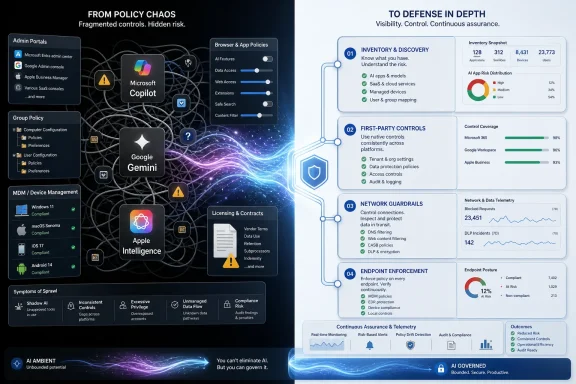
The Admin Playbook Is Becoming Defense in Depth by Necessity
The emerging playbook is not elegant, but it is becoming recognizable. Start with inventory. Identify which AI features are available in the tenant, which clients expose them, which users have licenses, which browser policies apply, which mobile devices are supervised, and which network paths are observable.Then apply first-party controls. Use Microsoft 365 admin settings, cloud policy, Group Policy, Edge policies, Google Admin Console controls, Chrome Enterprise policies, and Apple MDM restrictions before reaching for blunt-force blocking. Vendor-supported controls are usually more maintainable and less likely to break unrelated services.
Then add network controls where they make sense. DNS filtering, secure web gateways, firewall rules, and proxy policies can catch unmanaged access attempts and provide useful telemetry. But they should be documented as secondary controls, with known business-impact risks and exception processes.
Finally, enforce endpoint reality. If users can install unmanaged browsers, run portable applications, sign in with personal accounts, or use unsupervised mobile devices for sensitive work, AI policy settings will not save the organization. Application control, device compliance, identity restrictions, and data loss prevention still matter.
This is the unglamorous truth: built-in AI governance looks less like buying an AI security product and more like doing the basics well across identity, endpoint, network, browser, SaaS administration, and mobile management.
The Practical Map for This Round of AI Suppression
The immediate lesson from the Microsoft-Google-Apple scramble is that no administrator should trust a single switch, a single portal, or a single vendor brand name. Copilot, Gemini, and Apple Intelligence are not one thing each. They are bundles of features, entry points, and policies that have to be controlled at the level where users actually encounter them.- Microsoft environments should treat Microsoft 365 Copilot, Copilot Chat, Windows Copilot, and Edge Copilot surfaces as related but separately governed controls.
- Google environments should disable Gemini and Workspace smart features in the Admin Console while also managing Chrome’s generative AI policies for users and developers.
- Apple environments should rely on MDM restrictions for Apple Intelligence because network blocking will not reliably follow iPhones and iPads off the corporate network.
- Network domain blocking can be useful as a backstop, but it can also disrupt cloud-suite functionality and should not be mistaken for clean governance.
- Licensing decisions remain one of the simplest AI controls because unassigned paid AI SKUs reduce both exposure and cost.
- The organizations most likely to succeed are the ones that turn AI suppression into a recurring review process rather than a one-time hardening ticket.
References
- Primary source: The Cryptonomist
Published: Thu, 04 Jun 2026 19:42:29 GMT
Disable built-in AI features: Microsoft, Google, Apple
IT teams can disable built-in AI features in corporate software via policies, domain blocking, and MDM across Microsoft, Google, and Apple. en.cryptonomist.ch
- Official source: learn.microsoft.com
Manage Microsoft 365 Copilot Chat | Microsoft Learn
Learn how to turn on Microsoft 365 Copilot Chat for your organization.learn.microsoft.com - Related coverage: chromeenterprise.google
DevToolsGenAiSettings: Settings for Chrome DevTools Generative AI Features | Chrome Enterprise
These features in Chrome DevTools employ generative AI models to provide additional debugging information. To use these features, Google Chrome has to collect data such as error messages, stack traces, code snippets, and network requests and send them to a server owned by Google, which runs a...chromeenterprise.google - Official source: developer.apple.com
Restrictions | Apple Developer Documentation
The payload that configures restrictions on a device.developer.apple.com
- Official source: support.microsoft.com
How harmful content protection works in Microsoft 365 Copilot Chat and agents | Microsoft Support
Learn about the harmful content protection toggle in Microsoft 365 Copilot Chat and agents.support.microsoft.com - Official source: support.google.com

Previous release notes - Chrome Enterprise and Education Help
Note: For information about the current Chrome version and targeted releases, see Chrome Enterprise release notes.  
support.google.com
- Official source: microsoft.com
</rdf:Alt> </dc:title> <dc:description> <rdf:Alt> <rdf:li xml:lang="x-default"/> </rdf:Alt> </dc:description> <dc:creator> <rdf:Seq> <rdf:li>Lukas V
</rdf:Alt> </dc:description> <dc:creator> <rdf:Seq> <rdf:li>Lukas Velushwww.microsoft.com
- Related coverage: content.govdelivery.com
</rdf:Alt> </dc:title> <dc:description> <rdf:Alt> <rdf:li xml:lang="x-default"/> </rdf:Alt> </dc:description> <dc:creator> <rdf:Seq> <rdf:li>Alyssa.
</rdf:Alt> </dc:description> <dc:creator> <rdf:Seq> <rdf:li>[email protected];[email protected];[email protected];[email protected]content.govdelivery.com
- Official source: cdn-dynmedia-1.microsoft.com
- Related coverage: jumpcloud.com
