

The surge of clearance listings and bargain “shop” pages for the AMD Radeon R9/R7 family — including the widely traded R9 280X — has thrust a simple but urgent question back into the spotlight: can these aging GPUs be trusted on modern Windows 10 systems, and what drivers should buyers and DIYers rely on? The short answer is: yes, they can work, but only if you understand the legacy-driver reality, choose installation paths that prioritize signed, validated packages, and accept the functional and security trade‑offs that come with hardware pushed into a maintenance-only lifecycle. ww.amd.com/en/support/downloads/drivers.html/graphics/radeon-r9-r7-r5/radeon-r9-200-series/amd-radeon-r9-280x.html)
The Radeon R7 and R9 “200‑series” family were flagship and mainstream workhorses in the 2013–2014 era. Cards such as the R9 280X, R9 270(X), and R7 260/370 variants offered solid 1080p gaming and general-purpose graphics for several years after launch. Over time, AMD’s product roadmap moved on to newer architectures and feature sets; the result is that many of these SKUs now sit in a legacy support tier, meaning active feature development and frequent driver optimizations have ceased. In practice that means driver updates are infrequent, new feature backpo vendors may refuse to support these products through the current mainstream update cadence.
Two technical truths follow from that lifecycle decision:
Source: Born2Invest https://born2invest.com/?b=style-237455512/
 Background / Overview
The Radeon R7 and R9 “200‑series” family were flagship and mainstream workhorses in the 2013–2014 era. Cards such as the R9 280X, R9 270(X), and R7 260/370 variants offered solid 1080p gaming and general-purpose graphics for several years after launch. Over time, AMD’s product roadmap moved on to newer architectures and feature sets; the result is that many of these SKUs now sit in a legacy support tier, meaning active feature development and frequent driver optimizations have ceased. In practice that means driver updates are infrequent, new feature backpo vendors may refuse to support these products through the current mainstream update cadence.Two technical truths follow from that lifecycle decision:
- Graphics drivers are kernel‑mode components and therefore high‑impact: a bad or unsigned driver can crash a system or open a persistent security hole.
- Legacy drivers may not be tested against recent OS kernel updates, and utilities users have come to expect (Radeon Overlay, WattMan, robust video‑decode support) may be absent or poorly functional on newer OS builds.
Why these cards are still being sold (and why that matters)
The market reality
- Many sellers are clearing old inventory or offloading refurbished/outlet boards at steep discounts.
- Small sellers and marketplaces list R9 280X and R7 cards as “perfect for older PCs” or “budget 1080p”, which is true if theiver and OS limitations.
- However, bargain driver packages and “one‑click” driver shops have proliferated to meet demand — and those are frequently the riskiest option.
Functional expectations
If you buy an R9 280X or similar R7/R9 card today, expect:- *Solid office productivity, and older* game performance at 1080p at medium settings. Modern AAA titles will push these GPUs past their effective limits.
- Limited or no modern codec acceleration (HEVC/AV1) comparable to contemporary GPUs; video‑decode support is dependent onimplementation.
- Absence or limited functionality of vendor utilities (streaming overlays, modern power‑management features).
Driver options and the safe hierarchy
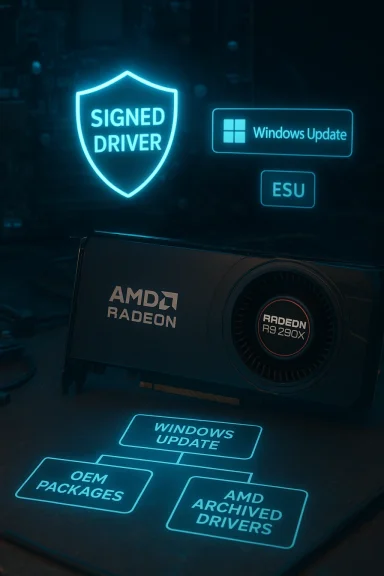
When you need a Windows 10 driver for an R9/R7 200‑series card, follow a conservative trust order — highest to lowest:- Microsoft Update / Windows Update — the safest first stop because Microsoft signs and validates these packages for compatibility with Windows versions. FWindows Update will provide a stable, signed driver that may lack features but will be the most reliable.
- Your OEM / system vendor (Dell, HP, Lenovo, ASUS, etc.) — for brandet desktops, vendor packages often contain OEM‑specific fixes, hybrid‑graphics support, and power‑management profiles that AMD generic packages do not include.
- AMD official archived / “previous” drivers (Catalyst / Adrenalin legacy packages) — AMD maintains legacy and previous driver downloads. These are authoritative and often the best compromise between features and compatibility, but they may be older packages that require manual installation or tweaking. Examples include AMD’s Catalyst 15.x and later legacy Adrenalin packages that list the R9 200 family explicitly. (amd.com)
- Reputable community archives (TechPowerUp, Guru3D, vetted forum posts) — useful for historical installer packages and INF references. Use these only after verifying signatures/checksums and understanding the risk.
- Remove or tamper with digital signatures and checksums.
- Edit Display.Driver*.inf files to force installs on unsupported hardware.
- Bundle Potentially Unwanted Programs (PUPs) or malware.
Windows 10’s lifecycle matters — and it has changed recently
A critical context for any Windows‑10 GPU discussion is that Windows 10 reached end of support on October 14, 2025. After that date Microsoft no longer supplies free security updates or routine fixes for standard Windows 10 editions; only Extended Security Updates (ESU) or specific enterprise programs can buy continued protection. That has two downstream effects for legacy GPU users:- Vendors have less incentive to test or certify legacy drivers against a platform Microsoft no longer actively services.
- Security exposure increases over time for devices stuck on an unsupported OS, because even a perfectly signed legacy driver cannot protect you from OS‑level vulnerabilities.
Installation: a conservative, step‑by‑step workflow
Below is a vetted workflow that stops as table and acceptable functionality. These steps are conservative because legacy drivers can behave unpredictably on modern builds.- Inventory and backup first:
- Record the GPU hardware ID: Device Manager → Display adapters → Properties → Details → Hardware Ids. This ID helps you locate the exact INF entries needed for manual installs.
- Cr point and a full system backup if the machine handles critical data.
- Try Windows Update first:
- Connect the system to the internet and run Windows Update. If a Microsoft‑signed driver is available, test it for stability and basic functionality (display, resolution, multi‑monitor). This is the lowest‑risk option.
- If Windows Update driver falls short, move to AMD / OEM:
- For desktops: locate the AMD archived driver package for your exact GPU family on AMD’s support site (previous drivers). Prefer the “All‑in‑One” or “previous drivers” listings that explicitly mention R9 200 / R7 200.
- For laptops: prefer the OEM package; many laptop vendors maintain hardware‑specific driver sets not available from AMD’s generic packal (advanced users):
- If moving from a problematic repackaged driver or an older Catalyst package, consider a safe driver cleanup prior to installing an archived package. Note: some community guides recommend Display Driver Uninstaller (DDU) in Safe Mode — this is an advanced step and not strictly necessary for every case; only proceed with DDU if you understand its implications. Flag this as an advanced operation.
- Manual INF install (last resort):
- If thes to run (“This device is not supported”), advanced users can extract the driver package, identify the correct Display.Driver INF file, and perform a manual install via Device Manager → Update driver → Browse my computer → Let me pick from a list → Have Disk. This path may invalidate driver signing or require enabling test‑signing; both increase risk and should be used only in isolated test systems.
- Stop when stable:
- If you obtain functional display, acceleration, and acceptable thermals, stop. The goaality*, not chasing the latest features on legacy hardware.
What goes wrong when you choose the wrong source
- Kernel-level instability: Modified or unsigned kernel driver binaries can cause BSODs and persistent system instability. Because graphics drivers operate at kernel level, a compromised or badly repackaged driver is an immediate security and stability risk.
- **Broken utilities and featurun modern AMD utilities (WattMan, Radeon Overlay) with legacy drivers or on an OS that has changed its WDDM expectations can cause crashes or invisible failures.
- Unsigned INF edits: Some repackagers edit INF files to force installs on unsupported devices; that breaks driver provenance and Windows signature checks, exposing the system to vulnerability.
- Bundled PUPs / malware: Untrustworthy driver shops sometimes bundle additional software with installers — at best annoying, at worst destructive.
Buying used/clearance cards: a hard’re shopping clearance or used listings for an R9 280X or R7 card, verify these physical and documentation points before buying:
- Confirm the exact part number and board revision printed on the PCB or product sticker. Different board partners (Sapphire, Asus, PowerColor) have different power connectors, BIOS versions, and VRM designs.
- Check connectors and power delivery: many R9‑class cards require one or two 6‑ or 8‑pin PCIe power connectors and a recommended PSU wattage in the 450W+ range for typical systems.
- Test the card with the Microsoft‑signed driver first on Windows 10 (or on a live/rescue environment) before accepting the sale when possible.
- Ask for return windows and seller reputation: low margins encourage sellers to offload defective boards.
Performance and modern multimedia caveats
- Expect reasonable legacy gaming performance at 1080p with medium settings on ol titles, frame rates will generally be below what modern midrange cards deliver.
- Video decode acceleration for modern codecs (HEVC, AV1) is limited or absent compared to newer GPUs. If you rely on hardware‑accelerated streaming or modern codec workflows, a newer GPU is the safer investment.
- Cross‑generation features (e.g., VSR, some CrossFire pairings from AMD’s 2014–2015 driver releases) exist, but their practical usefulness is limited in 2026’s software ecosystem. Old CrossFire setups in particular are often more trouble than they’re worth on current titles.
Alternatives and recommendations
- If you need a machine for general productivity and light gaming: a used R9/R7 in good condition can be a cost‑effective stopgap. Use the Microsoft‑signed Windows Update driver first, and move to AMD’s archived driver only if necessary.
- If you require modern codec support, streaming reliability, or driver security guarantees: consider a modest modern GPU (e.g., recent entry‑ to mid‑range RX or equivalent) that has active vendor support for Windows 11 and receives regular Adrenalin updates.
- If your environment runs Windows 10 and mull in Extended Security Updates (ESU) or plan to migrate to Windows 11 where driver testing and platform support will remain current. Microsoft’s lifecycle pages confirm the October 14, 2025 end‑of‑support milestone; plan accordingly.
- Microsoft Update / Windows Update.
- AMD official “Previous Drivers” and product pages; the R9 280X is listed in AMD’s archives and release notes.
- OEM support pages for laptop and prebuilt desktop models.
- Reputable community archives (TechPowerUp, Guru3D) and forum threads for historical context, but verify chenance before use.
Red flags and when to walk away
- A seller that insists you must download a proprietary “driver pack” from a marketplace or third‑party sork.
- A listing that cannot provide part numbers or photos of the actual PCB.
- A driver package without SHA‑256 checksums or where the installer’s digital signature is missing or altered.
- Any requirement to disable driver signing or use test‑signed drivers on a primary system — treat that as an explicit security downgrade.
Closing analysis: strengths, risks, and the responsible buyer’s checklist
Strengths- The R9/R7 200‑series cards remain valuable for users who need low‑cost desktop and light‑gaming solutions. They are often available at steep discounts and, when paired with a Microsoft‑signed driver,day tasks.
- AMD’s archived driver packages (Catalyst / legacy Adrenalin) ensure that a level of vendor‑authentic support exists for these GPU families even if active development has moved on.
- Running a legacy GPU on an unsupported OS exposes users to increasing security and compatibility risks over time, particularly after Windows 10’s support ended on October 14, 2025.
- Third‑party “driver shops” and repackaged installers are a persistent menace: kernel‑level risks, unsigned components, and bundled PUPs outweigh the short‑term convenience of a single‑click “fix.”
- Confirm exact part number and board revision.
- Test with Mi first.
- If moving to an AMD archive package, verify checksums and prefer WHQL/official releases (Catalyst 15.x / Adrenalin legacy notes mention R9 200 support).
- Keep a recovery plan: system image, bootable rescue media, and a willingness to revert if an installer destabilizes the system.
Source: Born2Invest https://born2invest.com/?b=style-237455512/
