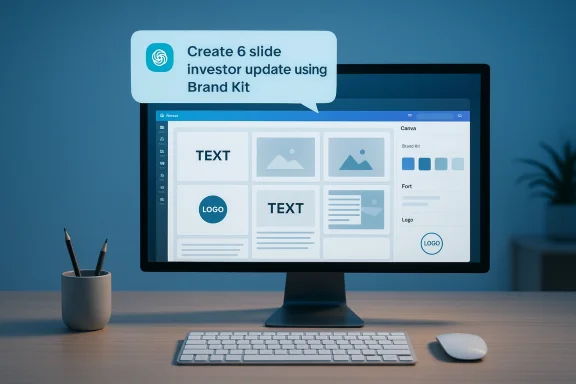
Canva’s design engine has quietly moved inside ChatGPT: users can now prompt an AI assistant and receive fully on‑brand, editable Canva projects that honor fonts, colours, logos and locked templates at generation time — not as an afterthought. This is not just image generation pasted into chat; it’s a writable, layered design returned into a user’s Canva workspace so teams can pick up and polish a production‑ready artifact immediately.
Canva’s public roadmap over the last year shifted from single‑asset image generation toward editable visual outputs and deeper platform connectors. That technical and product work — including a design model that understands layers and a connector framework called the Model Context Protocol (MCP) — set the stage for assistants to do more than describe designs: they can create, resize, autofill and return live Canva projects. Canva’s own newsroom describes the Claude rollout as the first step; the function has now been extended to ChatGPT, enabling Brand Kit application from within chat.
Industry reporting and third‑party explainers confirm the practical shift: assistants integrated via MCP can issue structured intents — createDesign, resizeAssdoperations server‑side, returning an actionable Canva file rather than a flattened PNG or JPG. This chat‑to‑app flow is the defining characteristic of MCP‑driven connectors.
This matters because the cost of “last‑mile” brand cleanup — the time designers spend reformatting, replacing fonts, and correcting colors — is often larger than the initial concept work. Applying brand rules during generation itself reduces revision cycles and speeds time‑to‑publish.
This approach differs from browser‑based embedding or simple API calls because MCP aims to produce actionable artifacts: layered, metadata‑rich projects that preserve placeholders, object hierarchy, and brand locks.
Canva and partner assistants have delivered a practical productivity leap: the on‑brand design in your chat. The prudent path forward for organizations is to pilot deliberately, instrument everything, and bake governance inthan retrofitting controls after adoption. The first drafts may arrive from a chat prompt, but the responsibility for what gets published — and who bears the legal and ethical costs — remains firmly human.
Source: Social Samosa Canva integrates Brand Kits into ChatGPT for AI designs
Source: IT Brief New Zealand https://itbrief.co.nz/story/canva-brings-brand-safe-design-generation-into-chatgpt/
Source: bestmediainfo.com Canva brings brand-ready design tools into ChatGPT workflows
 Background
Canva’s public roadmap over the last year shifted from single‑asset image generation toward editable visual outputs and deeper platform connectors. That technical and product work — including a design model that understands layers and a connector framework called the Model Context Protocol (MCP) — set the stage for assistants to do more than describe designs: they can create, resize, autofill and return live Canva projects. Canva’s own newsroom describes the Claude rollout as the first step; the function has now been extended to ChatGPT, enabling Brand Kit application from within chat. Industry reporting and third‑party explainers confirm the practical shift: assistants integrated via MCP can issue structured intents — createDesign, resizeAssdoperations server‑side, returning an actionable Canva file rather than a flattened PNG or JPG. This chat‑to‑app flow is the defining characteristic of MCP‑driven connectors.
What changed — the product shift that matters
From flattened images to editable, brand‑aware projects
For years, AI image generation pipelines produced static assets. Designers then re‑created or tweaked those results in a separate editor to match brand specifications. The integration between Canva and ChatGPT changes that workflow: the assistant can now produce layered Canva documents that alr Brand Kit (colors, fonts, logos, and locked template components). The result is a working artifact, not a mock that needs reassembly.This matters because the cost of “last‑mile” brand cleanup — the time designers spend reformatting, replacing fonts, and correcting colors — is often larger than the initial concept work. Applying brand rules during generation itself reduces revision cycles and speeds time‑to‑publish.
Brand Kits inside chat: what’s included
When a user connects their Canva account and permits access, the assistant can:- Apply the Brand Kit’s palette, typographic tokens, and logo
- Respect brand‑locked elements and templates (preventing unwanted overrides).
- Generate multiple design variants that keep layout and hierarchy intact.
- Return the result as an editable Canva project in the user’s Projects list for further refinement.
How it works — a technical primer
Model Context Protocol (MCP): the plumbing
The Model Context Protocol is a connector standard that enables assi ing structured intents. MCP is designed around scoped, OAuth‑style authorization: the assistant receives only the permissions the user grants (for example, design:read, design:write). The assistant then issues intent calls (createDesign, resizeAsset, etc.) and the app’s MCP server executes the operations and returns the resulting artifact.This approach differs from browser‑based embedding or simple API calls because MCP aims to produce actionable artifacts: layered, metadata‑rich projects that preserve placeholders, object hierarchy, and brand locks.
Typical flow you should expect
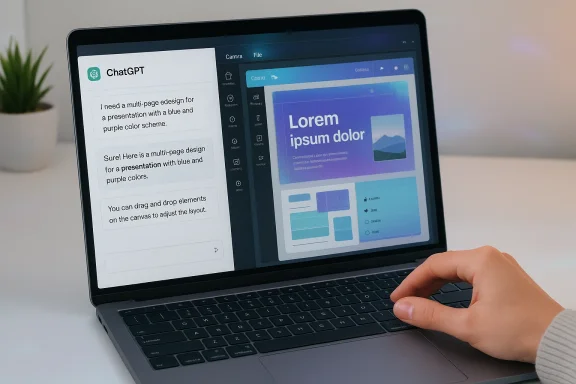
- The user issues a natural‑language prompt inside ChatGPT, e.g., “Create a 6‑slide product update deck using our AcmeCorp Brand Kit and these bullet points.”
- ChatGPT prompts the user to connect their Canva account via OAud permissions.
- ChatGPT issues an MCP intent to Canva’s MCP server (for example, createDesign + parameters).
- Canva returns an editable, layered design into the user’s Canva Projects; ChatGPT may show a live preview or a summary and provide follow‑ups such as “change cover to dark” or “replace hero with illustration.”
Why editable matters
Editable outputs preserve design metadata — font familieselements, and placeholders — so the artifact can be repurposed, resized and audited. For teams, that means:- Faster iteration cycles.
- Better reuse of templates and components.
- Preservation of brand fidelity through locked elements.
Real‑world benefits: who gains and how
Speed and productivity
The clearest benefit is time‑to‑first‑draft. Marketing teams, sales reps, and small agencies can go from brief to branded draft in minutes instead of hours. That reduces friction for one‑off creatives and internal reports ws more than pixel‑perfect design.Consistency at scale
For regulated industries, franchises, and enterprises with distributed marketing teams, applying a Brand Kit at generation time enforces visual identity rules from the outset. That reduces the need for centralized brand policing and lowers the risk of off‑brand customer‑facing materials.Interoperability and multi‑assistant parity
Because MCP is a protocol adopted by multiple assis backend can be exposed across different chat platforms. That means organizations can elect the assistant that fits a particular use case (internal Copilot vs. external ChatGPT) without rebuilding the design pipeline. Reports indicate Claude, ChatGPT apps, and other assistants are already integrating via Canva’s MCP endpoints.Enterprise concerns: governance, security and compliance
The productivity upside is large, but so are new governance responsibilities. Writable connectors like the Canva–ChatGPT link introduce fresh attack surfaces and compliance questions.Data residency and model training exposure
A key procurement question is whether design assets or prompts will be retained and used to train downstream models. Public descriptions of MCP emphasize scoped access, but contractual guarantees about non‑training and dattomatic; enterprises should seek explicit commitments if they plan to process IP, PHI, or other regulated data via these connectors. Vendor press materials sometimes publish usage totals (for example, Canva citing millions of designs created across assistants), but those numbers are vendor disclosures and should be verified in contract negotiations when they matter for risk assessment.OAuth consent phishing and permission creep
OAuth consent screens are an easy way for attackers to trick users into granting access. In the heat of a workflow, users may approve broad scopes. IT should treat MCP connectors like any other high‑privilege app and enforce admin consent, nal access where appropriate. Audit logs for connector provisioning and subsequent actions should be centralized into SIEM and Purview pipelines.Auditability and traceability
Admins must confirm where connector actions are logged — in the Canva audit trail, the assistant vendor logs, or both — and preserve provenance for created and modified assets. Without clear logging, it will be difficult to connect a published asset back to the initiating useruring compliance reviews.Hallucinations, accuracy and brand risk
Assistants can produce persuasive but incorrect copy, charts or labels. Visual artifacts with inaccurate data can be particularly dangerous because their appearance lends credibility. Any outward‑facing content should pass human review for legal claims, financial figures, or regulated statements. The assistant can draft layouts and copy, but teams mrkflows for high‑stakes communications.Licensing and IP ambiguity
The legal environment for AI‑generated imagery is still unsettled. Teams should verify whether generated images include licensed stock or third‑party content and obtain clear usage rights when assets are intended for commercial distribution. Procurement should negotiate indemnity and IP clarity into contracts with Canva and the assistant vendor when the businights.Availability, rollout and administrative checklist
Staged rollouts are likely
Multiple news outlets and vendor posts show the integration is being expanded across assistants, but availability is likely staged by region, subscription tiers, tenant policies, and Canva plan level (Free vs. Pro vs. Teams vs. Enterprise). Admins should confirm availability in their tenant before making rollout plans.Governance and rollout checklist for IT and brand teams
- Require admin consent for MCP connectols centrally.
- Restrict connector provisioning to designated roles via Conditional Access.
- Enforce SSO + MFA for both Canva and the assistant accounts.
- Map connector audit logs into your SIEM and Purview/audit pipelines.
- Negotiate contractual non‑training and data retention guarantees where needed.
- Create a verification pipeline (brand QA → legal reviewally‑facing assets.
- Run a 30–90 day pilot with instrumentation: time‑to‑draft, edits required, export fidelity, and user satisfaction metrics.
Pprompt recipes
Below are tested prompt patterns — treat them as recipes rather than rigid templates. Each assumes you’ve connected your Canva Brand Kit and geate a 6‑slide investor update using our Brand Kit ‘AcmeCorp’. Include a timeline slide and a slide with three team headshots; export for 16:9 slides.”- “Make five LinkedIn carousel posts from this blog excerpt. Use corporate blue as primary (#0A66C2), our brand font, and generate three layout variants.”
- “Find the latest Q4 sales deck in my Canva projects, summarize the key metrics, then create a new deck with the same color palette and add speaker notes.”
- Provide a clear audience and format (e.g., “internal 10‑slide update, 16:9, senior leadership”).
- Ask for multiple variants and pick the best to iterate from.
- Request explicit asset attributions for any stock or third‑party images used.
- Always run a human QC step for legal, numbers and licensing before publishing.
Critical analysis — strengths, weaknesses and strategic implications
Strengths
- Productivity uplift: Ta multi‑step brief→design→edit process into a single conversational loop, which is a major win for speed and iteration.
- Brand safety at source: Applying Brand Kits at generation time reduces manual rework and enforces identity standards earlier in the creative lifecycle.
- Actionable AI: MCP makes assistants do work inside tools instead of merely describing what to do — a material shift that unlocks automation across workflows.
Weaknesses and unresolved questions
- **Vendor claims vs. indepey usage figures (for example, millions of designs created through assistants) are vendor‑reported. Treat such numbers as promotional until independently audited or contractually confirmed.
- **Data governanconnector model increases the surface for data leakage and exposure; procurement must negotiate non‑training, retention and access clauses where sensitive IP is involved.
- UI/UX maturity: While the high‑level flow is consistent, actual UI prompts, permission screens and error handling may vary across assistants and tenants. Expect oscillation and staged feature parity.
Strategic implications for organizations
- Small teams and agencies can accelerate go‑to‑market and reduce reliance on dedicated design resources for routine assets.
- Enterprises gain a means to scale creative output while enforcing identity rules — but only if governance, audit trails and contractual protections are in place.
- IT and Proc connectors as platform features that require lifecycle management: monitoring, patching, vendor reviews and contractual guardrails.
Recom next steps
- Pilot it: run a constrained pilot with a defined set of teams (marketing, sales enablement) and measure time‑to‑first‑draft, design edits reailures.
- Lock governance early: require admin consent for connectors, enforce SSO + MFA, and map connector actions to n policies.
- Contract for clarity: negotiate non‑training and data retention terms for sensitive use, and confirm IP ownership nerated assets.
- Add human‑in‑the‑loop checkpoints for all outward‑facing content and create clear sign‑off flows for legal and brand.
- Educate users: run training on OAuth consent risks and provide prompt templates that produce predictable, reviewable outputs.
The bigger picture
Canva’s Brand Kit integration into ChatGPT is an exemplar of the broader shift from “AI that suggests” to “AI that executes.” By surfacing editable, brand‑aware designs inside conversational assistants, the industry has closed a key loop between ideation and production. That loop will drive faster creative cycles and new workflows — but it will also concentrate governance burdens, contractual questions and risk surfaces that organizations cannot ignore. Treat this technology as a platform capability that demands the same lifecycle discipline you apply to identity, storage and critical productivity services.Canva and partner assistants have delivered a practical productivity leap: the on‑brand design in your chat. The prudent path forward for organizations is to pilot deliberately, instrument everything, and bake governance inthan retrofitting controls after adoption. The first drafts may arrive from a chat prompt, but the responsibility for what gets published — and who bears the legal and ethical costs — remains firmly human.
Source: Social Samosa Canva integrates Brand Kits into ChatGPT for AI designs
Source: IT Brief New Zealand https://itbrief.co.nz/story/canva-brings-brand-safe-design-generation-into-chatgpt/
Source: bestmediainfo.com Canva brings brand-ready design tools into ChatGPT workflows