

The Carolinas AI & Automation Summit is scheduled for July 15–16, 2026, in a live online format aimed at professionals, small business owners, consultants, operators, healthcare teams, and local leaders seeking practical AI training rather than enterprise-scale theory. The event, announced through Issuewire and reflected on the summit’s own registration site, is modestly priced, regionally branded, and deliberately practical. That combination is the story. In a year when AI has become both workplace infrastructure and workplace anxiety, the Carolinas event is a useful signal that the next phase of adoption will be fought less in keynote halls than in small-business calendars, Microsoft 365 tenants, healthcare back offices, and one-person consultancies trying to turn curiosity into repeatable work.
For the first two years of the generative AI boom, the loudest conversation belonged to the largest players. Microsoft wrapped Copilot around Office, Google pushed Gemini into Workspace, OpenAI and Anthropic chased enterprise deals, and consulting giants sold transformation programs to companies with transformation budgets. The assumption was that AI adoption would trickle down after the enterprise figured it out.
That assumption now looks incomplete. The real bottleneck for many workers is not whether a model can summarize a document, draft a campaign, or generate a workflow. It is whether ordinary professionals know when to trust it, how to frame the task, how to protect sensitive data, and how to connect the output to a business process that actually matters.
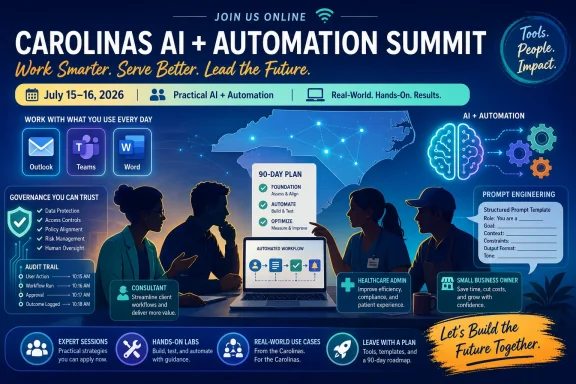
The Carolinas AI & Automation Summit plants itself directly in that gap. Its promotional materials describe 25 sessions over two days, live demonstrations, Lunch & Learn labs, prompt engineering, AI readiness, automation strategy, governance, Microsoft Copilot, content creation, industry examples, and a 90-day implementation plan. That is not the language of speculative futurism. It is the language of people who have already opened ChatGPT or Copilot, found something useful, and then realized usefulness is not the same thing as operational maturity.
That distinction matters for WindowsForum readers because the modern workplace AI stack is increasingly tied to the tools people already use. In many offices, AI arrives not as a separate platform but as a button inside Word, Outlook, Teams, Excel, Edge, Dynamics, or a browser tab. The training challenge is therefore not only “learn AI.” It is “learn how AI changes the software environment you already depend on.”
That is why regional events like this can matter more than their modest ticket prices suggest. The summit is not trying to compete with global AI conferences by promising celebrity CEOs or frontier-model announcements. It is selling translation: from hype to workflow, from tool list to implementation plan, from “AI is coming” to “here is what you should do on Monday.”
The speaker lineup reinforces that positioning. The announced presenters include Sharon Easterling of Upskillz AI Advisors, Wanda Thomas of 2bzz2 Consulting, Kevin Smith of Kev The AI Guy, Chrishonda Benson of Benora Solutions, Tesha Colston of AI By Design, Donna Davis of DW Davis Consulting, Robin Cash of Cash Capital Group, Melessa Lawson of The Helper Group, Delethia Johnson of Ink & Prosper, and Tenita Abraham of Building Legacies LLC. This is not a vendor roadshow built around one platform. It is a collection of consultants and business leaders packaging AI adoption as professional development.
That approach has strengths and risks. On the strength side, local consultants often understand the actual constraints of small organizations: thin margins, limited staff, messy data, and software subscriptions chosen over years rather than quarters. On the risk side, the AI education market is already crowded with prompt packs, tool directories, and implementation promises that can age quickly. The summit’s value will depend on whether its demonstrations are grounded in durable skills, not just this month’s favorite app.
Microsoft’s 2026 Work Trend Index argues that the companies pulling ahead are focused on AI absorption rather than mere adoption. That is a useful phrase, even allowing for Microsoft’s obvious commercial interest in normalizing Copilot and agents across the workplace. Adoption is buying access. Absorption is changing how work is assigned, reviewed, measured, and governed.
Small organizations have a version of the same problem, but with fewer layers. A five-person business does not need a 90-page AI strategy document. It does need rules about client data, reusable prompts, where outputs are stored, who checks them, and which tasks are worth automating. Without that discipline, AI becomes another productivity theater: a collection of subscriptions that produce impressive demos but no lasting process change.
This is where the summit’s 90-day action-plan promise is smart. Ninety days is long enough to identify a workflow, test a tool, train a small team, and compare before-and-after results. It is also short enough to avoid the trap of treating AI strategy as a grand digital transformation program that never reaches the person doing the invoicing, scheduling, intake, follow-up, or reporting.
That difference is crucial. A user asking Copilot to summarize a meeting transcript is performing a productivity task. A department using Copilot-connected workflows to draft customer responses, classify tickets, prepare financial commentary, or generate healthcare documentation is changing an operational process. The second category requires more scrutiny than the first.
The summit’s inclusion of governance alongside Copilot is therefore encouraging. Too many AI workshops treat safety as a final disclaimer after the demos are over. In real Windows and Microsoft 365 environments, governance is the thing that determines whether AI can be used broadly at all. Identity, permissions, retention, sensitivity labels, audit logs, data residency, and acceptable-use policies are not glamorous, but they are the plumbing between a fun demo and a defensible deployment.
Still, Copilot should not be treated as a magic default. Many small businesses use a hybrid of Microsoft 365, Google Workspace, QuickBooks, Canva, HubSpot, industry-specific SaaS tools, and consumer AI subscriptions. Practical AI training has to acknowledge that reality. The winning workflow may involve Copilot in Outlook, an automation connector, a CRM update, and a human approval step — not a single vendor’s clean architecture diagram.
That makes healthcare a useful stress test for the whole “practical AI” movement. Prompt engineering can help staff summarize policies, draft patient-facing language, organize denial reasons, or prepare training materials. Automation can reduce manual routing and repetitive status checks. But the moment AI touches protected health information, payer documentation, coding support, or patient communication, the tolerance for casual experimentation drops sharply.
A credible AI readiness program for healthcare-adjacent teams should therefore spend as much time on boundaries as on possibilities. Which tools are approved? Which data can be entered? What outputs require human review? How are prompts and generated content documented? Who owns the policy when a model gives a plausible but wrong recommendation?
If the summit handles those questions plainly, it could be more useful than many enterprise AI webinars that talk about healthcare transformation without confronting the everyday compliance load of small practices, billing teams, and administrative staff. The professionals most likely to benefit from AI are often the same ones least able to absorb a mistake.
That matters because AI literacy has become a kind of workplace advantage. Professionals with time, money, and institutional support can experiment faster. Everyone else gets fragmented advice from social media, vendor marketing, and trial-and-error. A low-cost regional summit is making an implicit argument that basic AI readiness should not be reserved for workers inside large companies.
The organizers say as much in the announcement, arguing that AI access should not be “a privilege of the well-resourced.” That is a strong line because it identifies a real divide. The people most likely to need automation help — solo operators, small teams, overloaded admins, local service businesses — are often the least likely to have formal AI enablement programs.
Of course, affordability does not guarantee quality. A $37 event can still overpromise, and a prompt toolkit can become shelfware as quickly as any enterprise playbook. But the price point lowers the barrier to experimentation, and that is valuable in a market where many professionals are still trying to determine whether AI is a career risk, a productivity tool, or both.
Day Two moves toward implementation: industry examples, building a first AI workflow in 20 minutes, data-to-decisions work, a 90-day action plan, and the future of work. That progression is important. A training event that ends at prompting leaves attendees with tactics. A training event that ends with workflow and implementation at least gestures toward operating discipline.
The phrase “Build Your First AI Workflow — In 20 Minutes” deserves both interest and skepticism. It is good pedagogy to give attendees a fast win. But fast workflows can also create a false sense of readiness if they skip testing, error handling, permissions, and maintenance. The best version of that session would show not only how to build the workflow, but how to decide whether it should exist.
That is the broader challenge for AI education in 2026. The models are easier to access than ever. The hard part is judgment. Training has to teach professionals to ask boring but essential questions: What problem are we solving? What data is involved? What happens when the model is wrong? Who reviews the output? How do we know this saved time instead of creating hidden work elsewhere?
It can also break things at scale. Bad prompts produce bad text one output at a time. Bad automations can propagate errors through a system before anyone notices. That is why the automation portions of the summit should be watched closely by attendees with IT, compliance, or operations responsibilities.
The most mature automation strategy usually starts small. Pick a repetitive, low-risk task. Keep a human in the loop. Log the outputs. Compare time saved against review time added. Then expand only after the process survives contact with real work. This is less exciting than “autonomous agents,” but it is far more likely to help small teams.
For Windows-heavy organizations, the tooling landscape can include Power Automate, Copilot Studio, SharePoint, Teams, Excel, Outlook rules, third-party connectors, and industry SaaS platforms. The temptation is to wire everything together because it can be wired together. The discipline is knowing which handoffs should remain manual because accountability matters more than speed.
That literacy is not limited to standalone chatbots. The same skill applies when asking Copilot to summarize a thread, telling an AI writing assistant to match a brand voice, instructing a spreadsheet tool to explain anomalies, or asking a workflow builder to generate logic. Prompting is the new layer between human intent and software action.
The risk is that prompt training becomes theatrical. It is easy to impress an audience with a cleverly worded request that produces a polished response. It is harder to teach a repeatable method: role, context, source material, constraints, examples, output format, verification, and revision. Professionals do not need magic words. They need a way to turn vague work into explicit instructions.
That is why the summit’s promise of practical workflows matters more than the prompt sessions alone. Prompting becomes valuable when it is embedded in a job: drafting a denial appeal, summarizing a client discovery call, preparing a board update, creating content variants, triaging leads, or turning meeting notes into assigned tasks. The prompt is not the product. The improved workflow is.
For small businesses, governance can sound like enterprise jargon. But the core questions are universal. What data should never be pasted into an AI tool? Which tools are approved for client work? Can employees use personal accounts? Are AI-generated outputs labeled, reviewed, or archived? What happens if a customer asks whether AI was used?
These questions are especially relevant for consultants, content creators, healthcare workers, and professional services firms — all audiences named in the summit announcement. A consultant who feeds client strategy documents into an unapproved tool may create confidentiality problems. A content creator who relies on AI-generated claims without verification may create reputational risk. A healthcare operator who uses AI casually with sensitive information may create legal exposure.
The good news is that governance does not have to be elaborate to be useful. A one-page AI acceptable-use policy, a list of approved tools, a data classification rule, and a human-review requirement for external outputs can prevent many predictable mistakes. The bad news is that many teams will not create even that much until something goes wrong.
They also benefit from it. AI adoption is creating a new services layer around readiness assessments, workflow audits, prompt libraries, automation builds, staff training, and governance templates. Some of that market will be genuinely helpful. Some of it will be recycled business coaching with AI branding attached. Buyers will need discernment.
The summit’s collective speaker model may help. Instead of presenting AI as one guru’s system, it brings together professionals with different angles: literacy, healthcare, governance, automation, content creation, leadership readiness, entrepreneurship, workflow design, systems integration, and responsible implementation. That breadth reflects how AI actually enters organizations. It does not arrive in one department and stay there.
For attendees, the practical test is whether they leave with something specific enough to use. A good summit outcome is not “I understand AI better.” It is “I identified three workflows, chose one, defined the data boundary, selected a tool, assigned a reviewer, and scheduled a 30-day measurement check.” Anything less risks dissolving into inspiration.
This is where the Carolinas event fits the moment. The sessions are not framed around building frontier models or replacing departments. They are framed around readiness, tools, workflows, leadership, governance, and a 90-day plan. That is the vocabulary of operational adoption.
It is also the vocabulary of accountability. If AI is going to justify its place in small organizations, it must produce measurable results: fewer hours spent on repetitive work, faster response times, cleaner documentation, better content throughput, improved reporting, or more consistent customer follow-up. “We use AI” is no longer an impressive statement by itself.
The next phase will favor professionals who can combine domain knowledge with AI fluency. The billing specialist who understands denial patterns and can build a safe summarization workflow may become more valuable, not less. The consultant who can turn scattered client notes into structured deliverables faster may gain capacity. The manager who can distinguish useful automation from risky shortcutting will become essential.
 The AI Training Market Has Moved Downstream
For the first two years of the generative AI boom, the loudest conversation belonged to the largest players. Microsoft wrapped Copilot around Office, Google pushed Gemini into Workspace, OpenAI and Anthropic chased enterprise deals, and consulting giants sold transformation programs to companies with transformation budgets. The assumption was that AI adoption would trickle down after the enterprise figured it out.That assumption now looks incomplete. The real bottleneck for many workers is not whether a model can summarize a document, draft a campaign, or generate a workflow. It is whether ordinary professionals know when to trust it, how to frame the task, how to protect sensitive data, and how to connect the output to a business process that actually matters.
The Carolinas AI & Automation Summit plants itself directly in that gap. Its promotional materials describe 25 sessions over two days, live demonstrations, Lunch & Learn labs, prompt engineering, AI readiness, automation strategy, governance, Microsoft Copilot, content creation, industry examples, and a 90-day implementation plan. That is not the language of speculative futurism. It is the language of people who have already opened ChatGPT or Copilot, found something useful, and then realized usefulness is not the same thing as operational maturity.
That distinction matters for WindowsForum readers because the modern workplace AI stack is increasingly tied to the tools people already use. In many offices, AI arrives not as a separate platform but as a button inside Word, Outlook, Teams, Excel, Edge, Dynamics, or a browser tab. The training challenge is therefore not only “learn AI.” It is “learn how AI changes the software environment you already depend on.”
Charlotte Is Becoming a Test Case for Practical AI Literacy
The summit’s Carolinas branding is not incidental. Charlotte and the surrounding region have a dense mix of finance, healthcare, logistics, education, professional services, and small businesses — exactly the kind of economy where AI adoption can be both promising and uneven. A bank, hospital system, or university may have internal governance staff and vendor roadmaps. A bookkeeping firm, solo consultant, nonprofit operator, or small clinic often does not.That is why regional events like this can matter more than their modest ticket prices suggest. The summit is not trying to compete with global AI conferences by promising celebrity CEOs or frontier-model announcements. It is selling translation: from hype to workflow, from tool list to implementation plan, from “AI is coming” to “here is what you should do on Monday.”
The speaker lineup reinforces that positioning. The announced presenters include Sharon Easterling of Upskillz AI Advisors, Wanda Thomas of 2bzz2 Consulting, Kevin Smith of Kev The AI Guy, Chrishonda Benson of Benora Solutions, Tesha Colston of AI By Design, Donna Davis of DW Davis Consulting, Robin Cash of Cash Capital Group, Melessa Lawson of The Helper Group, Delethia Johnson of Ink & Prosper, and Tenita Abraham of Building Legacies LLC. This is not a vendor roadshow built around one platform. It is a collection of consultants and business leaders packaging AI adoption as professional development.
That approach has strengths and risks. On the strength side, local consultants often understand the actual constraints of small organizations: thin margins, limited staff, messy data, and software subscriptions chosen over years rather than quarters. On the risk side, the AI education market is already crowded with prompt packs, tool directories, and implementation promises that can age quickly. The summit’s value will depend on whether its demonstrations are grounded in durable skills, not just this month’s favorite app.
The Strategy Gap Is Now More Important Than the Tool Gap
The summit’s announcement uses the phrase “AI readiness gap,” and that may be the sharpest framing in the entire release. The average professional no longer needs to be convinced that AI tools exist. The harder problem is knowing what to automate, what not to automate, and how to measure whether the experiment helped.Microsoft’s 2026 Work Trend Index argues that the companies pulling ahead are focused on AI absorption rather than mere adoption. That is a useful phrase, even allowing for Microsoft’s obvious commercial interest in normalizing Copilot and agents across the workplace. Adoption is buying access. Absorption is changing how work is assigned, reviewed, measured, and governed.
Small organizations have a version of the same problem, but with fewer layers. A five-person business does not need a 90-page AI strategy document. It does need rules about client data, reusable prompts, where outputs are stored, who checks them, and which tasks are worth automating. Without that discipline, AI becomes another productivity theater: a collection of subscriptions that produce impressive demos but no lasting process change.
This is where the summit’s 90-day action-plan promise is smart. Ninety days is long enough to identify a workflow, test a tool, train a small team, and compare before-and-after results. It is also short enough to avoid the trap of treating AI strategy as a grand digital transformation program that never reaches the person doing the invoicing, scheduling, intake, follow-up, or reporting.
Microsoft Copilot Is the Obvious Windows Angle — But Not the Whole Story
For Windows professionals, the Microsoft Copilot session is likely to be one of the more relevant pieces of the program. Copilot has become Microsoft’s preferred interface for selling AI into the productivity stack, and its reach now extends across Microsoft 365, Windows, Edge, Teams, GitHub, security tooling, and business applications. If your organization is already paying for Microsoft 365, the question is no longer whether AI is nearby. It is whether employees understand the difference between a chatbot prompt and a governed enterprise workflow.That difference is crucial. A user asking Copilot to summarize a meeting transcript is performing a productivity task. A department using Copilot-connected workflows to draft customer responses, classify tickets, prepare financial commentary, or generate healthcare documentation is changing an operational process. The second category requires more scrutiny than the first.
The summit’s inclusion of governance alongside Copilot is therefore encouraging. Too many AI workshops treat safety as a final disclaimer after the demos are over. In real Windows and Microsoft 365 environments, governance is the thing that determines whether AI can be used broadly at all. Identity, permissions, retention, sensitivity labels, audit logs, data residency, and acceptable-use policies are not glamorous, but they are the plumbing between a fun demo and a defensible deployment.
Still, Copilot should not be treated as a magic default. Many small businesses use a hybrid of Microsoft 365, Google Workspace, QuickBooks, Canva, HubSpot, industry-specific SaaS tools, and consumer AI subscriptions. Practical AI training has to acknowledge that reality. The winning workflow may involve Copilot in Outlook, an automation connector, a CRM update, and a human approval step — not a single vendor’s clean architecture diagram.
Healthcare and Revenue Cycle Teams Need More Than Prompt Tricks
The summit’s stated audience includes healthcare and revenue cycle teams, which raises the stakes. Healthcare administration is full of repetitive, document-heavy, rules-bound work that appears tailor-made for AI assistance. It is also a domain where privacy, accuracy, auditability, and regulatory exposure are not optional concerns.That makes healthcare a useful stress test for the whole “practical AI” movement. Prompt engineering can help staff summarize policies, draft patient-facing language, organize denial reasons, or prepare training materials. Automation can reduce manual routing and repetitive status checks. But the moment AI touches protected health information, payer documentation, coding support, or patient communication, the tolerance for casual experimentation drops sharply.
A credible AI readiness program for healthcare-adjacent teams should therefore spend as much time on boundaries as on possibilities. Which tools are approved? Which data can be entered? What outputs require human review? How are prompts and generated content documented? Who owns the policy when a model gives a plausible but wrong recommendation?
If the summit handles those questions plainly, it could be more useful than many enterprise AI webinars that talk about healthcare transformation without confronting the everyday compliance load of small practices, billing teams, and administrative staff. The professionals most likely to benefit from AI are often the same ones least able to absorb a mistake.
The Price Point Is Part of the Argument
General access is listed at $37, with a $97 VIP option that includes replays, a workbook, downloadable resources, a Mega Prompts & Agent Toolkit, and a limited-seat VIP Deep Dive Session. In the AI training market, those numbers are notable. They position the summit closer to community professional development than to the premium conference circuit.That matters because AI literacy has become a kind of workplace advantage. Professionals with time, money, and institutional support can experiment faster. Everyone else gets fragmented advice from social media, vendor marketing, and trial-and-error. A low-cost regional summit is making an implicit argument that basic AI readiness should not be reserved for workers inside large companies.
The organizers say as much in the announcement, arguing that AI access should not be “a privilege of the well-resourced.” That is a strong line because it identifies a real divide. The people most likely to need automation help — solo operators, small teams, overloaded admins, local service businesses — are often the least likely to have formal AI enablement programs.
Of course, affordability does not guarantee quality. A $37 event can still overpromise, and a prompt toolkit can become shelfware as quickly as any enterprise playbook. But the price point lowers the barrier to experimentation, and that is valuable in a market where many professionals are still trying to determine whether AI is a career risk, a productivity tool, or both.
The Session Arc Shows the Industry Growing Up
The announced Day One agenda begins with AI foundations and productivity: “The AI Era Is Here,” “The AI Readiness Check,” “Prompt Like a Pro,” “AI Automation in Action,” “Top AI Tools Worth Your Time,” and “The AI Readiness Gap.” That is a familiar arc, but it is also the right one for a mixed professional audience. Most workers do not need a lecture on transformer architecture. They need to understand capabilities, limitations, and immediate use cases.Day Two moves toward implementation: industry examples, building a first AI workflow in 20 minutes, data-to-decisions work, a 90-day action plan, and the future of work. That progression is important. A training event that ends at prompting leaves attendees with tactics. A training event that ends with workflow and implementation at least gestures toward operating discipline.
The phrase “Build Your First AI Workflow — In 20 Minutes” deserves both interest and skepticism. It is good pedagogy to give attendees a fast win. But fast workflows can also create a false sense of readiness if they skip testing, error handling, permissions, and maintenance. The best version of that session would show not only how to build the workflow, but how to decide whether it should exist.
That is the broader challenge for AI education in 2026. The models are easier to access than ever. The hard part is judgment. Training has to teach professionals to ask boring but essential questions: What problem are we solving? What data is involved? What happens when the model is wrong? Who reviews the output? How do we know this saved time instead of creating hidden work elsewhere?
Automation Is Where AI Gets Real — and Where It Gets Dangerous
The summit pairs AI with automation, and that pairing is where the conversation becomes concrete. A chatbot that drafts an email is useful. A workflow that reads an intake form, classifies the request, updates a spreadsheet, drafts a reply, and alerts a team member can change how a small organization operates.It can also break things at scale. Bad prompts produce bad text one output at a time. Bad automations can propagate errors through a system before anyone notices. That is why the automation portions of the summit should be watched closely by attendees with IT, compliance, or operations responsibilities.
The most mature automation strategy usually starts small. Pick a repetitive, low-risk task. Keep a human in the loop. Log the outputs. Compare time saved against review time added. Then expand only after the process survives contact with real work. This is less exciting than “autonomous agents,” but it is far more likely to help small teams.
For Windows-heavy organizations, the tooling landscape can include Power Automate, Copilot Studio, SharePoint, Teams, Excel, Outlook rules, third-party connectors, and industry SaaS platforms. The temptation is to wire everything together because it can be wired together. The discipline is knowing which handoffs should remain manual because accountability matters more than speed.
Prompt Engineering Is Becoming Office Literacy
The summit includes prompt engineering, a phrase that already feels both overused and unavoidable. Critics are right that prompt tricks should not be mistaken for deep technical expertise. But in ordinary office work, the ability to define a task clearly, provide context, constrain output, and evaluate a response is becoming a practical literacy.That literacy is not limited to standalone chatbots. The same skill applies when asking Copilot to summarize a thread, telling an AI writing assistant to match a brand voice, instructing a spreadsheet tool to explain anomalies, or asking a workflow builder to generate logic. Prompting is the new layer between human intent and software action.
The risk is that prompt training becomes theatrical. It is easy to impress an audience with a cleverly worded request that produces a polished response. It is harder to teach a repeatable method: role, context, source material, constraints, examples, output format, verification, and revision. Professionals do not need magic words. They need a way to turn vague work into explicit instructions.
That is why the summit’s promise of practical workflows matters more than the prompt sessions alone. Prompting becomes valuable when it is embedded in a job: drafting a denial appeal, summarizing a client discovery call, preparing a board update, creating content variants, triaging leads, or turning meeting notes into assigned tasks. The prompt is not the product. The improved workflow is.
Governance Has to Be Taught Before the Accident
Every AI training event now has to decide how seriously it takes governance. It is tempting to place governance near the end, after the exciting demonstrations, as a reminder to “use AI responsibly.” That is backwards. Governance is not the brake pedal. It is the road map.For small businesses, governance can sound like enterprise jargon. But the core questions are universal. What data should never be pasted into an AI tool? Which tools are approved for client work? Can employees use personal accounts? Are AI-generated outputs labeled, reviewed, or archived? What happens if a customer asks whether AI was used?
These questions are especially relevant for consultants, content creators, healthcare workers, and professional services firms — all audiences named in the summit announcement. A consultant who feeds client strategy documents into an unapproved tool may create confidentiality problems. A content creator who relies on AI-generated claims without verification may create reputational risk. A healthcare operator who uses AI casually with sensitive information may create legal exposure.
The good news is that governance does not have to be elaborate to be useful. A one-page AI acceptable-use policy, a list of approved tools, a data classification rule, and a human-review requirement for external outputs can prevent many predictable mistakes. The bad news is that many teams will not create even that much until something goes wrong.
The Local Consultant Economy Is Having Its AI Moment
One underappreciated element of the Carolinas summit is the role of independent consultants in spreading AI literacy. Large vendors can sell platforms, but they rarely have the patience or incentive to map those platforms onto the messy processes of a small local business. Consultants fill that gap.They also benefit from it. AI adoption is creating a new services layer around readiness assessments, workflow audits, prompt libraries, automation builds, staff training, and governance templates. Some of that market will be genuinely helpful. Some of it will be recycled business coaching with AI branding attached. Buyers will need discernment.
The summit’s collective speaker model may help. Instead of presenting AI as one guru’s system, it brings together professionals with different angles: literacy, healthcare, governance, automation, content creation, leadership readiness, entrepreneurship, workflow design, systems integration, and responsible implementation. That breadth reflects how AI actually enters organizations. It does not arrive in one department and stay there.
For attendees, the practical test is whether they leave with something specific enough to use. A good summit outcome is not “I understand AI better.” It is “I identified three workflows, chose one, defined the data boundary, selected a tool, assigned a reviewer, and scheduled a 30-day measurement check.” Anything less risks dissolving into inspiration.
The Hype Cycle Is Giving Way to the Implementation Cycle
AI’s public conversation still swings between utopian productivity claims and job-loss alarm. Both contain pieces of truth, but neither helps a small business decide whether to automate appointment reminders or train staff on Copilot. The implementation cycle is less dramatic and more consequential.This is where the Carolinas event fits the moment. The sessions are not framed around building frontier models or replacing departments. They are framed around readiness, tools, workflows, leadership, governance, and a 90-day plan. That is the vocabulary of operational adoption.
It is also the vocabulary of accountability. If AI is going to justify its place in small organizations, it must produce measurable results: fewer hours spent on repetitive work, faster response times, cleaner documentation, better content throughput, improved reporting, or more consistent customer follow-up. “We use AI” is no longer an impressive statement by itself.
The next phase will favor professionals who can combine domain knowledge with AI fluency. The billing specialist who understands denial patterns and can build a safe summarization workflow may become more valuable, not less. The consultant who can turn scattered client notes into structured deliverables faster may gain capacity. The manager who can distinguish useful automation from risky shortcutting will become essential.
The Carolinas Summit’s Real Test Comes After the Replays
The concrete facts are straightforward, but the implications are broader than a two-day calendar entry.- The Carolinas AI & Automation Summit is scheduled for Wednesday, July 15, 2026, and Thursday, July 16, 2026, with 25 announced sessions across AI literacy, automation, governance, Copilot, content, workflows, and implementation planning.
- The event is aimed at practical adopters rather than AI specialists, including small business owners, solo professionals, operators, consultants, healthcare and revenue cycle teams, and leaders trying to establish a responsible starting point.
- The pricing — $37 for general access and $97 for VIP access — positions the summit as accessible professional development rather than a premium enterprise conference.
- The inclusion of Microsoft Copilot is especially relevant for Windows and Microsoft 365 environments, where AI is increasingly embedded in everyday productivity software rather than purchased as a separate experiment.
- The summit’s strongest promise is its 90-day implementation framing, because AI value depends less on tool discovery than on repeatable workflows, governance, measurement, and human review.
- The biggest risk is that attendees mistake prompt collections and fast demos for durable capability; the real value will come only if the event teaches judgment, boundaries, and operational follow-through.
References
- Primary source: Issuewire
Published: 2026-07-06T06:50:12.180130
Loading…
www.issuewire.com - Related coverage: skypoint.ai
Loading…
skypoint.ai - Related coverage: clture.org
Loading…
clture.org - Related coverage: element451.com
Loading…
element451.com - Related coverage: infosec-conferences.com
Loading…
infosec-conferences.com - Related coverage: teaching.charlotte.edu
Loading…
teaching.charlotte.edu
- Related coverage: cyberriskalliance.swoogo.com
Loading…
cyberriskalliance.swoogo.com - Related coverage: btcwire.io
Loading…
btcwire.io - Official source: microsoft.com
2026 Work Trend Index report: Agents, human agency, and opportunity
As AI and agents take on execution, our own agency expands. The question is whether organizations are built to capture it.www.microsoft.com