

PCMag’s hands-on test found that three AI shopping approaches—deep research in ChatGPT or Gemini, Alexa product questions inside Amazon, and Gemini’s Virtual Try-On for supported Google Shopping clothes—can materially reduce research fatigue, provided shoppers treat their output as assistance rather than purchasing authority.
The practical workflow is straightforward:
That distinction is the entire story. AI is becoming genuinely useful at reducing an exhausting field of products, reviews, specifications, and promotional language to something a person can inspect. It remains unreliable at the final mile, where the shopper must confirm that the exact item being sold matches the researched product and that the transaction terms are acceptable.
The operating rule is simple: Let AI organize the decision; never let it finalize the facts.
The original promise of online retail was almost comically simple: more choice, lower prices, and no need to drive from store to store. The modern reality is that shoppers routinely face dozens of near-identical products, overlapping model numbers, unfamiliar brands, contradictory reviews, changing promotions, and listings written as much for discovery systems as for human readers.
That abundance creates a new kind of labor. Before buying a chair, monitor, laptop, appliance, or jacket, a careful shopper may open a stack of tabs, scan several buying guides, compare specification sheets, read one-star reviews, search for recurring defects, check return policies, and then repeat parts of the process when the shortlist changes.
The hard part is no longer finding products. It is turning an unstructured mass of commercial information into a defensible decision.
That is where PCMag’s experiment becomes more interesting than another list of AI tricks. The publication did not find a machine capable of replacing consumer judgment. It found three narrower tools that remove different forms of shopping friction: deep research reduces the candidate field, Alexa summarizes product context inside Amazon, and Gemini’s Virtual Try-On helps answer an aesthetic question that text and measurements cannot.
These are not interchangeable systems, even though all three are presented under the broad banner of artificial intelligence.
The practical lesson is that “AI shopping” is not one capability. It is a collection of interfaces applied to different stages of the buying process, and each stage demands a different standard of verification.
The important phrase is deep research, not merely “ask a chatbot.” A one-line request for “the best laptop” or “a good office chair” gives the model almost nothing meaningful to optimize. The answer may default to familiar products and generic buying-guide criteria rather than the shopper’s actual needs.
A detailed research prompt is fundamentally different. It can specify the buyer’s budget, expected usage, current product, desired improvements, unacceptable compromises, room or desk dimensions, available ports, software requirements, warranty concerns, and tolerance for noise, heat, maintenance, or weight.
PCMag’s chair example demonstrates why that context matters. Instead of manually cross-referencing several chair lists and investigating every recurring model, the shopper supplied personal and usage details along with the qualities expected from an upgrade.
The resulting report did not make the purchase automatically. It created a smaller set of candidates on which human research could be concentrated.
That division of labor is sensible. Machines are well suited to sorting information, extracting repeated themes, building comparison structures, and checking candidates against a long list of stated requirements. People must still decide whether a compromise is tolerable, whether a source is persuasive, and whether an expensive purchase should be delayed.
For Windows users, this can eliminate much of the browser-tab sprawl associated with buying PC hardware. A useful monitor prompt, for example, would state the graphics card, desk depth, preferred screen size, target resolution, games or professional applications, required ports, refresh-rate expectations, tolerance for display technologies’ known tradeoffs, and maximum budget.
The model’s task is to identify candidates, compare them consistently, and show what still needs confirmation. The shopper’s task is to verify the exact model number, current price, warranty, connectivity, seller, and recurring defects before paying.
That workflow is more rigorous than asking for the “best monitor,” yet faster than beginning with hundreds of listings. It also reduces a subtle source of purchasing error: losing track of the original requirements after hours of reading attractive but irrelevant product descriptions.
A procurement team does not ask a vendor for “a good computer.” It defines workload, compatibility, deployment environment, service expectations, security constraints, budget, and expected lifespan. Consumers can benefit from the same discipline, even when the purchase is only a chair or kitchen appliance.
A strong shopping prompt should establish what must be true, what would be useful, and what would disqualify a product. It should ask for tradeoffs rather than a theatrical declaration of one universal winner.
The model should also be told how to handle uncertainty. Asking it to distinguish product-page claims from independent observations, identify facts that need confirmation, and show the basis for important specifications makes the output more useful than an unsupported recommendation.
This is particularly important for PCs, components, accessories, and networking equipment. Retail listings may mix variants, reviews may apply to several products grouped under one page, and a familiar product name may conceal differences in processor, memory, panel, wireless hardware, power supply, operating system edition, or regional configuration.
AI can compare the wrong variants with impressive fluency. A neatly formatted table does not prove that its rows describe identical products.
The most productive deep-research report therefore ends with unresolved questions. Those might include whether a laptop’s memory is upgradeable, whether a monitor’s advertised port supports the required resolution and refresh rate, whether a docking station supplies enough power, or whether a chair’s warranty applies to the shopper’s weight and expected usage.
That is not failure. It is the system correctly identifying where manual verification is required.
A good shortlist explains why each candidate survived, what distinguishes it from the others, and what evidence could still eliminate it. It makes the shopper’s remaining work smaller and more targeted.
This also guards against automation bias—the tendency to accept a computer-generated result because it appears comprehensive. Long reports, polished tables, and citations create an aura of diligence, but presentation quality and factual reliability are separate variables.
A deep-research system may misunderstand a requirement, retrieve an outdated specification, overvalue a weak review, or fail to access a relevant page. The correct response is to position the tool where mistakes are inexpensive and recoverable.
Use AI to reduce 100 possible products to five. Then verify those five against primary product specifications, credible independent testing, retailer terms, and the live checkout page.
This can reduce one of the least pleasant jobs in online retail: scanning a listing, customer questions, and large numbers of reviews to find the answer to a practical concern. A shopper may want to know whether buyers repeatedly mention noise, difficult assembly, unreliable controls, poor packaging, or another issue that is easy to overlook in the main description.
Many product questions are aggregations in disguise. “Is it noisy?” means “Do enough owners independently complain about noise that I should investigate it?” “Is it easy to assemble?” means “Do customer reports reveal recurring trouble not visible in the product description?”
An assistant can reduce the reading burden by extracting recurring themes. It can also answer follow-up questions in ordinary language, making the experience less mechanical than filtering reviews by keyword.
Amazon’s advantage is proximity. Alexa operates next to the retailer’s listings and can use Amazon shopping-history context when making recommendations, according to PCMag.
That convenience deserves a boundary: information drawn from shopping history may help personalize an answer, but it does not make the recommendation complete or independent.
From a convenience perspective, remembered purchases can reduce repetitive setup. An assistant may be able to make a more relevant suggestion when previous Amazon orders provide useful context.
From a privacy perspective, the same feature reminds shoppers that a retail account can preserve a substantial record of past purchasing behavior. That history may include routine household items as well as purchases connected to health, hobbies, gifts, work, or family life.
This does not make Alexa’s recommendations unusable. It means shoppers should use personalization consciously rather than assuming the assistant arrived at its answer without account context.
The safest approach is to treat an Alexa recommendation as a retailer-scoped lead. Ask why the product was suggested, what listing details support the answer, what common complaints appear in reviews, and which compatibility facts remain uncertain. Then compare the candidate outside that conversational answer before purchasing.
Potential commercial influences on rankings and recommendations are difficult for a shopper to evaluate from the interface alone. Rather than speculating about which factor caused a product to appear, use a neutral rule: a recommendation inside a marketplace should be independently compared with alternatives and verified against the shopper’s written requirements.
A summary also hides distribution. “Customers praised the display” does not necessarily reveal how many customers did so, whether recent buyers agree, whether a newer revision changed the product, or whether that praise was offset by reliability complaints.
The operating rule is to ask focused questions and inspect enough underlying material to confirm the answer. If an assistant says owners repeatedly report monitor flicker, loose chair armrests, unstable wireless connections, or confusing controls, search the reviews for those subjects and check whether the pattern appears genuine and relevant to the exact variant.
It is also useful to ask the inverse question. After requesting common praise, request common complaints, reports of failure after extended use, and signs that reviewers may be discussing different products grouped on the same page.
The objective is not to force Alexa to make the decision. It is to use conversational search as a faster route into evidence that would otherwise be tedious to locate.
According to PCMag, Gemini’s Try On feature lets users upload a selfie and visualize supported clothes found through Google Shopping. PCMag associates the image quality with Gemini’s Nano Banana technology, which received the publication’s Technical Excellence award.
The appeal is obvious. The shopper can explore how a color or overall style interacts with characteristics such as hairstyle and skin tone without visiting a store, ordering several options, or relying entirely on a catalog model.
It is a meaningful improvement over imagining the result. It is not a fitting room.
PCMag supplies the crucial warning: “It’s about style, not fit.”
That distinction matters because visual realism can create more confidence than the system has earned. A text recommendation saying “this color may suit you” is visibly tentative. A polished image of the shopper apparently wearing the garment can feel like proof.
It is not proof. It is a generated preview.
A synthetic image cannot establish fabric weight, stretch, seam placement, sleeve mobility, pressure points, transparency, texture, or how the garment behaves when the wearer sits, walks, bends, or reaches. It cannot replace the precise relationship among body measurements, brand sizing, garment measurements, and the construction of that item.
Shoppers should therefore split the clothing decision into two tracks. Virtual Try-On can help determine whether the color and style are worth investigating; size charts, garment measurements, customer reports, return terms, and actual physical fitting must establish whether the item is likely to fit.
The more vivid the preview, the more important it is to separate what was visualized from what was measured.
That limitation can shape the shopping process. A supported garment is easier to visualize, while an unsupported one requires the shopper to rely on catalog images, measurements, reviews, or an in-person visit.
Shoppers should avoid treating availability of the visualization as evidence of product quality. An unsupported garment may still be better made, less expensive, or more appropriate.
A virtual try-on result should answer, “Do I want to investigate this garment further?” It should not answer, “Is this the only garment worth considering?”
A model cannot know which laptop is “good” without knowing the workload, budget, portability requirements, battery expectations, screen preferences, software dependencies, repair priorities, and tolerance for heat or fan noise.
The word best conceals a set of weights. If the shopper does not supply them, the system must fill in the gaps.
The answer can still sound decisive because fluent language does not require complete context. Broad shopping questions are therefore risky because they encourage specificity before the decision has been properly defined.
The cure is requirement clarity.
If the shopper cannot explain what matters, the chatbot should first be used to identify the relevant criteria. An initial conversation might ask what distinguishes mobile and desktop-class processors, which display characteristics matter for photo editing, why USB-C power delivery matters, or what compromises accompany different monitor-panel technologies.
That turns AI into a requirements analyst before it becomes a research assistant. For an unfamiliar product category, this may be one of its strongest roles.
PCMag specifically warns against relying on AI chatbots as deal-search tools. The publication identifies three problems: chatbots may be unable to access many websites, may rely on web-search snippets rather than complete pages, and may fall back on outdated training data.
Each problem undermines deal verification.
An inaccessible retailer might have a relevant offer but never enter the comparison. A search snippet might display an expired promotional amount or omit the conditions required to receive it. Older model knowledge may describe a price that no longer reflects the current market.
Deals also contain details that resist summarization. The displayed amount may require a membership, rebate, trade-in, coupon, subscription, financing plan, regional store, specific color, refurbished condition, or third-party seller. Shipping charges and return restrictions can erase the apparent saving.
A chatbot can help identify which products are worth tracking. It cannot be assumed to have a complete, transaction-ready view of the market.
The final price must be verified directly at the retailer immediately before purchase. The exact product variant, seller identity, condition, shipping cost, return policy, warranty coverage, and promotion requirements must be checked at the same time.
This is where traditional price-comparison tools, retailer alerts, deal specialists, and direct product pages retain an advantage. They focus on rapidly changing commercial data, while a general chatbot’s answer may reflect only the sources it could access at the time.
Deep research can turn requirements into a shortlist. Alexa can make an Amazon listing easier to interrogate. Gemini Virtual Try-On can make clothing discovery more personal and visual. Each tool can save time when it is assigned a narrow job.
The mistake is allowing convenience to erase verification.
A well-written answer can contain an outdated specification. A concise review summary can conceal mixed variants or weak evidence. A realistic clothing preview can look persuasive without establishing fit. A reported deal can disappear or change once the exact seller and transaction conditions are inspected.
The solution is not to reject AI shopping. It is to use it in a controlled sequence:
The practical workflow is straightforward:
- Use ChatGPT or Gemini to build a requirements-based shortlist.
- Use Alexa on Amazon to interrogate a specific listing and summarize relevant customer feedback.
- Use Gemini Virtual Try-On only to evaluate clothing style, not size or fit.
That distinction is the entire story. AI is becoming genuinely useful at reducing an exhausting field of products, reviews, specifications, and promotional language to something a person can inspect. It remains unreliable at the final mile, where the shopper must confirm that the exact item being sold matches the researched product and that the transaction terms are acceptable.
The operating rule is simple: Let AI organize the decision; never let it finalize the facts.
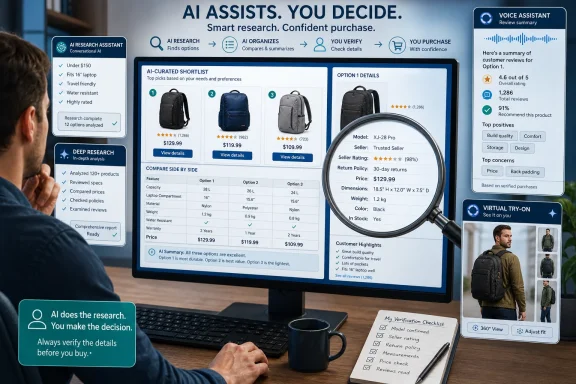 Online Shopping Has Become an Information-Management Problem
The original promise of online retail was almost comically simple: more choice, lower prices, and no need to drive from store to store. The modern reality is that shoppers routinely face dozens of near-identical products, overlapping model numbers, unfamiliar brands, contradictory reviews, changing promotions, and listings written as much for discovery systems as for human readers.That abundance creates a new kind of labor. Before buying a chair, monitor, laptop, appliance, or jacket, a careful shopper may open a stack of tabs, scan several buying guides, compare specification sheets, read one-star reviews, search for recurring defects, check return policies, and then repeat parts of the process when the shortlist changes.
The hard part is no longer finding products. It is turning an unstructured mass of commercial information into a defensible decision.
That is where PCMag’s experiment becomes more interesting than another list of AI tricks. The publication did not find a machine capable of replacing consumer judgment. It found three narrower tools that remove different forms of shopping friction: deep research reduces the candidate field, Alexa summarizes product context inside Amazon, and Gemini’s Virtual Try-On helps answer an aesthetic question that text and measurements cannot.
These are not interchangeable systems, even though all three are presented under the broad banner of artificial intelligence.
| AI shopping approach | Where it operates | Best use | Context supplied by the shopper or platform | Critical limitation |
|---|---|---|---|---|
| Deep research in ChatGPT or Gemini | Across web sources available to the chatbot | Building and comparing a product shortlist | Requirements such as budget, dimensions, usage, existing equipment, and priorities | Sources may be inaccessible, incomplete, snippet-based, or outdated |
| Alexa product questions | Inside Amazon through the Alexa sidebar | Asking about a specific listing or requesting recommendations | The selected listing and, where applicable, Amazon shopping-history context | It operates inside one retailer’s catalog and may summarize weak or mixed-quality evidence |
| Gemini Virtual Try-On | Supported clothing products found through Google Shopping | Visualizing whether a garment’s style works with the shopper’s appearance | An uploaded selfie and a supported product | It visualizes style, not real-world fit |
Deep Research Works Because It Replaces Tab Management, Not Judgment
Deep research is the most broadly useful of the three approaches because it tackles the part of shopping that consumes the most time: transforming personal requirements into a manageable shortlist. PCMag identifies ChatGPT and Gemini as chatbots that can be used for this kind of work.The important phrase is deep research, not merely “ask a chatbot.” A one-line request for “the best laptop” or “a good office chair” gives the model almost nothing meaningful to optimize. The answer may default to familiar products and generic buying-guide criteria rather than the shopper’s actual needs.
A detailed research prompt is fundamentally different. It can specify the buyer’s budget, expected usage, current product, desired improvements, unacceptable compromises, room or desk dimensions, available ports, software requirements, warranty concerns, and tolerance for noise, heat, maintenance, or weight.
PCMag’s chair example demonstrates why that context matters. Instead of manually cross-referencing several chair lists and investigating every recurring model, the shopper supplied personal and usage details along with the qualities expected from an upgrade.
The resulting report did not make the purchase automatically. It created a smaller set of candidates on which human research could be concentrated.
That division of labor is sensible. Machines are well suited to sorting information, extracting repeated themes, building comparison structures, and checking candidates against a long list of stated requirements. People must still decide whether a compromise is tolerable, whether a source is persuasive, and whether an expensive purchase should be delayed.
For Windows users, this can eliminate much of the browser-tab sprawl associated with buying PC hardware. A useful monitor prompt, for example, would state the graphics card, desk depth, preferred screen size, target resolution, games or professional applications, required ports, refresh-rate expectations, tolerance for display technologies’ known tradeoffs, and maximum budget.
The model’s task is to identify candidates, compare them consistently, and show what still needs confirmation. The shopper’s task is to verify the exact model number, current price, warranty, connectivity, seller, and recurring defects before paying.
That workflow is more rigorous than asking for the “best monitor,” yet faster than beginning with hundreds of listings. It also reduces a subtle source of purchasing error: losing track of the original requirements after hours of reading attractive but irrelevant product descriptions.
Copy-Ready Deep-Research Prompt for a Windows Monitor
WindowsForum readers can paste the following template into a deep-research tool and replace the bracketed fields:The same structure can be adapted to laptops by replacing monitor-specific fields with processor class, memory, storage, battery expectations, weight, display requirements, software compatibility, upgradeability, docking needs, webcam quality, and acceptable fan noise.I need a shortlist of Windows-compatible monitors based on the requirements below. Research current models, but do not name a single universal winner. Recommend three to five candidates and explain the tradeoffs.
Budget: [maximum price before tax]
PC or GPU: [desktop/laptop model and graphics hardware]
Primary uses: [gaming, office work, programming, photo editing, video editing, CAD, mixed use]
Preferred size: [for example, 27 inches or 32 inches]
Target resolution: [1080p, 1440p, 4K, ultrawide, or undecided]
Refresh-rate requirement: [minimum or preferred refresh rate]
Desk depth and space limits: [measurements]
Required connections: [DisplayPort, HDMI version, USB-C, power delivery, KVM, USB hub]
Adaptive-sync needs: [FreeSync, G-Sync compatibility, or no preference]
Image priorities: [text clarity, color accuracy, HDR, contrast, motion clarity]
Unacceptable compromises: [for example, OLED burn-in risk, aggressive curve, external power brick, poor stand, fan noise]
Warranty or support priorities: [requirements]
For every candidate, provide the exact model number, relevant specifications, major advantages, major disadvantages, compatibility concerns, and unresolved facts that I must verify. Distinguish manufacturer claims from independent findings where possible. Flag cases in which retailers appear to combine several variants on one listing. Do not treat prices as final; tell me to verify the seller, current price, return policy, warranty, and exact variant before purchase.
A Good Prompt Is Really a Procurement Specification
The popular conception of prompting treats it as a clever way to talk to a computer. In shopping research, the better analogy is writing a lightweight procurement specification.A procurement team does not ask a vendor for “a good computer.” It defines workload, compatibility, deployment environment, service expectations, security constraints, budget, and expected lifespan. Consumers can benefit from the same discipline, even when the purchase is only a chair or kitchen appliance.
A strong shopping prompt should establish what must be true, what would be useful, and what would disqualify a product. It should ask for tradeoffs rather than a theatrical declaration of one universal winner.
The model should also be told how to handle uncertainty. Asking it to distinguish product-page claims from independent observations, identify facts that need confirmation, and show the basis for important specifications makes the output more useful than an unsupported recommendation.
This is particularly important for PCs, components, accessories, and networking equipment. Retail listings may mix variants, reviews may apply to several products grouped under one page, and a familiar product name may conceal differences in processor, memory, panel, wireless hardware, power supply, operating system edition, or regional configuration.
AI can compare the wrong variants with impressive fluency. A neatly formatted table does not prove that its rows describe identical products.
The most productive deep-research report therefore ends with unresolved questions. Those might include whether a laptop’s memory is upgradeable, whether a monitor’s advertised port supports the required resolution and refresh rate, whether a docking station supplies enough power, or whether a chair’s warranty applies to the shopper’s weight and expected usage.
That is not failure. It is the system correctly identifying where manual verification is required.
The Shortlist Is the Product
The biggest mistake is expecting deep research to output a command: Buy this one. Its most valuable output is a shortlist with an audit trail.A good shortlist explains why each candidate survived, what distinguishes it from the others, and what evidence could still eliminate it. It makes the shopper’s remaining work smaller and more targeted.
This also guards against automation bias—the tendency to accept a computer-generated result because it appears comprehensive. Long reports, polished tables, and citations create an aura of diligence, but presentation quality and factual reliability are separate variables.
A deep-research system may misunderstand a requirement, retrieve an outdated specification, overvalue a weak review, or fail to access a relevant page. The correct response is to position the tool where mistakes are inexpensive and recoverable.
Use AI to reduce 100 possible products to five. Then verify those five against primary product specifications, credible independent testing, retailer terms, and the live checkout page.
Amazon’s Alexa Knows the Store—and May Know the Shopper’s History
Alexa’s role on Amazon is narrower but, in some situations, more immediately convenient. According to PCMag, shoppers can open the Alexa sidebar on Amazon and request product recommendations or ask questions about individual products.This can reduce one of the least pleasant jobs in online retail: scanning a listing, customer questions, and large numbers of reviews to find the answer to a practical concern. A shopper may want to know whether buyers repeatedly mention noise, difficult assembly, unreliable controls, poor packaging, or another issue that is easy to overlook in the main description.
Many product questions are aggregations in disguise. “Is it noisy?” means “Do enough owners independently complain about noise that I should investigate it?” “Is it easy to assemble?” means “Do customer reports reveal recurring trouble not visible in the product description?”
An assistant can reduce the reading burden by extracting recurring themes. It can also answer follow-up questions in ordinary language, making the experience less mechanical than filtering reviews by keyword.
Amazon’s advantage is proximity. Alexa operates next to the retailer’s listings and can use Amazon shopping-history context when making recommendations, according to PCMag.
That convenience deserves a boundary: information drawn from shopping history may help personalize an answer, but it does not make the recommendation complete or independent.
Personalization Requires Deliberate Use
PCMag explicitly raises a privacy concern about Amazon using shopping history as recommendation context.From a convenience perspective, remembered purchases can reduce repetitive setup. An assistant may be able to make a more relevant suggestion when previous Amazon orders provide useful context.
From a privacy perspective, the same feature reminds shoppers that a retail account can preserve a substantial record of past purchasing behavior. That history may include routine household items as well as purchases connected to health, hobbies, gifts, work, or family life.
This does not make Alexa’s recommendations unusable. It means shoppers should use personalization consciously rather than assuming the assistant arrived at its answer without account context.
The safest approach is to treat an Alexa recommendation as a retailer-scoped lead. Ask why the product was suggested, what listing details support the answer, what common complaints appear in reviews, and which compatibility facts remain uncertain. Then compare the candidate outside that conversational answer before purchasing.
Potential commercial influences on rankings and recommendations are difficult for a shopper to evaluate from the interface alone. Rather than speculating about which factor caused a product to appear, use a neutral rule: a recommendation inside a marketplace should be independently compared with alternatives and verified against the shopper’s written requirements.
Review Summaries Can Compress Bad Evidence Too
Alexa’s ability to summarize customer feedback solves a reading problem, but it does not solve the underlying evidence problem. If source reviews are low quality, attached to several variants, or dominated by comments about delivery rather than the product, a fluent summary may preserve those weaknesses.A summary also hides distribution. “Customers praised the display” does not necessarily reveal how many customers did so, whether recent buyers agree, whether a newer revision changed the product, or whether that praise was offset by reliability complaints.
The operating rule is to ask focused questions and inspect enough underlying material to confirm the answer. If an assistant says owners repeatedly report monitor flicker, loose chair armrests, unstable wireless connections, or confusing controls, search the reviews for those subjects and check whether the pattern appears genuine and relevant to the exact variant.
It is also useful to ask the inverse question. After requesting common praise, request common complaints, reports of failure after extended use, and signs that reviewers may be discussing different products grouped on the same page.
The objective is not to force Alexa to make the decision. It is to use conversational search as a faster route into evidence that would otherwise be tedious to locate.
Gemini’s Virtual Try-On Is for Style, Not Sizing
Gemini’s Virtual Try-On addresses a different source of uncertainty. Product research can establish that a jacket has the right material, price, and features, yet none of those facts answer whether the shopper likes the way its color or overall design works with their appearance.According to PCMag, Gemini’s Try On feature lets users upload a selfie and visualize supported clothes found through Google Shopping. PCMag associates the image quality with Gemini’s Nano Banana technology, which received the publication’s Technical Excellence award.
The appeal is obvious. The shopper can explore how a color or overall style interacts with characteristics such as hairstyle and skin tone without visiting a store, ordering several options, or relying entirely on a catalog model.
It is a meaningful improvement over imagining the result. It is not a fitting room.
PCMag supplies the crucial warning: “It’s about style, not fit.”
A Convincing Image Is Not a Measurement
A generated image can provide a plausible visualization without measuring how the actual garment will sit on the shopper’s body.That distinction matters because visual realism can create more confidence than the system has earned. A text recommendation saying “this color may suit you” is visibly tentative. A polished image of the shopper apparently wearing the garment can feel like proof.
It is not proof. It is a generated preview.
A synthetic image cannot establish fabric weight, stretch, seam placement, sleeve mobility, pressure points, transparency, texture, or how the garment behaves when the wearer sits, walks, bends, or reaches. It cannot replace the precise relationship among body measurements, brand sizing, garment measurements, and the construction of that item.
Shoppers should therefore split the clothing decision into two tracks. Virtual Try-On can help determine whether the color and style are worth investigating; size charts, garment measurements, customer reports, return terms, and actual physical fitting must establish whether the item is likely to fit.
The more vivid the preview, the more important it is to separate what was visualized from what was measured.
Support Is Part of the Experience
PCMag also notes that users cannot visualize every item found through Google Shopping. Only supported products can be tried on.That limitation can shape the shopping process. A supported garment is easier to visualize, while an unsupported one requires the shopper to rely on catalog images, measurements, reviews, or an in-person visit.
Shoppers should avoid treating availability of the visualization as evidence of product quality. An unsupported garment may still be better made, less expensive, or more appropriate.
A virtual try-on result should answer, “Do I want to investigate this garment further?” It should not answer, “Is this the only garment worth considering?”
AI Fails When the Question Is Too Broad
PCMag’s account draws a sharp line between deep research and an ordinary chatbot recommendation. Asking an AI to recommend a good laptop is a weak prompt likely to produce a context-poor answer based on generic criteria.A model cannot know which laptop is “good” without knowing the workload, budget, portability requirements, battery expectations, screen preferences, software dependencies, repair priorities, and tolerance for heat or fan noise.
The word best conceals a set of weights. If the shopper does not supply them, the system must fill in the gaps.
The answer can still sound decisive because fluent language does not require complete context. Broad shopping questions are therefore risky because they encourage specificity before the decision has been properly defined.
The cure is requirement clarity.
If the shopper cannot explain what matters, the chatbot should first be used to identify the relevant criteria. An initial conversation might ask what distinguishes mobile and desktop-class processors, which display characteristics matter for photo editing, why USB-C power delivery matters, or what compromises accompany different monitor-panel technologies.
That turns AI into a requirements analyst before it becomes a research assistant. For an unfamiliar product category, this may be one of its strongest roles.
Deal Hunting Exposes the Weakest Part of the AI Shopping Stack
Product selection and deal discovery appear closely related, but they rely on different kinds of information. A chair’s dimensions may remain valid for months. A discount, coupon, seller, stock status, or delivery promise can change while a chatbot is composing its answer.PCMag specifically warns against relying on AI chatbots as deal-search tools. The publication identifies three problems: chatbots may be unable to access many websites, may rely on web-search snippets rather than complete pages, and may fall back on outdated training data.
Each problem undermines deal verification.
An inaccessible retailer might have a relevant offer but never enter the comparison. A search snippet might display an expired promotional amount or omit the conditions required to receive it. Older model knowledge may describe a price that no longer reflects the current market.
Deals also contain details that resist summarization. The displayed amount may require a membership, rebate, trade-in, coupon, subscription, financing plan, regional store, specific color, refurbished condition, or third-party seller. Shipping charges and return restrictions can erase the apparent saving.
A chatbot can help identify which products are worth tracking. It cannot be assumed to have a complete, transaction-ready view of the market.
The final price must be verified directly at the retailer immediately before purchase. The exact product variant, seller identity, condition, shipping cost, return policy, warranty coverage, and promotion requirements must be checked at the same time.
This is where traditional price-comparison tools, retailer alerts, deal specialists, and direct product pages retain an advantage. They focus on rapidly changing commercial data, while a general chatbot’s answer may reflect only the sources it could access at the time.
Use a Two-Pass Buying Process
The most reliable workflow separates product research from transaction verification.Pass One: Decide What Qualifies
Use deep research to define requirements and create a shortlist. For each candidate, record:- Exact manufacturer and model number
- Required processor, memory, storage, panel, or connectivity variant
- Compatibility with the existing Windows PC and accessories
- Major tradeoffs
- Warranty expectations
- Known questions that remain unresolved
- The maximum acceptable price
Pass Two: Verify the Live Offer
After selecting one or two acceptable products, inspect the live retailer page and checkout terms. Confirm:- The listing matches the exact researched model and variant
- The seller is the retailer or another seller you intentionally chose
- The condition is new, used, renewed, refurbished, or open-box as expected
- The current price includes any required coupon or membership
- Shipping cost and delivery time are acceptable
- The return window and restocking terms are acceptable
- Warranty coverage applies to that seller and region
- Clothing measurements or hardware dimensions match the requirement
- Included accessories are clearly identified
What Each Tool Should—and Should Not—Decide
The three systems in PCMag’s test fit different points in a practical shopping sequence.Deep Research Should Decide
- Which products appear to satisfy a detailed requirement set
- What the major tradeoffs are
- Which specifications or claims remain uncertain
- Which candidates deserve manual investigation
Deep Research Should Not Decide
- Whether a live price is accurate at checkout
- Whether a third-party seller is acceptable
- Whether two similar model names represent the same hardware
- Whether a purchase should proceed without checking original sources
Alexa Should Decide
- Which parts of an Amazon listing deserve closer attention
- Which praise or complaints appear repeatedly in available customer feedback
- Which follow-up questions to ask about a selected listing
Alexa Should Not Decide
- That an Amazon recommendation is automatically the best option across the market
- That a review summary proves product quality
- That reviews grouped on one page necessarily describe the exact variant being purchased
Gemini Virtual Try-On Should Decide
- Whether a garment’s color or style is worth further consideration
- Whether the shopper wants to compare the item with other visual options
Gemini Virtual Try-On Should Not Decide
- Which size to buy
- Whether the garment will be comfortable
- Whether its material, construction, or movement will match the visualization
- Whether the return policy is good enough to absorb sizing uncertainty
WindowsForum Buyer’s Verification Checklist
For a monitor, laptop, desktop, graphics card, dock, router, peripheral, chair, or other significant purchase, complete this checklist before checkout.Identity
- [ ] Manufacturer name confirmed
- [ ] Exact model number confirmed
- [ ] Exact processor, panel, capacity, color, or regional variant confirmed
- [ ] Listing title and technical details agree
- [ ] Reviews are relevant to the same variant, or mixed reviews have been identified
Compatibility
- [ ] Required Windows version and software support confirmed
- [ ] Ports and protocol versions confirmed
- [ ] Physical dimensions measured against the installation space
- [ ] Power requirements confirmed
- [ ] Required cables, adapters, mounting hardware, or chargers identified
- [ ] Upgradeability and replaceable components confirmed where relevant
Transaction
- [ ] Current price checked directly
- [ ] Seller identity confirmed
- [ ] Product condition confirmed
- [ ] Shipping charge and delivery estimate checked
- [ ] Coupon, membership, financing, or rebate conditions understood
- [ ] Return window and restocking terms checked
- [ ] Warranty coverage confirmed for the seller and region
Evidence
- [ ] Important specifications checked against the manufacturer’s materials
- [ ] At least one credible independent evaluation consulted for an expensive purchase
- [ ] Recurring owner complaints examined rather than accepted only through a summary
- [ ] AI-identified uncertainties resolved or consciously accepted
- [ ] Final choice still matches the original written requirements
- [ ] Body measurements are current
- [ ] Brand size chart checked
- [ ] Garment measurements checked where available
- [ ] Fabric composition and stretch considered
- [ ] Return or exchange process acceptable
- [ ] Virtual Try-On used only as a style preview
The Next Shopping Interface Will Be Conversational—but Checkout Still Requires Proof
AI shopping tools are likely to become more visible because they address a real problem: online stores contain more information than most people can efficiently evaluate.Deep research can turn requirements into a shortlist. Alexa can make an Amazon listing easier to interrogate. Gemini Virtual Try-On can make clothing discovery more personal and visual. Each tool can save time when it is assigned a narrow job.
The mistake is allowing convenience to erase verification.
A well-written answer can contain an outdated specification. A concise review summary can conceal mixed variants or weak evidence. A realistic clothing preview can look persuasive without establishing fit. A reported deal can disappear or change once the exact seller and transaction conditions are inspected.
The solution is not to reject AI shopping. It is to use it in a controlled sequence:
- Write the requirements.
- Generate a shortlist.
- Interrogate the listing.
- Use visualization only for style.
- Verify the exact model or variant, seller, current price, return policy, and measurements before checkout.
References
- Primary source: PCMag
Published: 2026-07-09T13:00:22.508251
I Hate to Admit It, But AI Actually Takes the Stress Out of Online Shopping | PCMag
I use these three AI features to spend less time finding things to buy and more time checking out. You should do the same.www.pcmag.com - Official source: openai.com
Introducing shopping research in ChatGPT | OpenAI
Shopping research in ChatGPT helps you explore, compare, and discover products with personalized buyer’s guides that simplify decision-makingopenai.com - Related coverage: blog.google
Google virtual try on shopping feature adds new studio-quality images
Say goodbye to bad dressing room lighting and awkward outfit selfies. Today U.S. shoppers have a new way to use our virtual try on tool: Now if you don’t have a full bod…blog.google - Related coverage: developer.amazon.com
Design the Product Recommendation | Alexa Skills Kit
Design the purchase recommendation for Alexa Shopping Actions to enable a customer to purchase the recommended product or add it to their Amazon Shopping Cart or Wish List.developer.amazon.com - Official source: help.openai.com
ChatGPTでショッピングリサーチを使う | OpenAI Help Center
 help.openai.com
- Related coverage: aboutamazon.com
What is Alexa for Shopping? Amazon's agentic AI assistant explained
Discover how Alexa for Shopping can automate recurring purchases, find personalized deals, and help you shop smarter. www.aboutamazon.com
- Related coverage: info.fieldagent.net
- Related coverage: axios.com
Amazon pushes Alexa deeper into AI shopping with Rufus integration
Amazon is folding its Rufus assistant into Alexa+ as it pushes deeper into AI shopping tools that track deals, automate purchases and shop across devices.www.axios.com
- Related coverage: kiplinger.com
Amazon AI on Prime Day: Deal Helper or Upsell Machine? | Kiplinger
Amazon’s Rufus chatbot, Alexa voice deals and Amazon Lens can change how you shop on Prime Day. Here’s how to use them wisely — and avoid being upsold.www.kiplinger.com - Related coverage: tomsguide.com
Alexa+ can now shop for you — here are all the new features rolling out | Tom's Guide
Alexa+ now helps you shop smarter, track deals, manage deliveries and organize your family calendar.www.tomsguide.com