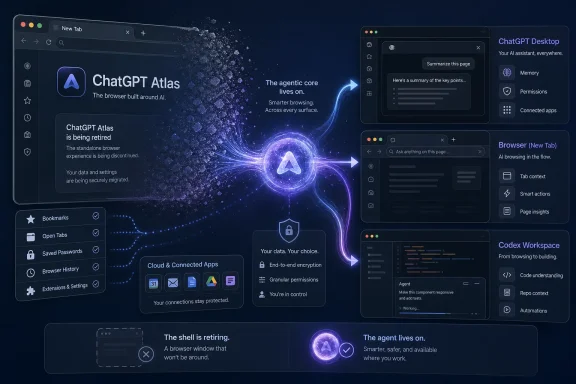
That distinction matters because OpenAI is not retreating from browser automation. It is retreating from the much harder proposition of persuading people to move their bookmarks, passwords, history, extensions, work identities, and daily habits into a new standalone browser.
Journalarta’s July 2026 article correctly identifies the Atlas shutdown and names seven services with active free versions. It then collapses chat assistants, research engines, design suites, image generators, video editors, productivity software, and browsers into a single category, producing a list that is easy to scan but unreliable as a guide to what Atlas users should install next.
OpenAI Killed the Browser but Kept the Browser Agent
OpenAI introduced ChatGPT Atlas on October 21, 2025, as a browser with ChatGPT at its core. It arrived first on macOS, combining conventional Chromium-style browsing with a persistent ChatGPT sidebar, browser memories, page visibility controls, and an agent mode capable of interacting with websites.
The pitch was larger than adding a chatbot button to a toolbar. Atlas was supposed to give ChatGPT direct access to the place where users already researched products, managed accounts, filled forms, wrote messages, compared information, and moved between cloud applications. With user permission, it could interpret the current page, draw on browsing context, remember prior activity, and take actions instead of merely describing them.
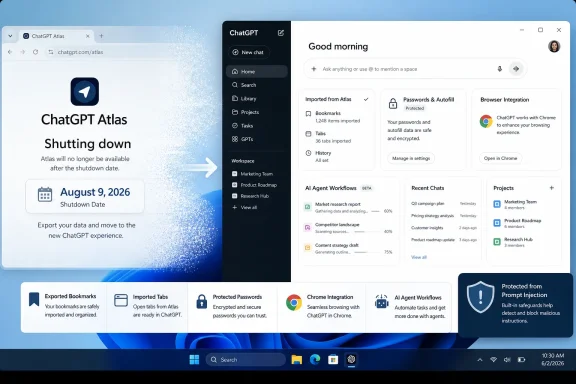
OpenAI’s July 9, 2026 release notes now say Atlas is being deprecated as browser-based agentic capabilities move into ChatGPT and Codex. The browser is scheduled to stop working on August 9, leaving users approximately one month to export or save important data.
MacRumors framed the announcement plainly: OpenAI’s ChatGPT Atlas browser is shutting down. TechCrunch emphasized the other half of the story, arguing that OpenAI’s AI-browser ambitions remain alive because Atlas capabilities are being redistributed into the desktop app and Chrome integration. Both descriptions are defensible, but the second is more useful for understanding the strategy.
The standalone browser is being discontinued. The underlying idea—that an AI system should see, navigate, and operate a browser—is becoming part of OpenAI’s broader application layer.
That shift reduces the number of products OpenAI must maintain while allowing it to meet users inside environments they have already adopted. A Chrome extension does not need to win a browser war before becoming useful. A desktop agent does not need to replace every extension, password manager, enterprise policy, identity provider, accessibility tool, or site-compatibility assumption embedded in an existing browser deployment.
Atlas therefore looks less like an abandoned experiment than a product whose most valuable components are being absorbed by a larger platform. The browser shell lost; the agentic browsing model survived.
Atlas Ran Into the Browser Market’s Real Switching Cost
Replacing a browser is not comparable to installing another chatbot. A browser is an operating environment for the web, and even technically adventurous users tend to underestimate how much personal and institutional infrastructure accumulates inside it.
Bookmarks are the obvious asset, but they are only the beginning. Users depend on stored passwords, passkeys, active sessions, pinned tabs, browser history, site permissions, certificate decisions, profiles, search defaults, extensions, developer tools, accessibility settings, content filters, payment information, and years of learned keyboard and navigation behavior.
Organizations add another layer. Enterprise browsers may be governed by device-management policies, approved extension lists, data-loss-prevention controls, conditional-access rules, security monitoring, identity restrictions, update rings, and support documentation. A new browser must prove that it can participate in this ecosystem without creating a shadow channel around existing controls.
Atlas initially launched worldwide for Mac users and remained fundamentally a macOS-first experience. That limited the addressable audience before OpenAI had even confronted enterprise adoption. A browser trying to become a daily work surface cannot treat Windows support as an eventual detail when Windows remains central to business computing.
The more consequential obstacle was trust. Atlas could become useful precisely because it could inspect page content, remember browsing context, and act on websites. Those same capabilities widened the security and privacy questions users and administrators had to answer.
An AI sidebar that summarizes a public article is relatively easy to evaluate. An agent with access to authenticated pages, account sessions, business applications, payment flows, email, or internal documents creates a different risk model. It must distinguish the user’s instructions from hostile instructions embedded in webpages, advertisements, documents, comments, or compromised sites.
OpenAI acknowledged at launch that safeguards would not stop every attack as web agents evolved. That was an appropriately cautious admission, but it also exposed the commercial difficulty: Atlas needed broad access to become compelling while constrained access made it easier to trust.
Traditional browsers already represent one of the most security-sensitive components on a computer. Adding an agent capable of interpreting content and taking action introduces another decision-making layer between the user and the site. Even when each individual action is reviewable, the combination of browser state, AI interpretation, third-party content, saved credentials, and user authorization is difficult to reason about.
The result is a familiar platform problem. The users most willing to experiment with an AI browser may not generate enough mainstream adoption, while the organizations capable of deploying it widely require a level of maturity, control, auditing, and cross-platform support that an early product cannot immediately supply.
OpenAI’s solution is not to solve every browser-distribution problem simultaneously. It is to put the agent into ChatGPT, Codex, the desktop app, and Chrome, where the user’s existing browser can remain the browser.
The Shutdown Is Also a Data-Migration Event
The most immediate consequence for Atlas users is not strategic. It is operational.
OpenAI says Atlas browser data will not automatically transfer as a complete package. Bookmarks, open tabs, and browser history require attention before August 9. ChatGPT conversation history is stored separately and is expected to remain available according to the user’s plan, workspace settings, and account access, but that does not preserve the browser state surrounding those conversations.
Bookmarks can be exported to an HTML file and imported into another browser. Important tabs should be bookmarked or have their addresses copied somewhere durable. Pages buried only in browser history should be saved before Atlas becomes unavailable.
Cookies and active sessions require greater caution. OpenAI says export options may be available for some browser data, but cookie and session files should be treated as sensitive credentials. A session cookie may grant access to an account without requiring the password again, making careless storage or sharing equivalent to handing over an authenticated session.
That is particularly important in workplaces where users may have tried Atlas with corporate software. An employee who exports browser data to an unmanaged location could unintentionally move authentication material outside normal controls. Administrators should not frame migration as a simple bookmarks exercise.
OpenAI also warns that discontinued browsers need continuing security maintenance. Users should not attempt to keep Atlas as a frozen legacy browser after August 9 merely because it remains installed. Even if parts of the application continue to open, an unsupported browser is not an appropriate long-term environment for authenticated browsing.
Action checklist for admins
- Identify users who installed or signed into Atlas, including pilot groups and unmanaged Mac users.
- Tell affected users that Atlas is scheduled to stop working on August 9, 2026.
- Require the export of needed bookmarks and the preservation of important open-tab addresses before the deadline.
- Treat exported cookies and session files as sensitive authentication data; prohibit casual sharing or storage in unapproved locations.
- Confirm whether the ChatGPT desktop app, Chrome extension, sidebar, ChatGPT Work, or Codex is available and approved for each workspace.
- Update internal software catalogs, onboarding documents, browser guidance, support scripts, and security policies that mention Atlas.
- Remove Atlas from managed deployments after migration and avoid leaving an unsupported browser available for routine use.
A Seven-Tool List Becomes a Category Error
Journalarta presents Meta AI, Gemini 1.5, Canva AI, Microsoft Copilot, Leonardo AI, Runway ML, and Perplexity AI beneath a headline about “the AI browsers people actually use.” The article’s own descriptions show why that label does not hold.
Meta AI is a conversational assistant distributed through Meta’s services. Canva is a design platform. Microsoft Copilot is a family of chat and productivity experiences. Leonardo is a generative-media suite. Runway is an AI video and image platform. Perplexity is an answer engine that also operates an actual AI browser, but the list describes its search product rather than evaluating its browser as an Atlas replacement.
Gemini is similarly a broad assistant and model family, not a browser in the ordinary sense. Google can embed Gemini capabilities into web and browser experiences, but listing “Gemini 1.5” for document summaries does not tell a departing Atlas user what browser to adopt, how data migrates, or whether browser automation is available.
The comparison is therefore not between seven substitutes for the same product. It is between seven services that might replace individual tasks someone performed with Atlas or ChatGPT.
| Tool | Journalarta’s stated use | Free-access reality in July 2026 | Where it can help | Critical caveat |
|---|---|---|---|---|
| Meta AI | Chat, Q&A, images | Available through Meta services without a separate AI subscription in supported experiences | Casual chat and image-assisted social workflows | It is an assistant distributed across apps, not an Atlas-style browser |
| Gemini 1.5 | Research and document summaries | The named model was already shut down by Google | The current Gemini service can research and analyze uploaded files | “Gemini 1.5” is not a valid current recommendation |
| Canva AI | Design, presentations, video | A range of AI tools is available on Canva Free; higher usage and advanced features require paid plans | Template-led design and presentation creation | Free Canva access does not make every AI feature unrestricted |
| Microsoft Copilot | Word, Excel, PowerPoint | Free Copilot exists, but deep Microsoft 365 app integration depends on an eligible subscription, license, and organizational settings | Office-document creation, editing, and analysis | The free chatbot and Copilot inside Office are not interchangeable entitlements |
| Leonardo AI | HD image creation | Free users receive a limited daily token allowance | Image generation, experimentation, and upscaling | Usage is metered, and some models or capabilities are premium |
| Runway ML | AI video editing | A free plan exists, but some advanced editing tools require paid access | Generative video and selected image or video workflows | Object removal and advanced editing cannot be assumed to be free |
| Perplexity AI | Information search and journal sources | Core search is free; advanced searches, browser-agent use, uploads, and other capabilities are limited by plan | Cited web research and source discovery | Its answer engine is relevant, but its browser must be evaluated separately |
This does not make the seven products bad recommendations. It means they are recommendations for different jobs, with different limits, data practices, deployment models, and payment structures.
A user seeking a browser replacement needs a browser comparison. A user seeking alternatives to ChatGPT needs an assistant comparison. A designer, researcher, Office user, image creator, and video editor should not be directed to the same list as if those roles were interchangeable.
Gemini 1.5 Exposes the List’s Staleness
The clearest factual weakness is the recommendation of Gemini 1.5 in a list dated 2026. Google’s official Gemini API release notes say the Gemini 1.5 models were shut down on September 29, 2025.
That does not mean Gemini itself was unavailable in July 2026. Google continued developing newer Gemini generations, and the Gemini application still supported research and file analysis. It means the article attached an obsolete model label to a current service roughly ten months after that model generation had been retired.
Model names are not harmless decorative details. They communicate expected capability, supported context, availability, pricing, and lifecycle status. When an article recommends a retired model, readers cannot know whether the author tested the current product, copied an older comparison, or used “Gemini 1.5” as a generic name for Gemini.
The claim that Gemini 1.5 can analyze PDF documents of up to 1,000 pages illustrates the problem. Large-document analysis was one of the generation’s notable capabilities, but the useful question in July 2026 is what the current Gemini application permits under the user’s account and plan. Google’s documentation describes file analysis, supported formats, account requirements, and usage limitations rather than offering a universal promise that every free user can always process any 1,000-page PDF.
Page count is also a poor proxy for workload. A scanned, image-heavy technical manual is not equivalent to a text-only novel with the same number of pages. File size, format, OCR quality, model context, upload limits, account tier, and service-side quotas all affect the result.
The stale Gemini reference should make readers skeptical of the list’s broader precision. A roundup can be technically correct that a service has a free entry point while still being outdated about the model, wrong about the included capability, or vague about the limit that determines whether the recommendation is useful.
“Free” Now Describes an Entrance, Not a Product
Journalarta says all seven tools had active free versions as of July 2026 and warns that free-tier policies can change. That statement is defensible at the broadest level, but it papers over the central fact of modern AI pricing: free access is normally metered.
The relevant unit may be messages, searches, tokens, credits, uploaded files, generated seconds, image jobs, model availability, concurrency, output resolution, or access to an agent. Two services can both advertise a free plan while providing radically different practical value.
Leonardo’s support documentation, for example, says free users receive 150 daily tokens. Those tokens do not accumulate when unused, and different models, settings, image sizes, and actions consume different amounts. Calling Leonardo a free HD-image tool is less informative than explaining that it offers a recurring but finite experimentation allowance.
Runway also advertises a free plan, but its own product documentation distinguishes free entry from paid advanced editing. Some current editing environments are limited to paid plans, while particular apps may require a standard-or-higher subscription and consume credits. The Journalarta description of object removal and background replacement is a fair summary of Runway’s broader abilities, not proof that those abilities are all included without payment.
Canva makes a range of AI-powered tools available on its Free plan and offers a large template library. Canva also states that increased usage and more advanced features are available through paid plans. Its value lies partly in combining templates, editing, presentations, video, and brand-oriented workflows, but “free” does not erase the boundary between free and premium content or between basic and advanced AI use.
Perplexity provides extensive basic search without payment and returns answers with inline source citations. Its free tier, however, offers only limited access to more advanced searches and file features, and its browser agent is not included as a general free capability. The free answer engine may be useful to an Atlas user doing research, but it does not provide a like-for-like replacement for Atlas agent mode.
Meta AI comes closest to the consumer meaning of a widely accessible free assistant because it is distributed through WhatsApp, Instagram, Facebook, Messenger, its website, and its dedicated app in supported markets. Even there, “fully free” is broader than the evidence justifies. Availability can vary by region, product surface, account, rollout stage, and feature.
The practical rule is simple: a free tier proves that a user can enter the product, not that the advertised workflow can be completed indefinitely without payment.
Microsoft Copilot Is Not One Entitlement
The list’s treatment of Microsoft Copilot is especially relevant to WindowsForum readers because “Microsoft Copilot” can refer to several related but differently licensed experiences.
Microsoft offers a free Copilot service intended for general questions, web-grounded assistance, and everyday tasks. Microsoft also provides Copilot capabilities through Microsoft 365, including experiences in Word, Excel, PowerPoint, Outlook, and the Microsoft 365 Copilot application.
Those are not automatically the same benefit.
Microsoft’s support material says deep integration with desktop applications depends on an eligible Microsoft 365 subscription or workplace license. For organizational users, access can also depend on administrator configuration. Features exposed inside Word, Excel, or PowerPoint may differ according to whether the account has basic chat access, standard application access, or a fuller Microsoft 365 Copilot entitlement.
That distinction changes what the product can do. A free web chatbot may help draft text intended for a Word document, but that is not equivalent to an assistant operating inside the document, understanding its context, editing the file, using organizational data, or building a presentation within the managed Microsoft 365 environment.
The Journalarta wording—“connects directly with Microsoft Office applications”—describes an important Copilot strength. Presenting that integration inside a list of free tools risks implying that anyone using free Copilot receives the complete in-app experience without licensing, account, plan, or policy conditions.
For individual users, the correct first step is to inspect the Microsoft 365 subscription attached to the account. For enterprise users, administrators must examine assigned licenses, tenant configuration, enabled models, data protections, and application availability.
Copilot may be the strongest of the seven options for someone whose work already lives in Word, Excel, and PowerPoint. It may also be irrelevant to someone looking for an independent AI browser. The product decision follows the workflow and entitlement, not the brand name.
Perplexity Is the One Entry That Points Toward a Browser
Perplexity is the most interesting inclusion because it operates both a cited answer engine and Comet, an AI-oriented browser. Journalarta describes only the information-search side: answers linked to sources, including journal material.
That is useful, but it misses the browser comparison implied by the headline.
Perplexity’s core service searches the web and produces synthesized answers with citations, making it a credible tool for initial research and source discovery. The company’s current plan documentation says free users receive broad access to basic searches while more advanced searches, uploads, models, and agent capabilities remain limited.
Comet is the product that should be compared with Atlas, not Perplexity’s search box in isolation. The relevant questions would include platform support, extension compatibility, account migration, browser-agent limits, privacy controls, session handling, enterprise management, security updates, and whether the browser remains useful when an AI quota is exhausted.
A product can be an excellent research assistant and an unsuitable managed browser. It can also be a capable browser while imposing agent limits that make it a poor replacement for a specific workflow. Mixing those layers produces recommendations that sound comprehensive while avoiding the decisions users actually face.
The same standard should apply to Chrome and Edge. Both increasingly contain AI assistance, but an AI feature inside an incumbent browser does not automatically make it functionally equivalent to Atlas agent mode. Users must separate page summarization, sidebar chat, search assistance, authenticated action-taking, multi-tab research, and autonomous workflow execution.
“AI browser” has become a marketing category broad enough to include almost anything with a chatbot near a webpage. For evaluation purposes, it should be narrower: a browser or browser-connected agent that can understand web context, preserve navigational state, and perform controlled actions across pages.
Atlas Demonstrates Why AI Features Gravitate Toward Existing Platforms
The history of browser competition is filled with technically interesting products that failed to overcome distribution. Rendering performance and interface novelty matter, but defaults, compatibility, account ecosystems, mobile synchronization, enterprise policy, and extension support matter more.
AI does not repeal those economics. It intensifies them.
An AI browser benefits from access to browsing context, but users are most likely to grant that access to a browser they already trust and use. Google can add Gemini capabilities to Chrome without asking users to migrate. Microsoft can deepen Copilot integration across Windows, Edge, and Microsoft 365. Perplexity must persuade users to adopt Comet, while OpenAI can now put ChatGPT beside Chrome or inside its own desktop application.
OpenAI’s retreat from Atlas therefore acknowledges a distribution asymmetry. Building a compelling assistant may be easier than replacing the browser that hosts it.
The desktop-app approach also allows OpenAI to connect browser work with files, applications, coding tools, and generated deliverables. ChatGPT Work is presented as an agent for longer tasks that can research information, operate across connected resources, and create finished documents, spreadsheets, presentations, reports, and sites. Codex covers more technical workflows.
From OpenAI’s perspective, keeping Atlas as a separate browser risked fragmenting those capabilities. A user might browse in Atlas, code in Codex, converse in ChatGPT, and perform longer tasks in Work, each with overlapping agent functions and different state.
Consolidation makes the product story more coherent. ChatGPT becomes the workspace, browser automation becomes a capability, and Chrome becomes one possible surface rather than an enemy that must be displaced.
The risk is that consolidation can also make permissions harder to understand. When a single agent can access files, applications, webpages, connected services, and account sessions, users need clear visibility into what it can read, what it can change, and where approval is required. Removing the separate browser product does not remove browser-agent risk; it relocates that risk into a broader system.
The Real Alternatives Depend on the Task Atlas Was Doing
Someone who used Atlas mainly for page summaries does not need another AI-native browser. A supported mainstream browser paired with an assistant sidebar may be sufficient and easier to manage.
Someone who relied on Atlas for multi-step browser actions needs to test the ChatGPT desktop app, available Chrome integration, or another browser agent against real authenticated workflows. Marketing demonstrations are not enough. The test should include error recovery, confirmation prompts, account switching, dynamic webpages, downloads, and the ability to distinguish trustworthy instructions from untrusted page content.
A researcher may prefer Perplexity for source-linked discovery and current Gemini tools for document analysis. A Microsoft 365 user may receive more value from Copilot’s proximity to Word, Excel, and PowerPoint than from any dedicated browser. A social-media team may combine Canva and Leonardo, while a video creator may add Runway.
That combination can replace a collection of tasks, but it does not replace the browser as a coherent environment. It also introduces multiple accounts, privacy policies, upload rules, payment systems, data-retention practices, and usage quotas.
For organizations, tool sprawl may be a greater problem than losing Atlas. A department told to choose among seven “free” AI tools may create seven unmanaged data paths. Employees may upload the same sensitive document to multiple services because each offers a different transformation.
The right procurement question is not which tool has the longest feature list. It is which approved tool can complete the workflow under acceptable security, governance, licensing, retention, and cost conditions.
Timeline
September 29, 2025 — Google shut down the Gemini 1.5 models later named in Journalarta’s 2026 recommendation.
October 21, 2025 — OpenAI introduced ChatGPT Atlas worldwide for macOS, with Windows, mobile, and additional platform versions described as coming later.
July 9, 2026 — OpenAI announced that it was retiring Atlas and moving browser-based agentic capabilities into ChatGPT and Codex.
July 2026 — Journalarta published its list of seven AI tools, stating that each had an active free version while incorrectly presenting Gemini 1.5 as a current option.
August 9, 2026 — Atlas is scheduled to stop working, making this the deadline for users to preserve needed browser data and complete migration.
The Seven Claims Users Should Carry Forward
Journalarta’s list captures a real shift: capable AI tools are available without an immediate subscription, and users no longer need one general-purpose chatbot for every job. Its central failure is treating that abundance as evidence of equivalence.
The practical conclusions are narrower and more actionable:
- Atlas is scheduled to stop working on August 9, 2026; bookmarks, tabs, and useful history require migration before then.
- OpenAI is transferring agentic browsing into ChatGPT, Codex, its desktop application, and Chrome-connected experiences rather than abandoning the technology.
- Meta AI, Canva, Copilot, Leonardo, and Runway are not direct browser replacements.
- Gemini remains relevant, but Gemini 1.5 was already shut down and should not appear in a current 2026 recommendation.
- Every listed service has some form of free entry, but meaningful limits apply through licensing, plans, tokens, credits, quotas, or feature restrictions.
- Perplexity’s cited search is useful for research, while its Comet browser must be assessed separately as a potential Atlas alternative.
Atlas will be remembered less as the browser that challenged Chrome than as the test bed that taught OpenAI which parts of an AI browser were worth keeping. The standalone application could not justify the switching cost, but its agent, context, and browsing concepts are moving into larger products where adoption is easier and the permission model is more consequential. The next browser war will not be won by placing the best chatbot in a new window; it will be decided by which platform can let an agent act across the web without making users surrender compatibility, administrative control, or trust.
Update: ChatGPT Work rollout expands Atlas replacement to Windows (July 12, 2026)
Pulse2 reports that OpenAI began rolling out ChatGPT Work and GPT-5.6 on July 12, providing more detail about the platform absorbing Atlas’s agentic features. Work can divide complex projects into steps, use connected apps and files, operate through a built-in browser, and produce finished documents, spreadsheets, presentations, sites, and web apps while requesting approval for important actions.
The updated ChatGPT desktop app is now available globally on Windows and macOS, combining Chat, Work, and Codex. OpenAI says the replacement browser experience is gaining multiple tabs, downloads, improved navigation, and account-login support. This gives Windows users access to the broader desktop agent even though Atlas itself never progressed beyond its macOS-first release.
OpenAI is also launching Sites in public beta and adding Scheduled Tasks that can run once, recur, respond to events, or monitor changes. Plugins can connect Work to services including Microsoft Teams, Slack, SharePoint, Google Drive, email, calendars, CRMs, and project-management systems.
Work is initially rolling out on web and mobile for Pro, Enterprise, and Edu customers, with Plus and Business access following. Chat, Work, and Codex are available through the desktop app on every plan, including Free, although specific capabilities and usage limits may still vary by plan and workspace policy.
References
- With ChatGPT Atlas shutting down, here are the AI browsers people actually use JournalArta · 2026-07-11T23:50:08.117273
- OpenAI Introduces ChatGPT Work And Deprecates Atlas Browser Pulse 2.0 · 2026-07-12T19:42:08.625917
- help.openai.com help.openai.com