

Business and Enterprise teams have until August 6, 2026, to test ChatGPT for PowerPoint before usage begins drawing from the shared OpenAI workspace-credit pool.
Before that deadline, organizations should:
The deadline matters because PowerPoint is not receiving an isolated allowance. Its tasks will draw from the same pool supporting Workspace Agents, ChatGPT for Excel, and ChatGPT Work. Presentation activity can therefore consume credits that would otherwise fund automation, analysis, and coding work.
The risk is not that every slide deck will be expensive. It is that ordinary users can initiate variable-cost work from an interface that feels as familiar as opening a sidebar. The August audit must turn that uncertainty into measured cost, documented controls, and a clear deployment decision.
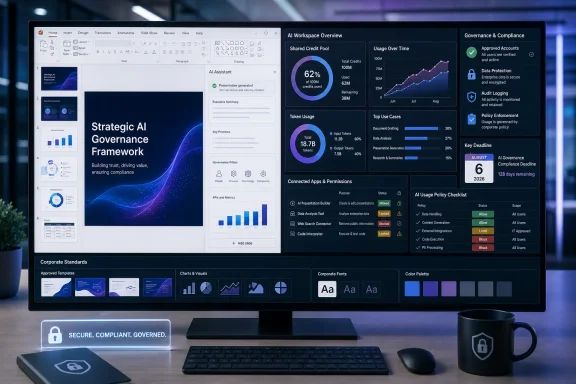
ChatGPT for PowerPoint is a Microsoft Office web add-in, implemented as a JavaScript-based sidebar inside PowerPoint rather than as a separate presentation generator.
For individual installation where Microsoft Marketplace access is permitted, the available path is:
PowerPoint > Home > Add-ins > search for “ChatGPT”
IT should permit this path only when users are authorized to install add-ins, the approved organizational account is clearly identified, and unmanaged installation does not conflict with software-control policy.
The administrative alternative is centralized deployment with the add-in’s manifest XML. IT should use manifest-based deployment when the organization needs to assign the add-in to approved users or groups, manage rollout timing, test it with a pilot population, or prevent users from selecting an unreviewed Marketplace installation.
If policy prohibits unmanaged or personal-account use, administrators should not rely on employee instructions alone. They should combine the organization’s available Microsoft 365 add-in controls with an approved OpenAI workspace, documented sign-in requirements, restricted Marketplace installation where appropriate, and user guidance that distinguishes organizational accounts from personal OpenAI accounts. If those controls cannot reliably enforce policy, the defensible interim decision is to block the add-in until they can.
The implementation remains central to the product’s appeal. Employees do not need to create a deck on another website, export it, and import it into PowerPoint. ChatGPT works against the presentation in place, and generated slides remain editable throughout the process.
The sidebar can build first-draft decks from supported source material, revise or extend an existing presentation, rewrite material for a particular audience, and inspect a deck’s narrative structure for gaps. Narrative review may prove as useful as automated slide creation because many business presentations fail through repetition, missing evidence, or an argument buried beneath organizational boilerplate.
OpenAI also places Skills and connected apps at the center of its broader workspace experience. Skills are reusable workflow templates that can encode style rules, formatting expectations, and output structures. Connected apps can make authorized sources from services such as SharePoint, Outlook, and Gmail available when the workspace configuration and user permissions allow it.
Administrators should test each source path separately rather than assuming that all input methods have identical controls. The documented data boundary is clear for the add-in’s core operation: slide content processed through the sidebar is transmitted to OpenAI servers for inference. Any use of connected apps or additional source files should be evaluated according to the specific feature enabled, the workspace configuration, and the organization’s applicable agreements. IT should not assume that every possible attachment or connected source is automatically included in—or excluded from—processing.
Integration does not eliminate review work. OpenAI says template adherence is not guaranteed, complex formatting remains limited, advanced chart types and specific font handling are not fully supported, and ChatGPT Memory is unavailable in the add-in. The product can accelerate a first draft, but it does not promise the exact visual discipline expected from a tightly governed corporate presentation system.
PowerPoint users judge more than whether a deck’s words are accurate. They judge whether titles fit, charts use approved forms, fonts and spacing follow brand standards, and layouts remain usable after editing. A conceptually sound but visually inconsistent slide still creates cleanup work. If users send every formatting defect back through the assistant, that cleanup may also consume additional credits.
The products overlap in visible capability, but they are not interchangeable administratively. Each can involve a different account, commercial arrangement, permission model, and data-processing relationship.
OpenAI’s GPT-5.6 release makes the comparison less intuitive. Effective July 9, GPT-5.6 became the preferred Copilot model across Word, Excel, PowerPoint, Chat, and Cowork, with GPT-5.6 Sol preferred for several Office tasks.
That does not establish that every task in ChatGPT for PowerPoint uses the same model or routing as Microsoft Copilot. It establishes that Microsoft has selected GPT-5.6 within Copilot while OpenAI’s PowerPoint add-in remains a distinct product with its own interface, account requirements, permissions, and workspace-credit model. Administrators should evaluate those product boundaries rather than inferring equivalence from the model family alone.
Claude adds another possible path. An organization could therefore have multiple assistants capable of processing similar presentation material. That may be useful where teams have a documented requirement for different tools, but it also increases the number of account, billing, support, and data-processing relationships that IT must assess.
Organizations should not assume that every employee needs access to every assistant. The deployment question is whether each tool has a defined, approved role that existing products cannot adequately meet.
For organizations already standardized on Microsoft 365 Copilot, ChatGPT for PowerPoint must justify why a second assistant should process presentation content or access approved connected sources. For organizations with broad ChatGPT adoption, the attraction may be stronger: reusable Skills, OpenAI-connected workflows, and an existing workspace can extend into PowerPoint.
The right question is not which assistant is universally best. It is whether ChatGPT for PowerPoint produces measurable value for specific workloads after accounting for credits, manual cleanup, account administration, data handling, and overlap with tools the organization already licenses.
For GPT-5.5 tasks, fresh input costs 125 credits per million tokens. Cached input costs 12.5 credits per million, while output costs 750 credits per million.
Those rates make output the dominant variable. A generated output token costs six times as much as a fresh input token and sixty times as much as a cached input token. A task that reads a long document and produces a concise outline can therefore cost less than one that repeatedly generates dense slide copy, speaker notes, alternate versions, and follow-up rewrites.
OpenAI’s worked example shows how the components combine. A run using 20,000 fresh-input tokens, 80,000 cached-input tokens, and 5,000 output tokens costs approximately 7.25 credits: 2.5 credits for fresh input, one credit for cached input, and 3.75 credits for output.
The apparently largest part of that workload—the 80,000 cached tokens—is not the largest part of the bill. The 5,000 generated tokens cost nearly four times as much as the cached context despite representing one-sixteenth as many tokens.
For a typical GPT-5.5 PowerPoint task, OpenAI’s rate card estimates 10 to 50 credits. Its product help material gives a broader estimate of 20 to 110 credits for more complex PowerPoint requests. Neither range is a guaranteed per-deck price. The difference reinforces the central planning problem: there is no stable billing unit called “one presentation.”
A request to condense a completed report into five sparse slides is not economically equivalent to a request that reads several sources, creates a long deck, generates speaker notes, revises the result repeatedly, and adds new sections. Users may perceive both as one task, but the underlying token flows can be very different.
The model becomes more consequential because Workspace Agents, ChatGPT for Excel, ChatGPT for PowerPoint, and ChatGPT Work draw from the same credit pool. For Enterprise customers, credits are purchased at the contract level and shared across users and seat types in the workspace.
A sales group generating presentations can therefore reduce capacity available to analysts working in spreadsheets, developers using agentic coding capabilities, or operations teams running Workspace Agents. A deck has both a direct cost and an opportunity cost against other workloads funded by the pool.
The shared pool is the real billing unit. Per-task estimates are useful for testing, but finance and IT must plan around aggregate behavior: how many users can initiate tasks, how often they do so, how much output they request, and how frequently retries and revisions multiply the first-draft consumption.
That is why the organization must assign a named owner before August 6. The owner may sit in IT, finance, procurement, an AI governance function, or a joint operations team, but the responsibility must be explicit. Someone must monitor consumption, approve access, set escalation thresholds, and resolve conflicts between departments drawing from the same pool.
A 50,000-token document costs 6.25 credits when processed as fresh GPT-5.5 input. If the same material qualifies as cached input on a later pass, that portion costs 0.625 credits.
Corporate style instructions, approved deck structures, disclosure language, formatting rules, and recurring analytical frameworks can potentially become stable context rather than freshly composed instructions. The more consistently those blocks are reused, the more opportunity there is for the lower cached-input rate to apply.
Skills provide an obvious organizational mechanism. A Skill can describe the expected structure of a board update, quarterly business review, executive briefing, or customer presentation. Instead of asking every employee to improvise a long prompt, the organization can create repeatable workflows for approved deck types.
That improves more than cost. Standardized Skills can reduce prompt variation, make results easier to compare, and give administrators a smaller, more legible set of workflows to govern. A workspace with ten approved presentation Skills is easier to evaluate than one where hundreds of employees invent their own instructions and source combinations.
Skills should not be confused with deterministic presentation templates. OpenAI warns that template adherence is not guaranteed. A Skill that describes corporate style may improve consistency, but it does not enforce every master layout, font, chart, or spacing rule.
There is also a distinction between reusable instructions and changing source material. Stable rules are the strongest candidates for reuse, while the latest figures, documents, and audience requirements will normally remain fresh. A disciplined workflow separates them: keep persistent instructions stable and supply only the changing context needed for the current deck.
Teams that repeatedly send the same brand manual, formatting requirements, and presentation philosophy as fresh input may consume more credits than teams using controlled, reusable instructions. The August test should therefore compare at least one improvised workflow with one standardized workflow built around stable instructions.
Prompt design is part of cost architecture under token-based billing. Better instructions may improve the result, but stable context, constrained output, and reusable workflows can also influence how quickly a shared financial resource is consumed.
PowerPoint encourages iteration. A user may request a ten-slide draft, reject it, change the tone, expand three sections, shorten every title, add speaker notes, produce an executive version, and restore information removed earlier. From the employee’s perspective, this is one editing session. From the workspace’s perspective, it can be a sequence of separately metered tasks.
OpenAI’s documented limitations make some correction unavoidable. If a generated deck diverges from the desired template, mishandles complex formatting, or cannot reproduce a specific chart treatment, the user must repair the result manually or submit another request. The first response costs employee time; the second can consume more credits without guaranteeing that the visual problem will be resolved.
The audit must therefore measure more than the initial task. For every representative deck, testers should record:
The strongest candidates for approval are likely to be bounded and repeatable: turning a known report into a standard briefing, revising an established deck for a defined audience, drafting slides from approved source material, or checking narrative structure against a documented outline.
An unbounded request such as “make a great presentation about this topic” invites more output, uncertainty, and iteration. Such prompts may still be useful for experimentation, but they should not define the business case.
Organizations should establish stop conditions. If exact template alignment, advanced chart work, or font treatment fails after the permitted number of retries, the workflow should return to conventional PowerPoint editing rather than continuing to consume credits in pursuit of a capability OpenAI says is limited.
A 30-credit draft that saves two hours can be a strong result. A 30-credit draft followed by 80 credits of revisions and an hour of manual repair may not be. The decision must be based on the completed task, not the most attractive first-generation example.
OpenAI states that data shared through Business, Enterprise, Edu, and Teachers workspaces is not used to train its models by default. That commitment is important, but “not used for training” is not the same as “never leaves PowerPoint.”
A presentation may contain earnings information, legal strategy, employee data, customer plans, security architecture, merger discussions, or material governed by a nondisclosure agreement. Administrators need to determine whether the approved OpenAI workspace and applicable contractual and compliance arrangements permit each category of presentation content.
Connected-app access requires a separate control decision. If an organization enables sources such as SharePoint, Outlook, or Gmail, the review should identify:
ChatGPT Memory is not available in the add-in, reducing one form of persistent personalization but not removing inference processing. The service still requires enough slide and source context to complete the requested operation.
Credential confusion is another practical risk. An employee with both a personal OpenAI account and an organizational account may not understand which environment is active. Deployment instructions should name the approved workspace, show the required sign-in path, prohibit personal-account use for company content where that is policy, and identify where users should report an incorrect account or unexpected permission request.
Generated output also requires control. Editable slides can quickly blend into ordinary work after being copied, revised, exported, or emailed. For high-stakes presentations, review must cover factual claims, calculations, omissions, and narrative framing—not merely visual appearance. Fluent formatting can make an unsupported conclusion appear more authoritative than the underlying evidence warrants.
GPT-5.6 is a three-tier family. Sol is positioned for complex agentic tasks and advanced reasoning; Terra is presented as a lower-cost option with performance comparable to the prior GPT-5.5 generation; and Luna is positioned for cost-efficient, high-volume work.
Those model distinctions suggest that future cost management may involve both token consumption and workload routing. Organizations may want to reserve higher-capability configurations for tasks that justify them and direct routine or high-volume work toward more economical options when quality remains acceptable.
Users inside an Office application may not see every routing decision as clearly as developers using an API. Administrators should verify which model or routing policy applies to the product surface they approve rather than assuming that the model named elsewhere in the ecosystem powers every PowerPoint task.
OpenAI has expanded its productivity presence through spreadsheet and presentation experiences while Microsoft has adopted GPT-5.6 as the preferred Copilot model across its own productivity suite. OpenAI is therefore offering products at Microsoft’s application layer while also supplying model technology used in Microsoft’s assistant.
The commercial relationships remain distinct. An organization does not need to leave Microsoft 365 to adopt ChatGPT for PowerPoint, but it does need to decide whether to introduce an OpenAI account path, OpenAI data-processing boundary, and OpenAI workspace-credit pool into the application.
OpenAI reported approximately $5.7 billion in first-quarter 2026 revenue, illustrating the scale of demand behind its expansion. Metered agentic work provides a way to connect revenue more directly to recurring business use, including document creation, analysis, coding, and presentation workflows.
May 22, 2026: OpenAI extended that deadline through a release-notes update.
July 6, 2026: Workspace Agent billing began, and ChatGPT for PowerPoint became generally available for Business workspaces.
July 9, 2026: OpenAI publicly released GPT-5.6 and announced ChatGPT Work; GPT-5.6 also became the preferred Copilot model across Word, Excel, PowerPoint, Chat, and Cowork.
August 6, 2026: The free ChatGPT for PowerPoint period ends for Business and Enterprise customers, after which eligible tasks move to the token-based workspace-credit model.
These dates create a 31-day evaluation window for the PowerPoint launch. Organizations must assess a new Office add-in and its shared-pool billing consequences before metered use begins.
There is a temporary exception elsewhere in Workspace Agent billing. Runs initiated directly in eligible ChatGPT workspaces draw credits, while runs triggered from connected Slack channels remain outside the July 6 billing scope.
OpenAI has not published an end date for that carve-out. Organizations should treat it as an exception of unspecified duration rather than as a permanent free tier.
Testing should use representative workloads, such as:
Record the approved OpenAI workspace, eligible account type, workspace administrator, add-in version or deployment package under review, and approved pilot group. Confirm that testers can distinguish the organizational account from any personal account.
If IT cannot identify or enforce the approved workspace, testing should pause. Cost and data measurements are not meaningful when users may be operating in different account environments.
2. Choose the installation control
Use the PowerPoint Marketplace path—Home > Add-ins > search “ChatGPT”—for a controlled pilot only when user installation is permitted and sign-in requirements are clear.
Use manifest XML deployment when IT needs centralized assignment, staged rollout, group-based access, or control over when the add-in appears. Restrict unmanaged Marketplace installation if policy requires central approval.
If personal or unmanaged accounts are prohibited, document the technical and procedural controls used to prevent them. Where prevention cannot be assured, block production use and limit testing to supervised accounts.
3. Define the test set
Select representative decks from at least three materially different workflows. Include one simple transformation, one source-intensive task, and one revision-heavy task. Use approved or sanitized content during initial testing, then move to realistic business material only after the data-handling review permits it.
Include at least one deck that stresses corporate templates, one that uses charts or tables, and one that requires audience-specific rewriting.
4. Capture task-level measurements
For every task, record:
The total completed-deck figure is the principal cost metric. First-draft credits alone should never be presented as the cost of a successful deck when revisions were required.
5. Test data and connected-app boundaries
Document which slide content was processed, which source categories were used, whether any connected app was accessed, and whether that access was necessary. Confirm that the source material falls within approved data classes and that the user is signed into the approved workspace.
Do not enable connected apps merely to make a demonstration more impressive. Enable them only where they support a defined, approved workflow.
6. Validate presentation quality
Inspect every completed deck for:
7. Compare against the existing workflow
Run a reasonable comparison for tasks that would otherwise use Microsoft Copilot, Claude, manual PowerPoint work, or a combination of those methods. The comparison need not claim that every tool is identical. It should answer whether ChatGPT materially reduces elapsed time, manual effort, or quality problems for the approved use case.
Record the incumbent workflow and whether ChatGPT displaced it. Avoid counting a task as new productivity value if the organization was already completing it satisfactorily with a licensed assistant.
8. Project shared-pool impact
Multiply observed total credits per completed deck by expected monthly task volume and likely user count. Add a contingency for revisions and adoption growth. Then evaluate that demand against Excel, Workspace Agent, ChatGPT Work, and other products drawing from the same pool.
The projection should include at least a low, expected, and high-use case. A pilot involving ten careful testers will not necessarily predict behavior after hundreds of users gain access.
9. Assign ownership and thresholds
Name the owner of the shared credit pool and document:
10. Make the decision before August 6
The final outcome should be one of three explicit states: allow, limit, or block.
A limited deployment is not a failed trial. It may be the most rational outcome when the product performs well for recurring executive briefings but poorly for brand-sensitive customer decks, or when one department has a strong use case but broad access would create unpredictable shared-pool demand.
A block decision also need not be permanent. IT can record the unmet conditions—such as stronger account enforcement, better template handling, clearer model routing, or improved usage controls—and reconsider the product when those conditions change.
ChatGPT for PowerPoint may earn a broad deployment, a narrow role, or no production role at all. The defensible outcome is the one reached from measured tasks and enforceable controls—not from a polished demo conducted while the meter was temporarily off.
Before that deadline, organizations should:
- Identify the approved OpenAI workspace and account type.
- Deploy the add-in centrally or block it pending review.
- Test representative decks with approved source material.
- Record first-draft, revision, retry, and total credit consumption.
- Review connected-app permissions and data-handling requirements.
- Validate templates, charts, fonts, and manual cleanup time.
- Assign an owner for the shared credit pool and decide whether to allow, limit, or block the add-in before billing starts.
The free month looks like a product launch, but for enterprise IT it is an accelerated cost-and-governance trial. Organizations have weeks—not quarters—to determine what a generated deck costs, what corporate content is transmitted to OpenAI for processing, and whether another AI assistant inside PowerPoint adds enough value to justify its billing, account, and data-processing requirements.Scope and deadline
- General availability: ChatGPT for PowerPoint became generally available to Business workspaces on July 6, 2026.
- Free testing period: The free period applies to Business and Enterprise customers through August 6, 2026.
- After August 6: Eligible PowerPoint tasks begin consuming credits from the organization’s shared OpenAI workspace pool under the token-based billing model.
- Administrative priority: Complete testing and make an allow, limit, or block decision before metered use begins.
The deadline matters because PowerPoint is not receiving an isolated allowance. Its tasks will draw from the same pool supporting Workspace Agents, ChatGPT for Excel, and ChatGPT Work. Presentation activity can therefore consume credits that would otherwise fund automation, analysis, and coding work.
The risk is not that every slide deck will be expensive. It is that ordinary users can initiate variable-cost work from an interface that feels as familiar as opening a sidebar. The August audit must turn that uncertainty into measured cost, documented controls, and a clear deployment decision.
 OpenAI Has Put the Meter Inside PowerPoint
ChatGPT for PowerPoint is a Microsoft Office web add-in, implemented as a JavaScript-based sidebar inside PowerPoint rather than as a separate presentation generator.For individual installation where Microsoft Marketplace access is permitted, the available path is:
PowerPoint > Home > Add-ins > search for “ChatGPT”
IT should permit this path only when users are authorized to install add-ins, the approved organizational account is clearly identified, and unmanaged installation does not conflict with software-control policy.
The administrative alternative is centralized deployment with the add-in’s manifest XML. IT should use manifest-based deployment when the organization needs to assign the add-in to approved users or groups, manage rollout timing, test it with a pilot population, or prevent users from selecting an unreviewed Marketplace installation.
If policy prohibits unmanaged or personal-account use, administrators should not rely on employee instructions alone. They should combine the organization’s available Microsoft 365 add-in controls with an approved OpenAI workspace, documented sign-in requirements, restricted Marketplace installation where appropriate, and user guidance that distinguishes organizational accounts from personal OpenAI accounts. If those controls cannot reliably enforce policy, the defensible interim decision is to block the add-in until they can.
The implementation remains central to the product’s appeal. Employees do not need to create a deck on another website, export it, and import it into PowerPoint. ChatGPT works against the presentation in place, and generated slides remain editable throughout the process.
The sidebar can build first-draft decks from supported source material, revise or extend an existing presentation, rewrite material for a particular audience, and inspect a deck’s narrative structure for gaps. Narrative review may prove as useful as automated slide creation because many business presentations fail through repetition, missing evidence, or an argument buried beneath organizational boilerplate.
OpenAI also places Skills and connected apps at the center of its broader workspace experience. Skills are reusable workflow templates that can encode style rules, formatting expectations, and output structures. Connected apps can make authorized sources from services such as SharePoint, Outlook, and Gmail available when the workspace configuration and user permissions allow it.
Administrators should test each source path separately rather than assuming that all input methods have identical controls. The documented data boundary is clear for the add-in’s core operation: slide content processed through the sidebar is transmitted to OpenAI servers for inference. Any use of connected apps or additional source files should be evaluated according to the specific feature enabled, the workspace configuration, and the organization’s applicable agreements. IT should not assume that every possible attachment or connected source is automatically included in—or excluded from—processing.
Integration does not eliminate review work. OpenAI says template adherence is not guaranteed, complex formatting remains limited, advanced chart types and specific font handling are not fully supported, and ChatGPT Memory is unavailable in the add-in. The product can accelerate a first draft, but it does not promise the exact visual discipline expected from a tightly governed corporate presentation system.
PowerPoint users judge more than whether a deck’s words are accurate. They judge whether titles fit, charts use approved forms, fonts and spacing follow brand standards, and layouts remain usable after editing. A conceptually sound but visually inconsistent slide still creates cleanup work. If users send every formatting defect back through the assistant, that cleanup may also consume additional credits.
Three Assistants Now Compete for the Same Slide
The July launch gives organizations another AI option inside PowerPoint. Microsoft Copilot is the native Microsoft assistant, Anthropic’s Claude has offered PowerPoint slide-building capability, and ChatGPT is available as OpenAI’s Office add-in.The products overlap in visible capability, but they are not interchangeable administratively. Each can involve a different account, commercial arrangement, permission model, and data-processing relationship.
| Assistant | PowerPoint position | Required account | Pricing model | Primary administrative consideration |
|---|---|---|---|---|
| Microsoft Copilot | Native Microsoft 365 assistant | Microsoft organizational account | Bundled into Microsoft 365 Commercial licensing | Evaluate within the organization’s existing Microsoft 365 licensing, identity, and administrative configuration |
| Anthropic Claude | PowerPoint add-in with slide-building capability | Anthropic account | Draws on Anthropic’s credit structure | Introduces an Anthropic credential, billing structure, and data-processing relationship |
| OpenAI ChatGPT | Microsoft Office web add-in and in-app sidebar | OpenAI account | Draws on the OpenAI workspace credit pool | Shares credits with other metered OpenAI workspace products |
That does not establish that every task in ChatGPT for PowerPoint uses the same model or routing as Microsoft Copilot. It establishes that Microsoft has selected GPT-5.6 within Copilot while OpenAI’s PowerPoint add-in remains a distinct product with its own interface, account requirements, permissions, and workspace-credit model. Administrators should evaluate those product boundaries rather than inferring equivalence from the model family alone.
Claude adds another possible path. An organization could therefore have multiple assistants capable of processing similar presentation material. That may be useful where teams have a documented requirement for different tools, but it also increases the number of account, billing, support, and data-processing relationships that IT must assess.
Organizations should not assume that every employee needs access to every assistant. The deployment question is whether each tool has a defined, approved role that existing products cannot adequately meet.
For organizations already standardized on Microsoft 365 Copilot, ChatGPT for PowerPoint must justify why a second assistant should process presentation content or access approved connected sources. For organizations with broad ChatGPT adoption, the attraction may be stronger: reusable Skills, OpenAI-connected workflows, and an existing workspace can extend into PowerPoint.
The right question is not which assistant is universally best. It is whether ChatGPT for PowerPoint produces measurable value for specific workloads after accounting for credits, manual cleanup, account administration, data handling, and overlap with tools the organization already licenses.
The Credit Pool Turns Slide Creation Into a Shared Resource Problem
ChatGPT for PowerPoint does not have a flat price per deck. After the free window closes, cost depends on the quantity and type of tokens consumed by a task under the workspace’s token-based credit structure.For GPT-5.5 tasks, fresh input costs 125 credits per million tokens. Cached input costs 12.5 credits per million, while output costs 750 credits per million.
Those rates make output the dominant variable. A generated output token costs six times as much as a fresh input token and sixty times as much as a cached input token. A task that reads a long document and produces a concise outline can therefore cost less than one that repeatedly generates dense slide copy, speaker notes, alternate versions, and follow-up rewrites.
OpenAI’s worked example shows how the components combine. A run using 20,000 fresh-input tokens, 80,000 cached-input tokens, and 5,000 output tokens costs approximately 7.25 credits: 2.5 credits for fresh input, one credit for cached input, and 3.75 credits for output.
The apparently largest part of that workload—the 80,000 cached tokens—is not the largest part of the bill. The 5,000 generated tokens cost nearly four times as much as the cached context despite representing one-sixteenth as many tokens.
For a typical GPT-5.5 PowerPoint task, OpenAI’s rate card estimates 10 to 50 credits. Its product help material gives a broader estimate of 20 to 110 credits for more complex PowerPoint requests. Neither range is a guaranteed per-deck price. The difference reinforces the central planning problem: there is no stable billing unit called “one presentation.”
A request to condense a completed report into five sparse slides is not economically equivalent to a request that reads several sources, creates a long deck, generates speaker notes, revises the result repeatedly, and adds new sections. Users may perceive both as one task, but the underlying token flows can be very different.
The model becomes more consequential because Workspace Agents, ChatGPT for Excel, ChatGPT for PowerPoint, and ChatGPT Work draw from the same credit pool. For Enterprise customers, credits are purchased at the contract level and shared across users and seat types in the workspace.
A sales group generating presentations can therefore reduce capacity available to analysts working in spreadsheets, developers using agentic coding capabilities, or operations teams running Workspace Agents. A deck has both a direct cost and an opportunity cost against other workloads funded by the pool.
The shared pool is the real billing unit. Per-task estimates are useful for testing, but finance and IT must plan around aggregate behavior: how many users can initiate tasks, how often they do so, how much output they request, and how frequently retries and revisions multiply the first-draft consumption.
That is why the organization must assign a named owner before August 6. The owner may sit in IT, finance, procurement, an AI governance function, or a joint operations team, but the responsibility must be explicit. Someone must monitor consumption, approve access, set escalation thresholds, and resolve conflicts between departments drawing from the same pool.
Caching Makes Workflow Design a Financial Control
The pricing structure rewards repetition when repetition is engineered deliberately. Previously processed prompt prefixes can be reused as cached input at one-tenth the GPT-5.5 fresh-input rate, reducing the cost from 125 credits to 12.5 credits per million tokens.A 50,000-token document costs 6.25 credits when processed as fresh GPT-5.5 input. If the same material qualifies as cached input on a later pass, that portion costs 0.625 credits.
Corporate style instructions, approved deck structures, disclosure language, formatting rules, and recurring analytical frameworks can potentially become stable context rather than freshly composed instructions. The more consistently those blocks are reused, the more opportunity there is for the lower cached-input rate to apply.
Skills provide an obvious organizational mechanism. A Skill can describe the expected structure of a board update, quarterly business review, executive briefing, or customer presentation. Instead of asking every employee to improvise a long prompt, the organization can create repeatable workflows for approved deck types.
That improves more than cost. Standardized Skills can reduce prompt variation, make results easier to compare, and give administrators a smaller, more legible set of workflows to govern. A workspace with ten approved presentation Skills is easier to evaluate than one where hundreds of employees invent their own instructions and source combinations.
Skills should not be confused with deterministic presentation templates. OpenAI warns that template adherence is not guaranteed. A Skill that describes corporate style may improve consistency, but it does not enforce every master layout, font, chart, or spacing rule.
There is also a distinction between reusable instructions and changing source material. Stable rules are the strongest candidates for reuse, while the latest figures, documents, and audience requirements will normally remain fresh. A disciplined workflow separates them: keep persistent instructions stable and supply only the changing context needed for the current deck.
Teams that repeatedly send the same brand manual, formatting requirements, and presentation philosophy as fresh input may consume more credits than teams using controlled, reusable instructions. The August test should therefore compare at least one improvised workflow with one standardized workflow built around stable instructions.
Prompt design is part of cost architecture under token-based billing. Better instructions may improve the result, but stable context, constrained output, and reusable workflows can also influence how quickly a shared financial resource is consumed.
The Cheapest Deck Is the One That Does Not Need Five Rewrites
Caching will not solve expensive revision behavior if users repeatedly ask the model to regenerate weak outputs. Because output tokens are the highest-priced stream, verbose creation and revision cycles can erase savings gained from cached instructions.PowerPoint encourages iteration. A user may request a ten-slide draft, reject it, change the tone, expand three sections, shorten every title, add speaker notes, produce an executive version, and restore information removed earlier. From the employee’s perspective, this is one editing session. From the workspace’s perspective, it can be a sequence of separately metered tasks.
OpenAI’s documented limitations make some correction unavoidable. If a generated deck diverges from the desired template, mishandles complex formatting, or cannot reproduce a specific chart treatment, the user must repair the result manually or submit another request. The first response costs employee time; the second can consume more credits without guaranteeing that the visual problem will be resolved.
The audit must therefore measure more than the initial task. For every representative deck, testers should record:
- Credits consumed by the first draft.
- Credits consumed by each revision.
- Total credits required to reach a completed, accepted deck.
- Number of retries or substantial regenerations.
- Manual cleanup time after AI generation.
- Source types used, such as an existing deck, document, spreadsheet, image, or approved connected source.
- Connected-app access actually used during the task.
- Template, layout, chart, and font failures.
- Whether the task displaced work that otherwise would have been performed with Microsoft Copilot or Claude.
- Whether the final output met the defined acceptance criteria.
The strongest candidates for approval are likely to be bounded and repeatable: turning a known report into a standard briefing, revising an established deck for a defined audience, drafting slides from approved source material, or checking narrative structure against a documented outline.
An unbounded request such as “make a great presentation about this topic” invites more output, uncertainty, and iteration. Such prompts may still be useful for experimentation, but they should not define the business case.
Organizations should establish stop conditions. If exact template alignment, advanced chart work, or font treatment fails after the permitted number of retries, the workflow should return to conventional PowerPoint editing rather than continuing to consume credits in pursuit of a capability OpenAI says is limited.
A 30-credit draft that saves two hours can be a strong result. A 30-credit draft followed by 80 credits of revisions and an hour of manual repair may not be. The decision must be based on the completed task, not the most attractive first-generation example.
Presentation Data Now Crosses Another Enterprise Boundary
The billing deadline is visible, but the data boundary is the more durable governance issue. Slide content processed through the ChatGPT sidebar is transmitted to OpenAI servers for inference.OpenAI states that data shared through Business, Enterprise, Edu, and Teachers workspaces is not used to train its models by default. That commitment is important, but “not used for training” is not the same as “never leaves PowerPoint.”
A presentation may contain earnings information, legal strategy, employee data, customer plans, security architecture, merger discussions, or material governed by a nondisclosure agreement. Administrators need to determine whether the approved OpenAI workspace and applicable contractual and compliance arrangements permit each category of presentation content.
Connected-app access requires a separate control decision. If an organization enables sources such as SharePoint, Outlook, or Gmail, the review should identify:
- Which connected apps are approved.
- Which user groups may use them.
- What source categories are allowed.
- Whether sensitive locations or data classes should be excluded.
- Whether access is necessary for each approved presentation workflow.
- How users will confirm that they are operating in the correct organizational workspace.
ChatGPT Memory is not available in the add-in, reducing one form of persistent personalization but not removing inference processing. The service still requires enough slide and source context to complete the requested operation.
Credential confusion is another practical risk. An employee with both a personal OpenAI account and an organizational account may not understand which environment is active. Deployment instructions should name the approved workspace, show the required sign-in path, prohibit personal-account use for company content where that is policy, and identify where users should report an incorrect account or unexpected permission request.
Generated output also requires control. Editable slides can quickly blend into ordinary work after being copied, revised, exported, or emailed. For high-stakes presentations, review must cover factual claims, calculations, omissions, and narrative framing—not merely visual appearance. Fluent formatting can make an unsupported conclusion appear more authoritative than the underlying evidence warrants.
July’s Product Rush Compresses the Governance Calendar
OpenAI did not launch PowerPoint into a quiet product cycle. Workspace Agent billing started on July 6, the same day ChatGPT for PowerPoint reached general availability for Business workspaces. Three days later, on July 9, OpenAI publicly released GPT-5.6 and announced ChatGPT Work.GPT-5.6 is a three-tier family. Sol is positioned for complex agentic tasks and advanced reasoning; Terra is presented as a lower-cost option with performance comparable to the prior GPT-5.5 generation; and Luna is positioned for cost-efficient, high-volume work.
Those model distinctions suggest that future cost management may involve both token consumption and workload routing. Organizations may want to reserve higher-capability configurations for tasks that justify them and direct routine or high-volume work toward more economical options when quality remains acceptable.
Users inside an Office application may not see every routing decision as clearly as developers using an API. Administrators should verify which model or routing policy applies to the product surface they approve rather than assuming that the model named elsewhere in the ecosystem powers every PowerPoint task.
OpenAI has expanded its productivity presence through spreadsheet and presentation experiences while Microsoft has adopted GPT-5.6 as the preferred Copilot model across its own productivity suite. OpenAI is therefore offering products at Microsoft’s application layer while also supplying model technology used in Microsoft’s assistant.
The commercial relationships remain distinct. An organization does not need to leave Microsoft 365 to adopt ChatGPT for PowerPoint, but it does need to decide whether to introduce an OpenAI account path, OpenAI data-processing boundary, and OpenAI workspace-credit pool into the application.
OpenAI reported approximately $5.7 billion in first-quarter 2026 revenue, illustrating the scale of demand behind its expansion. Metered agentic work provides a way to connect revenue more directly to recurring business use, including document creation, analysis, coding, and presentation workflows.
Timeline
May 6, 2026: The original Workspace Agent free-preview deadline was scheduled to arrive.May 22, 2026: OpenAI extended that deadline through a release-notes update.
July 6, 2026: Workspace Agent billing began, and ChatGPT for PowerPoint became generally available for Business workspaces.
July 9, 2026: OpenAI publicly released GPT-5.6 and announced ChatGPT Work; GPT-5.6 also became the preferred Copilot model across Word, Excel, PowerPoint, Chat, and Cowork.
August 6, 2026: The free ChatGPT for PowerPoint period ends for Business and Enterprise customers, after which eligible tasks move to the token-based workspace-credit model.
These dates create a 31-day evaluation window for the PowerPoint launch. Organizations must assess a new Office add-in and its shared-pool billing consequences before metered use begins.
There is a temporary exception elsewhere in Workspace Agent billing. Runs initiated directly in eligible ChatGPT workspaces draw credits, while runs triggered from connected Slack channels remain outside the July 6 billing scope.
OpenAI has not published an end date for that carve-out. Organizations should treat it as an exception of unspecified duration rather than as a permanent free tier.
The August Audit Must Measure Work, Not Demos
The free period should not be spent primarily on polished demonstrations. A demo establishes that the add-in can generate slides; it does not show how the product performs against real templates, permissions, sources, review requirements, and usage patterns.Testing should use representative workloads, such as:
- A quarterly business review built from an approved spreadsheet and written summary.
- An executive update created from an existing corporate presentation.
- A customer presentation revised for a defined industry or audience.
- An internal training deck assembled from approved policy documents.
- A narrative review of an existing deck with known structural problems.
- A presentation containing approved charts, corporate fonts, and master layouts.
- A recurring deck generated first with improvised instructions and then with a standardized Skill.
August 6 Audit Procedure
1. Establish the approved environmentRecord the approved OpenAI workspace, eligible account type, workspace administrator, add-in version or deployment package under review, and approved pilot group. Confirm that testers can distinguish the organizational account from any personal account.
If IT cannot identify or enforce the approved workspace, testing should pause. Cost and data measurements are not meaningful when users may be operating in different account environments.
2. Choose the installation control
Use the PowerPoint Marketplace path—Home > Add-ins > search “ChatGPT”—for a controlled pilot only when user installation is permitted and sign-in requirements are clear.
Use manifest XML deployment when IT needs centralized assignment, staged rollout, group-based access, or control over when the add-in appears. Restrict unmanaged Marketplace installation if policy requires central approval.
If personal or unmanaged accounts are prohibited, document the technical and procedural controls used to prevent them. Where prevention cannot be assured, block production use and limit testing to supervised accounts.
3. Define the test set
Select representative decks from at least three materially different workflows. Include one simple transformation, one source-intensive task, and one revision-heavy task. Use approved or sanitized content during initial testing, then move to realistic business material only after the data-handling review permits it.
Include at least one deck that stresses corporate templates, one that uses charts or tables, and one that requires audience-specific rewriting.
4. Capture task-level measurements
For every task, record:
| Metric | What to capture |
|---|---|
| First-draft credits | Credits consumed before any correction or revision |
| Revision credits | Credits consumed by each follow-up request |
| Total completed-deck credits | All credits consumed from the first prompt through acceptance |
| Retry count | Regenerations or substantial repeated attempts |
| Manual cleanup time | Minutes spent correcting content, layout, charts, fonts, and formatting |
| Source types | Existing slides, documents, spreadsheets, images, or other approved sources |
| Connected-app access | Which connected source, if any, was actually used |
| Formatting failures | Template, master-layout, chart, font, spacing, overflow, or other visible defects |
| Content failures | Unsupported claims, omissions, incorrect numbers, weak structure, or audience mismatch |
| Displaced assistant | Whether the task otherwise would have used Copilot, Claude, or no AI assistant |
| Final disposition | Accepted, accepted with cleanup, rejected, or abandoned |
5. Test data and connected-app boundaries
Document which slide content was processed, which source categories were used, whether any connected app was accessed, and whether that access was necessary. Confirm that the source material falls within approved data classes and that the user is signed into the approved workspace.
Do not enable connected apps merely to make a demonstration more impressive. Enable them only where they support a defined, approved workflow.
6. Validate presentation quality
Inspect every completed deck for:
- Corporate template adherence.
- Master-layout use.
- Font substitution or inconsistency.
- Title and body-text overflow.
- Chart accuracy and approved chart treatment.
- Table readability.
- Spacing, alignment, and visual hierarchy.
- Factual accuracy and source fidelity.
- Missing caveats or material omissions.
- Audience and tone requirements.
- Accessibility requirements used by the organization.
7. Compare against the existing workflow
Run a reasonable comparison for tasks that would otherwise use Microsoft Copilot, Claude, manual PowerPoint work, or a combination of those methods. The comparison need not claim that every tool is identical. It should answer whether ChatGPT materially reduces elapsed time, manual effort, or quality problems for the approved use case.
Record the incumbent workflow and whether ChatGPT displaced it. Avoid counting a task as new productivity value if the organization was already completing it satisfactorily with a licensed assistant.
8. Project shared-pool impact
Multiply observed total credits per completed deck by expected monthly task volume and likely user count. Add a contingency for revisions and adoption growth. Then evaluate that demand against Excel, Workspace Agent, ChatGPT Work, and other products drawing from the same pool.
The projection should include at least a low, expected, and high-use case. A pilot involving ten careful testers will not necessarily predict behavior after hundreds of users gain access.
9. Assign ownership and thresholds
Name the owner of the shared credit pool and document:
- Who approves new PowerPoint users.
- Who reviews consumption.
- How frequently usage is reviewed.
- What threshold triggers investigation.
- What threshold pauses new deployment.
- How departments are allocated or charged for consumption.
- Who may approve connected apps.
- Who can suspend the add-in if cost or data controls fail.
10. Make the decision before August 6
The final outcome should be one of three explicit states: allow, limit, or block.
Decision Matrix
| Decision | Use when | Required controls |
|---|---|---|
| Allow | Representative tasks show measurable value; total completed-deck cost is acceptable; data processing is approved; account controls are effective; template and content failures remain within defined tolerances | Approved organizational workspace, documented deployment method, named credit-pool owner, task-level monitoring, connected-app policy, user training, and periodic review |
| Limit | The product is valuable for specific workflows or teams but cost, formatting, permissions, or overlap concerns make broad deployment unjustified | Group-based deployment, approved use-case list, blocked or restricted connected apps, credit thresholds, retry limits, defined data classifications, and scheduled reassessment |
| Block | The organization cannot enforce approved accounts, cannot accept the data-processing boundary, cannot control installation, sees unacceptable shared-pool consumption, or finds that existing tools already meet the need | Remove or prevent deployment, restrict Marketplace installation where appropriate, communicate the approved alternative, and establish conditions for any future retest |
A block decision also need not be permanent. IT can record the unmet conditions—such as stronger account enforcement, better template handling, clearer model routing, or improved usage controls—and reconsider the product when those conditions change.
Final Administrator Checklist
Before August 6, 2026, confirm that the organization has completed every applicable item:- [ ] Identified the approved Business or Enterprise workspace.
- [ ] Documented the distinction between Business general availability and the Business-and-Enterprise free period.
- [ ] Named the organizational account users must use.
- [ ] Decided whether deployment will use Marketplace installation or manifest XML.
- [ ] Restricted unmanaged add-in installation if required by policy.
- [ ] Addressed personal-account use and credential confusion.
- [ ] Selected a representative pilot group.
- [ ] Tested real deck types rather than demonstration-only prompts.
- [ ] Recorded first-draft credits for every test.
- [ ] Recorded credits for every revision.
- [ ] Calculated total credits per accepted deck.
- [ ] Counted retries and substantial regenerations.
- [ ] Measured manual cleanup time.
- [ ] Recorded source types used.
- [ ] Recorded connected-app access actually used.
- [ ] Reviewed connected-app permissions and business purpose.
- [ ] Tested corporate templates and master layouts.
- [ ] Tested required charts, tables, and fonts.
- [ ] Recorded template, formatting, chart, and font failures.
- [ ] Reviewed factual accuracy, omissions, and narrative framing.
- [ ] Recorded whether each task displaced Copilot, Claude, or manual work.
- [ ] Compared completed-workflow value rather than first-draft appearance.
- [ ] Projected low, expected, and high monthly credit use.
- [ ] Assessed the effect on other products using the shared pool.
- [ ] Assigned an owner for the shared credit pool.
- [ ] Defined usage thresholds and escalation actions.
- [ ] Defined approved data categories and prohibited content.
- [ ] Set retry limits or stop conditions for unsupported formatting tasks.
- [ ] Chosen and documented an allow, limit, or block decision.
- [ ] Communicated the decision before metered billing begins.
ChatGPT for PowerPoint may earn a broad deployment, a narrow role, or no production role at all. The defensible outcome is the one reached from measured tasks and enforceable controls—not from a polished demo conducted while the meter was temporarily off.