

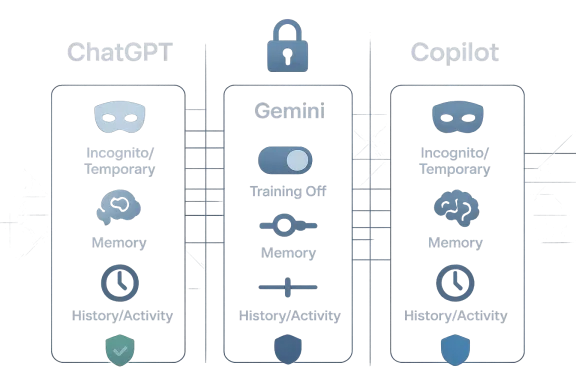
As of April 2026, the privacy story for consumer AI assistants is no longer just about whether a chatbot “remembers” your last prompt. It is about how long your chats persist, whether they feed personalization systems, and whether they can be used for training at all. The good news is that ChatGPT, Gemini, and Microsoft Copilot all now offer meaningful privacy controls; the bad news is that the defaults, names, and scopes vary enough to confuse even experienced users.
The rise of always-on assistant features has made AI privacy a moving target. What used to be a simple “delete chat” action now sits inside a larger web of memory, history, training, activity logs, and connected apps. OpenAI, Google, and Microsoft all frame these controls as user empowerment, but they do not behave identically, and that difference matters if you are discussing code, legal strategy, medical concerns, business plans, or personal issues.
OpenAI’s current model is the clearest example of this split. Temporary Chat conversations do not appear in history, do not create memories, and are not used to train models, although OpenAI says it may retain a copy for up to 30 days for safety purposes. Turning off Chat History & Training is a different setting: it keeps your chats in history, but stops them from being used to improve ChatGPT. That distinction is easy to miss, but it is the heart of the privacy problem.
Google has moved Gemini in a similar direction, but with more emphasis on personalization across the broader Google ecosystem. Gemini’s privacy hub and recent product posts make clear that users can turn off activity retention, use Temporary Chats, and manage whether past chats influence future responses. Google also says Temporary Chats do not show in Recent Chats or Gemini Apps Activity and are not used to train its AI models, though they are retained briefly for safety and processing.
Microsoft’s Copilot story is more fragmented because the privacy rules depend heavily on account type. For personal Microsoft accounts, Copilot includes controls for personalization, memory, model training, and ads. For work and school accounts using Microsoft 365 Copilot, Microsoft points users to Enterprise Data Protection, which is the company’s stronger commercial privacy promise. In practice, that means the same Copilot branding can represent very different privacy regimes.
That is why the headline version of “how to keep your chats private” is too simple. Real privacy comes from combining the right mode with the right account type, then regularly reviewing what each vendor is allowed to keep, remember, and reuse. The rules are not identical across platforms, and that gap is where most users accidentally overshare.
This is important because many users assume “temporary” means ephemeral in the absolute sense. It does not. Operational privacy is better than zero-retention privacy, but it is still not the same thing as end-to-end secrecy. If you are discussing highly sensitive material, the better assumption is that the platform may retain data briefly for abuse monitoring, debugging, or legal compliance.
The practical upside is still significant. Temporary Chat is useful for drafting a resignation letter, sketching a confidential product idea, or testing a prompt without contaminating your history and memory profile. It is also the cleanest way to prevent a conversation from influencing future recommendations or saved preferences.
There is also a strategic difference between history and training. History mainly affects your own account experience and your ability to revisit prior work, while training affects whether your content may be used to improve future models. Users who care about both should separate those concerns instead of treating them as one switch.
A sensible ChatGPT privacy routine looks like this:
The real lesson is that ChatGPT privacy is not one feature but a stack of features. Temporary Chat protects the conversation itself, while Data Controls govern the account’s longer-term behavior. If you only use one, you are only solving half the problem.
For many users, the key control is not merely deleting a single chat but deciding whether Gemini should keep activity at all. Google says users can turn Gemini Apps Activity off, and if they leave it on they can choose an auto-delete period. The company’s product materials also emphasize that users remain in control of connected apps and data-sharing permissions.
That matters because Gemini is increasingly positioned as a personalized assistant rather than a standalone chatbot. The more it draws from Google services, the more useful it becomes for planning, writing, and retrieval. But the more it draws from those services, the more users need to think about whether convenience is worth the data trail.
That 72-hour retention window is a small but important nuance. It means Temporary Chat is private in effect, not nonexistent in storage. For ordinary users that may be enough, but security-conscious readers should understand that the conversation remains on Google systems briefly before disappearing.
The feature is best used for questions you would not want linked to your broader profile: a sensitive health draft, a relationship concern, an internal work brainstorm, or a speculative idea that should not affect future suggestions. It is also the safest way to test whether Gemini’s personalization is helping or simply producing a more invasive experience.
Google has also been steadily expanding Gemini’s links to connected apps and past chats, which strengthens the case for careful permission management. If a user wants the assistant to be helpful but forgetful, they should prefer Temporary Chat for sensitive one-offs and disable activity retention where possible. The more apps you connect, the more important that habit becomes.
The catch is that Microsoft’s interface and branding can make these controls feel less intuitive than they are. In practice, users need to think in layers: memory, personalization, model training, and product-specific settings. If you ignore one layer, Copilot may still retain more than you intended.
Microsoft has also been expanding how Copilot behaves across its consumer products, including notebook-style experiences and tighter integration with the Microsoft 365 ecosystem. That makes the assistant more capable, but it also increases the number of places where your data might surface if your settings are not aligned.
This distinction matters because many users mix personal and work accounts in the same browser or device ecosystem. A user may assume they are in a protected enterprise context when they are actually signed into a personal Microsoft account, or vice versa. That kind of account drift is one of the most common privacy mistakes in modern AI use.
Microsoft’s current help content also suggests that users should not treat Copilot Pro, Microsoft 365 Personal, and Microsoft 365 Copilot as equivalent privacy environments. The same assistant name can sit on top of very different retention and training rules, which is exactly why people should verify the sign-in context before sharing sensitive material.
For readers trying to minimize exposure, the most practical Copilot rule is simple: use work accounts for work data, personal accounts for casual use, and review memory/training settings regularly. That sounds basic, but in a multi-account world, basic discipline is often what prevents the worst surprises.
That separation is exactly why vendor privacy dashboards matter. If you only delete chat history but leave memory enabled, the assistant may still preserve useful facts about you. If you only turn off training, the assistant may still remember your preferences in future sessions. If you only use a temporary mode, you may still leave behind a brief server-side retention record.
The clearest takeaway for users is that privacy is compositional. You get stronger protection by combining controls than by relying on one “magic” toggle. That principle applies across all three platforms.
For power users, the issue is more operational. Once chats become part of memory or personalization, they can subtly change outputs over time. That can be helpful for continuity, but it can also encode mistakes, outdated facts, or preferences you no longer want the system to keep.
The most likely next step is a continued split between consumer and enterprise experiences. Enterprise customers will keep getting stronger contractual assurances, while consumer users will get more toggles and more prominent temporary modes. That is a sensible direction, but it also means ordinary users will increasingly need to read the fine print if they want enterprise-like caution in a consumer app.
Source: newspress.co.in How To Keep Your Chats Private On ChatGPT, Gemini, and Copilot - NewsPress India
 Overview
The rise of always-on assistant features has made AI privacy a moving target. What used to be a simple “delete chat” action now sits inside a larger web of memory, history, training, activity logs, and connected apps. OpenAI, Google, and Microsoft all frame these controls as user empowerment, but they do not behave identically, and that difference matters if you are discussing code, legal strategy, medical concerns, business plans, or personal issues.OpenAI’s current model is the clearest example of this split. Temporary Chat conversations do not appear in history, do not create memories, and are not used to train models, although OpenAI says it may retain a copy for up to 30 days for safety purposes. Turning off Chat History & Training is a different setting: it keeps your chats in history, but stops them from being used to improve ChatGPT. That distinction is easy to miss, but it is the heart of the privacy problem.
Google has moved Gemini in a similar direction, but with more emphasis on personalization across the broader Google ecosystem. Gemini’s privacy hub and recent product posts make clear that users can turn off activity retention, use Temporary Chats, and manage whether past chats influence future responses. Google also says Temporary Chats do not show in Recent Chats or Gemini Apps Activity and are not used to train its AI models, though they are retained briefly for safety and processing.
Microsoft’s Copilot story is more fragmented because the privacy rules depend heavily on account type. For personal Microsoft accounts, Copilot includes controls for personalization, memory, model training, and ads. For work and school accounts using Microsoft 365 Copilot, Microsoft points users to Enterprise Data Protection, which is the company’s stronger commercial privacy promise. In practice, that means the same Copilot branding can represent very different privacy regimes.
That is why the headline version of “how to keep your chats private” is too simple. Real privacy comes from combining the right mode with the right account type, then regularly reviewing what each vendor is allowed to keep, remember, and reuse. The rules are not identical across platforms, and that gap is where most users accidentally overshare.
ChatGPT: Temporary Chat vs. Data Controls
OpenAI now gives users two separate privacy levers, and they are not interchangeable. Temporary Chat is the closest thing to an incognito mode: it avoids history, avoids memory, and avoids training use. Data Controls are more like a standing preference: you can disable chat-history-based training while still keeping a visible record of conversations in your account.What Temporary Chat actually does
Temporary Chats are designed for one-off conversations that should not shape future behavior. OpenAI says they do not show in your history, they do not create or use memories, and they are not used to train models. However, OpenAI also says safety-related retention can still apply, including keeping a copy for up to 30 days.This is important because many users assume “temporary” means ephemeral in the absolute sense. It does not. Operational privacy is better than zero-retention privacy, but it is still not the same thing as end-to-end secrecy. If you are discussing highly sensitive material, the better assumption is that the platform may retain data briefly for abuse monitoring, debugging, or legal compliance.
The practical upside is still significant. Temporary Chat is useful for drafting a resignation letter, sketching a confidential product idea, or testing a prompt without contaminating your history and memory profile. It is also the cleanest way to prevent a conversation from influencing future recommendations or saved preferences.
How to lock down ChatGPT history and training
If your goal is not just “don’t remember this one chat” but “stop using my chats for model training,” OpenAI’s Chat History & Training toggle is the setting to review. OpenAI says turning it off stops new conversations from being used to train its models, while still leaving them in your history. That makes it a privacy improvement, but not a secrecy feature.There is also a strategic difference between history and training. History mainly affects your own account experience and your ability to revisit prior work, while training affects whether your content may be used to improve future models. Users who care about both should separate those concerns instead of treating them as one switch.
A sensible ChatGPT privacy routine looks like this:
- Use Temporary Chat for sensitive, disposable, or high-stakes prompts.
- Turn off Chat History & Training if you do not want future chats used for model improvement.
- Review Memory settings if you do want some persistence, but not full chat-based recall.
- Delete conversations you no longer need.
- Avoid posting identifying details unless the task genuinely requires them.
Enterprise and business users
For business accounts, OpenAI’s privacy story changes again. OpenAI says Team, Enterprise, and Edu plans offer additional data controls, and its temporary-chat and retention policies may differ under compliance-oriented deployments. That means enterprise buyers should not copy consumer advice verbatim; they should read the workspace-level policy and admin settings first.The real lesson is that ChatGPT privacy is not one feature but a stack of features. Temporary Chat protects the conversation itself, while Data Controls govern the account’s longer-term behavior. If you only use one, you are only solving half the problem.
Gemini: Activity Controls and Temporary Chats
Google has made Gemini more powerful by connecting it to broader account data, but that also makes privacy management more important. The company’s current guidance centers on Gemini Apps Activity, the newer Keep Activity terminology in some surfaces, and Temporary Chat for conversations that should not influence future personalization. Google explicitly says Temporary Chats will not appear in recent chats or Gemini Apps Activity and will not be used to personalize Gemini or train its AI models.Gemini Apps Activity and why it matters
Gemini’s activity system is broader than a simple chat log. Google says activity and connected settings can include past chats, uploads, and in some contexts signals tied to product use. That creates a stronger personalization engine, but it also increases the amount of data sitting behind the assistant experience.For many users, the key control is not merely deleting a single chat but deciding whether Gemini should keep activity at all. Google says users can turn Gemini Apps Activity off, and if they leave it on they can choose an auto-delete period. The company’s product materials also emphasize that users remain in control of connected apps and data-sharing permissions.
That matters because Gemini is increasingly positioned as a personalized assistant rather than a standalone chatbot. The more it draws from Google services, the more useful it becomes for planning, writing, and retrieval. But the more it draws from those services, the more users need to think about whether convenience is worth the data trail.
Temporary Chat in Gemini
Google introduced Temporary Chat as the simplest privacy-first option inside Gemini. According to Google, these chats are not shown in Recent Chats or Gemini Apps Activity, and they are not used for personalization or model training. They are retained for up to 72 hours so the system can respond and process optional feedback.That 72-hour retention window is a small but important nuance. It means Temporary Chat is private in effect, not nonexistent in storage. For ordinary users that may be enough, but security-conscious readers should understand that the conversation remains on Google systems briefly before disappearing.
The feature is best used for questions you would not want linked to your broader profile: a sensitive health draft, a relationship concern, an internal work brainstorm, or a speculative idea that should not affect future suggestions. It is also the safest way to test whether Gemini’s personalization is helping or simply producing a more invasive experience.
Workspace, consumer, and admin nuance
Gemini privacy is not the same for every Google account. Google says Workspace data is not used to train the Gemini model by default for certain business and education contexts, and it repeatedly points users back to admin-managed policies for organizational accounts. That is a meaningful distinction, because enterprise governance often overrides the assumptions made by consumer-facing guides.Google has also been steadily expanding Gemini’s links to connected apps and past chats, which strengthens the case for careful permission management. If a user wants the assistant to be helpful but forgetful, they should prefer Temporary Chat for sensitive one-offs and disable activity retention where possible. The more apps you connect, the more important that habit becomes.
Copilot: Personal Accounts vs. Enterprise Protection
Microsoft’s Copilot privacy model is the most account-sensitive of the three. For personal Microsoft accounts, Copilot can personalize responses, remember details, and use conversation activity for model training if you allow it. For work and school users, Microsoft directs attention to Enterprise Data Protection and the separate privacy commitments that come with Microsoft 365 Copilot.Personal Copilot settings
Microsoft says personal-account users can control whether Copilot personalizes responses, remembers details, trains generative AI models, and shows personalized ads. The company also says users can edit or delete what Copilot remembers and can turn off personalization at any time. That makes Copilot more configurable than many people assume, especially for a consumer-facing assistant.The catch is that Microsoft’s interface and branding can make these controls feel less intuitive than they are. In practice, users need to think in layers: memory, personalization, model training, and product-specific settings. If you ignore one layer, Copilot may still retain more than you intended.
Microsoft has also been expanding how Copilot behaves across its consumer products, including notebook-style experiences and tighter integration with the Microsoft 365 ecosystem. That makes the assistant more capable, but it also increases the number of places where your data might surface if your settings are not aligned.
Enterprise Data Protection and the work account divide
For business customers, Microsoft’s message is much more reassuring. Microsoft says Microsoft 365 Copilot is covered by enterprise privacy, security, and compliance commitments, and its current documentation positions Enterprise Data Protection as the stronger successor to earlier commercial protection language. That means enterprise prompts are handled under a different operational promise than personal chats.This distinction matters because many users mix personal and work accounts in the same browser or device ecosystem. A user may assume they are in a protected enterprise context when they are actually signed into a personal Microsoft account, or vice versa. That kind of account drift is one of the most common privacy mistakes in modern AI use.
Microsoft’s current help content also suggests that users should not treat Copilot Pro, Microsoft 365 Personal, and Microsoft 365 Copilot as equivalent privacy environments. The same assistant name can sit on top of very different retention and training rules, which is exactly why people should verify the sign-in context before sharing sensitive material.
Notebook and drafting privacy
Microsoft’s Notebook-style experiences are often described as safer spaces for longer drafting, but users should not confuse “safer” with “private by default.” Notebook workflows may improve organization and context handling, yet they still sit inside Microsoft’s broader account and product settings. The privacy question is therefore not the workspace alone, but the workspace plus the account type plus the data controls.For readers trying to minimize exposure, the most practical Copilot rule is simple: use work accounts for work data, personal accounts for casual use, and review memory/training settings regularly. That sounds basic, but in a multi-account world, basic discipline is often what prevents the worst surprises.
What “Training” Really Means
A lot of privacy advice on AI assistants fails because it treats “training” as if it were the same thing as “retention.” It is not. A provider can retain your chat for safety or debugging without using it for model improvement, and it can also exclude a conversation from training while still leaving it in history or memory. The distinction is technical, but for users it has practical consequences.History, memory, personalization, and training are different
History is about whether you can see the conversation again. Memory is about whether the assistant can carry forward information about you. Personalization is about whether prior data shapes future answers. Training is about whether the platform can use your content to improve its models. Those four concepts often overlap in marketing copy, but they are not the same thing operationally.That separation is exactly why vendor privacy dashboards matter. If you only delete chat history but leave memory enabled, the assistant may still preserve useful facts about you. If you only turn off training, the assistant may still remember your preferences in future sessions. If you only use a temporary mode, you may still leave behind a brief server-side retention record.
The clearest takeaway for users is that privacy is compositional. You get stronger protection by combining controls than by relying on one “magic” toggle. That principle applies across all three platforms.
Why this matters for everyday users
For casual users, the main risk is not espionage; it is accidental persistence. A chat about a job search, a medical issue, a child’s school problems, or a business idea may stay in a vendor’s systems longer than expected. That can create discomfort later even when no breach occurs.For power users, the issue is more operational. Once chats become part of memory or personalization, they can subtly change outputs over time. That can be helpful for continuity, but it can also encode mistakes, outdated facts, or preferences you no longer want the system to keep.
How to Reduce Your Digital Footprint
The safest way to use AI assistants is to assume that anything you type may be stored longer than you expect unless you deliberately prevent it. That does not mean you should avoid the tools; it means you should use them with the same discipline you would apply to cloud email or shared documents. Convenience without boundaries is usually what causes data exposure.A practical privacy checklist
Use this routine across ChatGPT, Gemini, and Copilot if you want a smaller footprint:- Prefer temporary / private modes for one-off sensitive chats.
- Disable training if you do not want future model improvement use.
- Review memory or personalization separately from training.
- Remove connected apps you do not actively need.
- Clear old chats and activity logs on a regular schedule.
- Avoid pasting secrets, tokens, or confidential identifiers into prompts.
- Use enterprise accounts only when they are the intended environment.
When to use each platform’s safest mode
A useful rule of thumb is to choose the platform mode that matches the sensitivity of the task. In ChatGPT, that usually means Temporary Chat for disposable prompts and Data Controls for broader account-level restraint. In Gemini, that means Temporary Chat or a disabled Gemini Apps Activity setting. In Copilot, that means checking whether you are on a personal account or a business-managed account before you type anything you would not want treated as reusable context.Strengths and Opportunities
The strongest development across all three vendors is that privacy controls are becoming more visible and more usable. That is a real shift from the early days of consumer AI, when users often had little insight into how chats were stored or reused. The better tools now are not perfect, but they are finally explicit enough for informed decision-making.- Temporary modes now exist in both ChatGPT and Gemini.
- Training opt-outs are available to consumer users.
- Memory controls give users finer-grained control than a simple delete button.
- Enterprise tiers offer stronger governance for business deployments.
- Auto-delete windows help reduce long-lived retention exposure.
- Connected-app controls let users limit how much context is shared.
- Separate account types create clearer boundaries for work vs. personal use.
Risks and Concerns
The biggest risk is user confusion caused by overlapping terminology. A “temporary” chat, a “memory” toggle, a “training” opt-out, and an “activity” setting sound similar, but they do very different things. That confusion can lead users to think they are private when only one layer of persistence has actually been reduced.- Temporary Chat is not zero-retention in every case.
- Turning off training does not remove history.
- Memory can persist even when other settings are off.
- Connected apps can broaden the data surface significantly.
- Personal and enterprise accounts can behave differently on the same device.
- Interface changes can make settings hard to find after updates.
- Defaults may shift over time, especially as vendors expand personalization.
Looking Ahead
The privacy battle in AI assistants is likely to shift from basic controls to trust architecture. Vendors will keep adding memory, personalization, and connected-app features because those features make the products more useful, but every new layer will create another reason users want clearer consent and better account separation. The result should be a more mature privacy model, though not necessarily a simpler one.The most likely next step is a continued split between consumer and enterprise experiences. Enterprise customers will keep getting stronger contractual assurances, while consumer users will get more toggles and more prominent temporary modes. That is a sensible direction, but it also means ordinary users will increasingly need to read the fine print if they want enterprise-like caution in a consumer app.
What to watch for
- Wider rollout of temporary private chat modes across assistants.
- More explicit auto-delete and retention controls.
- Better separation of memory from training in user interfaces.
- Stronger account-type labeling for consumer vs. business use.
- Changes to how connected apps influence personalization.
- New transparency reports on how assistants retain and process chats.
Source: newspress.co.in How To Keep Your Chats Private On ChatGPT, Gemini, and Copilot - NewsPress India
Last edited:
