

OpenAI has rolled out pinned chats and expanded Projects across ChatGPT on web, Android, and iOS, with Projects reaching free users on September 3, 2025, pinned chats appearing broadly by December 2025, and a simplified mobile sidebar arriving on March 26, 2026. The update is not a model breakthrough, and that is precisely why it matters. ChatGPT has become less like a demo box and more like a daily work surface, and work surfaces need drawers, labels, and a few things within arm’s reach. Organization is now part of the product, not an afterthought.
For the first couple of years of mainstream AI chat, the interface treated every conversation as disposable. You asked a question, got an answer, maybe copied it into a document, and moved on. That worked when ChatGPT was a novelty and a session was closer to a search query than a workspace.
But the way people actually use these tools has changed. A single user might now have chats for PowerShell scripts, travel planning, résumé rewrites, contract summaries, fantasy football drafts, school notes, debugging logs, and half-finished business ideas. The old left sidebar became a chronological landfill: technically searchable, theoretically complete, practically irritating.
Pinned chats are the smallest possible admission that chronology is the wrong organizing principle for an assistant. The most recent conversation is not necessarily the most important one. A sysadmin’s recurring “patch Tuesday notes” chat, a developer’s “release checklist” thread, or a home user’s “family budget workbook” prompt may matter far more than whatever throwaway exchange happened five minutes ago.
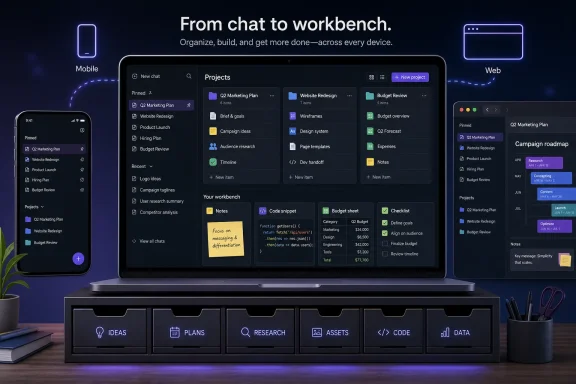
Projects make the larger admission. ChatGPT is no longer just a sequence of chats; it is becoming a container for ongoing contexts. Files, instructions, and related conversations can now live together, which means the assistant can start to resemble a lightweight workspace rather than a blank prompt with memory problems.
Email clients needed folders and flags. Browsers needed bookmarks and pinned tabs. IDEs needed project trees. Messaging apps needed starred messages. The pattern is not subtle: once a tool becomes part of daily work, users stop asking only what it can generate and start asking whether they can find yesterday’s work without wanting to throw the laptop.
ChatGPT had reached that threshold. The model may be the expensive part, but the interface is where trust either accumulates or evaporates. If a user cannot reliably return to a useful exchange, the assistant feels less like a collaborator and more like a slot machine with a transcript.
That is why this update lands differently from a typical quality-of-life patch. It acknowledges that conversational AI has a persistence problem. The value of a good chat often compounds over time, but only if the product gives users a sane way to preserve and reuse it.
A Project gives ChatGPT a place to keep a cluster of related chats and files under one roof. A user planning a product launch can collect market notes, draft announcements, pricing spreadsheets, customer personas, and brainstorming sessions in one workspace. A developer can keep implementation notes, design decisions, and bug triage conversations in a single project instead of scattering them across a recency feed.
The important detail is per-project custom instructions. This gives each workspace its own behavioral contract. A coding project can tell ChatGPT to prefer TypeScript, avoid unnecessary dependencies, and explain diffs tersely. A writing project can ask for a specific editorial tone, house style, or audience assumption. A compliance project can remind the model to flag uncertainty and avoid making legal conclusions.
That is not the same thing as true project memory in the enterprise knowledge-management sense, and users should not pretend it is. But it is a meaningful step toward contextual computing. The assistant is no longer just responding to the last prompt; it is being placed inside a labeled environment with its own documents and rules.
Five files is enough to demonstrate why Projects matter. A student can group a syllabus, a rubric, and a couple of readings. A household can keep a few budgeting files together. A casual user can discover that project-level organization is better than throwing everything into the same chat history.
But five files is also small enough to become painful once the habit forms. Real work expands quickly. A modest software project has requirements, API notes, logs, screenshots, test output, deployment instructions, and design docs. A small business campaign has drafts, brand guidelines, customer notes, spreadsheets, and analytics exports. The moment ChatGPT becomes a real workspace, the free limit starts to feel less like a feature and more like a preview.
That is classic SaaS packaging, but it is also a useful signal for IT buyers. OpenAI is not merely selling access to stronger models; it is selling continuity. The upsell is not just “better answers.” It is “your work can live here.”
That matters because mobile AI use is often fragmented. People ask quick questions in between meetings, paste text from messages, dictate notes, or revisit a conversation while away from a desk. Without good navigation, mobile chat history becomes even more chaotic than desktop history because the screen is smaller and the interaction cost is higher.
A pinned chat on mobile is not just a convenience. It is a way to make an ongoing assistant task feel reachable in two taps rather than buried behind search. A Project on mobile lets a user return to a workspace without remembering the exact title of a prior conversation.
The redesign also suggests OpenAI understands that the sidebar is no longer just a list of old chats. It is becoming the control plane for ChatGPT. The more features OpenAI adds — memory, files, tools, apps, agents, voice, image generation — the more the navigation system determines whether the product feels powerful or cluttered.
Projects encourage users to treat ChatGPT as a repository. That is useful, but repositories are governed differently from transient chat sessions. Once people start uploading documents and grouping work by client, department, or product, the assistant begins to overlap with document management, collaboration, and records-retention territory.
This is where the distinction between consumer ChatGPT and managed enterprise offerings becomes important. A personal Project is not a SharePoint site, a Teams channel, or a governed Microsoft 365 workspace. It may feel like a project folder, but IT should resist the temptation to treat familiar UI metaphors as evidence of familiar controls.
The practical risk is not that pinned chats are dangerous. It is that convenience changes behavior. Users who previously pasted snippets may upload whole files. Users who previously treated ChatGPT as a scratchpad may start treating it as a working archive. The feature set nudges the product toward stickier, longer-lived use, and policy needs to catch up with that reality.
OpenAI is now building its own version of that layer inside ChatGPT. That has implications for Microsoft, even though Microsoft and OpenAI remain deeply intertwined commercially and technically. Copilot’s advantage has always been integration with the Microsoft work graph: documents, meetings, email, chats, calendars, identities, and permissions. ChatGPT’s weakness has been that it sat outside much of that structure.
Projects do not erase that gap, but they narrow the psychological distance. If a user can create a workspace, upload relevant files, define instructions, and pin the conversations that matter, ChatGPT becomes less like an external chatbot and more like an alternate productivity environment. For some workflows, that may be enough.
Microsoft’s counterargument remains strong: enterprise context, identity, compliance, and native Office integration are hard to bolt on after the fact. But OpenAI does not need to replace Microsoft 365 to create gravity. It only needs enough users to decide that their AI-first workspace begins in ChatGPT and that traditional apps are where outputs get exported.
That creates a navigation problem and a revenue opportunity at the same time. The more work users bring into ChatGPT, the more they need organization. The more organization OpenAI provides, the more likely users are to keep their work inside ChatGPT. The more work stays inside ChatGPT, the easier it becomes to justify paid plans.
This is why the “quality-of-life” label undersells the move. Quality-of-life updates are often framed as kindness to users. In platform businesses, they are also retention mechanisms. A pinned chat is a tiny anchor. A Project full of files and instructions is a much heavier one.
The risk for OpenAI is clutter. Every platform wants to become the place where work happens, and every such place eventually risks becoming the mess it promised to clean up. If Projects accumulate without good search, archiving, permissions, export, and lifecycle controls, today’s tidy workspace becomes tomorrow’s second landfill.
Projects should be named like real workspaces, not vibes. “Q3 home budget,” “Windows 11 deployment notes,” or “Python inventory app” will age better than “stuff,” “ideas,” or “important.” The more ChatGPT becomes a practical tool, the more boring naming discipline starts to matter.
For administrators, the update is a prompt to revisit acceptable-use guidance. If employees are using ChatGPT, they may now be using it in a more persistent and document-heavy way than older policies anticipated. A rule written for one-off prompts may not cover project workspaces with uploaded files and reusable instructions.
The right answer is not necessarily to panic or block everything. It is to classify usage. Low-risk drafting, personal productivity, and public information research are different from uploading customer data, source code, incident reports, contracts, or regulated records. Projects make those distinctions more urgent because they make accumulation easier.
 OpenAI Discovers That Chat History Is Infrastructure
For the first couple of years of mainstream AI chat, the interface treated every conversation as disposable. You asked a question, got an answer, maybe copied it into a document, and moved on. That worked when ChatGPT was a novelty and a session was closer to a search query than a workspace.But the way people actually use these tools has changed. A single user might now have chats for PowerShell scripts, travel planning, résumé rewrites, contract summaries, fantasy football drafts, school notes, debugging logs, and half-finished business ideas. The old left sidebar became a chronological landfill: technically searchable, theoretically complete, practically irritating.
Pinned chats are the smallest possible admission that chronology is the wrong organizing principle for an assistant. The most recent conversation is not necessarily the most important one. A sysadmin’s recurring “patch Tuesday notes” chat, a developer’s “release checklist” thread, or a home user’s “family budget workbook” prompt may matter far more than whatever throwaway exchange happened five minutes ago.
Projects make the larger admission. ChatGPT is no longer just a sequence of chats; it is becoming a container for ongoing contexts. Files, instructions, and related conversations can now live together, which means the assistant can start to resemble a lightweight workspace rather than a blank prompt with memory problems.
The Feature Sounds Boring Because the Problem Is Real
Pinned chats are not glamorous. Nobody is going to keynote a new AI era around the ability to keep a conversation at the top of a sidebar. But the history of productivity software is full of small, boring features that ended up changing how people worked because they reduced friction at exactly the right point.Email clients needed folders and flags. Browsers needed bookmarks and pinned tabs. IDEs needed project trees. Messaging apps needed starred messages. The pattern is not subtle: once a tool becomes part of daily work, users stop asking only what it can generate and start asking whether they can find yesterday’s work without wanting to throw the laptop.
ChatGPT had reached that threshold. The model may be the expensive part, but the interface is where trust either accumulates or evaporates. If a user cannot reliably return to a useful exchange, the assistant feels less like a collaborator and more like a slot machine with a transcript.
That is why this update lands differently from a typical quality-of-life patch. It acknowledges that conversational AI has a persistence problem. The value of a good chat often compounds over time, but only if the product gives users a sane way to preserve and reuse it.
Projects Turn ChatGPT From a Thread List Into a Workbench
Projects are the more consequential half of the rollout because they formalize what power users were already improvising. Before Projects, many people used naming conventions, browser bookmarks, external notes, or awkward “master chats” to keep related work together. Those hacks worked until they didn’t, usually when the sidebar filled with dozens of near-identical titles generated by the model.A Project gives ChatGPT a place to keep a cluster of related chats and files under one roof. A user planning a product launch can collect market notes, draft announcements, pricing spreadsheets, customer personas, and brainstorming sessions in one workspace. A developer can keep implementation notes, design decisions, and bug triage conversations in a single project instead of scattering them across a recency feed.
The important detail is per-project custom instructions. This gives each workspace its own behavioral contract. A coding project can tell ChatGPT to prefer TypeScript, avoid unnecessary dependencies, and explain diffs tersely. A writing project can ask for a specific editorial tone, house style, or audience assumption. A compliance project can remind the model to flag uncertainty and avoid making legal conclusions.
That is not the same thing as true project memory in the enterprise knowledge-management sense, and users should not pretend it is. But it is a meaningful step toward contextual computing. The assistant is no longer just responding to the last prompt; it is being placed inside a labeled environment with its own documents and rules.
The Free Tier Gets Enough Rope, the Paid Tier Gets the Workshop
The file limits reveal OpenAI’s product strategy as clearly as the interface does. Free users can upload up to 5 files per project, while paid tiers get larger caps, reportedly ranging from 25 to 40 files depending on the subscription. That split is not accidental; it is the monetization model wearing a usability hat.Five files is enough to demonstrate why Projects matter. A student can group a syllabus, a rubric, and a couple of readings. A household can keep a few budgeting files together. A casual user can discover that project-level organization is better than throwing everything into the same chat history.
But five files is also small enough to become painful once the habit forms. Real work expands quickly. A modest software project has requirements, API notes, logs, screenshots, test output, deployment instructions, and design docs. A small business campaign has drafts, brand guidelines, customer notes, spreadsheets, and analytics exports. The moment ChatGPT becomes a real workspace, the free limit starts to feel less like a feature and more like a preview.
That is classic SaaS packaging, but it is also a useful signal for IT buyers. OpenAI is not merely selling access to stronger models; it is selling continuity. The upsell is not just “better answers.” It is “your work can live here.”
Mobile Was the Interface That Gave the Game Away
The March 26, 2026 mobile sidebar redesign is easy to overlook, but it tells us where OpenAI thinks ChatGPT usage is headed. If pinned chats and Projects were only for desktop knowledge workers, the mobile interface could have remained a cramped afterthought. Instead, OpenAI simplified the iOS and Android sidebar to give more space to those organizational elements.That matters because mobile AI use is often fragmented. People ask quick questions in between meetings, paste text from messages, dictate notes, or revisit a conversation while away from a desk. Without good navigation, mobile chat history becomes even more chaotic than desktop history because the screen is smaller and the interaction cost is higher.
A pinned chat on mobile is not just a convenience. It is a way to make an ongoing assistant task feel reachable in two taps rather than buried behind search. A Project on mobile lets a user return to a workspace without remembering the exact title of a prior conversation.
The redesign also suggests OpenAI understands that the sidebar is no longer just a list of old chats. It is becoming the control plane for ChatGPT. The more features OpenAI adds — memory, files, tools, apps, agents, voice, image generation — the more the navigation system determines whether the product feels powerful or cluttered.
The Enterprise Lesson Is That Organization Is Governance’s Front Door
For WindowsForum’s IT-pro audience, the consumer convenience story is only half the point. The same features that help individuals organize personal chats also raise familiar administrative questions. Where are files stored? Who can access project contents? How are chats retained? Can users accidentally mix personal, customer, and corporate data inside a workspace that feels informal?Projects encourage users to treat ChatGPT as a repository. That is useful, but repositories are governed differently from transient chat sessions. Once people start uploading documents and grouping work by client, department, or product, the assistant begins to overlap with document management, collaboration, and records-retention territory.
This is where the distinction between consumer ChatGPT and managed enterprise offerings becomes important. A personal Project is not a SharePoint site, a Teams channel, or a governed Microsoft 365 workspace. It may feel like a project folder, but IT should resist the temptation to treat familiar UI metaphors as evidence of familiar controls.
The practical risk is not that pinned chats are dangerous. It is that convenience changes behavior. Users who previously pasted snippets may upload whole files. Users who previously treated ChatGPT as a scratchpad may start treating it as a working archive. The feature set nudges the product toward stickier, longer-lived use, and policy needs to catch up with that reality.
Microsoft Should Recognize the Shape of This Move
There is a reason this update will feel familiar to Windows and Microsoft 365 users. Microsoft has spent decades teaching people that productivity is partly about surfaces: Start menu pins, taskbar pins, File Explorer quick access, Outlook folders, Teams channels, OneNote notebooks, SharePoint libraries. The names change, but the underlying premise is the same: the user’s important stuff needs a stable place to live.OpenAI is now building its own version of that layer inside ChatGPT. That has implications for Microsoft, even though Microsoft and OpenAI remain deeply intertwined commercially and technically. Copilot’s advantage has always been integration with the Microsoft work graph: documents, meetings, email, chats, calendars, identities, and permissions. ChatGPT’s weakness has been that it sat outside much of that structure.
Projects do not erase that gap, but they narrow the psychological distance. If a user can create a workspace, upload relevant files, define instructions, and pin the conversations that matter, ChatGPT becomes less like an external chatbot and more like an alternate productivity environment. For some workflows, that may be enough.
Microsoft’s counterargument remains strong: enterprise context, identity, compliance, and native Office integration are hard to bolt on after the fact. But OpenAI does not need to replace Microsoft 365 to create gravity. It only needs enough users to decide that their AI-first workspace begins in ChatGPT and that traditional apps are where outputs get exported.
The Sidebar Is Becoming a Business Model
The most interesting thing about pinned chats and Projects is that they are not isolated usability tweaks. They sit inside a larger pattern: AI companies are trying to turn chatbots into operating environments. The chat box is still there, but around it we now see files, memory, connectors, app integrations, agents, voice modes, image tools, and collaboration experiments.That creates a navigation problem and a revenue opportunity at the same time. The more work users bring into ChatGPT, the more they need organization. The more organization OpenAI provides, the more likely users are to keep their work inside ChatGPT. The more work stays inside ChatGPT, the easier it becomes to justify paid plans.
This is why the “quality-of-life” label undersells the move. Quality-of-life updates are often framed as kindness to users. In platform businesses, they are also retention mechanisms. A pinned chat is a tiny anchor. A Project full of files and instructions is a much heavier one.
The risk for OpenAI is clutter. Every platform wants to become the place where work happens, and every such place eventually risks becoming the mess it promised to clean up. If Projects accumulate without good search, archiving, permissions, export, and lifecycle controls, today’s tidy workspace becomes tomorrow’s second landfill.
Users Get Relief, Admins Get a New Policy Conversation
For individual users, the immediate advice is simple: use pins sparingly and Projects deliberately. Pinning everything defeats the purpose. A pinned area should be for living workflows, not a trophy case of old chats that once seemed useful.Projects should be named like real workspaces, not vibes. “Q3 home budget,” “Windows 11 deployment notes,” or “Python inventory app” will age better than “stuff,” “ideas,” or “important.” The more ChatGPT becomes a practical tool, the more boring naming discipline starts to matter.
For administrators, the update is a prompt to revisit acceptable-use guidance. If employees are using ChatGPT, they may now be using it in a more persistent and document-heavy way than older policies anticipated. A rule written for one-off prompts may not cover project workspaces with uploaded files and reusable instructions.
The right answer is not necessarily to panic or block everything. It is to classify usage. Low-risk drafting, personal productivity, and public information research are different from uploading customer data, source code, incident reports, contracts, or regulated records. Projects make those distinctions more urgent because they make accumulation easier.
The Small Buttons Reveal the Big Product Bet
The concrete changes are easy to summarize, but their implications are broader than their UI footprint suggests. OpenAI is making ChatGPT more organized because it wants ChatGPT to be used for work that lasts longer than a single prompt.- Pinned chats keep selected conversations fixed near the top of ChatGPT’s sidebar instead of letting them disappear under newer sessions.
- Projects group related chats, uploaded files, and custom instructions into workspaces that better match ongoing tasks.
- Free users received access to Projects on September 3, 2025, which moved the feature from paid-product perk to mainstream ChatGPT behavior.
- File limits create a clear split between casual use and heavier paid workflows, with free users getting a small but useful allowance and higher tiers getting more room.
- The March 26, 2026 mobile sidebar redesign shows that OpenAI sees organization as central to ChatGPT on phones, not just desktop browsers.
- IT teams should treat Projects as a sign that users may be storing more persistent work context in ChatGPT than earlier chatbot policies assumed.
References
- Primary source: Crypto Briefing
Published: 2026-06-15T22:03:22.672222
ChatGPT rolls out pinned chats and projects for better organization
OpenAI rolls out pinned chats and projects across ChatGPT's web and mobile platforms, letting users organize conversations into customizable workspaces.cryptobriefing.com - Official source: help.openai.com
ChatGPT — Release Notes | OpenAI Help Center
A changelog of the latest updates and release notes for ChatGPT help.openai.com
- Related coverage: techradar.com
Pinned chats in ChatGPT are here – and so is a mildly annoying restriction | TechRadar
Stick a pin in itwww.techradar.com - Official source: openai.com
Introducing group chats in ChatGPT | OpenAI
Collaborate with others, and ChatGPT, in the same conversation.openai.com - Related coverage: archive.ph
- Related coverage: engadget.com
OpenAI rolls out ChatGPT Projects to free users
ChatGPT's Projects feature for organizing AI chats will now be available to free users as part of a recent update.www.engadget.com
- Related coverage: business-standard.com
- Official source: help-lb.openai.com
ChatGPT Enterprise & Edu - Release Notes | OpenAI Help Center
 help-lb.openai.com
- Related coverage: aiupdates.news
ChatGPT Projects for Free users: uploads, customization, memory - AIUpdates.news
Unlock the benefits of ChatGPT Projects for Free users. Enjoy customization options and improved file upload limits now available.aiupdates.news - Related coverage: axios.com
OpenAI updates ChatGPT after rise of Google Gemini and "Code Red" scramble
GPT-5.2 is available today starting with paid ChatGPT plans and in the API.www.axios.com
- Related coverage: itpro.com
OpenAI's Codex app is now available on macOS – and it’s free for some ChatGPT users for a limited time | IT Pro
OpenAI wants more people to code with Codex, so it’s rolling out an app for macOS and making the AI coding tool available to free users for a limited time.www.itpro.com - Related coverage: windowscentral.com
ChatGPT Images AI model promises precision and speed | Windows Central
ChatGPT images just got a massive upgrade and are now 4x faster, more precise, and more creative.www.windowscentral.com - Related coverage: tomsguide.com
OpenAI now lets users customize how enthusiastic ChatGPT is — here's how to do it | Tom's Guide
ChatGPT just got a major personality update, allowing for more customization than ever before.www.tomsguide.com
