

A TechRepublic-hosted guide originally appearing on eSecurityPlanet lays out 10 ChatGPT prompts for L1 security operations center analysts, arguing that generative AI can help daily incident response work including alert summaries, log review, triage checklists, escalation, phishing review, ATT&CK mapping, threat hunting, detection tuning, and executive reporting. The piece is not really about clever prompt wording. It is about where entry-level SOC labor is being squeezed: too many alerts, too little context, too much documentation, and not enough time to turn raw telemetry into decisions. Used well, ChatGPT becomes a drafting and structuring layer; used badly, it becomes another uncontrolled data leak waiting to happen.
The most useful thing about the TechRepublic guide is that it refuses to sell ChatGPT as a replacement analyst. The article’s core claim is narrower and more believable: generative artificial intelligence can help L1 SOC analysts reduce the time spent translating messy security data into readable summaries, repeatable checklists, clean ticket notes, escalation messages, and business-facing explanations.
That distinction matters. The security operations center is already one of the most automation-heavy corners of IT, but it remains full of human friction. Alerts arrive from endpoint tools, SIEM rules, email gateways, identity platforms, network sensors, and cloud services, each with its own language and assumptions. An L1 analyst often has to decide, quickly, whether an event is noise, a policy violation, a misconfiguration, or the first visible edge of a real incident.
The promise of ChatGPT in that workflow is not omniscience. It is compression. A model can take verbose alert text, rough analyst notes, log snippets, or a pile of investigation details and produce a first-pass summary that is easier to inspect. It can propose the first three investigation steps, draft a checklist, or convert a jagged set of observations into an escalation message for L2 or L3 analysts.
That is useful because much of L1 work is not glamorous threat hunting. It is queue hygiene, triage discipline, evidence collection, and handoff quality. The guide’s strongest insight is that AI’s near-term SOC value sits in the seams between tools and people, not in replacing either one.
That sequence is revealing. It begins with comprehension, then documentation, then collaboration, then maturity. In other words, the prompts trace the path from “what am I looking at?” to “how do I make the rest of the security program better?”
The table in the source article describes each prompt as a practical aid rather than a finished product. That framing is important. A prompt that asks ChatGPT to “analyze raw logs” is not a forensic conclusion; it is an acceleration tool. A prompt that maps activity to MITRE ATT&CK tactics, techniques, and procedures — TTPs — is not a substitute for analyst understanding; it is a way to force the analyst to think in a common language.
This is where the guide becomes most useful for WindowsForum readers and IT administrators. Many organizations do not have lavishly staffed SOCs. They have one or two security analysts, a managed detection provider, an overworked systems administrator, and a pile of Microsoft 365, endpoint, identity, and network telemetry that somebody must interpret. For those teams, a prompt library is not a toy. It is a lightweight way to impose structure on messy security work.
A modern security alert can include process metadata, parent-child relationships, command lines, reputation signals, rule names, cloud identifiers, timestamps, and proprietary detection labels. The hard part is not seeing the data. The hard part is turning that data into a defensible sentence: “This may represent suspicious PowerShell execution from a user context that does not normally launch administrative tooling,” or “This looks like a benign software updater misclassified by a broad behavior rule.”
A language model can help by paraphrasing the alert into a shorter narrative. It can separate what is observed from why it matters. It can also ask for the next pieces of evidence: related endpoint events, authentication history, file reputation, recent email activity, or whether the affected user or host has appeared in other alerts.
The danger is that the model’s confidence can exceed its evidence. A well-written summary can make a weak hypothesis sound stronger than it is. That is why the prompt should be used to generate a starting point, not a final severity call. In a mature workflow, the analyst should treat AI output like a junior colleague’s draft: useful, inspectable, and never beyond review.
That is a natural fit for generative AI because log analysis often begins as language work. The analyst is trying to identify repeated structures, spot anomalies, and translate machine output into possible behavior. “Repeated failures” might suggest brute forcing, but it might also reflect a misconfigured service account. “Unusual geographic access” could indicate credential compromise, but it could also be a traveling employee, a VPN exit point, or a cloud automation process.
The model can help by clustering what looks odd and proposing hypotheses. It can say, in effect, “these lines appear to show repeated failed authentication followed by a success,” or “this process launch is unusual because it appears to invoke administrative tooling.” That can save time, especially for L1 analysts who are still learning what normal looks like.
But logs are also where organizations are most likely to cross the privacy and security line. Raw logs may contain usernames, hostnames, domains, email addresses, IP addresses, file hashes associated with internal systems, asset names, tenant details, and sensitive incident clues. The TechRepublic article’s reminder not to paste sensitive data into unapproved public AI systems is not boilerplate. It is the central operational constraint.
The safe version of this workflow requires sanitization before prompting. Replace user and host identifiers with placeholders. Strip internal IP addresses unless absolutely necessary and approved. Avoid proprietary logs and sensitive incident details in public tools. If the organization has an approved enterprise AI environment, use that instead and make sure the workflow aligns with legal, privacy, and security requirements.
This may be the highest-value use case in the list because it asks AI for process rather than verdict. A checklist is inherently reviewable. If the model proposes weak steps, a senior analyst can correct them. If it forgets a local requirement, the SOC can amend the prompt or insert the organization’s approved playbook. If the output is generic, it still may be better than an inexperienced analyst improvising under pressure.
The key is to bind AI-generated checklists to internal procedures. A checklist for suspicious PowerShell activity should not merely say “check process details.” It should align with the organization’s actual telemetry: endpoint events, script block logging if available, identity logs, command-line capture, parent process data, and any relevant EDR timeline. A checklist for impossible travel should reflect how the organization handles VPNs, cloud access policies, conditional access, known travel, and service accounts.
This is where L1 work matures. Good triage is not heroic intuition; it is repeatability. When an alert arrives at 3 a.m., the analyst should not be inventing the investigation from scratch. AI can help generate the scaffolding, but the SOC must decide what counts as evidence, what thresholds matter, and when escalation is mandatory.
Poor notes are one of the quiet ways security teams lose time. An L1 analyst may investigate correctly but document vaguely: “checked logs, looked okay.” A handoff then requires L2 to re-run the same queries, ask the same questions, or reconstruct the timeline from scratch. During an audit or post-incident review, thin notes become a liability.
AI can improve this without making any security decision at all. It can turn rough notes into a concise ticket update that says what was investigated, what evidence was reviewed, what actions were taken, what remains open, and what the current status is. That helps handoffs and auditability, particularly when analysts are juggling multiple tickets.
The trick is to keep the model in its lane. The analyst should provide only sanitized, approved details and should verify that the generated case note does not add facts that were not observed. A polished ticket note that invents a mitigation step or overstates the status of an incident is worse than a messy note. It creates false institutional memory.
A useful prompt pattern is to tell the model explicitly not to infer unprovided facts. The model should format and clarify, not embellish. SOC managers should make that a rule for all AI-assisted documentation: if the evidence is not in the ticket, the model may not create it.
This is another strong use case because escalation failures are expensive. If an L1 analyst sends too little detail, the next tier has to ask basic questions. If the analyst sends too much undifferentiated detail, the signal gets buried. If the analyst escalates without explaining what has already been validated, L2 may duplicate work or miss the actual concern.
A good escalation summary has a simple structure: what was observed, why it is concerning, what has already been checked, what evidence supports the concern, what remains unknown, and what action is recommended. ChatGPT can help impose that structure, especially for analysts who know what they found but struggle to communicate it cleanly.
For Windows-heavy environments, that can make a practical difference. A suspicious administrative behavior alert might require L2 to quickly understand whether a privileged account acted outside its normal pattern, whether the activity came from an expected management host, and whether there are related authentication events. The L1 analyst may not be empowered to make a containment call, but a clean escalation can make the difference between a 10-minute review and an hour of rediscovery.
The cultural effect matters too. L2 and L3 analysts tend to trust L1 teams that escalate with disciplined evidence. AI-assisted summaries can help raise the floor, provided the SOC does not let them become formulaic cover letters attached to shallow investigations.
This is an attractive use case because phishing analysis contains a lot of textual and structural clues. The model can help junior analysts notice emotional pressure, brand impersonation, mismatched sender details, suspicious links, attachment lures, and business email compromise patterns. It can also help classify whether a message appears closer to credential harvesting, malware delivery, business email compromise, or ordinary spam.
But phishing is also a place where surface plausibility can mislead. A legitimate urgent email can look suspicious. A malicious message can be grammatically clean and visually convincing. Domains may be lookalikes, compromised legitimate services, or benign third-party senders used by marketing and HR systems. Email headers can be complex, and conclusions often require checking authentication results, link detonation, tenant history, sender reputation, and user-reported context.
The right role for ChatGPT is to organize the analysis, not to declare guilt. It can list red flags and suggest what to verify next. It can help explain phishing mechanics to a junior analyst. It can draft a user-facing note or ticket summary after the analyst confirms the evidence.
That still requires careful handling of email content. Messages can contain employee names, customer data, internal addresses, confidential business context, or malicious URLs that should not be pasted into an unapproved public tool. The sanitized version may preserve the structure of the lure while replacing real identifiers with placeholders. That is slower than copying and pasting the raw message, but it is the difference between controlled assistance and shadow AI.
This is where AI can help L1 analysts move beyond alert-by-alert thinking. MITRE ATT&CK gives defenders a shared vocabulary for discussing adversary behavior. A suspicious process is not merely “weird”; it may represent execution, persistence, defense evasion, credential access, lateral movement, command and control, or another stage of activity depending on the evidence.
The most valuable part of the prompt is not the mapping itself. It is the request to explain why the mapping fits and what evidence would confirm it. That forces a healthy analytical habit: do not merely label activity; connect the label to observed behavior and identify the missing proof.
A weak implementation would use ChatGPT to sprinkle ATT&CK language into tickets to make them sound more mature. That helps nobody. A stronger implementation would use the output as a teaching aid: here is the suspected tactic, here is the possible technique, here is the evidence we have, here is the evidence we still need, and here is why the mapping may be wrong.
For SOC managers, this is a training opportunity. L1 analysts can compare AI-generated ATT&CK mappings with senior analyst review, gradually learning where the model overreaches and where their own assumptions were too narrow. In that sense, the prompt can become a feedback loop rather than a reporting shortcut.
This is where the guide is most ambitious. Threat hunting is not just “search for more bad stuff.” A real hunt begins with a hypothesis, then tests that hypothesis against available data. If suspicious PowerShell appears on one host, a hunt might ask whether similar execution patterns appear elsewhere in endpoint logs, whether related authentication activity exists, whether proxy or DNS logs show suspicious destinations, or whether the same user touched other systems.
ChatGPT can help generate these hypotheses. That is useful because junior analysts often see the alert in front of them but struggle to imagine adjacent activity. A model can suggest lateral questions: what else would an attacker do if this were real? What logs would show that behavior? What would distinguish a benign admin action from malicious automation?
The weakness is that generated hunt ideas can be too generic. “Search for suspicious PowerShell” is not a hunt; it is a vibe. The SOC must translate ideas into environment-specific queries, data sources, time windows, and thresholds. Without that, AI-generated hunting becomes a pile of noisy searches that burn analyst time.
This is why the best prompt asks not only for hypotheses but for data sources and queries. Even then, the analyst has to adapt the output to the organization’s tooling. A Windows estate with strong endpoint telemetry, centralized authentication logs, proxy data, and DNS visibility can test different hypotheses than a small business with limited logging. AI can broaden the analyst’s thinking, but it cannot invent visibility the environment does not have.
This is a valuable prompt precisely because it uses the word “ideas.” Detection engineering is not just writing a rule. It requires understanding telemetry quality, field consistency, attacker behavior, expected administrative activity, asset criticality, and the cost of false positives. A detection that fires constantly will be ignored. A detection that is too narrow will miss the behavior it claims to catch.
ChatGPT can help an L1 analyst think like a detection engineer by asking: what fields matter, what conditions might indicate risk, what benign activity might look similar, and what tuning options exist? It can turn a one-off investigation into a proposal for better coverage.
The governance problem is that AI-generated detection logic can look deceptively complete. It may reference fields that do not exist in the organization’s SIEM, assume logging that is not enabled, or propose thresholds that are inappropriate for the environment. It may also produce logic that catches the example but fails under small variations.
The right workflow is to treat the output as a design sketch. A detection engineer or senior analyst should validate the data model, test against known benign and suspicious samples where possible, document assumptions, and monitor false positives after deployment. For L1 analysts, the prompt is still useful because it teaches the defensive habit that every incident should leave the environment slightly better instrumented than before.
This is often treated as a softer skill, but it is central to incident response. Security incidents are not merely technical events. They can affect operations, legal exposure, customer trust, financial risk, and regulatory obligations. A technically correct explanation that a business leader cannot understand is not effective communication.
ChatGPT can help translate investigation details into business language. It can replace jargon with plain English, structure the summary around impact and status, and help an analyst avoid drowning stakeholders in logs and acronyms. That is especially useful for L1 analysts who rarely get formal training in executive communication.
But business summaries are also high-risk artifacts. They may be read by legal, compliance, management, auditors, insurers, or customers. If the AI output says data was not accessed when the team has only failed to find evidence of access, that difference matters. If it says an incident is contained before containment is confirmed, it can mislead decision-makers.
The safest executive-summary workflow requires strict factual boundaries. The prompt should ask the model to distinguish confirmed facts, current assumptions, open questions, and recommended next steps. The analyst or incident lead must then review the language carefully. In incident communications, certainty is a control surface.
The more immediate governance risk is data movement. The TechRepublic article is explicit that SOC analysts should not paste sensitive, confidential, regulated, or internal security data into a public AI tool unless the organization has approved that usage. It lists customer or employee personal data, credentials or secrets, internal IP addresses or asset inventories, proprietary logs, sensitive incident details, regulated or classified information, and internal investigation notes containing identifiable system or user data as examples of material that should not go into unapproved public systems.
That warning is not anti-AI. It is basic security hygiene. SOC data is some of the most sensitive data an organization holds because it describes internal architecture, user behavior, defensive coverage, suspicious activity, and sometimes active compromise. A raw incident prompt may reveal more than a single log line; it may reveal how the organization detects, investigates, and responds.
OpenAI’s public business-data materials distinguish between approved business or enterprise usage and uncontrolled consumer-style use, and organizations should understand those differences before allowing security workflows to touch any AI system. The practical rule for admins is simple: do not let analysts decide this ad hoc in the middle of an incident. Decide it in policy, procurement, logging, and training before the alert queue is on fire.
A prompt used manually by an analyst is one risk profile. An AI agent connected to tickets, logs, alerts, knowledge bases, and messaging systems is another. Once a model can retrieve data, summarize it, draft updates, and potentially trigger workflow actions, the organization must think about access control, audit logs, data minimization, approval gates, and failure modes.
For example, an agent that drafts case notes from a ticket may be low-risk if it only sees sanitized fields and cannot write directly without analyst approval. An agent that reads raw logs across the environment, interprets suspicious behavior, updates incident records, and recommends escalation is more powerful — and more dangerous. It may reduce repetitive work, but it also concentrates data and decision support in a system that needs oversight.
The sensible path is staged adoption. Start with human-in-the-loop drafting and summarization. Move to controlled retrieval only after the organization understands data exposure. Add automation only where outputs are reviewable and reversible. Keep containment, notification, and executive reporting behind explicit human approval.
This is especially important for smaller IT teams tempted to use public AI tools as an unofficial SOC assistant. The productivity boost is real, but so is the temptation to paste the whole problem into the chat window. If the organization cannot afford a full SOC, it still cannot afford uncontrolled disclosure of incident data.
The difference lies in how managers frame use. If AI is treated as an answer machine, analysts will ask it for verdicts. If it is treated as a coach and drafting assistant, analysts will ask better questions: what evidence supports this? What else should I check? What are the false positives? What would make this more severe? What would disprove the hypothesis?
The best prompts in the list already point in that direction. They ask for investigation steps, evidence to collect, escalation criteria, false-positive considerations, and additional confirmation. Those are learning prompts, not just productivity prompts.
SOC leaders should build review into the workflow. Have L1 analysts compare AI-generated checklists with official playbooks. Have senior analysts annotate AI-written escalation summaries. Review ATT&CK mappings in team meetings. Turn the model’s output into a training surface.
That way, ChatGPT can help L1 analysts become better analysts instead of merely faster ticket processors. The goal is not to reduce human thinking. It is to spend less human time formatting, paraphrasing, and staring at repetitive text so more time can be spent validating, reasoning, and improving detection.
Each prompt should have an approved purpose, allowed data types, required redactions, expected output format, and review requirement. The alert-summary prompt should specify that severity is tentative. The log-analysis prompt should require sanitized excerpts unless an approved enterprise environment is used. The case-note prompt should prohibit invented facts. The escalation prompt should distinguish observed facts from analyst concerns. The executive-summary prompt should separate confirmed impact from unknowns.
This may sound bureaucratic, but it is how security teams turn useful hacks into repeatable operations. The SOC does not need every analyst experimenting with different prompt styles while handling sensitive incidents. It needs a shared library that reflects the organization’s tooling, playbooks, legal requirements, and escalation paths.
There is also an opportunity for Windows and Microsoft-centric teams to integrate prompts into existing operational habits. Many organizations already have incident ticket templates, phishing review queues, identity alerts, endpoint detections, and SIEM workflows. AI should fit into those structures rather than sit outside them. The output should land in the same places analysts already document work, and it should be subject to the same review.
The prompt list is therefore best understood as a seed. The finished product should be local. A healthcare provider, a manufacturer, a school district, and a financial firm will not have identical redaction rules, escalation thresholds, or executive-summary requirements. ChatGPT can provide structure, but the organization must provide context.
The more cautious reading is that AI can also create a new layer of polished mediocrity. A ticket can look better without being better investigated. An escalation can sound professional while omitting the one fact L2 needs. An executive summary can be beautifully written and subtly wrong. A detection idea can sound plausible but produce a false-positive storm.
Both readings are true. The technology makes it easier to produce structured security work. It does not guarantee that the work is correct.
That is why the article’s repeated emphasis on human judgment is not an afterthought. Analysts still need to validate findings, apply critical thinking, and follow internal procedures and playbooks. AI can speed up summarization, structure, documentation, interpretation, and communication, but it cannot own the accountability for incident response.
For admins and SOC leaders, the strategic question is not whether L1 analysts will use generative AI. Many already will, officially or not. The question is whether that usage becomes governed, auditable, and educational — or whether it remains a private workaround in browser tabs.
The TechRepublic and eSecurityPlanet prompt list is useful because it is modest. It does not promise an autonomous analyst, a magical SOC, or a future where incident response becomes push-button work. It shows something more believable: 10 places where ChatGPT can help L1 analysts write, structure, and reason under pressure. The next phase will be decided not by the prompts themselves, but by whether security teams wrap them in policy, training, validation, and restraint before the next incident turns a productivity shortcut into evidence.
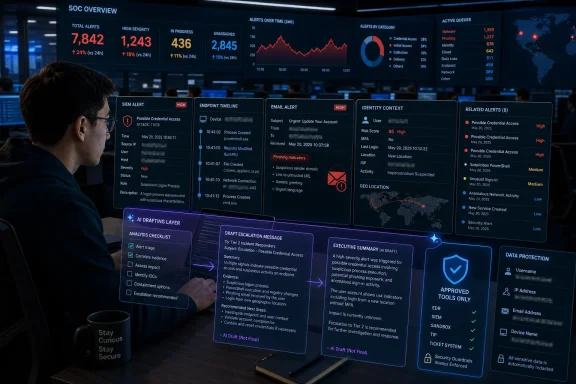 The SOC Does Not Need Magic; It Needs Compression
The most useful thing about the TechRepublic guide is that it refuses to sell ChatGPT as a replacement analyst. The article’s core claim is narrower and more believable: generative artificial intelligence can help L1 SOC analysts reduce the time spent translating messy security data into readable summaries, repeatable checklists, clean ticket notes, escalation messages, and business-facing explanations.That distinction matters. The security operations center is already one of the most automation-heavy corners of IT, but it remains full of human friction. Alerts arrive from endpoint tools, SIEM rules, email gateways, identity platforms, network sensors, and cloud services, each with its own language and assumptions. An L1 analyst often has to decide, quickly, whether an event is noise, a policy violation, a misconfiguration, or the first visible edge of a real incident.
The promise of ChatGPT in that workflow is not omniscience. It is compression. A model can take verbose alert text, rough analyst notes, log snippets, or a pile of investigation details and produce a first-pass summary that is easier to inspect. It can propose the first three investigation steps, draft a checklist, or convert a jagged set of observations into an escalation message for L2 or L3 analysts.
That is useful because much of L1 work is not glamorous threat hunting. It is queue hygiene, triage discipline, evidence collection, and handoff quality. The guide’s strongest insight is that AI’s near-term SOC value sits in the seams between tools and people, not in replacing either one.
TechRepublic’s Prompt List Is Really a Map of L1 Pain
The 10 prompts in the source article look simple on the surface, but they line up neatly with the bottlenecks that make first-line SOC work difficult. They start with summarizing security alerts and analyzing raw logs, move through triage checklists, case notes, and escalation summaries, then widen into phishing analysis, MITRE ATT&CK mapping, threat hunting, SIEM detection improvement, and executive summaries.That sequence is revealing. It begins with comprehension, then documentation, then collaboration, then maturity. In other words, the prompts trace the path from “what am I looking at?” to “how do I make the rest of the security program better?”
| Prompt area | Primary L1 use | Operational value | Main risk if mishandled |
|---|---|---|---|
| Alert and log interpretation | Summarize alerts and analyze raw logs | Speeds initial triage and pattern recognition | Blind trust in inaccurate interpretation |
| Triage and documentation | Create checklists and draft case notes | Improves consistency, handoffs, and auditability | Generic workflows that miss local playbook requirements |
| Escalation and communication | Write escalation and executive summaries | Reduces back-and-forth across technical and business teams | Oversimplification or premature certainty |
| Phishing and ATT&CK context | Analyze emails and map behavior to TTPs | Helps junior analysts recognize attacker patterns | False confidence in unvalidated mappings |
| Hunting and detection improvement | Generate hunting ideas and SIEM detection concepts | Turns incidents into broader defensive learning | Noisy queries, weak detections, and false positives |
This is where the guide becomes most useful for WindowsForum readers and IT administrators. Many organizations do not have lavishly staffed SOCs. They have one or two security analysts, a managed detection provider, an overworked systems administrator, and a pile of Microsoft 365, endpoint, identity, and network telemetry that somebody must interpret. For those teams, a prompt library is not a toy. It is a lightweight way to impose structure on messy security work.
The First Real Use Case Is Making Alerts Legible
The first prompt in the TechRepublic list asks ChatGPT to summarize a security alert in simple terms for an L1 SOC analyst, including what happened, why it matters, likely severity, and the first three investigation steps. That is exactly the kind of task junior analysts often struggle with, not because they cannot read, but because vendor alerts are frequently optimized for detection engines rather than human reasoning.A modern security alert can include process metadata, parent-child relationships, command lines, reputation signals, rule names, cloud identifiers, timestamps, and proprietary detection labels. The hard part is not seeing the data. The hard part is turning that data into a defensible sentence: “This may represent suspicious PowerShell execution from a user context that does not normally launch administrative tooling,” or “This looks like a benign software updater misclassified by a broad behavior rule.”
A language model can help by paraphrasing the alert into a shorter narrative. It can separate what is observed from why it matters. It can also ask for the next pieces of evidence: related endpoint events, authentication history, file reputation, recent email activity, or whether the affected user or host has appeared in other alerts.
The danger is that the model’s confidence can exceed its evidence. A well-written summary can make a weak hypothesis sound stronger than it is. That is why the prompt should be used to generate a starting point, not a final severity call. In a mature workflow, the analyst should treat AI output like a junior colleague’s draft: useful, inspectable, and never beyond review.
Raw Logs Are Where AI Can Help — and Where It Can Mislead
The second prompt asks ChatGPT to analyze raw logs for suspicious activity, notable indicators, possible attacker behavior, and recommended next steps. The source article specifically names unusual authentication attempts, repeated failures, odd process launches, suspicious domains, unusual geographic access, and signs of command-and-control activity as examples of patterns that may emerge from log review.That is a natural fit for generative AI because log analysis often begins as language work. The analyst is trying to identify repeated structures, spot anomalies, and translate machine output into possible behavior. “Repeated failures” might suggest brute forcing, but it might also reflect a misconfigured service account. “Unusual geographic access” could indicate credential compromise, but it could also be a traveling employee, a VPN exit point, or a cloud automation process.
The model can help by clustering what looks odd and proposing hypotheses. It can say, in effect, “these lines appear to show repeated failed authentication followed by a success,” or “this process launch is unusual because it appears to invoke administrative tooling.” That can save time, especially for L1 analysts who are still learning what normal looks like.
But logs are also where organizations are most likely to cross the privacy and security line. Raw logs may contain usernames, hostnames, domains, email addresses, IP addresses, file hashes associated with internal systems, asset names, tenant details, and sensitive incident clues. The TechRepublic article’s reminder not to paste sensitive data into unapproved public AI systems is not boilerplate. It is the central operational constraint.
The safe version of this workflow requires sanitization before prompting. Replace user and host identifiers with placeholders. Strip internal IP addresses unless absolutely necessary and approved. Avoid proprietary logs and sensitive incident details in public tools. If the organization has an approved enterprise AI environment, use that instead and make sure the workflow aligns with legal, privacy, and security requirements.
Checklists Are a Better AI Target Than Conclusions
The third prompt asks ChatGPT to create a step-by-step triage checklist for an alert, including what to validate, what evidence to collect, and when to escalate. The source article gives examples such as suspicious PowerShell activity, impossible travel alerts, phishing, and unusual outbound traffic.This may be the highest-value use case in the list because it asks AI for process rather than verdict. A checklist is inherently reviewable. If the model proposes weak steps, a senior analyst can correct them. If it forgets a local requirement, the SOC can amend the prompt or insert the organization’s approved playbook. If the output is generic, it still may be better than an inexperienced analyst improvising under pressure.
The key is to bind AI-generated checklists to internal procedures. A checklist for suspicious PowerShell activity should not merely say “check process details.” It should align with the organization’s actual telemetry: endpoint events, script block logging if available, identity logs, command-line capture, parent process data, and any relevant EDR timeline. A checklist for impossible travel should reflect how the organization handles VPNs, cloud access policies, conditional access, known travel, and service accounts.
This is where L1 work matures. Good triage is not heroic intuition; it is repeatability. When an alert arrives at 3 a.m., the analyst should not be inventing the investigation from scratch. AI can help generate the scaffolding, but the SOC must decide what counts as evidence, what thresholds matter, and when escalation is mandatory.
Documentation Is the Unglamorous Place AI May Deliver the Most
The fourth prompt asks ChatGPT to draft professional SOC case notes or ticket updates from investigation details. That sounds mundane until you have read enough incident tickets.Poor notes are one of the quiet ways security teams lose time. An L1 analyst may investigate correctly but document vaguely: “checked logs, looked okay.” A handoff then requires L2 to re-run the same queries, ask the same questions, or reconstruct the timeline from scratch. During an audit or post-incident review, thin notes become a liability.
AI can improve this without making any security decision at all. It can turn rough notes into a concise ticket update that says what was investigated, what evidence was reviewed, what actions were taken, what remains open, and what the current status is. That helps handoffs and auditability, particularly when analysts are juggling multiple tickets.
The trick is to keep the model in its lane. The analyst should provide only sanitized, approved details and should verify that the generated case note does not add facts that were not observed. A polished ticket note that invents a mitigation step or overstates the status of an incident is worse than a messy note. It creates false institutional memory.
A useful prompt pattern is to tell the model explicitly not to infer unprovided facts. The model should format and clarify, not embellish. SOC managers should make that a rule for all AI-assisted documentation: if the evidence is not in the ticket, the model may not create it.
Escalation Summaries Are Where L1 and L2 Trust Is Won
The fifth prompt focuses on drafting a concise escalation message for L2 or L3 analysts. The source article gives concrete examples of cases that may need escalation: possible credential compromise, malware execution, suspicious administrative behavior, or ransomware activity.This is another strong use case because escalation failures are expensive. If an L1 analyst sends too little detail, the next tier has to ask basic questions. If the analyst sends too much undifferentiated detail, the signal gets buried. If the analyst escalates without explaining what has already been validated, L2 may duplicate work or miss the actual concern.
A good escalation summary has a simple structure: what was observed, why it is concerning, what has already been checked, what evidence supports the concern, what remains unknown, and what action is recommended. ChatGPT can help impose that structure, especially for analysts who know what they found but struggle to communicate it cleanly.
For Windows-heavy environments, that can make a practical difference. A suspicious administrative behavior alert might require L2 to quickly understand whether a privileged account acted outside its normal pattern, whether the activity came from an expected management host, and whether there are related authentication events. The L1 analyst may not be empowered to make a containment call, but a clean escalation can make the difference between a 10-minute review and an hour of rediscovery.
The cultural effect matters too. L2 and L3 analysts tend to trust L1 teams that escalate with disciplined evidence. AI-assisted summaries can help raise the floor, provided the SOC does not let them become formulaic cover letters attached to shallow investigations.
Phishing Analysis Shows the Difference Between Pattern Recognition and Proof
The sixth prompt asks ChatGPT to analyze suspected phishing emails for red flags, likely attacker tactics, suspicious indicators, and recommended response actions. The source article names spoofing indicators, suspicious domains, urgency language, impersonation tactics, attachment risks, and possible malicious links as examples of what the prompt can help identify.This is an attractive use case because phishing analysis contains a lot of textual and structural clues. The model can help junior analysts notice emotional pressure, brand impersonation, mismatched sender details, suspicious links, attachment lures, and business email compromise patterns. It can also help classify whether a message appears closer to credential harvesting, malware delivery, business email compromise, or ordinary spam.
But phishing is also a place where surface plausibility can mislead. A legitimate urgent email can look suspicious. A malicious message can be grammatically clean and visually convincing. Domains may be lookalikes, compromised legitimate services, or benign third-party senders used by marketing and HR systems. Email headers can be complex, and conclusions often require checking authentication results, link detonation, tenant history, sender reputation, and user-reported context.
The right role for ChatGPT is to organize the analysis, not to declare guilt. It can list red flags and suggest what to verify next. It can help explain phishing mechanics to a junior analyst. It can draft a user-facing note or ticket summary after the analyst confirms the evidence.
That still requires careful handling of email content. Messages can contain employee names, customer data, internal addresses, confidential business context, or malicious URLs that should not be pasted into an unapproved public tool. The sanitized version may preserve the structure of the lure while replacing real identifiers with placeholders. That is slower than copying and pasting the raw message, but it is the difference between controlled assistance and shadow AI.
MITRE ATT&CK Mapping Is Useful Only If It Teaches the Analyst
The seventh prompt asks ChatGPT to map observed activity to likely MITRE ATT&CK tactics and techniques, explain why each mapping fits, and identify what additional evidence would help confirm it. The source article expands ATT&CK’s relevance as a framework for classifying threat actor tactics, techniques, and procedures.This is where AI can help L1 analysts move beyond alert-by-alert thinking. MITRE ATT&CK gives defenders a shared vocabulary for discussing adversary behavior. A suspicious process is not merely “weird”; it may represent execution, persistence, defense evasion, credential access, lateral movement, command and control, or another stage of activity depending on the evidence.
The most valuable part of the prompt is not the mapping itself. It is the request to explain why the mapping fits and what evidence would confirm it. That forces a healthy analytical habit: do not merely label activity; connect the label to observed behavior and identify the missing proof.
A weak implementation would use ChatGPT to sprinkle ATT&CK language into tickets to make them sound more mature. That helps nobody. A stronger implementation would use the output as a teaching aid: here is the suspected tactic, here is the possible technique, here is the evidence we have, here is the evidence we still need, and here is why the mapping may be wrong.
For SOC managers, this is a training opportunity. L1 analysts can compare AI-generated ATT&CK mappings with senior analyst review, gradually learning where the model overreaches and where their own assumptions were too narrow. In that sense, the prompt can become a feedback loop rather than a reporting shortcut.
Threat Hunting Prompts Can Stretch L1 Analysts Without Pretending They Are Senior Hunters
The eighth prompt asks ChatGPT to suggest 10 threat hunting hypotheses based on an alert or suspicious behavior, along with data sources or queries to investigate further. The article notes that threat hunting is traditionally associated with more senior analysts but argues that AI agents in SOCs can help L1 analysts upskill toward hunting and deeper threat intelligence activities.This is where the guide is most ambitious. Threat hunting is not just “search for more bad stuff.” A real hunt begins with a hypothesis, then tests that hypothesis against available data. If suspicious PowerShell appears on one host, a hunt might ask whether similar execution patterns appear elsewhere in endpoint logs, whether related authentication activity exists, whether proxy or DNS logs show suspicious destinations, or whether the same user touched other systems.
ChatGPT can help generate these hypotheses. That is useful because junior analysts often see the alert in front of them but struggle to imagine adjacent activity. A model can suggest lateral questions: what else would an attacker do if this were real? What logs would show that behavior? What would distinguish a benign admin action from malicious automation?
The weakness is that generated hunt ideas can be too generic. “Search for suspicious PowerShell” is not a hunt; it is a vibe. The SOC must translate ideas into environment-specific queries, data sources, time windows, and thresholds. Without that, AI-generated hunting becomes a pile of noisy searches that burn analyst time.
This is why the best prompt asks not only for hypotheses but for data sources and queries. Even then, the analyst has to adapt the output to the organization’s tooling. A Windows estate with strong endpoint telemetry, centralized authentication logs, proxy data, and DNS visibility can test different hypotheses than a small business with limited logging. AI can broaden the analyst’s thinking, but it cannot invent visibility the environment does not have.
SIEM Detection Ideas Are Not SIEM Detections
The ninth prompt asks ChatGPT to help create or improve a SIEM detection for suspicious behavior, including detection logic ideas, key fields to monitor, false-positive considerations, and tuning recommendations. The source article names brute-force activity, suspicious PowerShell usage, privilege escalation, unusual service creation, lateral movement, and abnormal authentication patterns as examples.This is a valuable prompt precisely because it uses the word “ideas.” Detection engineering is not just writing a rule. It requires understanding telemetry quality, field consistency, attacker behavior, expected administrative activity, asset criticality, and the cost of false positives. A detection that fires constantly will be ignored. A detection that is too narrow will miss the behavior it claims to catch.
ChatGPT can help an L1 analyst think like a detection engineer by asking: what fields matter, what conditions might indicate risk, what benign activity might look similar, and what tuning options exist? It can turn a one-off investigation into a proposal for better coverage.
The governance problem is that AI-generated detection logic can look deceptively complete. It may reference fields that do not exist in the organization’s SIEM, assume logging that is not enabled, or propose thresholds that are inappropriate for the environment. It may also produce logic that catches the example but fails under small variations.
The right workflow is to treat the output as a design sketch. A detection engineer or senior analyst should validate the data model, test against known benign and suspicious samples where possible, document assumptions, and monitor false positives after deployment. For L1 analysts, the prompt is still useful because it teaches the defensive habit that every incident should leave the environment slightly better instrumented than before.
Executive Summaries Are Not Soft Work
The tenth prompt asks ChatGPT to write a non-technical incident summary for managers or executives, explaining what happened, business impact, current status, and recommended next steps without heavy technical jargon. The source article names managers, compliance teams, legal teams, and executives as example stakeholders.This is often treated as a softer skill, but it is central to incident response. Security incidents are not merely technical events. They can affect operations, legal exposure, customer trust, financial risk, and regulatory obligations. A technically correct explanation that a business leader cannot understand is not effective communication.
ChatGPT can help translate investigation details into business language. It can replace jargon with plain English, structure the summary around impact and status, and help an analyst avoid drowning stakeholders in logs and acronyms. That is especially useful for L1 analysts who rarely get formal training in executive communication.
But business summaries are also high-risk artifacts. They may be read by legal, compliance, management, auditors, insurers, or customers. If the AI output says data was not accessed when the team has only failed to find evidence of access, that difference matters. If it says an incident is contained before containment is confirmed, it can mislead decision-makers.
The safest executive-summary workflow requires strict factual boundaries. The prompt should ask the model to distinguish confirmed facts, current assumptions, open questions, and recommended next steps. The analyst or incident lead must then review the language carefully. In incident communications, certainty is a control surface.
The Real Risk Is Not Hallucination; It Is Unapproved Data Flow
Most AI-in-the-SOC discussions quickly land on hallucinations, and for good reason. A model may misread an alert, overstate a hypothesis, produce a bad ATT&CK mapping, or suggest a weak query. Those are real problems, but they are familiar security problems: bad analysis, bad assumptions, bad review.The more immediate governance risk is data movement. The TechRepublic article is explicit that SOC analysts should not paste sensitive, confidential, regulated, or internal security data into a public AI tool unless the organization has approved that usage. It lists customer or employee personal data, credentials or secrets, internal IP addresses or asset inventories, proprietary logs, sensitive incident details, regulated or classified information, and internal investigation notes containing identifiable system or user data as examples of material that should not go into unapproved public systems.
That warning is not anti-AI. It is basic security hygiene. SOC data is some of the most sensitive data an organization holds because it describes internal architecture, user behavior, defensive coverage, suspicious activity, and sometimes active compromise. A raw incident prompt may reveal more than a single log line; it may reveal how the organization detects, investigates, and responds.
OpenAI’s public business-data materials distinguish between approved business or enterprise usage and uncontrolled consumer-style use, and organizations should understand those differences before allowing security workflows to touch any AI system. The practical rule for admins is simple: do not let analysts decide this ad hoc in the middle of an incident. Decide it in policy, procurement, logging, and training before the alert queue is on fire.
Action checklist for admins
- Define which AI tools, if any, are approved for SOC use, and block or discourage unapproved public workflows.
- Publish a redaction standard for usernames, hostnames, domains, email addresses, IP addresses, file hashes, internal asset details, and incident notes.
- Require analysts to treat AI output as draft work that must be validated against logs, tools, and internal playbooks.
- Build approved prompt templates for alert summaries, log review, triage, escalation, phishing analysis, ATT&CK mapping, hunting, detection ideas, and executive summaries.
- Add AI-assisted work to ticketing and audit procedures so reviewers can tell what was generated, validated, edited, and approved.
- Train L1 analysts on what must never be pasted into unapproved public AI systems, including personal data, credentials, secrets, proprietary logs, and regulated information.
AI Agents Make the Policy Question Harder
The source article briefly suggests that these prompts could be used to train an AI agent to help automate parts of the workflow. That is where the story stops being a prompt-writing exercise and becomes an operations architecture question.A prompt used manually by an analyst is one risk profile. An AI agent connected to tickets, logs, alerts, knowledge bases, and messaging systems is another. Once a model can retrieve data, summarize it, draft updates, and potentially trigger workflow actions, the organization must think about access control, audit logs, data minimization, approval gates, and failure modes.
For example, an agent that drafts case notes from a ticket may be low-risk if it only sees sanitized fields and cannot write directly without analyst approval. An agent that reads raw logs across the environment, interprets suspicious behavior, updates incident records, and recommends escalation is more powerful — and more dangerous. It may reduce repetitive work, but it also concentrates data and decision support in a system that needs oversight.
The sensible path is staged adoption. Start with human-in-the-loop drafting and summarization. Move to controlled retrieval only after the organization understands data exposure. Add automation only where outputs are reviewable and reversible. Keep containment, notification, and executive reporting behind explicit human approval.
This is especially important for smaller IT teams tempted to use public AI tools as an unofficial SOC assistant. The productivity boost is real, but so is the temptation to paste the whole problem into the chat window. If the organization cannot afford a full SOC, it still cannot afford uncontrolled disclosure of incident data.
L1 Analysts Should Not Be Deskilled by Their Own Tools
There is a subtle training risk in the TechRepublic prompt list. If ChatGPT becomes the first place an L1 analyst goes for every alert, the analyst may learn to accept fluent summaries instead of developing investigative instincts. The same tool that can accelerate learning can also flatten it.The difference lies in how managers frame use. If AI is treated as an answer machine, analysts will ask it for verdicts. If it is treated as a coach and drafting assistant, analysts will ask better questions: what evidence supports this? What else should I check? What are the false positives? What would make this more severe? What would disprove the hypothesis?
The best prompts in the list already point in that direction. They ask for investigation steps, evidence to collect, escalation criteria, false-positive considerations, and additional confirmation. Those are learning prompts, not just productivity prompts.
SOC leaders should build review into the workflow. Have L1 analysts compare AI-generated checklists with official playbooks. Have senior analysts annotate AI-written escalation summaries. Review ATT&CK mappings in team meetings. Turn the model’s output into a training surface.
That way, ChatGPT can help L1 analysts become better analysts instead of merely faster ticket processors. The goal is not to reduce human thinking. It is to spend less human time formatting, paraphrasing, and staring at repetitive text so more time can be spent validating, reasoning, and improving detection.
Where the Prompt Library Actually Belongs
The most practical way to adopt the TechRepublic guide is not to forward it to the SOC and say “use these.” It is to turn the 10 use cases into an internal, approved prompt library with guardrails.Each prompt should have an approved purpose, allowed data types, required redactions, expected output format, and review requirement. The alert-summary prompt should specify that severity is tentative. The log-analysis prompt should require sanitized excerpts unless an approved enterprise environment is used. The case-note prompt should prohibit invented facts. The escalation prompt should distinguish observed facts from analyst concerns. The executive-summary prompt should separate confirmed impact from unknowns.
This may sound bureaucratic, but it is how security teams turn useful hacks into repeatable operations. The SOC does not need every analyst experimenting with different prompt styles while handling sensitive incidents. It needs a shared library that reflects the organization’s tooling, playbooks, legal requirements, and escalation paths.
There is also an opportunity for Windows and Microsoft-centric teams to integrate prompts into existing operational habits. Many organizations already have incident ticket templates, phishing review queues, identity alerts, endpoint detections, and SIEM workflows. AI should fit into those structures rather than sit outside them. The output should land in the same places analysts already document work, and it should be subject to the same review.
The prompt list is therefore best understood as a seed. The finished product should be local. A healthcare provider, a manufacturer, a school district, and a financial firm will not have identical redaction rules, escalation thresholds, or executive-summary requirements. ChatGPT can provide structure, but the organization must provide context.
The Floor Moves Up, but the Ceiling Still Belongs to Humans
The most optimistic reading of the guide is that AI can raise the floor for L1 SOC performance. A new analyst can get help turning alerts into plain English, logs into hypotheses, rough notes into usable documentation, and suspicious emails into structured analysis. That alone has value.The more cautious reading is that AI can also create a new layer of polished mediocrity. A ticket can look better without being better investigated. An escalation can sound professional while omitting the one fact L2 needs. An executive summary can be beautifully written and subtly wrong. A detection idea can sound plausible but produce a false-positive storm.
Both readings are true. The technology makes it easier to produce structured security work. It does not guarantee that the work is correct.
That is why the article’s repeated emphasis on human judgment is not an afterthought. Analysts still need to validate findings, apply critical thinking, and follow internal procedures and playbooks. AI can speed up summarization, structure, documentation, interpretation, and communication, but it cannot own the accountability for incident response.
For admins and SOC leaders, the strategic question is not whether L1 analysts will use generative AI. Many already will, officially or not. The question is whether that usage becomes governed, auditable, and educational — or whether it remains a private workaround in browser tabs.
The Practical Read for WindowsForum Readers
For WindowsForum’s audience, the lesson is concrete: ChatGPT is most useful in the SOC when it is pointed at repeatable language-heavy work and least safe when it becomes an unapproved dumping ground for raw security data.- The 10 prompts are best treated as workflow templates, not analyst replacements.
- The strongest use cases are alert summaries, triage checklists, case notes, escalation summaries, and executive-facing incident explanations.
- Log analysis, phishing review, ATT&CK mapping, threat hunting, and SIEM detection ideas are useful but require stronger validation.
- Sensitive data must be sanitized or kept inside approved enterprise AI tooling aligned with legal, privacy, and security requirements.
- L1 analysts should use AI to ask better investigative questions, not to outsource judgment.
- SOC leaders should convert public prompt examples into internal approved templates with review gates.
The TechRepublic and eSecurityPlanet prompt list is useful because it is modest. It does not promise an autonomous analyst, a magical SOC, or a future where incident response becomes push-button work. It shows something more believable: 10 places where ChatGPT can help L1 analysts write, structure, and reason under pressure. The next phase will be decided not by the prompts themselves, but by whether security teams wrap them in policy, training, validation, and restraint before the next incident turns a productivity shortcut into evidence.
References
- Primary source: TechRepublic
Published: 2026-07-08T23:20:13.540488
Loading…
www.techrepublic.com - Related coverage: esecurityplanet.com
Loading…
www.esecurityplanet.com - Related coverage: itpro.com
Loading…
www.itpro.com - Related coverage: axios.com
Loading…
www.axios.com - Related coverage: windowscentral.com
OpenAI forced to release 20 million chat logs in NYT lawsuit | Windows Central
OpenAI has been ordered to provide millions of ChatGPT chat logs in its copyright battle with the New York Times.www.windowscentral.com - Related coverage: time.com
Is Giving ChatGPT Health Your Medical Records a Good Idea?
We asked experts the potential risks and benefits of turning over your health data to an AI tool.time.com