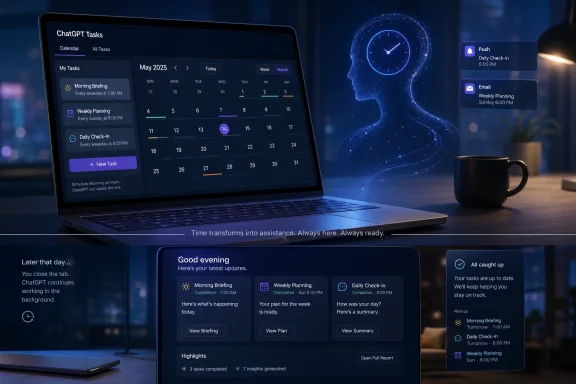
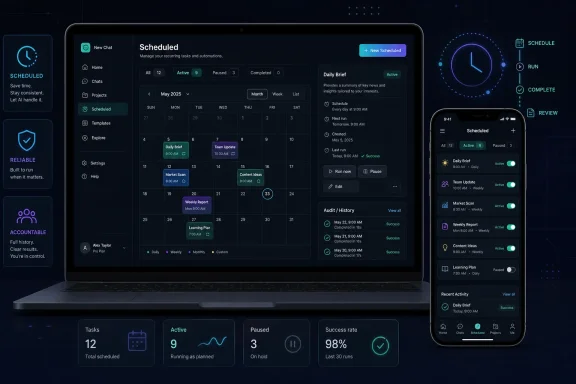
OpenAI began rolling out a redesigned Scheduled Tasks experience for ChatGPT on June 17, 2026, adding a dedicated Scheduled page for managing automated prompts and reminders across web and mobile for Go, Plus, Pro, Business, and Enterprise users. The feature is not new, but the packaging is: ChatGPT’s automation layer is moving from a clever chat trick into something closer to a first-class productivity surface. That matters because the next fight in consumer and workplace AI is not just about who answers best, but who reliably shows up at the right time. Scheduled Tasks is OpenAI’s quiet bet that the chatbot becomes stickier when it stops waiting to be summoned.
Scheduled Tasks has always been one of ChatGPT’s more revealing features because it exposes the ambition behind the interface. A chatbot that answers questions is useful; a chatbot that remembers to act later starts to resemble an assistant. The difference is small in UI terms and enormous in user expectation.
Until now, Scheduled Tasks felt like a feature living partly inside the conversation model and partly inside the product shell. Users could ask ChatGPT to remind them, prepare recurring summaries, or run a prompt at a set time, but managing those automations could still feel like rummaging through the attic. The new Scheduled page changes the framing: tasks are no longer merely something ChatGPT can create in passing, but a class of work users are expected to revisit, edit, and maintain.
That is why the dedicated page is the most important part of the update. Faster execution and better reliability are necessary, especially for a feature that fails visibly when it is late. But centralization is what turns scheduled prompts from a novelty into a habit.
A calendar, reminder app, or task manager earns trust partly because it gives users a place to audit their commitments. ChatGPT is now moving in that direction. If users cannot see what the AI has promised to do, they cannot reasonably trust it to do anything on their behalf.
A delayed answer in a normal chat is irritating. A missed reminder is a breach of confidence. A recurring research prompt that fails silently can be worse than useless, because it creates the impression that work is being handled when it is not.
This is where Scheduled Tasks becomes more interesting than a simple reminder feature. A traditional reminder app usually has a narrow job: notify the user at a specified time. ChatGPT’s scheduled prompts can combine notification with generation, summarization, planning, and recurring context. That creates more value, but it also creates more failure modes.
A morning planning prompt can be late. A market or news digest can be stale. A weekly project status nudge can fire without the context the user assumed it had. A habit reminder can become noise if it is too verbose, too eager, or insufficiently aware of what the user has already done.
The new Scheduled page does not solve all of that. What it does is give users a visible control plane. In automation, visibility is the first step toward accountability.
The more consequential use cases sit somewhere between calendar, workflow automation, and junior staff work. ChatGPT can be asked to prepare a Monday meeting brief, generate a weekly content checklist, prompt a sales follow-up, produce a recurring research digest, or help structure a Friday retrospective. These are not merely reminders. They are recurring prompts attached to an output.
That distinction matters for WindowsForum’s core audience of admins, developers, and IT pros. Many of them already live inside scheduled jobs, scripts, cron, PowerShell tasks, monitoring dashboards, ticket queues, and recurring reports. They understand the difference between “tell me at 9” and “run this workflow every Monday and give me the result.”
ChatGPT’s Scheduled Tasks is obviously not a replacement for enterprise automation tooling. It is not Group Policy, not Intune, not Azure Automation, not a SIEM rule, and not a production scheduler. But it is a sign that consumer AI products are creeping toward the same mental territory: recurring work, proactive alerts, and semi-structured routines.
That is the broader story. OpenAI is not just making reminders easier. It is teaching mainstream users to think of prompts as things that can be scheduled, reviewed, paused, and reused.
This is especially true for automation. A user may enjoy creating a task conversationally, but they should not have to interrogate a chat thread to understand what is running. The new page gives Scheduled Tasks the same sort of product reality that saved chats, projects, files, memories, and connectors have gradually acquired.
There is a lesson here that Microsoft, Google, Anthropic, and OpenAI have all had to learn in different ways. Conversational interfaces are excellent for creation and terrible as the only means of administration. Asking an AI to “show me what I scheduled” may be convenient, but it is not a substitute for a browsable management layer.
For power users, the dedicated page also reduces friction around experimentation. If tasks are easy to find and edit, users are more likely to try recurring prompts. If they are buried, users will either forget them or fear creating clutter they cannot later control.
This is the mundane side of AI product design, and it is often the part that decides whether a feature survives beyond the launch tweet. People do not adopt automation because it sounds futuristic. They adopt it because it becomes easy to maintain.
ChatGPT Go’s inclusion is particularly interesting. OpenAI has increasingly used lower-cost tiers to expand access while preserving premium features and higher usage for Plus, Pro, and business customers. Bringing Scheduled Tasks to Go suggests the company sees automation not merely as an elite power-user feature, but as part of the baseline assistant experience.
For Business and Enterprise customers, the calculus is different. Scheduled prompts raise questions about governance, data handling, auditability, and user behavior. A recurring prompt that summarizes internal notes or reminds a manager to follow up on sensitive work is not just a personal convenience; it becomes part of the organization’s information flow.
That does not make the feature dangerous by default. It does mean administrators will need to understand how scheduled tasks behave inside managed workspaces. The more proactive AI becomes, the more it intersects with compliance expectations that were designed for email, files, calendars, and workflow tools.
Enterprise IT has seen this movie before. A feature begins as a helpful convenience, then becomes a shadow process, then requires policy, retention rules, user training, and support documentation. Scheduled Tasks is still early in that arc, but the direction is familiar.
Scheduled AI work also carries a subtle trust problem. Many reminders are low-stakes, but recurring AI tasks can feel higher-stakes because they often generate content or analysis. If a daily briefing arrives late, omits important context, or reflects stale assumptions, the user may not immediately know. The danger is not just failure, but quiet failure.
That is why the best early use cases remain bounded and reviewable. A prompt that asks you to plan the day is safer than one that drafts and sends messages. A recurring research summary is useful if treated as a starting point, not an oracle. A task that prepares meeting notes is helpful if someone still reads them before acting.
The temptation will be to overstate what Scheduled Tasks can do. OpenAI, like every AI vendor, benefits from the aura of autonomy. But practical users should treat this update as a better harness, not a guarantee that the horse will always know where to go.
The strongest version of Scheduled Tasks is not one that replaces human judgment. It is one that reduces the number of times a user has to remember to ask for help.
Microsoft already understands scheduled work at an infrastructure level better than almost anyone. Windows Task Scheduler, Power Automate, Outlook rules, Intune policies, Defender alerts, Azure Automation jobs, and Teams workflows all exist because recurring actions need structure. The challenge is that Microsoft’s AI layer has not always made that structure feel simple or unified.
OpenAI’s advantage here is not that it invented scheduling. It did not. Its advantage is that it can present scheduling as a natural extension of a chat relationship. Tell ChatGPT what you want, let it create the task, then manage it from a dedicated page. That is a clean loop.
Microsoft’s opportunity is deeper but harder. Copilot can, in theory, connect scheduled intelligence to mail, files, meetings, tickets, device state, security posture, and business processes. But the more systems involved, the more governance and UX complexity appear. OpenAI can move faster because its initial promise is narrower.
Still, the competitive pressure is real. If users begin to expect AI assistants to run recurring prompts and reminders from a central task page, Copilot will need comparable clarity. The assistant wars will not be won only by model benchmarks. They will be won by the daily surfaces people trust.
This should not surprise anyone who has watched productivity tools evolve. Email grew folders, filters, labels, search, rules, and priority inboxes. Calendars grew availability, invitations, recurring events, reminders, and resource booking. Task managers grew projects, tags, due dates, dependencies, and views.
AI assistants are now undergoing the same transformation. The blank prompt box is becoming a front door, not the whole building. Behind it are pages for files, memories, projects, connectors, agents, tasks, and whatever comes next.
That evolution is healthy, but it complicates the original sales pitch. Generative AI was supposed to let users express intent in natural language and skip the interface maze. In reality, natural language is excellent for creating ambiguity, and interfaces are excellent for resolving it.
Scheduled Tasks sits directly at that intersection. “Remind me every Monday morning to prepare for the staff meeting” is easy to say. But users still need to know which time zone applies, whether the task repeats forever, whether it sends a push notification or an email, whether it can be paused, what prompt it will run, and whether it has failed before.
A dedicated management page is not a retreat from AI. It is the product growing up.
That does not mean users should avoid the feature. It does mean they should be deliberate. A recurring task is not a one-off chat. It is an instruction that persists.
For individual users, the practical rule is simple: do not schedule sensitive prompts unless you understand where they will appear, what notifications they may generate, and who else can access the device or workspace. A bill reminder on a locked phone may be harmless; a recurring prompt about a confidential project in a shared work environment may not be.
For businesses, the governance questions are more formal. Admins will want to know whether scheduled tasks are covered by existing workspace controls, how they appear in compliance tooling, whether task outputs are retained, and what happens when a user leaves the organization. These are not exotic concerns. They are the ordinary questions that follow any feature that stores user intent and executes later.
The history of productivity software suggests that users will create workflows faster than administrators can document them. Scheduled Tasks is likely to follow that pattern. The best defense is not panic, but policy that arrives before the workaround culture hardens.
The feature may seem modest compared with agentic browsing, code execution, or full workplace automation. But small recurring features can be disproportionately sticky. A user who relies on ChatGPT every morning for planning or every Friday for a retrospective has turned the product into a ritual.
Rituals matter more than demos. Many AI announcements look impressive on stage and vanish from daily life. A scheduled prompt that reliably nudges a user at 8 a.m. has less spectacle but more staying power.
This is where the new management page earns its keep. If users accumulate recurring tasks, they need confidence that the system will not become a junk drawer. The difference between a useful assistant and an irritating notification machine is often curation.
OpenAI is trying to make ChatGPT proactive without making it chaotic. That is a harder balance than it sounds.
There is also the question of composability. A scheduled prompt is useful; a scheduled prompt that can reliably use files, projects, connectors, web access, memory, and workspace context is much more powerful. But every added capability increases the burden on permissions, transparency, and failure reporting.
This is the point where consumer enthusiasm and IT caution diverge. A creator may see a weekly content planner. A sysadmin sees a recurring process with unclear logging. A manager sees automated follow-ups. A compliance officer sees persistent instructions generating outputs over time.
None of those views is wrong. The product will have to satisfy all of them if Scheduled Tasks is to become more than a convenience feature.
The most promising near-term role is as a personal automation layer for low-risk, recurring cognitive work. Draft the agenda. Remind me to review goals. Generate a planning prompt. Summarize public developments. Ask me for a status update. These are useful tasks precisely because the user remains in the loop.
The concrete implications are easy to miss because none of them requires science fiction. They are ordinary productivity changes with cumulative weight.
 OpenAI Turns the Reminder Into a Product Surface
Scheduled Tasks has always been one of ChatGPT’s more revealing features because it exposes the ambition behind the interface. A chatbot that answers questions is useful; a chatbot that remembers to act later starts to resemble an assistant. The difference is small in UI terms and enormous in user expectation.Until now, Scheduled Tasks felt like a feature living partly inside the conversation model and partly inside the product shell. Users could ask ChatGPT to remind them, prepare recurring summaries, or run a prompt at a set time, but managing those automations could still feel like rummaging through the attic. The new Scheduled page changes the framing: tasks are no longer merely something ChatGPT can create in passing, but a class of work users are expected to revisit, edit, and maintain.
That is why the dedicated page is the most important part of the update. Faster execution and better reliability are necessary, especially for a feature that fails visibly when it is late. But centralization is what turns scheduled prompts from a novelty into a habit.
A calendar, reminder app, or task manager earns trust partly because it gives users a place to audit their commitments. ChatGPT is now moving in that direction. If users cannot see what the AI has promised to do, they cannot reasonably trust it to do anything on their behalf.
The Real Upgrade Is Not Speed, but Accountability
OpenAI says the new Scheduled Tasks experience is faster and more reliable. That is welcome, but it also hints at the weakness that has shadowed AI automation from the beginning: reliability is not a bonus feature. It is the product.A delayed answer in a normal chat is irritating. A missed reminder is a breach of confidence. A recurring research prompt that fails silently can be worse than useless, because it creates the impression that work is being handled when it is not.
This is where Scheduled Tasks becomes more interesting than a simple reminder feature. A traditional reminder app usually has a narrow job: notify the user at a specified time. ChatGPT’s scheduled prompts can combine notification with generation, summarization, planning, and recurring context. That creates more value, but it also creates more failure modes.
A morning planning prompt can be late. A market or news digest can be stale. A weekly project status nudge can fire without the context the user assumed it had. A habit reminder can become noise if it is too verbose, too eager, or insufficiently aware of what the user has already done.
The new Scheduled page does not solve all of that. What it does is give users a visible control plane. In automation, visibility is the first step toward accountability.
ChatGPT Wants to Own the Space Between Calendar and Coworker
The most obvious Scheduled Tasks examples are personal: remind me to stretch, review my goals every evening, ask me each morning what I need to accomplish. Those use cases are easy to understand because they map directly onto existing reminder apps. But they are not where the strategic action is.The more consequential use cases sit somewhere between calendar, workflow automation, and junior staff work. ChatGPT can be asked to prepare a Monday meeting brief, generate a weekly content checklist, prompt a sales follow-up, produce a recurring research digest, or help structure a Friday retrospective. These are not merely reminders. They are recurring prompts attached to an output.
That distinction matters for WindowsForum’s core audience of admins, developers, and IT pros. Many of them already live inside scheduled jobs, scripts, cron, PowerShell tasks, monitoring dashboards, ticket queues, and recurring reports. They understand the difference between “tell me at 9” and “run this workflow every Monday and give me the result.”
ChatGPT’s Scheduled Tasks is obviously not a replacement for enterprise automation tooling. It is not Group Policy, not Intune, not Azure Automation, not a SIEM rule, and not a production scheduler. But it is a sign that consumer AI products are creeping toward the same mental territory: recurring work, proactive alerts, and semi-structured routines.
That is the broader story. OpenAI is not just making reminders easier. It is teaching mainstream users to think of prompts as things that can be scheduled, reviewed, paused, and reused.
A Dedicated Page Makes AI Automation Less Magical and More Useful
The dedicated Scheduled page is a retreat from pure conversational minimalism. That is a good thing. The industry spent the first phase of the generative AI boom pretending that a single text box could absorb every interface. In practice, the more useful AI gets, the more it needs buttons, pages, histories, permissions, filters, and management screens.This is especially true for automation. A user may enjoy creating a task conversationally, but they should not have to interrogate a chat thread to understand what is running. The new page gives Scheduled Tasks the same sort of product reality that saved chats, projects, files, memories, and connectors have gradually acquired.
There is a lesson here that Microsoft, Google, Anthropic, and OpenAI have all had to learn in different ways. Conversational interfaces are excellent for creation and terrible as the only means of administration. Asking an AI to “show me what I scheduled” may be convenient, but it is not a substitute for a browsable management layer.
For power users, the dedicated page also reduces friction around experimentation. If tasks are easy to find and edit, users are more likely to try recurring prompts. If they are buried, users will either forget them or fear creating clutter they cannot later control.
This is the mundane side of AI product design, and it is often the part that decides whether a feature survives beyond the launch tweet. People do not adopt automation because it sounds futuristic. They adopt it because it becomes easy to maintain.
The Supported Plans Reveal OpenAI’s Productivity Ladder
The rollout covers ChatGPT Go, Plus, Pro, Business, and Enterprise users, according to the announcement and subsequent reporting. That range is notable because it places Scheduled Tasks across both personal and workplace tiers rather than reserving it only for the most expensive subscriptions. OpenAI seems to understand that recurring AI assistance is most valuable when it becomes habitual, and habits form best when the entry point is broad.ChatGPT Go’s inclusion is particularly interesting. OpenAI has increasingly used lower-cost tiers to expand access while preserving premium features and higher usage for Plus, Pro, and business customers. Bringing Scheduled Tasks to Go suggests the company sees automation not merely as an elite power-user feature, but as part of the baseline assistant experience.
For Business and Enterprise customers, the calculus is different. Scheduled prompts raise questions about governance, data handling, auditability, and user behavior. A recurring prompt that summarizes internal notes or reminds a manager to follow up on sensitive work is not just a personal convenience; it becomes part of the organization’s information flow.
That does not make the feature dangerous by default. It does mean administrators will need to understand how scheduled tasks behave inside managed workspaces. The more proactive AI becomes, the more it intersects with compliance expectations that were designed for email, files, calendars, and workflow tools.
Enterprise IT has seen this movie before. A feature begins as a helpful convenience, then becomes a shadow process, then requires policy, retention rules, user training, and support documentation. Scheduled Tasks is still early in that arc, but the direction is familiar.
Reliability Is the Line Between Assistant and Toy
OpenAI’s emphasis on faster and more reliable task execution is not marketing fluff. It is an admission of where the feature must improve if it is to matter. Users can forgive a chatbot for a clumsy answer; they are less forgiving when a system promises to act at a specific time and does not.Scheduled AI work also carries a subtle trust problem. Many reminders are low-stakes, but recurring AI tasks can feel higher-stakes because they often generate content or analysis. If a daily briefing arrives late, omits important context, or reflects stale assumptions, the user may not immediately know. The danger is not just failure, but quiet failure.
That is why the best early use cases remain bounded and reviewable. A prompt that asks you to plan the day is safer than one that drafts and sends messages. A recurring research summary is useful if treated as a starting point, not an oracle. A task that prepares meeting notes is helpful if someone still reads them before acting.
The temptation will be to overstate what Scheduled Tasks can do. OpenAI, like every AI vendor, benefits from the aura of autonomy. But practical users should treat this update as a better harness, not a guarantee that the horse will always know where to go.
The strongest version of Scheduled Tasks is not one that replaces human judgment. It is one that reduces the number of times a user has to remember to ask for help.
Microsoft Should Be Watching the Control Plane
For Windows users, the OpenAI update lands in a familiar competitive landscape. Microsoft has pushed Copilot across Windows, Edge, Microsoft 365, Teams, and enterprise workflows, but the experience has often felt scattered across surfaces. OpenAI’s Scheduled page is a small reminder that AI assistants need coherent places where users can manage what the assistant is doing.Microsoft already understands scheduled work at an infrastructure level better than almost anyone. Windows Task Scheduler, Power Automate, Outlook rules, Intune policies, Defender alerts, Azure Automation jobs, and Teams workflows all exist because recurring actions need structure. The challenge is that Microsoft’s AI layer has not always made that structure feel simple or unified.
OpenAI’s advantage here is not that it invented scheduling. It did not. Its advantage is that it can present scheduling as a natural extension of a chat relationship. Tell ChatGPT what you want, let it create the task, then manage it from a dedicated page. That is a clean loop.
Microsoft’s opportunity is deeper but harder. Copilot can, in theory, connect scheduled intelligence to mail, files, meetings, tickets, device state, security posture, and business processes. But the more systems involved, the more governance and UX complexity appear. OpenAI can move faster because its initial promise is narrower.
Still, the competitive pressure is real. If users begin to expect AI assistants to run recurring prompts and reminders from a central task page, Copilot will need comparable clarity. The assistant wars will not be won only by model benchmarks. They will be won by the daily surfaces people trust.
The Feature Also Exposes the Limits of Chat-Based Workflows
There is a paradox in Scheduled Tasks: the more successful it becomes, the less chat-like ChatGPT looks. A serious assistant needs inventories, schedules, statuses, histories, and controls. In other words, it needs software.This should not surprise anyone who has watched productivity tools evolve. Email grew folders, filters, labels, search, rules, and priority inboxes. Calendars grew availability, invitations, recurring events, reminders, and resource booking. Task managers grew projects, tags, due dates, dependencies, and views.
AI assistants are now undergoing the same transformation. The blank prompt box is becoming a front door, not the whole building. Behind it are pages for files, memories, projects, connectors, agents, tasks, and whatever comes next.
That evolution is healthy, but it complicates the original sales pitch. Generative AI was supposed to let users express intent in natural language and skip the interface maze. In reality, natural language is excellent for creating ambiguity, and interfaces are excellent for resolving it.
Scheduled Tasks sits directly at that intersection. “Remind me every Monday morning to prepare for the staff meeting” is easy to say. But users still need to know which time zone applies, whether the task repeats forever, whether it sends a push notification or an email, whether it can be paused, what prompt it will run, and whether it has failed before.
A dedicated management page is not a retreat from AI. It is the product growing up.
The Privacy Conversation Moves From Storage to Timing
Most ChatGPT privacy debates focus on what users type, what the model remembers, and how data is stored or used. Scheduled Tasks adds another dimension: timing. A scheduled prompt can reveal habits, routines, work cycles, health goals, financial reminders, and personal priorities.That does not mean users should avoid the feature. It does mean they should be deliberate. A recurring task is not a one-off chat. It is an instruction that persists.
For individual users, the practical rule is simple: do not schedule sensitive prompts unless you understand where they will appear, what notifications they may generate, and who else can access the device or workspace. A bill reminder on a locked phone may be harmless; a recurring prompt about a confidential project in a shared work environment may not be.
For businesses, the governance questions are more formal. Admins will want to know whether scheduled tasks are covered by existing workspace controls, how they appear in compliance tooling, whether task outputs are retained, and what happens when a user leaves the organization. These are not exotic concerns. They are the ordinary questions that follow any feature that stores user intent and executes later.
The history of productivity software suggests that users will create workflows faster than administrators can document them. Scheduled Tasks is likely to follow that pattern. The best defense is not panic, but policy that arrives before the workaround culture hardens.
The Small Automation Layer Could Become the Sticky One
OpenAI’s biggest product successes have often come from making complex capabilities feel casual. ChatGPT made large language models accessible through conversation. Image generation became a prompt away. Deep research became something a user could invoke without building a research pipeline. Scheduled Tasks applies the same logic to time.The feature may seem modest compared with agentic browsing, code execution, or full workplace automation. But small recurring features can be disproportionately sticky. A user who relies on ChatGPT every morning for planning or every Friday for a retrospective has turned the product into a ritual.
Rituals matter more than demos. Many AI announcements look impressive on stage and vanish from daily life. A scheduled prompt that reliably nudges a user at 8 a.m. has less spectacle but more staying power.
This is where the new management page earns its keep. If users accumulate recurring tasks, they need confidence that the system will not become a junk drawer. The difference between a useful assistant and an irritating notification machine is often curation.
OpenAI is trying to make ChatGPT proactive without making it chaotic. That is a harder balance than it sounds.
Where the New Scheduled Page Leaves Power Users
For power users, the immediate question is not whether Scheduled Tasks is useful. It is how far it can be pushed before the edges show. The answer will depend on execution details: task limits, model access, notification behavior, supported tools, workspace policies, and how consistently scheduled prompts run under load.There is also the question of composability. A scheduled prompt is useful; a scheduled prompt that can reliably use files, projects, connectors, web access, memory, and workspace context is much more powerful. But every added capability increases the burden on permissions, transparency, and failure reporting.
This is the point where consumer enthusiasm and IT caution diverge. A creator may see a weekly content planner. A sysadmin sees a recurring process with unclear logging. A manager sees automated follow-ups. A compliance officer sees persistent instructions generating outputs over time.
None of those views is wrong. The product will have to satisfy all of them if Scheduled Tasks is to become more than a convenience feature.
The most promising near-term role is as a personal automation layer for low-risk, recurring cognitive work. Draft the agenda. Remind me to review goals. Generate a planning prompt. Summarize public developments. Ask me for a status update. These are useful tasks precisely because the user remains in the loop.
The New Scheduled Page Changes the Job Description
OpenAI’s update is modest in interface terms and significant in direction. Scheduled Tasks is no longer just a tucked-away beta-style capability that users discover by asking the right thing. It now has a home, and in software, a home often signals intent.The concrete implications are easy to miss because none of them requires science fiction. They are ordinary productivity changes with cumulative weight.
- ChatGPT now has a more centralized place for users to view, edit, and manage scheduled automations across supported plans.
- The rollout covers web and mobile users on Go, Plus, Pro, Business, and Enterprise, making scheduled AI prompts part of the broader ChatGPT product ladder.
- Faster and more reliable task execution is essential because scheduled AI work fails differently from ordinary chat responses.
- The feature is most practical today for reminders, planning prompts, recurring summaries, and low-risk workflows that a user can review.
- Business and Enterprise customers should treat scheduled prompts as persistent workflow instructions that may require governance, training, and audit awareness.
- The dedicated Scheduled page is a sign that AI assistants are evolving from chat boxes into managed productivity systems.
References
- Primary source: thewincentral.com
Published: 2026-06-17T09:20:12.017327
ChatGPT Upgrades Scheduled Tasks With New Management Page - WinCentral
ChatGPT now offers a faster, more reliable Scheduled Tasks experience with a dedicated management page on web and mobile. - Read in AI News on WinCentral thewincentral.com
- Official source: help.openai.com
ChatGPT — Release Notes | OpenAI Help Center
A changelog of the latest updates and release notes for ChatGPT help.openai.com
- Official source: help-lb.openai.com
Scheduled Tasks in ChatGPT | OpenAI Help Center
Automate your work with tasks in ChatGPT. help-lb.openai.com
- Official source: openai.com
Introducing ChatGPT Go, now available worldwide | OpenAI
ChatGPT Go is now available worldwide, offering expanded access to GPT-5.2 Instant, higher usage limits, and longer memory—making advanced AI more affordable globally.openai.com - Related coverage: androidcentral.com
ChatGPT moves in on Google again as 'Scheduled Tasks' enters beta | Android Central
Tell the AI what you need to be reminded of or what you'd like to stay engaged with.www.androidcentral.com - Related coverage: techradar.com
OpenAI claims the new ChatGPT agent can run your errands, build your slides, and make you look like you have your life together | TechRadar
The autonomous AI promises to handle every click and open tab in your browserwww.techradar.com
- Related coverage: chatai.guide
ChatGPT Tasks: Schedule AI Reminders
Learn how ChatGPT Tasks work, how to schedule reminders, what limits apply, and when to use Tasks instead of a calendar, reminders app, or automation tool. chatai.guide
- Related coverage: chatgptexperiment.com
- Related coverage: mavgpt.store