

OpenAI’s July 16 update to the new ChatGPT desktop app fixes the most consequential flaw in its first week on Windows: cloud-based Work conversations now sync across desktop, web, and mobile. The update also brings Chat and Work histories into a single Recents view, restores Projects inside the app, and makes the divide between ordinary ChatGPT use and its longer-running Work agent much clearer.
Crypto Briefing first highlighted the repair after the rocky July 9 rollout of OpenAI’s unified desktop client. OpenAI’s own release notes confirm the change is live on both Windows and macOS, though access to Work itself remains a gradual rollout for eligible paid accounts rather than a feature every user will necessarily see immediately.
For Windows users, this is less a flashy feature release than a needed course correction. OpenAI combined ChatGPT, Work, and Codex into one desktop application, but initially shipped an experience where desktop use did not reliably carry over to other surfaces. That was a particularly awkward limitation for an agent positioned around longer, multi-step work.
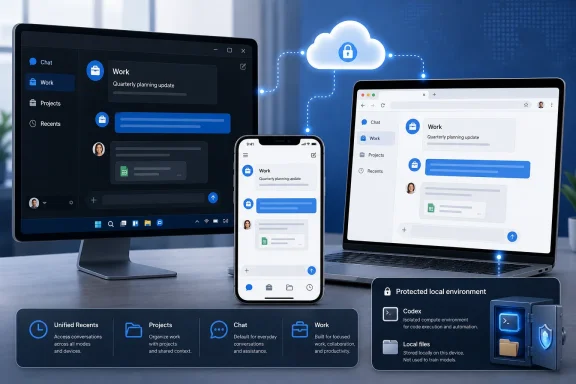
The key change is that a cloud Work thread can now move among the Windows desktop app, ChatGPT on the web, and the mobile app. A user can begin a research task in a browser, continue refining it from a Windows PC, then check its progress or provide more instructions on a phone.
That sounds basic, but it changes the practical value of Work. OpenAI describes Work as the mode for research, analysis, documents, spreadsheets, presentations, reports, and Sites—tasks that often take more than one sitting and regularly cross devices. Before this update, the desktop app could access local files and apps with permission, but cloud Work conversations started elsewhere did not show up in desktop Work.
OpenAI is drawing an important boundary, however. Local Work chats remain local. If a Windows user opens a local folder or allows Work to use desktop applications, the associated local files and outputs stay on that computer unless the user explicitly moves or shares them. That is sensible from both a privacy and systems-management perspective, but administrators should not mistake “Work sync” for universal synchronization of everything an agent can touch.
The sync promise applies to cloud conversations. It does not turn the desktop client into a transparent bridge for local folders, application data, repositories, or sensitive Windows-hosted material.
Existing ChatGPT Projects also now appear in the Windows client. A Project can serve as a container for related chats, files, and instructions; within one, users can start either a conventional Chat conversation or a Work thread that uses the project context. That matters for users who organize ongoing client work, documentation efforts, research assignments, or development planning around Projects rather than single disposable prompts.
The initial design problem was not merely that a sidebar looked different. Conversation history is the working memory of a serious ChatGPT workflow. Removing it from an obvious location—or separating it by mode without clear navigation—makes the product feel less dependable precisely when OpenAI is asking people to trust it with larger, longer-running tasks.
OpenAI’s revised layout separates the product into two top-level choices: ChatGPT and Codex. Under ChatGPT, a toggle selects Chat for quick conversational work or Work for agent-oriented tasks. Codex remains a separate view for software development, including use with local repositories, terminals, developer tools, and folders.
That structure is cleaner than treating every interaction as the same kind of “chat,” but it comes with a caveat: not every history stream is unified.
Windows developers using Codex should therefore expect a different continuity model than workers using Chat or cloud Work. Supported Codex sessions can be reached through the Remote tab in the ChatGPT mobile app, but they do not become ordinary web or mobile chat history.
That distinction has operational consequences. A Windows developer can use Codex locally against a repository, terminal, or project folder, while a nontechnical user can move a cloud Work task among devices. Those are not interchangeable models, and neither should be treated as a general-purpose synchronization mechanism for company files.
For organizations, the separation is likely intentional. The desktop app can take advantage of local context that browsers and phones cannot access, while cloud conversations remain portable. Keeping those channels distinct reduces the chance that local project context is silently replicated across services or devices.
According to OpenAI’s migration guidance, ChatGPT Classic will continue receiving model updates, bug fixes, security patches, and support for its existing Enterprise capabilities. The new unified application is where OpenAI is placing Work and Codex, meaning users who need those agent features will eventually need the new client—but a wholesale migration is not required at launch.
That is useful breathing room for Windows administrators and cautious users. A desktop-agent app with local file access, an in-app browser, app integrations, and separate cloud and local execution paths warrants testing before broad deployment. Keeping Classic available makes it possible to pilot the new client without abruptly disrupting established ChatGPT workflows.
The company also says the navigation update does not change an organization’s existing workspace permissions, security settings, governance controls, or spend model. That should reduce concern that simply installing the unified client rewrites tenant policy. It does not remove the need to review what Work and Codex are permitted to access on managed endpoints.
That makes the desktop update broader than the Work feature itself. A Windows user can obtain the new client, use Chat, and see the redesigned navigation, yet still lack the Work toggle because their plan or workspace is not enabled. Enterprise and Edu administrators also need to account for OpenAI’s preview and control model before assuming the feature is switched on for an entire organization.
Work follows the usage structure associated with Codex, including included capacity and possible additional credits. IT teams evaluating the tool should therefore look beyond the interface change: agent-style tasks can have a different consumption pattern from routine ChatGPT conversations.
The July 16 update does not erase the complexity OpenAI introduced by merging ChatGPT, Work, and Codex. It does address the most visible usability break: a task started in the cloud should no longer disappear when users sit down at their Windows PC. The next test is whether OpenAI can make that continuity reliable while preserving the crucial line between cloud history and the local data its desktop agents are allowed to use.
Crypto Briefing first highlighted the repair after the rocky July 9 rollout of OpenAI’s unified desktop client. OpenAI’s own release notes confirm the change is live on both Windows and macOS, though access to Work itself remains a gradual rollout for eligible paid accounts rather than a feature every user will necessarily see immediately.
For Windows users, this is less a flashy feature release than a needed course correction. OpenAI combined ChatGPT, Work, and Codex into one desktop application, but initially shipped an experience where desktop use did not reliably carry over to other surfaces. That was a particularly awkward limitation for an agent positioned around longer, multi-step work.
 Work threads finally behave like cloud conversations
The key change is that a cloud Work thread can now move among the Windows desktop app, ChatGPT on the web, and the mobile app. A user can begin a research task in a browser, continue refining it from a Windows PC, then check its progress or provide more instructions on a phone.That sounds basic, but it changes the practical value of Work. OpenAI describes Work as the mode for research, analysis, documents, spreadsheets, presentations, reports, and Sites—tasks that often take more than one sitting and regularly cross devices. Before this update, the desktop app could access local files and apps with permission, but cloud Work conversations started elsewhere did not show up in desktop Work.
OpenAI is drawing an important boundary, however. Local Work chats remain local. If a Windows user opens a local folder or allows Work to use desktop applications, the associated local files and outputs stay on that computer unless the user explicitly moves or shares them. That is sensible from both a privacy and systems-management perspective, but administrators should not mistake “Work sync” for universal synchronization of everything an agent can touch.
The sync promise applies to cloud conversations. It does not turn the desktop client into a transparent bridge for local folders, application data, repositories, or sensitive Windows-hosted material.
Recents and Projects repair the missing-navigation problem
The July 16 release puts Chat and Work conversations together in a unified Recents area. Users can sort, filter, and pin conversations rather than hunting through a fragmented interface or wondering whether a thread belongs to the desktop app at all.Existing ChatGPT Projects also now appear in the Windows client. A Project can serve as a container for related chats, files, and instructions; within one, users can start either a conventional Chat conversation or a Work thread that uses the project context. That matters for users who organize ongoing client work, documentation efforts, research assignments, or development planning around Projects rather than single disposable prompts.
The initial design problem was not merely that a sidebar looked different. Conversation history is the working memory of a serious ChatGPT workflow. Removing it from an obvious location—or separating it by mode without clear navigation—makes the product feel less dependable precisely when OpenAI is asking people to trust it with larger, longer-running tasks.
OpenAI’s revised layout separates the product into two top-level choices: ChatGPT and Codex. Under ChatGPT, a toggle selects Chat for quick conversational work or Work for agent-oriented tasks. Codex remains a separate view for software development, including use with local repositories, terminals, developer tools, and folders.
That structure is cleaner than treating every interaction as the same kind of “chat,” but it comes with a caveat: not every history stream is unified.
Codex stays deliberately separate
The new Recents view unifies Chat and Work, not Codex. OpenAI says Codex workflows and history remain separate from ChatGPT history, and Codex is still not a selectable mode on the web or standard mobile interface.Windows developers using Codex should therefore expect a different continuity model than workers using Chat or cloud Work. Supported Codex sessions can be reached through the Remote tab in the ChatGPT mobile app, but they do not become ordinary web or mobile chat history.
That distinction has operational consequences. A Windows developer can use Codex locally against a repository, terminal, or project folder, while a nontechnical user can move a cloud Work task among devices. Those are not interchangeable models, and neither should be treated as a general-purpose synchronization mechanism for company files.
For organizations, the separation is likely intentional. The desktop app can take advantage of local context that browsers and phones cannot access, while cloud conversations remain portable. Keeping those channels distinct reduces the chance that local project context is silently replicated across services or devices.
ChatGPT Classic remains the conservative option
OpenAI has not forced existing desktop users to abandon the previous client. During the transition, the unified app may install alongside the old application, which is now labeled ChatGPT Classic.According to OpenAI’s migration guidance, ChatGPT Classic will continue receiving model updates, bug fixes, security patches, and support for its existing Enterprise capabilities. The new unified application is where OpenAI is placing Work and Codex, meaning users who need those agent features will eventually need the new client—but a wholesale migration is not required at launch.
That is useful breathing room for Windows administrators and cautious users. A desktop-agent app with local file access, an in-app browser, app integrations, and separate cloud and local execution paths warrants testing before broad deployment. Keeping Classic available makes it possible to pilot the new client without abruptly disrupting established ChatGPT workflows.
The company also says the navigation update does not change an organization’s existing workspace permissions, security settings, governance controls, or spend model. That should reduce concern that simply installing the unified client rewrites tenant policy. It does not remove the need to review what Work and Codex are permitted to access on managed endpoints.
The rollout still has practical limits
The updated desktop app is available globally for Windows and macOS, but Work availability is still phased. OpenAI says Work is rolling out to eligible paid accounts; Pro, Pro Lite, Enterprise, and Edu users receive access first, with Plus and Business following. Free and Go plans are excluded from Work on web and mobile.That makes the desktop update broader than the Work feature itself. A Windows user can obtain the new client, use Chat, and see the redesigned navigation, yet still lack the Work toggle because their plan or workspace is not enabled. Enterprise and Edu administrators also need to account for OpenAI’s preview and control model before assuming the feature is switched on for an entire organization.
Work follows the usage structure associated with Codex, including included capacity and possible additional credits. IT teams evaluating the tool should therefore look beyond the interface change: agent-style tasks can have a different consumption pattern from routine ChatGPT conversations.
The July 16 update does not erase the complexity OpenAI introduced by merging ChatGPT, Work, and Codex. It does address the most visible usability break: a task started in the cloud should no longer disappear when users sit down at their Windows PC. The next test is whether OpenAI can make that continuity reliable while preserving the crucial line between cloud history and the local data its desktop agents are allowed to use.