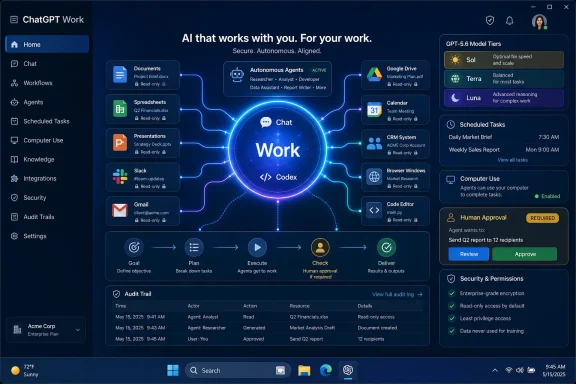
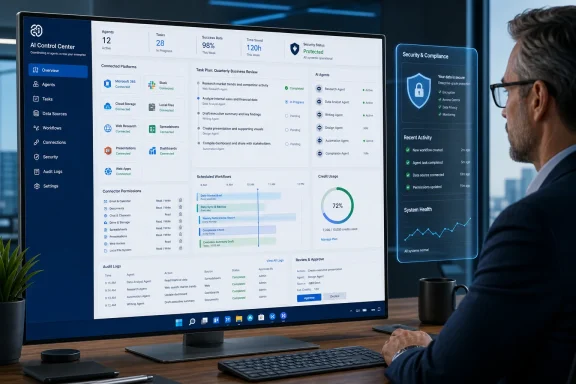
OpenAI introduced ChatGPT Work on June 9 as an enterprise work app that pairs an action-taking AI agent with the GPT-5.6 model family and a redesigned desktop experience bringing Chat, Work, and Codex into one workspace. The enterprise implication is straightforward: OpenAI is moving from chatbot assistance toward delegated work across apps, files, and business workflows. For Windows admins, that makes ChatGPT Work an endpoint, identity, permissions, logging, and application-control issue from day one, not merely another productivity tool to allow or block.
The pitch, as reported by Free Press Journal and Livemint from OpenAI’s statement, is deliberately expansive: ChatGPT Work can act across users’ apps and files, work on complex projects for hours, and turn a goal into completed work. That is the phrase that matters. OpenAI is no longer merely selling a system that helps employees draft, search, summarize, or code; it is selling a system that can be delegated work and expected to return documents, spreadsheets, presentations, and web applications.
That ambition also explains why OpenAI framed ChatGPT Work as a “super app” for enterprises. In consumer tech, the phrase often means one app that swallows payments, messaging, shopping, and identity. In enterprise AI, the more important idea is a single work surface sitting above the inbox, file system, calendar, codebase, browser, CRM, and collaboration stack. The phrase is marketing, but the administrative consequences are real.
The most important detail in the launch is not GPT-5.6 by itself. It is the redesigned desktop application that brings Chat, Work, and Codex into a unified workspace. That is OpenAI admitting that the old product boundary between “assistant,” “agent,” and “developer tool” is collapsing.
Chat remains the familiar everyday assistant. Work is positioned for multi-step tasks that require the agent to operate across apps, files, and workflows. Codex remains the developer and technical-professional surface, but ChatGPT Work extends its capabilities across web, mobile, and desktop. In other words, Codex is no longer just a coding story; it is becoming part of a broader automation layer for enterprise work.
That is a direct shot at Microsoft Copilot and Google Gemini. Microsoft has the distribution advantage inside Windows, Microsoft 365, Teams, Outlook, Excel, SharePoint, and Azure. Google has the Workspace layer, Gmail, Drive, Calendar, Docs, and Android reach. OpenAI’s answer is to avoid competing app by app and instead argue that the agent should sit above whichever apps the enterprise already uses.
The unified plugin directory is the operational core of that strategy. Free Press Journal and Livemint both reported that ChatGPT Work links ChatGPT with third-party services including Slack, Gmail, Google Drive, calendars, and customer relationship management software. That is not a decorative integration list; it is the minimum viable enterprise nervous system. If the agent can see messages, files, schedules, and customer records, it can begin to execute the kinds of tasks that used to require a human employee to hop between six browser tabs and three desktop apps.
For WindowsForum readers, the desktop app angle is especially important. A browser-only assistant can be managed like a SaaS tool. A desktop agent with an in-app browser and Computer Use capabilities starts to look more like a privileged user sitting at the endpoint. It can interact with websites and local applications, which makes the endpoint policy conversation much harder than “block or allow chat.openai.com.”
Traditional enterprise software tends to organize work around systems of record: the CRM, the ticketing system, the ERP database, the document repository, the source-control platform. ChatGPT Work is organized around intent. The user gives the system a goal, and the agent is supposed to gather context, traverse tools, perform steps, and return an output.
That difference is why OpenAI’s examples matter. Documents, spreadsheets, presentations, and web applications are not just file types. They are the deliverables that sit at the end of common business processes: the board memo, the sales forecast, the quarterly review deck, the internal portal, the data cleanup workbook, the customer follow-up plan. OpenAI is aiming at the layer where work becomes a finished artifact.
The practical consequence is that enterprises will need to stop thinking of AI tools as writing aids. If the agent can produce a spreadsheet, it may also be transforming source data. If it can produce a presentation, it may be selecting claims, charts, customer examples, and financial assumptions. If it can build a web application, it may be touching credentials, repositories, deployment workflows, or internal APIs. The output may look polished, but the risk lives in the invisible chain of actions that produced it.
That is where the comparison with Copilot and Gemini becomes more interesting. Microsoft and Google can argue that their agents inherit the permissions and administrative models of their productivity suites. OpenAI, by contrast, is presenting itself as a cross-stack actor. That is powerful for enterprises that live in mixed environments, but it also means administrators must ask sharper questions about identity, consent, auditability, data boundaries, and revocation.
The flagship Sol model is designed to improve performance in coding, knowledge work, cybersecurity, and scientific research while using fewer tokens and lowering computing costs, according to Livemint’s account of the company website. Terra is aimed at everyday enterprise work. Luna is the company’s most cost-efficient model. That lineup maps neatly onto how businesses actually deploy AI: premium reasoning for hard tasks, balanced capability for common work, and cheaper models for high-volume automation.
The split also hints at how OpenAI wants enterprise AI budgets to work. Companies do not want every email summary, spreadsheet cleanup, and calendar task to run through the most expensive model. Nor do they want sensitive cybersecurity analysis or scientific research handled by the cheapest available option. A model family lets OpenAI sell capability tiers while giving procurement teams a language for cost control.
On availability, the verified public reporting is narrower than the product vision. Livemint reported that GPT-5.6 will roll out across ChatGPT, Codex, and the Application Programming Interface, while Free Press Journal and Livemint described ChatGPT Work as a newly introduced enterprise product. That supports the direction of travel, but it does not by itself answer every entitlement question for every tenant, region, plan, or user. Admins should therefore treat availability as something to verify in their own OpenAI workspace, procurement channel, and product console before writing policy around it. The safe operational assumption is simple: do not assume that every announced capability is enabled for every employee, and do not assume that model access, desktop access, plugin access, Codex access, Scheduled Tasks, and Computer Use arrive under one identical control surface.
That matters because enterprise buyers often hear “rollout” as “available to my users now.” Here, IT teams evaluating ChatGPT Work should separate the marketing architecture from the entitlement reality: which users can access which model, in which product, under which workspace, with which connectors, and with which data controls.
That is a major shift. Developers have been the early proving ground for agentic AI because software tasks are structured, testable, and tool-rich. A coding agent can inspect a repository, run tests, open a pull request, and receive feedback. The loop is imperfect, but it has measurable checkpoints. Enterprise office work is messier: the task may involve ambiguous requirements, partial documents, contradictory emails, stale CRM records, and social judgment.
By bringing Chat, Work, and Codex into one workspace, OpenAI is effectively trying to export the developer-agent pattern into the rest of the company. Give the system context. Let it plan. Let it use tools. Let it produce a finished artifact. Review the result. Repeat.
That is why the desktop app is more than packaging. A unified desktop workspace reduces the friction between asking, building, browsing, and executing. It lets a user move from a chat conversation to a multi-step work task to a developer workflow without mentally switching products. For OpenAI, that increases engagement. For enterprises, it increases the likelihood that employees will use the system for tasks that previously would have stayed inside specialized tools.
The danger is that the same convenience can blur boundaries. A user may not always know whether they are in casual assistant mode, delegated-work mode, or code-execution mode. An admin may not be able to treat “ChatGPT usage” as one category anymore. A compliance team may need different rules for summarizing a document, modifying a spreadsheet, accessing a CRM record, browsing a website, and generating an internal web app—even if all of those actions occur under the same ChatGPT desktop roof.
Every integration expands the agent’s context window in the organizational sense, not merely the model sense. Slack can contain informal decisions, customer escalations, credentials mistakenly pasted into channels, and sensitive HR chatter. Gmail can contain contracts, invoices, confidential negotiations, and external attachments. Google Drive can contain everything from public marketing copy to board materials. Calendars can reveal organizational priorities and relationships. CRM systems hold customer data, revenue history, pipeline forecasts, and support context.
An enterprise agent that can touch all of those systems can do impressive work. It can prepare a customer briefing before a meeting, reconcile notes with account history, draft follow-ups, update a spreadsheet, and produce a presentation. But if its permissions are too broad, it can also over-collect, over-share, or produce outputs that combine data from contexts that were never meant to meet.
This is the oldest problem in enterprise software wearing a new interface: permissions are easy to grant and hard to reason about. Human employees already over-permission apps because they want work to get done. Agents raise the stakes because they can act faster and traverse systems in ways a person may not explicitly monitor step by step.
The right mental model is not “Can ChatGPT Work access Slack?” It is “Which Slack workspaces, which channels, which files, which message histories, under which user identity, with which logging, and with what ability to write back?” The same questions apply to Gmail, Drive, calendars, and CRM systems. A plugin directory without granular controls becomes a convenience layer over a sprawling permissions problem.
A chatbot waits. A scheduled agent initiates. That difference matters operationally and psychologically. If a system can run every morning, every Friday, or before every sales call, it becomes part of the company’s process fabric. It is no longer an assistant summoned for occasional help; it is background labor.
That can be genuinely useful. Recurring reporting, CRM hygiene, meeting prep, document checks, inbox triage, spreadsheet refreshes, and status summaries are exactly the kinds of repetitive work knowledge workers resent and managers still need. Automating them through a natural-language interface could make agentic workflows accessible to employees who will never write a script or build a traditional automation.
But scheduled tasks also create new failure modes. An incorrect prompt can keep producing incorrect work. A permissions mistake can keep pulling sensitive data into recurring outputs. A workflow that was safe when run manually once may be risky when run automatically every day. If the agent writes back to systems, the risks grow from bad summaries to bad records.
For IT departments, scheduled AI tasks should be treated like automations, not chats. They need owners, logs, scopes, review cycles, and kill switches. They should not be invisible personal conveniences scattered across an enterprise. If ChatGPT Work succeeds, one of the first cleanup jobs for admins will be discovering how many recurring agent tasks employees have created and what those tasks are allowed to touch.
Enterprise security has spent years teaching admins to think in terms of identity providers, SaaS permissions, browser isolation, endpoint detection, data loss prevention, and mobile-device management. Computer Use forces those domains to overlap. The agent may be acting through a user’s session, in a local app, on a managed machine, through a browser tab, with access to files that were never exposed through a clean API.
That is powerful because many real business workflows still do not have elegant APIs. Employees copy data from one portal to another. They extract information from PDFs. They reconcile fields in desktop apps. They use internal web tools that were never designed for automation. Computer Use promises to automate the messy middle of enterprise work.
It is risky for the same reason. API-based integrations can be scoped and logged with some precision. GUI-based action is harder to constrain. If an agent can click, type, read screens, and operate local applications, admins need to understand how approvals work, how screenshots or observed content are handled, how secrets are protected, and how actions are recorded.
The Windows endpoint has always been where business reality defeats clean architecture. ChatGPT Work does not change that; it intensifies it. The more capable the desktop agent becomes, the more enterprises will need endpoint policies that understand AI-mediated action rather than simply human action.
That gives Copilot a structural advantage. It can be bundled, surfaced inside existing workflows, governed through familiar admin centers, and justified as an extension of tools customers already pay for. For many CIOs, the easiest AI purchase is the one that appears inside the Microsoft contract they already negotiate every year.
OpenAI’s advantage is different. It has the ChatGPT brand, a reputation for frontier models, a strong developer story through Codex, and the ability to position itself as cross-stack rather than suite-bound. If an enterprise runs Microsoft 365 but also lives in Slack, Gmail, Google Drive, Salesforce-style CRM systems, GitHub, internal web apps, and local tools, OpenAI can argue that an independent agentic layer is more useful than a suite-native assistant.
That argument will appeal to companies whose work is fragmented. It will also worry IT teams that have spent years trying to reduce fragmentation. A single AI work surface sounds efficient until it becomes another place where sensitive data, user actions, third-party plugins, and generated artifacts must be governed.
The strategic irony is that OpenAI’s best case against Microsoft is also its biggest enterprise adoption challenge. Microsoft can say, in effect, that it is already inside the tenant. OpenAI has to convince enterprises to connect systems that may currently be governed by different owners, contracts, and control planes.
That makes the plugin directory central to OpenAI’s competitive posture. OpenAI does not need to own Gmail or Google Drive if it can connect to them reliably and governably. But the quality of that experience will determine whether ChatGPT Work feels like a true enterprise workbench or a clever overlay that breaks at permission boundaries.
In that sense, GPT-5.6 is not merely a model announcement; it is OpenAI defending the premium end of the market while ChatGPT Work attacks the workflow layer. The company wants to be judged both on the intelligence of its best model and the usefulness of its everyday enterprise interface. That is a hard combination to execute because frontier capability and enterprise manageability are different disciplines.
Consumer enthusiasm made ChatGPT famous. Developer adoption made OpenAI strategically important. Enterprise workflow ownership is the revenue prize. A company preparing for public-market scrutiny needs more than viral usage and model benchmarks; it needs repeatable contracts, expanding seats, predictable usage, and a story about why customers will build processes around its products.
ChatGPT Work is that story. It says OpenAI can sit at the center of enterprise work, not just sell API calls or chatbot subscriptions. It says the company can provide a workspace, agentic execution, coding assistance, third-party integrations, scheduled automation, and model tiers. It says the product surface can be sticky enough that enterprises standardize around it.
The danger is that public-market logic can pressure AI vendors to move faster than enterprise controls can absorb. The more OpenAI emphasizes agents that complete work across apps and files, the more it must prove that those agents can be controlled, audited, limited, and trusted. Growth investors may reward the “super app” narrative. CIOs will ask who owns the blast radius.
The first question is identity. Does the user access ChatGPT Work through a personal account, a business workspace, or an enterprise-managed identity? The second is data. Which files, drives, mailboxes, calendars, and apps can the agent see? The third is action. Can it only read and draft, or can it write, send, update, create, deploy, and schedule?
The fourth is observability. If a user delegates a task that runs for hours, what logs exist? Can admins see which systems were accessed, which files were read, which outputs were created, and which actions required approval? The fifth is lifecycle management. What happens when the employee changes roles, leaves the company, or loses access to a connected app?
These are not theoretical concerns. They are the same concerns enterprises already face with macros, scripts, robotic process automation, browser extensions, OAuth apps, and low-code workflows. ChatGPT Work combines pieces of all of them and makes them easier for nontechnical employees to create.
The concrete takeaway is this: Windows admins should not wait for broad employee adoption before setting rules. Start by classifying ChatGPT Work as an agentic automation client, verify exactly which capabilities are available in your tenant or contract, restrict production data to managed workspaces, and pilot it with a small group whose identity, connector, endpoint, and logging controls can be inspected end to end. If the pilot cannot answer who the agent acts as, what it can read, what it can change, where its actions are logged, and how access is revoked, it is not ready for broad deployment.
Agentic AI compresses that path. A user can describe the outcome they want, connect services, schedule a task, and let the system operate. That is the product’s appeal. It is also the reason IT departments need to move closer to the point of use.
The old model of annual SaaS review will not be enough. Admins will need practical visibility into which users are creating agent workflows, which connectors are being approved, which endpoints are running desktop agents, and which tasks have been scheduled. Security teams will need to think less about a single application boundary and more about chains of action: email to drive, drive to spreadsheet, spreadsheet to presentation, presentation to external send, CRM to calendar, browser to local app.
That does not mean organizations should reject ChatGPT Work outright. The productivity upside is obvious. If the product works as described, it could reduce busywork, speed up analysis, help developers and nondevelopers collaborate, and turn vague business goals into usable artifacts more quickly. For employees buried in meetings, tabs, documents, and status updates, that is a real value proposition.
But the winning deployments will be the controlled ones. The organizations that benefit most will not be the ones that simply turn everything on. They will be the ones that define allowed use cases, constrain connectors, verify logs, separate read from write, and teach employees that delegating work to an agent is still a business action with consequences.
ChatGPT Work is OpenAI’s clearest attempt yet to make AI feel less like a tool beside work and more like a participant inside work. For Windows admins, that means the next AI policy debate is not just about prompts or data leakage. It is about who, or what, is allowed to act on the endpoint, across the browser, inside connected apps, and on behalf of the user.
The report also provides additional governance details. Enterprise admins can control plugins, connected tools, browser and network access, sensitive actions, spending, and usage limits. OpenAI says an automated review system checks critical connected-tool and API actions before execution, while ChatGPT Work requests user approval for sensitive operations.
OpenAI has also launched Sites in public beta for Plus, Pro, Business, and Enterprise users. It converts project materials into interactive dashboards, reports, trackers, internal portals, prototypes, and web apps that ChatGPT can test and update when source information changes. For Windows administrators, the clarified rollout means desktop deployment and agent entitlement should be managed separately: installing the unified client does not necessarily grant every user access to Work, Sites, Computer Use, or enterprise connectors.
The report also says existing standalone Codex installations will automatically update to the new desktop app. Developers can retain a Codex-focused experience by setting Codex as the default view and using its logo as the application icon.
Scheduled Tasks will support event-triggered actions in addition to one-time and recurring schedules, including monitoring sources for changes. For Windows admins, these additions expand the deployment review beyond desktop entitlements: browser-extension policies, automatic client migration, local application access, and event-driven automations will also require governance.
The report also identifies GPT-5.6 as the preferred model powering Microsoft 365 Copilot, complicating the launch’s competitive framing: OpenAI is challenging Microsoft’s enterprise workspace while supplying underlying model technology for Copilot.
GPT-5.6 users can adjust reasoning effort, including an Ultra mode for demanding tasks. Reported API pricing begins at $1 per million input tokens for Luna, $2.50 for Terra, and $5 for Sol.
For IT teams, the security review and staged availability reinforce the need to verify model access, pricing, and feature entitlements rather than treating the announcement as an immediate universal release.
The pitch, as reported by Free Press Journal and Livemint from OpenAI’s statement, is deliberately expansive: ChatGPT Work can act across users’ apps and files, work on complex projects for hours, and turn a goal into completed work. That is the phrase that matters. OpenAI is no longer merely selling a system that helps employees draft, search, summarize, or code; it is selling a system that can be delegated work and expected to return documents, spreadsheets, presentations, and web applications.
That ambition also explains why OpenAI framed ChatGPT Work as a “super app” for enterprises. In consumer tech, the phrase often means one app that swallows payments, messaging, shopping, and identity. In enterprise AI, the more important idea is a single work surface sitting above the inbox, file system, calendar, codebase, browser, CRM, and collaboration stack. The phrase is marketing, but the administrative consequences are real.
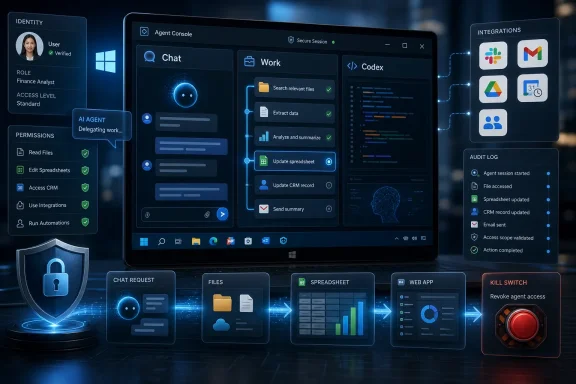 OpenAI Wants the Workbench, Not Just the Chat Window
The most important detail in the launch is not GPT-5.6 by itself. It is the redesigned desktop application that brings Chat, Work, and Codex into a unified workspace. That is OpenAI admitting that the old product boundary between “assistant,” “agent,” and “developer tool” is collapsing.Chat remains the familiar everyday assistant. Work is positioned for multi-step tasks that require the agent to operate across apps, files, and workflows. Codex remains the developer and technical-professional surface, but ChatGPT Work extends its capabilities across web, mobile, and desktop. In other words, Codex is no longer just a coding story; it is becoming part of a broader automation layer for enterprise work.
That is a direct shot at Microsoft Copilot and Google Gemini. Microsoft has the distribution advantage inside Windows, Microsoft 365, Teams, Outlook, Excel, SharePoint, and Azure. Google has the Workspace layer, Gmail, Drive, Calendar, Docs, and Android reach. OpenAI’s answer is to avoid competing app by app and instead argue that the agent should sit above whichever apps the enterprise already uses.
The unified plugin directory is the operational core of that strategy. Free Press Journal and Livemint both reported that ChatGPT Work links ChatGPT with third-party services including Slack, Gmail, Google Drive, calendars, and customer relationship management software. That is not a decorative integration list; it is the minimum viable enterprise nervous system. If the agent can see messages, files, schedules, and customer records, it can begin to execute the kinds of tasks that used to require a human employee to hop between six browser tabs and three desktop apps.
For WindowsForum readers, the desktop app angle is especially important. A browser-only assistant can be managed like a SaaS tool. A desktop agent with an in-app browser and Computer Use capabilities starts to look more like a privileged user sitting at the endpoint. It can interact with websites and local applications, which makes the endpoint policy conversation much harder than “block or allow chat.openai.com.”
“Super App” Is Marketing, but the Architecture Is Real
It is easy to dismiss “super app” as launch-day theater. Enterprise buyers have heard similar language before, usually attached to collaboration suites, low-code platforms, portals, intranets, or workflow automation products that promised to unify work and instead created one more place to check. But the architecture OpenAI is describing has a different center of gravity.Traditional enterprise software tends to organize work around systems of record: the CRM, the ticketing system, the ERP database, the document repository, the source-control platform. ChatGPT Work is organized around intent. The user gives the system a goal, and the agent is supposed to gather context, traverse tools, perform steps, and return an output.
That difference is why OpenAI’s examples matter. Documents, spreadsheets, presentations, and web applications are not just file types. They are the deliverables that sit at the end of common business processes: the board memo, the sales forecast, the quarterly review deck, the internal portal, the data cleanup workbook, the customer follow-up plan. OpenAI is aiming at the layer where work becomes a finished artifact.
The practical consequence is that enterprises will need to stop thinking of AI tools as writing aids. If the agent can produce a spreadsheet, it may also be transforming source data. If it can produce a presentation, it may be selecting claims, charts, customer examples, and financial assumptions. If it can build a web application, it may be touching credentials, repositories, deployment workflows, or internal APIs. The output may look polished, but the risk lives in the invisible chain of actions that produced it.
That is where the comparison with Copilot and Gemini becomes more interesting. Microsoft and Google can argue that their agents inherit the permissions and administrative models of their productivity suites. OpenAI, by contrast, is presenting itself as a cross-stack actor. That is powerful for enterprises that live in mixed environments, but it also means administrators must ask sharper questions about identity, consent, auditability, data boundaries, and revocation.
GPT-5.6 Turns the Launch From Workflow Tool to Platform Bet
Alongside ChatGPT Work, OpenAI unveiled GPT-5.6, described by Livemint as its latest family of AI models. The family comprises Sol, Terra, and Luna. That structure is revealing because it acknowledges a reality enterprise AI buyers already understand: there is no single “best model” for all work.The flagship Sol model is designed to improve performance in coding, knowledge work, cybersecurity, and scientific research while using fewer tokens and lowering computing costs, according to Livemint’s account of the company website. Terra is aimed at everyday enterprise work. Luna is the company’s most cost-efficient model. That lineup maps neatly onto how businesses actually deploy AI: premium reasoning for hard tasks, balanced capability for common work, and cheaper models for high-volume automation.
| GPT-5.6 model | Positioning | Target use described in the source material | Enterprise implication |
|---|---|---|---|
| Sol | Flagship model | Coding, knowledge work, cybersecurity, scientific research | Reserved for higher-value, higher-risk work where capability matters most |
| Terra | Everyday enterprise model | General enterprise work | Likely fit for routine business workflows and broad internal adoption |
| Luna | Most cost-efficient model | Cost-sensitive use | Suited to high-volume tasks where price matters more than maximum capability |
On availability, the verified public reporting is narrower than the product vision. Livemint reported that GPT-5.6 will roll out across ChatGPT, Codex, and the Application Programming Interface, while Free Press Journal and Livemint described ChatGPT Work as a newly introduced enterprise product. That supports the direction of travel, but it does not by itself answer every entitlement question for every tenant, region, plan, or user. Admins should therefore treat availability as something to verify in their own OpenAI workspace, procurement channel, and product console before writing policy around it. The safe operational assumption is simple: do not assume that every announced capability is enabled for every employee, and do not assume that model access, desktop access, plugin access, Codex access, Scheduled Tasks, and Computer Use arrive under one identical control surface.
That matters because enterprise buyers often hear “rollout” as “available to my users now.” Here, IT teams evaluating ChatGPT Work should separate the marketing architecture from the entitlement reality: which users can access which model, in which product, under which workspace, with which connectors, and with which data controls.
Codex Is Becoming the Bridge Between Developers and Everyone Else
The launch also reframes Codex. Until now, Codex has been easiest to understand as OpenAI’s coding agent: a tool for writing, reviewing, and shipping code. In the ChatGPT Work announcement, Codex becomes something broader: the technical engine whose capabilities can be extended into workplace automation.That is a major shift. Developers have been the early proving ground for agentic AI because software tasks are structured, testable, and tool-rich. A coding agent can inspect a repository, run tests, open a pull request, and receive feedback. The loop is imperfect, but it has measurable checkpoints. Enterprise office work is messier: the task may involve ambiguous requirements, partial documents, contradictory emails, stale CRM records, and social judgment.
By bringing Chat, Work, and Codex into one workspace, OpenAI is effectively trying to export the developer-agent pattern into the rest of the company. Give the system context. Let it plan. Let it use tools. Let it produce a finished artifact. Review the result. Repeat.
That is why the desktop app is more than packaging. A unified desktop workspace reduces the friction between asking, building, browsing, and executing. It lets a user move from a chat conversation to a multi-step work task to a developer workflow without mentally switching products. For OpenAI, that increases engagement. For enterprises, it increases the likelihood that employees will use the system for tasks that previously would have stayed inside specialized tools.
The danger is that the same convenience can blur boundaries. A user may not always know whether they are in casual assistant mode, delegated-work mode, or code-execution mode. An admin may not be able to treat “ChatGPT usage” as one category anymore. A compliance team may need different rules for summarizing a document, modifying a spreadsheet, accessing a CRM record, browsing a website, and generating an internal web app—even if all of those actions occur under the same ChatGPT desktop roof.
The Plugin Directory Is Where Productivity Meets Exposure
The unified plugin directory is the most enterprise-ready part of the announcement and the most obvious source of risk. Connecting ChatGPT with Slack, Gmail, Google Drive, calendars, and CRM software is exactly what makes ChatGPT Work useful. It is also what turns an AI tool into a potential cross-application data mover.Every integration expands the agent’s context window in the organizational sense, not merely the model sense. Slack can contain informal decisions, customer escalations, credentials mistakenly pasted into channels, and sensitive HR chatter. Gmail can contain contracts, invoices, confidential negotiations, and external attachments. Google Drive can contain everything from public marketing copy to board materials. Calendars can reveal organizational priorities and relationships. CRM systems hold customer data, revenue history, pipeline forecasts, and support context.
An enterprise agent that can touch all of those systems can do impressive work. It can prepare a customer briefing before a meeting, reconcile notes with account history, draft follow-ups, update a spreadsheet, and produce a presentation. But if its permissions are too broad, it can also over-collect, over-share, or produce outputs that combine data from contexts that were never meant to meet.
This is the oldest problem in enterprise software wearing a new interface: permissions are easy to grant and hard to reason about. Human employees already over-permission apps because they want work to get done. Agents raise the stakes because they can act faster and traverse systems in ways a person may not explicitly monitor step by step.
The right mental model is not “Can ChatGPT Work access Slack?” It is “Which Slack workspaces, which channels, which files, which message histories, under which user identity, with which logging, and with what ability to write back?” The same questions apply to Gmail, Drive, calendars, and CRM systems. A plugin directory without granular controls becomes a convenience layer over a sprawling permissions problem.
Scheduled Tasks Move AI From Request-Response to Background Labor
Livemint reported that Scheduled Tasks can automate recurring work. That sounds small compared with GPT-5.6 or Computer Use, but it may be one of the most important enterprise features in the package. Scheduled work changes the relationship between employee and agent.A chatbot waits. A scheduled agent initiates. That difference matters operationally and psychologically. If a system can run every morning, every Friday, or before every sales call, it becomes part of the company’s process fabric. It is no longer an assistant summoned for occasional help; it is background labor.
That can be genuinely useful. Recurring reporting, CRM hygiene, meeting prep, document checks, inbox triage, spreadsheet refreshes, and status summaries are exactly the kinds of repetitive work knowledge workers resent and managers still need. Automating them through a natural-language interface could make agentic workflows accessible to employees who will never write a script or build a traditional automation.
But scheduled tasks also create new failure modes. An incorrect prompt can keep producing incorrect work. A permissions mistake can keep pulling sensitive data into recurring outputs. A workflow that was safe when run manually once may be risky when run automatically every day. If the agent writes back to systems, the risks grow from bad summaries to bad records.
For IT departments, scheduled AI tasks should be treated like automations, not chats. They need owners, logs, scopes, review cycles, and kill switches. They should not be invisible personal conveniences scattered across an enterprise. If ChatGPT Work succeeds, one of the first cleanup jobs for admins will be discovering how many recurring agent tasks employees have created and what those tasks are allowed to touch.
Computer Use Makes the Endpoint the New Policy Frontier
The redesigned desktop application now includes an in-app browser and Computer Use capabilities, according to Livemint. That detail moves ChatGPT Work directly into WindowsForum territory. Once an agent can carry out tasks across websites and local applications, the endpoint becomes part of the AI control plane.Enterprise security has spent years teaching admins to think in terms of identity providers, SaaS permissions, browser isolation, endpoint detection, data loss prevention, and mobile-device management. Computer Use forces those domains to overlap. The agent may be acting through a user’s session, in a local app, on a managed machine, through a browser tab, with access to files that were never exposed through a clean API.
That is powerful because many real business workflows still do not have elegant APIs. Employees copy data from one portal to another. They extract information from PDFs. They reconcile fields in desktop apps. They use internal web tools that were never designed for automation. Computer Use promises to automate the messy middle of enterprise work.
It is risky for the same reason. API-based integrations can be scoped and logged with some precision. GUI-based action is harder to constrain. If an agent can click, type, read screens, and operate local applications, admins need to understand how approvals work, how screenshots or observed content are handled, how secrets are protected, and how actions are recorded.
The Windows endpoint has always been where business reality defeats clean architecture. ChatGPT Work does not change that; it intensifies it. The more capable the desktop agent becomes, the more enterprises will need endpoint policies that understand AI-mediated action rather than simply human action.
The Microsoft Problem Is Distribution, Trust, and Proximity
OpenAI’s enterprise push is often described as a fight with Microsoft Copilot and Google Gemini, but the Microsoft comparison is especially complicated. Microsoft is not merely another AI vendor in the workplace. It owns the productivity suite, the Windows platform, the identity layer for many enterprises, the management tooling, and a huge share of the developer and cloud estate.That gives Copilot a structural advantage. It can be bundled, surfaced inside existing workflows, governed through familiar admin centers, and justified as an extension of tools customers already pay for. For many CIOs, the easiest AI purchase is the one that appears inside the Microsoft contract they already negotiate every year.
OpenAI’s advantage is different. It has the ChatGPT brand, a reputation for frontier models, a strong developer story through Codex, and the ability to position itself as cross-stack rather than suite-bound. If an enterprise runs Microsoft 365 but also lives in Slack, Gmail, Google Drive, Salesforce-style CRM systems, GitHub, internal web apps, and local tools, OpenAI can argue that an independent agentic layer is more useful than a suite-native assistant.
That argument will appeal to companies whose work is fragmented. It will also worry IT teams that have spent years trying to reduce fragmentation. A single AI work surface sounds efficient until it becomes another place where sensitive data, user actions, third-party plugins, and generated artifacts must be governed.
The strategic irony is that OpenAI’s best case against Microsoft is also its biggest enterprise adoption challenge. Microsoft can say, in effect, that it is already inside the tenant. OpenAI has to convince enterprises to connect systems that may currently be governed by different owners, contracts, and control planes.
Google Defines the Collaboration Flank
Google’s Gemini is the other obvious comparison because Google controls many of the same work surfaces OpenAI wants to connect: Gmail, Drive, Calendar, Docs, Sheets, and Meet. If Microsoft’s advantage is enterprise incumbency, Google’s is collaboration-native work. For organizations already standardized on Workspace, Gemini has proximity that OpenAI must recreate through integrations.That makes the plugin directory central to OpenAI’s competitive posture. OpenAI does not need to own Gmail or Google Drive if it can connect to them reliably and governably. But the quality of that experience will determine whether ChatGPT Work feels like a true enterprise workbench or a clever overlay that breaks at permission boundaries.
In that sense, GPT-5.6 is not merely a model announcement; it is OpenAI defending the premium end of the market while ChatGPT Work attacks the workflow layer. The company wants to be judged both on the intelligence of its best model and the usefulness of its everyday enterprise interface. That is a hard combination to execute because frontier capability and enterprise manageability are different disciplines.
The IPO Shadow Raises the Stakes
Livemint reported that OpenAI confidentially filed for a potential initial public offering earlier this year. That context matters because ChatGPT Work looks like the kind of product a company builds when it needs to prove that massive AI demand can become durable enterprise revenue.Consumer enthusiasm made ChatGPT famous. Developer adoption made OpenAI strategically important. Enterprise workflow ownership is the revenue prize. A company preparing for public-market scrutiny needs more than viral usage and model benchmarks; it needs repeatable contracts, expanding seats, predictable usage, and a story about why customers will build processes around its products.
ChatGPT Work is that story. It says OpenAI can sit at the center of enterprise work, not just sell API calls or chatbot subscriptions. It says the company can provide a workspace, agentic execution, coding assistance, third-party integrations, scheduled automation, and model tiers. It says the product surface can be sticky enough that enterprises standardize around it.
The danger is that public-market logic can pressure AI vendors to move faster than enterprise controls can absorb. The more OpenAI emphasizes agents that complete work across apps and files, the more it must prove that those agents can be controlled, audited, limited, and trusted. Growth investors may reward the “super app” narrative. CIOs will ask who owns the blast radius.
Windows Admins Should Treat This as a New Class of Managed Application
For Windows administrators, ChatGPT Work should not be evaluated like a browser bookmark or a standalone productivity app. It is closer to a managed automation environment with a conversational interface, model routing, plugin access, browser capability, local-app interaction, and cross-device reach. That requires a different intake process.The first question is identity. Does the user access ChatGPT Work through a personal account, a business workspace, or an enterprise-managed identity? The second is data. Which files, drives, mailboxes, calendars, and apps can the agent see? The third is action. Can it only read and draft, or can it write, send, update, create, deploy, and schedule?
The fourth is observability. If a user delegates a task that runs for hours, what logs exist? Can admins see which systems were accessed, which files were read, which outputs were created, and which actions required approval? The fifth is lifecycle management. What happens when the employee changes roles, leaves the company, or loses access to a connected app?
These are not theoretical concerns. They are the same concerns enterprises already face with macros, scripts, robotic process automation, browser extensions, OAuth apps, and low-code workflows. ChatGPT Work combines pieces of all of them and makes them easier for nontechnical employees to create.
The concrete takeaway is this: Windows admins should not wait for broad employee adoption before setting rules. Start by classifying ChatGPT Work as an agentic automation client, verify exactly which capabilities are available in your tenant or contract, restrict production data to managed workspaces, and pilot it with a small group whose identity, connector, endpoint, and logging controls can be inspected end to end. If the pilot cannot answer who the agent acts as, what it can read, what it can change, where its actions are logged, and how access is revoked, it is not ready for broad deployment.
Action checklist for admins
- Inventory where ChatGPT, Codex, and any ChatGPT Work access are already being used across web, mobile, and desktop.
- Evaluation question: Are users accessing the service through personal accounts, unmanaged browser sessions, the desktop app, mobile devices, or approved business workspaces?
- Decision criterion: Allow company data only in managed business or enterprise workspaces where ownership, retention, user lifecycle, and administrative controls are defined.
- Require enterprise-managed identity for work use.
- Evaluation question: Can access be tied to the organization’s identity provider, group membership, role, and employment status?
- Decision criterion: Do not approve production use if access depends on personal credentials that IT cannot disable, review, or recover during offboarding.
- Review plugin access for Slack, Gmail, Google Drive, calendars, and CRM systems before broad rollout.
- Evaluation question: Which connectors are enabled, which users can approve them, and what exact scopes are granted?
- Decision criterion: Start with the smallest set of connectors needed for a defined workflow; reject broad scopes that allow the agent to read or write across entire workspaces without business justification.
- Separate read permissions from write permissions.
- Evaluation question: Can the agent only summarize and draft, or can it send messages, update records, modify files, create calendar events, commit code, or deploy changes?
- Decision criterion: Permit read-only and draft-only workflows first; require documented owner approval, human review, and rollback plans for any workflow that writes back to business systems.
- Define logging requirements before enabling high-impact workflows.
- Evaluation question: Can admins determine which user delegated the task, which connected systems were accessed, which files or records were used, what outputs were generated, and whether the agent performed write actions?
- Decision criterion: Do not approve workflows involving regulated data, customer records, source code, financial data, or HR information unless logs are sufficient for security review and incident reconstruction.
- Treat Scheduled Tasks as automations that require owners, review cycles, logging, and revocation.
- Evaluation question: Who owns each scheduled task, how often does it run, what systems does it access, and who reviews the results?
- Decision criterion: Require an accountable business owner, a review interval, a maximum data scope, and a documented kill switch before allowing recurring tasks.
- Define which users may use Computer Use capabilities on managed endpoints and under what approval rules.
- Evaluation question: Can the agent interact with local apps, browsers, internal portals, downloaded files, screenshots, or sensitive desktop content?
- Decision criterion: Limit Computer Use to approved pilot groups and managed devices; block or defer use where screen content, local files, or secrets cannot be adequately controlled.
- Create a revocation path for users, connectors, tasks, and devices.
- Evaluation question: When an employee leaves, changes roles, or loses access to an underlying app, are ChatGPT Work permissions, connected plugins, scheduled tasks, and desktop sessions automatically removed or disabled?
- Decision criterion: Approve only if revocation is testable and repeatable; access removal must cover the account, connectors, stored authorizations, recurring tasks, and any endpoint installation.
- Separate policies for assistance, document generation, app/file actions, code work, and browser/local-application control.
- Evaluation question: Are all AI actions being treated as one category, or are policies aligned to the risk of the action?
- Decision criterion: Use different approval levels for low-risk drafting, internal document generation, customer-facing output, CRM updates, repository actions, and local-app control.
The Governance Burden Moves Closer to the User
The hard part of ChatGPT Work is that it decentralizes automation. Historically, if an enterprise wanted a workflow automated, it might go through IT, business systems, a developer team, a low-code platform, or a formal robotic process automation project. Those routes were slower, but they created natural review points. Someone had to define the workflow, request permissions, test the output, and own the failure mode.Agentic AI compresses that path. A user can describe the outcome they want, connect services, schedule a task, and let the system operate. That is the product’s appeal. It is also the reason IT departments need to move closer to the point of use.
The old model of annual SaaS review will not be enough. Admins will need practical visibility into which users are creating agent workflows, which connectors are being approved, which endpoints are running desktop agents, and which tasks have been scheduled. Security teams will need to think less about a single application boundary and more about chains of action: email to drive, drive to spreadsheet, spreadsheet to presentation, presentation to external send, CRM to calendar, browser to local app.
That does not mean organizations should reject ChatGPT Work outright. The productivity upside is obvious. If the product works as described, it could reduce busywork, speed up analysis, help developers and nondevelopers collaborate, and turn vague business goals into usable artifacts more quickly. For employees buried in meetings, tabs, documents, and status updates, that is a real value proposition.
But the winning deployments will be the controlled ones. The organizations that benefit most will not be the ones that simply turn everything on. They will be the ones that define allowed use cases, constrain connectors, verify logs, separate read from write, and teach employees that delegating work to an agent is still a business action with consequences.
ChatGPT Work is OpenAI’s clearest attempt yet to make AI feel less like a tool beside work and more like a participant inside work. For Windows admins, that means the next AI policy debate is not just about prompts or data leakage. It is about who, or what, is allowed to act on the endpoint, across the browser, inside connected apps, and on behalf of the user.
Update: OpenAI clarifies ChatGPT Work rollout and admin controls (July 10, 2026)
TestingCatalog reports that ChatGPT Work is initially available on web and mobile for Pro, Enterprise, and Edu users, with Plus and Business access expected in the coming days. The redesigned Windows and Mac desktop app is available globally across all plans, including Free, although access to Work itself remains plan-dependent. The previous desktop client will become ChatGPT Classic as Codex is folded into the new application.The report also provides additional governance details. Enterprise admins can control plugins, connected tools, browser and network access, sensitive actions, spending, and usage limits. OpenAI says an automated review system checks critical connected-tool and API actions before execution, while ChatGPT Work requests user approval for sensitive operations.
OpenAI has also launched Sites in public beta for Plus, Pro, Business, and Enterprise users. It converts project materials into interactive dashboards, reports, trackers, internal portals, prototypes, and web apps that ChatGPT can test and update when source information changes. For Windows administrators, the clarified rollout means desktop deployment and agent entitlement should be managed separately: installing the unified client does not necessarily grant every user access to Work, Sites, Computer Use, or enterprise connectors.
Update: OpenAI replaces Atlas browser with Chrome extension (July 10, 2026)
Windows Report says OpenAI is discontinuing its standalone Atlas browser and shifting browser-based work to an updated Chrome sidebar extension and ChatGPT’s built-in desktop browser. This further consolidates OpenAI’s workplace, coding, browsing, and automation tools around the unified ChatGPT application.The report also says existing standalone Codex installations will automatically update to the new desktop app. Developers can retain a Codex-focused experience by setting Codex as the default view and using its logo as the application icon.
Scheduled Tasks will support event-triggered actions in addition to one-time and recurring schedules, including monitoring sources for changes. For Windows admins, these additions expand the deployment review beyond desktop entitlements: browser-extension policies, automatic client migration, local application access, and event-driven automations will also require governance.
Update: GPT-5.6 rollout followed US security review (July 10, 2026)
Inc42 reports that OpenAI delayed GPT-5.6’s public release while consulting US government officials over cybersecurity and national-security concerns. Access was initially restricted to trusted partners and a small group of approved users before additional testing by the US Center for AI Standards and Innovation cleared the way for a phased rollout.The report also identifies GPT-5.6 as the preferred model powering Microsoft 365 Copilot, complicating the launch’s competitive framing: OpenAI is challenging Microsoft’s enterprise workspace while supplying underlying model technology for Copilot.
GPT-5.6 users can adjust reasoning effort, including an Ultra mode for demanding tasks. Reported API pricing begins at $1 per million input tokens for Luna, $2.50 for Terra, and $5 for Sol.
For IT teams, the security review and staged availability reinforce the need to verify model access, pricing, and feature entitlements rather than treating the announcement as an immediate universal release.
References
- Primary source: Free Press Journal
Published: 2026-07-09T18:35:09.080553
OpenAI Unveils ChatGPT Work, GPT-5.6 To Expand Enterprise AI Push
OpenAI has launched ChatGPT Work, an enterprise-focused AI "super app" that combines AI agents, coding tools and workplace integrations in a unified interface. The company also introduced the GPT-5.6 family, Sol, Terra and Luna and a redesigned desktop app, aiming to strengthen its position... www.freepressjournal.in
- Independent coverage: livemint.com
Published: 2026-07-09T18:05:09.079365
OpenAI debuts ChatGPT Work, GPT-5.6 in bid to challenge Microsoft, Google | Mint
OpenAI has unveiled ChatGPT Work, a unified app for enterprises that combines AI capabilities with essential tools, challenging Microsoft and Google. www.livemint.com
- Official source: help.openai.com
GPT-5.6 in ChatGPT | OpenAI Help Center
Learn how GPT-5.6 Sol works in ChatGPT, which options are available by plan, and how usage limits and availability work. help.openai.com
- Official source: openai.com
Previewing GPT-5.6 Sol: a next-generation model | OpenAI
OpenAI previews GPT-5.6 Sol, a next-generation model with stronger capabilities in coding, science, and cybersecurity, paired with its most advanced safety stack.openai.com - Official source: deploymentsafety.openai.com
- Official source: cdn.openai.com
Last edited: