

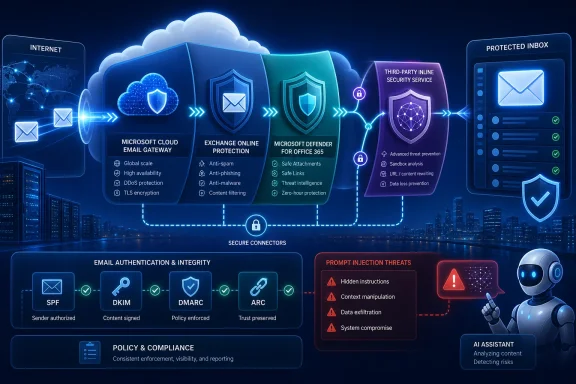
Microsoft’s renewed guidance on integrating third-party email security with Exchange Online has reopened a debate that many Microsoft 365 customers thought they had already settled: should another security service sit directly in the mail path, inspect messages through an API, or leave protection entirely to Microsoft? The practical answer is not determined by a simple “inline versus API” label. The decisive issue is whether the architecture preserves Microsoft 365’s authentication evidence, routing logic, security verdicts, compliance processing, availability, and administrative visibility while measurably reducing the number of dangerous messages that reach users.
Email security products have historically been built around the secure email gateway. An organization changed its MX records so that incoming internet mail reached an appliance or cloud gateway first, where messages were filtered before being relayed to an internal Exchange server.
Exchange Online Protection changed that model by making Microsoft’s own global filtering infrastructure the natural front door for Microsoft 365. Microsoft Defender for Office 365 subsequently added Safe Links, Safe Attachments, anti-phishing controls, automated investigation, threat intelligence, campaign analysis, and other capabilities above the baseline Exchange Online Protection service.
The move to cloud mailboxes also created new ways for independent security vendors to integrate. Some continued to operate as traditional gateways in front of Microsoft 365, some used Microsoft Graph and other APIs to inspect mailbox content, and others introduced routing designs in which Microsoft 365 processes a message before sending it to an external security service and accepting it back for delivery.
Poorly designed routing can produce several problems:
The route is broadly:
Internet sender → third-party gateway → Exchange Online Protection → mailbox
This arrangement gives the third party the earliest opportunity to block a threat. However, Exchange Online sees the gateway as the immediate SMTP peer rather than the original internet sender unless the environment is configured to recover the original source information.
Microsoft recommends Enhanced Filtering for Connectors, also known as skip listing, for applicable inbound gateway scenarios. It allows Microsoft’s filtering stack to look past known intermediary addresses and evaluate the original source, improving anti-spoofing, anti-phishing, reputation, and authentication decisions.
The conceptual path becomes:
Internet sender → Microsoft 365 → third-party service → Microsoft 365 → mailbox
Check Point describes its Microsoft 365 inline implementation in these terms. Microsoft applies its controls first, Check Point performs another pre-delivery inspection, and the message then returns for delivery.
This design preserves Microsoft as the internet-facing edge but introduces a non-linear route. It consequently requires meticulous handling of connectors, message identity, authentication, trust, transport rules, and loop prevention.
The simplified path is:
Internet sender → Microsoft 365 → mailbox, with the security platform observing and acting through APIs.
API integration avoids many SMTP-routing complications. Its central limitation is timing: if the product acts after delivery, a dangerous message may be visible in the inbox before the external service finds, quarantines, retracts, or modifies it.
Modern platforms increasingly combine these models rather than choosing only one. Inline processing may handle pre-delivery prevention, while API access supports retrospective searching, internal-message inspection, account-takeover detection, remediation, and collaboration-app coverage.
A loosely scoped inbound connector can create an alternate path around the expected filtering service. An overly broad outbound connector can send messages to the wrong smart host or apply the third-party route to mail that should have remained inside Microsoft 365.
Connector design should therefore follow least-privilege principles:
Transport rules commonly use headers or other properties to mark processing state. Those markers must resist forgery, survive legitimate message handling, and remain understandable during incident response.
A robust design should let an administrator answer three questions quickly:
Without appropriate handling, thousands of unrelated senders can appear to Microsoft 365 as traffic from the same small collection of gateway addresses. That reduces the value of source reputation and can complicate spoof detection.
Enhanced Filtering for Connectors addresses this problem for supported pre-Microsoft routing models by identifying trusted intermediary hops and recovering the relevant source. It should not be assumed to solve every post-Microsoft routing design, particularly when a message has already passed through Microsoft’s security stack before leaving the service.
Some changes are made for defensible security reasons. A product may replace a suspicious attachment, wrap a URL for click-time analysis, or add an external-sender warning. The question is not whether modification is always wrong, but whether the architecture records it without destroying the ability of downstream systems to understand the original authentication result.
Check Point says its integration uses ARC to preserve authentication continuity as messages travel between Microsoft 365 and its security service. That is technically relevant, but ARC is not a universal permission slip.
Trusting an ARC sealer is a significant administrative decision. The tenant is choosing to rely on authentication assertions generated by that intermediary, so administrators must verify the sealer identity, key management, failure behavior, and exact circumstances in which Microsoft consumes the ARC result.
ARC also does not make arbitrary content changes harmless. It helps explain the message’s earlier authentication state; it does not guarantee that the final content is safe or identical to what was originally signed.
Microsoft now strongly favors Enhanced Filtering for Connectors over broad spam bypassing in suitable pre-filtering scenarios. Shared gateway infrastructure can serve many customers, and treating every message from those addresses as inherently safe can allow phishing or spoofing to pass with reduced scrutiny.
Post-Microsoft inline models require different handling, but the principle remains the same: do not disable more native inspection than the architecture strictly requires.
Administrators should examine whether the integration changes or bypasses:
The difference between defense in depth and redundant complexity is coordination. Each control needs a defined role, and administrators need a predictable way to resolve disagreements.
If Microsoft considers a message malicious but the third party allows it, the message should not be resurrected. If the third party blocks a message Microsoft allowed, the incident should remain visible to both messaging and security operations teams. If one platform rewrites content before the other analyzes it, teams need to know which version each platform evaluated.
The danger lies in the interval between delivery and removal. Even a short gap can matter when:
A fail-closed configuration prioritizes security but can interrupt business communication. A fail-open configuration preserves delivery but temporarily removes the additional inspection layer. Neither policy is inherently correct for every organization; the choice should be conscious, tested, and documented.
Service-level objectives must cover more than portal availability. Customers need data on message-processing latency, regional resilience, queue management, retry behavior, maximum message size, attachment handling, and recovery after a provider or Microsoft outage.
Microsoft now documents email prompt-injection protection within Defender for Office 365 and describes detection before harmful content reaches a user or AI assistant. Microsoft 365 Copilot also has its own safeguards, including separation of instructions from retrieved content, access boundaries, filtering, and output protections.
That development complicates simplistic vendor claims that only an independent inline product can prevent email-borne prompt injection. Microsoft is actively building native defenses, and any comparison must reflect the capabilities available under the customer’s actual licensing and policy configuration.
At the same time, no probabilistic AI defense is perfect. Independent detection can still add value when it uses materially different models and telemetry. The relevant question is whether the second system finds attacks the first one misses without producing an unmanageable volume of false positives.
This increases the value of stopping malicious content before delivery. It also broadens the scope of testing: a security team must consider not only whether a person can click a link, but whether an automated process will parse a message, follow instructions, extract an attachment, or trigger an action.
Email security architecture should therefore be connected to AI governance. Organizations need policies for which assistants may read mail, what tools they can invoke, what sensitive data they can retrieve, and how prompt-injection events are logged and investigated.
This placement has a clear commercial and technical rationale. The organization retains Microsoft as its internet-facing mail edge while adding a separate pre-delivery decision point for phishing, malware, business email compromise, credential theft, QR-code lures, and other threats.
Check Point says it uses ARC, trusted connectors, trusted-sender configurations, transport-rule exclusions, and Microsoft-aligned routing controls to preserve authentication and prevent unnecessary reprocessing. The company also introduced infrastructure changes during 2026 involving new connectors, sending infrastructure, Tenant Allow/Block List entries, transport-rule exceptions, and connection-filter handling.
Those details demonstrate that the service is not merely “an API product with an inline checkbox.” It changes the tenant’s Exchange Online and Microsoft security configuration in meaningful ways.
Microsoft’s published guidance warns customers to be careful when mail leaves Microsoft 365 for a non-Exchange service after Microsoft has scanned it. Microsoft specifically notes that headers representing the first scanning verdict may no longer be accurate when the message eventually reaches the mailbox.
The fair conclusion is neither that Check Point’s design is inherently invalid nor that partnership status resolves Microsoft’s warning. The design must be evaluated on its actual message handling, not its logos.
An effective operating model should provide:
A well-engineered service should automate safe changes where possible while giving the customer advance notice, an audit trail, and a rollback path. Administrators should be especially cautious when vendor automation can create or modify transport rules, connectors, allow-list entries, or enterprise applications.
Every deployment should have a documented baseline. Periodic checks must confirm that the live tenant still matches it, because a configuration that worked on installation day can drift into an unsupported or insecure state.
The same complexity creates risk. A multinational organization may process millions of messages per day, so a small increase in latency or false positives can affect thousands of users. Connector changes must also be coordinated across messaging, identity, network, compliance, legal, procurement, and incident-response teams.
Large customers should demand evidence from controlled pilots rather than relying on product demonstrations. Detection improvement should be measured against a representative stream of real mail, with Microsoft-only and layered outcomes compared over enough time to include campaigns, benign bulk mail, encrypted messages, unusual attachments, and business-specific workflows.
Microsoft 365 Business Premium and Defender for Office 365 can already provide substantial protection when preset security policies, multifactor authentication, anti-impersonation controls, Safe Links, Safe Attachments, user reporting, and security awareness processes are correctly deployed.
For a small organization, improving those basics may deliver more value than adding a complicated inline route. A managed service provider can change the calculation, but only if it monitors the integration, handles false positives, reviews alerts, and owns incident response rather than merely reselling a license.
Multiple security layers can create repeated external-sender labels, stacked warning banners, rewritten URLs, attachment replacements, and conflicting quarantine notices. Overwarning users can be counterproductive because it trains them to ignore every warning.
A successful deployment should simplify the visible experience while increasing protection behind the scenes.
Microsoft may introduce stronger controls for trusted return paths, message provenance, direct delivery, and connector validation. Exchange Online’s increasing restrictions around unauthenticated sending and Direct Send already show a broader effort to reduce routes that attackers can exploit.
Useful reporting would distinguish:
No mail gateway can solve that problem alone. Effective protection will combine pre-delivery inspection, identity security, endpoint detection, browser controls, cloud-app governance, data protection, user reporting, behavioral analytics, and AI-specific safeguards.
The strategic question is therefore not whether Microsoft or a third party “owns” email security. It is whether the organization can create a coherent control plane across those layers without compromising the integrity of the mail system underneath them.
Inline email security remains a defensible option for Microsoft 365, but only when the implementation earns that position through verifiable authentication continuity, tightly restricted connectors, predictable routing, measurable detection gains, resilient service delivery, and complete administrative visibility. Check Point’s use of Microsoft-first processing, ARC, trusted routing components, inline inspection, and API capabilities represents a serious attempt to meet those requirements, yet customers must still validate every assumption in their own tenant. The best architecture is not the one with the most inspection points; it is the one that stops more real attacks while keeping mail flow, Microsoft’s native protections, compliance controls, and incident evidence trustworthy from the internet edge to the final inbox.
 Overview
Email security products have historically been built around the secure email gateway. An organization changed its MX records so that incoming internet mail reached an appliance or cloud gateway first, where messages were filtered before being relayed to an internal Exchange server.Exchange Online Protection changed that model by making Microsoft’s own global filtering infrastructure the natural front door for Microsoft 365. Microsoft Defender for Office 365 subsequently added Safe Links, Safe Attachments, anti-phishing controls, automated investigation, threat intelligence, campaign analysis, and other capabilities above the baseline Exchange Online Protection service.
The move to cloud mailboxes also created new ways for independent security vendors to integrate. Some continued to operate as traditional gateways in front of Microsoft 365, some used Microsoft Graph and other APIs to inspect mailbox content, and others introduced routing designs in which Microsoft 365 processes a message before sending it to an external security service and accepting it back for delivery.
Why Microsoft is warning customers
Microsoft’s concern is not theoretical. A message that leaves Exchange Online and then returns can acquire new headers, a different apparent source, altered content, or an authentication state that no longer matches the state Microsoft observed during the first pass.Poorly designed routing can produce several problems:
- It can cause Exchange Online to inspect the same message more than once.
- It can obscure the original sending infrastructure and weaken reputation analysis.
- It can invalidate DKIM signatures when an intermediary modifies content.
- It can create mail loops, unexpected connector selection, or delivery delays.
- It can cause stale security verdicts to remain attached to a message that changed after inspection.
- It can interfere with transport rules, journaling, encryption, forwarding, moderation, and compliance workflows.
- It can create a false sense that every message followed the third-party inspection path when direct delivery remains possible.
The Three Main Microsoft 365 Security Models
The phrase inline email security is often used too loosely. Administrators should first identify the exact route a message follows, because products with similar marketing descriptions can behave very differently.A gateway before Microsoft 365
The traditional cloud-gateway design points the organization’s MX record to the security provider. Internet mail reaches that provider, is inspected, and is then sent to Exchange Online through an inbound connector.The route is broadly:
Internet sender → third-party gateway → Exchange Online Protection → mailbox
This arrangement gives the third party the earliest opportunity to block a threat. However, Exchange Online sees the gateway as the immediate SMTP peer rather than the original internet sender unless the environment is configured to recover the original source information.
Microsoft recommends Enhanced Filtering for Connectors, also known as skip listing, for applicable inbound gateway scenarios. It allows Microsoft’s filtering stack to look past known intermediary addresses and evaluate the original source, improving anti-spoofing, anti-phishing, reputation, and authentication decisions.
A security service after Microsoft’s first pass
Some products leave the MX record pointed at Microsoft 365. Exchange Online Protection and Defender inspect the message first, after which transport rules and connectors route it to an external service. A message judged safe by that service is returned to Microsoft 365 for final delivery.The conceptual path becomes:
Internet sender → Microsoft 365 → third-party service → Microsoft 365 → mailbox
Check Point describes its Microsoft 365 inline implementation in these terms. Microsoft applies its controls first, Check Point performs another pre-delivery inspection, and the message then returns for delivery.
This design preserves Microsoft as the internet-facing edge but introduces a non-linear route. It consequently requires meticulous handling of connectors, message identity, authentication, trust, transport rules, and loop prevention.
API-based inspection
An API-oriented service integrates with Microsoft 365 without becoming a conventional SMTP hop. Depending on the product, it can inspect messages, attachments, identities, mailbox activity, collaboration content, and historical data through authorized cloud interfaces.The simplified path is:
Internet sender → Microsoft 365 → mailbox, with the security platform observing and acting through APIs.
API integration avoids many SMTP-routing complications. Its central limitation is timing: if the product acts after delivery, a dangerous message may be visible in the inbox before the external service finds, quarantines, retracts, or modifies it.
Modern platforms increasingly combine these models rather than choosing only one. Inline processing may handle pre-delivery prevention, while API access supports retrospective searching, internal-message inspection, account-takeover detection, remediation, and collaboration-app coverage.
Why Mail Routing Quality Matters
Email is a store-and-forward system constructed from a chain of independent decisions. Each transfer can affect identity, reputation, authentication, logging, and the security context available to the next processor.Connectors are security boundaries
Exchange Online connectors are more than routing conveniences. They tell Microsoft 365 which systems may submit messages, where selected messages should be sent, and what evidence—such as a certificate identity or IP range—must be present.A loosely scoped inbound connector can create an alternate path around the expected filtering service. An overly broad outbound connector can send messages to the wrong smart host or apply the third-party route to mail that should have remained inside Microsoft 365.
Connector design should therefore follow least-privilege principles:
- The connector should apply only to the intended domains and message classes.
- Certificate-based identification should be preferred where the service supports it reliably.
- IP restrictions should include every legitimate sending address without accepting unnecessarily broad ranges.
- TLS requirements should be explicit and validated.
- Fallback behavior should be documented rather than discovered during an outage.
- Direct-to-tenant delivery should be restricted when the organization expects all external mail to follow a designated gateway.
Non-linear flow raises the verification burden
When a message travels from Microsoft 365 to an external service and back, the tenant must distinguish a legitimate returning message from one that merely imitates that path. The system also needs to prevent the same message from being routed out repeatedly.Transport rules commonly use headers or other properties to mark processing state. Those markers must resist forgery, survive legitimate message handling, and remain understandable during incident response.
A robust design should let an administrator answer three questions quickly:
- Did this message pass through the required third-party inspection service?
- Did the content change after Microsoft or the third party issued its verdict?
- Can an attacker or unauthorized sender submit mail through the trusted return connector?
Authentication Must Survive the Journey
SPF, DKIM, and DMARC were designed for internet mail paths that are often simpler than today’s cloud-security chains. Intermediaries can legitimately disrupt the evidence those mechanisms evaluate.SPF and the last-hop problem
SPF checks whether the connecting infrastructure is authorized to send for the envelope sender’s domain. When a third-party gateway relays mail into Microsoft 365, the visible connection originates from the gateway rather than the sender’s original system.Without appropriate handling, thousands of unrelated senders can appear to Microsoft 365 as traffic from the same small collection of gateway addresses. That reduces the value of source reputation and can complicate spoof detection.
Enhanced Filtering for Connectors addresses this problem for supported pre-Microsoft routing models by identifying trusted intermediary hops and recovering the relevant source. It should not be assumed to solve every post-Microsoft routing design, particularly when a message has already passed through Microsoft’s security stack before leaving the service.
DKIM and message modification
DKIM applies a cryptographic signature to selected headers and message content. A service that rewrites links, changes the subject, removes an attachment, inserts a banner, alters MIME structure, or transforms the body can invalidate that signature.Some changes are made for defensible security reasons. A product may replace a suspicious attachment, wrap a URL for click-time analysis, or add an external-sender warning. The question is not whether modification is always wrong, but whether the architecture records it without destroying the ability of downstream systems to understand the original authentication result.
ARC as continuity evidence
Authenticated Received Chain, or ARC, allows a trusted intermediary to record the authentication state it observed and cryptographically seal that information. A downstream receiver can evaluate the chain even if forwarding or legitimate content processing caused the original SPF, DKIM, or DMARC checks to fail.Check Point says its integration uses ARC to preserve authentication continuity as messages travel between Microsoft 365 and its security service. That is technically relevant, but ARC is not a universal permission slip.
Trusting an ARC sealer is a significant administrative decision. The tenant is choosing to rely on authentication assertions generated by that intermediary, so administrators must verify the sealer identity, key management, failure behavior, and exact circumstances in which Microsoft consumes the ARC result.
ARC also does not make arbitrary content changes harmless. It helps explain the message’s earlier authentication state; it does not guarantee that the final content is safe or identical to what was originally signed.
Preserving Microsoft’s Native Security Stack
A third-party service should not quietly weaken the Microsoft controls the customer has already licensed and configured. This is one of the most important criteria in evaluating any integration.Avoiding broad bypass rules
Older gateway deployments sometimes used an Exchange transport rule that set the Spam Confidence Level to-1 for all messages arriving from the provider. That effectively told Microsoft 365 to bypass spam filtering for the trusted route.Microsoft now strongly favors Enhanced Filtering for Connectors over broad spam bypassing in suitable pre-filtering scenarios. Shared gateway infrastructure can serve many customers, and treating every message from those addresses as inherently safe can allow phishing or spoofing to pass with reduced scrutiny.
Post-Microsoft inline models require different handling, but the principle remains the same: do not disable more native inspection than the architecture strictly requires.
Administrators should examine whether the integration changes or bypasses:
- Exchange Online Protection anti-spam evaluation.
- Anti-phishing and impersonation policies.
- Microsoft Defender Safe Attachments processing.
- Safe Links rewriting and click-time protection.
- Zero-hour auto purge and automated remediation.
- Mail flow rules and compliance controls.
- Purview data loss prevention and information-protection actions.
- Quarantine, reporting, and submission workflows.
Double processing is not automatically defense in depth
Running two scanners can increase coverage, especially when they use different threat intelligence, models, emulation systems, and detection logic. It can also generate duplicate banners, multiple URL rewrites, conflicting quarantines, and inconsistent verdicts.The difference between defense in depth and redundant complexity is coordination. Each control needs a defined role, and administrators need a predictable way to resolve disagreements.
If Microsoft considers a message malicious but the third party allows it, the message should not be resurrected. If the third party blocks a message Microsoft allowed, the incident should remain visible to both messaging and security operations teams. If one platform rewrites content before the other analyzes it, teams need to know which version each platform evaluated.
The Case for Pre-Delivery Prevention
The strongest argument for an inline design is straightforward: a malicious message that never reaches the mailbox cannot be opened, forwarded, summarized, indexed, synchronized to a device, or processed by an automated workflow.The remediation gap
Post-delivery products can be highly effective, and Microsoft’s own automated investigation and zero-hour remediation capabilities also operate after initial delivery in some circumstances. Threat intelligence evolves, URLs change destinations, compromised sites are weaponized, and files initially judged clean can later acquire a malicious reputation.The danger lies in the interval between delivery and removal. Even a short gap can matter when:
- A user immediately opens a message on a phone.
- An inbox rule forwards it to another account.
- A help-desk process automatically creates a ticket from its contents.
- A CRM or workflow platform ingests the message.
- A synchronization client caches the content on a device.
- An AI assistant summarizes or acts upon mailbox material.
Prevention has its own availability cost
Inline inspection places the security provider in the delivery path. If the service slows down or becomes unavailable, mail may queue, be deferred, or follow a fail-open route.A fail-closed configuration prioritizes security but can interrupt business communication. A fail-open configuration preserves delivery but temporarily removes the additional inspection layer. Neither policy is inherently correct for every organization; the choice should be conscious, tested, and documented.
Service-level objectives must cover more than portal availability. Customers need data on message-processing latency, regional resilience, queue management, retry behavior, maximum message size, attachment handling, and recovery after a provider or Microsoft outage.
AI Changes the Email Threat Model
Email has always carried hostile instructions for humans. Generative AI introduces a second potential target: software that reads the message on the user’s behalf.Indirect prompt injection
An indirect prompt-injection attack places instructions inside an email, document, webpage, calendar item, or other untrusted content. An AI system may mistake those instructions for legitimate context and allow them to influence a summary, recommendation, or action.Microsoft now documents email prompt-injection protection within Defender for Office 365 and describes detection before harmful content reaches a user or AI assistant. Microsoft 365 Copilot also has its own safeguards, including separation of instructions from retrieved content, access boundaries, filtering, and output protections.
That development complicates simplistic vendor claims that only an independent inline product can prevent email-borne prompt injection. Microsoft is actively building native defenses, and any comparison must reflect the capabilities available under the customer’s actual licensing and policy configuration.
At the same time, no probabilistic AI defense is perfect. Independent detection can still add value when it uses materially different models and telemetry. The relevant question is whether the second system finds attacks the first one misses without producing an unmanageable volume of false positives.
The inbox is becoming an automation bus
Microsoft 365 is no longer just a place where employees manually read messages. Email feeds ticketing systems, finance workflows, customer-service platforms, compliance archives, security automation, mobile notifications, and AI assistants.This increases the value of stopping malicious content before delivery. It also broadens the scope of testing: a security team must consider not only whether a person can click a link, but whether an automated process will parse a message, follow instructions, extract an attachment, or trigger an action.
Email security architecture should therefore be connected to AI governance. Organizations need policies for which assistants may read mail, what tools they can invoke, what sensitive data they can retrieve, and how prompt-injection events are logged and investigated.
Check Point’s Position in the Mail Flow
Check Point presents Email Security, formerly associated with the Harmony Email & Collaboration branding, as an API-based service with inline prevention capabilities. Its documentation says it can inspect inbound, outbound, and internal Microsoft 365 messages, apply threat-prevention and data-protection policies, and perform post-delivery actions when required.Microsoft first, Check Point second
In the architecture described by Check Point, Microsoft’s native mail-protection controls process an inbound message before it is routed to Check Point for additional inspection. A permitted message then returns to Microsoft 365 for final mailbox delivery.This placement has a clear commercial and technical rationale. The organization retains Microsoft as its internet-facing mail edge while adding a separate pre-delivery decision point for phishing, malware, business email compromise, credential theft, QR-code lures, and other threats.
Check Point says it uses ARC, trusted connectors, trusted-sender configurations, transport-rule exclusions, and Microsoft-aligned routing controls to preserve authentication and prevent unnecessary reprocessing. The company also introduced infrastructure changes during 2026 involving new connectors, sending infrastructure, Tenant Allow/Block List entries, transport-rule exceptions, and connection-filter handling.
Those details demonstrate that the service is not merely “an API product with an inline checkbox.” It changes the tenant’s Exchange Online and Microsoft security configuration in meaningful ways.
Partnership is not architectural certification
Check Point highlights its long Microsoft partnership and participation in the Microsoft Intelligent Security Association. Those relationships indicate product integration and ecosystem involvement, but customers should not interpret them as proof that every deployment pattern is endorsed, risk-free, or automatically supported under every Microsoft scenario.Microsoft’s published guidance warns customers to be careful when mail leaves Microsoft 365 for a non-Exchange service after Microsoft has scanned it. Microsoft specifically notes that headers representing the first scanning verdict may no longer be accurate when the message eventually reaches the mailbox.
The fair conclusion is neither that Check Point’s design is inherently invalid nor that partnership status resolves Microsoft’s warning. The design must be evaluated on its actual message handling, not its logos.
Operational Impact for Administrators
The success of an email-security deployment is often determined months after installation, when a routing problem, false positive, certificate change, or service incident forces administrators to reconstruct what happened.Visibility across two platforms
A layered environment usually produces at least two sets of security verdicts, message identifiers, quarantines, audit logs, policy engines, and support processes. Administrators need a way to correlate them.An effective operating model should provide:
- End-to-end tracing from the internet connection to final mailbox delivery.
- A stable identifier that survives all processing hops.
- The Microsoft verdict and third-party verdict for the same message.
- A record of every content or header modification.
- Clear ownership for quarantine release and false-positive review.
- Alerts when a connector, transport rule, certificate, IP list, or trusted ARC configuration changes.
- Evidence that internal, outbound, forwarded, and externally relayed messages follow the intended paths.
- Exportable telemetry for a SIEM, Microsoft Defender XDR, or another security-operations platform.
Change management is part of security
Microsoft and security vendors continually update their infrastructure. IP ranges, certificates, application permissions, connectors, APIs, header formats, and product names can change.A well-engineered service should automate safe changes where possible while giving the customer advance notice, an audit trail, and a rollback path. Administrators should be especially cautious when vendor automation can create or modify transport rules, connectors, allow-list entries, or enterprise applications.
Every deployment should have a documented baseline. Periodic checks must confirm that the live tenant still matches it, because a configuration that worked on installation day can drift into an unsupported or insecure state.
Enterprise and Consumer Impact
Large enterprises and smaller Microsoft 365 customers face the same underlying threats, but the operational trade-offs differ substantially.Enterprise considerations
Enterprises often have regulated communications, complex hybrid routing, multiple accepted domains, business-unit exceptions, journaling, encryption gateways, data loss prevention, regional requirements, and dedicated security operations teams. For them, a second prevention layer can provide useful vendor diversity and specialized detection.The same complexity creates risk. A multinational organization may process millions of messages per day, so a small increase in latency or false positives can affect thousands of users. Connector changes must also be coordinated across messaging, identity, network, compliance, legal, procurement, and incident-response teams.
Large customers should demand evidence from controlled pilots rather than relying on product demonstrations. Detection improvement should be measured against a representative stream of real mail, with Microsoft-only and layered outcomes compared over enough time to include campaigns, benign bulk mail, encrypted messages, unusual attachments, and business-specific workflows.
Small-business considerations
Smaller businesses may lack the staff to operate two security platforms well. Adding another control can improve protection, but it can also create administrative debt that no one actively manages.Microsoft 365 Business Premium and Defender for Office 365 can already provide substantial protection when preset security policies, multifactor authentication, anti-impersonation controls, Safe Links, Safe Attachments, user reporting, and security awareness processes are correctly deployed.
For a small organization, improving those basics may deliver more value than adding a complicated inline route. A managed service provider can change the calculation, but only if it monitors the integration, handles false positives, reviews alerts, and owns incident response rather than merely reselling a license.
The user experience still matters
Users care about whether legitimate mail arrives, whether links work, whether attachments remain usable, and whether quarantine release is understandable. They do not care which vendor generated the verdict.Multiple security layers can create repeated external-sender labels, stacked warning banners, rewritten URLs, attachment replacements, and conflicting quarantine notices. Overwarning users can be counterproductive because it trains them to ignore every warning.
A successful deployment should simplify the visible experience while increasing protection behind the scenes.
A Practical Evaluation Framework
Organizations considering Check Point or another third-party service should evaluate the complete system rather than comparing feature matrices in isolation.Ten steps for a defensible assessment
- Document every current mail path. Include inbound, outbound, internal, hybrid, application-generated, forwarded, relayed, encrypted, journaled, and high-volume messages.
- Identify the security objective. Determine whether the organization needs better phishing detection, faster pre-delivery prevention, internal-mail inspection, data loss prevention, account-takeover detection, AI-threat protection, or operational redundancy.
- Establish a Microsoft baseline. Confirm which Exchange Online Protection, Defender for Office 365, Purview, and Microsoft Defender XDR features are licensed, enabled, and correctly configured.
- Draw the proposed route hop by hop. Record where each product inspects, modifies, rejects, quarantines, or releases the message.
- Test authentication preservation. Examine SPF, DKIM, DMARC, composite authentication, ARC, source IP recovery, and forwarded-message behavior across representative senders.
- Review every tenant change. Inventory enterprise applications, Graph permissions, connectors, transport rules, allow lists, trusted ARC sealers, accepted-domain settings, and certificate dependencies.
- Measure timing and availability. Capture normal and peak processing latency, post-delivery removal time, outage behavior, queueing, retries, and fail-open or fail-closed decisions.
- Compare detection outcomes. Measure unique true-positive catches, overlapping detections, false positives, false negatives, and cases where one product’s modification impaired the other.
- Exercise incident response. Trace a test message, release a false positive, investigate a compromised account, search historical mail, revoke malicious content, and export evidence.
- Define exit and rollback procedures. The organization must be able to remove the service cleanly without leaving orphaned connectors, permissive rules, stale applications, or broken mail flow.
Strengths and Opportunities
A well-integrated inline service can strengthen Microsoft 365 when it provides genuinely independent prevention without suppressing Microsoft’s native visibility.- Pre-delivery blocking reduces the exposure window. A message stopped before mailbox delivery cannot immediately reach a user, synchronized client, forwarding rule, workflow, or AI assistant.
- Independent detection can provide model diversity. Different telemetry, sandboxing systems, language models, reputation networks, and campaign analytics may identify attacks missed by another provider.
- Inline and API capabilities can complement each other. SMTP-path prevention can address inbound delivery while API access supports historical hunting, internal traffic, account behavior, and post-delivery remediation.
- Specialized controls can address organization-specific risks. Financial impersonation, supplier fraud, QR phishing, credential harvesting, and sensitive-data leakage may justify tailored policies.
- Layering can improve resilience against detection failure. A threat that evades one engine may still be blocked by another, provided their inspection and modification sequences do not conflict.
- Integrated telemetry can enrich incident response. When properly correlated, two perspectives can help analysts understand delivery, content, identity, and campaign behavior.
Risks and Concerns
Inline architecture also concentrates risk in a component that directly affects one of the organization’s most critical communication systems.- Non-linear routing can break Microsoft’s chain of trust. Returning messages may carry authentication evidence or earlier security verdicts that no longer describe the final content accurately.
- Connector mistakes can create bypasses. Broad IP ranges, weak certificate validation, permissive sender domains, or unrestricted direct delivery can allow messages around the intended gateway.
- Allow lists can weaken filtering. Trusted infrastructure should not automatically make every message delivered through it trustworthy.
- Content modification can invalidate signatures. Link rewriting, banner insertion, attachment replacement, and MIME changes can disrupt DKIM and complicate forensic comparison.
- A third party becomes an availability dependency. Outages and latency can delay business-critical mail or force the tenant to deliver messages without the additional inspection layer.
- Two consoles can fragment operations. Conflicting quarantines, alerts, verdicts, and policy ownership can slow investigations and confuse users.
- Licensing can outpace measurable value. Organizations may pay for overlapping features without establishing how many unique threats the additional service prevents.
- Vendor automation can expand privileged access. Applications that alter routing, read mail, remediate content, or manage tenant settings require rigorous permission and change reviews.
- AI-related marketing can exceed proven protection. Prompt injection is a real risk, but broad claims about stopping “AI-driven threats” should be separated into specific, testable detection capabilities.
What to Watch Next
Microsoft is steadily expanding native protection against phishing, business email compromise, malicious content, account abuse, and prompt injection. Third-party vendors will need to demonstrate more than feature parity as those capabilities improve.Microsoft’s treatment of post-processing services
Administrators should watch for changes to Microsoft’s documented support, recommendations, and detection behavior for services that operate after Microsoft 365’s first inspection. Enhanced Filtering for Connectors is designed primarily for systems that sit before Microsoft 365, so it should not be treated as a generic fix for every in-and-out routing model.Microsoft may introduce stronger controls for trusted return paths, message provenance, direct delivery, and connector validation. Exchange Online’s increasing restrictions around unauthenticated sending and Direct Send already show a broader effort to reduce routes that attackers can exploit.
Better proof of incremental efficacy
Security buyers should expect vendors to provide transparent evidence showing what their products uniquely detect in Microsoft 365 environments. Aggregate statements about millions of threats blocked do not reveal whether Microsoft had already stopped the same messages.Useful reporting would distinguish:
- Threats blocked only by Microsoft.
- Threats blocked only by the third party.
- Threats detected by both.
- Messages delayed or incorrectly blocked by either.
- Post-delivery threats removed before user interaction.
- Authentication failures caused or repaired by the integration.
- Incidents involving internal mail, compromised accounts, and collaboration applications.
Email, identity, and AI will converge
The next generation of email attacks will not remain confined to a message body or attachment. Adversaries will combine compromised accounts, legitimate cloud services, QR codes, conversational phishing, OAuth abuse, AI-generated social engineering, and instructions intended for automated assistants.No mail gateway can solve that problem alone. Effective protection will combine pre-delivery inspection, identity security, endpoint detection, browser controls, cloud-app governance, data protection, user reporting, behavioral analytics, and AI-specific safeguards.
The strategic question is therefore not whether Microsoft or a third party “owns” email security. It is whether the organization can create a coherent control plane across those layers without compromising the integrity of the mail system underneath them.
Inline email security remains a defensible option for Microsoft 365, but only when the implementation earns that position through verifiable authentication continuity, tightly restricted connectors, predictable routing, measurable detection gains, resilient service delivery, and complete administrative visibility. Check Point’s use of Microsoft-first processing, ARC, trusted routing components, inline inspection, and API capabilities represents a serious attempt to meet those requirements, yet customers must still validate every assumption in their own tenant. The best architecture is not the one with the most inspection points; it is the one that stops more real attacks while keeping mail flow, Microsoft’s native protections, compliance controls, and incident evidence trustworthy from the internet edge to the final inbox.
References
- Primary source: Check Point Blog
Published: 2026-07-21T20:30:09+00:00
Loading…
blog.checkpoint.com - Official source: microsoft.com
Loading…
www.microsoft.com - Official source: learn.microsoft.com
Loading…
learn.microsoft.com - Related coverage: sc1.checkpoint.com
Loading…
sc1.checkpoint.com - Official source: techcommunity.microsoft.com
Loading…
techcommunity.microsoft.com