

Google patched CVE-2026-14060 in Chrome 150.0.7871.47 for Windows on June 30, 2026, closing an insufficient-input-validation flaw in Chromoting that could let a local attacker escalate privileges by convincing a user to interact with a malicious file. The bug is officially tagged “Low” by Chromium, but that label undersells the operational reality for Windows fleets. CISA’s ADP scoring puts the issue at 7.8 High under CVSS 3.1, and the gap between those two ratings is the story: browser severity and enterprise risk are no longer speaking the same language.
CVE-2026-14060 is not the sort of Chrome flaw that usually makes headlines. It is not a remote code execution bug in V8, not a sandbox escape chained from a renderer exploit, and not a zero-day with exploitation confirmed in the wild. It lives in Chromoting, the Chromium component underpinning Chrome Remote Desktop and related remote-access plumbing, and it requires local attacker positioning plus user interaction.
That is probably why Chromium assigned it a Low security severity in Google’s June 30 Stable Channel Update for Desktop. Google’s post promoted Chrome 150 to stable for Windows, macOS, and Linux, with Windows and Mac builds landing at 150.0.7871.46/.47 and Linux at 150.0.7871.46. The release was huge: Google said it included 433 security fixes, with CVE-2026-14060 buried deep in the low-severity section.
But Windows administrators have learned to distrust the comfort of tidy vendor labels. A local privilege escalation is not “remote compromise,” but it is often the difference between an annoying foothold and a durable breach. Once an attacker has code running as a standard user, a privilege boundary bug becomes a ladder.
That ladder matters more on Windows than it does in Google’s severity taxonomy. Endpoint compromise in modern environments rarely begins and ends with one vulnerability. It begins with phish, attachment, stolen session, exposed remote tool, malicious installer, abused script, or help-desk social engineering. The follow-up move is usually elevation.
That is enough to act on, but not enough to satisfy anyone who wants exploit mechanics. The Chromium issue tracker entry remains restricted, which is normal for freshly fixed Chrome bugs. Google also notes in its release posts that access to bug details may remain limited until most users are updated, a policy designed to slow opportunistic exploitation while the patch rolls out.
The absence of exploit detail should not be confused with absence of risk. In fact, the phrasing is suggestive in the way Chrome CVE descriptions often are: “malicious file,” “local attacker,” and “privilege escalation” describe a bug that may become relevant after an initial compromise or social-engineering step. It is not a drive-by web page vulnerability, but it is not harmless either.
The release context also matters. CVE-2026-14060 shipped alongside a sprawling Chrome 150 security update that included numerous critical and high-severity issues across components such as Extensions, GPU, ANGLE, Dawn, WebUSB, Skia, Bluetooth, and Chromoting. Malwarebytes described the update as another “whopper,” while PCWorld highlighted the scale of the Chrome 150 fix set. Those outside writeups were not wrong: this was not a surgical patch; it was a mass cleanup of Chromium’s attack surface.
Remote-access code has a different threat profile from ordinary browser features. It often touches local resources, brokers sessions, handles files or configuration artifacts, and must mediate trust between a user-facing application and privileged system behavior. That does not mean every Chromoting bug is catastrophic. It does mean validation errors in this space deserve more suspicion than their “Low” label may imply.
The Chrome 150 release itself underlines the point. CVE-2026-14060 was not the only Chromoting-related fix in the batch. Google’s advisory listed critical use-after-free vulnerabilities in Chromoting, high-severity Chromoting issues, and low-severity Chromoting bugs in the same release train. When one component appears repeatedly across a major security update, defenders should pay attention even if any single CVE looks modest.
For WindowsForum readers, the Windows qualifier is especially important. This CVE affects Google Chrome on Windows prior to 150.0.7871.47. Linux and macOS have their own Chrome 150 builds, but the privilege-escalation description here is specifically Windows-scoped. If you manage mixed fleets, do not flatten that nuance into “all Chrome everywhere is equally affected.”
Both can be rational, depending on what each system is measuring. Chromium’s severity model is built around exploitability and browser-security impact in the Chrome threat model. A local, user-assisted elevation bug is less alarming than a remote renderer-to-system compromise. From that lens, Low is not absurd.
CVSS, by contrast, is outcome-heavy. If exploitation can yield high confidentiality, integrity, and availability impact, and if attack complexity is low, the score climbs quickly even when the attack vector is local and user interaction is required. That is how a bug that reads like a footnote in Google’s release notes can land as High in CISA’s enrichment.
This mismatch is not academic. Patch prioritization systems often ingest CVSS, vendor severity, EPSS, known exploitation status, asset exposure, and business context, then output a queue. When two authoritative feeds disagree, the worst possible response is to average them into complacency. The better response is to ask what role the affected component plays on your endpoints.
For a home user who never enabled Chrome Remote Desktop, the risk is probably low in practical terms, assuming Chrome updates normally. For an enterprise that permits remote support workflows, stores browser profiles on managed Windows endpoints, and has users opening files from email or collaboration platforms all day, the same CVE belongs in a faster patch lane.
The modern Windows compromise chain is modular. One technique lands code in the user context. Another disables defenses. Another steals tokens. Another elevates. Another persists. Another moves laterally. When defenders discount privilege escalation because it is not remotely exploitable by itself, they are evaluating a single rung while the attacker is building a staircase.
CVE-2026-14060’s “malicious file” requirement is therefore important but not disqualifying. User interaction is a barrier, but it is also the oldest barrier in security, and attackers spend real money and effort getting users to open things. An attachment does not need to exploit the browser renderer to matter if it can trigger a vulnerable local path through browser-adjacent components.
This is also where Chrome’s identity as “just a browser” becomes misleading. Chrome on Windows is an update mechanism, profile store, credential interface, enterprise policy endpoint, remote access client, document viewer, PWA host, and increasingly a desktop runtime. A bug in one of those satellite systems can have consequences beyond ordinary web browsing.
Chrome’s auto-update system is one of the better consumer software update mechanisms in the industry, but it is not magic. Browsers need to restart. Enterprise policies can defer updates. Golden images can lag. VDI pools can preserve stale builds. Kiosk systems can sit open for weeks. Users can believe they are patched because the browser downloaded an update that never completed installation.
For CVE-2026-14060, the operational threshold is straightforward: Windows systems should be on Chrome 150.0.7871.47 or later. The “or later” is doing real work here because Google’s Stable Channel may move again quickly. Administrators should verify the installed version, not merely confirm that Chrome’s updater service is present.
This is where Chrome’s scale works against clarity. The June 30 update fixed hundreds of issues, and not every system will receive exactly the same build number across platforms. Windows and Mac received 150.0.7871.46/.47, Linux received 150.0.7871.46, and Android received 150.0.7871.63 with the same desktop security fixes unless otherwise noted, according to Google’s release post. For this particular CVE, the NVD text points at Windows prior to 150.0.7871.47.
That means Windows patch compliance reporting should not be satisfied by “Chrome 150” alone. Major version parity is too coarse. The build matters.
In many organizations, Chrome patching sits with desktop engineering, while remote access governance sits with security operations or IT support. That division makes sense on an org chart and less sense during incident response. If Chrome Remote Desktop or Chromoting-adjacent functionality is permitted, inventory should reflect that choice.
Google’s own enterprise tooling and third-party endpoint management platforms can report browser versions, but defenders should also ask whether Chrome Remote Desktop is installed, enabled, blocked, or policy-managed. A vulnerability in a component is more interesting when that component participates in an approved support workflow. It is even more interesting when that workflow exists unofficially because users or contractors installed remote-control tooling outside central visibility.
There is a second lesson here about least privilege. If a local attacker can exploit a malicious file to elevate, the blast radius depends on what the user could already touch and what elevation unlocks. Application control, controlled folder access, endpoint detection, attack surface reduction rules, and sane local admin policy do not make the Chrome bug disappear. They make it less useful.
For sysadmins, the fastest defensible response is not panic. It is verification. Confirm Chrome version 150.0.7871.47 or later on Windows endpoints, force browser restarts where updates are staged, and review any exception groups that delay Chrome updates for compatibility reasons. If those exception groups include remote-support machines, developer workstations, or privileged admin endpoints, shorten the leash.
That advice may sound boring, but it is the part users most often skip. Chrome can download updates in the background, yet the old binary remains in use until the browser restarts. The user who keeps 43 tabs open for three weeks may be “updated” in theory and exposed in practice.
The malicious-file angle also points to ordinary hygiene. Do not open unknown files merely because they arrived through a familiar collaboration tool. Be skeptical of remote-support prompts you did not initiate. If someone claims you need to install, open, or import something to fix a browser or remote-access problem, slow down.
None of this means CVE-2026-14060 is the Chrome bug that will ruin your week. It means it is one of those flaws whose danger depends heavily on context. On a fully patched personal PC, it disappears into the churn of browser maintenance. On an unmanaged Windows laptop with stale Chrome, remote-access tools, and a user who handles arbitrary files all day, it becomes part of the attacker’s menu.
That is not necessarily an indictment of Chrome alone. Modern browsers are operating systems wearing browser clothes. They include graphics stacks, media stacks, JavaScript engines, file handling, sandboxing, password management, sync, remote access, WebUSB, Bluetooth, WebGPU, PDF rendering, extension runtimes, and enterprise policy engines. A vulnerability list this large is partly the price of that ambition.
But ambition does not erase risk. Every added capability creates another place where untrusted input meets complicated code. CVE-2026-14060 is almost a miniature of that problem: a low-severity validation bug in a remote-access-adjacent component that becomes meaningful only when mapped onto the real Windows endpoint.
The browser industry has spent years teaching users that updates are automatic and therefore invisible. That has been good for baseline security. It has also trained organizations to treat browsers as self-healing infrastructure. Chrome 150 is a reminder that automatic updates still require governance, reporting, restarts, and exception control.
Microsoft Edge administrators should also watch the downstream Chromium cadence. Edge is not Google Chrome, and CVE applicability depends on Microsoft’s own builds, backports, and advisories. But Edge inherits Chromium code, and security teams should track Microsoft’s release notes for corresponding fixes rather than assuming Chrome’s date and Edge’s date are identical.
Those are both true. The problem is that ticketing systems, dashboards, and executive summaries often flatten truth into a colored square. Green means ignore, yellow means later, red means now. CVE-2026-14060 resists that simplification.
A better internal description would be: “Windows Chrome local privilege escalation via Chromoting, fixed in 150.0.7871.47; user interaction required; no public exploitation confirmed from the available advisory data; prioritize managed Windows endpoints where Chrome updates lag or remote-access workflows exist.” That sentence is less elegant than a severity label, but it is more useful.
CISA’s SSVC enrichment also helps frame the issue. The record indicates no known exploitation, not automatable, and total technical impact. That combination is exactly why defenders should avoid both extremes. This is not a drop-everything zero-day. It is also not a harmless cosmetic bug.
The mature response is to patch promptly, verify completion, and reserve incident-response urgency for signs of exploitation or machines that cannot update. The immature response is to argue about whether Low or High is the “real” score while endpoints remain stale.
That makes this a compliance problem before it is a forensics problem. Inventory Chrome versions. Force updates where needed. Reboot or relaunch browsers where updates are pending. Check policy deferrals. Confirm that machines used by help desks, administrators, developers, and executives are not sitting in exception rings.
The uncomfortable part is that browser patching is often less centralized than OS patching. Windows Update has mature enterprise rituals: rings, deadlines, reporting, reboot windows, rollback plans. Browser updates are frequently treated as background noise until a zero-day breaks through the noise floor. Chrome 150 argues for putting browsers closer to the center of endpoint patch governance.
There is also a user-communication angle. Telling users “Chrome has a security update; relaunch today” is more actionable than sending a CVE dump. Users do not need to understand Chromoting. They need to understand that leaving the browser open indefinitely can leave the old vulnerable code running.
For WindowsForum’s audience, the advice is blunt: if you maintain machines for other people, do not wait for “coming days/weeks” to resolve itself. Chrome’s update machinery is good, but your job is to prove that it worked.
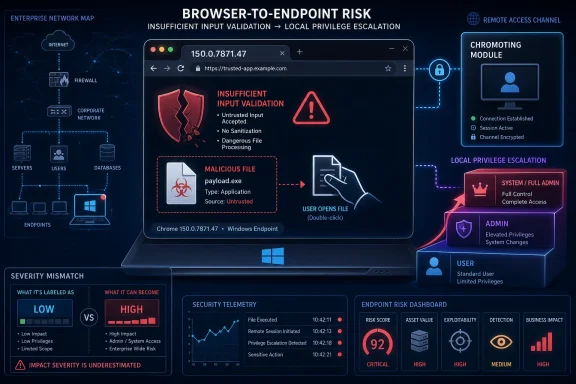 A Low-Severity Chrome Bug Walks Into a Windows Privilege Boundary
CVE-2026-14060 is not the sort of Chrome flaw that usually makes headlines. It is not a remote code execution bug in V8, not a sandbox escape chained from a renderer exploit, and not a zero-day with exploitation confirmed in the wild. It lives in Chromoting, the Chromium component underpinning Chrome Remote Desktop and related remote-access plumbing, and it requires local attacker positioning plus user interaction.That is probably why Chromium assigned it a Low security severity in Google’s June 30 Stable Channel Update for Desktop. Google’s post promoted Chrome 150 to stable for Windows, macOS, and Linux, with Windows and Mac builds landing at 150.0.7871.46/.47 and Linux at 150.0.7871.46. The release was huge: Google said it included 433 security fixes, with CVE-2026-14060 buried deep in the low-severity section.
But Windows administrators have learned to distrust the comfort of tidy vendor labels. A local privilege escalation is not “remote compromise,” but it is often the difference between an annoying foothold and a durable breach. Once an attacker has code running as a standard user, a privilege boundary bug becomes a ladder.
That ladder matters more on Windows than it does in Google’s severity taxonomy. Endpoint compromise in modern environments rarely begins and ends with one vulnerability. It begins with phish, attachment, stolen session, exposed remote tool, malicious installer, abused script, or help-desk social engineering. The follow-up move is usually elevation.
Google’s Patch Notes Hide the Important Signal in Plain Sight
The Google Chrome Releases blog is honest but not dramatic. It lists CVE-2026-14060 as “Insufficient validation of untrusted input in Chromoting,” reported by Google on April 14, 2026, and fixed in the Chrome 150 desktop release on June 30. The NVD entry, now undergoing enrichment, repeats the narrower description: Chrome on Windows prior to 150.0.7871.47 allowed local privilege escalation via a malicious file.That is enough to act on, but not enough to satisfy anyone who wants exploit mechanics. The Chromium issue tracker entry remains restricted, which is normal for freshly fixed Chrome bugs. Google also notes in its release posts that access to bug details may remain limited until most users are updated, a policy designed to slow opportunistic exploitation while the patch rolls out.
The absence of exploit detail should not be confused with absence of risk. In fact, the phrasing is suggestive in the way Chrome CVE descriptions often are: “malicious file,” “local attacker,” and “privilege escalation” describe a bug that may become relevant after an initial compromise or social-engineering step. It is not a drive-by web page vulnerability, but it is not harmless either.
The release context also matters. CVE-2026-14060 shipped alongside a sprawling Chrome 150 security update that included numerous critical and high-severity issues across components such as Extensions, GPU, ANGLE, Dawn, WebUSB, Skia, Bluetooth, and Chromoting. Malwarebytes described the update as another “whopper,” while PCWorld highlighted the scale of the Chrome 150 fix set. Those outside writeups were not wrong: this was not a surgical patch; it was a mass cleanup of Chromium’s attack surface.
Chromoting Is the Browser’s Quiet Remote-Access Back Doorway
Chromoting is one of those components many users never think about until something breaks. It is the technology lineage behind Chrome Remote Desktop, and it sits at the awkward intersection of browser, operating system, identity, and remote control. That intersection is powerful, which is another way of saying it is security-sensitive.Remote-access code has a different threat profile from ordinary browser features. It often touches local resources, brokers sessions, handles files or configuration artifacts, and must mediate trust between a user-facing application and privileged system behavior. That does not mean every Chromoting bug is catastrophic. It does mean validation errors in this space deserve more suspicion than their “Low” label may imply.
The Chrome 150 release itself underlines the point. CVE-2026-14060 was not the only Chromoting-related fix in the batch. Google’s advisory listed critical use-after-free vulnerabilities in Chromoting, high-severity Chromoting issues, and low-severity Chromoting bugs in the same release train. When one component appears repeatedly across a major security update, defenders should pay attention even if any single CVE looks modest.
For WindowsForum readers, the Windows qualifier is especially important. This CVE affects Google Chrome on Windows prior to 150.0.7871.47. Linux and macOS have their own Chrome 150 builds, but the privilege-escalation description here is specifically Windows-scoped. If you manage mixed fleets, do not flatten that nuance into “all Chrome everywhere is equally affected.”
The Severity Split Shows Why CVSS and Vendor Labels Keep Colliding
The most interesting detail in the NVD record is not the description. It is the disagreement around severity. Chromium calls the bug Low. CISA’s ADP entry assigns CVSS 3.1 vector AV:L/AC:L/PR:N/UI:R/S:U/C:H/I:H/A:H, yielding a 7.8 High score.Both can be rational, depending on what each system is measuring. Chromium’s severity model is built around exploitability and browser-security impact in the Chrome threat model. A local, user-assisted elevation bug is less alarming than a remote renderer-to-system compromise. From that lens, Low is not absurd.
CVSS, by contrast, is outcome-heavy. If exploitation can yield high confidentiality, integrity, and availability impact, and if attack complexity is low, the score climbs quickly even when the attack vector is local and user interaction is required. That is how a bug that reads like a footnote in Google’s release notes can land as High in CISA’s enrichment.
This mismatch is not academic. Patch prioritization systems often ingest CVSS, vendor severity, EPSS, known exploitation status, asset exposure, and business context, then output a queue. When two authoritative feeds disagree, the worst possible response is to average them into complacency. The better response is to ask what role the affected component plays on your endpoints.
For a home user who never enabled Chrome Remote Desktop, the risk is probably low in practical terms, assuming Chrome updates normally. For an enterprise that permits remote support workflows, stores browser profiles on managed Windows endpoints, and has users opening files from email or collaboration platforms all day, the same CVE belongs in a faster patch lane.
Local Does Not Mean The Attacker Is Already Done
Security teams sometimes treat local privilege escalation as a second-order concern because “the attacker already needs local access.” That phrase has aged badly. In 2026, local user-context execution is not the finish line; it is often the starting position.The modern Windows compromise chain is modular. One technique lands code in the user context. Another disables defenses. Another steals tokens. Another elevates. Another persists. Another moves laterally. When defenders discount privilege escalation because it is not remotely exploitable by itself, they are evaluating a single rung while the attacker is building a staircase.
CVE-2026-14060’s “malicious file” requirement is therefore important but not disqualifying. User interaction is a barrier, but it is also the oldest barrier in security, and attackers spend real money and effort getting users to open things. An attachment does not need to exploit the browser renderer to matter if it can trigger a vulnerable local path through browser-adjacent components.
This is also where Chrome’s identity as “just a browser” becomes misleading. Chrome on Windows is an update mechanism, profile store, credential interface, enterprise policy endpoint, remote access client, document viewer, PWA host, and increasingly a desktop runtime. A bug in one of those satellite systems can have consequences beyond ordinary web browsing.
The Patch Cadence Is Now Part of the Attack Surface
Google said Chrome 150 would roll out over the coming days and weeks. That phrase appears so often in Chrome release notes that it becomes wallpaper, but it is one of the most important operational facts in the advisory. A fix exists on June 30; a particular machine may not have it on June 30.Chrome’s auto-update system is one of the better consumer software update mechanisms in the industry, but it is not magic. Browsers need to restart. Enterprise policies can defer updates. Golden images can lag. VDI pools can preserve stale builds. Kiosk systems can sit open for weeks. Users can believe they are patched because the browser downloaded an update that never completed installation.
For CVE-2026-14060, the operational threshold is straightforward: Windows systems should be on Chrome 150.0.7871.47 or later. The “or later” is doing real work here because Google’s Stable Channel may move again quickly. Administrators should verify the installed version, not merely confirm that Chrome’s updater service is present.
This is where Chrome’s scale works against clarity. The June 30 update fixed hundreds of issues, and not every system will receive exactly the same build number across platforms. Windows and Mac received 150.0.7871.46/.47, Linux received 150.0.7871.46, and Android received 150.0.7871.63 with the same desktop security fixes unless otherwise noted, according to Google’s release post. For this particular CVE, the NVD text points at Windows prior to 150.0.7871.47.
That means Windows patch compliance reporting should not be satisfied by “Chrome 150” alone. Major version parity is too coarse. The build matters.
Enterprise IT Should Treat This as a Browser Patch and an Endpoint Patch
The practical fix is simple: update Chrome. The operational implications are broader. A Windows privilege-escalation flaw in a Chrome remote-access component belongs to both browser management and endpoint hardening teams.In many organizations, Chrome patching sits with desktop engineering, while remote access governance sits with security operations or IT support. That division makes sense on an org chart and less sense during incident response. If Chrome Remote Desktop or Chromoting-adjacent functionality is permitted, inventory should reflect that choice.
Google’s own enterprise tooling and third-party endpoint management platforms can report browser versions, but defenders should also ask whether Chrome Remote Desktop is installed, enabled, blocked, or policy-managed. A vulnerability in a component is more interesting when that component participates in an approved support workflow. It is even more interesting when that workflow exists unofficially because users or contractors installed remote-control tooling outside central visibility.
There is a second lesson here about least privilege. If a local attacker can exploit a malicious file to elevate, the blast radius depends on what the user could already touch and what elevation unlocks. Application control, controlled folder access, endpoint detection, attack surface reduction rules, and sane local admin policy do not make the Chrome bug disappear. They make it less useful.
For sysadmins, the fastest defensible response is not panic. It is verification. Confirm Chrome version 150.0.7871.47 or later on Windows endpoints, force browser restarts where updates are staged, and review any exception groups that delay Chrome updates for compatibility reasons. If those exception groups include remote-support machines, developer workstations, or privileged admin endpoints, shorten the leash.
Home Users Should Not Wait for the Browser to Get Around to It
For individual Windows users, this is easier but still worth doing manually. Open Chrome’s About page, let it check for updates, and relaunch. If the version is below 150.0.7871.47 on Windows, the system is behind for this CVE.That advice may sound boring, but it is the part users most often skip. Chrome can download updates in the background, yet the old binary remains in use until the browser restarts. The user who keeps 43 tabs open for three weeks may be “updated” in theory and exposed in practice.
The malicious-file angle also points to ordinary hygiene. Do not open unknown files merely because they arrived through a familiar collaboration tool. Be skeptical of remote-support prompts you did not initiate. If someone claims you need to install, open, or import something to fix a browser or remote-access problem, slow down.
None of this means CVE-2026-14060 is the Chrome bug that will ruin your week. It means it is one of those flaws whose danger depends heavily on context. On a fully patched personal PC, it disappears into the churn of browser maintenance. On an unmanaged Windows laptop with stale Chrome, remote-access tools, and a user who handles arbitrary files all day, it becomes part of the attacker’s menu.
The Bigger Chrome 150 Story Is Maintenance Debt at Browser Scale
The sheer size of the Chrome 150 security update should make everyone uncomfortable. Google’s advisory says 433 security fixes. Outside coverage from Malwarebytes and PCWorld also emphasized the unusually large patch set, with PCWorld noting critical flaws among the hundreds of fixes. Whether one counts only externally visible CVEs or the broader issue list, the message is the same: Chromium is carrying an enormous and constantly shifting security workload.That is not necessarily an indictment of Chrome alone. Modern browsers are operating systems wearing browser clothes. They include graphics stacks, media stacks, JavaScript engines, file handling, sandboxing, password management, sync, remote access, WebUSB, Bluetooth, WebGPU, PDF rendering, extension runtimes, and enterprise policy engines. A vulnerability list this large is partly the price of that ambition.
But ambition does not erase risk. Every added capability creates another place where untrusted input meets complicated code. CVE-2026-14060 is almost a miniature of that problem: a low-severity validation bug in a remote-access-adjacent component that becomes meaningful only when mapped onto the real Windows endpoint.
The browser industry has spent years teaching users that updates are automatic and therefore invisible. That has been good for baseline security. It has also trained organizations to treat browsers as self-healing infrastructure. Chrome 150 is a reminder that automatic updates still require governance, reporting, restarts, and exception control.
Microsoft Edge administrators should also watch the downstream Chromium cadence. Edge is not Google Chrome, and CVE applicability depends on Microsoft’s own builds, backports, and advisories. But Edge inherits Chromium code, and security teams should track Microsoft’s release notes for corresponding fixes rather than assuming Chrome’s date and Edge’s date are identical.
Security Teams Need Better Language Than “Low”
The label “Low” is useful only if everyone understands the frame. In Chrome’s frame, CVE-2026-14060 is not among the scary top-line bugs in the June 30 release. In an enterprise Windows frame, it is a local privilege-escalation issue in a component associated with remote access, fixed in a build that may take days or weeks to roll out automatically.Those are both true. The problem is that ticketing systems, dashboards, and executive summaries often flatten truth into a colored square. Green means ignore, yellow means later, red means now. CVE-2026-14060 resists that simplification.
A better internal description would be: “Windows Chrome local privilege escalation via Chromoting, fixed in 150.0.7871.47; user interaction required; no public exploitation confirmed from the available advisory data; prioritize managed Windows endpoints where Chrome updates lag or remote-access workflows exist.” That sentence is less elegant than a severity label, but it is more useful.
CISA’s SSVC enrichment also helps frame the issue. The record indicates no known exploitation, not automatable, and total technical impact. That combination is exactly why defenders should avoid both extremes. This is not a drop-everything zero-day. It is also not a harmless cosmetic bug.
The mature response is to patch promptly, verify completion, and reserve incident-response urgency for signs of exploitation or machines that cannot update. The immature response is to argue about whether Low or High is the “real” score while endpoints remain stale.
The Build Number Is the Story Windows Admins Can Actually Control
The cleanest operational line is Chrome 150.0.7871.47 on Windows. Everything below that is exposed to this CVE, according to the NVD description. Everything at or above it has the fix, assuming Google’s packaging and installation completed correctly.That makes this a compliance problem before it is a forensics problem. Inventory Chrome versions. Force updates where needed. Reboot or relaunch browsers where updates are pending. Check policy deferrals. Confirm that machines used by help desks, administrators, developers, and executives are not sitting in exception rings.
The uncomfortable part is that browser patching is often less centralized than OS patching. Windows Update has mature enterprise rituals: rings, deadlines, reporting, reboot windows, rollback plans. Browser updates are frequently treated as background noise until a zero-day breaks through the noise floor. Chrome 150 argues for putting browsers closer to the center of endpoint patch governance.
There is also a user-communication angle. Telling users “Chrome has a security update; relaunch today” is more actionable than sending a CVE dump. Users do not need to understand Chromoting. They need to understand that leaving the browser open indefinitely can leave the old vulnerable code running.
For WindowsForum’s audience, the advice is blunt: if you maintain machines for other people, do not wait for “coming days/weeks” to resolve itself. Chrome’s update machinery is good, but your job is to prove that it worked.
The Small CVE That Explains the Large Patch Problem
CVE-2026-14060 is easy to overstate and easier to understate. The disciplined reading sits in the middle.- CVE-2026-14060 affects Google Chrome on Windows before version 150.0.7871.47 and involves insufficient validation of untrusted input in Chromoting.
- Google fixed the issue in the June 30, 2026 Chrome 150 Stable Channel Update for Desktop, a release that included hundreds of security fixes.
- Chromium rates the bug Low, while CISA’s ADP CVSS 3.1 score is 7.8 High because successful exploitation can have high confidentiality, integrity, and availability impact.
- The attack requires local positioning and user interaction with a malicious file, so it is not a browser drive-by vulnerability based on the public description.
- Windows administrators should verify installed Chrome build numbers rather than assuming automatic updates have completed across the fleet.
- Organizations that allow Chrome Remote Desktop or similar remote-support workflows should treat Chromoting bugs as part of endpoint and remote-access risk management.
References
- Primary source: NVD / Chromium
Published: 2026-07-03T07:00:45-07:00
NVD - CVE-2026-14060
 nvd.nist.gov
- Security advisory: MSRC
Published: 2026-07-03T07:00:45-07:00
Original feed URL
Security Update Guide - Microsoft Security Response Center
 msrc.microsoft.com
- Related coverage: cvefeed.io
CVE-2026-14060 - Google Chrome Chromoting Local Privilege Escalation
Insufficient validation of untrusted input in Chromoting in Google Chrome on Windows prior to 150.0.7871.47 allowed a local attacker to perform privilege escalation via a malicious file. (Chromium security severity: Low)cvefeed.io