

Google fixed CVE-2026-14003 in Chrome 150.0.7871.47, released on June 30, 2026, after documenting a medium-severity Extensions flaw that could let a malicious Chrome extension leak cross-origin data if a user installed it. The vulnerability is not a drive-by browser apocalypse, and neither Google nor CISA is currently describing it as exploited in the wild. But it is exactly the kind of flaw that should make Windows administrators look harder at extension governance, because the browser’s permission model is now part of the enterprise security boundary.
As detailed in the National Vulnerability Database entry and Google’s Chrome Releases post for the Stable Channel update, CVE-2026-14003 sits in Chrome’s Extensions component and affects Chrome versions before 150.0.7871.47. CISA’s ADP enrichment gives it a CVSS 3.1 score of 4.3, with attack complexity low, no privileges required, user interaction required, and limited confidentiality impact. That sounds modest — and in the arithmetic of vulnerability scoring, it is — but browser extension bugs have a habit of turning “modest” into “meaningful” when they intersect with user trust, OAuth sessions, browser-stored state, and unmanaged add-ons.
The immediate remediation is refreshingly uncomplicated: update Chrome to 150.0.7871.47 or later on Windows and macOS, or the corresponding patched build on other supported platforms. Google’s June 30 Stable Channel release moved desktop Chrome into the 150.0.7871 branch and, according to reporting from Born’s IT and Windows Blog and Malwarebytes, bundled an unusually large number of security fixes in the same update train. For most home users, the answer is the familiar one: open Chrome’s About page, let the browser update, and relaunch.
The more interesting story is what CVE-2026-14003 says about the security model Chrome asks users and administrators to accept. The vulnerability required the victim to install a malicious extension, which is why the score lands in medium territory rather than high or critical. But “convince a user to install an extension” is not a theoretical barrier in 2026; it is a business model, a phishing pattern, a gray-market advertising ecosystem, and occasionally a supply-chain problem.
Extensions are not ordinary web pages. They are privileged bundles of code that can sit beside the browser’s most sensitive user activity, depending on the permissions granted and the APIs exposed. Chrome’s extension architecture is supposed to constrain that privilege through manifests, host permissions, API boundaries, review processes, and runtime policy enforcement. CVE-2026-14003 is a reminder that those enforcement layers are only useful if they are complete.
The NVD description is terse, but it gives away the important shape of the bug: insufficient policy enforcement allowed cross-origin data leakage through a crafted Chrome extension. In plain English, the flaw was not merely that a malicious extension behaved badly. It was that Chrome failed to enforce a boundary strongly enough once that extension was present.
It is also not the same thing as operational risk. A browser extension that can leak cross-origin data does not need to crash the browser, execute code outside the sandbox, or gain persistence at the operating-system level to matter. If the data exposed includes webmail content, internal application state, SaaS session material, or information from a privileged admin console, the blast radius is defined less by Chrome’s CVSS score than by what the user does in the browser all day.
That is why extension vulnerabilities occupy an awkward place in enterprise security. They are often not glamorous enough to trigger emergency patch calls, yet they sit directly on top of the workflows organizations have spent a decade moving into the browser. The modern Windows desktop may still run native apps, but identity, collaboration, CRM, ticketing, payroll, dashboards, device management, and cloud administration increasingly live in tabs.
The attacker path also deserves a more realistic reading. User interaction is required, but attackers routinely get users to install software, authorize OAuth applications, enable browser notifications, run “security” tools, or add productivity extensions. The installation prompt is not a moat. It is a speed bump whose effectiveness depends on user education, store review quality, brand impersonation defenses, and enterprise policy.
Extensions are attractive because they live in the ambiguous space between user choice and platform trust. A user installs them intentionally. Chrome exposes APIs intentionally. Enterprises often allow them intentionally, sometimes because a sales team needs a CRM helper, a developer needs a JSON formatter, or a support team needs a screen-capture tool. Once an extension becomes part of the workflow, it can be harder to remove than a suspicious executable.
The Chrome Web Store and Manifest V3 changes were designed in part to reduce risk, especially around overly broad background execution and web-request interception. But no manifest revision can eliminate the basic tension: extensions exist to let third-party code change the browsing experience. If the policy layer around those capabilities is incomplete, attackers do not need to defeat the browser from the outside; they can ask to be invited in.
CVE-2026-14003 appears to fit that pattern. It was not described as a sandbox escape or remote code execution flaw. It was a policy enforcement problem in the extension system, resulting in cross-origin data leakage. In a browser, origin boundaries are sacred plumbing. They are what prevent one site’s content and state from becoming another site’s raw material.
When an extension flaw enables cross-origin leakage, the immediate harm is confidentiality. That matches CISA’s scoring. But confidentiality failures can become stepping stones. A leaked token, page fragment, CSRF nonce, internal URL, document preview, or user-specific application state may support phishing, account takeover, reconnaissance, or lateral movement.
The key distinction is that an attacker exploiting CVE-2026-14003 would first need the malicious extension installed. That limits mass exploitation, but it does not eliminate targeted exploitation. In fact, targeted extension attacks can be more plausible in business environments because attackers can tailor the lure to a role: a fake meeting helper for executives, a bogus VPN companion for remote workers, a developer utility for engineers, or a “compliance” plugin for finance staff.
For WindowsForum readers, the Windows angle is practical rather than platform-exclusive. Chrome on Windows is still a dominant enterprise browser, often installed alongside Edge and sometimes left less governed than the operating system itself. If endpoint management treats browser extensions as user preference rather than software supply chain, CVE-2026-14003 is a nudge to correct that mismatch.
That speed has a downside: administrators often receive a flood of CVEs with minimal public detail, overlapping version numbers, and delayed third-party scoring. The NVD record for CVE-2026-14003 initially carried no NIST CVSS assessment, while CISA’s ADP enrichment supplied a medium 4.3 score and CWE-284, Improper Access Control. Google’s linked Chromium issue remained permission-restricted at disclosure time, which is also normal while users are still updating.
This leaves defenders in a familiar position. They know enough to patch, but not enough to fully reconstruct exploit mechanics. That asymmetry is frustrating, but it is also defensible. Publishing exploit details before a large share of Chrome users have updated would help attackers more than defenders.
The operational answer is to stop treating missing details as permission to wait. If Chrome says the affected versions are prior to 150.0.7871.47, and the flaw involves extension policy enforcement and cross-origin data leakage, the responsible move is to update first and debate severity later. Browser patching should already be a low-friction process in any managed Windows estate.
Chrome and Chromium-based browsers give administrators policy mechanisms to manage extensions. Organizations can block extension installation by default, allow only approved extensions, force-install required extensions, restrict host permissions, and audit what is already present. Those controls are not glamorous, but they are the difference between “a user installed something bad” and “the organization designed a system where installing something bad was easy.”
For smaller organizations, this often starts with inventory. Which extensions are installed across the fleet? Which ones have broad host permissions? Which ones are abandoned, sideloaded, or outside the Chrome Web Store? Which ones are installed by a tiny number of users but request access to every site?
For larger organizations, the challenge is governance. Someone has to own extension approval, and that someone cannot simply rubber-stamp every productivity request. Extensions should be evaluated like lightweight software suppliers: publisher identity, update history, permission scope, business need, data access, and removal plan all matter.
There may still be downstream ambiguity, because Chromium is not just Chrome. Microsoft Edge, Brave, Vivaldi, Opera, Electron-based applications, embedded Chromium runtimes, Linux distribution packages, and Android WebView-related components can all trail or transform upstream Chromium fixes in different ways. A Chrome CVE does not automatically mean every Chromium-derived product is vulnerable in the same exploitable configuration, but it does mean downstream vendors need to assess and ship the relevant patch.
That is where CPEs often lag reality. Vulnerability databases are good at naming the upstream product once the vendor reports it. They are less good at instantly mapping every derivative, repackaged, embedded, or distribution-specific consumer of the vulnerable code. Administrators who rely exclusively on CPE matching may miss exposure in Chromium-based browsers that are not branded Google Chrome.
The safer rule is version- and vendor-aware. Patch Google Chrome to 150.0.7871.47 or later, then check other Chromium-based browsers and packaged runtimes according to their own vendor advisories. If your vulnerability scanner only flags Google Chrome, do not assume Edge, Brave, or an embedded Chromium app is clean merely because the CPE feed is quiet.
If you cannot answer those questions, the medium score is almost beside the point. The browser has become the endpoint inside the endpoint. Its add-ons are an application layer. Its session state is identity material. Its policies are security controls.
The most common failure mode is assuming Chrome auto-update solves everything. Auto-update is excellent for unmanaged consumers and useful for enterprises, but business environments complicate the picture. Devices sleep, users defer relaunches, VDI images lag, golden images freeze old builds, app-control rules interfere, offline systems miss update windows, and change-management processes delay deployment.
The second failure mode is ignoring extension drift. A company may start with a clean allowlist and end up, two years later, with dozens of exceptions granted for short-term business reasons. Each exception becomes part of the attack surface, and the accumulated risk rarely gets the same review as a new Windows service or endpoint agent.
As detailed in the National Vulnerability Database entry and Google’s Chrome Releases post for the Stable Channel update, CVE-2026-14003 sits in Chrome’s Extensions component and affects Chrome versions before 150.0.7871.47. CISA’s ADP enrichment gives it a CVSS 3.1 score of 4.3, with attack complexity low, no privileges required, user interaction required, and limited confidentiality impact. That sounds modest — and in the arithmetic of vulnerability scoring, it is — but browser extension bugs have a habit of turning “modest” into “meaningful” when they intersect with user trust, OAuth sessions, browser-stored state, and unmanaged add-ons.
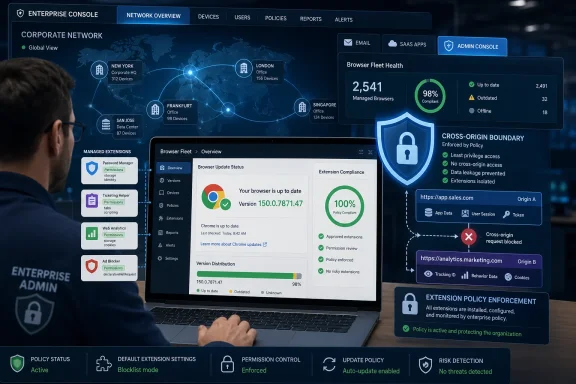 The Browser Patch Is Simple; the Trust Problem Is Not
The immediate remediation is refreshingly uncomplicated: update Chrome to 150.0.7871.47 or later on Windows and macOS, or the corresponding patched build on other supported platforms. Google’s June 30 Stable Channel release moved desktop Chrome into the 150.0.7871 branch and, according to reporting from Born’s IT and Windows Blog and Malwarebytes, bundled an unusually large number of security fixes in the same update train. For most home users, the answer is the familiar one: open Chrome’s About page, let the browser update, and relaunch.The more interesting story is what CVE-2026-14003 says about the security model Chrome asks users and administrators to accept. The vulnerability required the victim to install a malicious extension, which is why the score lands in medium territory rather than high or critical. But “convince a user to install an extension” is not a theoretical barrier in 2026; it is a business model, a phishing pattern, a gray-market advertising ecosystem, and occasionally a supply-chain problem.
Extensions are not ordinary web pages. They are privileged bundles of code that can sit beside the browser’s most sensitive user activity, depending on the permissions granted and the APIs exposed. Chrome’s extension architecture is supposed to constrain that privilege through manifests, host permissions, API boundaries, review processes, and runtime policy enforcement. CVE-2026-14003 is a reminder that those enforcement layers are only useful if they are complete.
The NVD description is terse, but it gives away the important shape of the bug: insufficient policy enforcement allowed cross-origin data leakage through a crafted Chrome extension. In plain English, the flaw was not merely that a malicious extension behaved badly. It was that Chrome failed to enforce a boundary strongly enough once that extension was present.
“Medium” Is the Score, Not the Security Lesson
CVSS has a necessary job, but it is a poor substitute for threat modeling. CISA’s vector for CVE-2026-14003 says the flaw is network-adjacent in practical exposure, low complexity, requires user interaction, needs no privileges, and affects confidentiality only. That is a fair machine-readable summary of the vulnerability as disclosed.It is also not the same thing as operational risk. A browser extension that can leak cross-origin data does not need to crash the browser, execute code outside the sandbox, or gain persistence at the operating-system level to matter. If the data exposed includes webmail content, internal application state, SaaS session material, or information from a privileged admin console, the blast radius is defined less by Chrome’s CVSS score than by what the user does in the browser all day.
That is why extension vulnerabilities occupy an awkward place in enterprise security. They are often not glamorous enough to trigger emergency patch calls, yet they sit directly on top of the workflows organizations have spent a decade moving into the browser. The modern Windows desktop may still run native apps, but identity, collaboration, CRM, ticketing, payroll, dashboards, device management, and cloud administration increasingly live in tabs.
The attacker path also deserves a more realistic reading. User interaction is required, but attackers routinely get users to install software, authorize OAuth applications, enable browser notifications, run “security” tools, or add productivity extensions. The installation prompt is not a moat. It is a speed bump whose effectiveness depends on user education, store review quality, brand impersonation defenses, and enterprise policy.
Extensions Have Become the Soft Underbelly of Browser Hardening
Chrome has spent years becoming harder to exploit in the classic sense. Site isolation, sandboxing, memory safety work, V8 hardening, process separation, exploit mitigations, and rapid update delivery have all raised the price of direct browser compromise. That progress is real, and it is one reason attackers continue looking for paths that use consent, configuration, and extensibility rather than raw memory corruption.Extensions are attractive because they live in the ambiguous space between user choice and platform trust. A user installs them intentionally. Chrome exposes APIs intentionally. Enterprises often allow them intentionally, sometimes because a sales team needs a CRM helper, a developer needs a JSON formatter, or a support team needs a screen-capture tool. Once an extension becomes part of the workflow, it can be harder to remove than a suspicious executable.
The Chrome Web Store and Manifest V3 changes were designed in part to reduce risk, especially around overly broad background execution and web-request interception. But no manifest revision can eliminate the basic tension: extensions exist to let third-party code change the browsing experience. If the policy layer around those capabilities is incomplete, attackers do not need to defeat the browser from the outside; they can ask to be invited in.
CVE-2026-14003 appears to fit that pattern. It was not described as a sandbox escape or remote code execution flaw. It was a policy enforcement problem in the extension system, resulting in cross-origin data leakage. In a browser, origin boundaries are sacred plumbing. They are what prevent one site’s content and state from becoming another site’s raw material.
Cross-Origin Leakage Is a Privacy Bug Until It Is an Incident
The phrase “cross-origin data” can sound academic, but it is one of the core ideas that makes the web tolerable. A browser is constantly juggling content from different domains: your bank, your email, your company intranet, a vendor dashboard, a document editor, an identity provider, an ad network, and a dozen embedded services. The same-origin policy and related enforcement rules are supposed to stop one origin from reading another origin’s data unless the browser, the site, and the user have allowed it through controlled mechanisms.When an extension flaw enables cross-origin leakage, the immediate harm is confidentiality. That matches CISA’s scoring. But confidentiality failures can become stepping stones. A leaked token, page fragment, CSRF nonce, internal URL, document preview, or user-specific application state may support phishing, account takeover, reconnaissance, or lateral movement.
The key distinction is that an attacker exploiting CVE-2026-14003 would first need the malicious extension installed. That limits mass exploitation, but it does not eliminate targeted exploitation. In fact, targeted extension attacks can be more plausible in business environments because attackers can tailor the lure to a role: a fake meeting helper for executives, a bogus VPN companion for remote workers, a developer utility for engineers, or a “compliance” plugin for finance staff.
For WindowsForum readers, the Windows angle is practical rather than platform-exclusive. Chrome on Windows is still a dominant enterprise browser, often installed alongside Edge and sometimes left less governed than the operating system itself. If endpoint management treats browser extensions as user preference rather than software supply chain, CVE-2026-14003 is a nudge to correct that mismatch.
Google’s Release Cadence Is Doing Its Job, But It Creates Its Own Fog
Google’s Chrome update machine is one of the strongest parts of the browser ecosystem. Stable Channel releases move quickly, patches roll out broadly, and Chrome’s update mechanism generally spares users the old ritual of hunting installers. In this case, Google’s June 30 Stable Channel update shipped the relevant fix before NVD completed its own full enrichment, which is normal for modern vulnerability handling.That speed has a downside: administrators often receive a flood of CVEs with minimal public detail, overlapping version numbers, and delayed third-party scoring. The NVD record for CVE-2026-14003 initially carried no NIST CVSS assessment, while CISA’s ADP enrichment supplied a medium 4.3 score and CWE-284, Improper Access Control. Google’s linked Chromium issue remained permission-restricted at disclosure time, which is also normal while users are still updating.
This leaves defenders in a familiar position. They know enough to patch, but not enough to fully reconstruct exploit mechanics. That asymmetry is frustrating, but it is also defensible. Publishing exploit details before a large share of Chrome users have updated would help attackers more than defenders.
The operational answer is to stop treating missing details as permission to wait. If Chrome says the affected versions are prior to 150.0.7871.47, and the flaw involves extension policy enforcement and cross-origin data leakage, the responsible move is to update first and debate severity later. Browser patching should already be a low-friction process in any managed Windows estate.
The Enterprise Control Plane Is Extension Policy, Not User Training
User education has a role, but it is the weakest control in this story. Telling users not to install malicious extensions is like telling them not to click convincing phishing emails: correct, necessary, and insufficient. The better control is to reduce the number of decisions users are allowed to make in high-risk contexts.Chrome and Chromium-based browsers give administrators policy mechanisms to manage extensions. Organizations can block extension installation by default, allow only approved extensions, force-install required extensions, restrict host permissions, and audit what is already present. Those controls are not glamorous, but they are the difference between “a user installed something bad” and “the organization designed a system where installing something bad was easy.”
For smaller organizations, this often starts with inventory. Which extensions are installed across the fleet? Which ones have broad host permissions? Which ones are abandoned, sideloaded, or outside the Chrome Web Store? Which ones are installed by a tiny number of users but request access to every site?
For larger organizations, the challenge is governance. Someone has to own extension approval, and that someone cannot simply rubber-stamp every productivity request. Extensions should be evaluated like lightweight software suppliers: publisher identity, update history, permission scope, business need, data access, and removal plan all matter.
The CPE Confusion Is Mostly a Timing Problem
The user-provided NVD change history asks the familiar vulnerability-database question: “Are we missing a CPE here?” In this case, the important CPE appears to have been added during NIST’s initial analysis on July 1, 2026: Google Chrome versions up to, but excluding, 150.0.7871.47. That is the right shape for the principal affected product.There may still be downstream ambiguity, because Chromium is not just Chrome. Microsoft Edge, Brave, Vivaldi, Opera, Electron-based applications, embedded Chromium runtimes, Linux distribution packages, and Android WebView-related components can all trail or transform upstream Chromium fixes in different ways. A Chrome CVE does not automatically mean every Chromium-derived product is vulnerable in the same exploitable configuration, but it does mean downstream vendors need to assess and ship the relevant patch.
That is where CPEs often lag reality. Vulnerability databases are good at naming the upstream product once the vendor reports it. They are less good at instantly mapping every derivative, repackaged, embedded, or distribution-specific consumer of the vulnerable code. Administrators who rely exclusively on CPE matching may miss exposure in Chromium-based browsers that are not branded Google Chrome.
The safer rule is version- and vendor-aware. Patch Google Chrome to 150.0.7871.47 or later, then check other Chromium-based browsers and packaged runtimes according to their own vendor advisories. If your vulnerability scanner only flags Google Chrome, do not assume Edge, Brave, or an embedded Chromium app is clean merely because the CPE feed is quiet.
Windows Admins Should Treat This as a Browser Fleet Hygiene Test
CVE-2026-14003 is not the kind of vulnerability that should cause panic. It is the kind that should reveal whether your browser management program is real. If you can answer which Chrome versions are deployed, which users are still below 150.0.7871.47, which extensions are installed, and which extensions have broad permissions, then this CVE is routine.If you cannot answer those questions, the medium score is almost beside the point. The browser has become the endpoint inside the endpoint. Its add-ons are an application layer. Its session state is identity material. Its policies are security controls.
The most common failure mode is assuming Chrome auto-update solves everything. Auto-update is excellent for unmanaged consumers and useful for enterprises, but business environments complicate the picture. Devices sleep, users defer relaunches, VDI images lag, golden images freeze old builds, app-control rules interfere, offline systems miss update windows, and change-management processes delay deployment.
The second failure mode is ignoring extension drift. A company may start with a clean allowlist and end up, two years later, with dozens of exceptions granted for short-term business reasons. Each exception becomes part of the attack surface, and the accumulated risk rarely gets the same review as a new Windows service or endpoint agent.
A Medium Chrome CVE With a Very Practical Checklist
CVE-2026-14003’s value is that it turns an abstract browser security principle into a concrete administrative exercise. The fix is available, the affected version boundary is clear, and the exploitation path depends on a control surface enterprises can actually manage: extension installation. That makes it a useful test case for whether browser security is being handled as policy or habit.- Chrome installations should be updated to 150.0.7871.47 or later wherever Google Chrome is deployed on Windows or macOS.
- Administrators should verify that users have relaunched Chrome after update delivery, because the patched build is not fully active until the running browser session is replaced.
- Extension inventories should be reviewed for broad host permissions, unknown publishers, abandoned add-ons, sideloaded packages, and tools installed by only a small number of users.
- Organizations should prefer extension allowlisting over user-driven installation in managed environments, especially for employees with access to administrative consoles, financial systems, source code, or sensitive SaaS data.
- Chromium-based browsers and embedded runtimes should be checked through their own vendor update channels rather than assumed safe from the Google Chrome CPE alone.
- Security teams should treat cross-origin leakage as a potentially serious confidentiality event when the affected browser profile has access to enterprise applications.
References
- Primary source: NVD / Chromium
Published: 2026-07-03T07:00:40-07:00
NVD - CVE-2026-14003
 nvd.nist.gov
- Security advisory: MSRC
Published: 2026-07-03T07:00:40-07:00
Original feed URL
Security Update Guide - Microsoft Security Response Center
 msrc.microsoft.com
- Related coverage: encyb.com
