

Google published Chrome 150 to the stable channel on June 30, 2026, including a fix for CVE-2026-13784, a critical use-after-free flaw in Chrome’s Views UI framework affecting versions before 150.0.7871.47. The vulnerability is not just another line item in a very large browser security release; it is a reminder that Chrome’s attack surface now includes the browser chrome itself, not merely the web content area. NVD’s evolving record, CISA’s higher severity assessment, and Google’s restricted bug details all point to the same operational conclusion: update first, litigate the metadata later.
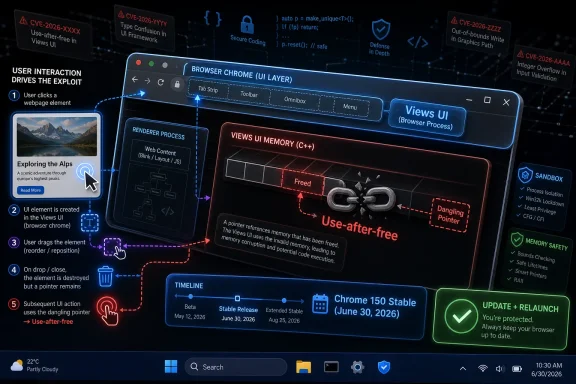
The phrase “use after free in Views” sounds like an implementation detail, and in one sense it is. Views is part of Chromium’s user-interface toolkit, the machinery behind browser controls, dialogs, surfaces, and pieces of the application shell that users tend to think of as separate from web pages. But CVE-2026-13784 is described by Chrome and NVD as reachable through a crafted HTML page if an attacker can convince the user to perform specific UI gestures.
That last clause matters. This is not described as a no-click worm or an automatically exploitable drive-by in the public record. NVD’s current CVSS 3.1 assessment marks user interaction as required, while CISA’s ADP assessment also says exploitation is “none” at the time of its SSVC entry. But “user interaction required” has become a comfort phrase that deserves less comfort than it gets.
Modern phishing already exists to elicit clicks, drags, prompts, permissions, window focus changes, and other gestures. If a crafted page can steer a user into a vulnerable UI state, the distinction between “automatic” and “gesture-assisted” is operationally meaningful but not reassuring. Enterprise defenders should read CVE-2026-13784 as the kind of browser bug that rewards social engineering and punishes slow patch adoption.
That scale is almost numbing. When a browser update carries hundreds of fixes, the individual CVE can disappear inside the statistical noise. Yet security operations teams do not patch statistics; they patch exploit paths, fleet versions, and risky configurations.
CVE-2026-13784 deserves attention because it sits at the intersection of three uncomfortable facts. It is a memory-safety bug. It is in UI-adjacent code. And it is public enough to have a CVE, scoring disagreement, and vendor advisory, while detailed bug information remains restricted by Google until enough users are updated.
Google’s standard advisory language says bug details and links may be kept restricted until a majority of users have received the fix. That is normal for Chrome, but it also creates the familiar patch-window race. Attackers know a severe bug exists; defenders know a severe bug exists; only the exact mechanics are temporarily obscured.
That split is not a clerical curiosity. It reflects how hard browser bugs are to score cleanly. If exploitation corrupts heap memory inside the browser process but remains within an expected sandbox boundary, one model may view the scope as unchanged. If the practical result crosses a trust boundary or enables impact beyond the immediate vulnerable component, another model may view scope as changed.
For admins, the distinction between 8.8 and 9.6 is not the right place to spend the afternoon. Both scores say the bug is remotely reachable, requires no prior authentication, requires some user action, and can plausibly affect confidentiality, integrity, and availability. In a browser deployed across the enterprise, that is enough to justify urgent treatment.
The SSVC data supplied by CISA is also useful because it says what is not yet known: exploitation is listed as none, and automation is listed as no. That does not mean exploitation cannot emerge. It means defenders are looking at a high-consequence vulnerability before public exploitation has been confirmed, which is exactly when patching has the most leverage.
The most obvious oddity is the affected-version language. The CVE description says Google Chrome prior to 150.0.7871.47 is affected. The Chrome CNA affected block shown in the record also points at 150.0.7871.47 as the cutoff. But the NVD CPE configuration in the change log reportedly added Chrome versions up to, but excluding, 150.0.7871.46.
That looks like a mismatch. If the vulnerability is fixed in 150.0.7871.47, then excluding only 150.0.7871.46 would appear to leave 150.0.7871.46 treated as the first fixed version, at least in that CPE range expression. The complication is that Google’s release itself used split desktop versioning: Linux is listed at 150.0.7871.46, while Windows and Mac are listed as 150.0.7871.46/.47.
That may explain why the enrichment data is unsettled. The same Chrome stable release train can expose different build numbers across platforms, and NVD’s CPE language often struggles when vendor advisories use platform-specific build cutoffs. The safe operational reading is not “150.0.7871.46 is universally safe” or “150.0.7871.46 is universally vulnerable.” The safe reading is: verify the installed channel and platform against Google’s release notes, and on Windows and macOS prefer 150.0.7871.47 or later for this CVE unless Google clarifies otherwise.
For Google Chrome itself, the expected application CPE is the familiar Google Chrome product entry, with version bounds representing affected releases. NVD’s change log shows an AND/OR configuration that combines the Chrome application with operating-system CPEs for Windows, Linux kernel, and macOS. That construction is common when NVD tries to express platform applicability: vulnerable Chrome installed on one of several operating systems.
But that does not solve the Chromium-derived browser problem. Microsoft Edge, Brave, Vivaldi, Opera, Arc, and embedded Chromium runtimes do not automatically become covered by a Google Chrome CPE just because they share upstream code. They need separate vendor advisories, separate version mapping, and often separate release timing. A flaw in Chromium Views may be inherited by downstream browsers, but CPE data generally does not infer that inheritance.
So yes, the CPE record may need amendment if the version cutoff is wrong or if platform-specific build handling is incomplete. But no, admins should not wait for CPE perfection before acting. CPE is inventory glue, not ground truth. The ground truth is whether a deployed browser build contains the Chromium patch that fixed issue 516962715 and its associated CVE.
This is where vulnerability scanners can mislead both ways. A scanner that keys strictly on NVD’s current CPE range could underreport if the cutoff is too low. A scanner that naively flags all Chrome 150.0.7871.46 instances could overreport on Linux if Google’s Linux build already contains the fix. The better approach is to use scanner findings as a queue for verification, not as the final verdict.
A Chrome CVE in a Chromium component should trigger an Edge check, but not an Edge conclusion. Microsoft typically publishes Edge stable updates after integrating Chromium fixes, and Edge has its own security release notes and versioning. An admin who patches Chrome but ignores Edge has only patched one browser-shaped attack surface.
The same is true for WebView2, though with more nuance. WebView2 uses the Edge runtime and is embedded in many Windows applications, which means Chromium security posture can matter even when users are not consciously launching a browser. Whether CVE-2026-13784 is practically reachable through a given WebView2 app depends on how that app exposes UI, content, and interaction, but fleet owners should still treat Edge/WebView2 runtime currency as part of the same patch hygiene conversation.
This is the part of browser security that rarely fits into a neat CVE blurb. The browser is no longer only an icon on the taskbar. It is a platform layer, an app runtime, an identity surface, a PDF viewer, a video stack, an extension host, and a UI shell. When a critical memory flaw lands in that universe, the blast radius is defined by deployment reality, not product branding.
Attackers can fake login flows, overlay instructions, create urgency, simulate broken media players, prompt users to drag files, request clicks in a precise order, or guide victims through “verification” rituals. Even without knowing the private bug details, the general pattern is familiar: UI state, timing, focus, and interaction can become part of the exploit chain.
This is particularly relevant for a Views bug because browser UI has special authority in the user’s mental model. Address bars, permission prompts, download shelves, file pickers, tabs, popups, and full-screen transitions all mediate trust. Bugs that involve the UI layer can blur the line between web content and browser chrome, which is exactly the line users depend on to decide what is safe.
That does not mean CVE-2026-13784 is a confirmed phishing superweapon. Public records do not show active exploitation as of the CISA SSVC entry described in the NVD change history. But it does mean defenders should stop treating “requires UI gestures” as a major downgrade. In the hands of a competent attacker, gestures are often the easiest part of the chain.
Chrome has invested heavily in fuzzing, sanitizers, sandboxing, site isolation, and memory-safety mitigations. Google’s own advisories routinely credit tools such as AddressSanitizer, MemorySanitizer, UndefinedBehaviorSanitizer, Control Flow Integrity, libFuzzer, and AFL for finding bugs before they reach users. Those efforts matter, and without them the situation would be much worse.
But the Chrome 150 advisory is also an indictment of scale. Hundreds of fixes in one stable promotion, many of them memory-safety issues, show how much vulnerable state still exists inside the codebase. Chromium is vast, fast-moving, cross-platform, and deeply integrated with GPU stacks, media stacks, UI frameworks, permissions, extensions, and operating-system APIs. That is precisely why it is valuable — and precisely why it is difficult to secure.
The industry’s slow migration toward memory-safe languages is not a slogan here. It is the long-term answer to a class of bugs that patching alone cannot extinguish. Until that migration reaches the hot paths that matter, enterprise security remains a treadmill: detect, patch, restart, verify, repeat.
This is where Windows admins should be unusually blunt. If Chrome is allowed to linger for days with a “relaunch to update” badge, the fleet is not patched in any meaningful operational sense. The binary on disk may be newer, but the process handling hostile web content may still be old.
Enterprise Chrome policies can force relaunch notifications and set relaunch windows. Those policies are sometimes unpopular because they interrupt work, kill sessions, and expose the reality that browsers have become persistent workspaces. But the alternative is pretending a browser patched in the background is equivalent to a browser restarted into the patched build.
For CVE-2026-13784, the practical mitigation is straightforward: update to a fixed Chrome build and relaunch. For Windows and macOS, that means targeting 150.0.7871.47 or later based on the current public description. For Linux, where Google’s stable release notes list 150.0.7871.46, admins should verify against distro packaging and Google’s own release channel rather than relying solely on the NVD version bound.
That lag is where attackers often find opportunity. The public CVE gives defenders a name to track, but it also gives attackers a breadcrumb. Once patches land, skilled researchers can diff changes, study the vulnerable component, and infer exploit conditions. Google’s restriction of issue details slows that process; it does not stop it forever.
For Windows-heavy organizations, this means inventories should not stop at “Chrome installed: yes/no.” They should include version, channel, architecture, update policy, last relaunch time if available, Edge version, WebView2 runtime version, and any approved Chromium-derived browsers. The more fragmented the browser estate, the less useful a single CVE dashboard becomes.
There is also a communication problem. Users understand “update Chrome” as a simple instruction, but organizations need to define what success looks like. Success is not the user clicking “About Chrome.” Success is the vulnerable executable no longer running anywhere important.
That difference matters because the browser is now the front door to almost everything: SaaS applications, admin consoles, email, password managers, identity providers, cloud storage, remote desktops, and internal tools. A critical browser memory bug is not just a consumer safety issue. It is an identity and data-access issue.
CVE-2026-13784 also lands in a release where Google fixed numerous other critical and high-severity flaws. Even if this particular Views flaw never sees public exploitation, the update still closes a broad set of attack paths. Security teams should avoid the trap of waiting for a single CVE to become famous before acting on the release that fixes it.
The better mental model is cumulative exposure. Every delayed browser update carries not one risk but a portfolio of recently disclosed and newly diffable bugs. Chrome 150’s portfolio is unusually large.
That makes the decision simple even if the metadata is not. Patch, relaunch, verify, and watch downstream Chromium products. Treat the NVD CPE oddity as something to monitor, not as a reason to defer remediation.
 A Browser UI Bug Is Still a Web Bug
The phrase “use after free in Views” sounds like an implementation detail, and in one sense it is. Views is part of Chromium’s user-interface toolkit, the machinery behind browser controls, dialogs, surfaces, and pieces of the application shell that users tend to think of as separate from web pages. But CVE-2026-13784 is described by Chrome and NVD as reachable through a crafted HTML page if an attacker can convince the user to perform specific UI gestures.That last clause matters. This is not described as a no-click worm or an automatically exploitable drive-by in the public record. NVD’s current CVSS 3.1 assessment marks user interaction as required, while CISA’s ADP assessment also says exploitation is “none” at the time of its SSVC entry. But “user interaction required” has become a comfort phrase that deserves less comfort than it gets.
Modern phishing already exists to elicit clicks, drags, prompts, permissions, window focus changes, and other gestures. If a crafted page can steer a user into a vulnerable UI state, the distinction between “automatic” and “gesture-assisted” is operationally meaningful but not reassuring. Enterprise defenders should read CVE-2026-13784 as the kind of browser bug that rewards social engineering and punishes slow patch adoption.
Google’s Giant Chrome 150 Drop Hides the Sharp Edges
According to Google’s Chrome Releases blog, Chrome 150 was promoted to stable for Windows, macOS, and Linux on June 30, with 150.0.7871.46 for Linux and 150.0.7871.46/.47 for Windows and Mac rolling out over the following days and weeks. Google’s advisory says the update includes 433 security fixes, and the public list contains a long run of critical issues, including CVE-2026-13784 and adjacent critical flaws in Views, Browser, Bluetooth, Ozone, Fullscreen, Skia, Dawn, WebUSB, GPU, Extensions, and other Chromium components.That scale is almost numbing. When a browser update carries hundreds of fixes, the individual CVE can disappear inside the statistical noise. Yet security operations teams do not patch statistics; they patch exploit paths, fleet versions, and risky configurations.
CVE-2026-13784 deserves attention because it sits at the intersection of three uncomfortable facts. It is a memory-safety bug. It is in UI-adjacent code. And it is public enough to have a CVE, scoring disagreement, and vendor advisory, while detailed bug information remains restricted by Google until enough users are updated.
Google’s standard advisory language says bug details and links may be kept restricted until a majority of users have received the fix. That is normal for Chrome, but it also creates the familiar patch-window race. Attackers know a severe bug exists; defenders know a severe bug exists; only the exact mechanics are temporarily obscured.
The CVSS Split Says More About Exposure Than Severity
NVD currently lists CVE-2026-13784 as CVSS 3.1 8.8, “High,” with network attack vector, low attack complexity, no privileges required, user interaction required, unchanged scope, and high confidentiality, integrity, and availability impact. CISA’s ADP score is harsher: 9.6, “Critical,” using a changed-scope vector while preserving the same broad shape of the attack.That split is not a clerical curiosity. It reflects how hard browser bugs are to score cleanly. If exploitation corrupts heap memory inside the browser process but remains within an expected sandbox boundary, one model may view the scope as unchanged. If the practical result crosses a trust boundary or enables impact beyond the immediate vulnerable component, another model may view scope as changed.
For admins, the distinction between 8.8 and 9.6 is not the right place to spend the afternoon. Both scores say the bug is remotely reachable, requires no prior authentication, requires some user action, and can plausibly affect confidentiality, integrity, and availability. In a browser deployed across the enterprise, that is enough to justify urgent treatment.
The SSVC data supplied by CISA is also useful because it says what is not yet known: exploitation is listed as none, and automation is listed as no. That does not mean exploitation cannot emerge. It means defenders are looking at a high-consequence vulnerability before public exploitation has been confirmed, which is exactly when patching has the most leverage.
The Metadata Is Messy, and That Matters
The user-submitted NVD record shows a “Modified After Enrichment” warning, which is the vulnerability-data equivalent of wet paint. It means the CVE record changed after NVD’s enrichment pass, and some derived enrichment data may need adjustment. In practical terms, defenders should treat the human-readable vendor advisory and Chrome version guidance as more authoritative than any single derived field in the NVD page.The most obvious oddity is the affected-version language. The CVE description says Google Chrome prior to 150.0.7871.47 is affected. The Chrome CNA affected block shown in the record also points at 150.0.7871.47 as the cutoff. But the NVD CPE configuration in the change log reportedly added Chrome versions up to, but excluding, 150.0.7871.46.
That looks like a mismatch. If the vulnerability is fixed in 150.0.7871.47, then excluding only 150.0.7871.46 would appear to leave 150.0.7871.46 treated as the first fixed version, at least in that CPE range expression. The complication is that Google’s release itself used split desktop versioning: Linux is listed at 150.0.7871.46, while Windows and Mac are listed as 150.0.7871.46/.47.
That may explain why the enrichment data is unsettled. The same Chrome stable release train can expose different build numbers across platforms, and NVD’s CPE language often struggles when vendor advisories use platform-specific build cutoffs. The safe operational reading is not “150.0.7871.46 is universally safe” or “150.0.7871.46 is universally vulnerable.” The safe reading is: verify the installed channel and platform against Google’s release notes, and on Windows and macOS prefer 150.0.7871.47 or later for this CVE unless Google clarifies otherwise.
The CPE Question Has a Real Answer, but Not a Satisfying One
Are we missing a CPE here? Possibly, but the larger issue is that CPE is an awkward fit for Chromium’s ecosystem.For Google Chrome itself, the expected application CPE is the familiar Google Chrome product entry, with version bounds representing affected releases. NVD’s change log shows an AND/OR configuration that combines the Chrome application with operating-system CPEs for Windows, Linux kernel, and macOS. That construction is common when NVD tries to express platform applicability: vulnerable Chrome installed on one of several operating systems.
But that does not solve the Chromium-derived browser problem. Microsoft Edge, Brave, Vivaldi, Opera, Arc, and embedded Chromium runtimes do not automatically become covered by a Google Chrome CPE just because they share upstream code. They need separate vendor advisories, separate version mapping, and often separate release timing. A flaw in Chromium Views may be inherited by downstream browsers, but CPE data generally does not infer that inheritance.
So yes, the CPE record may need amendment if the version cutoff is wrong or if platform-specific build handling is incomplete. But no, admins should not wait for CPE perfection before acting. CPE is inventory glue, not ground truth. The ground truth is whether a deployed browser build contains the Chromium patch that fixed issue 516962715 and its associated CVE.
This is where vulnerability scanners can mislead both ways. A scanner that keys strictly on NVD’s current CPE range could underreport if the cutoff is too low. A scanner that naively flags all Chrome 150.0.7871.46 instances could overreport on Linux if Google’s Linux build already contains the fix. The better approach is to use scanner findings as a queue for verification, not as the final verdict.
Windows Fleets Should Treat Edge as a Separate Patch Track
For WindowsForum readers, the Chrome name can obscure the Windows reality. Many Windows environments now carry at least two Chromium-based browsers: Google Chrome and Microsoft Edge. They may share upstream code, but they do not share the same update pipeline, enterprise controls, release notes, or version numbers.A Chrome CVE in a Chromium component should trigger an Edge check, but not an Edge conclusion. Microsoft typically publishes Edge stable updates after integrating Chromium fixes, and Edge has its own security release notes and versioning. An admin who patches Chrome but ignores Edge has only patched one browser-shaped attack surface.
The same is true for WebView2, though with more nuance. WebView2 uses the Edge runtime and is embedded in many Windows applications, which means Chromium security posture can matter even when users are not consciously launching a browser. Whether CVE-2026-13784 is practically reachable through a given WebView2 app depends on how that app exposes UI, content, and interaction, but fleet owners should still treat Edge/WebView2 runtime currency as part of the same patch hygiene conversation.
This is the part of browser security that rarely fits into a neat CVE blurb. The browser is no longer only an icon on the taskbar. It is a platform layer, an app runtime, an identity surface, a PDF viewer, a video stack, an extension host, and a UI shell. When a critical memory flaw lands in that universe, the blast radius is defined by deployment reality, not product branding.
“User Gestures” Are the New Exploit Primitive
The public description says exploitation requires convincing a user to engage in specific UI gestures. That phrase should not be dismissed as a limiting condition. The modern web is a machine for inducing gestures.Attackers can fake login flows, overlay instructions, create urgency, simulate broken media players, prompt users to drag files, request clicks in a precise order, or guide victims through “verification” rituals. Even without knowing the private bug details, the general pattern is familiar: UI state, timing, focus, and interaction can become part of the exploit chain.
This is particularly relevant for a Views bug because browser UI has special authority in the user’s mental model. Address bars, permission prompts, download shelves, file pickers, tabs, popups, and full-screen transitions all mediate trust. Bugs that involve the UI layer can blur the line between web content and browser chrome, which is exactly the line users depend on to decide what is safe.
That does not mean CVE-2026-13784 is a confirmed phishing superweapon. Public records do not show active exploitation as of the CISA SSVC entry described in the NVD change history. But it does mean defenders should stop treating “requires UI gestures” as a major downgrade. In the hands of a competent attacker, gestures are often the easiest part of the chain.
Memory Safety Remains Chromium’s Longest-Running Bill
Use-after-free vulnerabilities are a stubborn class of memory-corruption bug. The simplified version is that software releases memory, then later continues to use a stale reference to it. If an attacker can influence what occupies that freed memory afterward, the stale reference can become a route to controlled corruption.Chrome has invested heavily in fuzzing, sanitizers, sandboxing, site isolation, and memory-safety mitigations. Google’s own advisories routinely credit tools such as AddressSanitizer, MemorySanitizer, UndefinedBehaviorSanitizer, Control Flow Integrity, libFuzzer, and AFL for finding bugs before they reach users. Those efforts matter, and without them the situation would be much worse.
But the Chrome 150 advisory is also an indictment of scale. Hundreds of fixes in one stable promotion, many of them memory-safety issues, show how much vulnerable state still exists inside the codebase. Chromium is vast, fast-moving, cross-platform, and deeply integrated with GPU stacks, media stacks, UI frameworks, permissions, extensions, and operating-system APIs. That is precisely why it is valuable — and precisely why it is difficult to secure.
The industry’s slow migration toward memory-safe languages is not a slogan here. It is the long-term answer to a class of bugs that patching alone cannot extinguish. Until that migration reaches the hot paths that matter, enterprise security remains a treadmill: detect, patch, restart, verify, repeat.
The Restart Is Still the Weak Link
Chrome’s auto-update system is one of the best consumer software update mechanisms in circulation. It is also limited by human behavior and enterprise policy. A downloaded browser update does not fully protect a user until the browser restarts into the fixed version.This is where Windows admins should be unusually blunt. If Chrome is allowed to linger for days with a “relaunch to update” badge, the fleet is not patched in any meaningful operational sense. The binary on disk may be newer, but the process handling hostile web content may still be old.
Enterprise Chrome policies can force relaunch notifications and set relaunch windows. Those policies are sometimes unpopular because they interrupt work, kill sessions, and expose the reality that browsers have become persistent workspaces. But the alternative is pretending a browser patched in the background is equivalent to a browser restarted into the patched build.
For CVE-2026-13784, the practical mitigation is straightforward: update to a fixed Chrome build and relaunch. For Windows and macOS, that means targeting 150.0.7871.47 or later based on the current public description. For Linux, where Google’s stable release notes list 150.0.7871.46, admins should verify against distro packaging and Google’s own release channel rather than relying solely on the NVD version bound.
Security Teams Need to Track the Downstream Echo
The Chrome stable advisory is only the first wave. Chromium fixes ripple outward unevenly. Some downstream browsers move quickly; others lag. Some enterprise images bundle older browsers. Some application vendors ship embedded Chromium components and update on their own cadence. Some managed environments pin versions for compatibility and then forget the pin exists.That lag is where attackers often find opportunity. The public CVE gives defenders a name to track, but it also gives attackers a breadcrumb. Once patches land, skilled researchers can diff changes, study the vulnerable component, and infer exploit conditions. Google’s restriction of issue details slows that process; it does not stop it forever.
For Windows-heavy organizations, this means inventories should not stop at “Chrome installed: yes/no.” They should include version, channel, architecture, update policy, last relaunch time if available, Edge version, WebView2 runtime version, and any approved Chromium-derived browsers. The more fragmented the browser estate, the less useful a single CVE dashboard becomes.
There is also a communication problem. Users understand “update Chrome” as a simple instruction, but organizations need to define what success looks like. Success is not the user clicking “About Chrome.” Success is the vulnerable executable no longer running anywhere important.
Chrome 150 Turns Patch Management Into Browser Governance
The Chrome 150 release is large enough to be read as more than a patch. It is a governance test. Organizations that treat browsers as user-managed accessories will absorb the risk as scattered urgent work. Organizations that treat browsers as managed infrastructure will have version telemetry, relaunch policy, exception handling, and downstream tracking already in place.That difference matters because the browser is now the front door to almost everything: SaaS applications, admin consoles, email, password managers, identity providers, cloud storage, remote desktops, and internal tools. A critical browser memory bug is not just a consumer safety issue. It is an identity and data-access issue.
CVE-2026-13784 also lands in a release where Google fixed numerous other critical and high-severity flaws. Even if this particular Views flaw never sees public exploitation, the update still closes a broad set of attack paths. Security teams should avoid the trap of waiting for a single CVE to become famous before acting on the release that fixes it.
The better mental model is cumulative exposure. Every delayed browser update carries not one risk but a portfolio of recently disclosed and newly diffable bugs. Chrome 150’s portfolio is unusually large.
The Practical Read for This Specific CVE
CVE-2026-13784 is the kind of vulnerability that rewards boring discipline. There is no public exploit panic in the available record, no confirmed in-the-wild exploitation in the CISA SSVC data shown by NVD, and no need for theatrical mitigations. There is, however, a critical Chromium UI memory bug with a fixed Chrome build available.That makes the decision simple even if the metadata is not. Patch, relaunch, verify, and watch downstream Chromium products. Treat the NVD CPE oddity as something to monitor, not as a reason to defer remediation.
- Chrome users on Windows and macOS should be moved to 150.0.7871.47 or later for CVE-2026-13784 based on the public CVE description.
- Linux administrators should verify Chrome 150.0.7871.46 against Google’s platform-specific stable release notes and their package source because the public cutoff language is not perfectly aligned.
- Vulnerability teams should expect NVD enrichment data to change because the record itself warns that it was modified after enrichment.
- Microsoft Edge, WebView2, and other Chromium-derived products should be checked separately rather than assumed fixed by Chrome’s advisory.
- User-interaction requirements should reduce exploitability assumptions, not urgency, because phishing and gesture-coaching are normal parts of modern attack chains.
- Browser updates should be considered incomplete until the running browser process has restarted into the fixed version.
References
- Primary source: NVD / Chromium
Published: 2026-07-03T07:00:48-07:00
NVD - CVE-2026-13784
 nvd.nist.gov
- Security advisory: MSRC
Published: 2026-07-03T07:00:48-07:00
Original feed URL
Security Update Guide - Microsoft Security Response Center
 msrc.microsoft.com
- Related coverage: cvefeed.io
CVE-2026-13784 - Google Chrome Use-After-Free
Use after free in Views in Google Chrome prior to 150.0.7871.47 allowed a remote attacker who convinced a user to engage in specific UI gestures to potentially exploit heap corruption via a crafted HTML page. (Chromium security severity: Critical)cvefeed.io - Related coverage: radar.offseq.com
CVE-2026-13784: Use after free in Google Chrome - Live Threat Intelligence - Threat Radar | OffSeq.com
Detailed information about CVE-2026-13784: Use after free in Google Chrome affecting Google Chrome. Get real-time updates, technical details, and mitigation strradar.offseq.com
