

Google patched CVE-2026-14016 in Chrome 150.0.7871.47 for Windows and Mac after disclosing that a medium-severity SVG policy-enforcement flaw could let a remote attacker leak cross-origin data through a crafted HTML page in vulnerable desktop builds. The bug is not a headline-grabbing zero-day, and neither Google nor CISA currently says it is being exploited in the wild. But it is exactly the sort of browser weakness enterprise defenders should treat as operationally important: quiet, web-reachable, user-triggered, and sitting inside a format the modern web renders without ceremony. As detailed by Google’s Chrome Releases blog and the National Vulnerability Database, the fix landed inside a much larger Chrome 150 security update, which is both reassuring and a reminder that browser patching is now less an event than a permanent background process.
The phrase “medium severity” does a lot of work in vulnerability management, and not all of it is useful. For CVE-2026-14016, the label should not be read as “minor.” It means the flaw does not, on its own, provide code execution, persistence, or a sandbox escape. What it reportedly does provide is a path for a remote attacker to leak cross-origin data if the victim can be induced to open a crafted HTML page.
That distinction matters because the browser’s same-origin policy is one of the load-bearing walls of the web. A site should not be able to freely read sensitive content from another site just because the user is logged in to both. When a browser component mishandles that separation, even without arbitrary code execution, the result can be a breach of the trust model that makes browser-based work possible.
NVD describes the affected area as SVG, short for Scalable Vector Graphics, and characterizes the issue as an “inappropriate implementation” in Chrome before version 150.0.7871.47. Google’s own Chrome release notes list the bug as “Insufficient policy enforcement in SVG,” reported by Google on May 27, 2026, and fixed in the stable desktop release published June 30. Those two descriptions are slightly different in wording but consistent in substance: a browser subsystem that renders rich image content failed to enforce a security boundary correctly.
CISA’s ADP enrichment assigns the vulnerability a CVSS 3.1 score of 6.5, with network attack vector, low attack complexity, no privileges required, and user interaction required. The most telling part of that vector is the confidentiality impact: high. This is not a crash bug or a nuisance UI issue. It is a potential information-disclosure flaw in a browser component that routinely processes untrusted web content.
It is also why SVG has historically been a difficult security surface. The browser has to decide not merely how pixels should be painted, but which policies apply as the image interacts with CSS, layout, loading behavior, document origin, embedded references, and rendering pipelines. A mistake there may not look dramatic in a debugger, but it can still expose information the browser was supposed to keep compartmentalized.
Cross-origin leakage bugs often sound abstract because they do not map neatly to the cinematic version of hacking. There may be no malware download, no obvious prompt, no blinking command shell. The risk is subtler: a malicious page could use browser behavior as an oracle, inferring or extracting information about resources from another origin that the attacker should not be able to read directly.
That is why the “crafted HTML page” phrasing deserves attention. It means the attack path begins in ordinary browsing behavior. If a vulnerable user can be lured to a page — by phishing, malvertising, compromised web content, or a poisoned link inside a collaboration tool — the browser itself becomes the medium through which a policy failure can be exercised.
That is the trap. Modern Chromium updates are so dense that risk can be hidden by volume. Administrators scanning release notes see hundreds of entries, many with restricted bug details, and must decide what deserves escalation. In that environment, “medium” can be under-prioritized simply because there are also critical use-after-free bugs, type confusions, and sandbox-adjacent flaws in the same release train.
Google’s practice of restricting bug details until most users are updated is sensible, but it also changes how defenders must operate. For many Chrome vulnerabilities, the public description is intentionally sparse during the window when patch adoption is still catching up. That means security teams often have to act on metadata rather than exploit narratives: affected version, component, impact, attack prerequisites, and whether exploitation has been observed.
For CVE-2026-14016, the metadata points to a confidentiality issue in a web-reachable rendering feature. There is no public indication from CISA’s SSVC entry that exploitation is underway, and CISA marked exploitation as “none” with the issue not automatable. That lowers the temperature. It does not justify waiting through multiple browser release cycles.
The important point is that the CPE is not conceptually missing. NIST’s change history records the affected CPE as Google Chrome versions before 150.0.7871.47. If the visible configurations section looks empty or stuck, it is more likely a page-rendering or enrichment-display issue than evidence that the vulnerability has no affected product mapping.
That matters for scanners and asset systems. Some tools ingest NVD feeds and CPE data directly; others rely on vendor advisories, OS package metadata, endpoint inventory, or browser management APIs. A temporary mismatch between what the NVD page displays and what its change history records can produce confusing results, especially in dashboards that try to normalize Chrome, Chromium, Edge, Brave, Vivaldi, and Electron-based dependencies into a single vulnerability view.
For WindowsForum readers, the practical answer is simple: treat Chrome before 150.0.7871.47 on Windows and Mac as affected for this CVE. Treat Chromium-derived browsers separately unless their vendors have shipped corresponding fixes from the same Chromium baseline. CPEs are useful for inventory, but they are not a substitute for checking the actual browser build deployed on endpoints.
Microsoft Edge usually tracks Chromium security updates quickly, but “quickly” is not the same as “already everywhere.” Enterprise update rings, deferrals, offline machines, kiosk systems, VDI images, and application compatibility freezes all create lag. The same is true for third-party Chromium browsers, which may have their own release timing, patch policies, and version numbering.
This is where browser security becomes a supply-chain issue in miniature. The vulnerability may be born in one upstream project, disclosed through one vendor’s release notes, enriched by NVD and CISA, and remediated across a family of downstream products on different schedules. A security team that only asks “Did Google patch Chrome?” has not finished the job.
On Windows estates, the sprawl is especially visible. A single device may have Chrome installed for users, Edge installed by default, WebView2 used by desktop applications, and one or more bundled Chromium runtimes hiding inside collaboration, design, or line-of-business tools. CVE-2026-14016 is not evidence that all of those are exploitable in the same way. It is evidence that organizations should understand where Chromium code exists before the next, more severe rendering bug arrives.
Attackers are good at manufacturing ordinary. A crafted HTML page does not need to look like a suspicious exploit kit from 2012. It can be wrapped in a fake invoice portal, a shared design mockup, a conference agenda, an HR survey, or a compromised legitimate page. The browser’s job is to assume hostile content can arrive through mundane channels and still maintain boundaries.
The good news is that CISA’s SSVC data does not currently mark this vulnerability as exploited, and the “not automatable” assessment suggests the agency does not view it as an easy mass-exploitation primitive in isolation. But SSVC is not a promise about future weaponization. It is a decision-support snapshot based on known information at the time.
That is why medium confidentiality bugs should be patched on a business cadence that recognizes exposure, not only drama. If the browser is internet-facing, widely used, and automatically processes untrusted content, then “medium” still belongs in the normal rapid-update lane. It may not require an all-hands emergency bridge, but it should not wait for the next quarterly maintenance window.
This is the uncomfortable bargain of browser security. Full transparency on day one can help defenders understand risk, but it can also hand attackers a blueprint while millions of machines remain unpatched. Delayed disclosure is not secrecy for its own sake; it is an attempt to compress the window between public awareness and widespread remediation.
The downside is that administrators must become comfortable acting before every technical question is answered. That is particularly true for bugs in components like SVG, CSS, Paint, and layout engines, where exploitability may depend on implementation details that are not immediately public. Waiting for a polished write-up can mean waiting until the patch gap has already become the attacker’s opportunity.
For IT teams, the right response is not to reverse-engineer every medium Chrome CVE. It is to maintain a browser update process that assumes some patched issues are more serious than their short descriptions make them appear. The browser is too central, and the public metadata too intentionally thin, for a purely narrative-driven patch policy to work.
The target version for Windows and Mac in Google’s advisory is 150.0.7871.46/.47, while NVD frames the vulnerable range as prior to 150.0.7871.47. That kind of minor version split can confuse compliance checks, especially when different platforms receive slightly different builds. For Windows administrators, the defensible standard is to ensure Chrome reports at least the fixed Windows build identified by Google and that scanners understand the NVD cutoff.
The browser’s “About Chrome” page remains the simplest user-level verification path, but managed environments should not rely on screenshots or self-reporting. Chrome Browser Cloud Management, endpoint management platforms, software inventory, and vulnerability scanners should all converge on the same answer: which version is installed, which version is running, and whether a restart is pending.
The restart point is easy to overlook. A patched browser binary sitting on disk does not always mean the active browser process has picked up the fix. For high-risk users — administrators, developers, finance staff, executives, help-desk personnel with broad access — forcing or strongly prompting a browser restart after security updates is a reasonable control, not an inconvenience masquerading as security theater.
This is where organizations often get browser risk wrong. They treat Edge as “part of Windows” and Chrome as “an app,” then manage them through different operational cultures. Edge may be updated through Microsoft’s mechanisms, Chrome through Google’s, and third-party Chromium browsers through something else entirely. The attacker does not care which administrative bucket the vulnerable renderer came from.
The better model is to manage browsers as a class of high-risk, internet-facing runtime platforms. That means inventorying them, enforcing update policies, monitoring versions, and reducing unnecessary browser diversity where possible. Diversity can be useful when it prevents monoculture failure, but unmanaged diversity mostly creates blind spots.
For Edge specifically, administrators should verify that their deployed channel has received the Chromium security baseline corresponding to Chrome 150’s fixes. Stable, Beta, Dev, and Extended Stable channels can behave differently. In regulated or tightly managed environments, that distinction matters more than the branding on the icon.
That does not mean CVE-2026-14016 can read arbitrary enterprise secrets in every scenario. The public description does not support that level of certainty. Cross-origin leaks are often constrained by content type, timing, rendering behavior, cache state, redirects, authentication context, or the specific way a target resource is embedded. The problem is that defenders do not yet have enough public detail to draw comforting boundaries.
This uncertainty cuts both ways. It would be irresponsible to hype the bug as a catastrophic breach primitive without evidence. It would also be irresponsible to dismiss it because it lacks a critical rating. A web platform policy failure affecting confidentiality deserves a prompt fix because the browser is where so much authenticated work now happens.
The trend is bigger than SVG. Chrome 150’s release notes include many medium-severity issues in web platform components: CSS, Paint, XML, navigation, permissions, extensions, and more. Each one is a small reminder that browser security is not just memory safety. It is policy correctness across thousands of edge cases.
That response should be boring by design. Confirm affected versions. Validate update policy. Check deployment coverage. Watch for blocked or failed updates. Confirm restarts. Track Chromium-based browsers beyond Chrome. Close the loop with vulnerability management once scanners update their detections.
There is also a communication lesson here. Users do not need a lecture about SVG policy enforcement, but they do need clear expectations that browser restarts are part of security hygiene. If an organization trains users to ignore update prompts because “IT handles that,” then IT must actually handle it end to end.
Security teams should also resist the urge to overfit policy to this one CVE. Today it is SVG and cross-origin data leakage. Tomorrow it may be WebGPU, WebRTC, PDF rendering, extensions, or a JavaScript engine bug with active exploitation. The control that matters is not a special rule for SVG; it is a fast, observable, low-friction browser update pipeline.
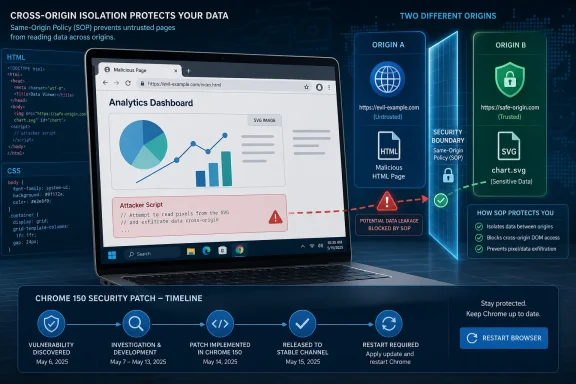 A Medium Chrome Bug Can Still Be a Data Boundary Bug
The phrase “medium severity” does a lot of work in vulnerability management, and not all of it is useful. For CVE-2026-14016, the label should not be read as “minor.” It means the flaw does not, on its own, provide code execution, persistence, or a sandbox escape. What it reportedly does provide is a path for a remote attacker to leak cross-origin data if the victim can be induced to open a crafted HTML page.That distinction matters because the browser’s same-origin policy is one of the load-bearing walls of the web. A site should not be able to freely read sensitive content from another site just because the user is logged in to both. When a browser component mishandles that separation, even without arbitrary code execution, the result can be a breach of the trust model that makes browser-based work possible.
NVD describes the affected area as SVG, short for Scalable Vector Graphics, and characterizes the issue as an “inappropriate implementation” in Chrome before version 150.0.7871.47. Google’s own Chrome release notes list the bug as “Insufficient policy enforcement in SVG,” reported by Google on May 27, 2026, and fixed in the stable desktop release published June 30. Those two descriptions are slightly different in wording but consistent in substance: a browser subsystem that renders rich image content failed to enforce a security boundary correctly.
CISA’s ADP enrichment assigns the vulnerability a CVSS 3.1 score of 6.5, with network attack vector, low attack complexity, no privileges required, and user interaction required. The most telling part of that vector is the confidentiality impact: high. This is not a crash bug or a nuisance UI issue. It is a potential information-disclosure flaw in a browser component that routinely processes untrusted web content.
SVG Is Not Just an Image Format
SVG tends to get mentally filed next to PNG and JPEG, but that has always been a simplification. SVG is XML-based, script-adjacent, style-aware, embeddable, and deeply integrated into layout engines. It can appear as a standalone document, an image resource, an icon, a mask, a background, or part of a larger application interface. That flexibility is precisely why web designers and application developers like it.It is also why SVG has historically been a difficult security surface. The browser has to decide not merely how pixels should be painted, but which policies apply as the image interacts with CSS, layout, loading behavior, document origin, embedded references, and rendering pipelines. A mistake there may not look dramatic in a debugger, but it can still expose information the browser was supposed to keep compartmentalized.
Cross-origin leakage bugs often sound abstract because they do not map neatly to the cinematic version of hacking. There may be no malware download, no obvious prompt, no blinking command shell. The risk is subtler: a malicious page could use browser behavior as an oracle, inferring or extracting information about resources from another origin that the attacker should not be able to read directly.
That is why the “crafted HTML page” phrasing deserves attention. It means the attack path begins in ordinary browsing behavior. If a vulnerable user can be lured to a page — by phishing, malvertising, compromised web content, or a poisoned link inside a collaboration tool — the browser itself becomes the medium through which a policy failure can be exercised.
Chrome 150 Turned One CVE Into Part of a Much Larger Patch Story
CVE-2026-14016 did not arrive as a standalone emergency bulletin. Google’s June 30 stable-channel update promoted Chrome 150 to stable for Windows, Mac, and Linux, with Windows and Mac moving to 150.0.7871.46/.47 and Linux to 150.0.7871.46. Google said the release included 433 security fixes, a number large enough to make any single medium-severity CVE feel like a footnote.That is the trap. Modern Chromium updates are so dense that risk can be hidden by volume. Administrators scanning release notes see hundreds of entries, many with restricted bug details, and must decide what deserves escalation. In that environment, “medium” can be under-prioritized simply because there are also critical use-after-free bugs, type confusions, and sandbox-adjacent flaws in the same release train.
Google’s practice of restricting bug details until most users are updated is sensible, but it also changes how defenders must operate. For many Chrome vulnerabilities, the public description is intentionally sparse during the window when patch adoption is still catching up. That means security teams often have to act on metadata rather than exploit narratives: affected version, component, impact, attack prerequisites, and whether exploitation has been observed.
For CVE-2026-14016, the metadata points to a confidentiality issue in a web-reachable rendering feature. There is no public indication from CISA’s SSVC entry that exploitation is underway, and CISA marked exploitation as “none” with the issue not automatable. That lowers the temperature. It does not justify waiting through multiple browser release cycles.
The CPE Confusion Is Mostly a Timing Problem, Not a Mystery
The user-facing NVD page shows an awkward split: the “Known Affected Software Configurations” area may appear to be loading or incomplete, while the change history says NIST added a CPE configuration for Google Chrome versions up to but excluding 150.0.7871.47. That is not unusual for a fresh CVE page. NVD pages often reflect a combination of CVE source data, enrichment work, ADP scoring, and web-interface rendering that does not always arrive in one clean pass.The important point is that the CPE is not conceptually missing. NIST’s change history records the affected CPE as Google Chrome versions before 150.0.7871.47. If the visible configurations section looks empty or stuck, it is more likely a page-rendering or enrichment-display issue than evidence that the vulnerability has no affected product mapping.
That matters for scanners and asset systems. Some tools ingest NVD feeds and CPE data directly; others rely on vendor advisories, OS package metadata, endpoint inventory, or browser management APIs. A temporary mismatch between what the NVD page displays and what its change history records can produce confusing results, especially in dashboards that try to normalize Chrome, Chromium, Edge, Brave, Vivaldi, and Electron-based dependencies into a single vulnerability view.
For WindowsForum readers, the practical answer is simple: treat Chrome before 150.0.7871.47 on Windows and Mac as affected for this CVE. Treat Chromium-derived browsers separately unless their vendors have shipped corresponding fixes from the same Chromium baseline. CPEs are useful for inventory, but they are not a substitute for checking the actual browser build deployed on endpoints.
The Browser Monoculture Makes “Chrome” Bugs Everyone’s Problem
CVE-2026-14016 is listed against Google Chrome, but the underlying issue lives in Chromium. That distinction is not academic. Microsoft Edge, Brave, Vivaldi, Opera, and many embedded browsing environments inherit large portions of Chromium’s rendering and security architecture. A fix landing in Chrome does not automatically mean every Chromium-based product in the fleet is fixed at the same moment.Microsoft Edge usually tracks Chromium security updates quickly, but “quickly” is not the same as “already everywhere.” Enterprise update rings, deferrals, offline machines, kiosk systems, VDI images, and application compatibility freezes all create lag. The same is true for third-party Chromium browsers, which may have their own release timing, patch policies, and version numbering.
This is where browser security becomes a supply-chain issue in miniature. The vulnerability may be born in one upstream project, disclosed through one vendor’s release notes, enriched by NVD and CISA, and remediated across a family of downstream products on different schedules. A security team that only asks “Did Google patch Chrome?” has not finished the job.
On Windows estates, the sprawl is especially visible. A single device may have Chrome installed for users, Edge installed by default, WebView2 used by desktop applications, and one or more bundled Chromium runtimes hiding inside collaboration, design, or line-of-business tools. CVE-2026-14016 is not evidence that all of those are exploitable in the same way. It is evidence that organizations should understand where Chromium code exists before the next, more severe rendering bug arrives.
User Interaction Is a Requirement Attackers Know How to Meet
The CVSS vector for CVE-2026-14016 requires user interaction, which tends to calm vulnerability dashboards. It should not calm them too much. Browser exploitation almost always starts with a user doing something ordinary: opening a link, previewing a document, visiting a site, clicking through a chat message, or landing on a page through a search result.Attackers are good at manufacturing ordinary. A crafted HTML page does not need to look like a suspicious exploit kit from 2012. It can be wrapped in a fake invoice portal, a shared design mockup, a conference agenda, an HR survey, or a compromised legitimate page. The browser’s job is to assume hostile content can arrive through mundane channels and still maintain boundaries.
The good news is that CISA’s SSVC data does not currently mark this vulnerability as exploited, and the “not automatable” assessment suggests the agency does not view it as an easy mass-exploitation primitive in isolation. But SSVC is not a promise about future weaponization. It is a decision-support snapshot based on known information at the time.
That is why medium confidentiality bugs should be patched on a business cadence that recognizes exposure, not only drama. If the browser is internet-facing, widely used, and automatically processes untrusted content, then “medium” still belongs in the normal rapid-update lane. It may not require an all-hands emergency bridge, but it should not wait for the next quarterly maintenance window.
The Restricted Bug Is a Feature of the Patch Model
One of the references for CVE-2026-14016 points to Chromium’s issue tracker, but access is restricted. That can frustrate defenders who want proof-of-concept detail, exploit mechanics, or a clear explanation of what data could be leaked under what conditions. Google’s release notes explicitly warn that bug details and links may remain restricted until a majority of users are updated.This is the uncomfortable bargain of browser security. Full transparency on day one can help defenders understand risk, but it can also hand attackers a blueprint while millions of machines remain unpatched. Delayed disclosure is not secrecy for its own sake; it is an attempt to compress the window between public awareness and widespread remediation.
The downside is that administrators must become comfortable acting before every technical question is answered. That is particularly true for bugs in components like SVG, CSS, Paint, and layout engines, where exploitability may depend on implementation details that are not immediately public. Waiting for a polished write-up can mean waiting until the patch gap has already become the attacker’s opportunity.
For IT teams, the right response is not to reverse-engineer every medium Chrome CVE. It is to maintain a browser update process that assumes some patched issues are more serious than their short descriptions make them appear. The browser is too central, and the public metadata too intentionally thin, for a purely narrative-driven patch policy to work.
Windows Administrators Should Verify the Build, Not the Feeling
Chrome’s automatic updater is one of the better patch-distribution systems in consumer software, but enterprise reality is messier. Some organizations disable auto-update controls. Some route updates through management tooling. Some run browser extensions or web apps that create pressure to pause a rollout. Some users leave browsers open for days, delaying the restart needed to complete installation.The target version for Windows and Mac in Google’s advisory is 150.0.7871.46/.47, while NVD frames the vulnerable range as prior to 150.0.7871.47. That kind of minor version split can confuse compliance checks, especially when different platforms receive slightly different builds. For Windows administrators, the defensible standard is to ensure Chrome reports at least the fixed Windows build identified by Google and that scanners understand the NVD cutoff.
The browser’s “About Chrome” page remains the simplest user-level verification path, but managed environments should not rely on screenshots or self-reporting. Chrome Browser Cloud Management, endpoint management platforms, software inventory, and vulnerability scanners should all converge on the same answer: which version is installed, which version is running, and whether a restart is pending.
The restart point is easy to overlook. A patched browser binary sitting on disk does not always mean the active browser process has picked up the fix. For high-risk users — administrators, developers, finance staff, executives, help-desk personnel with broad access — forcing or strongly prompting a browser restart after security updates is a reasonable control, not an inconvenience masquerading as security theater.
The Microsoft Edge Angle Is Less About Panic Than Discipline
Because WindowsForum readers live in a Microsoft-heavy world, the obvious next question is Edge. Edge is Chromium-based, and Microsoft typically integrates upstream Chromium fixes into Edge releases. But the existence of a Chrome CVE does not automatically tell you the exact Edge version, release timing, or exposure status without checking Microsoft’s release notes or Edge update channel.This is where organizations often get browser risk wrong. They treat Edge as “part of Windows” and Chrome as “an app,” then manage them through different operational cultures. Edge may be updated through Microsoft’s mechanisms, Chrome through Google’s, and third-party Chromium browsers through something else entirely. The attacker does not care which administrative bucket the vulnerable renderer came from.
The better model is to manage browsers as a class of high-risk, internet-facing runtime platforms. That means inventorying them, enforcing update policies, monitoring versions, and reducing unnecessary browser diversity where possible. Diversity can be useful when it prevents monoculture failure, but unmanaged diversity mostly creates blind spots.
For Edge specifically, administrators should verify that their deployed channel has received the Chromium security baseline corresponding to Chrome 150’s fixes. Stable, Beta, Dev, and Extended Stable channels can behave differently. In regulated or tightly managed environments, that distinction matters more than the branding on the icon.
This Is a Confidentiality Bug in a World Built on Browser Sessions
The confidentiality impact assigned by CISA is the center of the story. Browser sessions now carry the working identity of the user: email, documents, SaaS dashboards, admin consoles, cloud storage, password managers, chat, tickets, source repositories, and internal portals. A cross-origin data leak does not have to compromise the endpoint to matter if it can expose sensitive web-accessible information.That does not mean CVE-2026-14016 can read arbitrary enterprise secrets in every scenario. The public description does not support that level of certainty. Cross-origin leaks are often constrained by content type, timing, rendering behavior, cache state, redirects, authentication context, or the specific way a target resource is embedded. The problem is that defenders do not yet have enough public detail to draw comforting boundaries.
This uncertainty cuts both ways. It would be irresponsible to hype the bug as a catastrophic breach primitive without evidence. It would also be irresponsible to dismiss it because it lacks a critical rating. A web platform policy failure affecting confidentiality deserves a prompt fix because the browser is where so much authenticated work now happens.
The trend is bigger than SVG. Chrome 150’s release notes include many medium-severity issues in web platform components: CSS, Paint, XML, navigation, permissions, extensions, and more. Each one is a small reminder that browser security is not just memory safety. It is policy correctness across thousands of edge cases.
The Real Patch Test Is Whether Your Process Notices the Quiet Bugs
The organizations best positioned to handle CVE-2026-14016 are not necessarily the ones with the most expensive exploit intelligence feed. They are the ones whose browser patch process does not depend on a vulnerability becoming famous. A quiet NVD entry, a vendor release note, and a medium CVSS score should be enough to trigger a measured response.That response should be boring by design. Confirm affected versions. Validate update policy. Check deployment coverage. Watch for blocked or failed updates. Confirm restarts. Track Chromium-based browsers beyond Chrome. Close the loop with vulnerability management once scanners update their detections.
There is also a communication lesson here. Users do not need a lecture about SVG policy enforcement, but they do need clear expectations that browser restarts are part of security hygiene. If an organization trains users to ignore update prompts because “IT handles that,” then IT must actually handle it end to end.
Security teams should also resist the urge to overfit policy to this one CVE. Today it is SVG and cross-origin data leakage. Tomorrow it may be WebGPU, WebRTC, PDF rendering, extensions, or a JavaScript engine bug with active exploitation. The control that matters is not a special rule for SVG; it is a fast, observable, low-friction browser update pipeline.
Chrome 150’s SVG Fix Leaves a Short, Practical Checklist
CVE-2026-14016 is not the scariest Chrome bug of the year, but it is a useful test case for whether an organization treats browser confidentiality boundaries as real security controls. The practical response is straightforward, and the ambiguity around public exploit details is exactly why the response should not be delayed.- Confirm that Chrome on Windows and Mac is updated to a fixed 150.0.7871.47-era build or later, rather than merely assuming automatic updates have completed.
- Treat visible NVD CPE display gaps as a data-pipeline issue when the change history already records Google Chrome versions before 150.0.7871.47 as affected.
- Check Microsoft Edge and other Chromium-based browsers separately, because Chrome’s fix does not prove every downstream Chromium product has already updated.
- Prioritize restart completion for users with access to sensitive web applications, since browser processes may continue running after an update is staged.
- Do not wait for public proof-of-concept details before patching browser policy-enforcement flaws that can expose cross-origin data.
References
- Primary source: NVD / Chromium
Published: 2026-07-03T07:00:45-07:00
NVD - CVE-2026-14016
 nvd.nist.gov
- Security advisory: MSRC
Published: 2026-07-03T07:00:45-07:00
Original feed URL
Security Update Guide - Microsoft Security Response Center
 msrc.microsoft.com
- Related coverage: radar.offseq.com
CVE-2026-14016: Insufficient policy enforcement in Google Chrome - Live Threat Intelligence - Threat Radar | OffSeq.com
Detailed information about CVE-2026-14016: Insufficient policy enforcement in Google Chrome affecting Google Chrome. Get real-time updates, technical details, aradar.offseq.com - Related coverage: vuln.today
Cross-Site Request Forgery - Attack Technique - vuln.today
Cross-Site Request Forgery exploits the automatic credential inclusion behavior of web browsers.vuln.today
